Category Archives: How to Fix

Summary of solutions to open flash back problem after Python packaging

Recently, I wrote a python project, but I found no response after packing it today. I checked some information and said that adding a input input statement at the end of the program can stay here to see the cause of the error.

After I add the input statement, I execute the following command to package

pyinstaller -F --hidden-import babel.numbers start_trade.py

Pay attention not to add the - W parameter, so that the terminal window cannot be displayed and the saved information cannot be seen.
--hidden-import babel.numbers represents the hidden module of packaging

The error message displayed during operation is

No module named 'talib.stream' name 'UI' is not defined

Now the program can’t find the package.

resolvent

Introduce into the files using the module talib.stream

The same is true for the missing module. The missing module is introduced in the file that references the module

However, it should be noted that what it prompts should be introduced according to the name it prompts, such as

import talib.stream

MacBook M1 Big Sur logging into forticlient SSL VPN

It’s not sure whether it’s the system or the M1 chip. The PC version client can’t log in. After the IOS / iPad version logs in, it can’t access the VPN intranet. After a long tour, I saw the open source third-party solution on GitHub, https://github.com/adrienverge/openfortivpn , run after installation

Sudo openfortivpn IP: Port — user name = user name — PPPD use peerdns = 1, which can be run.

Conversion from hexadecimal to decimal

Problem Description:
write a program that accepts a hexadecimal value string and outputs the decimal string of the value (note that there may be multiple sets of data in a test case).

Input:
0xa

Output:
10

#include <cstdio>
#include <iostream>
#include <vector>
#include <string>
using namespace std;
vector<char> conclude;


int CharToInt(char x){
    if (x >= '0' && x <= '9'){
        return x - '0';
    }else{
        return x - 'A' + 10;
    }
}
void Convert(string str, int x){
    int number = 0;
    for(int i = 0; i < str.size(); ++i){
        number *= x;
        number += CharToInt(str[i]);
    }
    printf("%d\n", number);
}

int main(){
    string str;
    while (cin >> str){
        str = str.substr(2);
        Convert(str, 16);
    }
    return 0;
}

Mybatis idea environment integration jar package

    <dependencies>
        <dependency>
            <groupId>junit</groupId>
            <artifactId>junit</artifactId>
            <version>4.12</version>
        </dependency>
        <dependency>
            <groupId>mysql</groupId>
            <artifactId>mysql-connector-java</artifactId>
            <version>5.1.47</version>
        </dependency>
        <dependency>
            <groupId>org.mybatis</groupId>
            <artifactId>mybatis</artifactId>
            <version>3.5.2</version>
        </dependency>
        <dependency>
            <groupId>org.springframework</groupId>
            <artifactId>spring-webmvc</artifactId>
            <version>5.3.4</version>
        </dependency>
        <dependency>
            <groupId>org.springframework</groupId>
            <artifactId>spring-jdbc</artifactId>
            <version>5.3.4</version>
        </dependency>
        <dependency>
            <groupId>org.aspectj</groupId>
            <artifactId>aspectjweaver</artifactId>
            <version>1.8.13</version>
        </dependency>
        <dependency>
            <groupId>org.mybatis</groupId>
            <artifactId>mybatis-spring</artifactId>
            <version>2.0.2</version>
        </dependency>
    </dependencies>

Duplicate class com.xxx.xxx Find in modules problem solving (Aidl interdependence problem)

1. Usage scenarios:

A (with Aidl) AAR; B (with Aidl) AAR depends on a;

C (APP) relies on a and B AAR libraries

At this time, both a and B have the same Aidl interface class to report the above error!

2. Problem solving

B (Aidl) AAR depends on A. you can remove the Aidl interface class in class B.

Can read JBIG2 image: JBIG2 imageio is not installed

1、 Problem description

Error information: org.apache.pdfbox . contentstream.PDFStreamEngine.operatorException ( PDFStreamEngine.java:917 ) – Cannot read JBIG2 image: jbig2-imageio is not installed

Relevant environmental information:

An error occurred when calling the renderimagewithdpi (int PageIndex, float DPI) method of pdfrenderer

Pdfrenderer uses pdfbox, POM coordinates are:

<dependency>
	<groupId>org.apache.pdfbox</groupId>
	<artifactId>pdfbox</artifactId>
	<version>2.0.19</version>
</dependency>

2、 Solutions

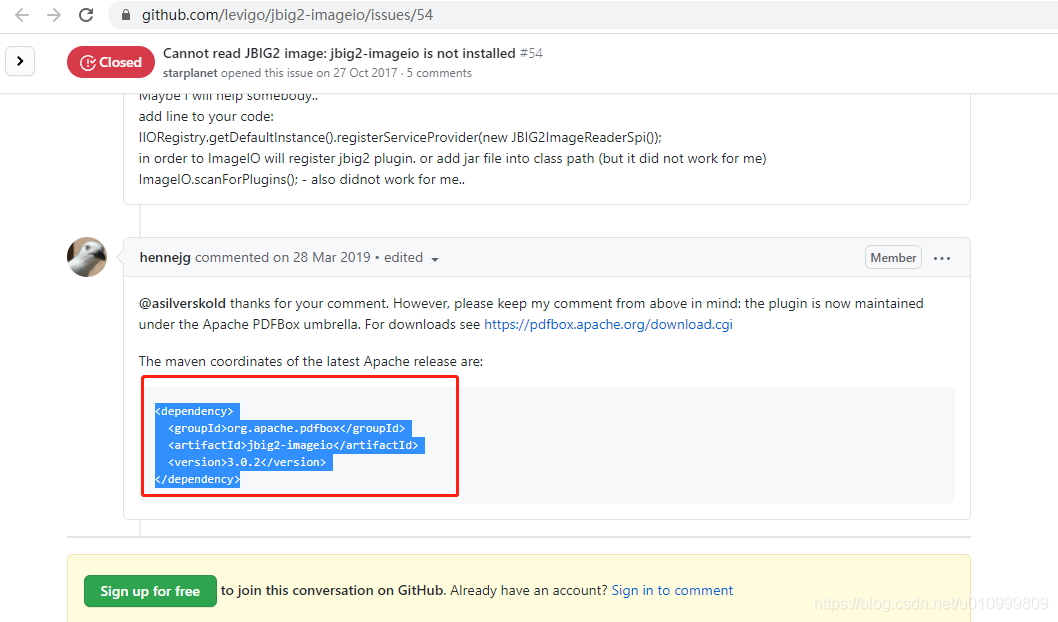
Add the following POM dependencies

<dependency>
	<groupId>org.apache.pdfbox</groupId>
	<artifactId>jbig2-imageio</artifactId>
	<version>3.0.2</version>
</dependency>


Reference link:

https://blog.csdn.net/chengzuo875963/article/details/100913781 (this link has been used for reference, but it didn’t work after trying. Finally, we found the scheme of the following link through Google.)

https://github.com/levigo/jbig2-imageio/issues/54

How to Fix Warning: Statement lambda can be replaced with expression lambda

Statement lambda can be replaced with expression lambda’s warning

The full text of warning is as follows

Statement lambda can be replaced with expression lambda less… (Ctrl+F1)
This inspection reports lambda expressions with code block bodies when expression-style bodies can be us

The place of warning is here

recyclerViewAdapter.setOnItemClicListener ((v ,id) -> {
checkChoosed(id);
});

Just change it to this

recyclerViewAdapter.setOnItemClicListener ((v ,id) -> checkChoosed(id) );

OK. Now that the lamda expression is used, it can be simpler

Solve the problem of illegalargumentexception: at least one JPA metadata must be present

problem

Springboot 2.0 project, start error, exception: nested exception is java.lang.IllegalArgumentException : At least one JPA metamodel must be present!。

Details are as follows:

org.springframework.beans.factory.BeanCreationException: Error creating bean with name 'jpaMappingContext': Invocation of init method failed; nested exception is java.lang.IllegalArgumentException: At least one JPA metamodel must be present!
	at org.springframework.beans.factory.support.AbstractAutowireCapableBeanFactory.initializeBean(AbstractAutowireCapableBeanFactory.java:1710) ~[spring-beans-5.0.4.RELEASE.jar:5.0.4.RELEASE]
	at org.springframework.beans.factory.support.AbstractAutowireCapableBeanFactory.doCreateBean(AbstractAutowireCapableBeanFactory.java:583) ~[spring-beans-5.0.4.RELEASE.jar:5.0.4.RELEASE]
	at org.springframework.beans.factory.support.AbstractAutowireCapableBeanFactory.createBean(AbstractAutowireCapableBeanFactory.java:502) ~[spring-beans-5.0.4.RELEASE.jar:5.0.4.RELEASE]
	at org.springframework.beans.factory.support.AbstractBeanFactory.lambda$doGetBean$0(AbstractBeanFactory.java:312) ~[spring-beans-5.0.4.RELEASE.jar:5.0.4.RELEASE]
	at org.springframework.beans.factory.support.DefaultSingletonBeanRegistry.getSingleton(DefaultSingletonBeanRegistry.java:228) ~[spring-beans-5.0.4.RELEASE.jar:5.0.4.RELEASE]
	at org.springframework.beans.factory.support.AbstractBeanFactory.doGetBean(AbstractBeanFactory.java:310) ~[spring-beans-5.0.4.RELEASE.jar:5.0.4.RELEASE]
	at org.springframework.beans.factory.support.AbstractBeanFactory.getBean(AbstractBeanFactory.java:200) ~[spring-beans-5.0.4.RELEASE.jar:5.0.4.RELEASE]
	at org.springframework.beans.factory.support.DefaultListableBeanFactory.preInstantiateSingletons(DefaultListableBeanFactory.java:741) ~[spring-beans-5.0.4.RELEASE.jar:5.0.4.RELEASE]
	at org.springframework.context.support.AbstractApplicationContext.finishBeanFactoryInitialization(AbstractApplicationContext.java:868) ~[spring-context-5.0.4.RELEASE.jar:5.0.4.RELEASE]
	at org.springframework.context.support.AbstractApplicationContext.refresh(AbstractApplicationContext.java:549) ~[spring-context-5.0.4.RELEASE.jar:5.0.4.RELEASE]
	at org.springframework.boot.web.servlet.context.ServletWebServerApplicationContext.refresh(ServletWebServerApplicationContext.java:140) ~[spring-boot-2.0.0.RELEASE.jar:2.0.0.RELEASE]
	at org.springframework.boot.SpringApplication.refresh(SpringApplication.java:752) [spring-boot-2.0.0.RELEASE.jar:2.0.0.RELEASE]
	at org.springframework.boot.SpringApplication.refreshContext(SpringApplication.java:388) [spring-boot-2.0.0.RELEASE.jar:2.0.0.RELEASE]
	at org.springframework.boot.SpringApplication.run(SpringApplication.java:327) [spring-boot-2.0.0.RELEASE.jar:2.0.0.RELEASE]
	at org.springframework.boot.SpringApplication.run(SpringApplication.java:1246) [spring-boot-2.0.0.RELEASE.jar:2.0.0.RELEASE]
	at org.springframework.boot.SpringApplication.run(SpringApplication.java:1234) [spring-boot-2.0.0.RELEASE.jar:2.0.0.RELEASE]
	at com.example.demo.JtademoApplication.main(JtademoApplication.java:22) [classes/:na]
Caused by: java.lang.IllegalArgumentException: At least one JPA metamodel must be present!
	at org.springframework.util.Assert.notEmpty(Assert.java:450) ~[spring-core-5.0.4.RELEASE.jar:5.0.4.RELEASE]
	at org.springframework.data.jpa.mapping.JpaMetamodelMappingContext.<init>(JpaMetamodelMappingContext.java:54) ~[spring-data-jpa-2.0.5.RELEASE.jar:2.0.5.RELEASE]
	at org.springframework.data.jpa.repository.config.JpaMetamodelMappingContextFactoryBean.createInstance(JpaMetamodelMappingContextFactoryBean.java:88) ~[spring-data-jpa-2.0.5.RELEASE.jar:2.0.5.RELEASE]
	at org.springframework.data.jpa.repository.config.JpaMetamodelMappingContextFactoryBean.createInstance(JpaMetamodelMappingContextFactoryBean.java:43) ~[spring-data-jpa-2.0.5.RELEASE.jar:2.0.5.RELEASE]
	at org.springframework.beans.factory.config.AbstractFactoryBean.afterPropertiesSet(AbstractFactoryBean.java:141) ~[spring-beans-5.0.4.RELEASE.jar:5.0.4.RELEASE]
	at org.springframework.beans.factory.support.AbstractAutowireCapableBeanFactory.invokeInitMethods(AbstractAutowireCapableBeanFactory.java:1769) ~[spring-beans-5.0.4.RELEASE.jar:5.0.4.RELEASE]
	at org.springframework.beans.factory.support.AbstractAutowireCapableBeanFactory.initializeBean(AbstractAutowireCapableBeanFactory.java:1706) ~[spring-beans-5.0.4.RELEASE.jar:5.0.4.RELEASE]
	... 16 common frames omitted

analysis

Spring boot supports JPA through spring boot starter data JPA. The default JPA implementer of spring boot is hibernate.
Due to pom.xml Spring boot starter data JPA is defined in the file.
<dependency>
            <groupId> org.springframework.boot&lt ;/groupId>
            <artifactId>spring-boot-starter-data-jpa</artifactId>
        </dependency>    

At this time, the project will automatically open the following two auto configuration classes:
jparepositoriesautoconfiguration
hibernatejpaautoconfiguration

As long as there is such a definition, the JPA metamodelmappingcontext class will check during the startup process. At least one JPA metamodel must be defined. Otherwise, an at least one JPA metamodel must be present! Error will be reported.

The relevant source code of jpametametamodelmappingcontext is as follows:

/**
	 * Creates a new JPA {@link Metamodel} based {@link MappingContext}.
	 *
	 * @param models must not be {@literal null} or empty.
	 */
	public JpaMetamodelMappingContext(Set<Metamodel> models) {

		Assert.notNull(models, "JPA metamodel must not be null!");
		Assert.notEmpty(models, "At least one JPA metamodel must be present!");

		this.models = models;
		this.persistenceProvider = PersistenceProvider.fromMetamodel(models.iterator().next());
	}


solve

Method 1: if JPA is not used in the system, remove the spring boot starter data JPA dependency.

Method 2: add @ enableautoconfiguration (exclude = {jparepositor) to the application iesAutoConfiguration.class }) notes.

Method 2 is mainly used for custom JPA configuration implementation.


The end of the article.
ImportError: cannot import name ‘SparkSession‘

Importerror: cannot import name ‘sparksession’
cannot find sparksession
reference https://databricks.com/blog/2016/08/15/how-to-use-sparksession-in-apache-spark-2-0.html

Sparksession is only available after spark2.0
so we need to change the spark version

wget
https://archive.apache.org/dist/spark/spark-2.3.0/
Choose your own version

I cried and went to install it again

Vs2019: solution nvcc total: cannot find compiler‘ cl.exe ‘ in PATH

vs2019:nvcc fatal : Cannot find compiler ‘ cl.exe ‘ in PATH

Three steps:

    Step 1:
    add the following two positions to the nameless variable path list of system variables
    Step 2:
    create a new variable named Lib, add three locations for it: C: program files (x86), Microsoft Visual Studio, 2019, community, VC, tools, MSVC, 14.27.29110, lib, x64
    C: program files (x86), windows kits, 10, lib, 10.0.18362.0, ucrt, x64
    C: Program files (x86), windows kits, 10, lib, 10.0.18362.0, um, x64 step 3:
    create a new variable named include in the system variable, and add 2 Location: C: program files (x86) – Microsoft Visual Studio (2019) – Community (VC) – tools – MSVC (14.27.29110) – include
    C: program files (x86) – Windows kits (10) – lib (10.0.18362.0) – ucrt

Reference article: http://iliutong.cn/2019/01/20/nvcc-cu-file-in-console-in-windows/

The meaning of escape character is’ ^] ‘prompted by telnet under linux / Unix

In Linux / Unix, you will be prompted to escape character is’ ^] ‘

This prompt means that pressing Ctrl +] will call out the command line of Telnet. After the telnet command comes out, you can execute the telnet command. For example, exit telnet is quit

Other common telnet command function description:

Close close the current connection logout force to exit the remote user and close the connection display display the parameters of the current operation mode try to enter the command line mode or character mode open connect to a site quit telnetsend send special characters set set the parameters of the current operation unset reset the current operation parameters status print status information Toggle switch the operation parameters SLC change special characters Character status auth on / off confirmation Z suspend telnetenviron change environment variable? Display help information