Category Archives: How to Fix

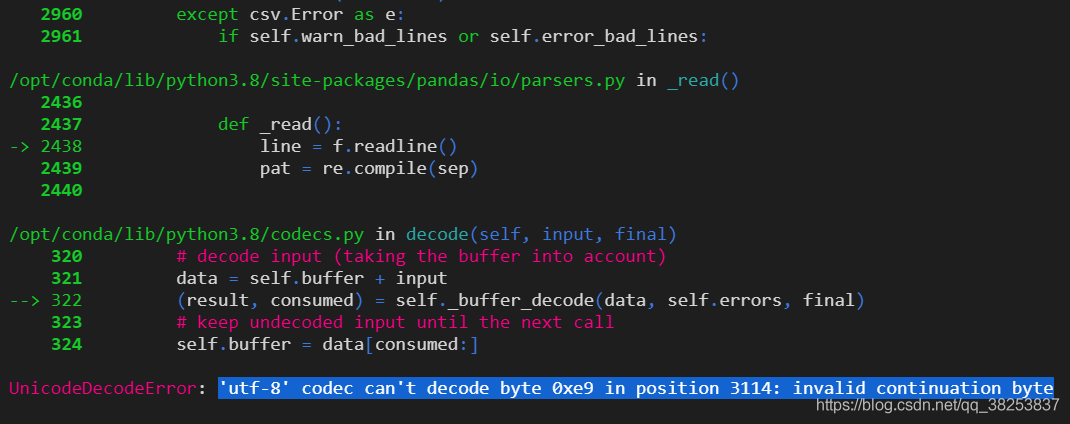
Solve the ‘UTF-8’ codec can’t decode byte 0xe9 in position 3114: invalid continuation byte error

Today, when using Python to open a file, the following error was reported:

the code is as follows:

movies = pd.read_table('../../dataset/ml-1m/movies.dat', sep='::', header=None, engine='python', encoding='utf-8').to_numpy()

Solution:
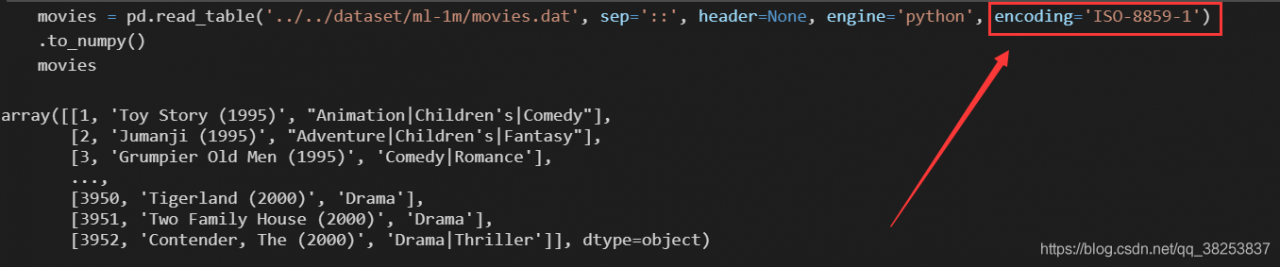
change the code to: iso-8859-1 just

movies = pd.read_table('../../dataset/ml-1m/movies.dat', sep='::', header=None, engine='python', encoding='ISO-8859-1').to_numpy()

Yarn: runtime.ContainerExecutionException : launch container failed

introduction:

After the spark submit submits the task, the code of the dirver side is executed normally, but the program gets stuck in the exciter stage and frequently reports errors until the task fails


location:

The log failed location prints a lot of warning:

The initial job did not accept any resources. Please check the cluster UI to make sure that the worker process is registered and has enough resources. The initial analysis is about resources. Then yarn logs pull down the logs to see:

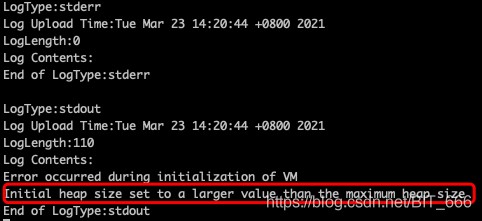
The initial heap size of the JVM exceeds the maximum heap size. Check the task environment to find out the truth


solve:

The initial memory of the JVM – XMS (the minimum heap value of heap memory) requires 13g, but Excutor.memory Only 12g is given, so the above problem appears. Modify the script to keep it stable excutor.mermory =The size of – XMS is OK, the problem is solved~

Tips: generally – XMS – Xmx (the maximum heap value of heap memory) can be set the same.

Oracle recommends setting the minimum heap size (-Xms)equal to the maximum heap size (-Xmx) to minimize garbage collections.


glCreateProgram error

Troubleshut< opengl>:

Problem Description:

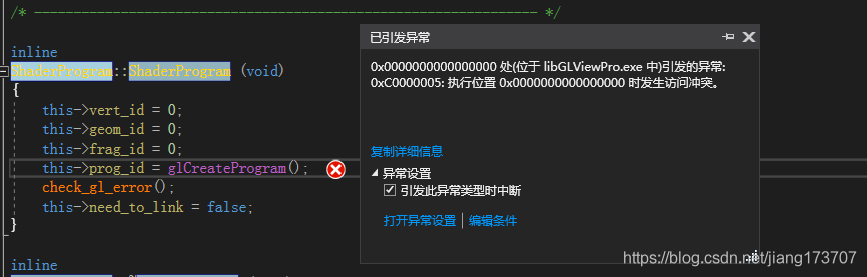
Today, I encountered an OpenGL error. I doubted my life. The error report is as follows:
glcreateprogram() is a function in glew. I thought that the library connection was wrong. Then I connected all kinds of glew32.lib to the computer for a long time. By chance, I found that glew had no init and fainted…

Solution:

Execute before calling:
/* initialize glew. */
glewexperimental = GL_ TRUE;
GLenum err = glewInit();
if (err != GLEW_ OK)
{
std::cout << “Error initializing GLEW: ” << glewGetErrorString(err)
<< std::endl;
std::exit(EXIT_ FAILURE);
}

Redirecting to /bin/systemctl stop mysqld.service

Start the service on Linux and report an error

[ root@iZ25n5kdt0kZ ~]# service mysqld stop
Redirecting to /bin/systemctl stop mysqld.service
Solution:

First, use the CD command to switch the directory, for example: CD bin, and operate MySQL under the corresponding directory according to the specific error prompt

1. Use the following command to operate MySQL:
systemctl restart mysqld.service
systemctl start mysqld.service
systemctl stop mysqld.service

2. If the above operation doesn’t work, try the second scheme. The owner of MySQL is root, and MySQL is executed as a MySQL user. Of course, it can’t be written in. It’s a matter of system permissions. Chown – R mysql:mysql /var/lib/mysql/ That’s it

Link to the original text: https://blog.csdn.net/Qyq0498/article/details/107579247

Unexpected error while observing UI hierarchy

solution: adjust to manual screenshot
principle: obtain the UI layout information of the current window and the screenshot of the current page through the ADB command, copy and send it to the computer, and then manually add the screenshot and file through uiautomatorview to analyze and locate the mobile phone elements
first step
You can first create a folder named test in the sdcard directory of your mobile phone
Step 2
open the CMD command line, and enter

adb shell uiautomator dump /sdcard/test/app.uix

# command explanation: output the UI layout information of the current window and input it to/sdcard/test/ app.uix Within the document( app.uix The file does not need to be created manually, and the command will be generated automatically). in this step, the CMD command line will report an error, but the final result will not be affected;
in the third step, the

adb shell screencap -p /sdcard/test/app.png

# command explanation: the ADB mobile phone screenshot command intercepts the current page and saves it to the mobile phone test folder (the mobile phone should be kept unlocked, otherwise the captured picture is pure black);
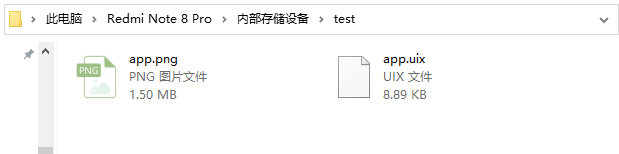
after completing these two steps, there should be two files in the/sdcard/test folder of the mobile phone
app.png Pictures captured for mobile phones
1 app.uix In order to capture the UI layout information of the image (later, the analysis elements can be operated through uiautomatiorview)
Step 4 of

adb pull /sdcard/test/app.uix E:/app.uix

?Command explanation: the app.uix File copy e disk
Step 5

adb pull /sdcard/test/app.png E:/app.png

Command explanation: copy the captured image to the e disk directory of the computer

at the same time, the two files of the computer should be as follows:

Step 6
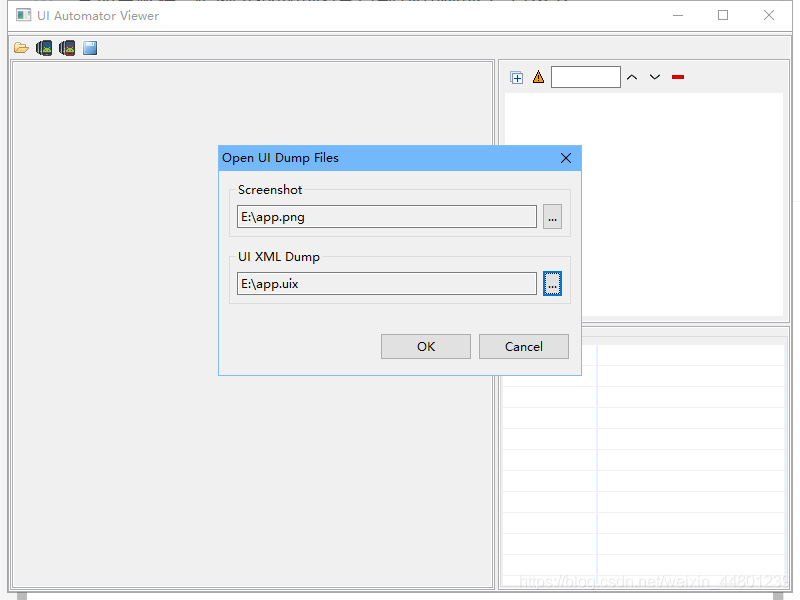
Open UI autoviewer
screenshot select the PNG end picture of disk e, that is, the screenshot of the mobile phone
UI XML dump select the uix end file of disk e, that is, the layout information of the screenshot of the mobile phone

screen These commands can be written as bat files. You need to take a screenshot and run the bat file directly. The contents are as follows ( note: each saved screenshot will cover the previous screenshot ):

@echo on
adb shell uiautomator dump /sdcard/test/app.uix
adb shell screencap -p /sdcard/test/app.png
adb pull /sdcard/test/app.uix E:/app.uix
adb pull /sdcard/test/app.png E:/app.png

After the model is instantiated by keras, the result returns nonetype

terms of settlement

Uninstall keras and then re install:

pip uninstall keras
pip install -i pip install -i https://pypi.tuna.tsinghua.edu.cn/simple/ keras

Analysis of the cause of error report

The probability of this kind of problem is that you directly use pychar to install keras . There is something wrong with pychar, the installation package of keras!

Record an error that the Tomcat resource publication cannot be updated:

Record an error that the Tomcat resource publication cannot be updated:

When it is found that Tomcat information is not updated after it is published, it is still the same as before; restart tomcat, delete the generated war package, and then re open it, it is found that there is no effect. After checking the configuration, it is found that there is no error. Check the resources under the published war package, and all the resources of the project are successfully published

So, after repeated operations, we finally found the error – the browser’s cache data is not cleared, delete the browser’s cache, restart, OK! No problem, Laotie

I hope my question will help you

Java retainAll throws an unsupported operation exception record

Today, when using Java’s retainAll method, I encountered an incredible problem. I reported a problem with JS bridge. But I’m sure that there is no problem with the JS bridge framework. I’ve been running for such a long time. So the problem lies in the use of the retainAll method of the final debug.

After the sentence “retain all”, although the page flashed back directly, there was no error in retain all. So I tried to try catch on the code to see what error was thrown. After debugging, I found that it was the error of unsupported operation exception. This means that the operation is not supported, that is, there is no such method?So I right-click the retainAll method and find that the comment of the retainAll method is as follows:

   /**
     * Retains only the elements in this list that are contained in the
     * specified collection (optional operation).  In other words, removes
     * from this list all of its elements that are not contained in the
     * specified collection.
     *
     * @param c collection containing elements to be retained in this list
     * @return <tt>true</tt> if this list changed as a result of the call
     * @throws UnsupportedOperationException if the <tt>retainAll</tt> operation
     *         is not supported by this list
     * @throws ClassCastException if the class of an element of this list
     *         is incompatible with the specified collection
     * (<a href="Collection.html#optional-restrictions">optional</a>)
     * @throws NullPointerException if this list contains a null element and the
     *         specified collection does not permit null elements
     *         (<a href="Collection.html#optional-restrictions">optional</a>),
     *         or if the specified collection is null
     * @see #remove(Object)
     * @see #contains(Object)
     */

Then I looked at the object of the array that I called retainAll, which is through the Arrays.asList This is the aslist method, as follows:

 @SafeVarargs
    @SuppressWarnings("varargs")
    public static <T> List<T> asList(T... a) {
        return new ArrayList<>(a);
    }

    /**
     * @serial include
     */
    private static class ArrayList<E> extends AbstractList<E>
        implements RandomAccess, java.io.Serializable
    {
        private static final long serialVersionUID = -2764017481108945198L;
        private final E[] a;

        ArrayList(E[] array) {
            a = Objects.requireNonNull(array);
        }

        @Override
        public int size() {
            return a.length;
        }

        @Override
        public Object[] toArray() {
            return a.clone();
        }

        @Override
        @SuppressWarnings("unchecked")
        public <T> T[] toArray(T[] a) {
            int size = size();
            if (a.length < size)
                return Arrays.copyOf(this.a, size,
                                     (Class<?extends T[]>) a.getClass());
            System.arraycopy(this.a, 0, a, 0, size);
            if (a.length > size)
                a[size] = null;
            return a;
        }

        @Override
        public E get(int index) {
            return a[index];
        }

        @Override
        public E set(int index, E element) {
            E oldValue = a[index];
            a[index] = element;
            return oldValue;
        }

        @Override
        public int indexOf(Object o) {
            E[] a = this.a;
            if (o == null) {
                for (int i = 0; i < a.length; i++)
                    if (a[i] == null)
                        return i;
            } else {
                for (int i = 0; i < a.length; i++)
                    if (o.equals(a[i]))
                        return i;
            }
            return -1;
        }

        @Override
        public boolean contains(Object o) {
            return indexOf(o) != -1;
        }

        @Override
        public Spliterator<E> spliterator() {
            return Spliterators.spliterator(a, Spliterator.ORDERED);
        }

        @Override
        public void forEach(Consumer<?super E> action) {
            Objects.requireNonNull(action);
            for (E e : a) {
                action.accept(e);
            }
        }

        @Override
        public void replaceAll(UnaryOperator<E> operator) {
            Objects.requireNonNull(operator);
            E[] a = this.a;
            for (int i = 0; i < a.length; i++) {
                a[i] = operator.apply(a[i]);
            }
        }

        @Override
        public void sort(Comparator<?super E> c) {
            Arrays.sort(a, c);
        }
    }

That is to say, the array object type generated by aslist is the internal class ArrayList. However, this class inherits the abstractlist and has no retainAll method. The retainAll method is java.util.List Methods in this class, ah Xi.. Solve the case.

So here, I think that I seem to have used the aslist method in other places. It seems that I need to check. After all, there are no add and remove methods.

mark!

Conclusion: This is a good question. It touches the blind area of knowledge and makes me more cautious. In the past, I used to use whatever method I could, but I didn’t really pay attention to the realization of the method. I didn’t know until I reported a mistake. It’s actually a bit fatal for programmers, because problems have already arisen. Therefore, we still need to read more source code and learn to recharge.
TensorFlow: InternalError: Blas SGEMM launch failed

Problem Description:

  InternalError: Blas SGEMM launch failed : a.shape=(100, 784), b.shape=(784, 10), m=100, n=10, k=784
     [[Node: MatMul = MatMul[T=DT_FLOAT, transpose_a=false, transpose_b=false, _device="/job:localhost/replica:0/task:0/gpu:0"](_recv_Placeholder_0/_4, Variable/read)]]
Caused by op u'MatMul', defined at:
  File "/usr/lib/python2.7/runpy.py", line 162, in _run_module_as_main
    "__main__", fname, loader, pkg_name)
  File "/usr/lib/python2.7/runpy.py", line 72, in _run_code
    exec code in run_globals
  File "/usr/local/lib/python2.7/dist-packages/ipykernel/__main__.py", line 3, in <module>
    app.launch_new_instance()
  File "/usr/local/lib/python2.7/dist-packages/traitlets/config/application.py", line 596, in launch_instance
    app.start()
  File "/usr/local/lib/python2.7/dist-packages/ipykernel/kernelapp.py", line 442, in start
    ioloop.IOLoop.instance().start()
  File "/usr/local/lib/python2.7/dist-packages/zmq/eventloop/ioloop.py", line 162, in start
    super(ZMQIOLoop, self).start()
  File "/usr/local/lib/python2.7/dist-packages/tornado/ioloop.py", line 883, in start
    handler_func(fd_obj, events)
  File "/usr/local/lib/python2.7/dist-packages/tornado/stack_context.py", line 275, in null_wrapper
    return fn(*args, **kwargs)
  File "/usr/local/lib/python2.7/dist-packages/zmq/eventloop/zmqstream.py", line 440, in _handle_events
    self._handle_recv()
  File "/usr/local/lib/python2.7/dist-packages/zmq/eventloop/zmqstream.py", line 472, in _handle_recv
    self._run_callback(callback, msg)

Causes:
(1) due to other pythonx programs occupying GPU resources, existing programs can not allocate enough resources to execute the current program.
(2) if you are using tensorflow of GPU version, and you want to train the model in the case of high occupancy rate of graphics card (such as playing games), you should pay attention to allocate a fixed amount of video memory for the session when initializing it, otherwise you may report an error and exit directly at the beginning of training:

Solution
(1): judge the current session ()

if 'session' in locals() and session is not None:
    print('Close interactive session')
    session.close()

(2) : allocate video memory

gpu_options = tf.GPUOptions(per_process_gpu_memory_fraction=0.333)
sess = tf.Session(config=tf.ConfigProto(gpu_options=gpu_options))

Reference:
[1] http://rylan.iteye.com/blog/2386155