Category Archives: How to Fix

Error: could’t connect to server 127.0.0.1:27017 Src / Mongo / shell/ mongo.js

A. check whether the service is started first. If the service is not started, start the service first: Net stat mongodb

B. if the service has been started, it may be that Mongo was shut down abnormally last time, resulting in the file storing data being occupied and locked. Just add the mongod.lock The file is deleted. Restart the service net stat mongodb.

[Tomcat] an error is reported when Tomcat starts ERROR:transport error 202:bind failed:Address already

Software testing technology exchange group: 429183023
2

A service of the test environment, which was good last week, suddenly couldn’t get up this week. I’m very puzzled.

But because of the test environment, the development was not very attentive, so I decided to solve it by myself. After observing the Catalina log, it is found that an error is reported

Tomcat start error ERROR:transport error 202:bind failed:Address already

So check it out start.sh File to see if there is a wrong address. When you see the remote debugging, you add a listening port, and the remote debugging of another service is also listening to this port before, so this port conflicts. The service can’t get up all the time. Delete – Xdebug- Xrunjdwp:transport=dt_ Socket, suspend = n, server = y, address = * * * *, perfect solution.

This admonishes us, because there are many services, when debugging a service remotely, we must restore the scene after debugging it!!! Because the test environment is shared, if someone else also uses this port for remote debugging, it will be GG

QT creator error: C1083: unable to open include file: “qmediaplayer”

QT creator error: C1083: unable to open include file: “qmediaplayer”: no such file or directory

But it was good before, and it was also good in other people’s code. After searching all afternoon, we finally found a solution

http://bbs.csdn.net/topics/390884883

Add QT + = Multimedia widgets to the. Pro file

Clean up the next project.
Menu build run qmake

Note: be sure to execute qmake, not just clean up the project!!!!

Error: could not create the Java virtual machine

Today, I suddenly encountered a very strange error report. Running Java program on the command line reported an error:

Error:Could not create the Java Virtual Machine.
Error:A Fatal exception has occurred,Program will exit.

Baidu later found that it deleted the java.exe 、 javaw.exe 、 javaws.exe These three running files can be deleted.

The specific reason is unknown.

Error:Could not create the Java Virtual Machine.
Error:A Fatal exception has occurred,Program will exit.

Start Tomcat and report error occurred during initialization of VM could not reserve enough space for object

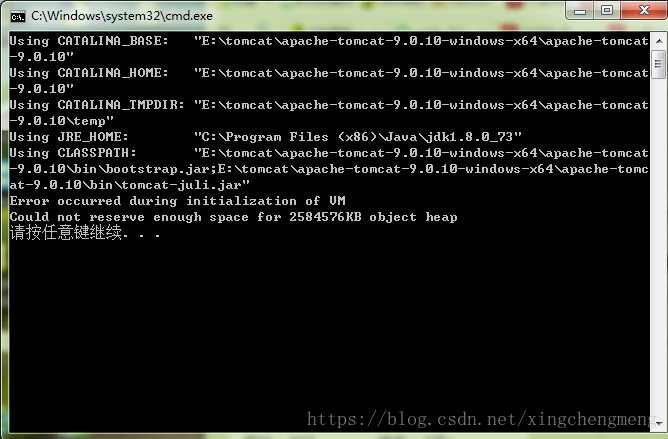
Double click the mouse to start cattom startup.bat Flashback and operation error occurred, localhost:8080 Naturally, web pages can’t be opened.

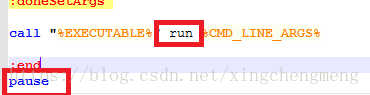
1. Can be edited in startup.bat , add a line at the end to view the information of running error. In order to see the information in more detail, let’s change another sentence: find call% executable% “run% CMD_ LINE_ Args% replaces start with run.

pause

2. After joining, save and run startup.bat Error occurred during initialization of VM could not reserve enough space for object heap catalina.sh The Tomcat memory parameter of the file is too large, which is caused by exceeding the total available memory of the machine. You can modify it to an appropriate value.

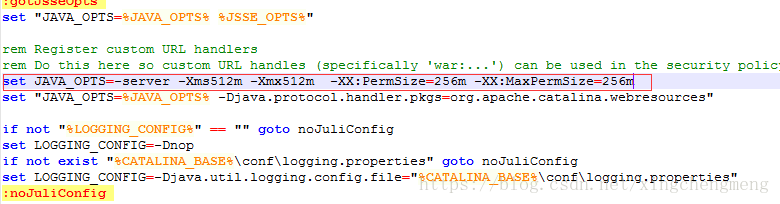
3. Find it in the bin directory of Tomcat catalina.bat Edit and join, save and exit startup.bat That’s it.

set JAVA_OPTS=-server -Xms512m -Xmx512m  -XX:PermSize=256m -XX:MaxPermSize=256m

An error is reported when springboot starts: error creating bean with name ‘XXXX’

Error creating bean with name ‘XXXX’

The complete errors are as follows: Cause Analysis:

The complete error report is as follows:

 Exception encountered during context initialization - cancelling refresh attempt: 
 org.springframework.beans.factory.UnsatisfiedDependencyException: Error creating bean with name 
 'testHelloController': Unsatisfied dependency expressed through field 'testHelloService'; nested exception is 
 org.springframework.beans.factory.NoSuchBeanDefinitionException: No qualifying bean of type 
 'com.jun.service.test.TestHelloService' available: expected at least 1 bean which qualifies as autowire 
 candidate. Dependency annotations: 
 {@org.springframework.beans.factory.annotation.Autowired(required=true)}

Cause analysis:

Because I’m a beginner of springboot, I just want to let the project run first to see the effect. If it takes half a day to build the project structure completely, I will report such a mistake as soon as I start it. The reason is very clear, that is, I can’t find the testhelloservice object template to inject it when I start it, and then I look at the @ service annotation in the service layer. It’s very smart When spring boot is started, it does not scan the service layer. After looking at the data, if so, you can directly type a annotation @ componentscan in the application of spring boot startup class to solve this problem:
the following is the code before error reporting:

package com.jun.web.test;

import org.springframework.boot.SpringApplication;
import org.springframework.boot.autoconfigure.SpringBootApplication;

@SpringBootApplication
public class Application {
    public static void main(String[] args) {
        SpringApplication.run(Application.class,args);
    }
}

Code after error reporting:

package com.jun.web.test;

import org.springframework.boot.SpringApplication;
import org.springframework.boot.autoconfigure.SpringBootApplication;
import org.springframework.context.annotation.ComponentScan;

**@ComponentScan(basePackages = {"com.jun.core.*","com.jun.service.*","com.jun.web.*"})**
@SpringBootApplication
public class Application {
    public static void main(String[] args) {
        SpringApplication.run(Application.class,args);
    }
}

Springboot project: error parsing HTTP request header note: further occurrences of HTTP request parsing

There is no error reported after the spirngboot project is started, but when testing the interface with postman, it is found that there will be intermittent (one good and one bad) errors

Error parsing HTTP request header
 Note: further occurrences of HTTP request parsing errors will be logged at DEBUG level.
java.lang.IllegalArgumentException : Invalid character found in method name. HTTP method names must be tokens

Simple appearance is also very normal, it is a success, a mistake, make me at a loss.

Looking up the online materials, 98% of them said that the configuration change of the maximum header value of Tomcat would be good, but springboot is built-in Tomcat,

The method of modification is as follows: sever.tomcat.max -http-header-size=8192

But this configuration has been abandoned by the boot project of higher version,

It can be changed to: sever.max -http-header-size=8192

Full of joy, thought that good, and then found No.

The other 2% said it might be related to the HTTPS protocol, so it could be changed to http.

But I started it locally. It’s always http.

After struggling for a long time, I found that the culprit actually added content length to the header when requesting and gave it a fixed value, so I would report an error. Stupid cry~~

As for the function of modifying the max HTTP header size, I set this to 1 and request again to find that the error reported is not the same as my previous one, but:

Error processing request
org.apache.coyote .http11.HeadersTooLargeException: An attempt was made to write more data to the response headers than there was room available in the buffer.
Run spark to report error while identifying ‘ org.apache.spark . sql.hive.HiveSessionState ‘

Problem description

Recently, I changed a computer and tested the spark streaming code of the original computer to the new computer. I used idea to run it, but I reported an error

Error while instantiating 'org.apache.spark.sql.hive.HiveSessionState'

The root scratch dir: /tmp/hive on HDFS should be writable

After checking, it is found that/TMP/hive has insufficient permissions

resolvent

First, make sure that there is Hadoop on the computer and that Hadoop is configured_ The home environment variable ensures% Hadoop_ HOME%\bin\ winutils.exe , winutils.exe The following code can be executed in Baidu CMD, where f is my code running directory

%HADOOP_HOME%\bin\winutils.exe ls F:\tmp\hive
%HADOOP_HOME%\bin\winutils.exe chmod 777 F:\tmp\hive
%HADOOP_HOME%\bin\winutils.exe ls F:\tmp\hive

After modification, spark streaming can run normally

Error reported by nodejs server of CentOS system: solution to cannot find module ‘jQuery’

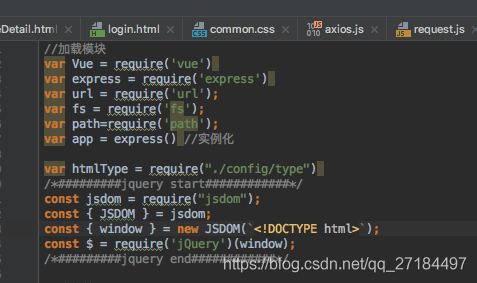
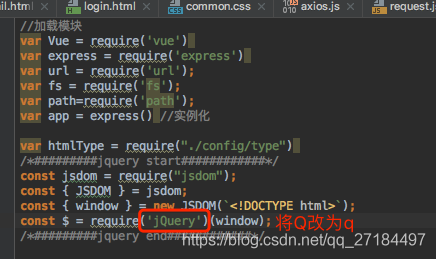
Let’s take a look at the content introduced by the nodejs server

As you can see, we have introduced the jQuery plug-in, and then we will run the server

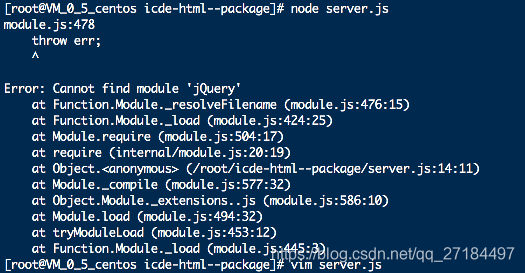
node server.js

It’s strange that I made a mistake. When I debugged on windows, I had no problem,

Later I learned that the Linux server is case sensitive,

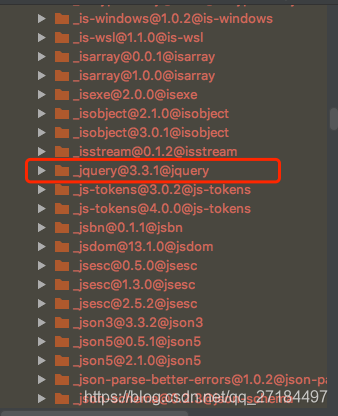
Our dependent folder node_ The jQuery under modules is like this

But when we quote, the Q letter of jQuery uses the uppercase Q, just change it to lowercase

The list command in HBase shell reported an error org.apache.hadoop . hbase.PleaseHoldException : Master is initializing

HBase has been running for many days. Today, it needs to be restarted, so stop is executed- hbase.sh Stop hbasecat/TMP/HBase Hadoop- master.pid No such file or directory- env.sh Configuration file, in which export HBase is set_ PID_ The dir attribute specifies a file directory. After doing this operation, start HBase, enter HBase shell, and execute the list command. An error is reported org.apache.hadoop . hbase.PleaseHoldException Error: can’t get master address from zookeeper; znode data = = null.

So stop- hbase.sh , the attribute HBase that will be modified_ PID_ Comment out dir, restart HBase, or report an error…

So stop again- hbase.sh Refer to the process of building zookeeper and HBase and the problems encountered, summarize the way to start HBase in this article, first use the command HBase- daemon.sh Start master start the master, and then use start- hbase.sh Start HBase, enter HBase shell, execute list command, everything is normal

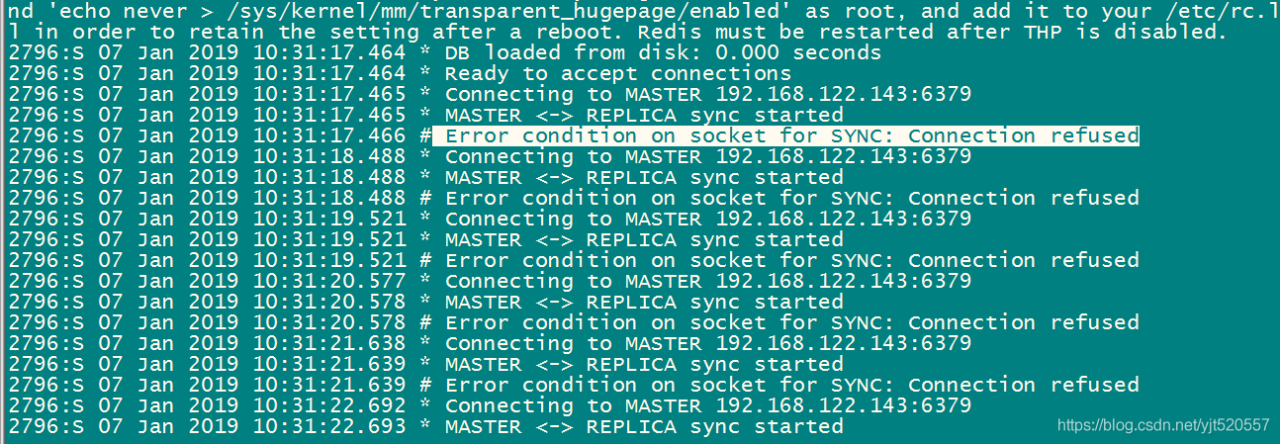
Error condition on socket for Sync: connection reused

Error condition on socket for Sync: connection reused

First of all, I shut down the firewall of Linux, and then I didn’t solve it

Close firewall
Start: systemctl start firewalld
Close: systemctl stop firewalld
View Status: systemctl status firewalld
boot disable: systemctl disable firewalld
boot enable: systemctl enable firewalld

Finally, the redis.conf Change bind127.0.0.1 in to 0.0.0.0, so that all IP can be connected


Restart service

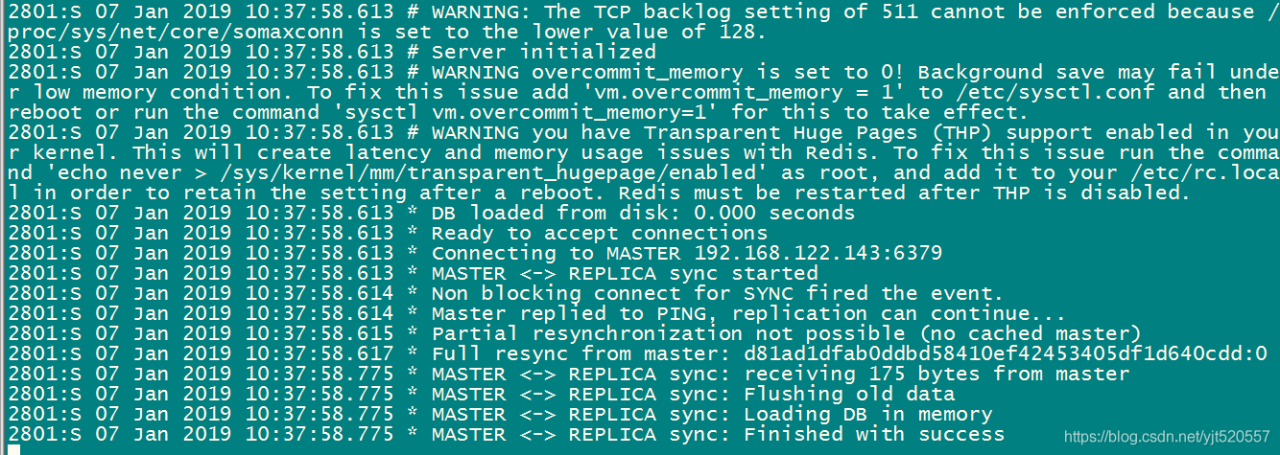
from server


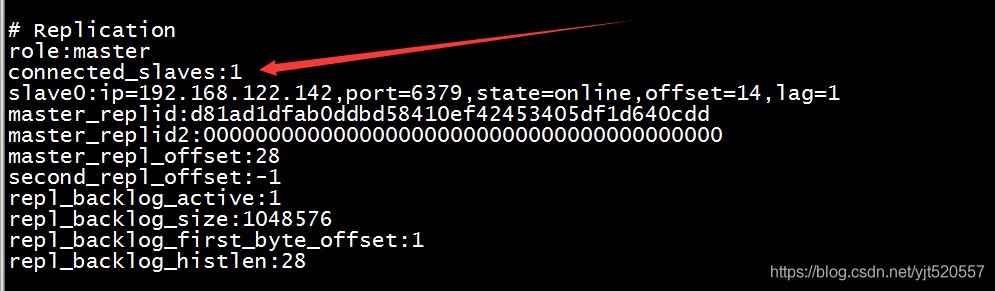
master server

You can see that the connection was successful