Category Archives: How to Fix

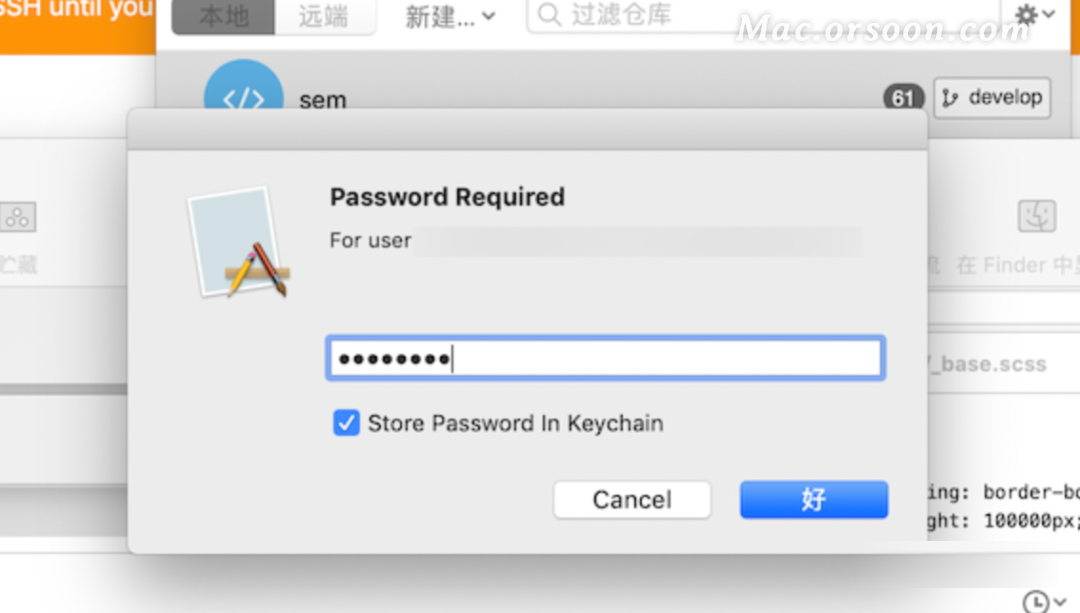
To solve the problem of repeated password input when operating sourcetree on MAC

After installing sourcetree, no matter the pull or push code, it will prompt the shell layer to input the password. What should I do?

Copy the following code to the terminal for execution:

git config –global credential.helper osxkeychain

Then enter the computer power on password, and check always allow.

Problem solving!!! You can safely push and pull code ~

Nodejs: TypeError: The super constructor to “inherits“ must not be null or undefined

Recently, when using statsd, this sentence is util. Inherits (configurator, process. Event emitter); Error: “typeerror: the super constructor to” inherits “must not be null or undefined”

The reason is that there is no event emitter object in process in the newer nodejs version. The solution is to create an event emitter object for process before calling util. Inherits, as follows:

process.EventEmitter = require('events').EventEmitter

CentOS execution command error: – bash: fork: cannot allocate memory processing / viewing process number

Contents of articles

Error reported by CentOS when executing command: – bash: fork: cannot allocate memory

Error reported by CentOS when executing command: – bash: fork: cannot allocate memory

Background:
executing any command will report – bash: fork: cannot allocate memory, but there is still a lot of free memory.

Problem analysis:
the reason is that the number of processes is full, which exceeds the default value set by the system

View the maximum number of processes

sysctl kernel.pid_max

View the number of processes

ps -eLf | wc -l

You will find that the number of all processes is almost more than the default number of processes

After modifying the maximum number of processes, the system can recover without restarting the process.

echo 1000000 > /proc/sys/kernel/pid_max

Permanent effect

echo "kernel.pid_max=1000000 " >> /etc/sysctl.conf
sysctl -p

Keepalived add service self-start error analysis [How to Solve]

After installing keepalived, set it to start the service automatically

Copy the file keepalived whose path is /usr/local/src/keepalived-1.3.4/keepalived/etc/init.d to /etc/init.d

cp /usr/local/src/keepalived-1.3.4/keepalived/etc/init.d/keepalived /etc/init.d/

Copy the file whose path is /usr/local/keepalived-1.3.4/etc/sysconfig/keepalived to /etc/sysconfig/keepalived

cp /usr/local/keepavlied-1.3.4/etc/sysconfig/keepalived  /etc/sysconfig/

Add execute permission

chmod +x /etc/init.d/keepalived

Add keepalived to the system service

chkconfig --add keepalived

start up

[root@localhost ~]# service keepalived start
Starting keepalived (via systemctl):  Job for keepalived.service failed because the control process exited with error code. See "systemctl status keepalived.service" and "journalctl -xe" for details.
[failure]

Report an error, start failure, use status to check the specific reason

[root@localhost ~]# systemctl status keepalived
● keepalived.service - LVS and VRRP High Availability Monitor
   Loaded: loaded (/usr/lib/systemd/system/keepalived.service; disabled; vendor preset: disabled)
   Active: failed (Result: exit-code) since 四 2019-04-25 14:25:01 CST; 24s ago
  Process: 17642 ExecStart=/usr/sbin/keepalived $KEEPALIVED_OPTIONS (code=exited, status=203/EXEC)

4月 25 14:25:01 localhost.localdomain systemd[1]: Starting LVS and VRRP High Availability Monitor...
4月 25 14:25:01 localhost.localdomain systemd[1]: keepalived.service: control process exited, code=ex...203
4月 25 14:25:01 localhost.localdomain systemd[1]: Failed to start LVS and VRRP High Availability Monitor.
4月 25 14:25:01 localhost.localdomain systemd[1]: Unit keepalived.service entered failed state.
4月 25 14:25:01 localhost.localdomain systemd[1]: keepalived.service failed.
Hint: Some lines were ellipsized, use -l to show in full.

Warning: ExecStart=/usr/sbin/keepalived $KEEPALIVED_OPTIONS (code=exited, status=203/EXEC)

Check that the ll /usr/sbin/keepalived file does not exist, there are two ways to solve it at this time

1. Copy a keepalived to /usr/sbin/

2. Modify the /lib/systemd/system/keepalived.service file, and change the /usr/sbin/ path to the path where we store the keepalived file

[root @ localhost ~] # vi / lib / systemd / system / keepalived.service

[Unit]
Description=LVS and VRRP High Availability Monitor
After=syslog.target network-online.target

[Service]
Type=forking
PIDFile=/var/run/keepalived.pid
KillMode=process
EnvironmentFile=-/etc/sysconfig/keepalived
ExecStart=/usr/local/bin/keepalived $KEEPALIVED_OPTIONS
ExecReload=/bin/kill -HUP $MAINPID

[Install]

3. Take effect

systemctl daemon-reload

4. Restart

[root@localhost keepalived-1.3.4]# systemctl start keepalived
[root@localhost keepalived-1.3.4]# systemctl status keepalived
● keepalived.service - LVS and VRRP High Availability Monitor
   Loaded: loaded (/usr/lib/systemd/system/keepalived.service; disabled; vendor preset: disabled)
   Active: active (running) since 四 2019-04-25 14:30:01 CST; 2s ago
  Process: 17691 ExecStart=/usr/local/bin/keepalived $KEEPALIVED_OPTIONS (code=exited, status=0/SUCCESS)
 Main PID: 17692 (keepalived)
   CGroup: /system.slice/keepalived.service
           ├─17692 /usr/local/bin/keepalived -D
           ├─17693 /usr/local/bin/keepalived -D
           └─17694 /usr/local/bin/keepalived -D

4月 25 14:30:02 localhost.localdomain Keepalived_vrrp[17694]: VRRP_Instance(VI_1) Changing effective p...52
4月 25 14:30:03 localhost.localdomain Keepalived_vrrp[17694]: VRRP_Instance(VI_1) Entering MASTER STATE
4月 25 14:30:03 localhost.localdomain Keepalived_vrrp[17694]: VRRP_Instance(VI_1) setting protocol VIPs.
4月 25 14:30:03 localhost.localdomain Keepalived_healthcheckers[17693]: Netlink reflector reports IP 17...d
4月 25 14:30:03 localhost.localdomain Keepalived_vrrp[17694]: Sending gratuitous ARP on em1 for 172.28...09
4月 25 14:30:03 localhost.localdomain Keepalived_vrrp[17694]: VRRP_Instance(VI_1) Sending/queueing gra...09
4月 25 14:30:03 localhost.localdomain Keepalived_vrrp[17694]: Sending gratuitous ARP on em1 for 172.28...09
Hint: Some lines were ellipsized, use -l to show in full.

success
To customize the aggregate function of Flink (Step-by-Step Tutorial)

In Flink computing, some common operations are map or flatmap. After some data, keyby opens a window to calculate. So what are the operators in these calculations?

There are two types of operators.

Incremental aggregation includes reduce and aggregate operators, and total aggregation includes apply and process operators. So today we will mainly explain the commonly used incremental aggregation operator, aggregate operator
three types of aggregate method signature & lt; Data source type, accumulator type, output type & gt
the four types of window function method signature are < IN, OUT, KEY, W extends Window>

Step 1: convert datastream to windowedstream


        // Reading data from kafka
        val inputStream = env.addSource(new FlinkKafkaConsumer[String]("hotitems", new SimpleStringSchema(), properties))
            .map(data => {
                val dataArray = data.split(",")
                UserBehavior(dataArray(0).toLong, dataArray(1).toLong, dataArray(2).toInt, dataArray(3), dataArray(4).toLong)
            })
            .assignAscendingTimestamps(_.timestamp * 1000L)
        
        // Performing window aggregation on data
        val aggStream: DataStream[ItemViewCount] = inputStream
            .filter(_.behavior == "pv") // filter out the pv data
            .keyBy(_.itemId)
            .timeWindow(Time.hours(1), Time.minutes(5)) // open window for statistics
            .aggregate(new CountAgg(), new WindowCountResult()) // Aggregate the count of the current item in the time window

Step 2: user defined aggregate function

// A custom pre-aggregation function that adds one to the data
class CountAgg() extends AggregateFunction[UserBehavior, Long, Long] {
    // The add method is an accumulator method, here is the simplest +1 operation
    override def add(value: UserBehavior, accumulator: Long): Long = accumulator + 1
    //initialize the accumulator value
    override def createAccumulator(): Long = 0L
    // finally return the value, here is the accumulator
    override def getResult(accumulator: Long): Long = accumulator
    // partition processing of the summation operation, here all the results of the summation process are added together
    override def merge(a: Long, b: Long): Long = a + b
}

Part 3: custom window function

// Custom window function
class WindowCountResult() extends WindowFunction[Long, ItemViewCount, Long, TimeWindow] {
    //Long type Key is the return value of the custom accumulator in the previous step
    //Window is the difference to your button type, no window type in the first step, TimeWindow
    //input is the type of data received, in this case the Long type iterator
    //out is the type returned by this method, here is the set of ItemViewCount sample class objects
    override def apply(key: Long, window: TimeWindow, input: Iterable[Long], out: Collector[ItemViewCount]): Unit = {
        // Call the constructor of the ItemViewCount sample class object to construct the ItemViewCount sample class in turn and return
        out.collect(ItemViewCount(key, window.getEnd, input.iterator.next()))
    }
}

In the laravel project of GitHub clone, whoops, looks like something went wrong

When configuring laravel project:

First of all, there is no vendor directory for the clone project from GitHub,

Run composer install to get composer dependencies from composer.json

Error running project:

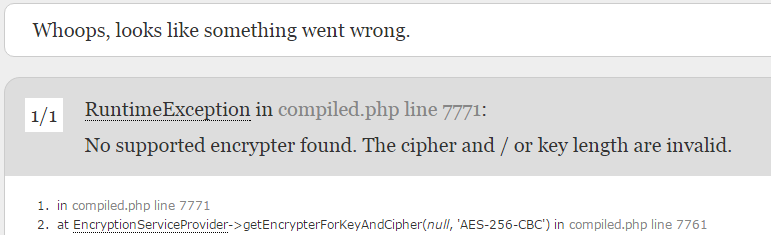
1.Whoops, looks like something went wrong.

Create a new. Env file, refer to. Env. Example

Modification: app_ DEBUG=true

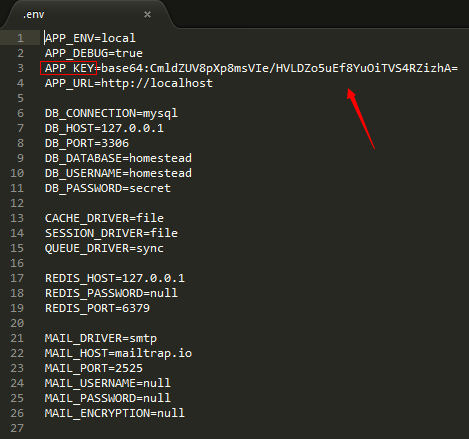
2.APP_ The value of key

No supported encrypter found. The cipher and/or key length are invalid.

Run in the project directory to get the new app_ KEY:

php artisan key:generate


OK !

Re installing Android studio always fails to install SDK when installing software (solution)

**

Android studio cannot install the SDK when the software is installed

**
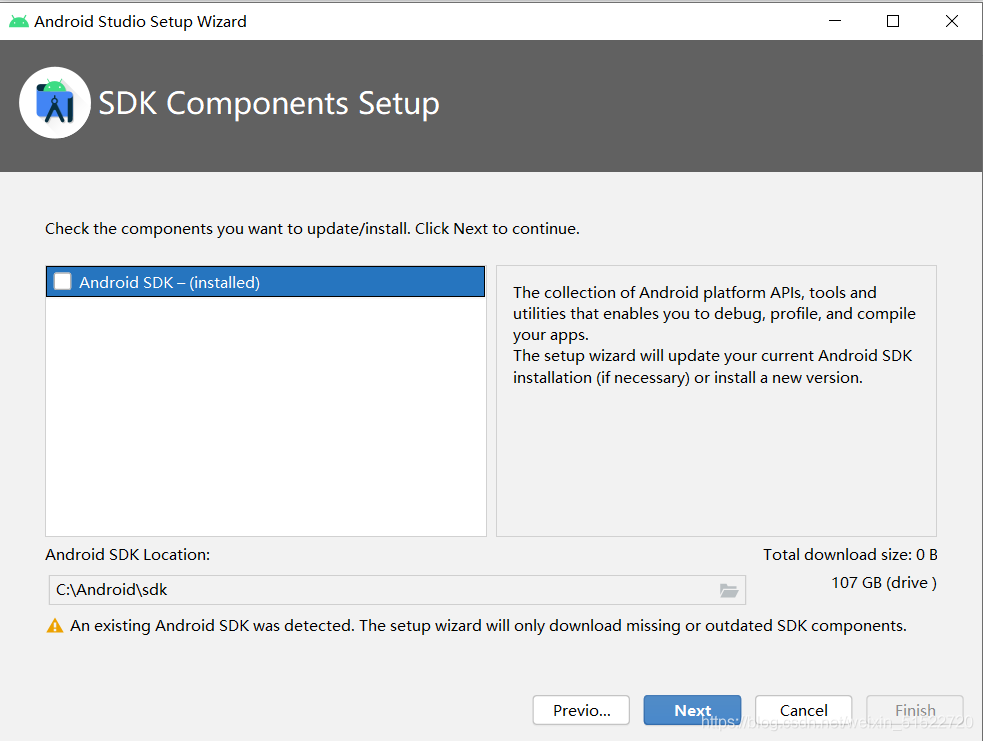
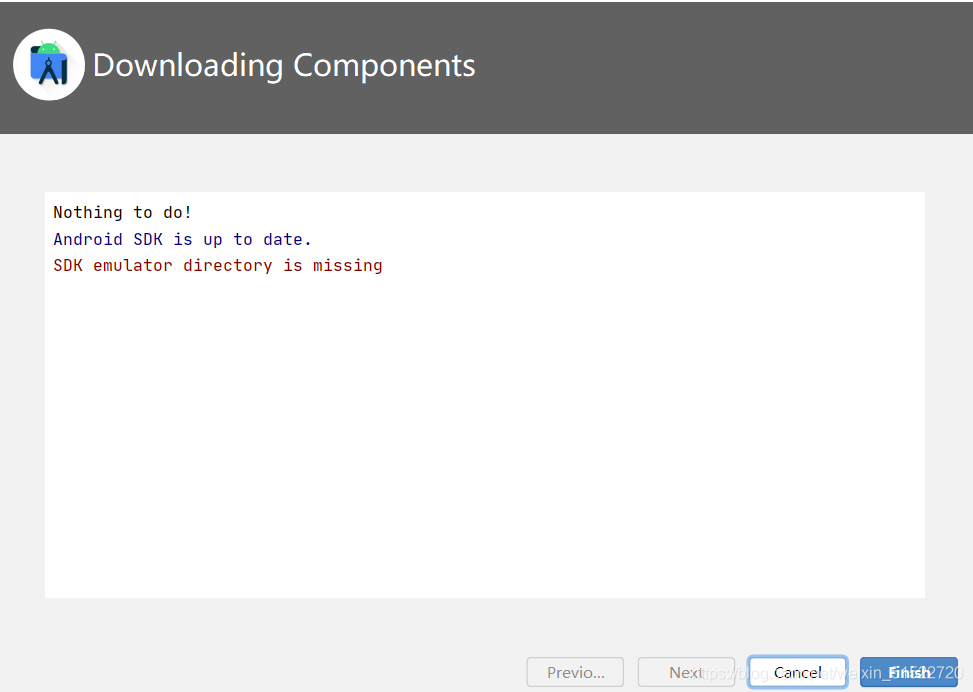
I don’t know what’s going on. Android’s AVD can’t be started. It’s stuck in the loading place all the time, indicating that it can’t respond. No matter it’s forced to shut down AVD or recreate one, it can’t be solved, so I decided to reload Android studio. However, when I uninstall Android and delete all the files and then install Android studio again, it always shows that the SDK has been installed and the project cannot be started because there is no SDK. As shown in the figure

finally, with the help of the teacher, I can use the new Android studio again!! Tearful eyes
specific operation:

    uninstall the current Android studio and delete the SDK, gradle, AVD and other folders in the installation directory. Find the. Android studioxxxx and. Gradle folder in the computer user directory, and then delete them. Go to the hidden appdata folder, go to the roaming folder, and then go to the Google folder to delete Android studio XXX. Everyone’s catalog may be different. The last and most important step: restart the computer( I just didn’t restart, so every time I reload, I will display SDK installed Installing Android studio is the same as installing it for the first time. Ha ha

After Android studio creates a new bottomnavigationactivity, there is a blank solution in the upper area of fragment

Problem description

For example, the screenshot is as follows, which is often empty above and incomplete below (recyclerview list) (blocked by the navigation bar at the bottom)

Problem solving ideas

After switching to another fragment, it is found that it is also lower than the whole, so it should be the whole setting problem, so the problem is located to activity_ Main.xml or mobile_ In navigation. XML, which is used to specify the newly created fragment, it turns out to be an activity_ Main.xml specifies mobile_ There’s a problem with navigation’s fragment.

Problem solving

At activity_ In main.xml

    deleting the paddingtop attribute of the outermost constraintlayout will @ + ID/NAV_ host_ Layout of fragment_ Height is set to 0dp

    result


The solution of eclipse code automatic prompt function

Eclipse IDE for Java developers version: 2019-03 (4.11.0), there is no automatic prompt function, that is, when an object can’t point out its related methods. Later, I searched the Internet, and the summary method is.

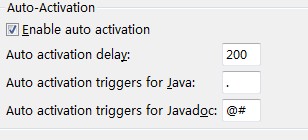
1. My window – & gt; Preferences-> Java-> Editor-> content assist  
put   Enable auto activation   Check the options: (as shown in the figure below)

And add. Abcdefghijklmnopqrstuvwxyz after the point

At this point, the restart of eclipse is not successful, and then the second step


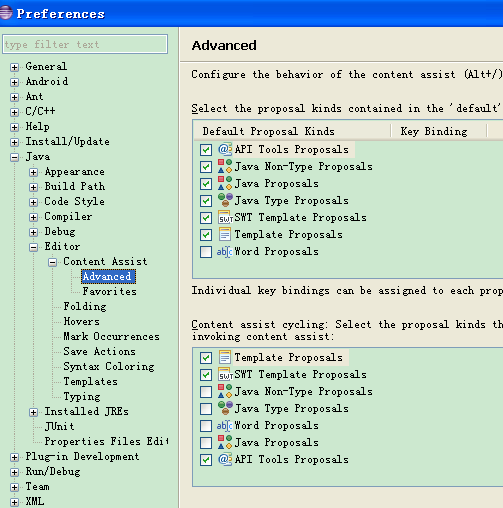
2. Tick the bucket that should be checked

My own eclipse was successful without a restart.

To sum up, the role of the first step is that when you enter a letter, eclipse will immediately associate the relevant words and display them, and those associated words will always follow. If you feel bored, change to the default dot. The second step is the key, the role is when you use Alt +/shortcut key will associate.

Image input data check: Nan inf and do not exist

import os
import cv2
import numpy as np
from tqdm import tqdm

# read txt file content to list
def ReadTxt_to_list(rootdir):
    lines = []
    with open(rootdir, 'r') as file_to_read:
        while True:
            line = file_to_read.readline()
            if not line:
                break
            line = line.rstrip('\n')
            lines.append(line)
    return lines

def check_exist_nan(lstFile):
    rt = os.path.split(lstFile)[0]
    notExist = open(os.path.join(rt,'Lst_notExist.txt'),'w')
    bad = open(os.path.join(rt,'Lst_bad.txt'),'w')

    lines = ReadTxt_to_list(lstFile)
    notNum = 0
    badNum = 0
    newLines = []
    for line in tqdm(lines):
        info_ = line.split('\t')
        assert len(info_) == 3
        _, filePth, idNum = info_
        if not os.path.exists(filePth):
            print('Not exist:', line)
            notExist.write(line+'\n')
            notNum += 1
        else:
            img = cv2.imread(filePth)
            try:
                if np.any(np.isnan(img)) or not np.all(np.isfinite(img)):
                    print('Nan/Inf:', line)
                    badNum += 1
                    bad.write(line + '\n')
                else:
                    newLines.append(line)
            except:
                print('Error:', line)
                badNum += 1
                bad.write(line + '\terror\n')

    print('Not exist', notNum)
    print('Bad', badNum)
    if len(lines) != len(newLines):
        newLst = open(os.path.join(rt,'Lst_new.txt'), 'w')
        for line in newLines:
            newLst.write(line+'\n')
        newLst.close()

    notExist.close()
    bad.close()

if __name__ == '__main__':
    imgLst = '/home/img.lst'
    check_exist_nan(imgLst)