jupyter notebook error 500 : Internal Server Error
How to Solve this error:
pip install –upgrade –user nbconvert
jupyter notebook error 500 : Internal Server Error
How to Solve this error:
pip install –upgrade –user nbconvert
Contents of articles
1、 2. Solutions
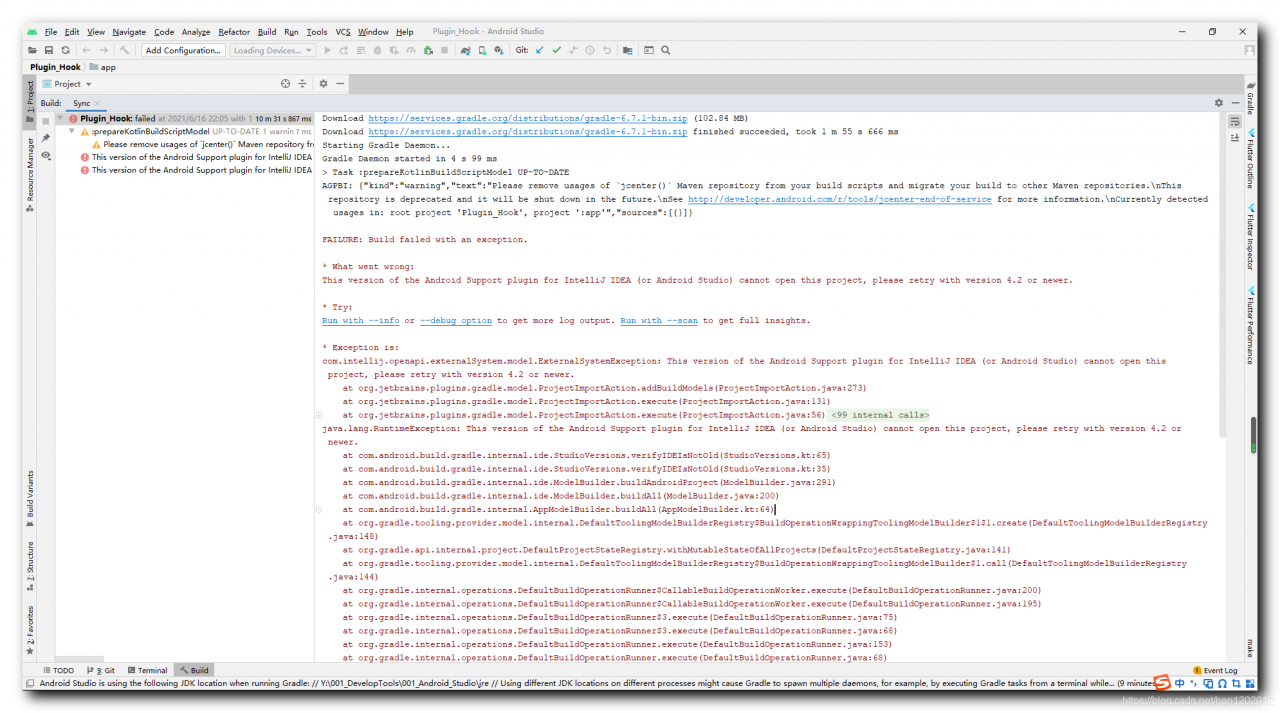
1、 Error information
Clone a piece of code from GitHub. The following error occurs when compiling;
Download https://services.gradle.org/distributions/gradle-6.7.1-bin.zip (102.84 MB)
Download https://services.gradle.org/distributions/gradle-6.7.1-bin.zip finished succeeded, took 1 m 55 s 666 ms
Starting Gradle Daemon...
Gradle Daemon started in 4 s 99 ms
> Task :prepareKotlinBuildScriptModel UP-TO-DATE
AGPBI: {"kind":"warning","text":"Please remove usages of `jcenter()` Maven repository from your build scripts and migrate your build to other Maven repositories.\nThis repository is deprecated and it will be shut down in the future.\nSee http://developer.android.com/r/tools/jcenter-end-of-service for more information.\nCurrently detected usages in: root project 'Plugin_Hook', project ':app'","sources":[{}]}

FAILURE: Build failed with an exception.

* What went wrong:
This version of the Android Support plugin for IntelliJ IDEA (or Android Studio) cannot open this project, please retry with version 4.2 or newer.

* Try:
Run with --info or --debug option to get more log output. Run with --scan to get full insights.

* Exception is:
com.intellij.openapi.externalSystem.model.ExternalSystemException: This version of the Android Support plugin for IntelliJ IDEA (or Android Studio) cannot open this project, please retry with version 4.2 or newer.
	at org.jetbrains.plugins.gradle.model.ProjectImportAction.addBuildModels(ProjectImportAction.java:273)
	at org.jetbrains.plugins.gradle.model.ProjectImportAction.execute(ProjectImportAction.java:131)
	at org.jetbrains.plugins.gradle.model.ProjectImportAction.execute(ProjectImportAction.java:56)
	at org.gradle.tooling.internal.consumer.connection.InternalBuildActionAdapter.execute(InternalBuildActionAdapter.java:79)
	at org.gradle.tooling.internal.provider.runner.ClientProvidedPhasedActionRunner$ActionRunningListener.runAction(ClientProvidedPhasedActionRunner.java:120)
	at org.gradle.tooling.internal.provider.runner.ClientProvidedPhasedActionRunner$ActionRunningListener.run(ClientProvidedPhasedActionRunner.java:110)
	at org.gradle.tooling.internal.provider.runner.ClientProvidedPhasedActionRunner$ActionRunningListener.buildFinished(ClientProvidedPhasedActionRunner.java:104)
	at org.gradle.internal.concurrent.ThreadFactoryImpl$ManagedThreadRunnable.run(ThreadFactoryImpl.java:56)
	at java.lang.Thread.run(Thread.java:748)


* Get more help at https://help.gradle.org

BUILD FAILED in 8m 33s
2、 Solutions
Core error information:
This version of the Android Support plugin for IntelliJ IDEA (or Android Studio) cannot open this project, please retry with version 4.2 or newer.
The current Android support plug-in can’t open the project. Upgrade Android studio to
four point two
four point two
Version 4.2 or above;
Contents of articles
1、 Error information 2. Error analysis 3. Solutions
1、 Error information
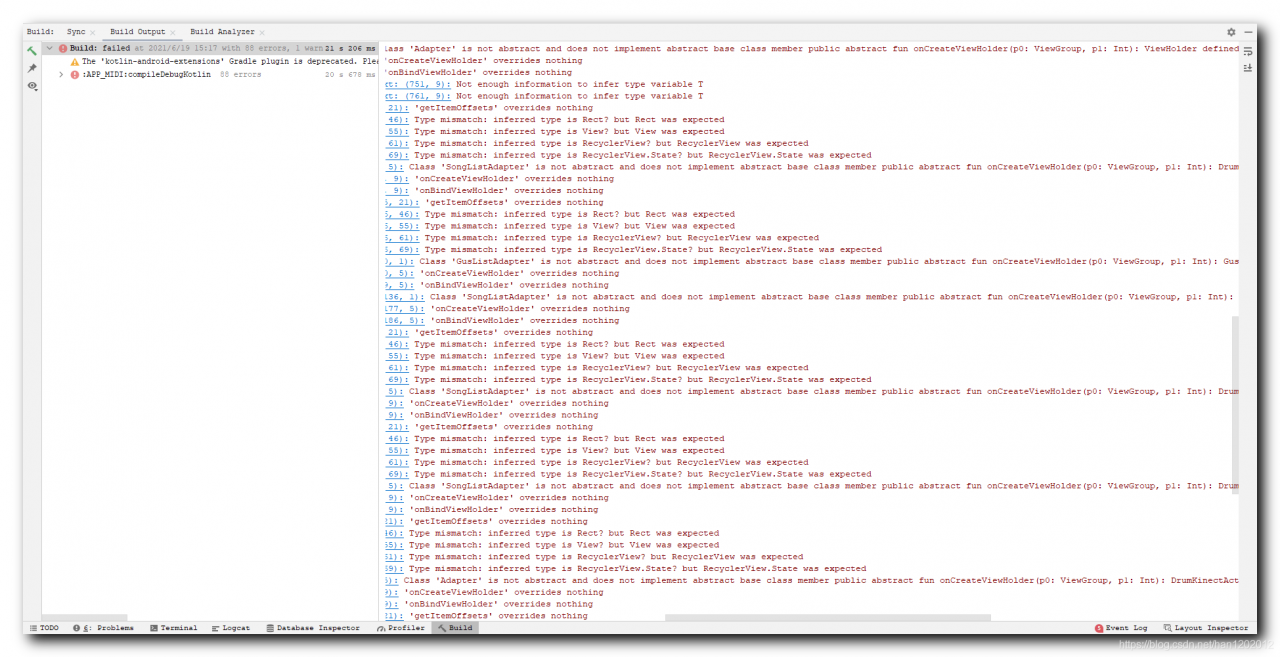
Recently, we have upgraded all the support libraries to
28.0.0
28.0.0
28.0.0 ;
implementation 'com.android.support:recyclerview-v7:28.0.0'
There are a lot of errors in the support library code of kotlin language;
2、 Error analysis
Here, we inherit the recyclerview.itemdecision class and override the getitemoffsets method,

object : RecyclerView.ItemDecoration() {
                    override fun getItemOffsets(outRect: Rect?, view: View?, parent: RecyclerView?, state: RecyclerView.State?) {
                        super.getItemOffsets(outRect, view, parent, state)
}
Note that in the overridden method, the parameter type
outRect: Rect?view: View?parent: RecyclerView?state: RecyclerView.State?
All are nullable types;
Look at the real code of itemdeclaration. The four parameters of getitemoffsets method are all non empty types, and the @ nonnull annotation is added. Therefore, non empty parameters must be passed in here. When inheriting, they are nullable parameters. An error will be reported, and the parameter types are inconsistent;
        public void getItemOffsets(@NonNull Rect outRect, @NonNull View view, @NonNull RecyclerView parent, @NonNull RecyclerView.State state) {
            this.getItemOffsets(outRect, ((RecyclerView.LayoutParams)view.getLayoutParams()).getViewLayoutPosition(), parent);
        }
Item decision complete code reference:
    public abstract static class ItemDecoration {
        public ItemDecoration() {
        }

        public void onDraw(@NonNull Canvas c, @NonNull RecyclerView parent, @NonNull RecyclerView.State state) {
            this.onDraw(c, parent);
        }

        /** @deprecated */
        @Deprecated
        public void onDraw(@NonNull Canvas c, @NonNull RecyclerView parent) {
        }

        public void onDrawOver(@NonNull Canvas c, @NonNull RecyclerView parent, @NonNull RecyclerView.State state) {
            this.onDrawOver(c, parent);
        }

        /** @deprecated */
        @Deprecated
        public void onDrawOver(@NonNull Canvas c, @NonNull RecyclerView parent) {
        }

        /** @deprecated */
        @Deprecated
        public void getItemOffsets(@NonNull Rect outRect, int itemPosition, @NonNull RecyclerView parent) {
            outRect.set(0, 0, 0, 0);
        }

        public void getItemOffsets(@NonNull Rect outRect, @NonNull View view, @NonNull RecyclerView parent, @NonNull RecyclerView.State state) {
            this.getItemOffsets(outRect, ((RecyclerView.LayoutParams)view.getLayoutParams()).getViewLayoutPosition(), parent);
        }
    }
3、 Solutions
Google did not add the @ nonnull annotation to the parameters of the support library method before. In the
28.0.0
28.0.0
In version 28.0.0, the annotation is added, which leads to the incompatibility of inheritance;
The modification method is to set all parameter types to non empty type and delete the question mark in each parameter;
Recently, after using the pynput library, the packaged exe flashback occurred.
Use pyinstall – f * *. Py to package, with terminal commands, so that you can see where the final error occurred.
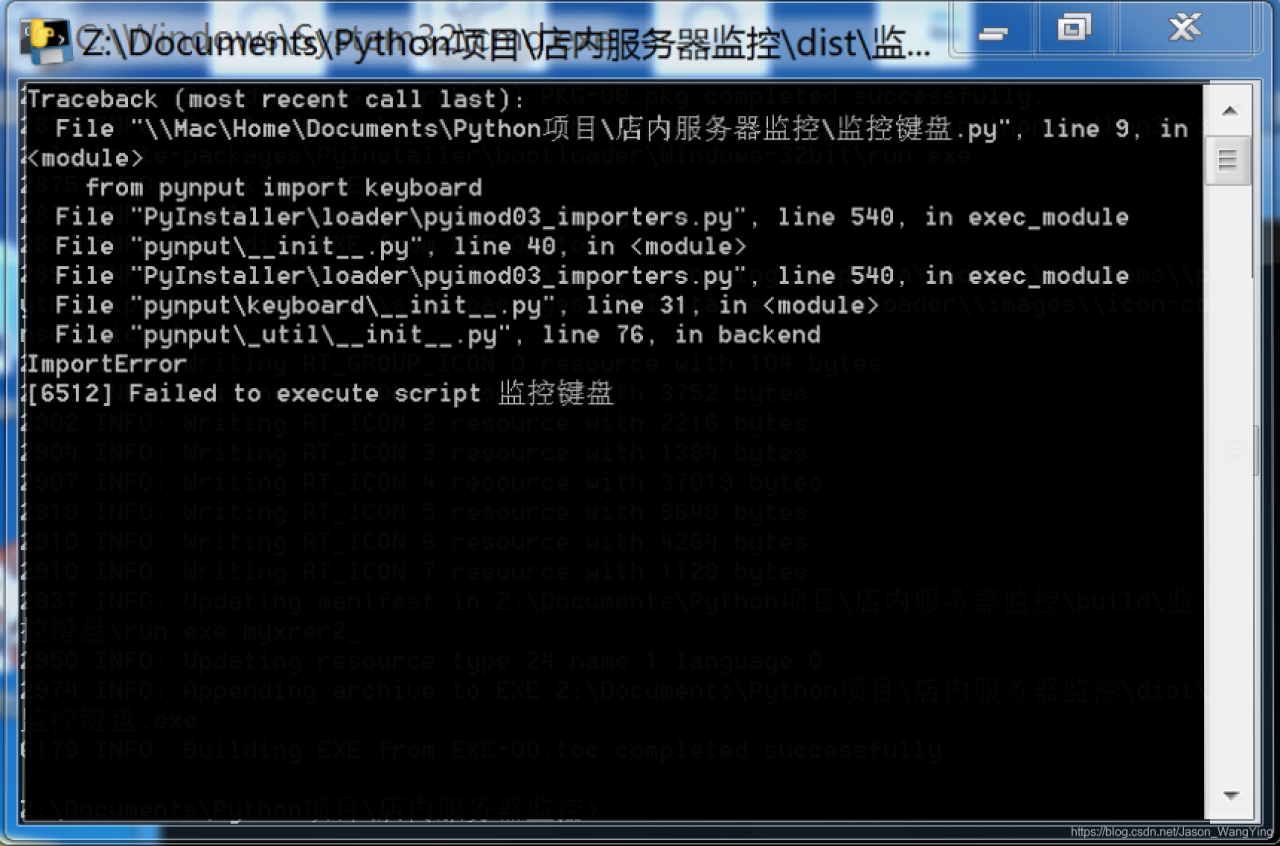
We can see that the import reference is wrong.
The solution is:
Reduce the version of pynput and use the old version. pip install pynput==1.6.8
Contents of articles
1、 2. Solutions
1、 Error information
Android studio compile time prompt
Invalid Gradle JDK configuration found
Mistakes;
2、 Solutions
Right click the project root directory in the project panel and select the “open module settings” option,
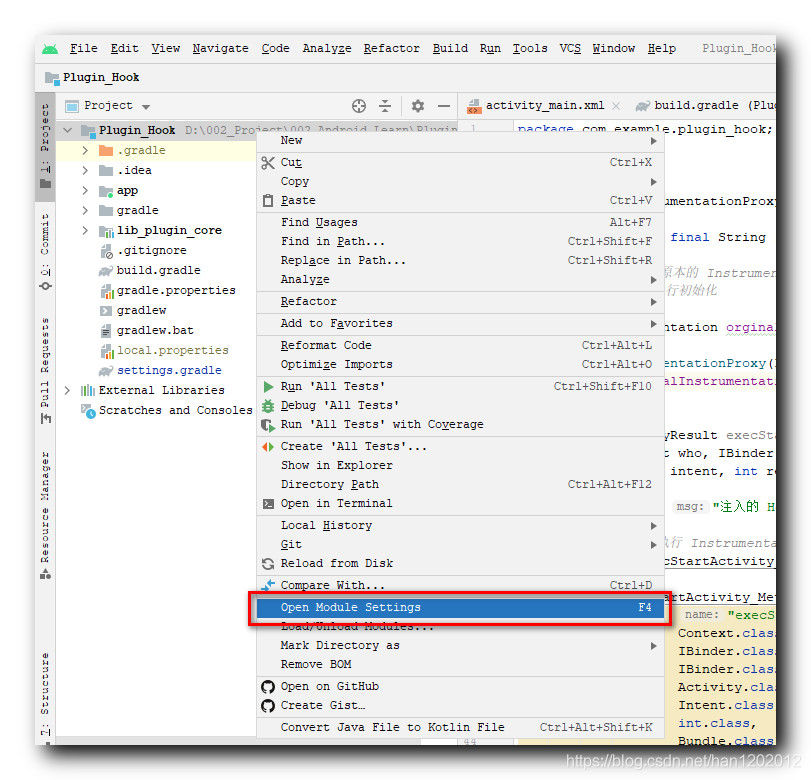
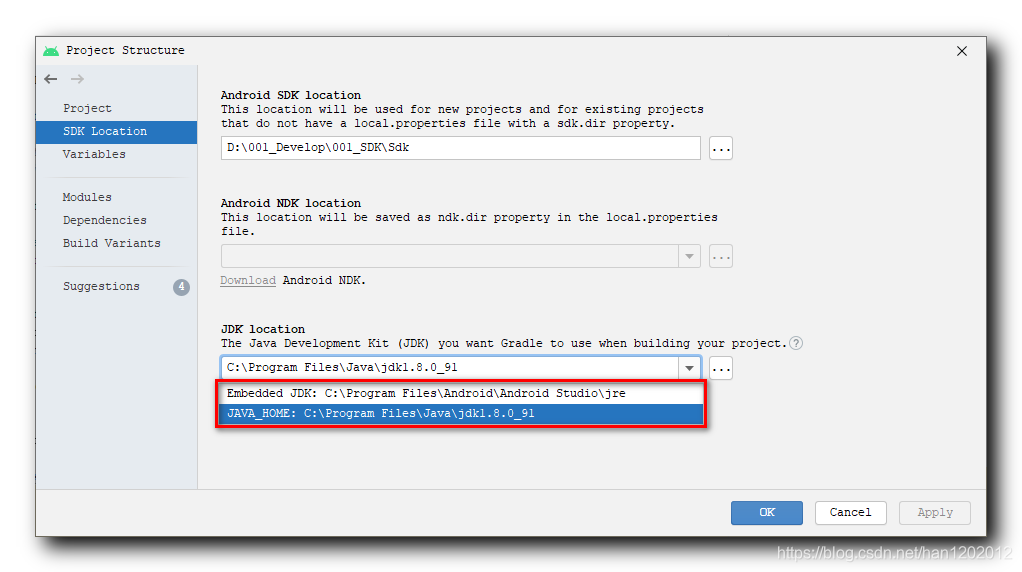
In the “SDK location” panel of the “project structure” dialog box, switch the setting of “JDK location”;
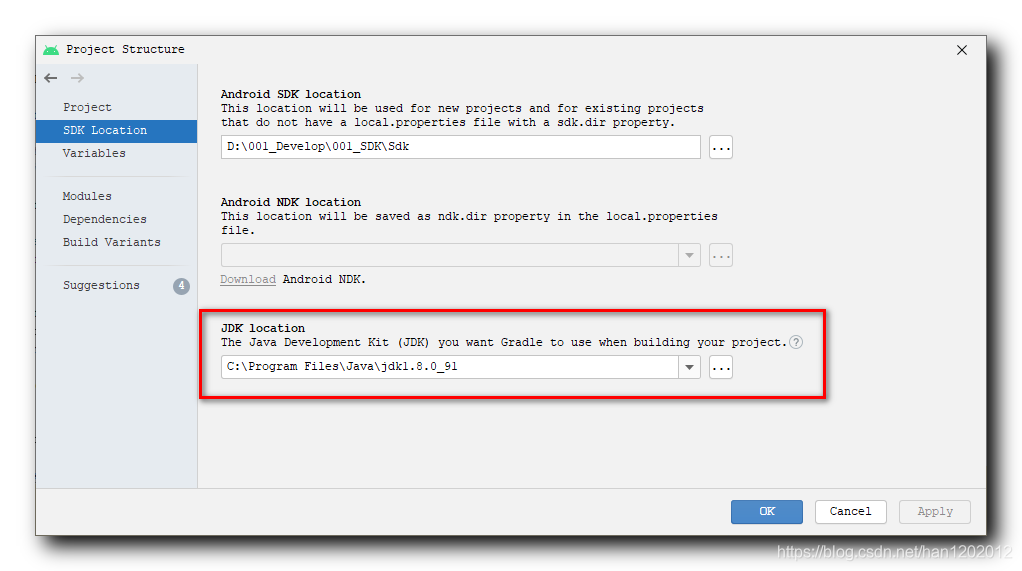
There are two options to set, one is the default JDK path of the system, and the other is the default JDK path of Android studio. Just switch it;
M1 native does not release binary version of canvas in node15. Therefore, when you install canvas, you will automatically compile from the source code, but if you do not install the corresponding dependency, you will report an error.
Solution
arch -arm64 brew install pkg-config cairo pango jpeg giflib librsvg
Troubleshooting
Homebrew cannot be installed
If you encounter
Error: Failure while executing; `tar --extract --no-same-owner --file /Users/wenbing/Library/Caches/Homebrew/downloads/6f65cc908bca8f42eeb93f33e25d76d748a7a28f20f30f41befe472ea2a01bc5--fribidi-1.0.10.arm64_big_sur.bottle.tar.gz --directory /private/tmp/d20210618-36598-16scyl7` exited with 1. Here's the output:
tar: Error opening archive: Failed to open '/Users/wenbing/Library/Caches/Homebrew/downloads/6f65cc908bca8f42eeb93f33e25d76d748a7a28f20f30f41befe472ea2a01bc5--fribidi-1.0.10.arm64_big_sur.bottle.tar.gz'
For this kind of error reporting, you need to manually install the dependency front dependency first, and then install the module

brew install libtiff gdk-pixbuf librsvg
Node gyp could not find the header file
If your homebrew is also M1 native, then homebrew will be installed under/opt/homebrew. Brew install will be under/opt/homebrew/cell/instead of linking to/usr/local/include. When node gyp is compiled, it is still compiled with clang in essence, and the header file cannot be found, so a fatal error: 'JPEG lib. H' file not found will be reported. The solution is to add/opt/homebrew/cell/to clang’s include path. My practice is in ~ /. Bash_ Add a line to profile
export CPLUS_INCLUDE_PATH=/opt/homebrew/include
Examination
Install
Accounting subjects
16:14:43,781 WARN org.apache.flink.streaming.api.functions.timestamps.AscendingTimestampExtractor - Timestamp monotony violated: -159096192 < 982926000
I used it
 DataStream<Tuple3<String,String,Integer>> timedData = dataStream
                .assignTimestampsAndWatermarks(new AscendingTimestampExtractor<Tuple3<String,String,Integer>>() {
                    @Override
                    public long extractAscendingTimestamp(Tuple3<String,String,Integer> s) {
                        return s.f2*1000;
                    }
                });
The error content violates the monotonicity of timestamps. The timestamps passed in by the ascendingtimestampextractor method must be monotonous.
After checking the simulation data, it is found that some timestamps are not monotonic, resulting in error.
It’s a time stamp that is smaller than the previous time stamp. Please correct it.
And then I thought, will this problem occur when Kafka is used in the future?Forget it. Let’s talk about it later
If the same key exists in this method, an error will be reported
Map<String,JKStackRedEx> result = v.stream().collect(Collectors.toMap(a->a.getManuId(),a->a));The following method can be used to avoid error reporting. The parameter returned by return can specify which value to use to override value1 or Value2
Map<String,JKStackRedEx> result = v.stream().collect(Collectors.toMap(a->a.getManuId(),a->a, (value1, value2) -> {
    return value2;
}));
You can also use multiple attributes to splice keys
Map<String,JKStackRedEx> result = v.stream().collect(Collectors.toMap(a->a.getManuId().concat(a.getStackingNum()),a->a, (value1, value2) -> {
                    return value2;
                }));
Generally, numpy is installed in “control panel + CMD”
Enter “PIP install numpy” in the command line window
The numpy installed at this time is not in the directory line of Python
No module named numpy will report an error, even if “import numpy as numpy” is imported at the beginning of the python program
2. Solutions:
(1) It is to directly find the python installation location in the DOS window and directly enter the “PIP install numpy” statement
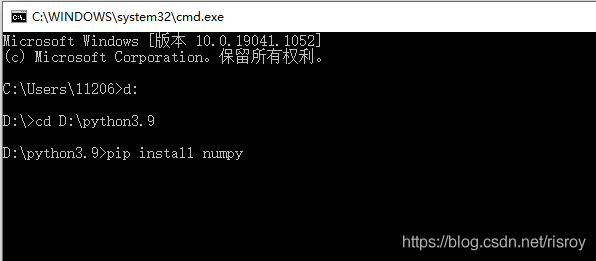
Enter enter and wait for installation
(2) Is it mandatory to download the latest version after installation
Find the installation location of Python in DOS window, and input “PIP install numpy — ignore installed numpy” statement
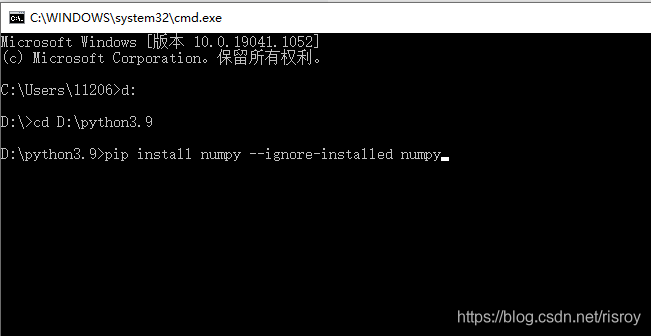
Will be forced to reload in a new location, this is to install the numpy package into python
Note that the following statement is entered in the win system
If you want to build a Linux system, you should add more “sudo” fields in front of it
Namely: “sudo PIP install numpy — ignore installed numpy”
This chapter is my opinion, let’s make progress together
When using websocket to push the JSON data to the front end, websocket needs to convert the JSON data into a string for transmission. In the front end, JavaScript is used to restore the text to a JSON object. Generally, the JSON. Paser () method is used to complete this work. However, in the actual transmission, there is a problem. The JSON. Parse() method always reports an error
Uncaught SyntaxError: Unexpected token ‘ in JSON at position 1
at JSON.parse (< anonymous>)
at WebSocket.ws.onmessage ((index):28)
After checking and comparing, it is found that in the process of transferring string by websocket, double quotation marks in string are replaced by single quotation marks, while JSON. Parse() method requires double quotation marks in string. After finding this reason, it is easy to solve it. Before parse conversion, single quotation marks in string are replaced by double quotation marks.
ws.onmessage = function (evt) {

        var a = evt.data.replace(/'/g, '"');
        var obj = JSON.parse(a);
        .....
This problem bothered me for five days, and for several days I fought hard into the night. I don’t want to eat all day long, but I finally solved it. Because there is little information on the Internet, I’d like to record here. If you have any questions about Doris, please exchange them~
The error information is as follows:
waiting to receive first heartbeat from frontend
waiting to receive first heartbeat from frontend
waiting to receive first heartbeat from frontend
waiting to receive first heartbeat from frontend
waiting to receive first heartbeat from frontend
master client, get client from cache failed.host: , port: 0, code: 7
invalid cluster id. ignore
View the result returned under be node in Fe node:
+-----------+-----------------+------------+------------+---------------+--------+----------+----------+---------------+---------------+-------+----------------------+-----------------------+-----------+------------------+---------------+---------------+---------+----------------+-----------------------------+---------+---------------------------+
| BackendId | Cluster         | IP         | HostName   | HeartbeatPort | BePort | HttpPort | BrpcPort | LastStartTime | LastHeartbeat | Alive | SystemDecommissioned | ClusterDecommissioned | TabletNum | DataUsedCapacity | AvailCapacity | TotalCapacity | UsedPct | MaxDiskUsedPct | ErrMsg                      | Version | Status                    |
+-----------+-----------------+------------+------------+---------------+--------+----------+----------+---------------+---------------+-------+----------------------+-----------------------+-----------+------------------+---------------+---------------+---------+----------------+-----------------------------+---------+---------------------------+
| 16006     | default_cluster | 172.17.0.2 | 172.17.0.2 | 9050          | -1     | -1       | -1       | NULL          | NULL          | false | false                | false                 | 0         | .000             | 1.000 B       | .000          | 0.00 %  | 0.00 %         | invalid cluster id. ignore. |         | {"lastStreamLoadTime":-1} |
+-----------+-----------------+------------+------------+---------------+--------+----------+----------+---------------+---------------+-------+----------------------+-----------------------+-----------+------------------+---------------+---------------+---------+----------------+-----------------------------+---------+---------------------------+
Problem solving:
Delete be under/storage/cluster_ ID
Restart be.
Cause of the problem:
Refer to the official document
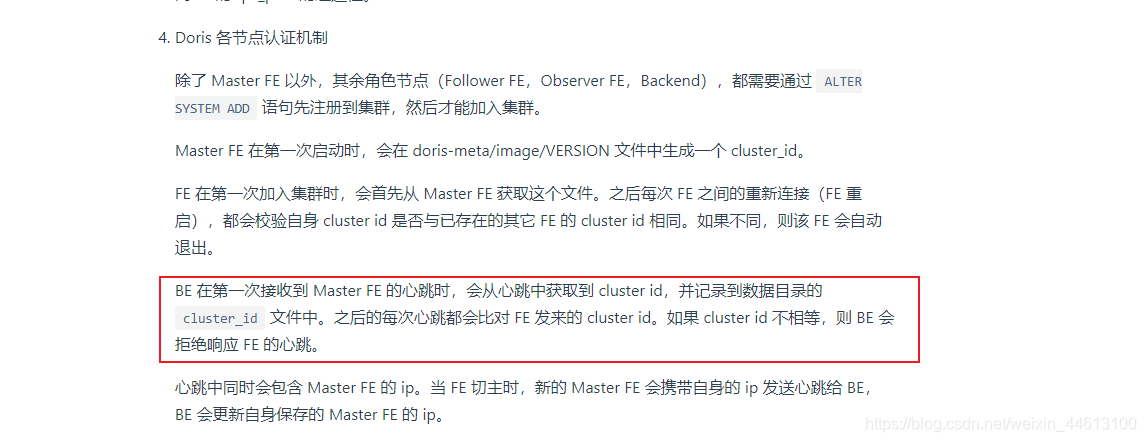
it may be that the Fe node has been rebuilt many times, resulting in cluster failure_ If the ID recorded in the ID file is incorrect, deleting the file and restarting be will generally solve the problem.
Note: if it is only port: 0, code: 7, please use telnet to check the connectivity of container port.
Possible problems:
1. If the rocketmq storage folder is not created, the broker log will also report an error
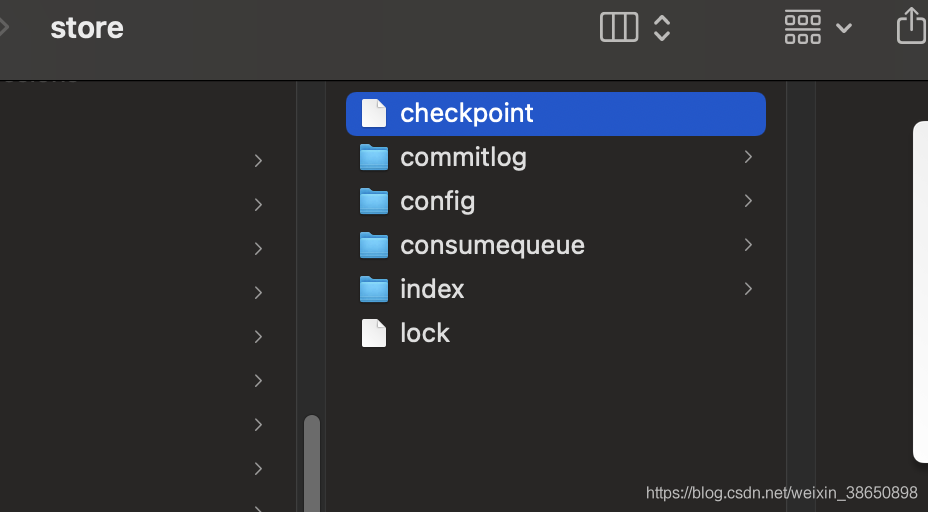
2. If the topic is not automatically created, the IP accessed at startup is different from the IP in broker.config configuration, and an error will be reported.
nohup sh mqbroker -n localhost:9876 autoCreateTopicEnable=true &
3. If the client version is inconsistent with the MQ version, an error may be reported