Category Archives: How to Fix

DM database data migration DTS error solution

Project scenario:

When using DTS data migration tool to migrate from Mysql to DM, ten tables reported errors. There are two kinds of errors

Problem Description:

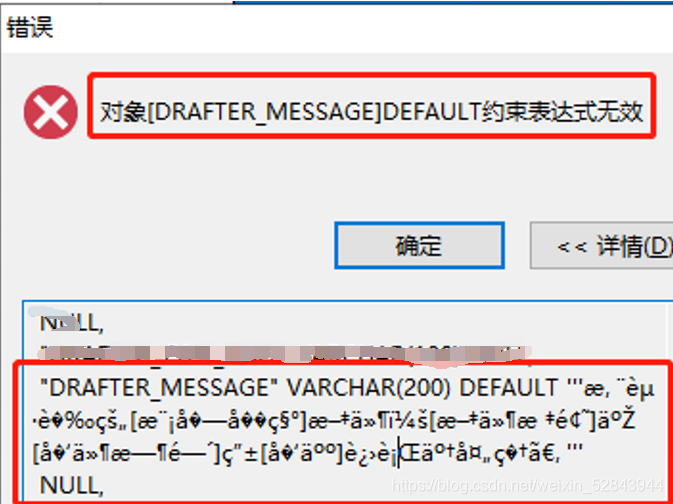
error number: – 2670
error message: Object [draft]_ The constraint expression of message] default is invalid
click the details query to find that the table definition is in disorder. You need to manually create this table in Dameng database </ font>

Error number: – 6169
error message: column [is]_ MOBILE_ Text] the length exceeds the definition
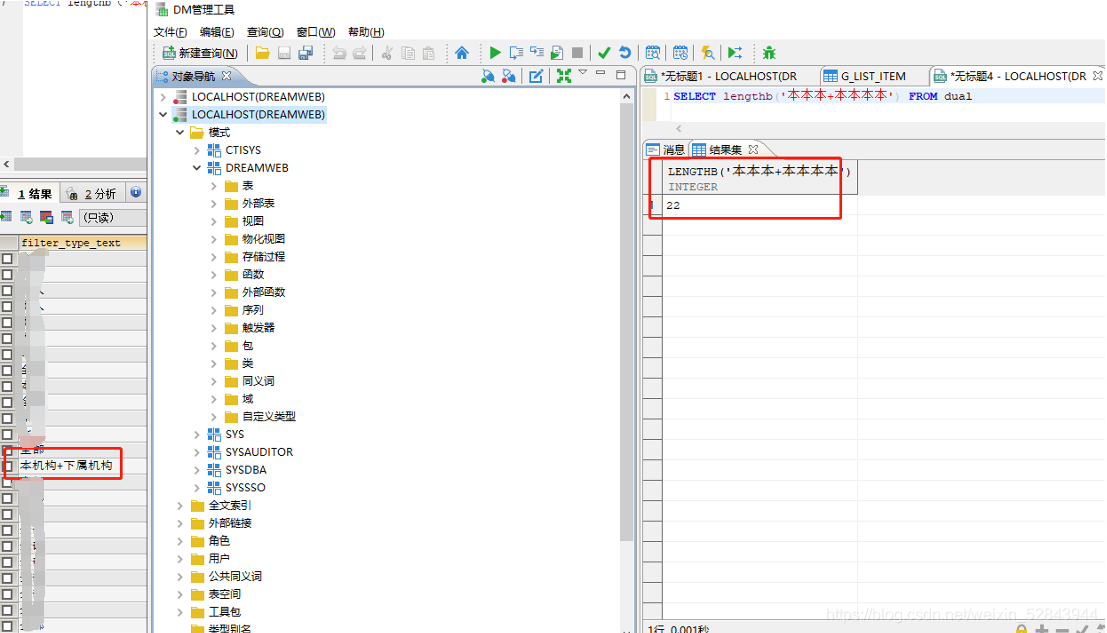
first, take out the table definition and create the table manually in DM database. If it is found that there is no problem, it should be the problem of data. Check that the character sets on both sides are consistent, and they are UTF-8. In the table definition, this column is varchar (20)
check that there is an obviously long field in this column of data in the source MSYQL. In DM calculation, it is found that this data occupies 22 bytes, so you need to change the field length

How to Solve Infinite scroll the pit encountered

InfiniteScroll The pitfalls of this infinite scrolling thing
Solution
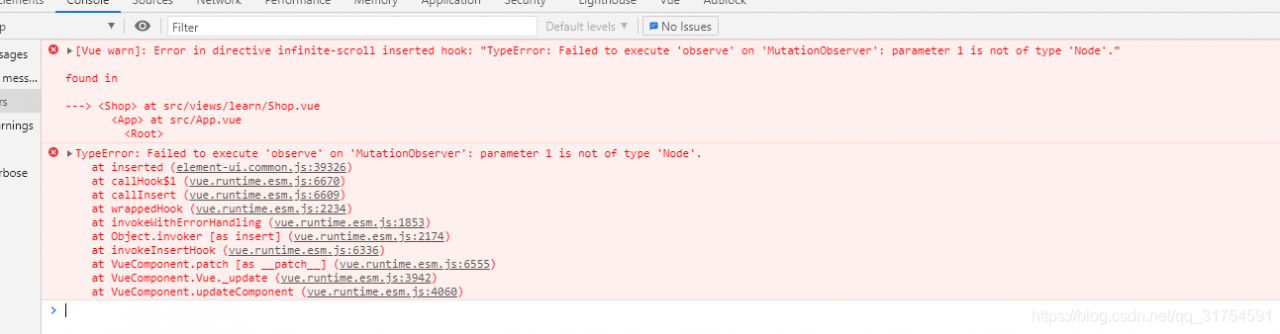
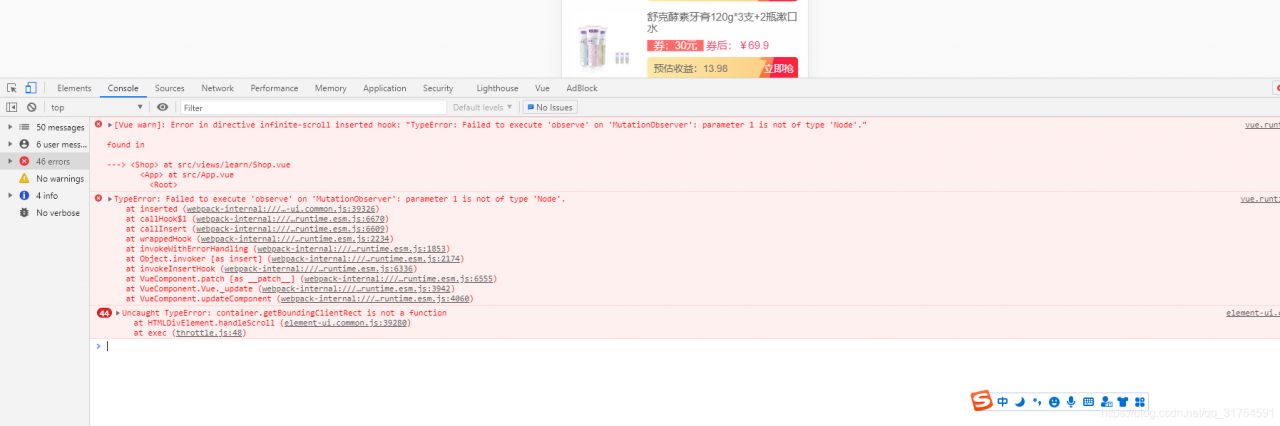
[Vue warn]: Error in directive infinite-scroll inserted hook: “TypeError: Failed to execute ‘observe’ on ‘MutationObserver’: parameter 1 is not of type ‘Node’.” found in
TypeError: Failed to execute ‘observe’ on ‘MutationObserver’: parameter 1 is not of type ‘Node’.

This is used by adding a large external box to theoverflow: auto;

overflow: auto;

Otherwise, the console will report a crazy error and prompt an error message, as shown in the figure

postgresql FATAL:no pg_hba.conf entry for host “192….“

In PG_ Add the IP to hbaconf and restart postgreql
as follows:[ https://blog.csdn.net/qq_ 36434219/article/details/118277681]

Note: there are many IP addresses added, one by one… You can directly configure the fixed network segment. For example, the above figure can be configured as follows:
192.168.3.0/24 represents having 254 IP addresses: from 192.168.1.1 to 192.168.1.254

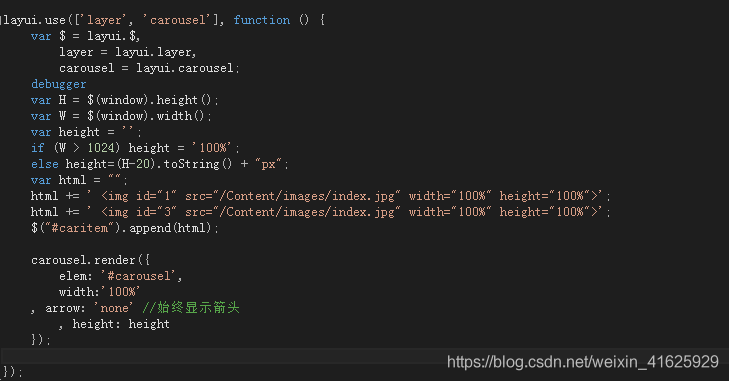
User defined height of layeui carousel

Layui’s official definition of carousel height is placed in

carousel.render({height:''...})

In the method   Pixels and percentages are supported. But the author has a demand, the carousel chart needs the background to return to the front according to the data permission control

And you need to set the height dynamically, not the fixed number of pixels and the proportion, and the height needs to be adjusted according to the current height

Adjust the pixels of the computer, such as how high is 1024 pixels, how high is normal pixels.

No more nonsense, just go to JS code:

Register global time filter in main.js in Vue

In main.js, define a global time filter through: Vue. Filter().
the first parameter is the name of the filter, such as: dataform,
the second parameter is the processing function of the time filter: function(), which needs to specify a formal parameter: originval, which is to process the time data
to get the originval time, first update the date and pass the originval to you, that is, to get a date object of the time according to the local time

Get four digit year through getfullyear()

Get the month through getmonth(). The month starts from 1, so make it + 1
if the month is less than two digits, fill in 0 in the front by calling. Padstart (2, ‘0’). The first parameter represents the total length of the number of digits, and the second parameter is a string. If the number of digits is less than two, which string should be filled in

Get the current date through: getdate()

Get the current hour through: gethours()

Get the current minutes through: getminutes()

Get the current seconds by: getseconds()

Let the obtained date, time, minute and second be spliced into a complete date string
return ${y} - ${m} - ${D} - ${HH}: ${mm}: ${SS}

//Format time filter
vue.filter (‘dataform ‘, function (originval) {
const DT = new date (originval)

const y = dt.getFullYear()
const m = (dt.getMonth() + 1 + ‘’).padStart(2, ‘0’)
const d = (dt.getDate() + ‘’).padStart(2, ‘0’)

const hh = (dt.getHours() + ‘’).padStart(2, ‘0’)
const mm = (dt.getMinutes() + ‘’).padStart(2, ‘0’)
const ss = (dt.getSeconds() + ‘’).padStart(2, ‘0’)

return ${y}-${m}-${d} ${hh}:${mm}:${ss}

RabbitMQ Startup Script (How to Set)

Create a new rabbitmq server script in the/etc/init. D directory

In the script, you need to modify Erlang path, daemon, control, init in path_LOG_Dir and PID_File parameter

#!/bin/sh
#
# rabbitmq-server RabbitMQ broker
#
# chkconfig: - 80 05
# description: Enable AMQP service provided by RabbitMQ
#

### BEGIN INIT INFO
# Provides:          rabbitmq-server
# Required-Start:    $remote_fs $network
# Required-Stop:     $remote_fs $network
# Description:       RabbitMQ broker
# Short-Description: Enable AMQP service provided by RabbitMQ broker
### END INIT INFO

# Source function library.
. /etc/init.d/functions
export HOME=/root
PATH=/sbin:/usr/sbin:/bin:/usr/bin:/usr/local/erlang/bin
NAME=rabbitmq-server
#DAEMON=/usr/local/rabbitmq/rabbitmq_server-3.8.17/sbin/${NAME}
#CONTROL=/usr/local/rabbitmq/rabbitmq_server-3.8.17/sbin/rabbitmqctl
DAEMON=/usr/local/rabbitmq/rabbitmq_server-3.8.17/sbin/${NAME}
CONTROL=/usr/local/rabbitmq/rabbitmq_server-3.8.17/sbin/rabbitmqctl
DESC=rabbitmq-server
USER=root
ROTATE_SUFFIX=
INIT_LOG_DIR=/usr/local/rabbitmq/rabbitmq_server-3.8.17/var/log/rabbitmq
PID_FILE=/usr/local/rabbitmq/rabbitmq_server-3.8.17/var/run/rabbitmq/pid

START_PROG="daemon"
LOCK_FILE=/var/lock/subsys/$NAME

test -x $DAEMON || exit 0
test -x $CONTROL || exit 0

RETVAL=0
set -e

[ -f /etc/default/${NAME} ] && . /etc/default/${NAME}

ensure_pid_dir () {
    PID_DIR=`dirname ${PID_FILE}`
    if [ ! -d ${PID_DIR} ] ; then
        mkdir -p ${PID_DIR}
        chown -R ${USER}:${USER} ${PID_DIR}
        chmod 755 ${PID_DIR}
    fi
}

remove_pid () {
    rm -f ${PID_FILE}
    rmdir `dirname ${PID_FILE}` || :
}

start_rabbitmq () {
    status_rabbitmq quiet
    if [ $RETVAL = 0 ] ; then
        echo RabbitMQ is currently running
    else
        RETVAL=0
        ensure_pid_dir
        set +e
        RABBITMQ_PID_FILE=$PID_FILE $START_PROG $DAEMON \
            > "${INIT_LOG_DIR}/startup_log" \
            2> "${INIT_LOG_DIR}/startup_err" \
            0<&- &
        $CONTROL wait $PID_FILE >/dev/null 2>&1
        RETVAL=$?
        set -e
        case "$RETVAL" in
            0)
                echo SUCCESS
                if [ -n "$LOCK_FILE" ] ; then
                    touch $LOCK_FILE
                fi
                ;;
            *)
                remove_pid
                echo FAILED - check ${INIT_LOG_DIR}/startup_\{log, _err\}
                RETVAL=1
                ;;
        esac
    fi
}

stop_rabbitmq () {
    status_rabbitmq quiet
    if [ $RETVAL = 0 ] ; then
        set +e
        $CONTROL stop ${PID_FILE} > ${INIT_LOG_DIR}/shutdown_log 2> ${INIT_LOG_DIR}/shutdown_err
        RETVAL=$?
        set -e
        if [ $RETVAL = 0 ] ; then
            remove_pid
            if [ -n "$LOCK_FILE" ] ; then
                rm -f $LOCK_FILE
            fi
        else
            echo FAILED - check ${INIT_LOG_DIR}/shutdown_log, _err
        fi
    else
        echo RabbitMQ is not running
        RETVAL=0
    fi
}

status_rabbitmq() {
    set +e
    if [ "$1" != "quiet" ] ; then
        $CONTROL status 2>&1
    else
        $CONTROL status > /dev/null 2>&1
    fi
    if [ $?!= 0 ] ; then
        RETVAL=3
    fi
    set -e
}

rotate_logs_rabbitmq() {
    set +e
    $CONTROL rotate_logs ${ROTATE_SUFFIX}
    if [ $?!= 0 ] ; then
        RETVAL=1
    fi
    set -e
}

restart_running_rabbitmq () {
    status_rabbitmq quiet
    if [ $RETVAL = 0 ] ; then
        restart_rabbitmq
    else
        echo RabbitMQ is not runnning
        RETVAL=0
    fi
}

restart_rabbitmq() {
    stop_rabbitmq
    start_rabbitmq
}

case "$1" in
    start)
        echo -n "Starting $DESC: "
        start_rabbitmq
        echo "$NAME."
        ;;
    stop)
        echo -n "Stopping $DESC: "
        stop_rabbitmq
        echo "$NAME."
        ;;
    status)
        status_rabbitmq
        ;;
    rotate-logs)
        echo -n "Rotating log files for $DESC: "
        rotate_logs_rabbitmq
        ;;
    force-reload|reload|restart)
        echo -n "Restarting $DESC: "
        restart_rabbitmq
        echo "$NAME."
        ;;
    try-restart)
        echo -n "Restarting $DESC: "
        restart_running_rabbitmq
        echo "$NAME."
        ;;
    *)
        echo "Usage: $0 {start|stop|status|rotate-logs|restart|condrestart|try-restart|reload|force-reload}" >&2
        RETVAL=1
        ;;
esac

exit $RETVAL

Set permissions

chmod a+x /etc/init.d/rabbitmq-server

StartUp Actions Manager

chkconfig --add /etc/init.d/rabbitmq-server

Rabbitmq Sweatshirt: https://blog.csdn.net/qq_39135287/article/details/95725385

ZABBIX agent failed to start

1. Journalctl – Xe print job for zabbix-agent.service failed because a configured resource limit was exceeded

2. Journal CTL – Xe print PID… Not runnable

resolvent:

Check whether there is a folder named ZABBIX in the/run directory. If not, create a new one

# mkdir zabbix

Then start ZABBIX  
# systemctl start   zabbix-agent

# systemctl status zabbix-agent