Category Archives: Error

The page you are requesting cannot be served because of the extension configuration

In deployment ASP.NET When the website is deployed to IIS, visit the page http://localhost/UserCenter/user.aspx , but an exception was thrown. At this time, to detect whether the deployment is successful, you can write a text file for testing in the root directory text.txt , and then access the file http://localhost/UserCenter/test.txt If you can see the contents of this file, it means that there is no problem with the deployment. Maybe there is a problem with the code.


Abnormal prompt:

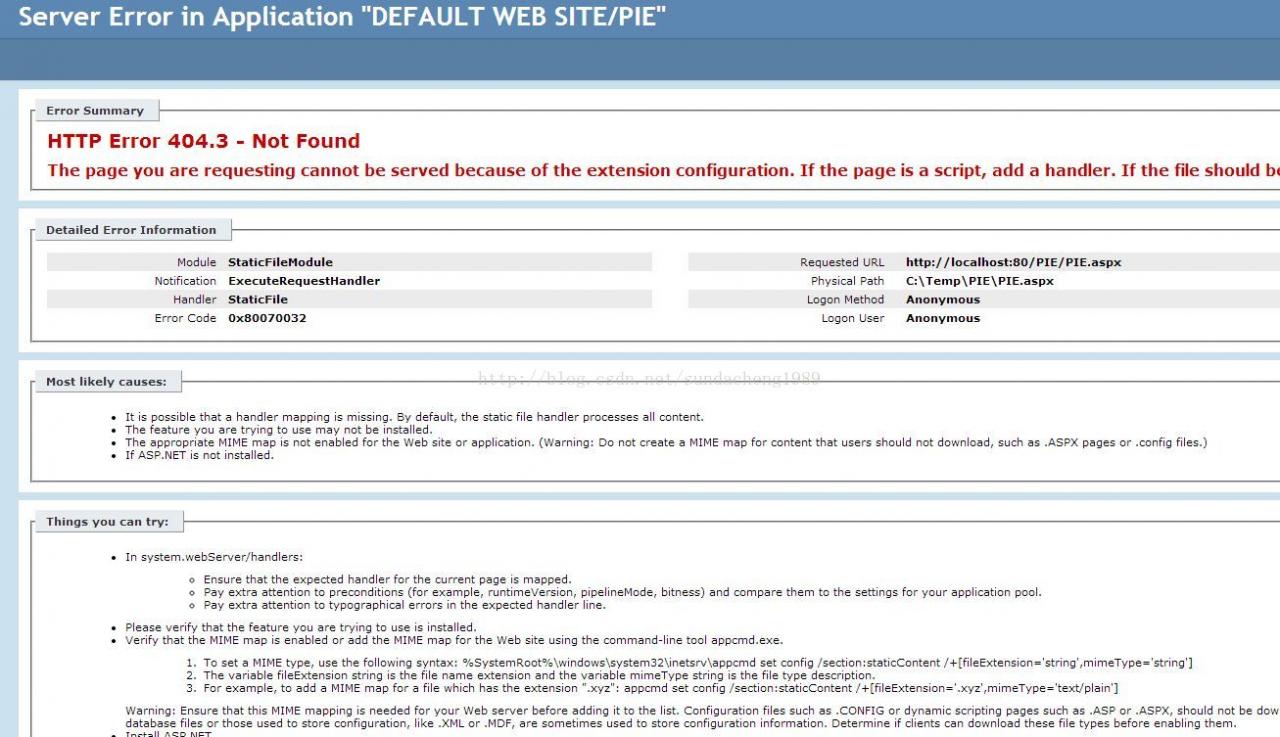
HTTP error 404.3 – not found
the page you are asking cannot be served because of the extension configuration. If the page is a script, add a handler. If the file should be downloaded, add a mime map.

abnormal screenshot


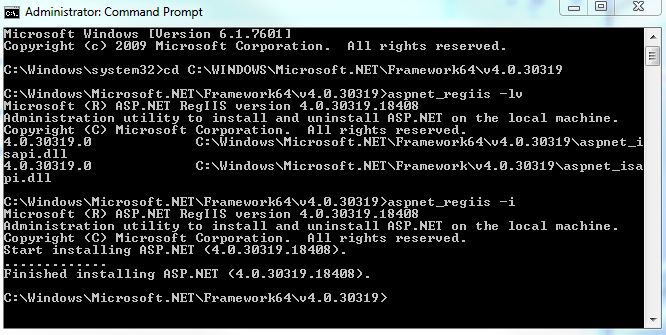
The reason for this problem is that there are multiple. Net versions on the machine, so there are multiple ASP.NET Version. Now our application pool is in version 4.0, but this version is not registered in IIS, so this error is reported. Now what we need to do is register the 4.0 ASP.NET Version. In C: windows\ Microsoft.NET \Find IIS registration tools, namely aspnet, in the directory of framework64/v4.0.xxxx_ regiis.exe Then start it in the form of a DOS window, aspnet_ Regiis – I refer to MSDN for details http://msdn.microsoft.com/en-us/library/k6h9cz8h%28VS.80%29.aspx

Running results


At this point, restart the application pool and website, and you can see the normal ASPX rendered page.


Cache penetration, cache breakdown and cache avalanche solutions

1. Preface

Cache is used in program design. The front-end sends data access request to the background

case 1: first, the data is retrieved from the cache and returned to the front end directly

case 2: if the data is not retrieved from the cache, the data will be retrieved from the database. After the data is retrieved, the cache will be updated first and then returned to the front end

case 3: if it is not found in the database, it will be returned to null directly.

2.Cache penetration [penetration cache, database, no data]

definition: cache penetration refers to the fact that there is no data in the cache and database, but the user constantly initiates requests, such as data with ID of “- 1” or data with ID of extra large and nonexistent. At this time, the user is likely to be an attacker, and the attack will lead to excessive pressure on the database.

solutions:

1) The verification is added in the interface layer. For example: ① user authentication verification, ② ID basic verification, ID & lt; = 0 direct interception and return.

2) Use temporary caching mechanism. If neither the cache nor the database can be retrieved, the key value pair can be written as key null, and a shorter cache validity time can be set (for example, 30 seconds. If the cache validity time is set too long, it may lead to the failure of normal use). In this way, users can be prevented from repeatedly using the same ID to brute force query attacks.

3.Cache breakdown [breakdown cache, can be found in database]

definition: cache breakdown refers to the fact that there is no data in the cache and there is data in the database (generally, the cache time is expired). At this time, because there are too many concurrent users, they can not read the data in the cache at the same time, and they go to the database to get the data at the same time, resulting in an instant increase in the pressure on the database.

solutions:

1) Hotspot data is set to never expire.

2) Add mutex lock to synchronize query operation. The reference code is as follows.

static Lock reenLock = new ReentrantLock();
   public List<String> getData() throws InterruptedException {
       List<String> result = new ArrayList<String>();
     
       // Fetching from the cache
       result = getDataFromCache();

       if (result.isEmpty()) {
           if (reenLock.tryLock()) {
               try {
                   System.out.println("Get the lock, fetch the database from the DB and write it to the cache");
                   // fetch data from database
                   result = getDataFromDB();

                   // Write the query data to the cache
                   setDataToCache(result);

               } finally {
                   reenLock.unlock();// Release the lock
               }

           } else {
               result = getDataFromCache();// check the cache again first
               
               if (result.isEmpty()) {
                   System.out.println("No lock, no data in cache, waiting...") ;
                   Thread.sleep(100);//wait
                   return getData();//retry
               }

           }
       }

       return result;

   }

Note:

1) If there is data in the cache, the result will be returned directly.

2) If there is no data in the cache, get the lock and get the data from the database. Before releasing the lock, other parallel threads will wait for 100ms, and then go to the cache again to get the data. In this way, we can prevent the database from repeatedly fetching data and updating data in the cache.

3) Of course, this is a simplified process. In theory, it would be better if the lock could be added according to the key value. That is, thread a’s fetching key1 data from the database does not prevent thread B’s fetching key2 data. The above code obviously can’t do this. scheme: lock can be fine-grained to key.

4、 Cache avalanche

definition: cache avalanche refers to the phenomenon that a large amount of data in the cache is due to the expiration time, and the amount of query data is huge, which leads to too much pressure on the database and even down the machine.

different from “cache breakdown”: cache breakdown refers to the concurrent query of the same data; cache avalanche refers to the fact that different data have basically expired at the same time, and many data cannot be found in the cache, so they turn to query the database.

solutions:

1) When saving data to redis in batches, the failure time of each key is set to a random value, so as to ensure that the data will not fail in a large area at the same time.

setRedis(Key,value,time + Math.random () * 10000);

2) If redis is a cluster deployment, the hotspot data can be evenly distributed in different redis databases to avoid the problem of all failure.

3) Hotspot data settings will never expire. If there is an update operation, the cache can be updated.
Log separation using tool cronlog

Foreword: Tomcat log is cut by date

Using cronolog to segment the image of tomcat9 catalina.out Log; Tomcat’s catalina.out The log file cannot be divided by date. All the log files are output and written to a single file catalina.out In this way, the. Out log will become larger and larger, and the cost of operation and maintenance will increase. To archive log files by date, cronolog can be used to realize log segmentation.

1. Step 1: cronlog installation

Use the yum command to install cronlog

yum install cronolog

2. Step 2: modify catalina.sh Documents

Directory: Tomcat/bin/ catalina.sh

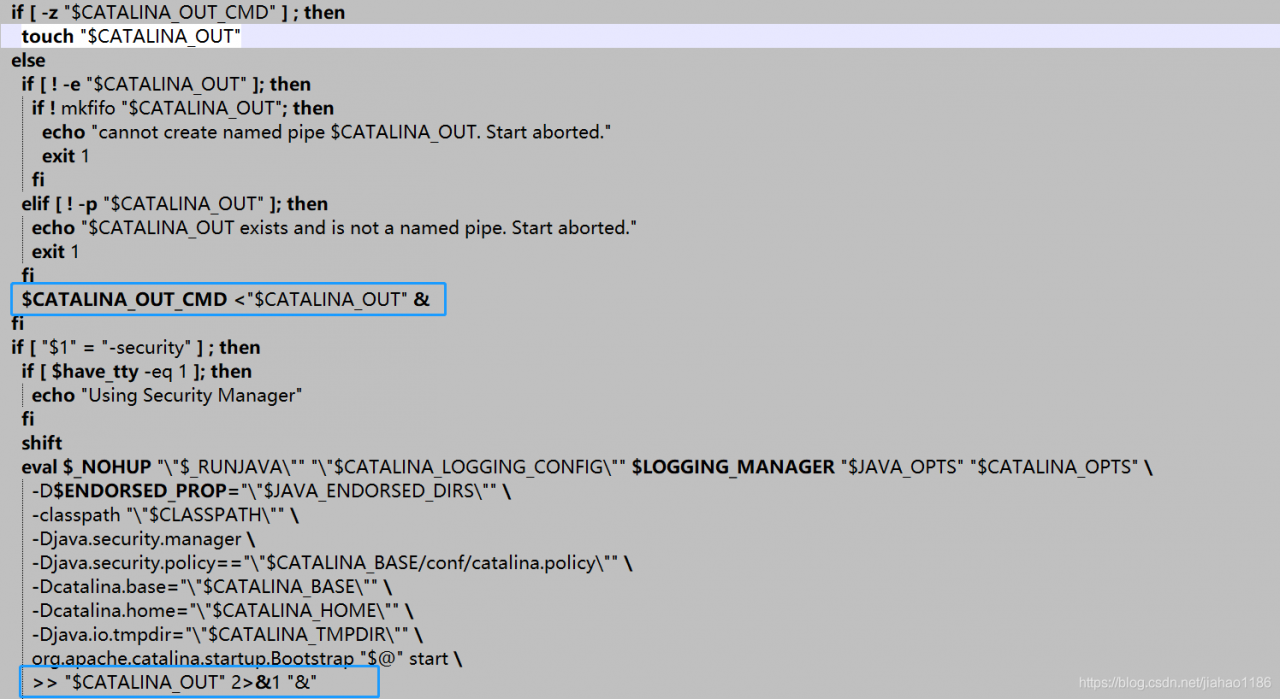
Original setting:

After modification:

shift
 # touch "$CATALINA_OUT"
  if [ "$1" = "-security" ] ; then
    if [ $have_tty -eq 1 ]; then
      echo "Using Security Manager"
    fi
    shift
    eval $_NOHUP "\"$_RUNJAVA\"" "\"$LOGGING_CONFIG\"" $LOGGING_MANAGER $JAVA_OPTS $CATALINA_OPTS \
      -D$ENDORSED_PROP="\"$JAVA_ENDORSED_DIRS\"" \
      -classpath "\"$CLASSPATH\"" \
      -Djava.security.manager \
      -Djava.security.policy=="\"$CATALINA_BASE/conf/catalina.policy\"" \
      -Dcatalina.base="\"$CATALINA_BASE\"" \
      -Dcatalina.home="\"$CATALINA_HOME\"" \
      -Djava.io.tmpdir="\"$CATALINA_TMPDIR\"" \
      org.apache.catalina.startup.Bootstrap "$@" start \
      2&>&1 | /usr/local/sbin/cronolog "$CATALINA_BASE/logs/catalina-%Y-%m-%d.out" &

  else
    eval $_NOHUP "\"$_RUNJAVA\"" "\"$LOGGING_CONFIG\"" $LOGGING_MANAGER $JAVA_OPTS $CATALINA_OPTS \
      -D$ENDORSED_PROP="\"$JAVA_ENDORSED_DIRS\"" \
      -classpath "\"$CLASSPATH\"" \
      -Dcatalina.base="\"$CATALINA_BASE\"" \
      -Dcatalina.home="\"$CATALINA_HOME\"" \
      -Djava.io.tmpdir="\"$CATALINA_TMPDIR\"" \
      org.apache.catalina.startup.Bootstrap "$@" start \
      2&>&1 | /usr/local/sbin/cronolog "$CATALINA_BASE/logs/catalina-%Y-%m-%d.out" &

  fi

3. Step 3: restart Tomcat

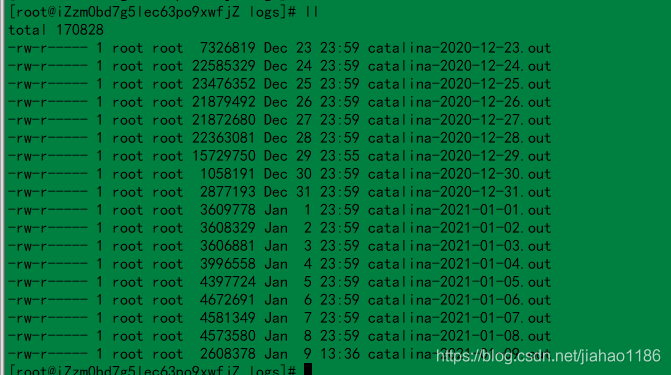
Restart Tomcat and the log will take effect according to the date. A screenshot of the log file is shown below.


Two implementation methods of spring boot scan mapper interface class

1. Method 1: use annotation @ mapper

Add annotation on all mapper interfaces @ mapper; spring boot starts annotation auto scanning.

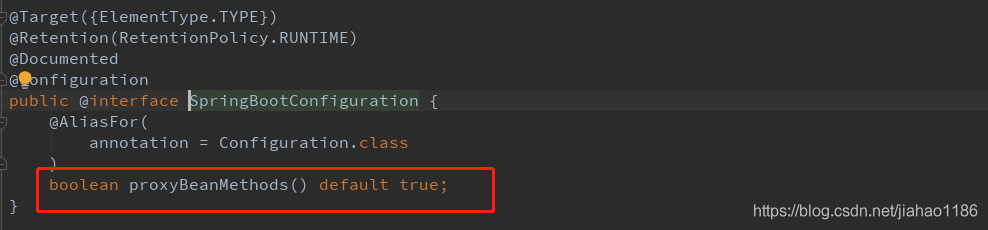
The following is the Default scan configuration of spring boot. When auto scan is started, all custom beans will be automatically scanned

2. Method 2: use annotation @ mapperscan

Add the annotation @ mapperscan to the springboot startup class to mark the package path of Dao. Once and for all, recommended!!

import org.mybatis.spring.annotation.MapperScan;
import org.springframework.boot.SpringApplication;
import org.springframework.boot.autoconfigure.SpringBootApplication;
import org.springframework.cloud.client.discovery.EnableDiscoveryClient;
import springfox.documentation.swagger2.annotations.EnableSwagger2;

@EnableSwagger2
@EnableDiscoveryClient
@MapperScan(basePackages = {"com.mp.service.provider.dao"})
@SpringBootApplication
public class MpServiceProviderApplication {
    public static void main(String[] args) {
        SpringApplication.run(MpServiceProviderApplication .class, args);
    }
}


Spring boot uses configuration interface webmvcconfigurer to solve cross domain problems

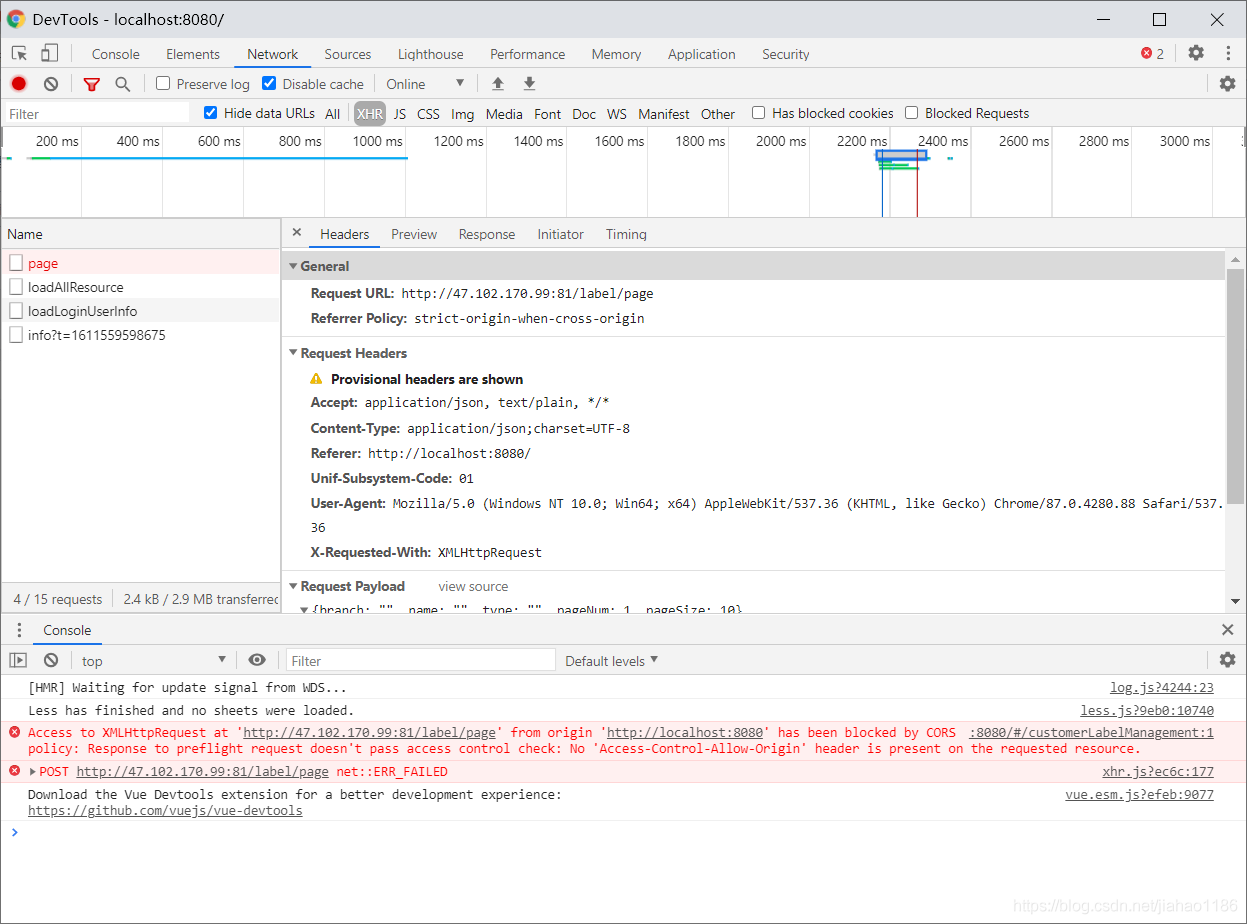
1. Problem Description: cross domain problem in front end call interface

2. Solution, add the following classes

import org.springframework.context.annotation.Bean;
import org.springframework.context.annotation.Configuration;
import org.springframework.web.servlet.config.annotation.CorsRegistry;
import org.springframework.web.servlet.config.annotation.WebMvcConfigurer;

@Configuration
public class CorsConfiguration {
    @Bean
    public WebMvcConfigurer corsConfigurer() {
        return new WebMvcConfigurer() {
            @Override
            public void addCorsMappings(CorsRegistry registry) {
                registry.addMapping("/**")
                        .allowCredentials(true)
                        .allowedMethods("POST", "GET", "PUT", "OPTIONS", "DELETE")
                        .allowedOrigins("*");
            }
        };
    }

}

The <> <<<<<<<<<<<<<<<<<<<<< <<< <<<< << <<<<<<<< <<<<<<<<< > access control allow- Credentials

allowedheads string array class or interface no access control request heads

exposed heads string array class or interface no access control expose heads

Note:

1) Attribute value, origins: configure the sources that can be accessed, for example: 0 https://adong.blog.csdn.net/article/details/113126033 * indicates that all domain names are allowed.

2) Property methods: configure the methods of cross domain request support, such as get, post, delete, put, and return all supported methods at one time.

3) Attribute maxage: configures the valid time of the pre check request. The unit is seconds. It indicates how long the second pre check request does not need to be issued.

4) Attribute allowcredentials: configure whether to allow sending cookies for credential requests. Cookies are not sent by default.

5) Attribute allowedheaders: configure the allowed custom request headers for pre checking requests.

6) Attribute exposedheaders: configure the header information of the response, in which other header information can be set. Without configuration, cache control, content language, content type, expires, last modified and pragma fields can be obtained by default.

SVN Error:svn: E230001: Server SSL certificate verification failed: certificate issued

Cause analysis: SVN certificate failed

Solution:

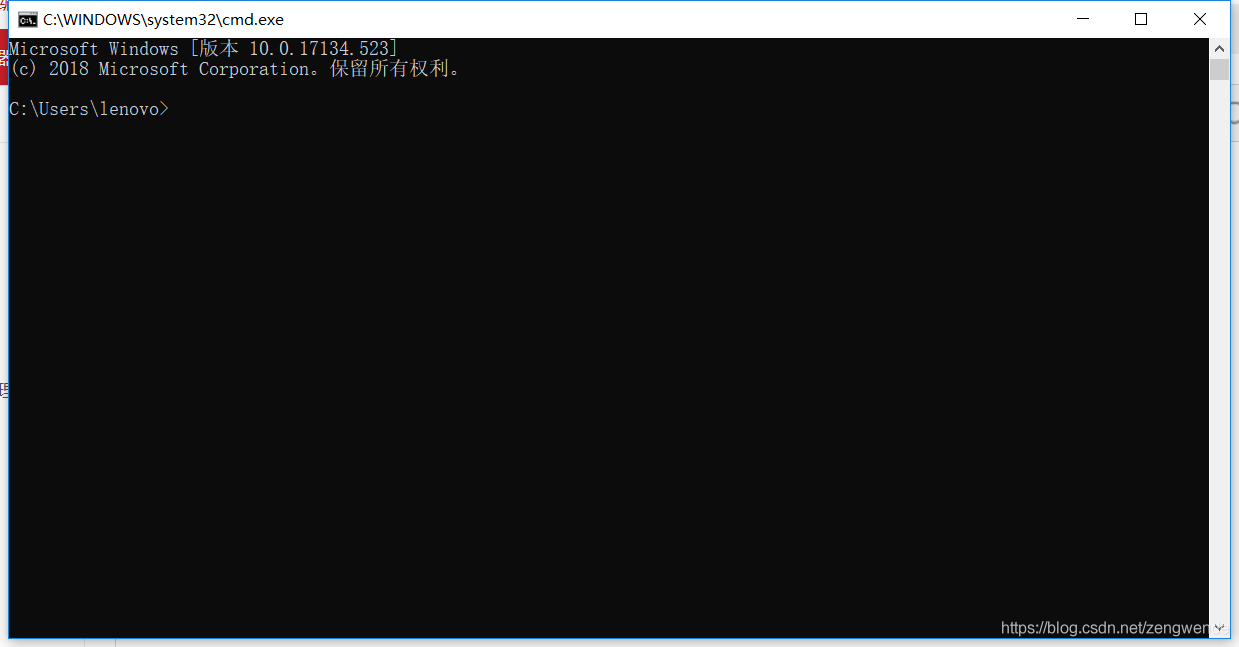
1. Open command desk (CMD)

2. Enter SVN LS address (example: SVN LS) https://111.111.111.111/svn/abc )

3. After the console outputs, enter P and enter (this command is to ask SVN to ignore the certificate and then follow the prompt to solve the problem of server SSL certificate verification failed: certificate issued)

Solve the problem that the native machine cannot use ant script checkout project

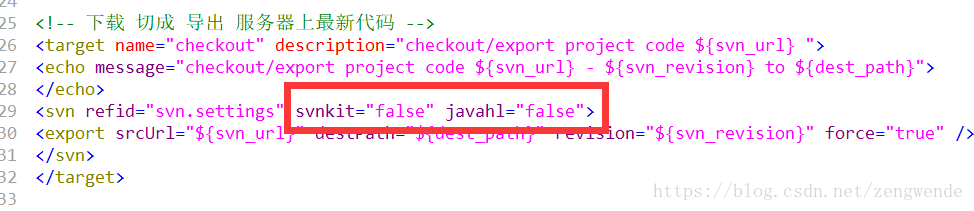
Problem Description: the local machine contains SVN command line. If svnsetting svnkit/javahl = true, there will be a conflict with the local SVN command line, resulting in the failure to check out items normally

solution: if both svnsetting svnkit and javahl are false, the program will automatically call native SVN in path.
example: & lt; svnsetting ID=“ svn.setting ” svnkit=”false” javahl=”false” username=”${svn_ user_ name}” password=”${svn_ user_ PWD} “/ &>
extension of the problem: if SVN command line is not installed on this machine, Download svnant and introduce svnkit/javahl jar package into ant/lib, svnkit/javahl corresponds to true


Java handles special characters in URL

The URL can’t display some special symbols, so the encoding will be used at this time. The encoding format is: a percent sign followed by the ASCII (hexadecimal) code value of the corresponding character. For example, the encoding value of a space is% 20. (ASCII reference)
some characters have special meanings in the URL, and the basic coding rules are as follows:
special meaning
hexadecimal value
1. + indicates empty space (spaces cannot be used in the URL)% 20
2/ Separate directory and subdirectory% 2F
3.?separate actual URL and parameter% 3F
4.% specify special character% 25
2 5. # indicates the separator% 26 between the parameters specified in the bookmark% 23
6. & amp; URL

For example: http://192.168.xxx.xxx/source/20190112 121000.txt

Note: such a URL cannot be successfully requested because the URL contains special words. The example URL contains special characters for spaces, so it needs to be converted to http://192.168.xxx.xxx/source/20190112%20121000.txt

Such a URL can request success.

Supplementary points:

Encoding and decoding functions of URL in Java java.net.URLEncoder . encode (string s) and java.net.URLDecoder . decode (string s);
URL encoding and decoding functions in JavaScript
escape (string s) and unescape (string s);
JavaScript