Category Archives: Error

How to Solve Spring Cloud Error context has been closed already

Context has been closed already solution

Error code

With such a piece of code, the context has been closed already error may occur during running, and once it occurs, it will make an error every time it runs in the future.

@Component
public class SpringContextUtil implements ApplicationContextAware {

    private static ApplicationContext context = null;

    @Override
    public void setApplicationContext(ApplicationContext applicationContext) throws BeansException {
        ApplicationContextExt.context = applicationContext;
    }

	/**
	 * This static method allows you to retrieve the desired bean from the Spring context.
	 */
	public static <T> T getBean(Class<T> cls) {
        if (context == null)
            throw new IllegalStateException("no application context aviliable.");
        try {
            return (T) context.getBean(cls); // Wrong!
        } catch (BeansException e) {
			throw new RuntimeException(e);
        }
        return (T) null;
    }
}    

Cause analysis

However, when spring cloud context. Jar is included in the classpath, because the contextrefresher class will close the old context when the context is refreshed, so that the context in the static class has been closed, so this error will occur.

Trigger exploration

Find out the direct reason. Find out that a jar that you depend on listens to a notification from MQ. When you hear the message to be refreshed, you will refresh the context, which leads to this phenomenon.
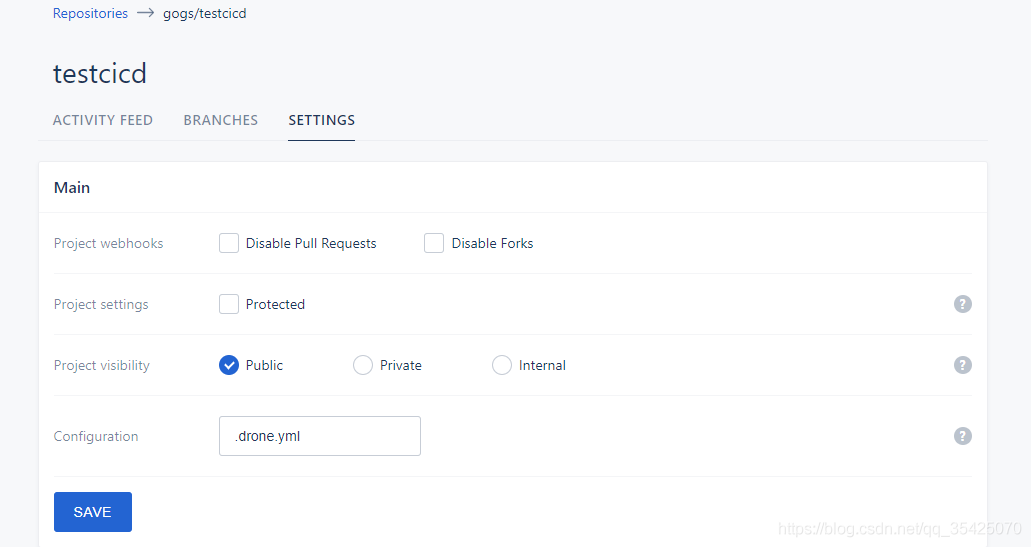
The drone settings page is not trusted

The drone settings page is not trusted

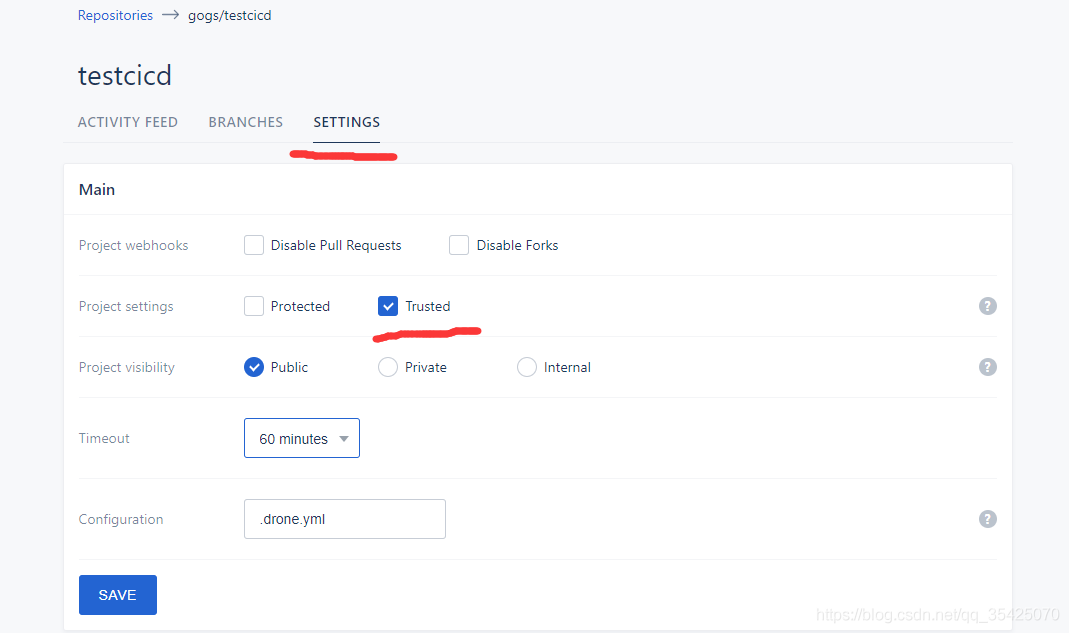
In the tutorial of building the drone cicd system, check trusted in the main part of settings. The normal page is like this

If you don’t have a trusted page, like this

It means that the user who logs in to drone is not an administrator, so you can’t see the option of trusted.

Solution

Check if there is drone in the docker running parameter of drone_ USER_ Create , as shown in the figure below

docker run \
  --volume=/opt/bin/drone/data:/data \
  --env=DRONE_GIT_ALWAYS_AUTH=true \
  --env=DRONE_GIT_USERNAME=xxx \
  --env=DRONE_GIT_PASSWORD=xxx \
  --env=DRONE_GOGS=true \
  --env=DRONE_GOGS_SKIP_VERIFY=false \
  --env=DRONE_GOGS_SERVER=http://xxx \
  --env=DRONE_PROVIDER=gogs \
  --env=DRONE_RPC_SECRET=xxx \
  --env=DRONE_USER_CREATE=username:yourUsername,admin:true \
  --env=DRONE_SERVER_PROTO=http \
  --publish=xxx:80 \
  --publish=xxx:443 \
  --restart=always \
  --detach=true \
  --name=drone \
  -h drone \
  drone/drone:1

--env=DRONE_ USER_ CREATE= username:yourUsername , admin:true this line is very important. After that, you can log in to drone with your user name and become an administrator. If you don’t add it, you won’t see the trusted button.

At that time, the -- env in my line was written as - env which resulted in that the parameters in this line did not take effect and that I did not run drone as an administrator, so I could not see the option of trusted.

Others: how to restart drone after it has been run?

docker rm -f drone # Delete the original image
# Run the above docker run to build a new image and run it

[Solved] fatal: could not read Username for

Total: could not read username for ‘http:// solution

After deploying the clone (cicd software), when the commit is triggered, the problem occurs when the clone runner executes the pull warehouse code (on his deployed gogs)

Initialized empty Git repository in /drone/src/.git/
+ git fetch origin +refs/heads/master:
fatal: could not read Username for 'http://ip:port': terminal prompts disabled

The reason is that you need to enter the user name and password, but because this is cicd software, there is no time to enter the password, so there are two solutions:

Using SSH, you can produce git public key on the server where drone is located and upload it to code hosting (I use the gogs built by myself here, but there will also be GitHub, gitea, gitee, gitlab, etc.), so that you don’t need to download and upload the user name and password, and use the memory password mechanism of GIT to save the user name and password

Enter the server where the drone is located, log in with the drone process user, enter the home directory ( Cd ~ ) and execute git clone [your git code path] , and find that you need to enter a password, Ctrl + C interrupt execution touch. Git credentials create. Git credentials file execute vim. Git credentials edit the file, press I key to enter edit mode, enter: HTTP (s):// {your user name}: {your password} @ your git server address [Note: select HTTPS/HTTP, Remove curly brackets] press ESC Enter : WQ save and exit to execute git config -- global credential.helper store cat ~ /. Gitconfig found one more item:

[credential]
helper = store

Explain that it has been configured. Try again git clone [your git code path] no need to enter a password

Fatal: could not read username for ‘http://…’: terminal prompts disabled problem solving~

Jmeter Error java.net.BindException: Address already in use: connect

resolvent:

1. Open the registry: Ctrl + R, enter regedit
2, enter – Computer \ HKEY_ LOCAL_ 3. Create a new DWORD value, name:TcpTimedWaitDelay , value:30 (decimal) set to 30 seconds
4. Create a new DWORD value, name:MaxUserPort , value:65534 (decimal) maximum number of connections 65534

If there is still a problem after modification, restart the machine and the problem disappears.

[Solved] The Ruby zlib extension was not compiled

If rbenv cannot install a particular version

% rbenv uninstall 2.7.1

BUILD FAILED (macOS 11.2.3 using ruby-build 20200520-14-g1642176)
...
The Ruby zlib extension was not compiled.
ERROR: Ruby install aborted due to missing extensions
Configure options used:
  --prefix=/Users/XXXX/.rbenv/versions/2.7.1
  --with-openssl-dir=/Users/cano/.rbenv/versions/2.7.1/openssl
  --enable-shared
  --with-readline-dir=/usr/local/opt/readline
  CC=clang
  LDFLAGS=-L/Users/cano/.rbenv/versions/2.7.1/lib 
  CPPFLAGS=-I/Users/cano/.rbenv/versions/2.7.1/include 

Install with options

% RUBY_CONFIGURE_OPTS="--with-zlib-dir=$(brew --prefix zlib)" rbenv install 2.7.1

If not

% RUBY_CONFIGURE_OPTS="--with-openssl-dir=/usr/local/opt/openssl" rbenv install 2.7.1

Flash back problem when Android studio plays music in sdcard through intent

Code

Add a button in the layout file, set listening events for button in the main class, and play music through intent

1. Write activity_ main.xml

<?xml version="1.0" encoding="utf-8"?>
<LinearLayout xmlns:android="http://schemas.android.com/apk/res/android"
    android:layout_width="match_parent"
    android:layout_height="match_parent"
    android:orientation="vertical" >
    
    <Button
        android:id="@+id/btn_click"
        android:layout_width="match_parent"
        android:layout_height="wrap_content"
        android:layout_margin="10dp"
        android:gravity="center"
        android:padding="8dp"
        android:text="@string/click4" />

</LinearLayout>

2. Import music into virtual machine

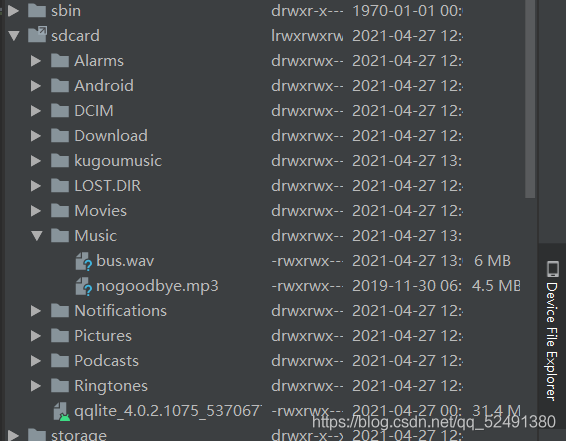
There is a device file explorer in the lower right corner of Android studio. After opening, you can see the file directory of the virtual machine. Find/MNT/sdcard/music, right-click upload and select the music to be imported. The file name should not appear in Chinese

3. Write mainactivity.class

package com.ch5_2;
import android.app.Activity;
import android.content.Intent;
import android.net.Uri;
import android.os.Bundle;
import android.view.View;

import java.io.File;

public class MainActivity extends Activity {

    @Override
    protected void onCreate(Bundle savedInstanceState) {
        super.onCreate(savedInstanceState);
        setContentView(R.layout.activity_main);
        
        findViewById(R.id.btn_click4).setOnClickListener(new View.OnClickListener() {
            @Override
            public void onClick(View v) {
                Intent intent = new Intent();
                intent.setAction(Intent.ACTION_VIEW);
                //Get the file path, the path is the virtual machine memory card path
                Uri data = Uri.fromFile(new File("/mnt/sdcard/Music/nogoodbye.mp3"));
                intent.setDataAndType(data,"audio/*");
                startActivity(intent);
            }
        });
    }
}

Questions

1. Flashback

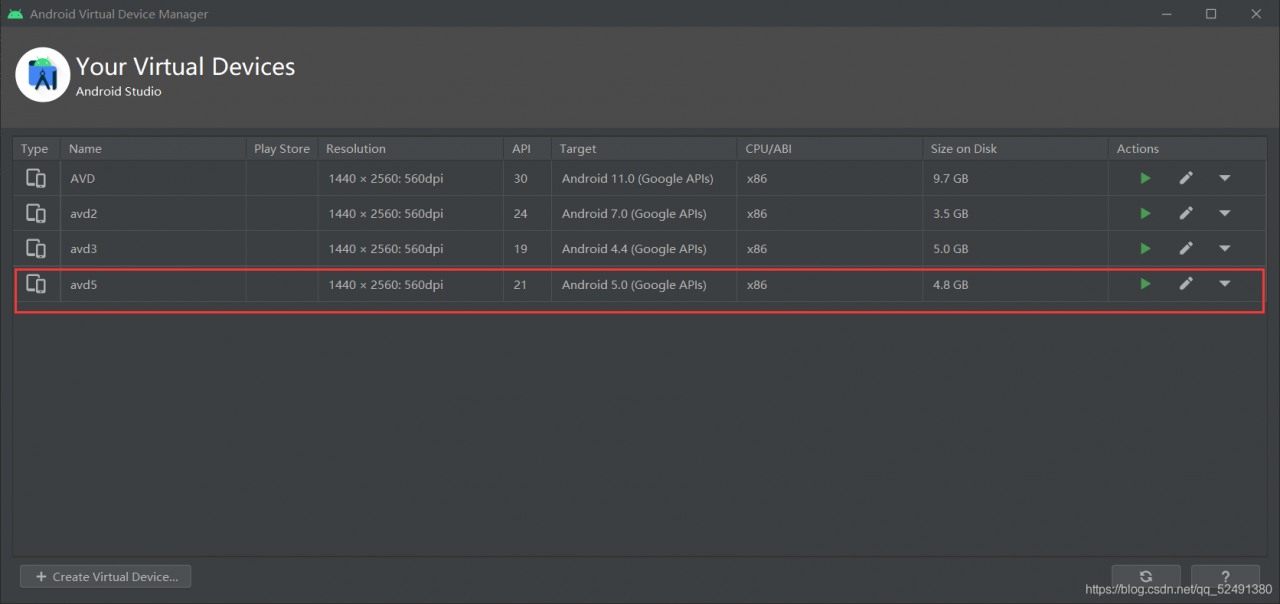
Here, the version of the virtual machine will affect the operation. If the version is too high, it will flash back. I used to use Android 11.0, but as soon as I click button, it will flash back. The reason should be the compatibility problem. Change to a lower version

here is Android 5.0

2. This file type problem is not supported

When changing to a lower version of the virtual machine, you may encounter the problem that Android music playing software does not support this type of file. I used MP3 file at the beginning, and the result shows that it does not support it. It’s OK to change to WAV format.

[How to Solve] Easyclick read text garbled

Easyclick read text garbled solution

This problem is caused by the forced reading of text encoded as UTF-8 after the upgrade of easyclick
for example,

terms of settlement

    1. write and read Java plug-ins in your own way. After modifying the encoding of the text to UTF-8, it can be read normally</ ol>

Java plug-in code


package com.plugin.gudcgukOhj;

import android.content.Context;
import android.os.Environment;
import android.util.Log;

import java.io.*;
import java.nio.charset.Charset;

public class PluginClz {
    Context context;

    public PluginClz(Context context) {
        System.out.println("--- " + context);
    }  
        /**
	     * Read the local text content to the specified encoding type
	     * @param strFilePath Full name of the text path
	     * @param encode encoding type
	     * @return
	     */
    public static String ReadTxtFile(String strFilePath ,String encode) {
        String path = strFilePath;
        String content = ""; 
        //open
        File file = new File(path);
        if (!file.isDirectory()) {
            try {
                InputStream instream = new FileInputStream(file);
                InputStreamReader inputStreamReader = null;
                try {
                    inputStreamReader = new InputStreamReader(instream, encode);
                } catch (UnsupportedEncodingException e1) {
                    e1.printStackTrace();
                }
                BufferedReader reader = new BufferedReader(inputStreamReader);
                StringBuffer sb = new StringBuffer("");
                String line;
                try {
                    while ((line = reader.readLine()) != null) {
                        sb.append(line);
                        sb.append("\n");
                    }
                } catch (IOException e) {
                    e.printStackTrace();
                }
                content = sb.toString();
            } catch (java.io.FileNotFoundException e) {
               System.ou.println("TestFile", "The File doesn't not exist.");
            }
        }
        return content;
    }
}    

Calling method main.js

//The call here is made by loading the apk file first and then instantiating the object
// the js file package will not enter the plug-in, for testing purposes only
function main() {
  //this is where the plugin is loaded
  var r = loadDex("mokuai.apk");
  if (!r) {
      loge("failed to load the plugin");
      return;
  } else {
      logd("Loading the plugin was successful");
  }


  //Here the object is instantiated, and then the relevant method is called
  var obj = new com.plugin.gudcgukOhj.PluginClz(context);
  let file = "/sdcard/1.txt"
  let encode = "GB18030"; // Specify your original encoding
  var s = obj.ReadTxtFile(file,encode);
  logd("java return data: "+s);

}

main();

How to Avoid Windows Error in Gitbook Serve

In Windows environment

$ gitbook serve

If you edit the markdown after execution

Error: EPERM: operation not permitted, lstat [_book directory name]

This is an urgent measure when the gitbook terminates abnormally with the error.

After starting gitbook serve, once you delete the “_book” folder, for some
reason it works normally after that,

[node.js global installation path] /bin/node_modules/gitbook-cli/bin/gitbook.js

If you add a description to delete the “_book” folder, for example, around the 180th to 194th lines of, gitbook servewill not end abnormally.

  • If you are using bash (git bash, etc.) for your shell
program
    .command('*')
    .description('run a command with a specific gitbook version')
    .action(function(commandName){
        var args = parsedArgv._.slice(1);
        var kwargs = _.omit(parsedArgv, '$0', '_');
        runPromise(
            manager.ensureAndLoad(bookRoot, program.gitbook)
            .then(function(gitbook) {
                if(commandName === 'serve'){
                    setTimeout(function(){
                        require('child_process').execSync('rm -rf _book');
                    },1000);
                }
                return commands.exec(gitbook.commands, commandName, args, kwargs);
            })
        );
    });
  • If you are using PowerShell as the shell, make the delete command part as follows
require('child_process').execSync('rm _book -Recurse');

(If you don’t want to make it dependent on the shell, you can delete it with fs.unlink, fs.rmdir, etc.)

[Rails 6] How to deal with ActiveRecord :: RecordInvalid: Validation failed:

symptom

When rails db: seed was executed, the following error was displayed and test data could not be created. (Rails 6.0.3)

Terminal
bundle exec rails db:seed
rails aborted!
ActiveRecord::RecordInvalid: Validation failed: Foods is invalid
C:/Users/ユーザー名/environment/プロジェクト名/db/seeds.rb:23:in `block in <main>'
C:/Users/ユーザー名/environment/プロジェクト名/db/seeds.rb:8:in `times'
C:/Users/ユーザー名/environment/プロジェクト名/db/seeds.rb:8:in `<main>'
bin/rails:4:in `<main>'
Tasks: TOP => db:seed
(See full trace by running task with --trace)
seeds.rb
3.times do |n|
    restaurant = Restaurant.new(
      name: "testレストラン_#{n}",
      fee: 100,
      time_required: 10,
    )

    12.times do |m|
      restaurant.foods.build(
        name: "title",
        price: 500,
        description: "description"
      )
    end

    restaurant.save!
  end
restaurant
class Restaurant < ApplicationRecord
    has_many :foods
end
food
class Food < ApplicationRecord
    belongs_to :restaurants
end

Looking at the error message, it seems that Foods has some kind of error.

Solution

It seems that an error occurred because s was added after belongs_to.
In a one-to-n relationship, if 1 is plural, it seems that a validation error will occur.

class Food < ApplicationRecord
    belongs_to :restaurant
end

[Vagrant] When vagrant up, it stops at “SSH auth method: private key” and times out.

vagrant upDid not start properly

The vagrant upfollowing error occurs when trying to start the VM environment for the first time in a long time

C:\work\centos>vagrant up
Bringing machine 'default' up with 'virtualbox' provider...
==> default: Checking if box 'centos/7' version '2004.01' is up to date...
~
    default: SSH username: vagrant
==> default: SSH auth method: private key
Timed out while waiting for the machine to boot. This means that
Vagrant was unable to communicate with the guest machine within
the configured ("config.vm.boot_timeout" value) time period.

If you look above, you should be able to see the error(s) that
Vagrant had when attempting to connect to the machine. These errors
are usually good hints as to what may be wrong.

If you're using a custom box, make sure that networking is properly
working and you're able to connect to the machine. It is a common
problem that networking isn't setup properly in these boxes.
Verify that authentication configurations are also setup properly,
as well.

If the box appears to be booting properly, you may want to increase
the timeout ("config.vm.boot_timeout") value.

There seems to be an error in SSH authentication

the reason

It was because I was trying to boot with Hyper-V on.
It was caused by temporarily switching Hyper-V to use Docker, so when I turned it off and restarted, vagrant upit started as if nothing had happened.

end

Another common cause of the same error seems to be a misconfigured VM network (although I was different).