Category Archives: Error

Mimemagic (0.3.10) Install Error and Bundler cannot continue

An error occurred while installing mimemagic (0.3.10), and Bundler cannot continue.
Make sure that
gem install mimemagic -v ‘0.3.10’ –source ‘https://rubygems.org/’` succeeds before bundling.`

Going back, it says something like this
Fetching mimemagic 0.3.10
Installing mimemagic 0.3.10 with native extensions
Gem::Ext::BuildError: ERROR: Failed to build gem native extension.

Install shared-mime-info

brew install shared-mime-info

bundle install

bundle install

mimemagic has been updated and the error is gone.

Webpack packaging error TypeError: this.getOptions is not a function at Object.lessLoader

In the past two days, I re-learned the use of Webpack. When learning to package css/less style resources, an error occurred:


The key error message is: this.getOptions is not a function. After a look at Baidu on the Internet, it is a version problem.

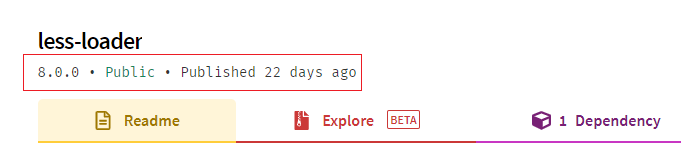
Then I checked the npm official website again, and it turned out that less-loader released a new version of 8.0.0 22 days ago, which is likely to be a compatibility issue caused by the new version.


Solution: Uninstall less-loader and download a lower version again so that it can be packaged normally.

cnpm uninstall less-loader
cnpm i -D less-loader@7 // The latest version is 8.0.0, so re-download the latest version of version 7

IDEA Compile Project Error: GC overhead limit exceeded solution

1. Brief description of the problem
. Compile the Java project under Intellij IDEA and report an error: java.lang.OutOfMemoryError: … (ignore here) GC overhead limit exceeded

2. Problem analysis The
error occurs in the compilation phase, not the runtime phase. 
1. The virtual machine used by idea to compile the Java project is separate from the virtual machine used by the idea software itself (that is, a separate process)
2. It can be solved by adding memory to the virtual machine used by the compiler. problem

Cube.js TimeoutError: ResourceRequest timed out problem

Recently, I encountered this problem when optimizing cube.js. In fact, after checking the official documents later, the official also explained the problem.

main cause

Redis concurrent connection configuration (but it’s not simple. After testing, if the connection pool is not available and the connection is not enough, there will be a problem that the entire service is unavailable)

The official solution

Combine your actual user query request to configure the connection pool

  • Reference configuration
CUBEJS_REDIS_POOL_MAX = 2000
CUBEJS_REDIS_POOL_MIN = 50
REDIS_URL = redis: //127.0.0.1:6379 // Reference connection, which can be combined with ioredis and redis client
  • A reference to optimize the allocation of
    reasonable or try not to trigger the maximum number of connections, pressure tested, prone to extreme in some cases after being connected with a full, do not have the entire service (even after a connection release)
    specifically cube.js based generic- the connection pool to pool resources to check each release number, the number may be recommended through the configuration can be released as soon as possible, to avoid causing unavailable services can not
    use
    packages / cubejs-query-orchestrator / src / orchestrator / RedisPool.ts
const opts = {
            min,
            max,
            acquireTimeoutMillis: 5000,
            idleTimeoutMillis: 3000,
            numTestsPerEvictionRun: 300, // can be solved by configuration
            evictionRunIntervalMillis: 5000
};

Description

In the short term, the solution is to use a larger number of connection pools, and perform more pressure tests later, and see if the configuration can be added to the official code.

Start Docker Quickstart Terminal error This computer is running Hyper-V. VirtualBox won’t boot a 64bits VM when Hyper-V is activated

Windows10 Home Edition
DockerToolbox-18.03.0-ce

Problem Description:

I found out that the home version cannot install Docker Desktop. Since mine is a genuine activation, I won’t be tossing for the professional version;

Then there is still a choice, which is to install DockerToolbox, but after the installation, there is an error when running Docker Quickstart Terminal:

Running pre- create checks...
Error  with pre- create  check : "This computer is running Hyper-V. VirtualBox won't boot a 64bits VM when Hyper-V is activated. Either use Hyper-V as a driver, or disable the Hyper-V hypervisor. (To skip this check, use --virtualbox-no-vtx-check)"

Solution:

File (according to the location you installed): C:\Program Files\Docker Toolbox\start.sh

Add –virtualbox-no-vtx-check part

STEP= "Checking if machine $VM exists"
if [ $VM_EXISTS_CODE -eq 1 ]; then
  " ${DOCKER_MACHINE} " rm -f " ${VM} " &> /dev/null ||:
  rm -rf ~/.docker/machine/machines/ " ${VM} "
  #set proxy variables if they exists
  if [ " ${HTTP_PROXY} " ]; then
    PROXY_ENV = " $PROXY_ENV --engine-env HTTP_PROXY = $HTTP_PROXY "
  fi
  if [ " ${HTTPS_PROXY} " ]; then
    PROXY_ENV = " $PROXY_ENV --engine-env HTTPS_PROXY = $HTTPS_PROXY "
  fi
  if [ " ${NO_PROXY} " ]; then
    PROXY_ENV = " $PROXY_ENV --engine-env NO_PROXY = $NO_PROXY "
  fi
  " ${DOCKER_MACHINE} " create -d virtualbox --virtualbox-no-vtx-check   $PROXY_ENV  " ${VM} "
fi

The spring project is normal locally, and the bean cannot be found error is thrown when entering the docker container

The error message is as follows:

1
Error creating bean with name 'messageServiceImpl': Lookup method resolution failed; nested exception is java.lang.IllegalStateException: Failed to introspect Class [com.qianxiao.blogwebscoket.service.impl.MessageServiceImpl] from ClassLoader [org.springframework.boot.loader.LaunchedURLClassLoader@41cf53f9]

The two environments are not local development

1
2
3
java version "1.8.0_281"
Java(TM) SE Runtime Environment (build 1.8.0_281-b09)
Java HotSpot(TM) Client VM (build 25.281-b09, mixed mode, sharing)

docker container environment

1
2
3
openjdk version "1.8.0_111"
OpenJDK Runtime Environment (build 1.8.0_111-8u111-b14-2~bpo8+1-b14)
OpenJDK 64-Bit Server VM (build 25.111-b14, mixed mode)

Looks like there is nothing wrong with this version

But when I add @Service annotation to the MessageServiceImpl class, I get an error at runtime.

Remove the @Service annotation and start normally

I have been looking for a problem for a long time; in the end, the problem lies in the use of the CallBack callback parameter in this implementation class. It is normal to remove this parameter and compile and restart! ! !

log4j:WARN No appenders could be found for logger (freemarker.cache)

The freemarker dependency package is introduced into the project. However, the red warning caused by the corresponding log level is not configured in the log4j.properties file. as follows:

< dependency >
   < groupId > org.springframework.boot </ groupId >
   < artifactId > spring-boot-starter-freemarker </ artifactId >
</ dependency >
log4j :WARN No appenders could be found for logger (freemarker.cache).
log4j :WARN Please initialize the log4j system properly.
log4j : WARN See HTTP : //logging.apache.org/log4j/1.2/faq.html#noconfig for More info.


Solution: log4j.properties plus the corresponding configuration

log4j.logger.freemarker.cache =ERROR
log4j.logger.freemarker.beans =ERROR

hint: Updates were rejected because the remote contains work that you do To XXX

his error reported when using webstorm or idea push code

The reason is to manually create git and specify the remote project

Open Terminal

git init # Initialize the local warehouse
git remote -v # View the associated warehouse address
git remote add origin https://gitee.com/xjseo/personnel-management.git # Add remote warehouse address

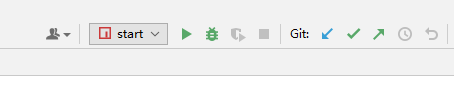
Then restart the editor and it will appear in the upper right corner

Then click the checkmark commit to submit all the code to the temporary storage,

Then click the third arrow to push

Will be fail to push

Checking the git log will find the following errors:

error: failed to push some refs to 'https://gitee.com/xjseo/personnel-management.git'
hint: Updates were rejected because the remote contains work that you do
To https://gitee.com/xjseo/personnel-management.git
hint: not have locally. This is usually caused by another repository pushing
!    refs/heads/master:refs/heads/master    [rejected] (fetch first)
Done
hint: to the same ref. You may want to first integrate the remote changes
hint: (e.g., 'git pull ...') before pushing again.
hint: See the 'Note about fast-forwards' in 'git push --help' for details.

The general idea is that you should pull the warehouse code and synchronize the local code.

So then click the first one to pull the following and then click the third push to succeed.

React Hook “useState“ is called in function “xxx“ which is neither a React function component or

Error code

import {useState,useEffect} from 'react'
const useData = () => {
    const [data,setData] = useState({count:0});
    useEffect(()=>{
        setTimeout(()=> {
            setData((data)=>({...data,count:data.count+1}))
        }, 1000 );
    },[])
    return {data}
}
 
export default useData

Modified code

import React from 'react'
import useData from '../hooks/AppData'
const AppData = ()=>{
    const {data} = useData()
    return <div>
    count->{data.count}
    </div>
}
export default AppData; // Change the first letter of the name to uppercase