Category Archives: Error

Swagger-ui.html Open Error: There was an unexpected error (type=Not Found, status=404)

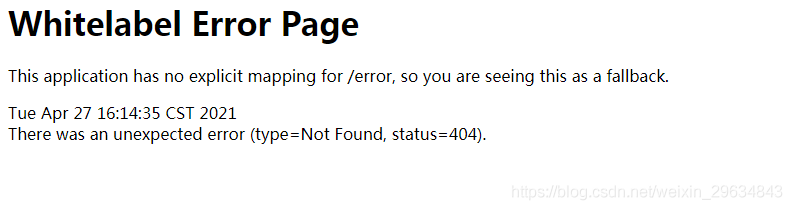
After starting the springboot project, the following error will be reported if the swagger page cannot be opened:

after checking the data, it is found that webmvcconfig custom inherits webmvcconfigureradapter in the code, which causes the configuration related contents in the configuration file to be invalid, and the static resources need to be specified again

@Configuration
public class WebMvcConfig extends WebMvcConfigurerAdapter {
    @Value("${file.front-end.path}")
    private String fePath;

    @Value("${file.up-down-load.static-path}")
    private String udlPath;

    /**
     * Static resource handling
     **/
    @Override
    public void addResourceHandlers(ResourceHandlerRegistry registry) {
        registry.addResourceHandler("/**")
                .addResourceLocations(fePath,udlPath);
    }

    /**
     * Front and back-end separation to solve cross-domain problems
     **/
    @Override
    public void addCorsMappings(CorsRegistry registry) {
        registry.addMapping("/**")
                .allowedMethods("*")
                .allowedOrigins("*")
                .allowCredentials(true);
    }

    //Allow multiple request addresses with extra slashes e.g. /msg/list   //msg/list
    @Bean
    public HttpFirewall httpFirewall() {
        return new DefaultHttpFirewall();
    }


}

It is amended as follows:

 /**
     * Static resource handling
     **/
    @Override
    public void addResourceHandlers(ResourceHandlerRegistry registry) {
        registry.addResourceHandler("/**")
                .addResourceLocations(fePath,udlPath);
        // Add access to swagger pages
        registry.addResourceHandler("swagger-ui.html").addResourceLocations(
                "classpath:/META-INF/resources/");
    }

Login again, access success

Spring Boot Druid Error: discard long time none received connection

Spring boot integration Druid exception

In the spring boot integrated Druid project, the following error messages are frequently found in the error log:

discard long time none received connection. , jdbcUrl : jdbc:mysql://******?useSSL=false&allowPublicKeyRetrieval=true&useUnicode=true&characterEncoding=UTF-8, version : 1.2.3, lastPacketReceivedIdleMillis : 172675

After troubleshooting, it was found that the exception was caused by Druid version, which did not appear in version 1.2.2 or earlier. In the above versions, there is this problem, the following is to analyze the causes of the exception and solutions.

Anomaly analysis

First of all, the above exception does not affect the normal operation of the program, but as a programmer to see the program constantly abnormal or intolerable. So we still need to get to the bottom of it.

Trace the stack information and find that the corresponding exception is thrown from the com.alibaba.druid.pool.druidabstractdatasource # testconnectioninternal method. The corresponding code is as follows:

if (valid && isMySql) { // unexcepted branch
    long lastPacketReceivedTimeMs = MySqlUtils.getLastPacketReceivedTimeMs(conn);
    if (lastPacketReceivedTimeMs > 0) {
        long mysqlIdleMillis = currentTimeMillis - lastPacketReceivedTimeMs;
        if (lastPacketReceivedTimeMs > 0 //
                && mysqlIdleMillis >= timeBetweenEvictionRunsMillis) {
            discardConnection(holder);
            String errorMsg = "discard long time none received connection. "
                    + ", jdbcUrl : " + jdbcUrl
                    + ", jdbcUrl : " + jdbcUrl
                    + ", lastPacketReceivedIdleMillis : " + mysqlIdleMillis;
            LOG.error(errorMsg);
            return false;
        }
    }
}

In the above code, mysqlutils.getlastpacketreceivedtimems (conn) is to get the last used time, mysqlidle millis is to calculate the idle time, and timebetweenevecitionrunsmillis is a constant of 60 seconds. If the connection is idle for more than 60 seconds, the discard connection (holder) discards the old connection and prints a log. Warn (errormsg) along with it.

Principle tracing

In the above code, we can see that there is a prerequisite for entering the business logic, that is, the variables valid and ismysql are true at the same time. It is necessary for ismysql to be true. What we use is the MySQL database. Can I make valid false?In this way, it will not enter the business processing?

Let’s take a look at the source of the valid method

boolean valid = validConnectionChecker.isValidConnection(conn, validationQuery, validationQueryTimeout);

We find the MySQL implementation subclass of validconnectionchecker, MySQL validconnectionchecker. The implementation of isvalidconnection in this class is as follows:

public boolean isValidConnection(Connection conn, String validateQuery, int validationQueryTimeout) throws Exception {
    if (conn.isClosed()) {
        return false;
    }

    if (usePingMethod) {
        if (conn instanceof DruidPooledConnection) {
            conn = ((DruidPooledConnection) conn).getConnection();
        }

        if (conn instanceof ConnectionProxy) {
            conn = ((ConnectionProxy) conn).getRawObject();
        }

        if (clazz.isAssignableFrom(conn.getClass())) {
            if (validationQueryTimeout <= 0) {
                validationQueryTimeout = DEFAULT_VALIDATION_QUERY_TIMEOUT;
            }

            try {
                ping.invoke(conn, true, validationQueryTimeout * 1000);
            } catch (InvocationTargetException e) {
                Throwable cause = e.getCause();
                if (cause instanceof SQLException) {
                    throw (SQLException) cause;
                }
                throw e;
            }
            return true;
        }
    }

    String query = validateQuery;
    if (validateQuery == null || validateQuery.isEmpty()) {
        query = DEFAULT_VALIDATION_QUERY;
    }

    Statement stmt = null;
    ResultSet rs = null;
    try {
        stmt = conn.createStatement();
        if (validationQueryTimeout > 0) {
            stmt.setQueryTimeout(validationQueryTimeout);
        }
        rs = stmt.executeQuery(query);
        return true;
    } finally {
        JdbcUtils.close(rs);
        JdbcUtils.close(stmt);
    }

}

We can see that there are three return places in the above methods: the first connection is closed; The second uses Ping to check; Third, use select 1 to check. When Ping is used, it will return true no matter whether the exception is thrown or not. Here we can disable this mode.

The business logic of Ping mainly depends on the variable usepingmethod. Tracing code will find the settings here:

public void configFromProperties(Properties properties) {
    String property = properties.getProperty("druid.mysql.usePingMethod");
    if ("true".equals(property)) {
        setUsePingMethod(true);
    } else if ("false".equals(property)) {
        setUsePingMethod(false);
    }
}

In other words, when we set the system property Druid. Mysql. Usepingmethod to false, we can disable this function.

Disable ping method

After finding the root of the problem, the rest is how to disable it. There are usually three forms.

First, when starting the program, add: – Druid. Mysql. Usepingmethod = false in the running parameters.

Second, in the spring boot project, you can add the following static code to the startup class:

static {
    System.setProperty("druid.mysql.usePingMethod","false");
}

Third, class file configuration. In the druidconfig class of the project, add:

/*
* Resolving druid log errors: discard long time none received connection:xxx
* */
@PostConstruct
public void setProperties(){
    System.setProperty("druid.mysql.usePingMethod","false");
}

So far, the function has been successfully turned off, and the exception information will never appear again.

Why clear connections that are idle for more than 60 seconds

It is speculated that the idle waiting time of the database set by Alibaba is 60 seconds. When the MySQL database reaches the idle waiting time, the idle connection will be closed to improve the processing capacity of the database server.

The default idle waiting time of MySQL is 8 hours, which is “wait”_ “Timeout”. If the database actively closes the idle connection, but the connection pool does not know that it is still using the connection, an exception will be generated.
NPM Install Error: npm ERR! ERESOLVE unable to resolve dependency tree

PS F:\devops_common\cloud-vue> npm cache   cache sudo npm cache clean -f
npm WARN using –force Recommended protections disabled.
npm ERR! code EUSAGE
npm ERR! npm cache
npm ERR!
npm ERR! Manipulates packages cache
npm ERR!
npm ERR! Usage:
npm ERR! npm cache add <folder>
npm ERR! npm cache add <tarball url>
npm ERR! npm cache add <git url>
npm ERR! npm cache add <name>@<version>
npm ERR! npm cache clean
npm ERR! npm cache verify
npm ERR!
npm ERR! Run “npm help cache” for more info
npm ERR! A complete log of this run can be found in:
npm ERR!     C:\Users\Mr\AppData\Local\npm-cache\_logs\2021-05-01T03_13_10_382Z-debug.log
PS F:\devops_common\cloud-vue> npm cache
npm ERR! code EUSAGE
npm ERR! npm cache
npm ERR!
npm ERR! Manipulates packages cache
npm ERR!
npm ERR! Usage:
npm ERR! npm cache add <folder>
npm ERR! npm cache add <name>@<version>
npm ERR! npm cache clean
npm ERR! npm cache verify
npm ERR!
npm ERR! Run “npm help cache” for more info
npm ERR! A complete log of this run can be found in:
npm ERR!     C:\Users\Mr\AppData\Local\npm-cache\_logs\2021-05-01T03_13_18_530Z-debug.log
PS F:\devops_common\cloud-vue> npm cache clean -f
npm WARN using –force Recommended protections disabled.
PS F:\devops_common\cloud-vue>
PS F:\devops_common\cloud-vue> npm install
npm ERR! code ERESOLVE
npm ERR! ERESOLVE unable to resolve dependency tree
npm ERR!
npm ERR! While resolving: [email protected]
npm ERR! Found: [email protected]
npm ERR! node_modules/less
npm ERR!   less@”^2.7.3″ from the root project
npm ERR!
npm ERR! Could not resolve dependency:
npm ERR! peer less@”^3.5.0 || ^4.0.0″ from [email protected]
npm ERR!   less-loader@”^7.3.0″ from the root project
npm ERR!
npm ERR! Fix the upstream dependency conflict, or retry
npm ERR! this command with –force, or –legacy-peer-deps
npm ERR!
npm ERR! See C:\Users\Mr\AppData\Local\npm-cache\eresolve-report.txt for a full report.
npm ERR! A complete log of this run can be found in:
npm ERR!     C:\Users\Mr\AppData\Local\npm-cache\_logs\2021-05-01T03_14_21_801Z-debug.log
PS F:\devops_common\cloud-vue> ^C
PS F:\devops_common\cloud-vue> npm install [email protected] -g
added 2 packages, removed 236 packages, changed 3 packages, and audited 54 packages in 14s
found 0 vulnerabilities
PS F:\devops_common\cloud-vue> npm installProblem Analysis: npm version is too high
Problem solved.
npm install [email protected] -g

Vscode pylint reported an error of “no member”, but it is running normally

Problem: 
Pylint Error Message: “E1101: Module 'xxx' has no 'xxx' member'”.
pylint no member issue but code still works in vscode

Python Python syntax checker for vscode


Pylint is static check . When using a third-party library, some members will be created only when the code is running, and it can’t find members

Solution:
using pylint Django to enhance pylin int steps

    1. install pylint Django
$ pip3 install pylint-django

Use pylint-django in vscode‘s setting.json for pylint-django</code

"python.linting.pylintArgs": [
    "--load-plugins",
    "pylint_django"
]
      1. restart VSCode

Spark ERROR client.TransportResponseHandler: Still have 1 requests outstanding when connection from

The spark task reports an error (though the calculated result is correct).

21/04/29 14:38:38 ERROR client.TransportResponseHandler: Still have 1 requests outstanding when connection from /172.16.4.156:37528 is closed
21/04/29 14:38:39 ERROR cluster.YarnScheduler: Lost executor 3 on cdh-slave1.test.com: Container marked as failed: container_1618397085347_0529_01_000004 on host: cdh-slave1.test.com. Exit status: 137. Diagnostics: [2021-04-29 14:38:39.112]Container killed on request. Exit code is 137
[2021-04-29 14:38:39.117]Container exited with a non-zero exit code 137.
[2021-04-29 14:38:39.119]Killed by external signal

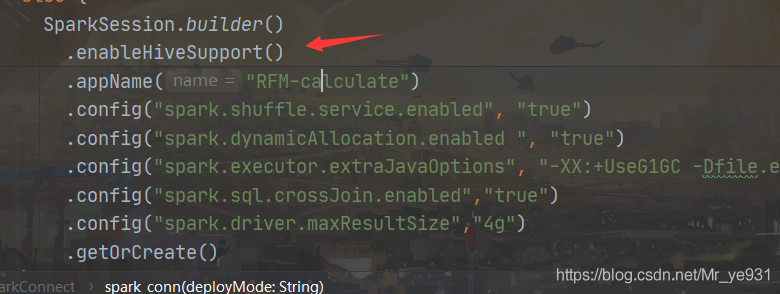
Looking at the code, I found that hive is not used in the spark program, but hive support is set during spark initialization.

The program works fine after deleting this line of code.

Prompt unknown error in pom.xml of Maven project

Today, we learn how to build a spring cloud foundation project. Pom.xml file prompts unknown error exception.

Try to solve the problem: I prefer to rely on Maven project and check whether the jar package that Maven project relies on is downloaded to the local warehouse normally, but none of them solve the problem.

After Googling, I found that many students met this situation, and I also found the cause of the problem.

Cause of the problem: there is a conflict between the spring boot version of Maven project and the Maven jar plugin version.

Solution version: reduce Maven jar plugin version

Pom.xml instance:

<project xmlns="http://maven.apache.org/POM/4.0.0" xmlns:xsi="http://www.w3.org/2001/XMLSchema-instance"
	xsi:schemaLocation="http://maven.apache.org/POM/4.0.0 http://maven.apache.org/xsd/maven-4.0.0.xsd">
	<modelVersion>4.0.0</modelVersion>
	<groupId>com.zzg</groupId>
	<artifactId>cx-cloud</artifactId>
	<version>0.0.1-SNAPSHOT</version>
	<packaging>pom</packaging>

	<description>CX-Cloud:Microservice Rights Management System</description>

	<parent>
		<groupId>org.springframework.boot</groupId>
		<artifactId>spring-boot-starter-parent</artifactId>
		<version>2.4.4</version>
		<relativePath /> <!-- lookup parent from repository -->
	</parent>

	<!--set the version -->
	<properties>
		<project.build.sourceEncoding>UTF-8</project.build.sourceEncoding>
		<java.version>1.8</java.version>
		<spring-boot.version>2.4.4</spring-boot.version>
		<spring-cloud.version>2020.0.2</spring-cloud.version>
		<maven-jar-plugin.version>3.1.1</maven-jar-plugin.version>
	</properties>

	<dependencyManagement>
		<dependencies>
			<dependency>
				<groupId>org.springframework.cloud</groupId>
				<artifactId>spring-cloud-dependencies</artifactId>
				<version>${spring-cloud.version}</version>
				<type>pom</type>
				<scope>import</scope>
			</dependency>
			<dependency>
				<groupId>org.apache.maven.plugins</groupId>
				<artifactId>maven-jar-plugin</artifactId>
				<version>${maven-jar-plugin.version}</version>
			</dependency>
		</dependencies>

	</dependencyManagement>


	<modules>
	<module>cx-commons</module>
	<module>cx-common</module>
	<module>cx-auth</module>
	<module>cx-server</module>
	</modules>
</project>

Note: the point is to specify the Maven jar plugin version in the properties version tab

Solution of socket write error caused by pressing F5 to refresh page by ehcache user

Method 1

When using ehcache as the page cache of a website, you may encounter a problem: when the user presses F5 to refresh the page continuously, the following error will be generated in the output log of Tomcat:

ClientAbortException:  java.net.SocketException: Software caused connection abort: socket write error
......
Caused by: java.net.SocketException: Software caused connection abort: socket write error

In a word, socket write error error

In fact, this is because the user keeps making requests when pressing F5, but each request is not complete. The user makes a request and immediately interrupts it. On the server side, because ehcache caches the page, ehcache is responsible for outputting the cached content to the user. Let’s look at the source code of cachingfilter of ehcache, in which the writecontent method is responsible for outputting content to users (of course, generally we choose to configure net.sf.ehcache.structures.web.filter.simplepagecachingfilter , simplepagecachingfilter inherits the cachingfilter class)

protected void writeContent(final HttpServletRequest request,  final HttpServletResponse response, final PageInfo pageInfo)
    throws IOException, ResponseHeadersNotModifiableException {
    byte[] body;
    boolean shouldBodyBeZero = ResponseUtil.shouldBodyBeZero(request, pageInfo.getStatusCode());
    if (shouldBodyBeZero) {
        body = new byte[0];
    } else if (acceptsGzipEncoding(request)) {
        body = pageInfo.getGzippedBody();
        if (ResponseUtil.shouldGzippedBodyBeZero(body, request)) {
            body = new byte[0];
        } else {
            ResponseUtil.addGzipHeader(response);
        }
    } else {
        body = pageInfo.getUngzippedBody();
    }
    response.setContentLength(body.length);
    OutputStream out = new BufferedOutputStream(response.getOutputStream());
    out.write(body);
    out.flush(); 
}

Here, the out. Flush () method is responsible for the final refresh of the output content. Obviously, if the user interrupts the request when the server sends data to the user, the server will generate an error of clientabortexception: java.net.socketexception: software caused connection above: socket write error .

Of course, this is a reasonable mechanism. However, if the background has been outputting a lot of error log information, it is not what we want. So, how to solve this problem?

Here, we can implement our own filter class by inheriting net.sf.ehcache.structures.web.filter.simplepagecacheingfilter :

import java.io.IOException;

import javax.servlet.http.HttpServletRequest;
import javax.servlet.http.HttpServletResponse;

import net.sf.ehcache.constructs.web.PageInfo;
import net.sf.ehcache.constructs.web.ResponseHeadersNotModifiableException;
import net.sf.ehcache.constructs.web.filter.SimplePageCachingFilter;

public class MySimplePageCachingFilter extends SimplePageCachingFilter {
	protected void writeContent(final HttpServletRequest request, final HttpServletResponse response, final PageInfo pageInfo) throws IOException, ResponseHeadersNotModifiableException {
		try {
			super.writeContent(request, response, pageInfo);
		} catch (IOException e) {
			System.out.println("Visits are too frequent!");
		}
	}
}

Here, we rewrite the writecontent method and use try catch to process this method. At this time, we can ensure that a large amount of socket write error log information does not appear in Tomcat log records.

Method 2

httpServletResponse.setHeader("Content-Type","text/html;charset=UTF-8");

GCC error: unrecognized command line option ‘-no-pie’

Input the command GCC - M32 - no-pie - O linkbox main. O Phase1. O to connect the two relocatable nodes. An error is reported: GCC: error: unrecognized command line option '- no-pie'

Reason: CentOS’s default compiled version of GCC is 4:00, so you need to upgrade GCC. Here you use Yum install to install. Enter the following command in turn
sudo Yum install CentOS release SCL RH
sudo Yum install devtoolset-8-build
sudo Yum install devtoolset-8-gdb
source/opt/Rh/devtoolset-8/enable , set the boot to use GCC – V to view the version, and upgrade to version 8.3.1