When testing Google payment order, the payment was successful, but the error was reported when querying the order as follows:
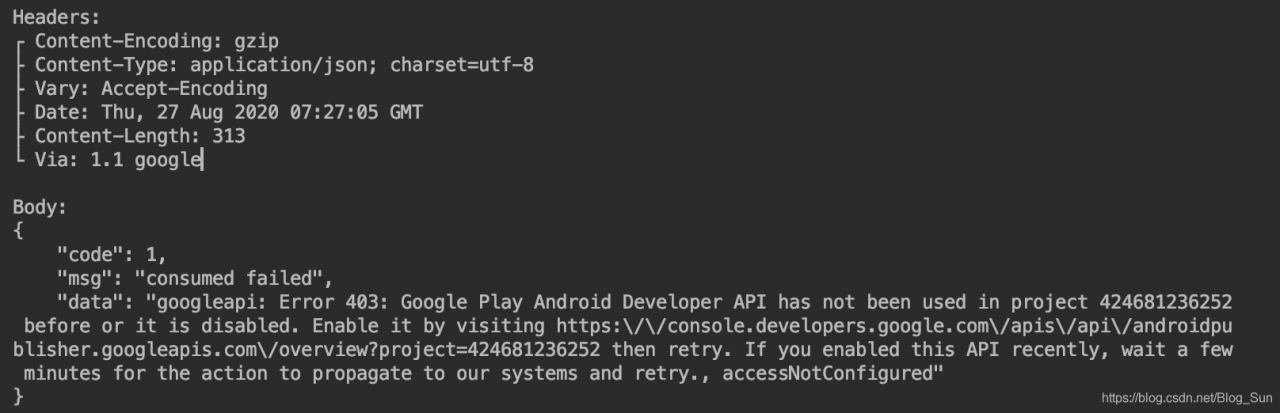
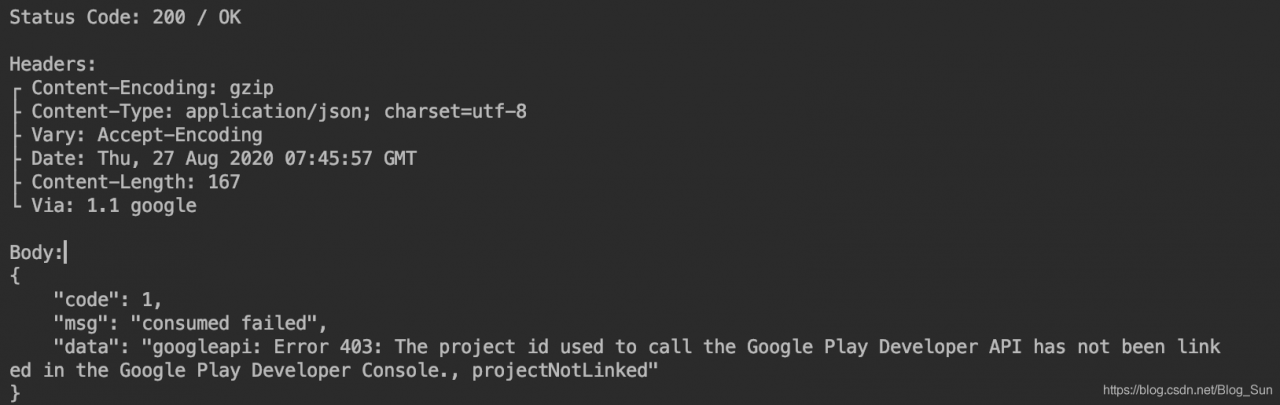
403 means that you do not have permission to access it. Just go to Google Play and enable API correlation project through the link address given by error. PS: It will take a while before the correlation becomes effective
You also need to go to the background of Google to do the correlation
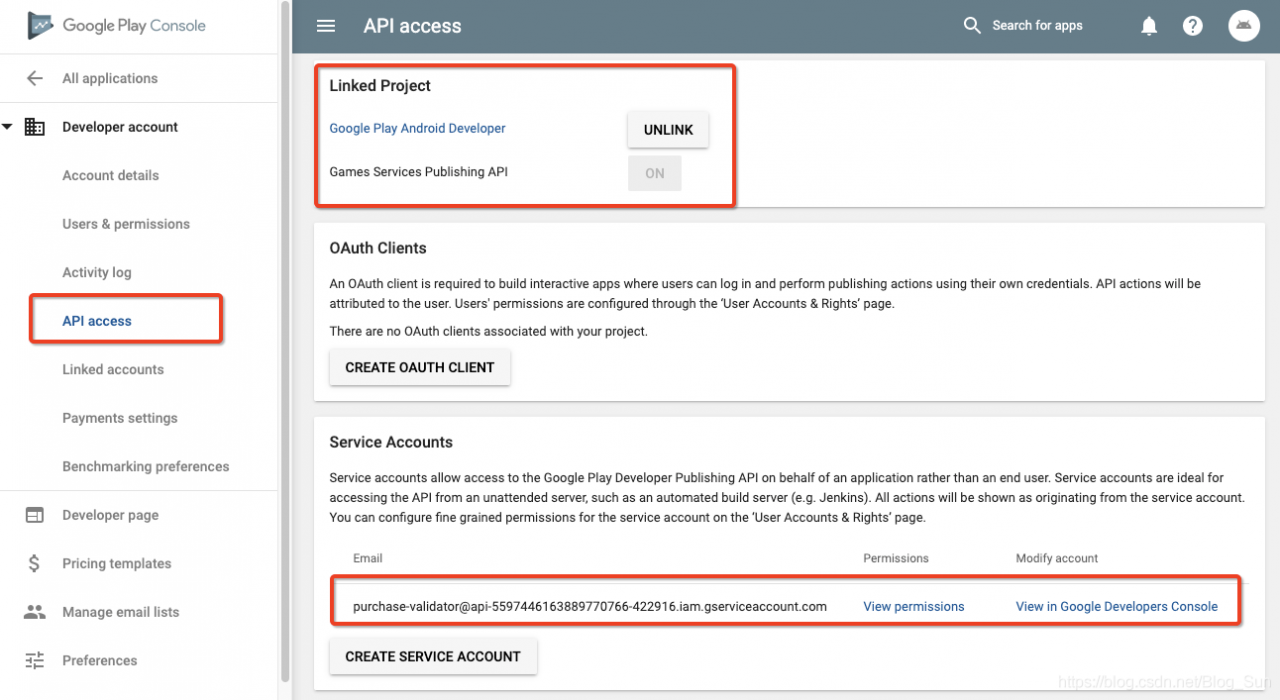
Find your project under Link Projects, and then click the Link button.
If the same error occurs again, it may be because you configured and purchased the product in the console before linking the project.
This means that in-app purchases need to be created after the associated api-project. If the order is reversed, even if it is configured, it will report projectNotLinked errors. . If you have the reverse order like me, one solution is to create a new in-app purchase item (temporary use, create and delete, do not need to re-delete the original item, just create a test item, created can be deleted, but this operation must have).
To solve this problem, simply add a new product to your application.
Reference :Google Play single interface 403
Author Archives: Robins
VBoxManage error: VT-x is not available (VERR_VMX_NO_VMX)
Problem description
yitian@ubuntu:~/auroraclone/aurora$ vagrant up
Bringing machine ‘devcluster’ up with ‘virtualbox’ provider…
==> devcluster: Box ‘apache-aurora/dev-environment’ could not be found. Attempting to find and install…
     devcluster: Box Provider: virtualbox
     devcluster: Box Version: 0.0.14
==> devcluster: Loading metadata for box ‘apache-aurora/dev-environment’
     devcluster: URL: https://vagrantcloud.com/apache-aurora/dev-environment
==> devcluster: Adding box ‘apache-aurora/dev-environment’ (v0.0.14) for provider: virtualbox
     devcluster: Downloading: https://vagrantcloud.com/apache-aurora/boxes/dev-environment/versions/0.0.14/providers/virtualbox.box
==> devcluster: Box download is resuming from prior download progress
     devcluster: Progress: 99% (Rate: 3239k/s, Estimated time remaining: –:–:–==> devcluster: Successfully added box ‘apache-aurora/dev-environment’ (v0.0.14) for ‘virtualbox’!
==> devcluster: Importing base box ‘apache-aurora/dev-environment’…
==> devcluster: Matching MAC address for NAT networking…
==> devcluster: Checking if box ‘apache-aurora/dev-environment’ is up to date…
==> devcluster: Setting the name of the VM: aurora_devcluster_1518401875602_20147
==> devcluster: Clearing any previously set forwarded ports…
Vagrant is currently configured to create VirtualBox synced folders with
the `SharedFoldersEnableSymlinksCreate` option enabled. If the Vagrant
guest is not trusted, you may want to disable this option. For more
information on this option, please refer to the VirtualBox manual:

  https://www.virtualbox.org/manual/ch04.html#sharedfolders

This option can be disabled globally with an environment variable:

  VAGRANT_DISABLE_VBOXSYMLINKCREATE=1

or on a per folder basis within the Vagrantfile:

  config.vm.synced_folder ‘/host/path’, ‘/guest/path’, SharedFoldersEnableSymlinksCreate: false
==> devcluster: Clearing any previously set network interfaces…
==> devcluster: Preparing network interfaces based on configuration…
     devcluster: Adapter 1: nat
     devcluster: Adapter 2: hostonly
==> devcluster: Forwarding ports…
     devcluster: 22 (guest) => 2222 (host) (adapter 1)
==> devcluster: Running ‘pre-boot’ VM customizations…
==> devcluster: Booting VM…

There was an error while executing `VBoxManage`, a CLI used by Vagrant
for controlling VirtualBox. The command and stderr is shown below.

Command: [“startvm”, “cb997990-9f9e-40c1-97f8-ca8ac7422288”, “–type”, “headless”]

Stderr: VBoxManage: error: VT-x is not available (VERR_VMX_NO_VMX)
VBoxManage: error: Details: code NS_ERROR_FAILURE (0x80004005), component ConsoleWrap, interface IConsole
Issue inspection
yitian@ubuntu:~/auroraclone/aurora$ sudo apt-get install cpu-checker

yitian@ubuntu:~/auroraclone/aurora$ sudo kvm-ok
INFO: Your CPU does not support KVM extensions
KVM acceleration can NOT be used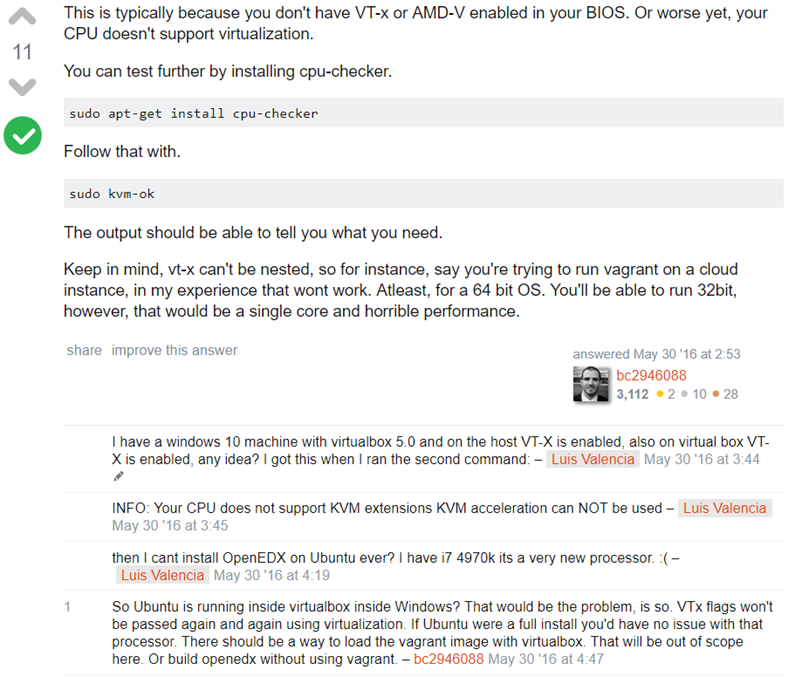
When using vagrant Stderr: VBoxManage: error: VT-x is not available (VERR_VMX_NO_VMX)(important)Vagrant Up VT-X not available
Buffer I/O Error in /var/log/messages
Host error message.
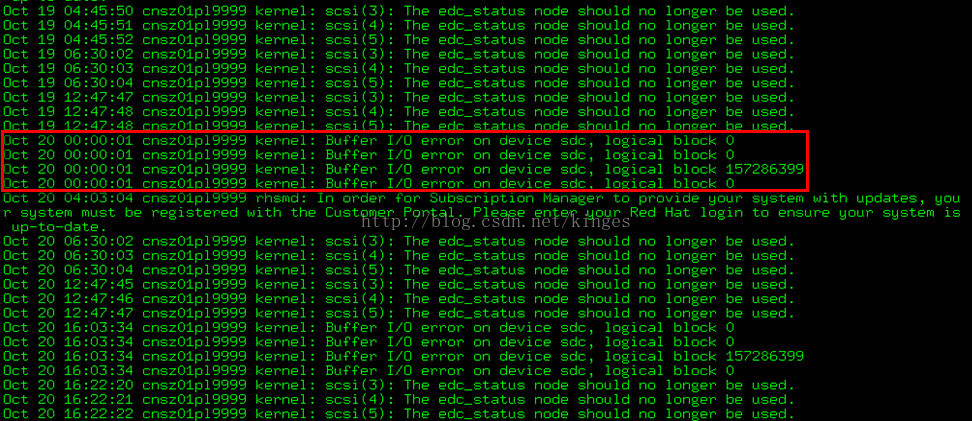
Buffer I/O errors occurring on SAN devices presented to Linux host using Linux native multipathing.
kernel: Buffer I/O error on device sdb, logical block 0
kernel: Buffer I/O error on device sdb, logical block 1
kernel: Buffer I/O error on device sdb, logical block 2
kernel: Buffer I/O error on device sdb, logical block 3
A server using a LUN, which is presented by a storage array through fabric channels, may show buffer I/O errors while the server is booting or commands such as fdisk and vgscan are being run. The access can be a read or write attempt. These messages are sometimes harmless. When using PowerPath, these errors are suppressed. However, in the case where Linux native multipathing is used, there is no automatic provision for filtering these messages.
The errors can occur when using an active/passive storage array, such as EMC Clarion series. These types of SANs contain two storage processors. LUNs are assigned to only one of the processors at the time of LUN creation. The LUN can receive I/O only via that one processor. The other processor is passive; it acts as a backup, ready to receive I/O if the active controller fails, or if all paths to the LUN via the active controller fails.
Paths to the LUN going via the passive controller are passive paths and will generate an I/O errors should I/O be sent over them. At bootup, the kernel’s SCSI mid-layer scans all paths to find devices. Thus it will scan both active and passive paths and will generate buffer I/O errors for the passive paths.
This is a normal behavior for Linux native multipath, and the errors do not indicate an array issue. The errors can safely be filtered through the OS logging configuration or the user can avoid access to native devices (as opposed to using /dev/mapper devices). Alternatively, a qualified version of PowerPath may be installed, which will automatically filter these errors.
Git Push remote error: GH007: Your push would publish a private email address.
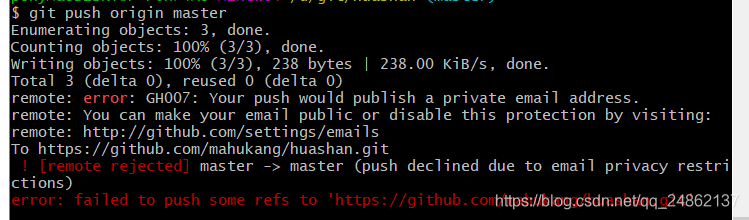
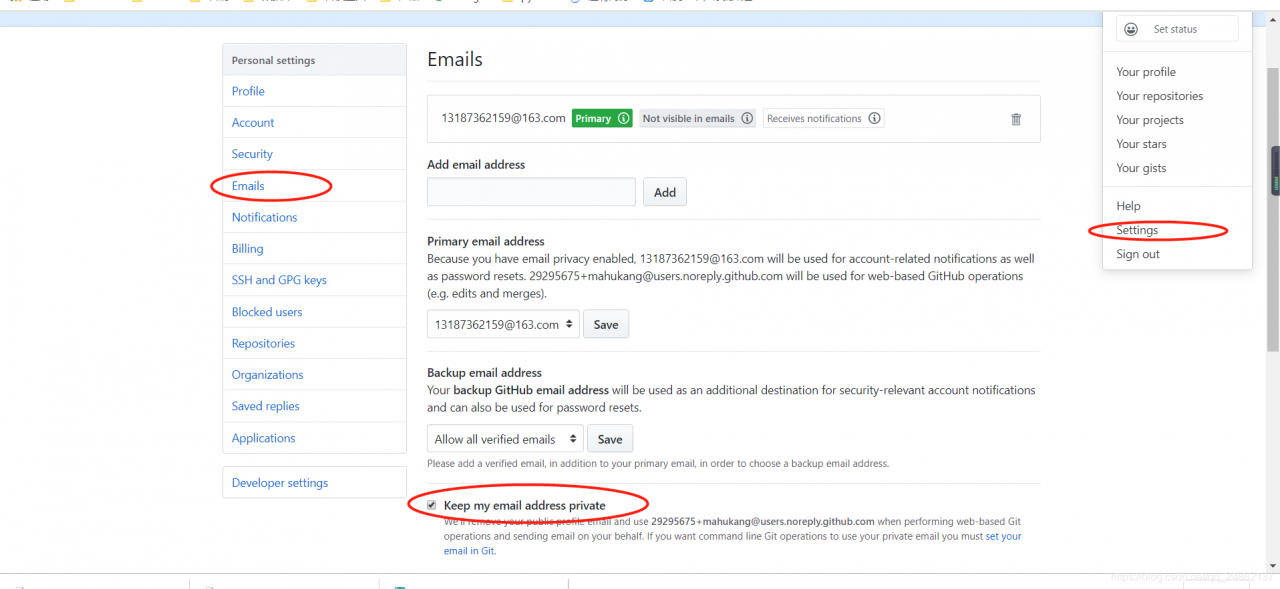
solution: on the top right corner of your account page on GitHub, at the location where you log in and log out, find the setting:
Here is the reference setting-> emails-> Keep my Email Address private, just uncheck it.
[305]MYSQL 1062 error: duplicate entry ‘…’ for key ‘primary
Explanation:
Duplicate entry ‘… ‘For key ‘PRIMARY, the PRIMARY key data to be inserted into the data. It already exists. You can’t add it again. Example: Duplicate entry ‘0’ for key ‘PRIMARY refers to the data with a PRIMARY key value of 0 already exists, so the data with a PRIMARY key value of 0 can no longer be inserted.
Problem Solving:
Before the insert operation, you can perform the search operation SELECT for the primary key value, such as:
Perform an insert (0, “triple”) operation
insert into table(id,name) values(0,'Mr Three');
Duplicate entry ‘0’ for key ‘PRIMARY
can be added a judgment before insertion. If the PRIMARY key value is 0, it can be found, and it exists. If it cannot be found, the insert operation is performed.
select id from table where id = 0;
Another installation will pop up when Windows installs the application inprogress.you must complete that installation before continu
I installed node and Mongodb in Windows7 at the same time. Another installation inprogress. You must complete that installation before continu.
Article type wants to change to translate, but I do not know how to say with this website, here to consult to everybody great god!
The original: https://support.techsmith.com/hc/en-us/articles/203730938-Snagit-Windows-Error-1500-1618-Another-installation-is-in-progress-You-must-complete-that-installation-before-before-proceeding-with-this-inst all
Snagit (Windows) : Errors 1500, 1618: Another installation is in progress. You must complete the installation before you can proceed with the installation
Last Update:
June 13, 2019 18:27
The problem
While installing the software, I received an error message indicating that another installation was in progress.
solution
Restart the computer, and then try to install Snagit again. If you still receive an error, do the following:
Windows 10 or Windows 8
Article type wants to change to translate, but I do not know how to say with this website, here to consult to everybody great god!
The original: https://support.techsmith.com/hc/en-us/articles/203730938-Snagit-Windows-Error-1500-1618-Another-installation-is-in-progress-You-must-complete-that-installation-before-before-proceeding-with-this-inst all
Snagit (Windows) : Errors 1500, 1618: Another installation is in progress. You must complete the installation before you can proceed with the installation
Last Update:
June 13, 2019 18:27
The problem
While installing the software, I received an error message indicating that another installation was in progress.
solution
Restart the computer, and then try to install Snagit again. If you still receive an error, do the following:
Windows 10 or Windows 8
- press CTRL + ALT + DEL and open task manager. Click on the bottom left corner for more details. On the Processes TAB, click to select Windows Installer under Background Processes. Click the end task button. Install Snagit again.
Windows 7
- press CTRL + ALT + DEL and open task manager. On the Processes TAB, right-click msiexec.exe, and then select End Process to install Snagit again.
Geforce experience appears something went wrong error code 0x0003 error code solution
Go to the official website to download the latest version of the graphics card driver, custom installation can choose to perform clean installation to solve most of the problems. If not, please try to fix LSP and check whether Nvidia related services have been started in the service. If not, please start manually.
If you cannot log in or the login screen is black after startup, please close the firewall and ensure that the Nvidia service is running.
If you cannot log in or the login screen is black after startup, please close the firewall and ensure that the Nvidia service is running.
MySQL unknown column ‘in’ field list ‘solution
Mysql Unknown column ” in ‘field List ‘solution
Reference article:
(1) mysql Unknown column “in” field List “solution
(2) https://www.cnblogs.com/plusUltra/p/10893043.html
memo.
FTP prompt in Linux — 553 could not create file (absolutely useful)
Linux FTP tip –553 Could not create file (absolutely useful)
Prompt 553 Could not create file, set the owner and permission of this directory, or report this error, then check carefully on the Internet, the problem is solved as follows:
Command:
Ftp> Put back_log. TXT/home/user001 /
553 Could not create file
ftp> Put back_log. TXT/home/user001/back_log. TXT
This command can be printed out using the echo command.
Error message
The current directory is /home
Ftp> ! ls -l
…
-RWXR-XR-x 1 root root 146 Aug 16 03:30 HOSTS
Rw – r – r – 1 root root 46 Aug 16 02:09 host. TXT
Rw – r – r – 1 root root 51 Aug 15 07:14 logins. TXT
…
Ftp> put host.txt
Local: host. TXT remote: host. TXT
227 ‘Entering into Passive Mode (127,0,0,1,62,184)
150 Ok to send data.
226 the File receive OK.
46 Bytes Sent in 0.014 seconds (3.2 Kbytes/s)
Ftp> put hosts
Local: hosts remote hosts
227 ‘Entering into Passive Mode (127,0,0,1,174,59)
150 Ok to send data.
226 the File receive OK.
146 Bytes Sent in 0.046 seconds (3.1 Kbytes/s)
Ftp> put /home/hosts
Local:/home/hosts remote:/home/hosts
227 ‘Entering into Passive Mode (127,0,0,1,232,15)
553 Could not create File.
Ftp>
Problem: ftp> Put the/home/hosts and ftp> Put hosts (the current directory is /home
) The parameters to be executed should be the same. Why can’t the former be uploaded?
When we come across this kind of problem, we should first analyze the reason
Consider whether selinux is a reason to try disabling SELinux
2. Maybe FTP folder does not have write permission, confirm the directory permission
3. Is there write_enable=YES in the configuration file
Solutions to error 25090 in office 2003
When you try to install, repair or uninstall Office, you may receive the following
Error message: Error 25090 Office Setup a Problem with the Office Source Engine, System Error: -2147023836 (Error 25090). Office installer has encountered problems related to Office Source Engine, system error: -2147023836)
Reason 1
The Office Source Engine (ose.exe) cannot be started because it has been stopped or disabled.
solution 1
Log in with administrative privileges.
right click “my computer”.
select manage.
click services and applications.
select service.
go to “Office Source Engine” and select enable the service.
Solution 2
Error message: Error 25090 Office Setup a Problem with the Office Source Engine, System Error: -2147023836 (Error 25090). Office installer has encountered problems related to Office Source Engine, system error: -2147023836)
Reason 1
The Office Source Engine (ose.exe) cannot be started because it has been stopped or disabled.
solution 1
Log in with administrative privileges.
right click “my computer”.
select manage.
click services and applications.
select service.
go to “Office Source Engine” and select enable the service.
Solution 2
modify the registry:
click start, click run, type regedit, find HKEY_LOCAL_MACHINE(abbreviated as HKLM), open the plus sign, then open SOFTWARE-> Microsoft-> Office-> 11.0 – & gt; Devilery, see the value of CDCache, change it to 0, OK! There is something wrong with WORD in my computer these days. Say what is missing iJ561401.CAB file. Each time it opens, a box appears.
I searched the Internet, finally found a set of WORD CAB files in one of the good website!
http://test.zlol.com.cn/%E5%BA%94%E7%94%A8%E8%BD%AF%E4%BB%B6/Office2003/OFFICE11/
in general
specific installation method:
1. Make sure you know which file you are missing before downloading. 2. Create a new folder and remember the location of the folder. 3. Find and download the files you need from this website, and put them into the new folder
4. When prompted to install office2003, enter the path to the saved file. Sometimes, for example, after you type in the path of “IJ561401.CAB “, a similar one pops up, telling you that another CAB file is missing, such as “ZA561401”, “YI541401”, “ZU61403”,
, you can do the same thing. You can put another folder in the same folder (at least that’s what I do, haha)
and if that works, WORD will open automatically at the end.
in the experiment, you open WORD again, directly appeared!! In addition, these CAB files on the Internet are all compressed files, I do not know whether I should decompress or not, at least I am decompressed in the same folder, no problem.
in WORD finally no longer out of the wind at the same time I would like to thank these find documents selfless dedication to the vast number of Internet users great people! There is a saying that “the power of Internet users is infinite”. It is precisely because of these selfless people who share their knowledge, power and resources. People can solve their own problems. Thanks again!
take the trouble to uninstall office, and then install again, it must be solved
Go start error: Panic: runtime error: invalid memory address or nil pointer reference
For more details, see blog post:
a pit about Golang variable scope
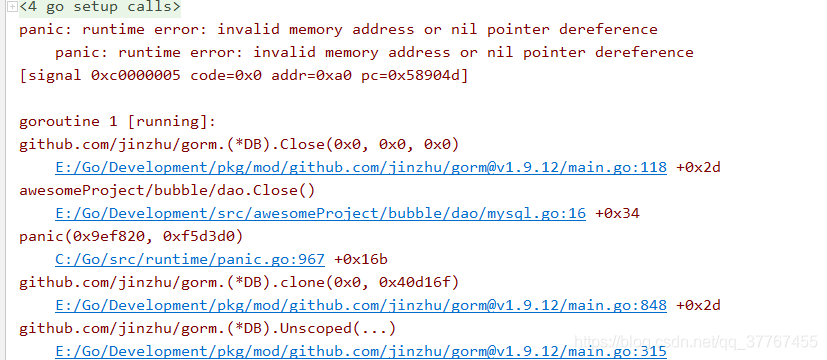
fix:
remove the colon from DB, err := gorm.open:
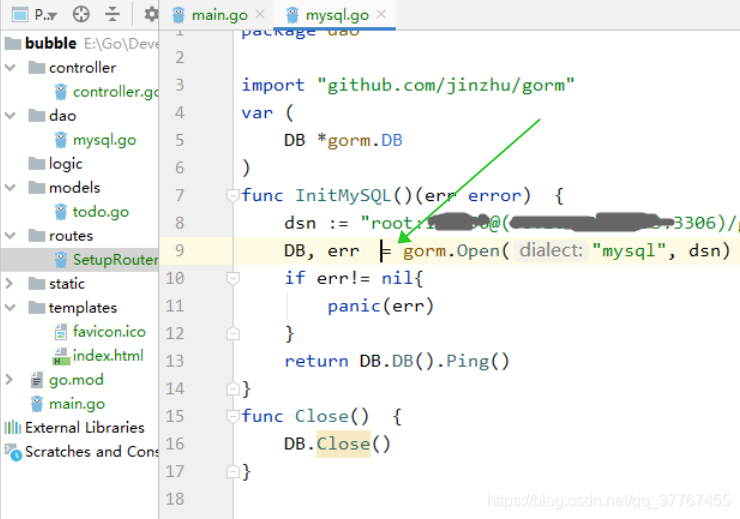
the original understanding was that golang would define the new variable err, DB was the global variable originally defined. But the reality is that for a variable defined with :=, if the new variable DB is not in scope with the same name as the defined variable (in this case, the global variable DB), then Golang defines the new variable DB to cover up the global variable DB, which is the real cause of the problem.