Author Archives: Robins

Abnormal report error javax.net.ssl .SSLHandshakeException: server certificate change is restrictedduring renegotiation

Project Scenario:
Access the external interface address


Problem description:
The following abnormalities appear:

javax.net.ssl.SSLHandshakeException: server certificate change is restrictedduring renegotiation
	at sun.security.ssl.Alerts.getSSLException(Alerts.java:192)
	at sun.security.ssl.SSLSocketImpl.fatal(SSLSocketImpl.java:1884)
	at sun.security.ssl.Handshaker.fatalSE(Handshaker.java:276)
	at sun.security.ssl.Handshaker.fatalSE(Handshaker.java:266)
	at sun.security.ssl.ClientHandshaker.serverCertificate(ClientHandshaker.java:1402)
	at sun.security.ssl.ClientHandshaker.processMessage(ClientHandshaker.java:209)
	at sun.security.ssl.Handshaker.processLoop(Handshaker.java:878)
	at sun.security.ssl.Handshaker.process_record(Handshaker.java:814)
	at sun.security.ssl.SSLSocketImpl.readRecord(SSLSocketImpl.java:1016)
	at sun.security.ssl.SSLSocketImpl.performInitialHandshake(SSLSocketImpl.java:1312)
	at sun.security.ssl.SSLSocketImpl.startHandshake(SSLSocketImpl.java:1339)
	at sun.security.ssl.SSLSocketImpl.startHandshake(SSLSocketImpl.java:1323)
	at org.apache.http.conn.ssl.SSLConnectionSocketFactory.createLayeredSocket(SSLConnectionSocketFactory.java:395)
	at org.apache.http.conn.ssl.SSLConnectionSocketFactory.connectSocket(SSLConnectionSocketFactory.java:354)
	at org.apache.http.impl.conn.DefaultHttpClientConnectionOperator.connect(DefaultHttpClientConnectionOperator.java:134)
	at org.apache.http.impl.conn.PoolingHttpClientConnectionManager.connect(PoolingHttpClientConnectionManager.java:353)
	at org.apache.http.impl.execchain.MainClientExec.establishRoute(MainClientExec.java:380)
	at org.apache.http.impl.execchain.MainClientExec.execute(MainClientExec.java:236)
	at org.apache.http.impl.execchain.ProtocolExec.execute(ProtocolExec.java:184)
	at org.apache.http.impl.execchain.RetryExec.execute(RetryExec.java:88)
	at org.apache.http.impl.execchain.RedirectExec.execute(RedirectExec.java:110)
	at org.apache.http.impl.client.InternalHttpClient.doExecute(InternalHttpClient.java:184)
	at org.apache.http.impl.client.CloseableHttpClient.execute(CloseableHttpClient.java:71)
	at org.apache.http.impl.client.CloseableHttpClient.execute(CloseableHttpClient.java:220)
	at org.apache.http.impl.client.CloseableHttpClient.execute(CloseableHttpClient.java:164)
	at org.apache.http.impl.client.CloseableHttpClient.execute(CloseableHttpClient.java:139)

Reason analysis:
As a result of the Http access certificate problem, it is possible that the project environment is too old. The current Java environment is JDK1.7, Tomcat1.7
Solutions:
Turn off HTTP certificate validation
Measures are as follows:
Modify the Tomcat startup script Catalina.sh
Location: Tomcat root directory /bin/catalina.sh
Add the following values for the JAVA_OPTS parameter:

-Djdk.tls.allowUnsafeServerCertChange=true 
-Dsun.security.ssl.allowUnsafeRenegotiation=true

Restart the project and see if the parameter Settings take effect in the Tomcat startup log
Problem solving.

Python packaged *. Exe is running os.popen (cmd)/ subprocess.Popen *. Exe crashes with invalid [winerror 6] handle

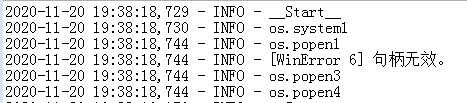
Summary of the problem: last week I used Python3.8.5 to write an upgrade script for a software running on Windows 7, and by printing and exception catching found that the script crashed when the script was executed to os.popen(CMD), the exception was [WinError 6] handle invalid

Part of the test code:

logging.info('__Start__')
logging.info('os.system1')
logging.info('os.popen1')
try:
    logging.info(os.popen('c:'))
    logging.info('os.popen2')
except Exception as a:
    logging.info(a)
    logging.info('os.popen3')
logging.info('os.popen4')

Effect :

After testing, it was found that the program and script could run normally on Win10, and the script was executed separately on Win7 without any problem, and the script was called with the program on Win7, even if the script was executed OS.popen (‘ c: ‘) would crash.

Because os.popen is actually the encapsulation of subprocess.Popen, so the title also carries subprocess.Popen
solution: to implement a function myPopen, or use subproce. popen0 will be 1 stdin = Subprocess. DEVNULL to modify, the code is as follows:

def myPopen(cmd):
    proc = subprocess.Popen(cmd,
                            shell=True,
                            stdout=subprocess.PIPE,
                            stdin=subprocess.DEVNULL)
    return proc.stdout.read().decode()

Python running as Windows Service: OSError: [WinError 6] The handle is invalid
Popen(

Adding project folder in SourceInsight is empty

A very strange problem occurred when I added the folder named Stdio to the project and found that the folder appeared empty in Soureinsight.
At first I thought it was a folder permissions issue, so I made all the files readable and writable. Still not solving the problem, I stumbled across a particular project in SourceInsight: the Base project
The purpose of this project is to put files that are common to all projects, thus achieving the effect of sharing public files. Have a try!
Come on!!

Shows my function!!

Creation and use of Oracle sequence

Creation of an Oracle sequence
CREATE SEQUENCE name
[br>]
[START WITH n]
[{MAXVALUE n>5 NOMAXVALUE}]0
1 2 [{MINVALUE n>6 NOMINVALUE}]3
4 [{CYCLE|NOCYCLE}]
[{CACHE n| NOCACHE}];
Parameter description:
INCREMENT BY– the step of a sequence change, that is, the step of the sequence, defaults to 1; Negative values indicate that the value of this Oracle sequence is decreasing in this step.
START WITH– – the initial value of the sequence, default is 1.
MAXVALUE – – the maximum that can be generated by the sequence. (default does not limit maximum: NOMAXVALUE — for increasing Oracle sequences, the maximum the system can produce is 10 to the 27th power; For descending sequences, the maximum value is -1)
MINVALUE – – the minimum value that can be generated by the sequence. (default does not limit minimum: NOMINVALUE)
CYCLE – – used to define whether a CYCLE (NOCYCLE: NOCYCLE, CYCLE: CYCLE) will occur when the value produced by the sequence reaches the limit value.
CACHE – – represents the number of cached sequences. Abnormal termination of the database may cause the sequence to be interrupted and discontinuous. The default value is 20.
Example:

CREATE SEQUENCE SEQ_DEMO INCREMENT BY 1 START WITH 1 NOMAXVALUE NOCYCLE NOCACHE

Use of Oracle sequences
currval – represents the current value of the sequence, the new sequence must be used once nextval to obtain the value, otherwise an error will be reported
nextval – represents the next value of the sequence. The first time a new sequence is used, the initial value of the sequence is obtained, and the set step increments start from the second use
The value of the query sequence:
select seq_name.[currval/nextval] seqno from dual;

1) dual : is a virtual table of oracle, not real.
2) seq_name : is the name given by the developer as a “sequence”, which is usually used to generate id Numbers.
3) seq_name.nextval : takes the next value of the sequence. If the current value of the sequence is 100, execute the above SELECT statement and seqNO becomes 101. One more time, seqno will get to 102… …

Conclusion:
To implement id autoincrement, Oracle needs to use sequence implementation. nextval must be called to generate a sequence value before using currval to see the current value. The starting value of the sequence must not be less than the minimum value; To create a loop sequence, the maximum value must be set; If a cached sequence is created, the cached value must satisfy the constraint formula: Max - min > =(cache value -1)* the value of each loop .

make modules_ Install compiles the kernel driver as a module, and the location of. Ko file in the root file

Based on the kernel Documentation: Documentation/kbuild/modules. TXT: Building External modules section 5 describes position description
can be determined as follows:

--- 5.1 INSTALL_MOD_PATH

	Above are the default directories but as always some level of
	customization is possible. A prefix can be added to the
	installation path using the variable INSTALL_MOD_PATH:

		$ make INSTALL_MOD_PATH=/frodo modules_install
		=> Install dir: /frodo/lib/modules/$(KERNELRELEASE)/kernel/

	INSTALL_MOD_PATH may be set as an ordinary shell variable or,
	as shown above, can be specified on the command line when
	calling "make." This has effect when installing both in-tree
	and out-of-tree modules.

--- 5.2 INSTALL_MOD_DIR

	External modules are by default installed to a directory under
	/lib/modules/$(KERNELRELEASE)/extra/, but you may wish to
	locate modules for a specific functionality in a separate
	directory. For this purpose, use INSTALL_MOD_DIR to specify an
	alternative name to "extra."

		$ make INSTALL_MOD_DIR=gandalf -C $KDIR \
		       M=$PWD modules_install
		=> Install dir: /lib/modules/$(KERNELRELEASE)/gandalf/

Setting label malloc in MAC development_ error_ Break breakpoint (Xcode)

From: http://stackoverflow.com/questions/971249/how-to-find-the-cause-of-a-malloc-double-free-error

To add a symbolic breakpoint . . .

    In the bottom-left corner of the breakpoint navigator, click the Add button. Choose Add Symbolic Breakpoint. Enter the symbol name in the Symbol field. Click Done.

It is mainly used to solve the problem of releasing the same object multiple times.

python2.7 ExcelWriter error Exception caught in workbook destructor. Explicit close() may be require

Use Pandas’ ExcelWriter to write to Excel

import pandas as pd

xlsx = pd.ExcelWriter('diff.xlsx')
for i in range(1,5):
	df = pd.DataFrame(data=[(1,2,3)])
	df.to_excel(xlsx, sheet_name='a', index=False)
df = pd.DataFrame(data=[(1,2,3)])
df.to_excel(xlsx, sheet_name='a', index=False)

Another excel write outside the for loop will report an error: Exception caught in workbook destructor. Explicit close() may be require.
this error is generally due to two reasons:

    1. needs to be saved and closed after writing the file. Add that the xlsx.save() file already exists and is open. That is to close the file and run the program
    again. This time, the code encountered a situation 1, which required xlsx.save() outside the for loop, and then write.

Still report an error after modification. A virtual environment was later created using python3.6 and still requires xlsx.save() to run successfully. The
modified python3.6 code is as follows

import pandas as pd

xlsx = pd.ExcelWriter('diff.xlsx')
for i in range(1,5):
	df = pd.DataFrame(data=[(1,2,3)])
	df.to_excel(xlsx, sheet_name='a', index=False)
df = pd.DataFrame(data=[(1,2,3)])
df.to_excel(xlsx, sheet_name='a', index=False)
xlsx.save()

nginx.conf php-fpm.conf and php.ini Error among the three_ Differences and relations between log instructions

The error_log directive is found in the configuration file nginx.conf of Nginx, the configuration file PHp-fPM, and php.ini. This article attempts to briefly explain the differences and associations between these three configurations.

php.ini
The error_log </ code> string
Sets the file to which script errors will be logged. This file must be writable by the Web server user. If the special value syslog is set, an error message is sent to the system logger. On Unix and similar systems, syslog(3) is used, while on Windows NT-class systems it is event logging. System logging is not supported on Windows 95. See: syslog(). If this configuration is not set, an error message is sent to the SAPI error logger. For example, an error appears in an Apache error log or is sent to Stderr in the CLI.

PHP – FPM. Conf
The error_log </ code> string
Location of the error log. Default: #INSTALL_PREFIX#/log/ php-pm. log. If set to "syslog", the log will not be written to the local file, but will be sent to syslogd.

nginx.conf
The

Syntax: </ th>

error_log file </ code> ( level </ code>];

Default:
error_log logs/error.log error;
Context: mainhttpmailstreamserverlocation

Configures logging. Several logs can be specified on the same level (1.5.2). If on the main configuration level writing a log to a file is not explicitly defined, the default file will be used.
The first parameter defines a file that will store the log. The special value stderr selects the standard error file. Logging to syslog can be configured by specifying the “syslog:” prefix. Logging to a cyclic memory buffer can be configured by specifying the “memory:” prefix and buffer size, and is generally used for debugging (1.7.11).
The second parameter determines the level of logging, and can be one of the following: debuginfonoticewarnerrorcritalert, or emerg. Log levels above are listed in the order of increasing severity. Setting a certain log level will cause all messages of the specified and more severe log levels to be logged. For example, the default level error will cause errorcritalert, and emerg messages to be logged. If this parameter is omitted then error is used.

From the above documentation, it is initially clear that error_log has a higher priority in php.ini, so let’s experiment with these combinations of configurations in turn.
The test reports errors using the following simple php code.

<?php
throw new Exception('foobar');

The configuration values of each error_log are as follows:

Nginx: error_log/var/log/nginx/error log.
Php-fpm: error_log = /var/log/php-fpm/error.log
Php.ini: error_log = /var/log/ PHP /error.log

1. When three values are configured at the same time, the PHP error log will be written to the file specified by the error_log in php.ini

[21-Apr-2019 22:19:13 Asia/Shanghai] PHP Fatal error: Uncaught Exception: Foobar in/usr/share/nginx/HTML/error. PHP: 5
the Stack trace: # 0 {main}

thrown in/usr/share/nginx/HTML/error. PHP on line 5

But what if the error_log specifies a file that does not have writable permissions, would it be logged into the error_log file of nginx or PHP-FPM?The answer is no, and the error message is lost because it cannot be written.
2. Do not configure the error_log in php.ini, and configure the error_log in nginx.conf and PHp-fPm.conf. At this time, the error log will be written to the error_log file of Nginx

2019/04/21 22:33:04 [Error] 2031#0: *102 FastCGI sent in stderr: “PHP message: PHP Fatal error: Uncaught Exception: Foobar in/usr/share/nginx/HTML/error. PHP: 5
the Stack trace: # 0 {main}

thrown in/usr/share/nginx/HTML/error. PHP on line 5 “while reading the response headers from upstream, the client: 127.0.0.1, server: _, request: “GET /error.php HTTP/1.1”, upstream: “fastcgi:// 127.0.0.9000 “, host: “127.0.0.1”

3. Since nginx error_log does not support shutdown, it is impossible to compare the priority of error_log between Nginx. conf and PHP-fpm. In fact, the error_log in PHP-fpm conf is not used to record PHP error messages, but to record some runtime information of the PHP-FPM process itself.
4. Although error_log in PHP-fPm.conf does not record PHP error information, php_value/php_flag or php_admin_value/ php_ADMIN_flag configuration can be used to override the configuration in PHp.ini:

You can also pass additional environment variables to a run pool, or update PHP configuration values. This can be done in the process pool configuration file with the following configuration parameters:
Example #1 passes environment variables to the runtime pool and sets the configuration values for PHP

env[HOSTNAME] = $HOSTNAME
       env[PATH] = /usr/local/bin:/usr/bin:/bin
       env[TMP] = /tmp
       env[TMPDIR] = /tmp
       env[TEMP] = /tmp

       php_admin_value[sendmail_path] = /usr/sbin/sendmail -t -i -f [email protected]
       php_flag[display_errors] = off
       php_admin_value[error_log] = /var/log/fpm-php.www.log
       php_admin_flag[log_errors] = on
       php_admin_value[memory_limit] = 32M

PHP configuration values are passed
Php_value or
Php_flag is set and overrides previous values. Please note that
Disable_functions or
The value defined in DISABle_classes in php.ini is not overridden, but the new setting is appended to the original value.
Values defined using php_ADMIN_value or php_ADMIN_flag cannot be overridden by ini_set() in PHP code.

For example, if you configure php_admin_value[error_log] in PHp-fpm.conf = /var/log/php-fpm/www-error.log, and configure error_log in php.ini, you will find that the PHP error message will be written into the /var/log/php-fpm/www-error.log file
Conclusion:
Error_log Priority: PHp_value [error_log]/php_admin_value[error_log] in PHP-pm.conf
Greater than PHP ini the error_log
The error_log is greater than the nginx. Conf
The error_log in PHP-pm.conf has nothing to do with logging an error message when PHP is running.
The easiest way to get PHP error logging is to look at the phpInfo () message and see the value of the error_log. If there is a value, the error logging is recorded where the value is specified, and if there is no error logging, it is recorded in nginx’s error_log.

Some frameworks use set_exception_handler and set_error_handler, as well as register_shutdown_function to reset the exception handling and error reporting, and may write the error log to another place, so in a development environment, temporarily open display_errors. This is the fastest way to locate errors.
That’s all
How to Fix “HTTP 405 method not allowed” Error

In the Angular 1.4 version of the project, the program was working fine until one day when the form submission prompted an “HTTP 405” error — “Method Not Allowed”.
Either GET or POST items GET interface submit data, but check back and back again and again. Both are POST. No problem at all.
After careful examination of the front-end code, it is found that the writing method is as follows:

$http({
    method : 'POST',
    url : '/test',
    params : {
        cycle : key,
        emp_id : user.id
    }
 }).success(function (resp) {
 });

This programming approach has two problems:
1. The submitted parameters are exposed; 2. The default Header parameter “content-type” submitted is “application/json”;
But after trial and error, see Prioritizing Browser Query Parameters and Form Data. The first problem doesn’t cause 405 errors, so it’s easy to identify the problem. The solution is to specify the “content-Type” explicitly, as follows:

$http({
    method : 'POST',
    url : '/test',
    params : {
        cycle : key,
        emp_id : user.id
    },
    //  New content-type header attribute
    heads : {
        'content-type' : 'application/x-www-form-urlencoded'
    }
 }).success(function (resp) {
    //  Processing Logic
 });

If you want to solve the first problem, you only need to introduce the $httpParamSerializer service as follows:

$http({
    method : 'POST',
    url : '/test',
    //  Submit as a form, converting Object to form arguments.
    data : $httpParamSerializer({
        cycle : key,
        emp_id : user.id
    }),
    //  New content-type header attribute
    heads : {
        'content-type' : 'application/x-www-form-urlencoded'
    }
 }).success(function (resp) {
    //  Processing Logic
 });

conclusion
In the event of an HTTP 405 error, first check the “content-Type” information in the request header.

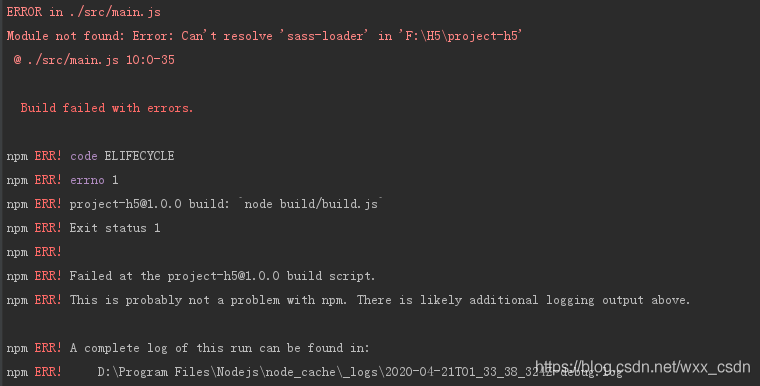
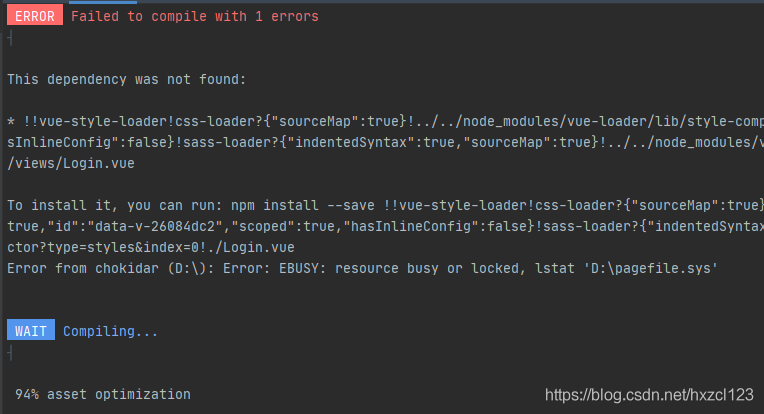
Module not found: Error: Can’t resolve ‘sass-loader’ in ‘F:\H5\project-h5’

Module not found: Error: Can’t resolve ‘sass-loader’ in ‘F:\H5\project-h5’

The error is more straightforward. Without the SASS-Loader, we just need to install the specified plug-in as required.

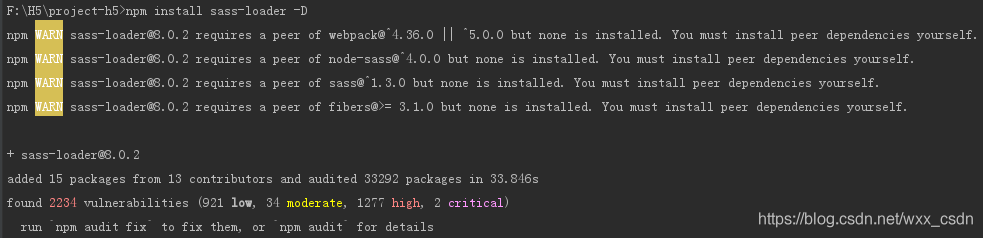
npm install sass-loader -D
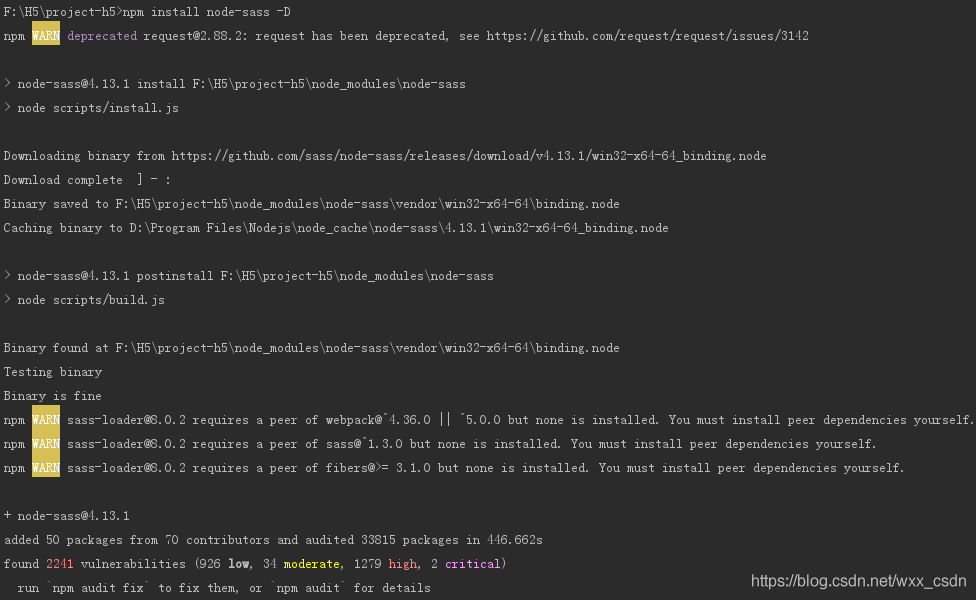
npm install node-sass -D


The second installation will take a little longer, so be patient.
Meng New exclusive extension: -d =& GT; — Save-dev, and another -s => – save.
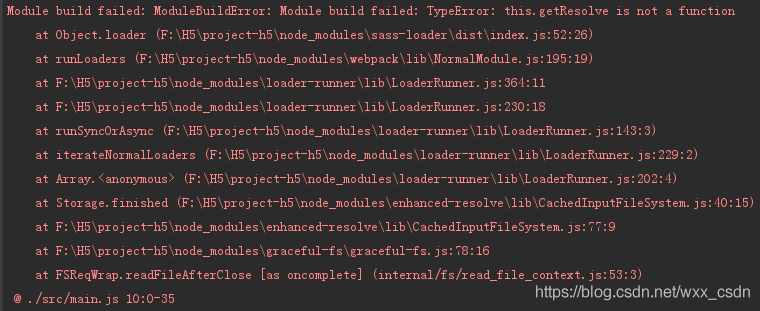
If the two plug-ins installed after the following error ↓

This may be a compilation error due to a high version of the SASS-Loader

npm uninstall sass-loader(Uninstall current version) 
npm install [email protected] --save-dev

Recompiling is successful

Module not found: Error: Can‘t resolve ‘sass-loader‘


there are many situations, such as not installing
SASS loader NPM install sass-loader node-sass –save-dev
or installing a version too high to support, the following is to solve the version too high

//First remove the version we have already installed.
npm uninstall node-sass 
npm uninstall sass-loader
npm uninstall style-loader
//Note that when we clean up, we can choose to clean up globally install globally, otherwise we will get the same error the next time we create the project.
npm i node-sass --sass_binary_site=https://npm.taobao.org/mirrors/node-sass/ //Taobao image installation
npm install [email protected] --save-dev //Install version 7.3.1 of sass
npm install style-loader --save-dev // install style-loader