Author Archives: Robins

(2) unrecoverable error: corrupted cluster config file

stay https://blog.csdn.net/zly_ On the basis of this blog post 9117 / article / details / 83349778, we found another error when starting redis. The error content is as follows

➜  7000 ../redis-server redis.conf &
[1] 11045
11045:C 24 Oct 2018 19:26:52.320 # oO0OoO0OoO0Oo Redis is starting oO0OoO0OoO0Oo
11045:C 24 Oct 2018 19:26:52.320 # Redis version=999.999.999, bits=64, commit=54e8dd11, modified=0, pid=11045, just started
11045:C 24 Oct 2018 19:26:52.320 # Configuration loaded
11045:M 24 Oct 2018 19:26:52.322 * Increased maximum number of open files to 10032 (it was originally set to 7168).
11045:M 24 Oct 2018 19:26:52.323 # Unrecoverable error: corrupted cluster config file.

The literal meaning is a damaged cluster configuration. Similarly, find the corresponding error throw point in the source code and find the following information

1. The output point of the error log is the code below

fmterr:
    serverLog(LL_WARNING,
        "Unrecoverable error: corrupted cluster config file.");
    zfree(line);
    if (fp) fclose(fp);
    exit(1);
}
According to the source code interpretation found that we did not build nodes.conf By default, this method returns a C_ Err, and then the caller clusterinit function creates a new file and a cluster. The overall code of clusterloadconfig function is as follows. But now I found this document and read it to prove it wrong redis.conf There is an error in the configuration file. After searching the configuration file, it is found that the parameter of cluster config file is configured incorrectly, and it is changed to cluster config file nodes.conf Problem solving.

/* Load the cluster config from 'filename'.
 *
 * If the file does not exist or is zero-length (this may happen because
 * when we lock the nodes.conf file, we create a zero-length one for the
 * sake of locking if it does not already exist), C_ERR is returned.
 * If the configuration was loaded from the file, C_OK is returned. */
int clusterLoadConfig(char *filename) {
    FILE *fp = fopen(filename,"r");
    struct stat sb;
    char *line;
    int maxline, j;

    if (fp == NULL) {
        if (errno == ENOENT) {
            return C_ERR;
        } else {
            serverLog(LL_WARNING,
                "Loading the cluster node config from %s: %s",
                filename, strerror(errno));
            exit(1);
        }
    }

    /* Check if the file is zero-length: if so return C_ERR to signal
     * we have to write the config. */
    if (fstat(fileno(fp),&sb) != -1 && sb.st_size == 0) {
        fclose(fp);
        return C_ERR;
    }

    /* Parse the file. Note that single lines of the cluster config file can
     * be really long as they include all the hash slots of the node.
     * This means in the worst possible case, half of the Redis slots will be
     * present in a single line, possibly in importing or migrating state, so
     * together with the node ID of the sender/receiver.
     *
     * To simplify we allocate 1024+CLUSTER_SLOTS*128 bytes per line. */
    maxline = 1024+CLUSTER_SLOTS*128;
    line = zmalloc(maxline);
    while(fgets(line,maxline,fp) != NULL) {
        int argc;
        sds *argv;
        clusterNode *n, *master;
        char *p, *s;

        /* Skip blank lines, they can be created either by users manually
         * editing nodes.conf or by the config writing process if stopped
         * before the truncate() call. */
        if (line[0] == '\n' || line[0] == '\0') continue;

        /* Split the line into arguments for processing. */
        argv = sdssplitargs(line,&argc);
        if (argv == NULL) goto fmterr;

        /* Handle the special "vars" line. Don't pretend it is the last
         * line even if it actually is when generated by Redis. */
        if (strcasecmp(argv[0],"vars") == 0) {
            for (j = 1; j < argc; j += 2) {
                if (strcasecmp(argv[j],"currentEpoch") == 0) {
                    server.cluster->currentEpoch =
                            strtoull(argv[j+1],NULL,10);
                } else if (strcasecmp(argv[j],"lastVoteEpoch") == 0) {
                    server.cluster->lastVoteEpoch =
                            strtoull(argv[j+1],NULL,10);
                } else {
                    serverLog(LL_WARNING,
                        "Skipping unknown cluster config variable '%s'",
                        argv[j]);
                }
            }
            sdsfreesplitres(argv,argc);
            continue;
        }

        /* Regular config lines have at least eight fields */
        if (argc < 8) goto fmterr;

        /* Create this node if it does not exist */
        n = clusterLookupNode(argv[0]);
        if (!n) {
            n = createClusterNode(argv[0],0);
            clusterAddNode(n);
        }
        /* Address and port */
        if ((p = strrchr(argv[1],':')) == NULL) goto fmterr;
        *p = '\0';
        memcpy(n->ip,argv[1],strlen(argv[1])+1);
        char *port = p+1;
        char *busp = strchr(port,'@');
        if (busp) {
            *busp = '\0';
            busp++;
        }
        n->port = atoi(port);
        /* In older versions of nodes.conf the "@busport" part is missing.
         * In this case we set it to the default offset of 10000 from the
         * base port. */
        n->cport = busp ? atoi(busp) : n->port + CLUSTER_PORT_INCR;

        /* Parse flags */
        p = s = argv[2];
        while(p) {
            p = strchr(s,',');
            if (p) *p = '\0';
            if (!strcasecmp(s,"myself")) {
                serverAssert(server.cluster->myself == NULL);
                myself = server.cluster->myself = n;
                n->flags |= CLUSTER_NODE_MYSELF;
            } else if (!strcasecmp(s,"master")) {
                n->flags |= CLUSTER_NODE_MASTER;
            } else if (!strcasecmp(s,"slave")) {
                n->flags |= CLUSTER_NODE_SLAVE;
            } else if (!strcasecmp(s,"fail?")) {
                n->flags |= CLUSTER_NODE_PFAIL;
            } else if (!strcasecmp(s,"fail")) {
                n->flags |= CLUSTER_NODE_FAIL;
                n->fail_time = mstime();
            } else if (!strcasecmp(s,"handshake")) {
                n->flags |= CLUSTER_NODE_HANDSHAKE;
            } else if (!strcasecmp(s,"noaddr")) {
                n->flags |= CLUSTER_NODE_NOADDR;
            } else if (!strcasecmp(s,"nofailover")) {
                n->flags |= CLUSTER_NODE_NOFAILOVER;
            } else if (!strcasecmp(s,"noflags")) {
                /* nothing to do */
            } else {
                serverPanic("Unknown flag in redis cluster config file");
            }
            if (p) s = p+1;
        }

        /* Get master if any. Set the master and populate master's
         * slave list. */
        if (argv[3][0] != '-') {
            master = clusterLookupNode(argv[3]);
            if (!master) {
                master = createClusterNode(argv[3],0);
                clusterAddNode(master);
            }
            n->slaveof = master;
            clusterNodeAddSlave(master,n);
        }

        /* Set ping sent / pong received timestamps */
        if (atoi(argv[4])) n->ping_sent = mstime();
        if (atoi(argv[5])) n->pong_received = mstime();

        /* Set configEpoch for this node. */
        n->configEpoch = strtoull(argv[6],NULL,10);

        /* Populate hash slots served by this instance. */
        for (j = 8; j < argc; j++) {
            int start, stop;

            if (argv[j][0] == '[') {
                /* Here we handle migrating / importing slots */
                int slot;
                char direction;
                clusterNode *cn;

                p = strchr(argv[j],'-');
                serverAssert(p != NULL);
                *p = '\0';
                direction = p[1]; /* Either '>' or '<' */
                slot = atoi(argv[j]+1);
                if (slot < 0 || slot >= CLUSTER_SLOTS) goto fmterr;
                p += 3;
                cn = clusterLookupNode(p);
                if (!cn) {
                    cn = createClusterNode(p,0);
                    clusterAddNode(cn);
                }
                if (direction == '>') {
                    server.cluster->migrating_slots_to[slot] = cn;
                } else {
                    server.cluster->importing_slots_from[slot] = cn;
                }
                continue;
            } else if ((p = strchr(argv[j],'-')) != NULL) {
                *p = '\0';
                start = atoi(argv[j]);
                stop = atoi(p+1);
            } else {
                start = stop = atoi(argv[j]);
            }
            if (start < 0 || start >= CLUSTER_SLOTS) goto fmterr;
            if (stop < 0 || stop >= CLUSTER_SLOTS) goto fmterr;
            while(start <= stop) clusterAddSlot(n, start++);
        }

        sdsfreesplitres(argv,argc);
    }
    /* Config sanity check */
    if (server.cluster->myself == NULL) goto fmterr;

    zfree(line);
    fclose(fp);

    serverLog(LL_NOTICE,"Node configuration loaded, I'm %.40s", myself->name);

    /* Something that should never happen: currentEpoch smaller than
     * the max epoch found in the nodes configuration. However we handle this
     * as some form of protection against manual editing of critical files. */
    if (clusterGetMaxEpoch() > server.cluster->currentEpoch) {
        server.cluster->currentEpoch = clusterGetMaxEpoch();
    }
    return C_OK;

fmterr:
    serverLog(LL_WARNING,
        "Unrecoverable error: corrupted cluster config file.");
    zfree(line);
    if (fp) fclose(fp);
    exit(1);
}
 

The influence of the loading order of props, data and computed in Vue

The influence of the loading order of props, data and computed in Vue

1. Computed and watch can only be used as change monitor, never initialization!!!

2. Because the loading order is props – & gt; methods – & gt; data – & gt; computed – & gt; watch

3. All init methods must directly call the database or this$ store.getters Read memory instead of computing it

Clion installing glfw_Using clion to configure Vulkan development environment on MacOS

preface
When learning graphics programming, in fact, in MacOS programming environment is the default Xcode, Windows and often use Visual Studio. But since I often have to switch programming between Windows and MacOS, occasionally switch to Ubuntu, and don’t want to switch between different IDEs repeatedly, I chose CLion. The nice thing about CLion is that it’s cross-platform.
Today, I spent several hours configuring the development environment of CLion +Vulkan on MacOS, which paved the way for learning Vulkan later. Those who know CLion know that C/C++ programming of CLion uses CMAKE to do engineering construction, which can force me to use a cross-platform architecture scheme, so that I can know the underlying engineering construction like the palm of my hand, and can also promote me to further understand and learn CMAKE.
My work environment
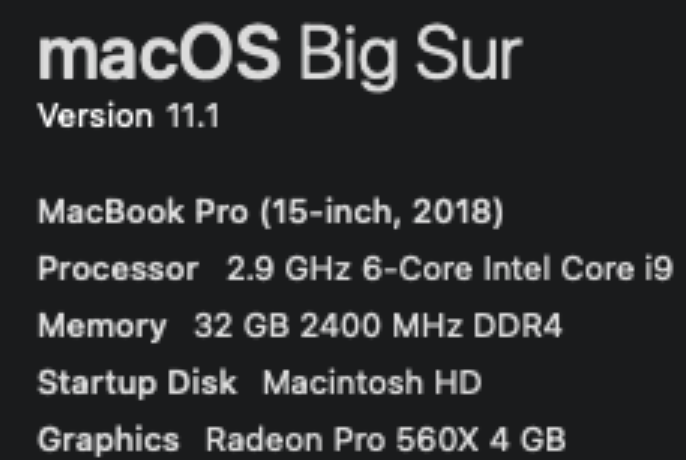
MacOS: Big Sur

gcc version

~/C/V/shaders ❯❯❯ gcc --versionConfigured with: --prefix=/Applications/Xcode.app/Contents/Developer/usr --with-gxx-include-dir=/Library/Developer/CommandLineTools/SDKs/MacOSX.sdk/usr/include/c++/4.2.1Apple clang version 12.0.0 (clang-1200.0.32.27)Target: x86_64-apple-darwin20.2.0Thread model: posixInstalledDir: /Applications/Xcode.app/Contents/Developer/Toolchains/XcodeDefault.xctoolchain/usr/bin

Configure the Lib required by Vulkan
Vulkan MacOS configuration mainly refers to the Vulkan Tutorial Development Environment. However, many MacOS articles only provide Xcode configuration, but the dependency on the file package is the same. Three main things are needed: Vulkan SDK, GLFW, and GLM.
Let’s take a look at how to install each of these.
Vulkan SDK installation
Vulkan SDK can be downloaded from https://vulkan.lunarg.com/sdk/home directly. See Getting Started with the MacOS Vulkan SDK for details on the installation process. In the process of specific installation, I adopted the step of Install the SDK-alternate method using system paths. Run the Python installation script that comes with the SDK to install:

sudo ./install_vulkan.py

The script is to install the Vulkan SDK libraries and header files in /usr/local.
/usr/local/lib is one of the directories that linker searches for required libraries. The lib installed by the user is stored in the /usr/local folder. The CLion search library is based mainly on the directories specified by the include_directories defined by Cmake.

Copying /Volumes/vulkansdk-macos-1.2.162.0/macOS/bin/spirv-opt to /usr/local/binCopying /Volumes/vulkansdk-macos-1.2.162.0/macOS/bin/vkvia to /usr/local/binCopying /Volumes/vulkansdk-macos-1.2.162.0/macOS/lib/cmake/SPVRemapperTargets-release.cmake to /usr/local/lib/cmake/vulkanCopying /Volumes/vulkansdk-macos-1.2.162.0/macOS/lib/cmake/SPIRV-Tools to /usr/local/lib/cmake/vulkan/SPIRV-ToolsCopying /Volumes/vulkansdk-macos-1.2.162.0/macOS/bin/spirv-link to /usr/local/binCopying /Volumes/vulkansdk-macos-1.2.162.0/macOS/bin/spirv-cfg to /usr/local/binCopying /Volumes/vulkansdk-macos-1.2.162.0/macOS/lib/libspirv-cross-c-shared.0.44.0.dylib to /usr/local/libCopying /Volumes/vulkansdk-macos-1.2.162.0/macOS/bin/spirv-val to /usr/local/binCopying /Volumes/vulkansdk-macos-1.2.162.0/macOS/include/vulkan to /usr/local/include/vulkanCopying /Volumes/vulkansdk-macos-1.2.162.0/macOS/lib/cmake/SPIRVTargets.cmake to /usr/local/lib/cmake/vulkanCopying /Volumes/vulkansdk-macos-1.2.162.0/macOS/lib/libSPIRV.a to /usr/local/libCopying /Volumes/vulkansdk-macos-1.2.162.0/macOS/bin/MoltenVKShaderConverter to /usr/local/binCopying /Volumes/vulkansdk-macos-1.2.162.0/macOS/lib/cmake/glslangTargets-release.cmake to /usr/local/lib/cmake/vulkanCopying /Volumes/vulkansdk-macos-1.2.162.0/macOS/share/vulkan to /usr/local/share/vulkanCopying /Volumes/vulkansdk-macos-1.2.162.0/macOS/lib/libshaderc_util.a to /usr/local/libCopying /Volumes/vulkansdk-macos-1.2.162.0/macOS/lib/libSPIRV-Tools.a to /usr/local/libCopying /Volumes/vulkansdk-macos-1.2.162.0/macOS/bin/vulkaninfo to /usr/local/binCopying /Volumes/vulkansdk-macos-1.2.162.0/macOS/bin/spirv-as to /usr/local/binCopying /Volumes/vulkansdk-macos-1.2.162.0/macOS/lib/libSPIRV-Tools-opt.a to /usr/local/libCopying /Volumes/vulkansdk-macos-1.2.162.0/macOS/lib/cmake/SPIRVTargets-release.cmake to /usr/local/lib/cmake/vulkanCopying /Volumes/vulkansdk-macos-1.2.162.0/Applications/vkconfig.app to /Applications/vkconfig.appCopying /Volumes/vulkansdk-macos-1.2.162.0/macOS/lib/cmake/glslangValidatorTargets.cmake to /usr/local/lib/cmake/vulkanCopying /Volumes/vulkansdk-macos-1.2.162.0/macOS/lib/cmake/OGLCompilerTargets.cmake to /usr/local/lib/cmake/vulkanCopying /Volumes/vulkansdk-macos-1.2.162.0/macOS/lib/libspirv-cross-c-shared.dylib to /usr/local/libCopying /Volumes/vulkansdk-macos-1.2.162.0/macOS/lib/libspirv-cross-cpp.a to /usr/local/libCopying /Volumes/vulkansdk-macos-1.2.162.0/macOS/bin/glslc to /usr/local/binCopying /Volumes/vulkansdk-macos-1.2.162.0/macOS/lib/cmake/HLSLTargets.cmake to /usr/local/lib/cmake/vulkanCopying /Volumes/vulkansdk-macos-1.2.162.0/Applications/vkcubepp.app to /Applications/vkcubepp.appCopying /Volumes/vulkansdk-macos-1.2.162.0/macOS/lib/libGenericCodeGen.a to /usr/local/libCopying /Volumes/vulkansdk-macos-1.2.162.0/macOS/lib/libspirv-cross-c-shared.0.dylib to /usr/local/libCopying /Volumes/vulkansdk-macos-1.2.162.0/macOS/lib/libspirv-cross-glsl.a to /usr/local/libCopying /Volumes/vulkansdk-macos-1.2.162.0/macOS/lib/libspirv-cross-msl.a to /usr/local/libCopying /Volumes/vulkansdk-macos-1.2.162.0/macOS/bin/spirv-remap to /usr/local/binCopying /Volumes/vulkansdk-macos-1.2.162.0/macOS/bin/spirv-dis to /usr/local/binCopying /Volumes/vulkansdk-macos-1.2.162.0/macOS/include/spirv_cross to /usr/local/include/spirv_crossCopying /Volumes/vulkansdk-macos-1.2.162.0/macOS/lib/cmake/SPIRV-Tools-link to /usr/local/lib/cmake/vulkan/SPIRV-Tools-linkCopying /Volumes/vulkansdk-macos-1.2.162.0/macOS/lib/cmake/SPVRemapperTargets.cmake to /usr/local/lib/cmake/vulkanCopying /Volumes/vulkansdk-macos-1.2.162.0/macOS/bin/dxc-3.7 to /usr/local/binCopying /Volumes/vulkansdk-macos-1.2.162.0/macOS/lib/cmake/SPIRV-Tools-opt to /usr/local/lib/cmake/vulkan/SPIRV-Tools-optCopying /Volumes/vulkansdk-macos-1.2.162.0/macOS/lib/cmake/OGLCompilerTargets-release.cmake to /usr/local/lib/cmake/vulkanCopying /Volumes/vulkansdk-macos-1.2.162.0/macOS/bin/glslangValidator to /usr/local/binCopying /Volumes/vulkansdk-macos-1.2.162.0/macOS/bin/spirv-lesspipe.sh to /usr/local/binCopying /Volumes/vulkansdk-macos-1.2.162.0/Applications/vkcube.app to /Applications/vkcube.appCopying /Volumes/vulkansdk-macos-1.2.162.0/macOS/lib/cmake/HLSLTargets-release.cmake to /usr/local/lib/cmake/vulkanCopying /Volumes/vulkansdk-macos-1.2.162.0/macOS/lib/cmake/spirv-remapTargets.cmake to /usr/local/lib/cmake/vulkanCopying /Volumes/vulkansdk-macos-1.2.162.0/macOS/lib/cmake/glslangValidatorTargets-release.cmake to /usr/local/lib/cmake/vulkanCopying /Volumes/vulkansdk-macos-1.2.162.0/macOS/lib/libSPIRV-Tools-link.a to /usr/local/libCopying /Volumes/vulkansdk-macos-1.2.162.0/macOS/lib/libspirv-cross-c.a to /usr/local/libCopying /Volumes/vulkansdk-macos-1.2.162.0/macOS/bin/spirv-reflect to /usr/local/binCopying /Volumes/vulkansdk-macos-1.2.162.0/Applications/vulkaninfo.app to /Applications/vulkaninfo.appCopying /Volumes/vulkansdk-macos-1.2.162.0/macOS/lib/libspirv-cross-hlsl.a to /usr/local/libCopying /Volumes/vulkansdk-macos-1.2.162.0/macOS/include/shaderc to /usr/local/include/shadercCopying /Volumes/vulkansdk-macos-1.2.162.0/macOS/lib/libSPIRV-Tools-reduce.a to /usr/local/libCopying /Volumes/vulkansdk-macos-1.2.162.0/macOS/lib/libshaderc_combined.a to /usr/local/libCopying /Volumes/vulkansdk-macos-1.2.162.0/macOS/lib/libspirv-cross-util.a to /usr/local/libCopying /Volumes/vulkansdk-macos-1.2.162.0/macOS/lib/libvulkan.1.2.162.dylib to /usr/local/libCopying /Volumes/vulkansdk-macos-1.2.162.0/macOS/lib/libOGLCompiler.a to /usr/local/libCopying /Volumes/vulkansdk-macos-1.2.162.0/macOS/lib/libshaderc_shared.1.dylib to /usr/local/libCopying /Volumes/vulkansdk-macos-1.2.162.0/macOS/lib/libSPIRV-Tools-shared.dylib to /usr/local/libCopying /Volumes/vulkansdk-macos-1.2.162.0/macOS/lib/libvulkan.dylib to /usr/local/libCopying /Volumes/vulkansdk-macos-1.2.162.0/macOS/lib/libOSDependent.a to /usr/local/libCopying /Volumes/vulkansdk-macos-1.2.162.0/macOS/lib/libshaderc.a to /usr/local/libCopying /Volumes/vulkansdk-macos-1.2.162.0/macOS/include/spirv-tools to /usr/local/include/spirv-toolsCopying /Volumes/vulkansdk-macos-1.2.162.0/macOS/lib/cmake/SPIRV-Tools-reduce to /usr/local/lib/cmake/vulkan/SPIRV-Tools-reduceCopying /Volumes/vulkansdk-macos-1.2.162.0/macOS/lib/libglslang.a to /usr/local/libCopying /Volumes/vulkansdk-macos-1.2.162.0/macOS/lib/libdxcompiler.3.7.dylib to /usr/local/libCopying /Volumes/vulkansdk-macos-1.2.162.0/macOS/lib/libMoltenVK.dylib to /usr/local/libCopying /Volumes/vulkansdk-macos-1.2.162.0/macOS/lib/libspirv-cross-reflect.a to /usr/local/libCopying /Volumes/vulkansdk-macos-1.2.162.0/macOS/lib/libHLSL.a to /usr/local/libCopying /Volumes/vulkansdk-macos-1.2.162.0/macOS/lib/libdxcompiler.dylib to /usr/local/libCopying /Volumes/vulkansdk-macos-1.2.162.0/macOS/bin/spirv-cross to /usr/local/binCopying /Volumes/vulkansdk-macos-1.2.162.0/macOS/lib/libVkLayer_khronos_validation.dylib to /usr/local/libCopying /Volumes/vulkansdk-macos-1.2.162.0/macOS/include/glslang to /usr/local/include/glslangCopying /Volumes/vulkansdk-macos-1.2.162.0/macOS/bin/spirv-reduce to /usr/local/binCopying /Volumes/vulkansdk-macos-1.2.162.0/macOS/lib/cmake/OSDependentTargets.cmake to /usr/local/lib/cmake/vulkanCopying /Volumes/vulkansdk-macos-1.2.162.0/macOS/bin/dxc to /usr/local/binCopying /Volumes/vulkansdk-macos-1.2.162.0/macOS/lib/libspirv-cross-core.a to /usr/local/libCopying /Volumes/vulkansdk-macos-1.2.162.0/macOS/lib/libSPVRemapper.a to /usr/local/libCopying /Volumes/vulkansdk-macos-1.2.162.0/macOS/lib/libVkLayer_api_dump.dylib to /usr/local/libCopying /Volumes/vulkansdk-macos-1.2.162.0/macOS/lib/cmake/spirv-remapTargets-release.cmake to /usr/local/lib/cmake/vulkanCopying /Volumes/vulkansdk-macos-1.2.162.0/macOS/lib/cmake/OSDependentTargets-release.cmake to /usr/local/lib/cmake/vulkanCopying /Volumes/vulkansdk-macos-1.2.162.0/macOS/lib/libvulkan.1.dylib to /usr/local/libCopying /Volumes/vulkansdk-macos-1.2.162.0/macOS/lib/cmake/glslangTargets.cmake to /usr/local/lib/cmake/vulkanCopying /Volumes/vulkansdk-macos-1.2.162.0/macOS/lib/libshaderc_shared.dylib to /usr/local/libCopying /Volumes/vulkansdk-macos-1.2.162.0/macOS/lib/libMachineIndependent.a to /usr/local/lib

Install GLFW
GLFW is used to create Windows, which supports different operating systems. Both OpenGL and Vulkan are only responsible for rendering graphics to the desktop in memory for display on the screen. As for the final creation of the desktop for each operating system, GL and Vulkan are not responsible for it. That’s what GLFW does. On Apple, GLFW can be installed through BREW. My Mac already had BREW installed, so I simply installed GLFW directly through BREW.

brew install glfw

Install the GLM
Vulkan also does not contain a mathematical library for linear algebra. So we’re going to have to use GLM when we change the graph. He can also install it through BREW.

brew install glm

After installing all the required libs above, we can set our own environment variables in a shell profile. These set environment variables will be used to indicate the path to which libraries to search when I use the CMAKE configuration file in the CLion IDE. Since I’m using ZSH, I added the GLFW and GLM lib paths to ~/.zprofile.

export GLFW_HOME="/usr/local/Cellar/glfw/3.3.2"export GLM_HOME="/usr/local/include/glm"

Note: BREW will place all installations in a directory called CELLAR, and then create soft links in /usr/local to connect to these directories under CELLAR.
And then we’re going to reroute my.zprofile.
When everything is configured, you can call the VKSDK command vkvia</code bbb> check if Vulkan was successfully installed.
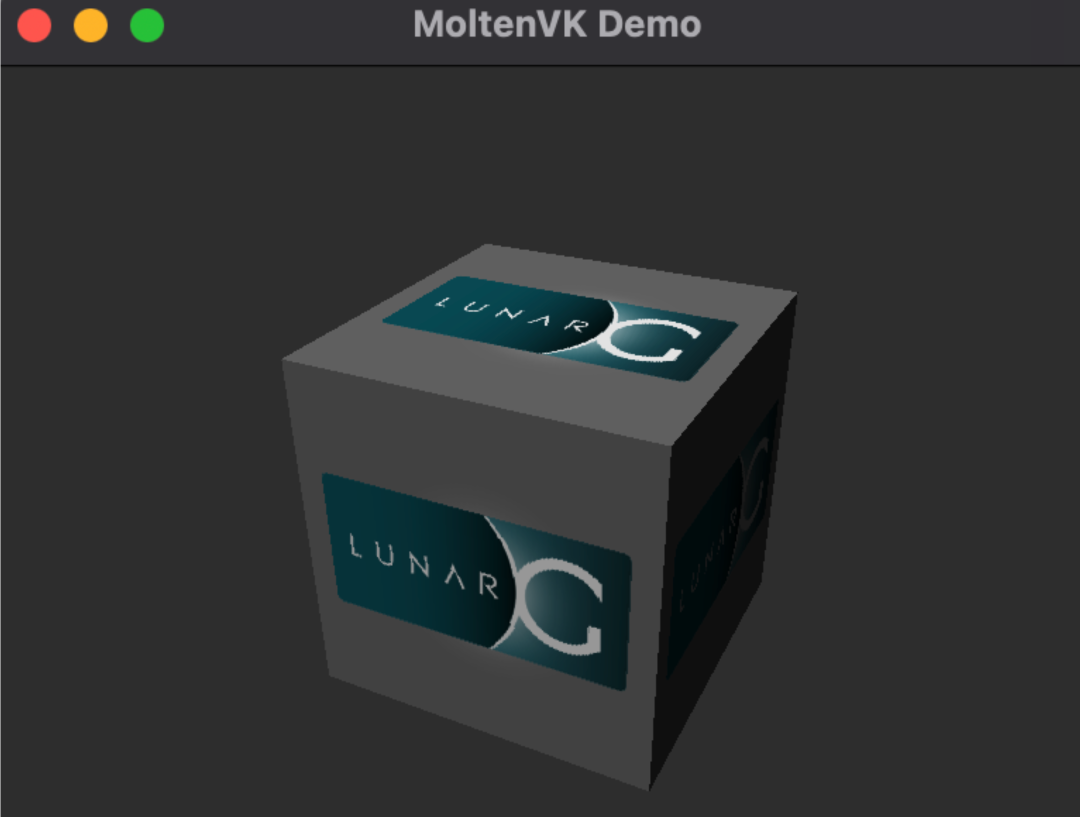
You can also run the Vulkan SDK's Cube app to check it out.

Create the CLion project
Let's create a Vulkandemo project. Once created, the project is very simple, with a single HelloWorld code for main.cpp.
Let's draw a triangle here, so let's configure cmake file to make sure that all the header files and libraries we need are loaded correctly.

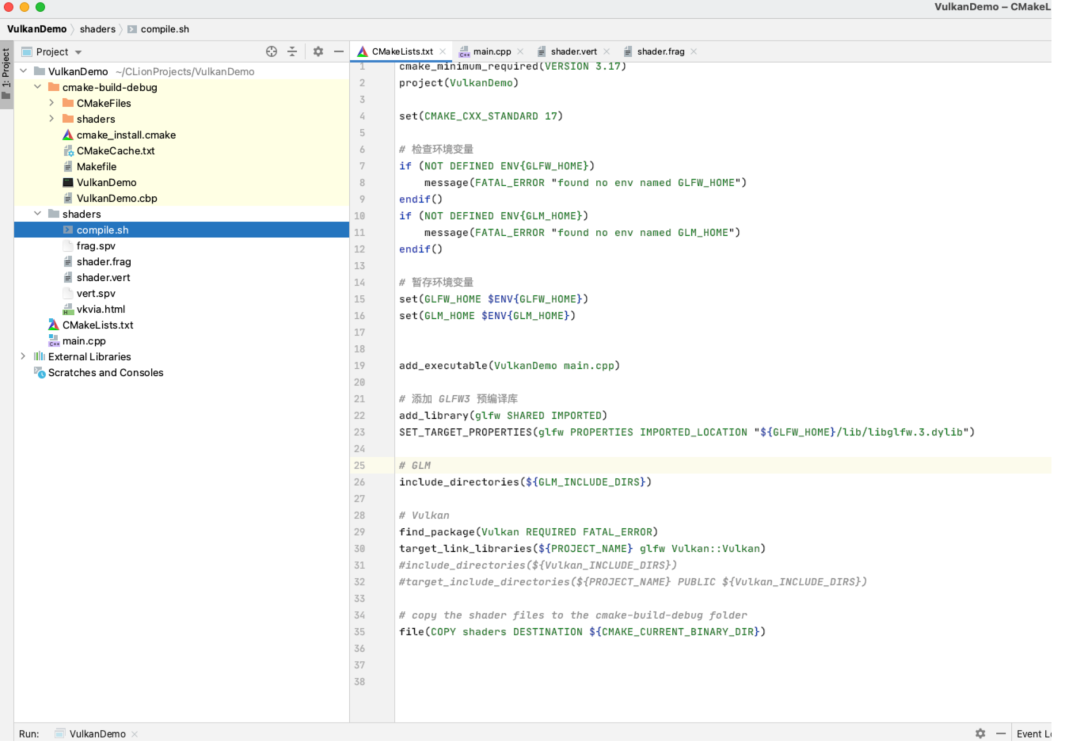
cmake_minimum_required(VERSION 3.17)project(VulkanDemo)set(CMAKE_CXX_STANDARD 17)# Check environment variables if (NOT DEFINED ENV{GLFW_HOME})    message(FATAL_ERROR "found no env named GLFW_HOME")endif()if (NOT DEFINED ENV{GLM_HOME})    message(FATAL_ERROR "found no env named GLM_HOME")endif()# 暂存环境变量set(GLFW_HOME $ENV{GLFW_HOME})set(GLM_HOME $ENV{GLM_HOME})add_executable(VulkanDemo main.cpp)# 添加 GLFW3 预编译库add_library(glfw SHARED IMPORTED)SET_TARGET_PROPERTIES(glfw PROPERTIES IMPORTED_LOCATION "${GLFW_HOME}/lib/libglfw.3.dylib")# GLMinclude_directories(${GLM_INCLUDE_DIRS})# Vulkanfind_package(Vulkan REQUIRED FATAL_ERROR)target_link_libraries(${PROJECT_NAME} glfw Vulkan::Vulkan)#include_directories(${Vulkan_INCLUDE_DIRS})#target_include_directories(${PROJECT_NAME} PUBLIC ${Vulkan_INCLUDE_DIRS})# copy the shader files to the cmake-build-debug folderfile(COPY shaders DESTINATION ${CMAKE_CURRENT_BINARY_DIR})

Once cmake is configured we start drawing our triangle. This article uses the Vulkan Tutorial code directly. Copy the code to main.cpp</code bbb> We're going to use two shaders here because we're drawing triangles. The code for shader comes from this section. So we need to add two shader files and a compile script to help us generate the spir-v files.
file(COPY shaders DESTINATION ${CMAKE_CURRENT_BINARY_DIR})</code bbb>because calling openfile in main needs to open our shader file. When Clion runs the binaries of the project, it assumes that the resource files are in the cmake-build-debug</code bbb>lder. So we must copy the shader folder to cmake-build-debug</code bbb>
Take a look at what your project as a whole looks like:

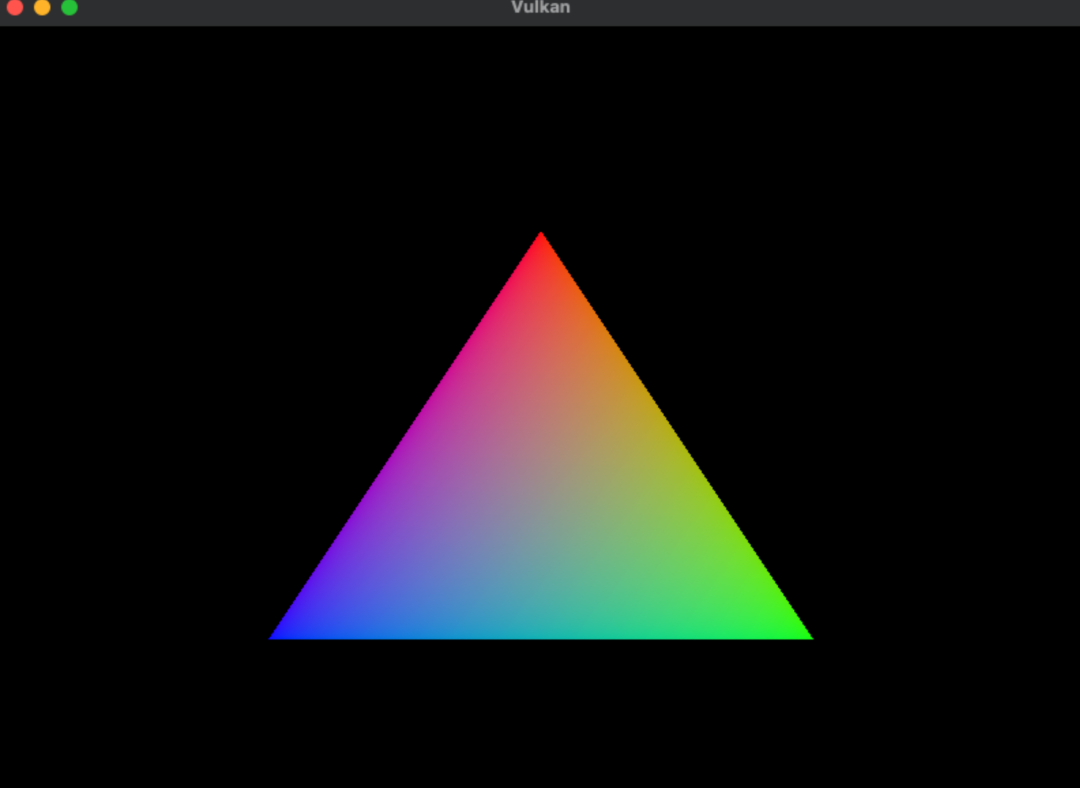
Okay, finally, let's run our Vulkandemo program in CLion. A triangle was born!

How to Fix Error when integrating spring cloud openfeign with spring cloud Alibaba

When learning how to integrate spring cloud with Alibaba, we encountered an openfeign call error

Caused by: java.lang.IllegalStateException: No Feign Client for loadBalancing defined. Did you forget to include spring-cloud-starter-loadbalancer?
	at org.springframework.cloud.openfeign.FeignClientFactoryBean.loadBalance(FeignClientFactoryBean.java:309) ~[spring-cloud-openfeign-core-3.0.0.jar:3.0.0]
	at org.springframework.cloud.openfeign.FeignClientFactoryBean.getTarget(FeignClientFactoryBean.java:335) ~[spring-cloud-openfeign-core-3.0.0.jar:3.0.0]
	at org.springframework.cloud.openfeign.FeignClientFactoryBean.getObject(FeignClientFactoryBean.java:315) ~[spring-cloud-openfeign-core-3.0.0.jar:3.0.0]
	at org.springframework.beans.factory.support.FactoryBeanRegistrySupport.doGetObjectFromFactoryBean(FactoryBeanRegistrySupport.java:169) ~[spring-beans-5.3.3.jar:5.3.3]
	... 47 common frames omitted

Baidu found that openfeign 3.0.0 built in spring cloud 2020.0.0 conflicts with Nacos framework of spring cloud Alibaba.

Here are two solutions

Methond 1

First add the loadbalancer dependency in pom.xml

<dependency>
    <groupId>org.springframework.cloud</groupId>
    <artifactId>spring-cloud-loadbalancer</artifactId>
</dependency>

Because nacos dependencies containing ribbon dependencies will cause loadbalancer to be invalid, you need to exclude the ribbon dependencies from nacos dependencies.

<dependency>
	<groupId>com.alibaba.cloud</groupId>
	<artifactId>spring-cloud-starter-alibaba-nacos-discovery</artifactId>
	<exclusions>
		<exclusion>
			<artifactId>spring-cloud-starter-netflix-ribbon</artifactId>
			<groupId>org.springframework.cloud</groupId>
		</exclusion>
	</exclusions>
</dependency>

Method 2

 <!-- spring cloud 2020.0.0built-in openfeign3.0.0 and spring cloud alibaba framework nacos, seata conflict temporary solution - >
        <dependency>
            <groupId>org.springframework.cloud</groupId>
            <artifactId>spring-cloud-starter-openfeign</artifactId>
            <version>2.2.6.RELEASE</version>
            <exclusions>
                <exclusion>
                    <groupId>org.springframework.cloud</groupId>
                    <artifactId>spring-cloud-starter</artifactId>
                </exclusion>
                <exclusion>
                    <groupId>org.springframework.cloud</groupId>
                    <artifactId>spring-cloud-openfeign-core</artifactId>
                </exclusion>
                <exclusion>
                    <groupId>org.springframework.cloud</groupId>
                    <artifactId>spring-cloud-commons</artifactId>
                </exclusion>
            </exclusions>
        </dependency>
        <dependency>
            <groupId>org.springframework.cloud</groupId>
            <artifactId>spring-cloud-starter</artifactId>
            <version>2.2.6.RELEASE</version>
        </dependency>
        <dependency>
            <groupId>org.springframework.cloud</groupId>
            <artifactId>spring-cloud-openfeign-core</artifactId>
            <version>2.2.6.RELEASE</version>
        </dependency>
        <dependency>
            <groupId>org.springframework.cloud</groupId>
            <artifactId>spring-cloud-commons</artifactId>
            <version>2.2.6.RELEASE</version>
        </dependency>

[How to Fix]Mybatisplus ignores mapped fields

In the development, we may encounter that mybatisplus uses entity class attribute for SQL operation. The entity has this attribute, but the database table does not have this field (that is, entity class attribute is not a database table field). If you don’t handle it, you will report an error.

FIRE

@TableName: Database Table Related

@TableId: table primary key identifier

@TableField: table field identifier

@TableLogic: Table field logical processing annotation (logical deletion

)
Solution

@TableField(exists = false): indicates that the property is not a database table field, but is required to be used.
 
@TableField(exists = true): indicates that the property is a database table field.

After adding this annotation to the attributes of the entity class, this field will not map to the database.

   @TableField(exist = false)
    private String deptName;

How to Check Password Modification Complexity

Password modification complexity check

The corresponding password policy modules of Linux are: PAM_ Passwdqc and PAM_ pwquality . PAM_The passwdqc module corresponds to /etc/login.defs ,pam_ Pwquality corresponds to /etc/security/pwquality.conf

Module adding method: etc/pam.d/passwd

vi /etc/pam.d/passwd
password required pam_pwquality.so retry=3

or

echo "password required pam_pwquality.so retry=3" >> /etc/pam.d/passwd

Open the password complexity verification configuration file / etc / security/ pwquality.conf

vi /etc/security/pwquality.conf
retry=3Defines the number of retries that can be made if the login/change password fails.
Difok=0#defines that there must be several characters in the new password to be different from the old one. but if more than 1/2 of the characters in the new password are different from the old one, that new password will be accepted.
minlen=0#defines the minimum length of the user's password.
dcredit=0#defines how many digits must be included in the user's password.
ucredit=0#defines how many uppercase letters must be included in the user's password.
lcredit=0#defines how many lowercase letters must be included in the user's password.
ocredit=0# defines how many special characters (other than numbers and letters) must be included in the user's password.
# where =-1 means that at least one

Modify password validity file/etc/login.defs

PASS_MAX_DAYS   99999     #The maximum validity of the password, 99999: permanent period
PASS_MIN_DAYS 0 # whether the password can be changed, 0 can be changed, non-0 how many days after the password can be changed
PASS_MIN_LEN 5 #Minimum length of password, use pam_cracklib module, this parameter is no longer valid
PASS_WARN_AGE 7 # how many days before the password expires to notify the user to change the password when they log in

Python Selenium: element is not attached to the page document error

Recently, when I was working on an automatic office project in selenium, I encountered an error in the mouse event Click(), when I was looking for page elements

div = driver.find_elements_by_xpath('//*[@id="test"]') #Find certain elements of a page
for x in range(10):#click on the first 10 links in order
	div[x].click()
	driver.switch_to.window(driver.window_handles[2])#switch to the page handle of the clicked page to perform the operation
	#Omit the operation code here
	driver.close()#close the current tab
	driver.switch_to.window(driver.window_handles[1])#switch to the initial tab handle

When the above code is executed, you can click the first link. When you loop to the second link, you will get the error of element is not attached to the page document.
After careful observation, it is found that when the first link is closed, the initial page will be forced to refresh once. Therefore, it is very likely that the element in the div has changed, resulting in that the element cannot be found later. Therefore, I try to put the statement of finding the element in the loop, that is, each loop will look up the element again, and the problem is solved. After the solution, the code comparison is as follows:

for x in range(10):#Click on the first 10 links in order
	div = driver.find_elements_by_xpath('//*[@id="test"]') # Move the find element statement inside the loop
	div[x].click()
	driver.switch_to.window(driver.window_handles[2])#Switch to the page handle of the clicked page to perform the operation
	#Omit the operation code here
	driver.close()#close the current tab
	driver.switch_to.window(driver.window_handles[1])#switch to the initial tab handle

[How to Fix]Element is not attached to the page document record

Record the click problem of the select box in automatic test

1. Paste the code first

#Open the Google Chrome
driver=webdriver.Chrome();
#driver.fullscreen_window();
#input the Google
driver.get('https://www.google.com/');
#driver.find_element_by_xpath("//*[@id='tsf']/div[2]/div[1]/div[1]/div/div[2]/input").send_keys('新冠状病毒');
time.sleep(1);
#Click the I'm feel Luckly
driver.find_element_by_css_selector("#tsf > div:nth-child(2) > div.A8SBwf > div.FPdoLc.tfB0Bf > center > input.RNmpXc").click();
time.sleep(1);
# click about us
driver.find_element_by_css_selector("#nav-list > li:nth-child(2) > a").click();
time.sleep(1);
#Cyclic click on select checkbox
for index in range(len(driver.find_elements_by_tag_name("option"))):
    driver.refresh();
    select = driver.find_element_by_id("lang-chooser");
    select_value = select.find_elements_by_tag_name("option");
    time.sleep(2);
    select_value[index].click();
    time.sleep(2);

First, by_ tag_ The name method gets the option information in the select box, which is returned in the form of list

driver.find_elements_by_tag_name("option")

Then use the for loop to traverse the list of select options through the index number, and remove the current option of click ()
because each click on the select option will refresh the whole web page, an error will be reported

element is not attached to the page document

So we need to use it driver.refresh() method to refresh the current page, and then get the elements of the select option box again to click

Go: How to Fix plug-in installation failure in vscode of windows system

1.Run go env -w GO111MODULE=on //enable mod   
  Run go env -w GOPROXY=https://goproxy.cn,direct //set proxy
2. Go to GOPATH directory, create src/golang.org/x/ directory, go to src/golang.org/x/ directory
    git clone https://github.com/golang/tools.git
    git clone https://github.com/golang/lint.git
3.Then you can install the go plugin in vscode as prompted (odds are it still won't work)
 So you need to execute the following command in the terminal of %GOPATH%/src directory
    go get -u -v github.com/mdempsky/gocode
    go get -u -v github.com/uudashr/gopkgs/cmd/gopkgs
    go get -u -v github.com/ramya-rao-a/go-outline
    go get -u -v github.com/acroca/go-symbols
    go get -u -v golang.org/x/tools/cmd/guru
    go get -u -v golang.org/x/tools/cmd/gorename
    go get -u -v github.com/go-delve/delve/cmd/dlv
    go get -u -v github.com/stamblerre/gocode
    go get -u -v github.com/rogpeppe/godef
    go get -u -v github.com/sqs/goreturns
    go get -u -v golang.org/x/lint/golint
    go get -u -v github.com/cweill/gotests/...
    go get -u -v github.com/fatih/gomodifytags
    go get -u -v github.com/josharian/impl
    go get -u -v github.com/davidrjenni/reftools/cmd/fillstruct
    go get -u -v github.com/haya14busa/goplay/cmd/goplay
    go get -u -v github.com/godoctor/godoctor
4.There may still be errors after performing the above steps, just follow the instructions prompted by vscode to fix them.


Note: There may be problems with the following:
    Error: go: cannot find main module; see 'go help modules'
    Solution go env -w GO111MODULE=off
GO111MODULE There are three values: off, on and auto (default).

GO111MODULE=off, no module support, find dependencies from $GOPATH and vendor folders.
GO111MODULE=on, with module support, go ignores the $GOPATH and vendor folders and only downloads dependencies based on go.mod.
GO111MODULE=auto, the go command line will decide whether to enable the modules feature based on the current directory.
There are two scenarios.
	module support is enabled when the project is outside of $GOPATH/src and the project root directory has a go.mod file.
	the project is inside $GOPATH/src and module support is not provided even if the go.mod file exists.

[How to Fix]No executorfactory found to execute the application

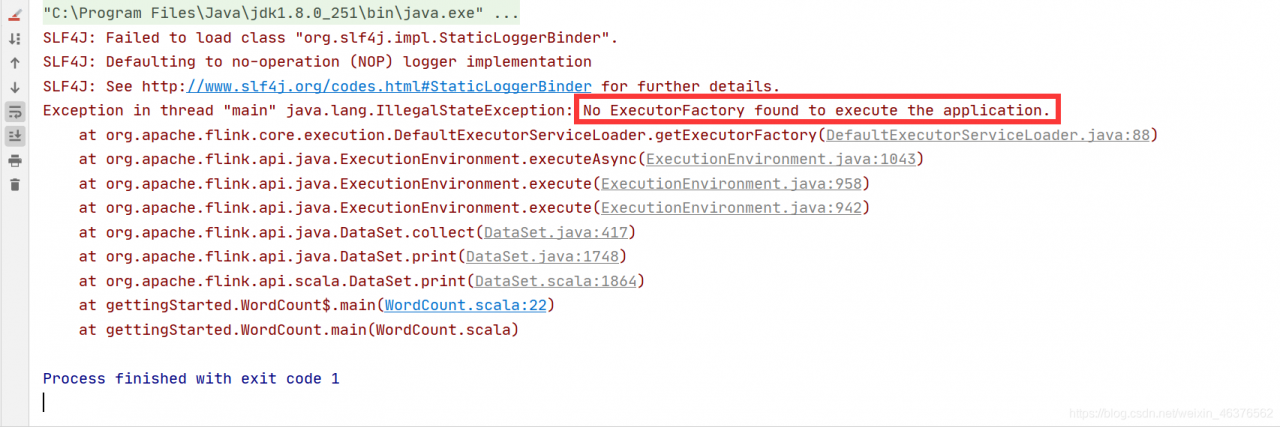
Error information

Cause of error

Starting from Flink 1.11, the dependency of flink-streaming-java on flink-clients has been removed and the clients dependency needs to be added manually.

How to Fix

Modify the POM file and add the Flink clients dependency

 <dependency>
        <groupId>org.apache.flink</groupId>
        <artifactId>flink-clients_2.12</artifactId>
        <version>1.12.2</version>
 </dependency>