Author Archives: Robins

Android Error: Found item attr/tabtextsize more than one time

cause

I’m at RES/values/atts.xml The tabtextsize attribute is defined in the file. There is no problem when using it, but in the process of compiling, I produced error: Found item attr / tabtextsize more than one time , which means error: Found item attr / tabtrimescribe defined more than once , at the beginning, I was puzzled, so I went to see the attributes defined in attr. Find the following as shown:

<resources>
    <declare-styleable name="View Name">
        <attr name="tabTextSize" format="float"/>
        <attr name="tabTextSelectedColor" format="color" />
        <attr name="tabTextUnselectedColor" format="color" />
     </declare-styleable>

    <declare-styleable name="View Name">
        <attr name="tabTextSize" format="float"/>
        <attr name="tabTextSelectedColor" format="color" />
        <attr name="tabTextUnselectedColor" format="color" />
    </declare-styleable>
</resources>
Since the custom view property name is the same, the error mentioned above occurred.

How to Fix

The solution is to extract the same attribute and define it. As shown below, <attr name="tabTextSize" format="float" />is extracted and then called in each view.

<resources>
    <attr name="tabTextSize" format="float"/>
    <declare-styleable name="View Name">
        <attr name="tabTextSize" />
        <attr name="tabTextSelectedColor" format="color" />
        <attr name="tabTextUnselectedColor" format="color" />
    </declare-styleable>

    <declare-styleable name="View Name">
        <attr name="tabTextSize"/>
        <attr name="tabTextSelectedColor" format="color" />
        <attr name="tabTextUnselectedColor" format="color" />
    </declare-styleable>
</resources>

Debian: How to install MariaDB

    1. command
apt install mariadb-server

sudo apt purge autoremove

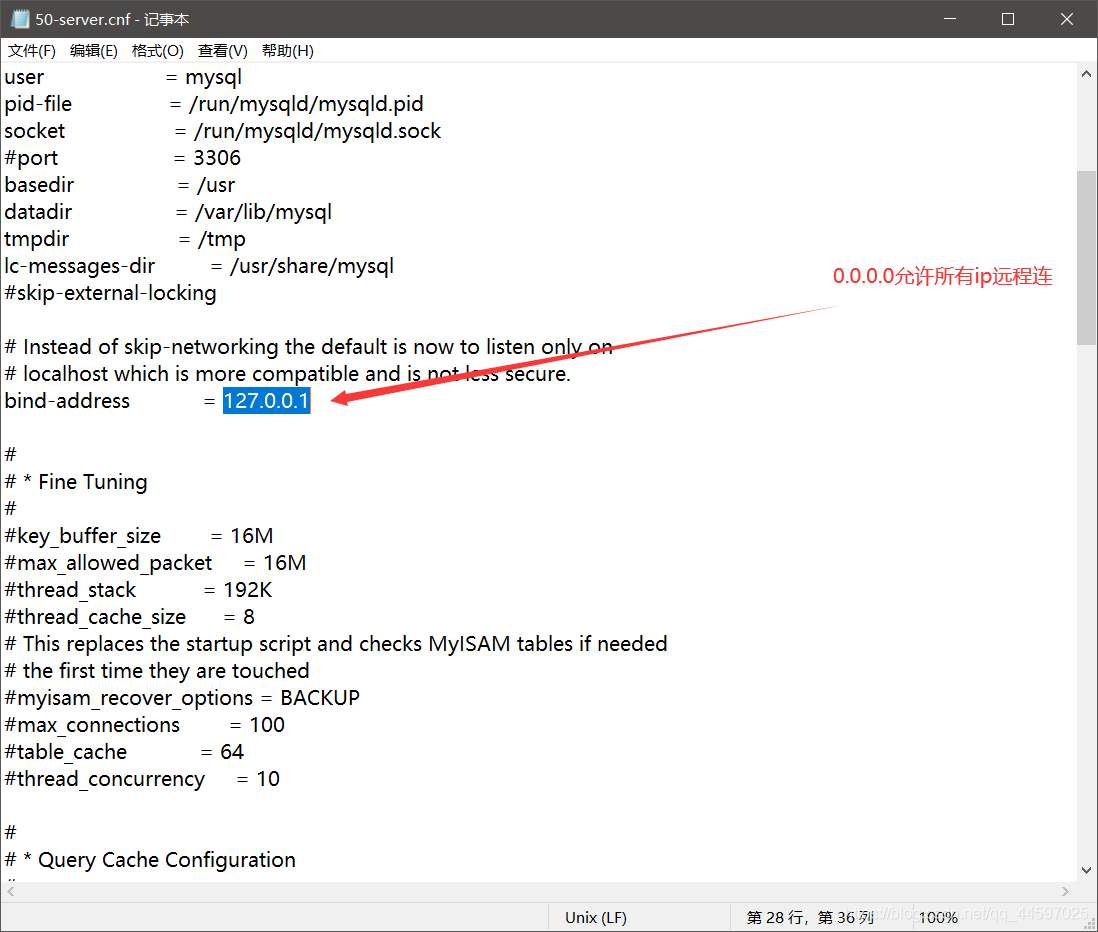
No account password is required for local login, and IP / etc / MySQL can be remotely connected/ mariadb.conf . D directory, comment out this line or IP change

instead

    1. change the password of root
update mysql.user set password=password('ChinaSkill20!') where user='root';
flush privileges;

Create a remote user and set a password

GRANT ALL PRIVILEGES ON *.* TO 'root'@'%' IDENTIFIED BY 'password' WITH GRANT OPTION;
flush privileges;

UNIX socket authentication is used by default. Some phpMyAdmin will have “access denied” error when logging in. We can use native MySQL authentication

update mysql.user set plugin = 'mysql_native_password' where User='root';   
flush privileges;  

restart

systemctl restart mariadb

[How to Fix]java.sql.SQLException: Incorrect string value: ‘\xF0\x9F\x98\x82\xF0\x9F…’

java.sql.SQLException : Incorrect string value: ‘\xF0\x9F\x98\x82\xF0\x9F…’

Problem:
because the emoticons stored in MySQL database string are not compatible with 4-byte Unicode.

Solution:
use the third-party jar to import and store after transformation.

POM introduction:

		 <!-- Expression Switching -->
        <dependency>
            <groupId>com.github.binarywang</groupId>
            <artifactId>java-emoji-converter</artifactId>
            <version>0.1.1</version>
        </dependency>

Specific conversion method:

	String content = "\xF0\x9F\x98\x82\xF0\x9F";
  	EmojiConverter emojiConverter = EmojiConverter.getInstance();
    content= emojiConverter.toAlias(content);//Escaping chat content
    System.out.println(content);

Python Error aiohttp.client_exceptions.ClientConnectorCertificateError, Cannot connect to host:443

An error is reported by the python connection interface
as follows:

aiohttp.client_exceptions.ClientConnectorCertificateError: Cannot connect to  host:443 ssl:True [SSLCertVerificationError: (1, '[SSL: CERTIFICATE_VERIFY_FAILED] certificate verify failed: self signed certificate in certificate chain (_ssl.c:1056)')]

SSL handshake failed on verifying the certificate
protocol: <asyncio.sslproto.SSLProtocol object at 0x000000B1D4E2A7F0>
transport: <_SelectorSocketTransport fd=708 read=polling write=<idle, bufsize=0>>

Solution:

# conn = aiohttp.TCPConnector(verify_ssl=False)  # Prevent ssl from reporting errors
async with aiohttp.ClientSession(connector=aiohttp.TCPConnector(limit=64,verify_ssl=False)) as session:

Add verify_ SSL = false.

Python: How to Delete Empty Files or Folders in the Directory

Traverse all subordinate files and folders in the directory, including subfolders, to find empty files and empty folders and delete them

def Clean_empty(path):
    """
    Iterate through all subfolders and subfiles under a file, cleaning up empty folders and files
    path:file path
    """
    
    for (dirpath,dirnames,filenames) in os.walk(path):
        for filename in filenames:
            file_folder=dirpath+'/'+filename
            # print(file_folder)
            if os.path.isdir(file_folder): 
                if not os.listdir(file_folder): 
                    print(file_folder)
                    # os.rmdir(dirpath+filename) 
            elif os.path.isfile(file_folder): 
                if os.path.getsize(file_folder) == 0: 
                    print(file_folder)
                    os.remove(file_folder)  
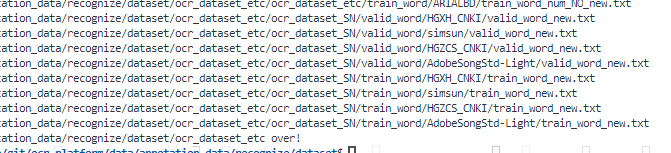
    print(path, 'clean over!')

if __name__ == "__main__": 
    path = '/data/git/ocr-platform/data/annotation_data/recognize/dataset/ocr_dataset_etc'
    Clean_empty(path)

Done!

How to Fix Common Arcpy Error

1. Error: arcgisscripting.ExecuteError : ERROR 000539: Invalid field one_1

analysis:

This problem occurs if the field referenced in the python expression does not exist or is misspelled.

solve:

Change the name of the field in the expression to the correct name.


2. Catch exception

try :
     arcpy.Union_analysis (inFeatures, outFeatures, "ALL")
 except arcpy.ExecuteError:
     arcpy.GetMessages()


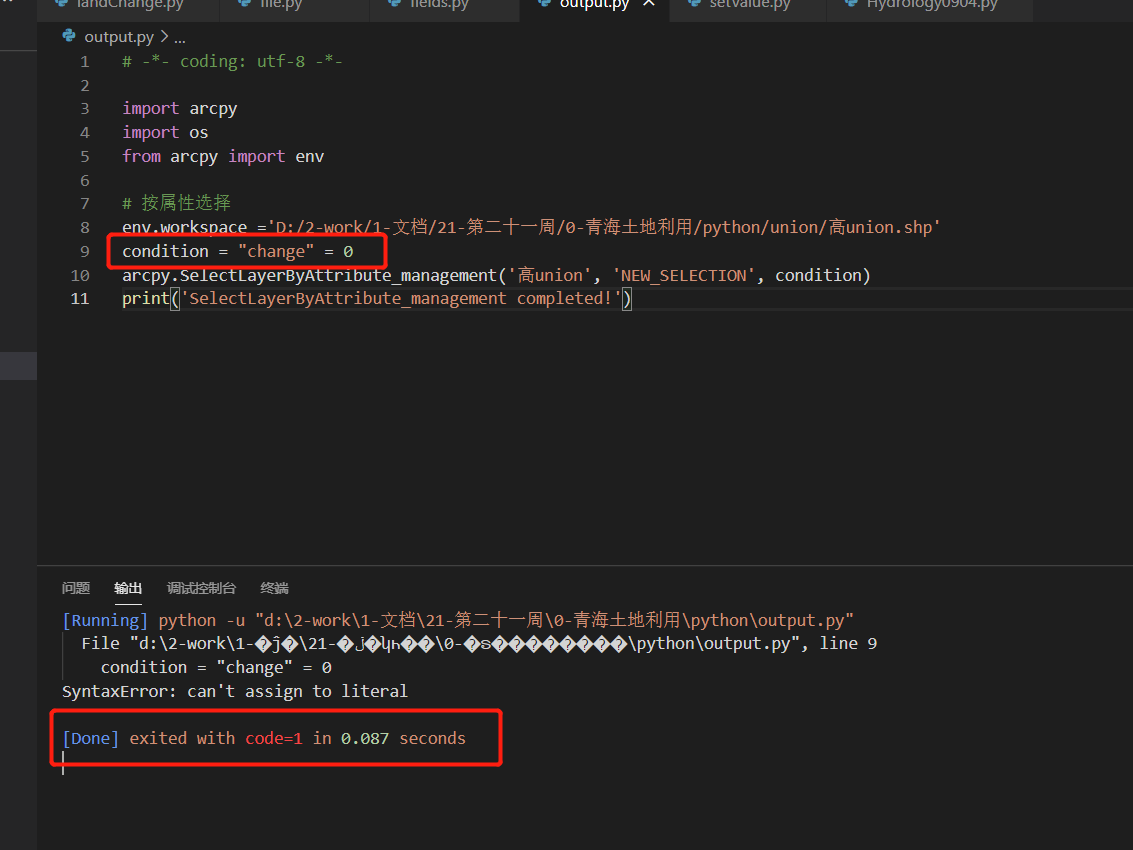
3. Syntax error: cannot assign to literal

solve:

Change to condition = '"change" = 0'


4. Error: object: create object layer invalid data source

This is arcpy.mapping.Layer Interface error:

    Check whether the file corresponding to the address passed into the interface exists. (if it is in the file geographic database, the extension does not include. SHP).
      1. Note that in the process of spelling address, /and \, do not mix. Generally, \

    is used

supplement

1. Python gets the file names of all specified suffixes in the specified directory

os.path.splitext():Separate filename and extension
os.path.splitext(file)[0] gets the file name
os.path.splitext(file)[1] get file extension

2. Python template string

from string import Template

query='''
  hi,%{name}this is a ${test}
'''
t = Template(query)
query = t.substitute({'name': 'Newber', 'test':'Test'})

An error occurred while loading commit signatures

After a new computer is replaced, the following error will be reported when you re open the gitlab project management web page in chrome:

An error occurred while loading commit signatures

Or the following error:

Error fetching diverging counts for branches. Please try again.

This is probably a proxy problem, so you need to check whether the proxy settings are correct. My problem is that I installed an ad plug-in (Adblock plus – a free ad blocker) in chrome, which blocks the normal access to web pages, so I just need to suspend the use of this plug-in.

After closing, all access is normal.

Exception loading sessions from persistent storage

Tomcat error:
serious: IOException while loading persistent sessions: java.io.EOFException
Exception loading sessions from persistent storage

Error Description:
0 The session data stored in the hard disk failed to read. Eofexception indicates that the end of the file or the end of the file stream was unexpectedly reached during the input process, resulting in the failure of reading data from the session. This exception is a problem of Tomcat itself, generally because some active sessions were persisted when Tomcat was shut down abnormally last time. When Tomcat was restarted, Tomcat tried to recover these sessions N but failed to read

Solution:
find the corresponding project under Tomcat / work / Catalina / localhost session.ser File, and then delete it

The original text is reproduced from: http://blog.csdn.net/angeldhp/article/details/4742075

Error reporting in CentOS 7 using yum

Yesterday, we encountered a problem. CentOS 7 reported an error using the yum installation command

yum install unzip zip

yum install unzip zip

Error reporting
Baidu error reporting is probably due to the image problem. To use the alicloud image
modification command, first backup CentOS- Base.repo , rename it

mv /etc/yum.repos.d/CentOS-Base.repo /etc/yum.repos.d/CentOS-Base.repo.backup

Then download the image
centos7:

wget -O /etc/yum.repos.d/CentOS-Base.repo http://mirrors.aliyun.com/repo/Centos-7.repo

And then you see, there’s a new CentOS- Base.repo
Just clear the yum cache and regenerate it

yum clera
yum makecache

When the cache is regenerated, it will run for a while. When the cache is generated and no error is reported, you can download it using yum

java.sql.SQLException: Incorrect string value:

Chinese prompt for inserting MySQL database java.sql.SQLException : incorrect string value: error.

When solving this problem, it is not good to change the database code and table code to utf8.

Finally, we find that the collation of the field is Latin1_ swedish_ Ci, change it to utf8_ general_ Ci is OK.

View field code command: show full columns from tablename;

Change field command: alter table tablename modify column columnname varchar (100) character set utf8 collate utf8_ general_ ci not null;