Author Archives: Robins

Python 3 error typeerror: ‘dict’_ keys‘ object is not subscriptable


Problem: using in Python encoding dict.keys (), typeerror: ‘dict’ will be reported_ Keys’ object is not subscriptable


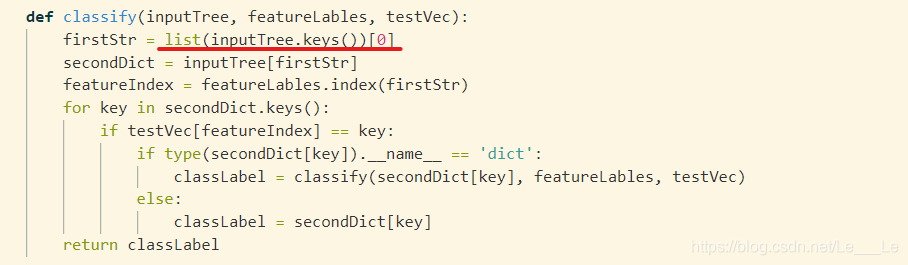
Solution: you need to use list in Python 3, as shown in the figure


Reason: Dict_ Keys ([‘No surfacing ‘,’flippers’]) returns a dict_ The keys object is no longer of the list type and does not support index

Therefore, the list type can be used


If there is any omission in my statement, please don’t hesitate to give me advice. Thank you very much!
If you think it’s useful, please praise it, creative power!

Gcc compiler warning solution: “extra tokens at end of ifndef directive” Tags: GCC, warning

Recently, after checking all the warnings in the project, we found an interesting warning: “extra tokens at end of ifndef directive”. Literally, “there are invalid instructions after ifndef.”. I wrote a small program verification in private, and found that there are two situations that can generate this warning.

Procedure 1:

// directive_1.c
#include <stdio.h>

#ifndef MIN
  #define MIN(x, y) ((x) > (y) ? (y) : (x)) 
#endif /**/x

int main()
{
	printf("min val = %d\n", MIN(100, -1));

	return 0;
}

The above program intentionally adds an invalid character X after “ENDIF / * * / and compiles with GCC with – wall parameter as follows:
GCC directive_ 1. C - wall - O out1
an alarm is generated immediately:

directive_1.c:5:12: warning: extra tokens at end of #endif directive [-Wendif-labels]
 #endif /**/x

I was immediately shocked. Such an obvious “error” problem was that GCC was just a warning, and generated an executable binary file to execute . / out1 . The result was normal, and the effect was as follows:

min val = -1

Procedure 2:

// directive_2.c
#include <stdio.h>

#ifndef MIN
  #define MIN(x, y) ((x) > (y) ? (y) : (x)) 
#endif

int main()
{
	printf("min val = %d\n", MIN(100, -1));

	return 0;
}

Remove the redundant “X” above, and the compilation will be completely normal. As follows:

wangkai@fiberserver:extra-tokens-at-end-of-#ifndef-directive$ gcc directive_2.c -Wall -o out1
wangkai@fiberserver:extra-tokens-at-end-of-#ifndef-directive$ 

After further divergence of the possible situation after ifndef, it is found that there is another situation that can cause this alarm.

Procedure 3:

// directive_3.c
#include <stdio.h>

#ifndef MIN(x, y)
  #define MIN(x, y) ((x) > (y) ? (y) : (x)) 
#endif

int main()
{
	printf("min val = %d\n", MIN(100, -1));

	return 0;
}

Execute the command “ GCC directive"_ 3. C - wall - O out3 , this alarm also magically appears, as follows:

wangkai@fiberserver:extra-tokens-at-end-of-#ifndef-directive$ gcc directive_3.c -Wall -o out3
directive_3.c:3:12: warning: extra tokens at end of #ifndef directive
 #ifndef MIN(x, y)
            ^

The reason is that the preprocessing of # ifndef in C language only checks the keywords, and the “(x, y)” after it is considered as redundant characters. If the brackets are removed and written as # ifndef min , there will be no alarm.
Solution to failure of SSL configuration in synergy

After the synergy Pro is activated, the SSL certificate is automatically generated and SSL encryption is turned on. However, due to some unknown bug, the certificate automatically generated for the first time on the Mac can’t be used. This error will be reported:


[2017-01-25T09:57:03]  INFO:  OpenSSL  1.0.2  22  Jan  2015

[2017-01-25T09:57:18]  ERROR:  ssl error occurred  (system call failure)

[2017-01-25T09:57:18]  ERROR:  eof violates ssl protocol

[2017-01-25T09:57:18]  ERROR:  failed to  accept secure socket

[2017-01-25T09:57:18]  INFO:  client connection may not  be secure

It needs to be solved as follows:

    in the settings of synergy pro, uncheck use SSL to close the current synergy pro, open the terminal, enter ~ / library / synergy / SSL to delete all files in the directory, reopen synergy pro, check use SSL in the settings, the software will regenerate the certificate, stop the original client, re connect, trust the certificate in the pop-up box, the problem is solved.

If there is such a problem when the client connects:


[2017-01-25T09:59:13]  ERROR:  ssl error occurred  (generic failure)

[2017-01-25T09:59:13]  ERROR:  error:140770FC:SSL routines:SSL23_GET_SERVER_HELLO:unknown protocol

[2017-01-25T09:59:13]  ERROR:  failed to  connect secure socket

It indicates that either client or server does not enable SSL. Please check all servers and clients. SSL must be enabled or not. There must not be only some enabled.

Spring ApplicationContext – Resource leak: ‘context’ is never closed

Compiling environment: Eclipse

Problem: in spring MVC applications, I use the following method to initialize variables in one of the service classes

ApplicationContext context=new ClassPathXmlApplicationContext("Beans.xml");
HelloWorld obj=(HelloWorld) context.getBean("helloWorld");
obj.getMessage();

In the first line of the above code, the ‘context’ variable generates a warning. The warning is as follows:

Resource leak: 'context' is never closed

Solution: because ApplicationContext has an instance of classpathxmlapplicationcontext, it has a close () method. We just need to throw the context object and call the close () method, as shown below.

((ClassPathXmlApplicationContext) context).close();

In addition, if the ApplicationContext uses an abstractapplicationcontext instance, you need to throw the context object of that type and call the close () method.

import org.springframework.context.support.AbstractApplicationContext;
    ...
    ...
    ...
    ...
((AbstractApplicationContext) context).close();


Animation event has no receiver in unity animation

In the process of editing animation by unity, this prompt always appears:


AnimationEvent ‘XXXXXX’ on animation ‘XXXXXX’ has no receiver! Are you missing a component?


After a long time, I changed the value, but it didn’t work


Hang the script of the method you want to execute on the object you want to execute the animation, and that’s it!


Yes, it’s that simple. But waste me a long time!!!


Failure delivering result ResultInfo

java.lang.RuntimeException : Failure delivering result ResultInfo{who=null, request=65555, result=-1, data=Intent { dat= content://media/external/images/media/57064 flg=0x1 launchParam=MultiScreenLaunchParams { mDisplayId=0 mBaseDisplayId=0 mFlags=0 }

Inexplicably, there is a strange bug in the online app, which only appears on one user. The location of the crash is when sending pictures. The first moment I found the bug, I suspected the problem caused by too large pictures, but I read the newspaper wrong

Caused by: android.database.CursorIndexOutOfBoundsException : Index 0 requested, with a size of 0
    at android.database.AbstractCursor .checkPosition( AbstractCursor.java:460 )
    at android.database.AbstractWindowedCursor .checkPosition(Ab stractWindowedCursor.java:136 )
    at android.database.AbstractWindowedCursor .getString(Ab stractWindowedCursor.java:50 )
    at android.database.CursorWrapper .getString( CursorWrapper.java:137 )
    at com.easemob.chatuidemo . activity.ChatFragment.sendPicByUri ( ChatFragment.java:922 )
    at com.easemob.chatuidemo . activity.ChatFragment.onImageSelected ( ChatFragment.java:908 )
    at com.easemob.chatuidemo . activity.ChatFragment.onActivityResult ( ChatFragment.java:862 )
    at android.support .v4. app.FragmentActivity.onActivityResult ( FragmentActivity.java:164 )
    at com.rosevision.ofashion . activity.BaseWithoutActionBarLogicActivity .onActivityResult(BaseWithoutAc tionBarLogicActivity.java:364 )
    at android.app.Activity .dispatchActivityResult( Activity.java:7282 )
    at android.app.ActivityThread .deliverResults( ActivityThread.java:4516 )
    at android.app.ActivityThread .handleSendResult( ActivityThread.java:4563 )
    at android.app.ActivityThread .-wrap22( ActivityThread.java )
    at android.app.ActivityThread $H.handleMessage( ActivityThread.java:1698 )
    at android.os.Handler .dispatchMessage( Handler.java:102 )
    at android.os.Looper .loop( Looper.java:154 )
    at android.app.ActivityThread .main( ActivityThread.java:6776 )
    at java.lang.reflect . Method.invoke (Native Method)
    at com.android.internal . os.ZygoteInit $ MethodAndArgsCaller.run ( ZygoteInit.java:1520 )
    at com.android.internal . os.ZygoteInit.main ( ZygoteInit.java:1410 )

Obviously, this is not the problem. The error is caused by the cursor, but there is no problem with other mobile phones. This problem only occurs with this user, so it may be related to the problem of user settings. The next experiment verifies my conjecture
conclusion

The reason for this problem is that the user has turned off the application reading permission of the software in the settings or some security software, resulting in the situation that the cursor reading data is empty, resulting in the following crash

tf.contrib.layers .xavier_ Initializer function usage

First of all tf.contrib.layers

This is a packaged high-level Library in tensorflow1. X, in which there are many high-level packages of functions,

Convolution function tf.contrib.layers . conv2d(), pooling function tf.contrib.layers .max_ Pool2d() and tf.contrib.layers .avg_ Pool2d (), all join function tf.contrib.layers .fully_ Connected () and so on

Using this high-level library to develop programs will improve efficiency.

Here is an introduction tf.contrib.layers .xavier_ Initializer function

xavier_initializer(
    uniform=True,
    seed=None,
    dtype=tf.float32
)

This function returns an initializer “Xavier” for initializing weights.

This initializer is used to make the variance of each layer output as equal as possible.

Parameters:

Uniform: use uniform or normal distribution to initialize randomly.
seed: can be regarded as seed used to generate random numbers
dtype: only supports floating-point numbers.

Return value:

Initializing the weight matrix
is necessary

Tensorflow2. X does not use contrib advanced library

solution: how to initialize weights by Xavier rules in tensorflow 2.0?

QuartusII software exception: error: top level design entity “” is undefined


When using quartus to design digital circuits, we encountered the following compilation errors:

Info: *******************************************************************
Info: Running Quartus II 64-Bit Analysis & Synthesis
 Info: Version 11.0 Build 157 04/27/2011 SJ Full Version
 Info: Processing started: Thu May 15 13:09:59 2014
Info: Command: quartus_ map –read_ settings_ files=on –write_ settings_ files=off simulate -c simulate
Info: Parallel compilation is enabled and will use 2 of the 2 processors detected
Info: Found 1 design units, including 1 entities, in source file simulate.v
 Info: Found entity 1: modelsim_ test
Error: Top-level design entity “simulate” is undefined

Error: Quartus II 64-Bit Analysis & Synthesis was unsuccessful. 1 error, 0 warnings
 Error: Peak virtual memory: 324 megabytes
 Error: Processing ended: Thu May 15 13:10:01 2014
 Error: Elapsed time: 00:00:02
 Error: Total CPU time (on all processors): 00:00:01
Error: Quartus II Full Compilation was unsuccessful. 3 errors, 0 warnings


as a result of

The module name in Verilog file (. V) is inconsistent with the top-level design entity (usually the file name of. V file).

module modelsim_test(clk,rst_n,div);
input clk;
input rst_n;
output div;
reg div;
always@(posedge clk or negedge rst_n)
	if(!rst_n)div<=1'b0;
	else div<=~div;
endmodule 

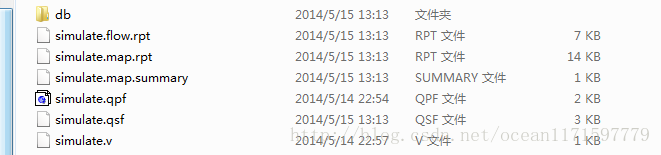
The name of the module above is Modelsim_ Test, and the Verilog file name in the project directory is simulate, as shown in the following figure.

The solution is: model sim_ Test is changed to simulate.

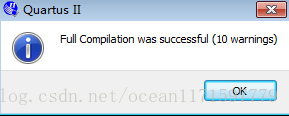
Compiled successfully!


Python Numpy.ndarray ValueError:assignment destination is read-only

reference resources: http://stackoverflow.com/questions/13572448/change-values-in-a-numpy-array

###################################################################3

Get the video stream from the raspberry pie camera and convert it to opencv format:

http://blog.csdn.net/u012005313/article/details/51482994

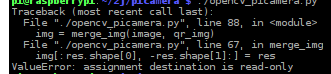
At the same time, you want to operate on each frame, but there is an error:

ValueError:assignment destination is read-only

Images cannot be manipulated because they are read-only.

Find a way on stackhover: because in Python, the opencv image format is Numpy.ndarray You can modify the properties of ndarray by:

img.flags.writeable = True

####################################################################

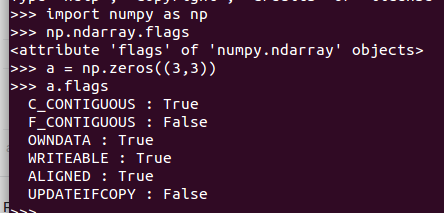
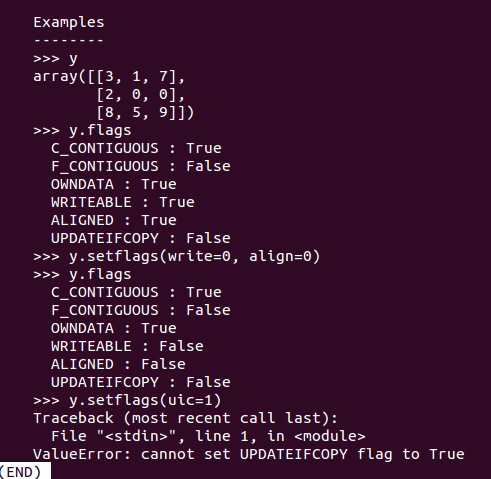
Numpy.ndarray It has the following attributes:

C_ CONTIGUOUS(c_ contiguous)

F_ CONTIGUOUS(f_ contiguous)

OWNDATA(owndata)

WRITEABLE(writeable)

ALIGNED(aligned)

UPDATEIFCOPY(updateifcopy)

import numpy as np
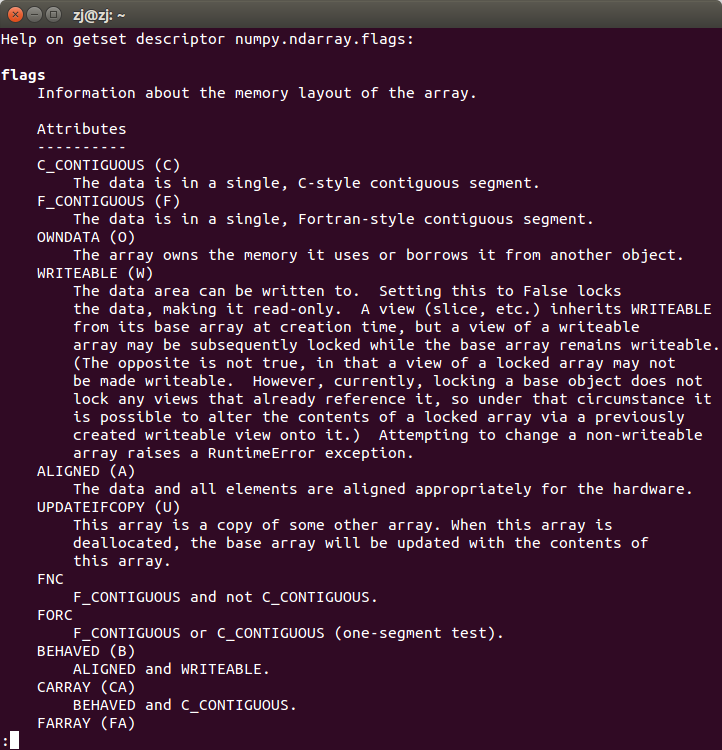
help(np.ndarray.flags)

The flags property is information about the array memory layout

Among them, the flags attribute can be modified in the form of a dictionary, for example:

a.flags['WRITEABLE'] = True

You can also use lowercase attribute names:

a.flags.writeable = True

Abbreviations (‘c ‘/’f’, etc.) are only used in dictionary form

Only the attributes updateifcopy, writeable and aligned can be modified by users in three ways

1. Direct assignment:

a.flags.writeable = True

2. Dictionary input:

a.flags['WRITEABLE'] = True

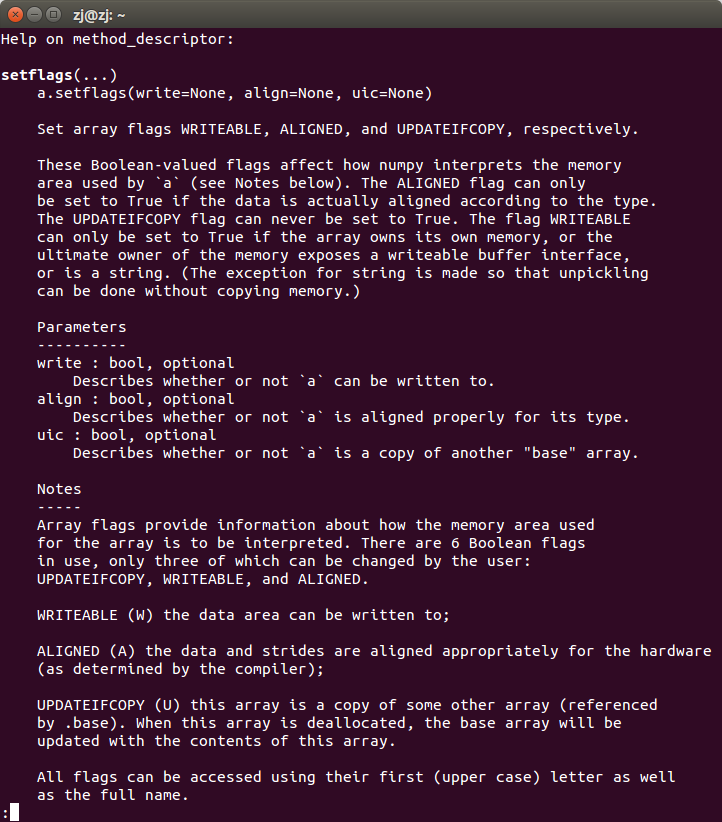
3. Use function ndarray.setflags :

help(np.ndarray.setflags)