Author Archives: Robins

Solve the problem that the interface between C # WinForm program and Oracle doesn’t respond for a long time

Procedures:

WinForm program (user management system) written by C #, the back-end WCF service provides data for it, and Oracle related operations are completed in WCF server.

Problems encountered: Recently, a user reported an exception, describing that a certain search interface of WinForm (to call WCF service to find data in Oracle) has been waiting. Someone in the DBA also reported that some Oracle sessions that call the stored procedures related to the user management system have been running for three hours, which has affected the Oracle database, and these processes need to be terminated manually.

Finally, the reasons are found

A large amount of data is suddenly inserted into the table of Oracle database, which makes the query slow. Then the user clicks the search button when searching in the WinForm interface, and the WCF service will be called to retrieve the database. However, the retrieval is very slow. After waiting for 3 minutes, the user doesn’t want to wait any longer, so he closes the interface directly. Notice that in the process,

Although WinForm forced the client to shut down during the connection with WCF, the server code of WCF was running half way and waiting for the result returned by Oracle. The WCF was not shut down and was still running. The connection with oracle was always connected.

Let’s talk about Oracle first. If C # calls one of its stored procedures, a connection or session will be established. Oracle has a mechanism to automatically clean up inactive sessions. Although it is not real-time, it has this mechanism. If the session between c#and Oracle is continuous, the session will not be cleaned up. If C # calls a time-consuming stored procedure, but C # exits in the middle of the way, the session will become inactive and will be cleaned up by Oracle at the right time.

Now the problem is that the user exits in the WinForm interface, but it is still executing in WCF, so the connection between WCF server and Oracle is always active session, so the stored procedure has been executing for three hours. At this time, the user opens a new WinForm interface and tries to query again. WCF will open a new session with Oracle, Until the available connection pool is used up (or the maximum number of connections that the Oracle server can accept at the same time), the WCF server and the Oracle session will be in the state of waiting for available connections, and then the WinForm interface will naturally be in the state of waiting for no response.

Solution:

Add the timeout attribute to WCF’s code to connect to Oracle. When the code is executed for more than 5 minutes, the connection will be automatically disconnected. After that, the inactive session in Oracle will be cleared, and the connection pool of C # WCF server will be enough, and there will be no waiting state.

Reasons for slow stored procedures and queries in databases:

This table has a large amount of data, and a large amount of data has just come in. Oracle sometimes encounters this problem. The same query statement was executed very slowly last time, and it may be completed very soon next time (I don’t know much about this DBA category). If a statement occupies the table for three hours, then other people’s session is also very slow to execute the query statement (maybe other people’s session is lucky and should have been right soon). Now use timeout to end this session, and other sessions will execute query statements, which may be faster.

https://stackoverflow.com/questions/12660636/oraclecommand-timeout?utm_ medium=organic&utm_ source=google_ rich_ qa&utm_ campaign=google_ rich_ qa  comand tiem out

https://forums.devart.com/viewtopic.php?t=25872
The problem of [connection lost contact] after C # code connecting Oracle database for a period of time

Recently, we are using C # code to connect Oracle database, which is divided into two parts, client and server of WCF. There is no problem in the startup and running of the program, and there is no problem in the running after it is deployed to the server. But when you visit again the next day, you will throw the exception shown below. What’s going on?


Oracle.DataAccess.Client.OracleException ORA-03135: connection lost contact
	Process ID: 22574
	Session ID: 799 Serial number: 43225    Oracle.DataAccess.Client.OracleException.HandleErrorHelper(Int32 errCode, OracleConnection conn, IntPtr opsErrCtx, OpoSqlValCtx* pOpoSqlValCtx, Object src, String procedure, Boolean bCheck)
	   at Oracle.DataAccess.Client.OracleCommand.ExecuteReader(Boolean requery, Boolean fillRequest, CommandBehavior behavior)
	   at Oracle.DataAccess.Client.OracleDataAdapter.Fill(DataSet dataSet, Int32 startRecord, Int32 maxRecords, String srcTable, IDbCommand command, CommandBehavior behavior)
	   at System.Data.Common.DbDataAdapter.Fill(DataSet dataSet, String srcTable)
	

The relevant code used to connect Oracle database is also very typical, without any complexity.


public DataSet ExcuteDataSetForOralce(string sql, CommandType type, List<OracleParameter> paras)
        {
            DataSet ds = new DataSet();
            OracleCommand cmd = null;
            try
            {
                using (OracleConnection conn = new OracleConnection(ConnectionString))
                {
                    using (cmd = new OracleCommand(sql, conn))
                    {
                        if (paras != null)
                        {
                            foreach (OracleParameter p in paras)
                            {
                                cmd.Parameters.Add(p);
                            }
                        }
                        cmd.CommandType = type;
                        OracleDataAdapter oda = new OracleDataAdapter();
                        oda.SelectCommand = cmd;
                        conn.Open();
                        oda.Fill(ds, "tempTable");
                        conn.Close();
                    }
                }
            }
            catch (Exception ex)
            {
                log.Error("error", ex, LogType.Error);
            }
            return ds;
        }


Through multi-party search, it is found that this is not a code problem. Moreover, the problem of the connection between the provider and the database. In fact, when we create a new connection, we get the connection from the database connection pool. These connections are placed in the. Net provider. Conn.Close () does not close the connection, but returns it to the connection pool.


Now the problem is Oracle provider, not code. Your program hasn’t interacted with the database for a long time, and the database server turned off the open state of the connection, but the provider didn’t handle it in time, and still gave it to the C # code, so this exception was thrown.


The solution is to directly connect to the database without using the connection pool. Although this problem will not occur, there will be performance loss.


stay app.config In the configuration file of, in the string datasource = ((description…), add do not use connection pool.


Data Source=(DESCRIPTION=(ADDRESS_LIST=(ADDRESS=(PROTOCOL=TCP)(HOST=xxx)(PORT=1521)))(CONNECT_DATA =(SERVICE_NAME=xxx)(SERVER = DEDICATED)));User ID=xxx;password=xxxxx;Pooling=false;


http://www.csdn.net/topics/3920225524


The provider is not compatible with the version of Oracle client systems

In fact, this problem is very intuitive, which is what you use in the C # project Oracal.DataAcess.dll The version of the file is the same as the one installed on your computer ODAC.EXE ( ODP.NET )Version inconsistency, whether it’s 32-bit or 64 bit platform inconsistency, or version inconsistency, anyway, it’s the mismatch that causes the problem. There are many specific solutions on the Internet, so I won’t go into details here.


But this time I had a strange problem. I have many on my machine ODAC.EXE Version, including two 64 bit, a 32-bit, and clearly I use in C # Oracle.DataAccess.dll The version of is exactly the same as an ODAC, but the exception “the provider is not compatible with the version of Oracle client sometimes” is thrown, which makes me very puzzled. What’s more strange is that this exception is not thrown out every time. Sometimes it doesn’t exist. That is to say, the connection between my code and the database, which can or can’t be connected, all depends on luck.


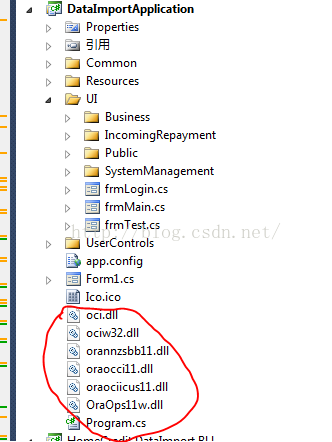
After a long search, we finally found the root of the problem. Because this is a legacy project, I downloaded it locally and saw the files circled in this project. Although I felt strange, I didn’t care too much. But it is these documents that cause the above problems. When I remove these files and recompile them, everything is OK and I can connect to the database normally. Therefore, the reason for this summary is that in the C # project of Oracle, you should not introduce OCI files casually. (at the moment, I don’t know why predecessors introduced these documents when they did this project.)


[failed to configure website XXXXXX to use ASP.NET 4.0。 For this site to work correctly, you must manually configure it to use ASP.NET 4.0] solutions to the problem

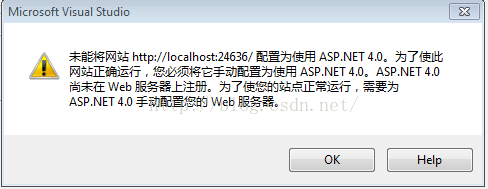
Recently, I was working on an MVC project using VS2010 (although it’s very old, but the company requires that there’s no way). When I opened this project with VS2010, I threw out a question:

The site could not be downloaded http://localhost : 2609/configured to use ASP.NET 4.0。 For this site to work correctly, you must manually configure it to use ASP.NET 4.0。 ASP.NET Not yet registered on the web server. You need to focus on ASP.NET 4.0 manually configure your web server to make your website run correctly.


After a variety of searches, it is found that the general reason is that this project uses ASP.NET4 Related things, but these things are not registered on VS2010 and related web servers. So, we need to register. How to register?It needs to be done by installing a patch. This patch is: vs10sp1-kb3002340-x86.exe, search the official website of this patch in Baidu or Google, and restart VS2010 after installation.

[unable to calculate item metadata “% (fullpath)” unable to apply item metadata “% (fullpath)” to path] problem solving

Recently, I downloaded a project from SVN to local. I encountered a problem in the process of opening it with visual studio. The problems encountered are as follows:

Cannot evaluate item metadata ‘% (fullpath)’. Cannot apply item metadata “% (fullpath)” to path “obj/debug/xxx… \ Basic.DomainModel.Model .dll”。

After searching in many ways, it is found that the problem is that the folder of this project is too long from top to bottom. Vs identifies the problem. That is to say, vs limits the total length of the file path in the project.

Solution: shorten the name of the upper folder where the. SLN file is located, or reduce the number of depth layers of the folder to a certain range.

org.apache.jasper.JasperException: Unsupported encoding:

org.apache.jasper .JasperException: Unsupported encoding: 

org.apache.jasper . compiler.DefaultErrorHandler.jspError ( DefaultErrorHandler.java:51 )

org.apache.jasper . compiler.ErrorDispatcher.dispatch ( ErrorDispatcher.java:409 )

org.apache.jasper . compiler.ErrorDispatcher.jspError ( ErrorDispatcher.java:116 )

org.apache.jasper . compiler.JspUtil.getReader ( JspUtil.java:1093 )

org.apache.jasper . compiler.ParserController.doParse ( ParserController.java:250 )

The reason for throwing this exception is that there is a problem in the encoding settings of the JSP page

<%@ page language=”java” import=” java.util .*” pageEncoding=””%>

Here, the value of pageencoding is empty, which cannot be recognized by the server. Even if there is one more space, the server will not recognize it.

& lt;% @ page contenttype = “text/HTML; charset = GB2312″% & gt; the charset here has an extra space, so this exception should be thrown.

Android studio upgrade 4.1 plug-in error

reason

The plugins plug-in failed

terms of settlement

1. Delete plug-in
user directory

\AppData\Roaming\Google\Android studio4.1\plugins

Find the directory and delete the corresponding plug-in
uninstall butterknife zelezny and install Android butterknife injections (support kotlin)
uninstall gsonformat and install gsonformatplus

2. The code is not highlighted and the error is not red

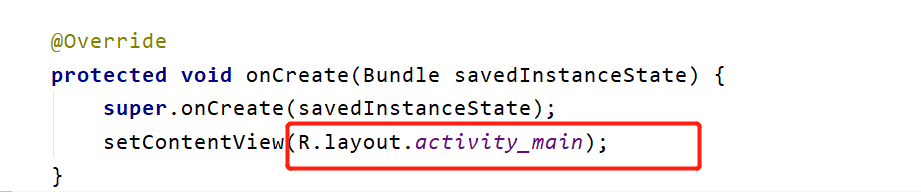
Errors don’t pop up, and they don’t pop up without this layout (I have already solved this problem)
don’t create an XML file according to the prompt

3. Code writing does not prompt

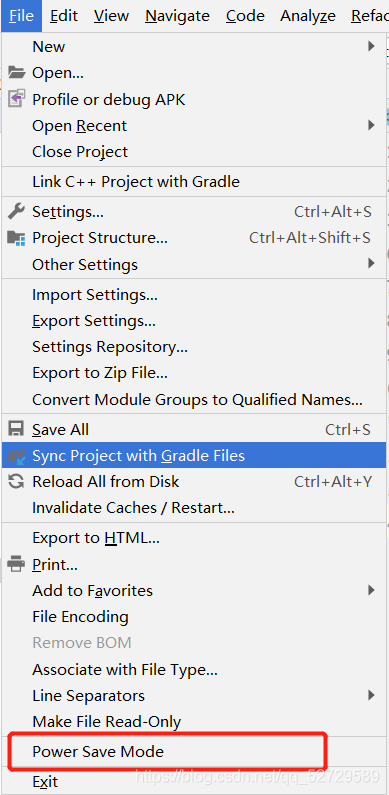
Click the file in the upper left corner to find the power save mode. If it is checked, you can cancel the check and restart studio.

How to generate PDF by C #

In the previous project, we used wkhtmltopdf to render web pages to generate PDF files. This scheme has not been very stable, and the styles of different scenes are often different, so it needs to be adjusted. Today, we have studied the scheme of generating PDF directly by C #, which is relatively simple. The overall scheme is as follows:

Generate XPS file through WPF library
Convert XPS file into PDF file through pdfsharp
first, take a look at the code of generating XPS file. The code is as follows:

var fixedDoc = new FixedDocument();
var pageContent = new PageContent();
var fixedPage = new FixedPage();
 
fixedPage.Children.Add(canvas);
((IAddChild)pageContent).AddChild(fixedPage);
fixedDoc.Pages.Add(pageContent);
 
using var xpsd = new XpsDocument(@"r:\3.xps", FileAccess.ReadWrite);
var xw = XpsDocument.CreateXpsDocumentWriter(xpsd);
 
xw.Write(fixedDoc);
xpsd.Close();

Because visual in WPF can be converted to XPS file. Thanks to the powerful display ability of WPF, even rendering complex XPS files is very easy.

After having the XPS file, the next step is to convert it to PDF. Here, I use the free pdfsharp package. Because I use. Net 5, I introduce PDF PdfSharp.Xps.dotNet . core, the code is relatively simple, a line of code can be done.

PdfSharp.Xps.XpsConverter.Convert(@"r:\3.xps", @"r:\3.pdf", 0);

The scheme of generating PDF is simple and easy to use with the help of class library of WPF platform, and can realize visualization. The disadvantage is that you can’t run on Linux. If you want to realize PDF generation on Linux platform, you can also use pdfsharp directly. For details, please refer to this article: PDF generation and printing in. Net

The above is the detailed content of the method for C to generate PDF. For more information about C to generate PDF, please refer to

ArcGIS SOE unable to add extension FAQ

Problem description 1:

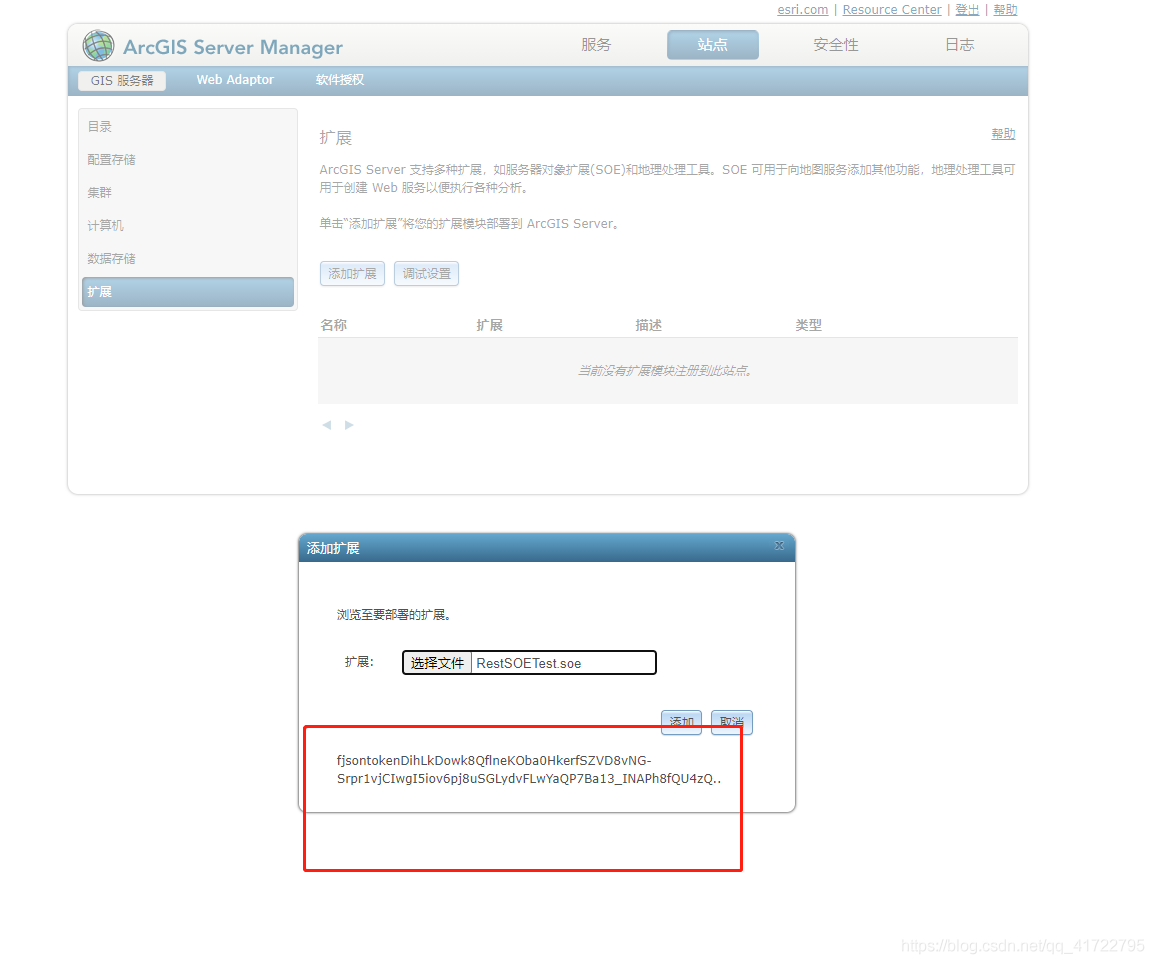
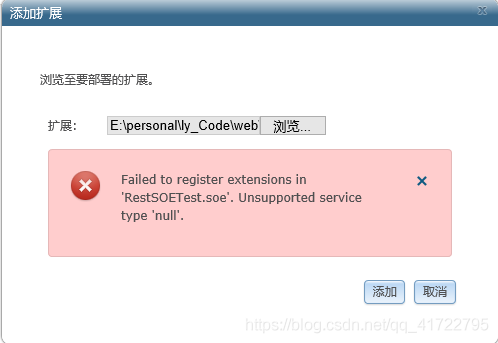
In the development process, when I wrote the SOE extension file, I found that adding SOE extension failed. The following errors occurred:

Causes of bugs

First of all, I use ArcGIS version 10.2, which can’t be extended by Google browser and 360

This bug is caused by the incompatibility of Dojo upload plug-ins.

Bug resolution

Use IE browser to upload SOE file:


There’s a new bug

ArcGIS SOE add extension error “unsupported service type ‘null’

Failed to register extensions in ‘ RestSOETest.soe . unsupported service type ‘null’, as shown in the figure below:


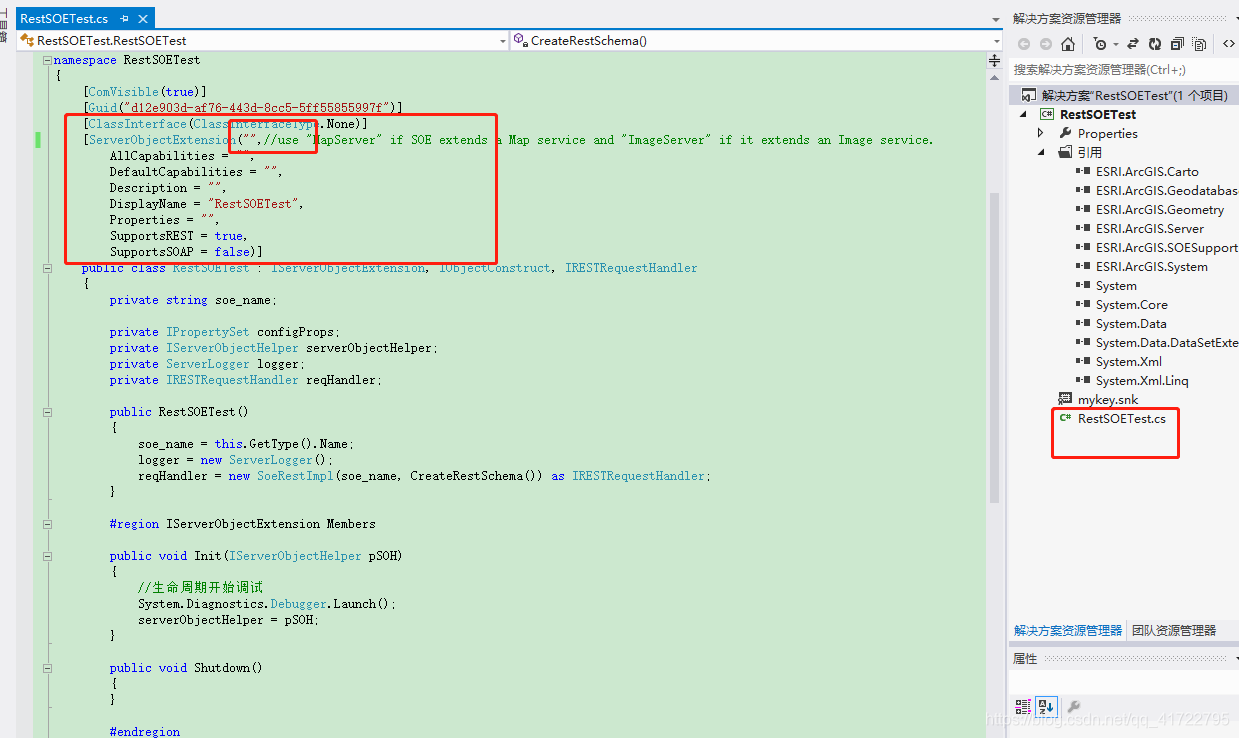
I’ve been looking for the reason for a long time: type of serverobjectextension (choose between MapServer and imageserver)


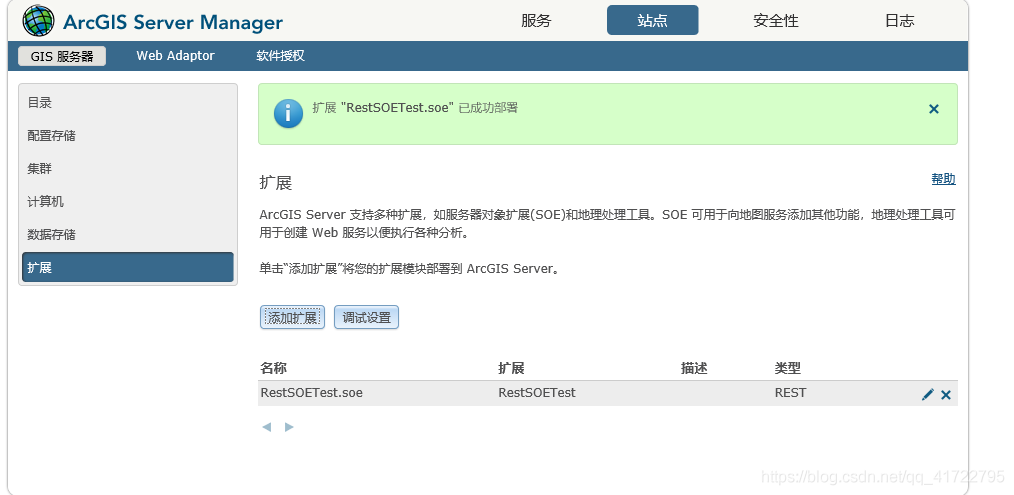
Then use IE browser to add: after adding successfully, as shown in the figure


Can mybatis prevent SQL injection

1. Concept: what is SQL injection

sql injection : is a code injection technology, used to attack data-driven applications, malicious SQL statements are inserted into the executed entity fields.

It’s a common attack. If the attacker enters some special SQL fragments (such as “or 1 = 1”) on the form information or URL of the interface, it is possible to invade the application with incomplete parameter verification. Therefore, some work should be done in application development to prevent SQL injection. In some applications with high security requirements (such as banking software), SQL statements are usually replaced by stored procedures to prevent SQL injection. It’s a very safe way to deal with it.

answer: mybatis can prevent SQL injection, please continue to read.

2. Implementation: mybatis prevents SQL injection

<select id="selectByNameAndPassword" parameterType="java.util.Map" resultMap="BaseResultMap">
  select id, username, password, role
     from user
        where username = #{username,jdbcType=VARCHAR}
        and password = #{password,jdbcType=VARCHAR}
</select>
<select id="selectByNameAndPassword" parameterType="java.util.Map" resultMap="BaseResultMap">
    select id, username, password, role
        from user
        where username = ${username,jdbcType=VARCHAR}
        and password = ${password,jdbcType=VARCHAR}
</select>

the difference between # and $ in mybatis:

1. # will treat all incoming parameters as a string, and will automatically add a double quotation mark to it.

For example: where user name = # {user name}, if the value passed in is 111, then the value parsed into SQL is where user name = # {user name}. If the value passed in is ID, then the value parsed into SQL is where user name = # {user name}

2. $ directly displays and generates the incoming data in SQL.

For example: where user name = ${user name}, if the value passed in is 111, then the value parsed into SQL is where user name = 111

If the passed in value is; drop table user;, then the parsed SQL is: select id, username, password, role from user where username =; drop table user

3. The # method can prevent SQL injection to a great extent, while the $ method cannot prevent SQL injection.

4. The $ method is generally used to pass in database objects, such as table names

5. It is recommended to use #, to avoid using $. If you have to use parameters like “${XXX}”, you need to do a good job in filtering to prevent SQL injection attacks.

6. In mybatis, parameters with “${XXX}” format will directly participate in SQL compilation, so injection attack cannot be avoided. But when it comes to dynamic table names and column names, we can only use parameter formats like “${XXX}”. Therefore, such parameters need to be handled manually in the code to prevent injection.

[Conclusion] the format of “# {XXX}” should be used as much as possible when writing the mapping statement of mybatis. If you have to use parameters like “${XXX}”, you should do a good job of filtering manually to prevent SQL injection attacks.

3. Principle analysis: how does mybatis prevent SQL injection

Mybatis framework is a semi-automatic persistence layer framework , SQL statements need to be written manually by developers, at this time, SQL injection must be prevented. In fact, mybatis SQL has the function of “ input + output “, which is similar to the function structure. Please refer to the above two examples. Among them, parametertype indicates the input parameter type and resulttype indicates the output parameter type. In retrospect, if you want to prevent SQL injection, you have to do something about the input parameters. In the above code, #, is the part where input parameters are spliced in SQL. After the parameters are passed in, the executed SQL statement will be printed out, as follows:

select id, username, password, role from user where username=?and password=?

That is, no matter what kind of parameters you enter, the printed SQL will look like the above. Reason: mybatis enables the precompile function. Before SQL execution, SQL will be sent to the database for compilation. During execution, the compiled SQL will be used directly, and the parameter can replace the “?” in the place holder. Because SQL injection can only work on the compilation process, this way can avoid SQL injection attack.

[underlying implementation principle] how does mybatis precompile SQL?In fact, at the bottom of the framework, it is the Preparedstatement class in JDBC that works. Preparedstatement is a subclass of statement that we are very familiar with. Its objects contain compiled SQL statements. This “ready” approach not only improves security, but also improves efficiency when executing the same SQL multiple times. The reason is that the SQL has been compiled and there is no need to compile it again.

//Safe, pre-compiled
Connection conn = getConn();//Get the connection
String sql = "select id, username, password, role from user where id=?" ; // the statement will be pre-compiled before executing sql
PreparedStatement pstmt = conn.prepareStatement(sql); 
pstmt.setString(1, id); 
ResultSet rs=pstmt.executeUpdate(); 
......

//Unsafe, not pre-compiled
private String getNameByUserId(String userId) {
    Connection conn = getConn();//connected
    String sql = "select id,username,password,role from user where id=" + id;
    //When the id parameter is "3;drop table user;", the executed sql statement is as follows:
    //select id,username,password,role from user where id=3; drop table user;  
    PreparedStatement pstmt =  conn.prepareStatement(sql);
    ResultSet rs=pstmt.executeUpdate();
    ......
}

Conclusion

#{}: equivalent to Preparedstatement in JDBC

${}: is the value of the output variable

In short: # {} needs to be precompiled, which is safe; ${} only takes variable values without precompiling, which is not safe, and there is a risk of SQL injection attack.

If ${} is used after the order by statement, there is a risk of SQL injection when nothing is done. Need to develop this code level parameter verification, filtering parameters, parameter length, whether in the expected set, whether contains special or database keywords.

Cache penetration, cache breakdown and cache avalanche solutions

1. Preface

Cache is used in program design. The front-end sends data access request to the background

case 1: first, the data is retrieved from the cache and returned to the front end directly

case 2: if the data is not retrieved from the cache, the data will be retrieved from the database. After the data is retrieved, the cache will be updated first and then returned to the front end

case 3: if it is not found in the database, it will be returned to null directly.

2.Cache penetration [penetration cache, database, no data]

definition: cache penetration refers to the fact that there is no data in the cache and database, but the user constantly initiates requests, such as data with ID of “- 1” or data with ID of extra large and nonexistent. At this time, the user is likely to be an attacker, and the attack will lead to excessive pressure on the database.

solutions:

1) The verification is added in the interface layer. For example: ① user authentication verification, ② ID basic verification, ID & lt; = 0 direct interception and return.

2) Use temporary caching mechanism. If neither the cache nor the database can be retrieved, the key value pair can be written as key null, and a shorter cache validity time can be set (for example, 30 seconds. If the cache validity time is set too long, it may lead to the failure of normal use). In this way, users can be prevented from repeatedly using the same ID to brute force query attacks.

3.Cache breakdown [breakdown cache, can be found in database]

definition: cache breakdown refers to the fact that there is no data in the cache and there is data in the database (generally, the cache time is expired). At this time, because there are too many concurrent users, they can not read the data in the cache at the same time, and they go to the database to get the data at the same time, resulting in an instant increase in the pressure on the database.

solutions:

1) Hotspot data is set to never expire.

2) Add mutex lock to synchronize query operation. The reference code is as follows.

static Lock reenLock = new ReentrantLock();
   public List<String> getData() throws InterruptedException {
       List<String> result = new ArrayList<String>();
     
       // Fetching from the cache
       result = getDataFromCache();

       if (result.isEmpty()) {
           if (reenLock.tryLock()) {
               try {
                   System.out.println("Get the lock, fetch the database from the DB and write it to the cache");
                   // fetch data from database
                   result = getDataFromDB();

                   // Write the query data to the cache
                   setDataToCache(result);

               } finally {
                   reenLock.unlock();// Release the lock
               }

           } else {
               result = getDataFromCache();// check the cache again first
               
               if (result.isEmpty()) {
                   System.out.println("No lock, no data in cache, waiting...") ;
                   Thread.sleep(100);//wait
                   return getData();//retry
               }

           }
       }

       return result;

   }

Note:

1) If there is data in the cache, the result will be returned directly.

2) If there is no data in the cache, get the lock and get the data from the database. Before releasing the lock, other parallel threads will wait for 100ms, and then go to the cache again to get the data. In this way, we can prevent the database from repeatedly fetching data and updating data in the cache.

3) Of course, this is a simplified process. In theory, it would be better if the lock could be added according to the key value. That is, thread a’s fetching key1 data from the database does not prevent thread B’s fetching key2 data. The above code obviously can’t do this. scheme: lock can be fine-grained to key.

4、 Cache avalanche

definition: cache avalanche refers to the phenomenon that a large amount of data in the cache is due to the expiration time, and the amount of query data is huge, which leads to too much pressure on the database and even down the machine.

different from “cache breakdown”: cache breakdown refers to the concurrent query of the same data; cache avalanche refers to the fact that different data have basically expired at the same time, and many data cannot be found in the cache, so they turn to query the database.

solutions:

1) When saving data to redis in batches, the failure time of each key is set to a random value, so as to ensure that the data will not fail in a large area at the same time.

setRedis(Key,value,time + Math.random () * 10000);

2) If redis is a cluster deployment, the hotspot data can be evenly distributed in different redis databases to avoid the problem of all failure.

3) Hotspot data settings will never expire. If there is an update operation, the cache can be updated.

Successful cases of redis distributed lock

1. Custom distributed lock tool class

package com.cache.redis.demo.util;

import org.apache.commons.lang.time.DateFormatUtils;
import org.slf4j.Logger;
import org.slf4j.LoggerFactory;
import org.springframework.data.redis.connection.RedisStringCommands;
import org.springframework.data.redis.connection.ReturnType;
import org.springframework.data.redis.core.RedisCallback;
import org.springframework.data.redis.core.RedisTemplate;
import org.springframework.data.redis.core.types.Expiration;

import java.nio.charset.StandardCharsets;
import java.util.HashMap;
import java.util.Map;
import java.util.UUID;

/**
 * redisImplementing distributed locks
 * */
public class RedisLockHelper {

    private static final Logger log = LoggerFactory.getLogger(RedisLockHelper.class);

    /**
     * Default interval for lock acquisition by rotation, in milliseconds
     */
    private static final int DEFAULT_ACQUIRE_RESOLUTION_MILLIS = 100;

    private static final String UNLOCK_LUA;

    static {
        StringBuilder sb = new StringBuilder();
        sb.append("if redis.call(\"get\",KEYS[1]) == ARGV[1] ");
        sb.append("then ");
        sb.append("    return redis.call(\"del\",KEYS[1]) ");
        sb.append("else ");
        sb.append("    return 0 ");
        sb.append("end ");
        UNLOCK_LUA = sb.toString();
    }

    private RedisTemplate redisTemplate;

    private final ThreadLocal<Map<String, LockVO&>&> lockMap = new ThreadLocal<&>();

    public RedisLockHelper(RedisTemplate redisTemplate) {
        this.redisTemplate = redisTemplate;
    }

    /**
     * Get the lock and wait if it is not acquired
     *
     * @param key redis key
     * @param expire lock expiration time, in seconds
     */
    public void lock(final String key, long expire) {
        try {
            acquireLock(key, expire, -1);
        } catch (Exception e) {
            throw new RuntimeException("acquire lock exception", e);
        }
    }

    /**
     * If the lock is not acquired within the specified time, false is returned. otherwise, true is returned.
     *
     * @param key redis key
     * @param expire lock expiration time, in seconds
     * @param acquireTimeout The lock timeout period, -1 means never, in seconds.
     */
    public boolean lock(final String key, long expire, long acquireTimeout) throws RuntimeException {
        try {
            return acquireLock(key, expire, acquireTimeout);
        } catch (Exception e) {
            throw new RuntimeException("acquire lock exception", e);
        }
    }

    /**
     * 
     *
     * @param key redis key
     */
    public void unlock(String key) {
        try {
            release(key);
        } catch (Exception e) {
            throw new RuntimeException("release lock exception", e);
        }
    }


    private boolean acquireLock(String key, long expire, long acquireTimeout) throws InterruptedException {
        //If it was previously fetched and did not time out, then return the fetch success
        boolean acquired = acquired(key);
        if (acquired) {
            return true;
        }

        long acquireTime = acquireTimeout == -1 ?-1 : acquireTimeout * 1000 + System.currentTimeMillis();
        String currentTimeStr = DateFormatUtils.format(System.currentTimeMillis(),"yyyy-MM-dd HH:mm:ss.SSS");
        String acquireTimeStr = DateFormatUtils.format(acquireTime,"yyyy-MM-dd HH:mm:ss.SSS");
        log.info("Current time: {}, Timeout time.{}",currentTimeStr,acquireTimeStr);


        //The same process, for the same key lock, only allows the first one to try to get it.
        synchronized (key.intern()) {
            String lockId = UUID.randomUUID().toString();
            do {
                long before = System.currentTimeMillis();

                boolean hasLock = tryLock(key, expire, lockId);

                //Acquire lock successfully
                if (hasLock) {
                    long after = System.currentTimeMillis();
                    Map<String, LockVO&> map = lockMap.get();
                    if (map == null) {
                        map = new HashMap<&>(2);
                        lockMap.set(map);
                    }
                    map.put(key, new LockVO(1, lockId, expire * 1000 + before, expire * 1000 + after));
                    log.debug("acquire lock {} {} ", key, 1);
                    return true;
                }

                Thread.sleep(DEFAULT_ACQUIRE_RESOLUTION_MILLIS);

            } while (acquireTime == -1 || acquireTime &> System.currentTimeMillis());
        }
        log.debug("acquire lock {} fail,because timeout ", key);
        return false;
    }

    private boolean acquired(String key) {
        Map<String, LockVO&> map = lockMap.get();
        if (map == null || map.size() == 0 || !map.containsKey(key)) {
            return false;
        }

        LockVO vo = map.get(key);

        if (vo.beforeExpireTime < System.currentTimeMillis()) {
            log.debug("lock {} maybe release, because timeout ", key);
            return false;
        }
        int after = ++vo.count;
        log.debug("acquire lock {} {} ", key, after);
        return true;
    }

    private void release(String key) {
        Map<String, LockVO&> map = lockMap.get();
        if (map == null || map.size() == 0 || !map.containsKey(key)) {
            return;
        }

        LockVO vo = map.get(key);

        if (vo.afterExpireTime < System.currentTimeMillis()) {
            log.debug("release lock {}, because timeout ", key);
            map.remove(key);
            return;
        }
        int after = --vo.count;
        log.debug("release lock {} {} ", key, after);

        if (after &> 0) {
            return;
        }

        map.remove(key);
        RedisCallback<Boolean&> callback = (connection) -&>
                connection.eval(UNLOCK_LUA.getBytes(StandardCharsets.UTF_8), ReturnType.BOOLEAN, 1,
                        (RedisPrefix.LOCK_REDIS_PREFIX + key).getBytes(StandardCharsets.UTF_8), vo.value.getBytes(StandardCharsets.UTF_8));
        redisTemplate.execute(callback);
    }


    private boolean tryLock(String key, long expire, String lockId) {
        RedisCallback<Boolean&> callback = (connection) -&>
                connection.set((RedisPrefix.LOCK_REDIS_PREFIX + key).getBytes(StandardCharsets.UTF_8),
                        lockId.getBytes(StandardCharsets.UTF_8), Expiration.seconds(expire), RedisStringCommands.SetOption.SET_IF_ABSENT);
        return (Boolean) redisTemplate.execute(callback);
    }

    private static class LockVO {
        private int count;
        private String value;
        private long beforeExpireTime;
        private long afterExpireTime;

        LockVO(int count, String value, long beforeExpireTime, long afterExpireTime) {
            this.count = count;
            this.value = value;
            this.beforeExpireTime = beforeExpireTime;
            this.afterExpireTime = afterExpireTime;
        }
    }

}

2. Business thread

package com.cache.redis.demo.service;

import com.cache.redis.demo.util.RedisLockHelper;
import lombok.extern.slf4j.Slf4j;
import org.springframework.data.redis.core.StringRedisTemplate;

@Slf4j
public class MyThread implements Runnable {
    public static Integer count = 0;

    private String threadName;
    private StringRedisTemplate stringRedisTemplate;

    public MyThread() {
    }

    public MyThread(String threadName, StringRedisTemplate stringRedisTemplate) {
        this.threadName = threadName;
        this.stringRedisTemplate = stringRedisTemplate;
    }

    @Override
    public void run() {
        String key = "sync-key";
        RedisLockHelper redisLockHelper = new RedisLockHelper(stringRedisTemplate);
        //Way 1: Do not set the lock timeout time, the lock expires in 2 seconds
        redisLockHelper.lock(key, 2L);

        // mode 2: no lock timeout of 5 seconds and lock expiration of 2 seconds
       /* Boolean flag = redisLockHelper.lock(key, 2L,5L);
        log.info("Obtain synchronization lock identification.{}",flag);
        if(false == flag){
            return;
        }*/

        count++;
        log.info("Action" + this.threadName + "output:" + count);

        redisLockHelper.unlock(key);
    }
}

3. Testing

package com.cache.redis.demo.util;

import com.cache.redis.demo.service.MyThread;
import org.springframework.data.redis.connection.RedisStandaloneConfiguration;
import org.springframework.data.redis.connection.jedis.JedisConnectionFactory;
import org.springframework.data.redis.core.StringRedisTemplate;
import org.springframework.data.redis.serializer.Jackson2JsonRedisSerializer;
import org.springframework.data.redis.serializer.StringRedisSerializer;

import java.util.concurrent.ExecutorService;
import java.util.concurrent.Executors;

public class TestLock {

    public static void main(String[] args) {
        StringRedisTemplate stringRedisTemplate = getRedisTemplate();
        ExecutorService fixedThreadPool = Executors.newFixedThreadPool(10);

        for (int i = 0; i < 100; i++) {
            MyThread myThread = new MyThread("threadName" + i, stringRedisTemplate);
            fixedThreadPool.execute(myThread);
        }

    }

    public static StringRedisTemplate getRedisTemplate() {
        RedisStandaloneConfiguration config = new RedisStandaloneConfiguration();
        config.setHostName("127.0.0.1");
        config.setPort(6379);
        config.setPassword("pp@123e");
        JedisConnectionFactory jedisConnectionFactory = new JedisConnectionFactory(config);
       /* JedisConnectionFactory jedisConnectionFactory = new JedisConnectionFactory();
        jedisConnectionFactory.setHostName("127.0.0.1");
        jedisConnectionFactory.setPort(6379);
        jedisConnectionFactory.setPassword("pp@123e");*/

        StringRedisTemplate stringRedisTemplate = new StringRedisTemplate();
        Jackson2JsonRedisSerializer<Object&> fastJsonRedisSerializer = new Jackson2JsonRedisSerializer<Object&>(Object.class);
        //value fastJsonRedisSerializer
        stringRedisTemplate.setValueSerializer(fastJsonRedisSerializer);
        stringRedisTemplate.setHashValueSerializer(fastJsonRedisSerializer);
        //key StringRedisSerializer
        stringRedisTemplate.setKeySerializer(new StringRedisSerializer());
        stringRedisTemplate.setHashKeySerializer(new StringRedisSerializer());

        stringRedisTemplate.setConnectionFactory(jedisConnectionFactory);

        stringRedisTemplate.afterPropertiesSet();

        return stringRedisTemplate;
    }
}