Author Archives: Robins

Spring boot uses thread pool to realize asynchronous processing without return and asynchronous processing with return

1. Scene

HTTP requests are processed asynchronously;

1) No need to return, such as sending SMS, push messages, e-mail and other ancillary services, asynchronous processing, reduce the total time consumption of HTTP requests, improve customer experience.

2) If you need to return, the front-end will wait for the business processing result data, and the asynchronous processing will return to the main thread of HTTP request, and return to the front-end; if it is a single business that can be optimized here, please check the previous and next articles in this blog; if it is multiple business processing, you can use multiple asynchronous processing with return, and the total weight will summarize the result and return.

2. Knowledge points

1) Thread pool threadpooltaskexecutor

2) Note: @ enableasync, @ async (“asyncserviceexecutor”)

3) Return value encapsulates future & lt; T & gt;, new asyncresult & lt; & gt; (T)

3. Code examples

1)controller

package com.liuxd.controller;

import com.liuxd.entity.Responses;
import com.liuxd.service.TaskService;
import lombok.extern.slf4j.Slf4j;
import org.springframework.beans.factory.annotation.Autowired;
import org.springframework.web.bind.annotation.RequestMapping;
import org.springframework.web.bind.annotation.RequestMethod;
import org.springframework.web.bind.annotation.RestController;

import java.util.concurrent.Future;

@Slf4j
@RestController
public class AsyncCtr {

    @Autowired
    private TaskService taskService;

    @RequestMapping(value = "/get", method = RequestMethod.GET)
    public Responses<String> getResult() throws Exception {

        log.info("HTTP request received...") ;
        long startTime = System.currentTimeMillis();

        //1. Asynchronous execution_processing_data_without_waiting
        taskService.handleData();

        //2. Asynchronous execution_processing_data_waiting_for_processing_results
        Future<String> future = taskService.getData();
        String result = future.get();

        log.info("Receiving HTTP request thread task completed, exit!") ;
        long endTime = System.currentTimeMillis();
        log.info("Total time spent on http request. " + (endTime - startTime) + "ms");

        return new Responses<>(0, result, "SUCCESS");

    }

}

2)service

package com.liuxd.service;

import lombok.extern.slf4j.Slf4j;
import org.springframework.scheduling.annotation.Async;
import org.springframework.scheduling.annotation.AsyncResult;
import org.springframework.stereotype.Service;

import java.util.concurrent.Future;

@Slf4j
@Service
public class TaskService {

    @Async("asyncServiceExecutor")
    public void handleData() {

        log.info("Call service no return asynchronous method, start execution...");
        long startTime = System.currentTimeMillis();
        try {
            Thread.sleep(2500L);
        } catch (InterruptedException e) {
            e.printStackTrace();
        }

        log.info("Call service no return asynchronous method, the end of execution!!!") ;
        long endTime = System.currentTimeMillis();
        log.info("Total time taken to call service without return asynchronous method. " + (endTime - startTime) + "ms");

    }

    @Async("asyncServiceExecutor")
    public Future<String> getData(){

        log.info("Call service has return asynchronous method, start execution...");
        long startTime = System.currentTimeMillis();

        try {
            Thread.sleep(2500L);
        } catch (InterruptedException e) {
            e.printStackTrace();
        }

        log.info("Call service has returned asynchronous methods, the end of execution!!!") ;

        long endTime = System.currentTimeMillis();
        log.info("Total time to call service with return asynchronous method: " + (endTime - startTime) + "ms");

        return new AsyncResult<>("Asynchronous processing completed!");

    }


}

3) Thread pool

package com.liuxd.config;

import org.springframework.context.annotation.Bean;
import org.springframework.context.annotation.Configuration;
import org.springframework.scheduling.annotation.EnableAsync;
import org.springframework.scheduling.concurrent.ThreadPoolTaskExecutor;

import java.util.concurrent.Executor;
import java.util.concurrent.ThreadPoolExecutor;

/**
 * @program: unif-insure-service
 * @description: Thread Pool
 **/
@Configuration
@EnableAsync
public class ExecutorConfig {
    @Bean
    public Executor asyncServiceExecutor() {
        ThreadPoolTaskExecutor executor = new ThreadPoolTaskExecutor();
        //Configure the number of core threads
        executor.setCorePoolSize(5);
        // Configure the maximum number of threads
        executor.setMaxPoolSize(5);
        //configure queue size
        executor.setQueueCapacity(1000);
        //configure the name prefix of the threads in the thread pool
        executor.setThreadNamePrefix("async-system-");

        // rejection-policy: How to handle new tasks when the pool has reached its max size
        // CALLER_RUNS: instead of executing the task in the new thread, the caller's thread will execute it
        executor.setRejectedExecutionHandler(new ThreadPoolExecutor.CallerRunsPolicy());
        //Execution initialization
        executor.initialize();
        return executor;
    }
}

4)Responses

package com.liuxd.entity;

import lombok.AllArgsConstructor;
import lombok.Builder;
import lombok.Data;
import lombok.NoArgsConstructor;

@Data
@Builder
@NoArgsConstructor
@AllArgsConstructor
public class Responses<T> {

    private Integer code;

    private String msg;

    private T data;

}

5) Print results

6) Result analysis

1) There are three threads, HTTP request main thread, asynchronous no return thread, asynchronous return thread

2) The main thread does not need to wait for no return thread, it will wait for the result of return thread, and finally return

Asynchronous processing of HTTP request by Java_ Method 1: through callable

1.Callable

1) Runnable, which performs an independent task but does not return a value. If you want a return value after the task is completed, you can use the callable interface;

2) Callable is a paradigm with type parameters. Its type parameter method is expressed as the value returned by the method call () instead of run (), and it must be used ExecutorService.submint () method.

difference:

1. Callable, which accepts a generic type and returns a value of this type in the call() method; however, runnable’s run() method has no return value;
2. Callable, whose call() method can throw an exception, while runnable’s run() method does not.

2. Business scenario:

In HTTP requests, the business processing process takes a long time, such as large queries, remote calls and other scenarios. The main thread that receives HTTP requests will be occupied all the time, and the number of threads in Tomcat thread pool is limited. Therefore, the number of HTTP requests accepted per unit time will decrease.

3. Code examples

1)controller

package com.liuxd.controller;

import com.liuxd.entity.Responses;
import com.liuxd.service.BusinessService;
import lombok.extern.slf4j.Slf4j;
import org.springframework.beans.factory.annotation.Autowired;
import org.springframework.web.bind.annotation.GetMapping;
import org.springframework.web.bind.annotation.RestController;

import java.util.concurrent.Callable;

@Slf4j
@RestController
public class AsyncCallableController {

    @Autowired
    private BusinessService businessService;

    @GetMapping(value = "/getData")
    public Callable<Responses<String>> getData() {

        log.info("HTTP request received...");

        Callable<Responses<String>> data = (() -> {
            return businessService.getData();
        });

        log.info("The task of the receiving HTTP request thread has been completed, exit!");

        return data;
    }

}

2) service

package com.liuxd.service;

import com.liuxd.entity.Responses;
import lombok.extern.slf4j.Slf4j;
import org.springframework.stereotype.Service;

@Slf4j
@Service
public class BusinessService {

    public Responses<String> getData(){

        log.info("Call the service method and start the execution...");

        try {
            Thread.sleep(2500L);
        } catch (InterruptedException e) {
            e.printStackTrace();
        }

        log.info("Call service method, end of execution!");

        return new Responses<>(0,"Done","SUCCESS");

    }

}

3) Print results

Asynchronous callback case of Java callback function

1. Callback function classification

Callback function distinction: synchronous callback and asynchronous callback

Synchronous callback: the meaning is only to complete the method call;

Asynchronous call: concurrency can be realized, and the main business thread can be released in time; asynchronous thread completes the work, executes callback function, and completes the aftermath work; the execution efficiency is improved.

2. Code examples

1. Note testing

package com.callback2;

public class AsyncCallBack {

    public static void main(String[] args) {
        System.out.println("Start of the main business thread ID:" + Thread.currentThread().getId());
        System.out.println("------------------");

        Son son = new Son();
        Mother mother = new Mother(son);

        mother.notice();
        son.writeHomeWork();

        System.out.println("End of the main business thread ID:" + Thread.currentThread().getId()+"\n");

    }

}

2. Mother

package com.callback2;

public class Mother {
    private Son son;
    public Mother(Son son) {
        this.son = son;
    }

    public void notice() {
        new Thread(new Runnable() {
            @Override
            public void run() {
                System.out.println("Notify the mother of the thread ID." + Thread.currentThread().getId());
                cookFood("Bread");
            }
        }).start();
    }

    public void cookFood(String bread) {
        System.out.println("Current cooking thread ID." + Thread.currentThread().getId());
        try {
            System.out.println("Mother Baking" + bread + "...");
            Thread.sleep(3000);
        } catch (InterruptedException e) {
            e.printStackTrace();
        }

        System.out.println("Mother has baked the bread");
        String message = "Ming, come and eat!";

        son.callback(message);

    }

}

3. My son Xiao Ming

package com.callback2;

public class Son {
    private String status = "";

    public void writeHomeWork() {
        System.out.println("Xiaoming writing homework thread ID: " + Thread.currentThread().getId());
        System.err.println("Ming is writing his homework...") ;
        setStatus("Writing homework");
    }


    public void callback(String message) {
        System.out.println("Callback Xiaoming meal thread ID: " + Thread.currentThread().getId());
        System.err.println(message);
        System.err.println("Okay, coming right up!") ;
        System.out.println("Ming started eating!") ;
        setStatus("Eating in progress");
        System.out.println("Xiaoming executing meal thread ID." + Thread.currentThread().getId());
    }

    public String getStatus() {
        return status;
    }
    public void setStatus(String status) {
        this.status = status;
    }
}

4. Implementation results

Business Main Thread Start ID: 1
------------------
Xiaoming writing homework thread ID: 1
Xiaoming writing homework in progress...
Business main thread end ID:1

Notify mother thread ID:12
Currently cooking thread ID:12
Mother baking bread...
Mother baked the bread
Callback to Xiaoming to eat Thread ID: 12
Ming, come and eat!
Okay, coming right up!
Ming starts eating!
Xiaoming executes meal thread ID: 12

5. Result analysis

1) Xiao Ming uses the main thread to do his homework (if he can’t finish it, he doesn’t need to care);

2) Mother uses the new thread to cook [concurrent], mother finishes the meal, executes the callback function, and notifies Xiao Ming to eat;

3) Xiao Ming uses a new thread and starts to eat.

Java callback function implementation case

1. What is a callback function

Callback function is a function called by function pointer. If you pass a function pointer (address) as a parameter to another function, when the pointer is used to call the function it points to, we say it is a callback function. In Java, pointers are called references. </ u> the callback function is not called directly by the implementer of the function, but by another party when a specific event or condition occurs, which is used to respond to the event or condition.

A callback method is any method that is called by another method with the callback method as its first parameter. Many times, a callback is a method that is called when something happens.

2. Application scenarios

Event driven mechanism

For example: Party A hires Party B to repair the car; then Party A goes to do other things; Party B notifies Party A that the car has been repaired, please come and get it. There is no need for Party A to wait for Party B to finish repairing the car.

3. Code examples

1. Test class

package com.callBack;
public class CallBckTest {

    public static void main(String[] args) {
        MainBusiness mainBusiness = new MainBusiness();

        System.out.println("*********The specific implementation class implements the callback method *********");
        mainBusiness.execute(new CallbackServiceImpl());

        System.out.println("********* anonymous internal class implements the callback method ********* flexible *********");
        mainBusiness.execute(new CallbackService() {
            public void callBackFunc() {
                System.out.println("The anonymous internal class callback function started executing...") ;
                System.out.println("Anonymous internal class callback function ends execution...\n");
            }
        });
    }
}

2. Business class and method

package com.callBack;
public class MainBusiness {

    private CallbackService callback;

    public void execute(CallbackService callback) {
        this.callback = callback;
        callBack();
    }

    public void callBack() {
        callback.callBackFunc();
    }
}

3. Callback function interface

package com.callBack;
//Callback functions of the interface and methods
public interface CallbackService {
    void callBackFunc();
}

4. Callback function implementation class

package com.callBack;
public class CallbackServiceImpl implements CallbackService {
    @Override
    public void callBackFunc() {
        System.out.println("The concrete implementation class callback function starts execution...") ;
        System.out.println("Concrete implementation class callback function ends execution...\n");
    }
}

5. Print results

*********Concrete implementation class implements the callback method *********
Concrete implementation class callback function starts execution...
Concrete implementation class callback function ends execution...

********* callback methods implemented by anonymous internal classes *********
Anonymous internal class callback function start execution...
Anonymous internal class callback function ends execution...

Solution: configuration of multiple front ends separated from front end and back end of nginx

1. Business scenarios

According to the business requirements, the front-end code needs to distinguish between the main business code and the sub business code.

2. Solutions

Routing is based on the root of the relative path.

3. Configuration file

  server {
        listen       9207;
        server_name  192.168.30.158;
        root /home/qdfinance/apps/pages/insure_wx/;

        #Front-end dependent business code pages are routed with relative paths to root/h5
        location /h5/ {
          root    /home/qdfinance/apps/pages/insure_wx_h5/;
          add_header Cache-Control "no-cache, no-store";
          rewrite ^/h5/(.*)$ /index.html  break;
        }
		#Reverse proxy tomcat service
        location/{
           proxy_set_header Host $host:$server_port;
           proxy_pass   http://192.168.80.192:8098/;
           root /home/qdfinance/apps/pages/insure_wx/;
           error_page 404 /index.html;
        }
		#Front-end main business code page
        location   =/{
          root /home/qdfinance/apps/pages/insure_wx/;
          add_header Cache-Control "no-cache, no-store";
        }
        location /index.html {
          root  /home/qdfinance/apps/pages/insure_wx/;
          add_header Cache-Control "no-cache, no-store";
        }
        location /statich5/ {
           root /home/qdfinance/apps/pages/insure_wx_h5/; 
        } 
  
        location /static/ {
          root  /home/qdfinance/apps/pages/insure_wx/;
        }
        location /detail/ {
          rewrite ^/(.*)$ /index.html last;
        }
		location /me {
          rewrite ^/(.*)$ /index.html last;
        }
        location /login/ {
          rewrite ^/(.*)$ /index.html last;
        }
        location /customer {
          rewrite ^/(.*)$ /index.html last;
        }
        location /customer-add {
          rewrite ^/(.*)$ /index.html last;
        }
        location /subscribe {
          rewrite ^/(.*)$ /index.html last;
        }
        location /order {
          rewrite ^/(.*)$ /index.html last;
        }
        location /order-detail {
          rewrite ^/(.*)$ /index.html last;
        }
        location /main {
          rewrite ^/(.*)$ /index.html last;
        }
        location /auth {
          rewrite ^/(.*)$ /index.html last;
        }
        location /policy {
          rewrite ^/(.*)$ /index.html last;
        }
        location /intellect {
          rewrite ^/(.*)$ /index.html last;
        }
		location /intellectanswerlist {
          rewrite ^/(.*)$ /index.html last;
        }
		location /immed {
          rewrite ^/(.*)$ /index.html last;
        }
        location /docking {
          rewrite ^/(.*)$ /index.html last;
        }
		location /success {

          rewrite ^/(.*)$ /index.html last;
        }
		location /error {
          rewrite ^/(.*)$ /index.html last;
        }
    }

[How to Solve] Java nested object @validated is not valid

1. Controller layer

@ApiOperation(value = "port")
    @PostMapping("/ygbx/regular")
    public Long regular(@Validated @RequestBody OrderCheckRegularVO vo) {
        return orderCheckService.saveRegular(vo);
    }

2. Main Vo

Solution: add @valid to the VO declaration inside the main vo

@Data
@ApiModel(description = "VO")
public class OrderCheckRegularVO extends OrderCheckBaseVO {

    @NotNull
    @Valid
    private ProductYgbxRegularVO price;

    @NotNull
    @Valid
    private OrderCheckRegularPolicyInfoVO policyInfo;

    @NotNull
    @Valid
    private OrderCheckChargeInfoVO chargeInfo;

    @NotNull
    @Valid
    private OrderCheckBenefitTotalVO benefitInfo;

    @NotEmpty
    @Valid
    private List<OrderCheckKindVO> kindList;


}

Design of MQ asynchronous collection report data

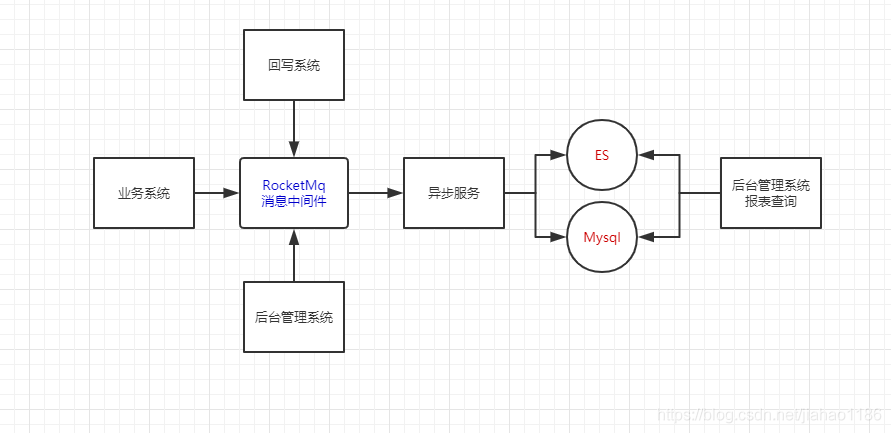
1. MQ asynchronous data acquisition

1) Using MQ asynchronization to break away from the main service and shorten the response time of the main service.

2) Using MQ asynchronous data storage operation to reduce the pressure of the main business server.

3) Storage uses es to support big data query and improve query efficiency.

4) In process asynchronous MQ message sending operation can be realized by using Google thread bus or spring @ async

2. The design is as follows


Could not create connection to database server. Attempted reconnect 3 times. Giving

1. Questions

The program connection to the database is abnormal, as follows:

Could not create connection to database server. Attempted reconnect 3 times. Giving 

2. Solutions

I tried a variety of solutions, and finally realized: MySQL connector- java.jar Inconsistent with the latest database version. The database is the latest version of 8

0.19,mysql-connector- java.jar It’s 5.0.6.

Solution: MySQL connector- java.jar Keep the same version number as the database.

The POM file is as follows, please check and modify the version by yourself; some versions are compatible, but it is better to keep them unified.

<dependency>
   <groupId>mysql</groupId>
   <artifactId>mysql-connector-java</artifactId>
   <version>8.0.19</version>
</dependency>


Optimization and upgrade solution for one click deployment without Jenkins under Linux

1. Scene

Jenkins one click deployment has not been installed under Linux.

2. Operation process

① Manual upload.

② Delete history code.

③ Unzip the war package.

④ Delete the war package.

⑤ Restart Tomcat.

⑥ Show logs.

3. Process disassembly

1) Use the RZ command to upload the war package.

2) Use the following command to complete the rest of the work in one go. Note: the last line is reserved for carriage return and line feed to ensure that the command will be executed.

cd   /opt/codes/portal-system
rm -rf  META-INF
rm -rf  WEB-INF
rm -rf importDataModel.xlsx
unzip portal-system-1.0.0. RELEASE.war
rm -rf portal-system-1.0.0. RELEASE.war
/opt/server/tomcat_ portal_ system/bin/ restart.sh
 

3) restart.sh Please refer to the previous blog post for the script.

4. Incremental design scheme

cd /opt/codes/portal-system/WEB-INF/classes
rz
rm -r com
unzip com.zip  
rm -rf com.zip  
/opt/server/tomcat_ portal_ system/bin/ restart.sh
#tail -f /opt/server/tomcat_ portal_ system/logs/ info.log

Why must microservices have gateways?

1、 What is a service gateway

Service gateway = route forwarding + filter

1. Route forwarding: receive all external requests and forward them to the back-end micro service.

2. Filter: in the service gateway, a series of crosscutting functions can be completed, such as permission verification, current limiting and monitoring. All these can be completed through the filter (in fact, routing and forwarding are also realized through the filter).

2、 Why a service gateway is needed
the above crosscutting function (taking permission verification as an example) can be written in three places:

1) each service is implemented by itself [not recommended]

2) write to a public service, and then all other services depend on this service [not recommended]

3) write it to the prefilter of the service gateway, and all requests come to check the permission [recommended]

First, the disadvantages are too obvious to use;
Second, compared with the first point, the code development is not redundant, but there are two disadvantages:

(1) because each service introduces this public service, it is equivalent to introducing the same permission verification code in each service, which increases the jar package size of each service for no reason. Especially for the deployment scenario using docker image, the smaller the jar, the better;

       ② Since this public service is introduced into every service, it may be difficult for us to upgrade this service in the future. Moreover, the more functions the public service has, the more difficult it will be to upgrade. Suppose we change the way of permission verification in public service. If we want all services to use the new way of permission verification, we need to re package all previous services , compile the deployment.

The service gateway can solve this problem

    write the logic of permission verification in the filter of the gateway, the back-end service does not need to pay attention to the code of permission verification, so the logic of permission verification will not be introduced into the jar package of the service, and the size of the jar package will not be increased; if you want to modify the logic of permission verification, you only need to modify the filter of permission verification in the gateway, without upgrading all existing micro services.

So, need service gateway!!!


3、 Service gateway technology selection


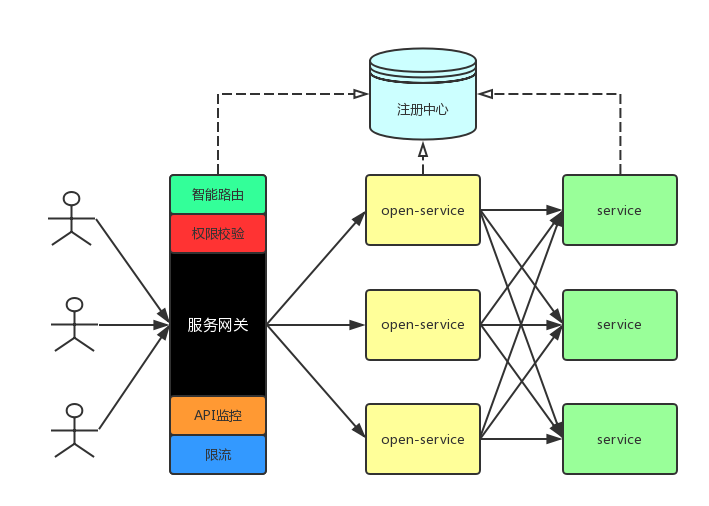
After the introduction of service gateway, the microservice architecture is as above, including three parts: service gateway, open service and service.

1. Overall process:

The service gateway, open service and service are registered in the registry when they are started; the user requests the gateway directly, and the gateway performs intelligent routing and forwarding (including service discovery and load balancing) to the open service, which includes permission verification, monitoring, current limiting and other operations. The open service aggregates the internal service response, returns it to the gateway, and the gateway returns it to the user

2. Points for attention in introducing gateway

With the addition of gateway and one more layer of forwarding (originally, the user requested to directly access the open service), the performance will decline (but the decline is not big. Generally, the performance of gateway machine will be very good, and the access between gateway and open service is usually intranet access, which is very fast); single point problem of gateway: there must be a single point in the whole network call process, which may be Gateway, nginx, DNS server, etc. To prevent gateway single point, you can hang another nginx in front of the gateway layer. The performance of nginx is very high, and it will not hang basically. After that, the gateway service can continuously add machines. However, such a request is forwarded twice, so the best way is to deploy the gateway single point service on a powerful machine (estimate the configuration of the machine through pressure test). Moreover, the performance comparison between nginx and zuul is similar according to the experiment done by a foreign friend. Zuul is an open source framework for gateway of Netflix, and the gateway should be fully implemented Light weight.

3. Basic functions of service gateway

Intelligent routing: receive all external requests and forward them to the external service open service of the back end;

Note: we only forward external requests, and requests between services do not go through the gateway. This means that full link tracking, internal service API monitoring, fault tolerance of calls between internal services, and intelligent routing cannot be completed in the gateway. Of course, all service calls can go through the gateway, and almost all functions can be integrated into the gateway, but in this case, the gateway’s pressure can be reduced It’s going to be very heavy. Permission verification: only the user’s request to the open service is verified, and the internal request of the service is not verified. Is it necessary to verify the request inside the service?API monitoring: only monitor the requests passing through the gateway and some performance indicators of the gateway itself (for example, GC, etc.); current limiting: cooperate with the monitoring to carry out current limiting operation; API log unified collection: similar to an aspect aspect aspect, record the relevant log when the interface enters and goes out… Follow up supplement

The above functions are the basic functions of the gateway, and the gateway can also realize the following functions:

A | B test: a | B test is a relatively large thing, including background experiment configuration, data burial point (see conversion rate) and streaming engine. In the service gateway, the streaming engine can be realized, but in fact the streaming engine will call internal services, so if it is in accordance with the architecture in the figure above, the streaming engine should be in the open service rather than in the service gateway…. Follow up supplement


4. Technology selection

The author is going to build a lightweight service gateway

Development language: java + groovy, the advantage of groovy is that the gateway service can dynamically add filter to achieve some functions without restart; microservice basic framework: springboot; gateway basic component: Netflix zuul; service registry: consult; permission verification: JWT; API monitoring: Prometheus + grafana; API unified log collection: logback+ Elk; stress test: JMeter;… Follow up supplement

In the follow-up introduction, will gradually introduce each knowledge point, and complete a lightweight service gateway!!!

Java uses lock to realize multithread sequential alternate execution mode 2

1. Principle

Lock synchronization lock

Signal() and await() of condition

2. Code examples

package com.thread;

import java.util.concurrent.ExecutorService;
import java.util.concurrent.Executors;
import java.util.concurrent.locks.Condition;
import java.util.concurrent.locks.Lock;
import java.util.concurrent.locks.ReentrantLock;

public class TasksTestLock extends Thread {
    private static Lock lock = new ReentrantLock();
    private static Condition condition = lock.newCondition();
    private static int num = 1;
    private int id;

    public TasksTestLock(int id) {
        this.id = id;
    }


    @Override
    public void run() {
        while (num <= 12) {

            lock.lock();

            System.out.println("Thread" + id + " num:" + num);
            num++;

            condition.signal();
            try {
                condition.await();
            } catch (InterruptedException e) {
                e.printStackTrace();
            }

            lock.unlock();

        }
    }


    public static void main(String[] args) {
        Thread thread0 = new TasksTestLock(0);
        Thread thread1 = new TasksTestLock(1);

        ExecutorService exec = Executors.newFixedThreadPool(3);

        exec.submit(thread0);
        exec.submit(thread1);

        exec.shutdown();

    }
}

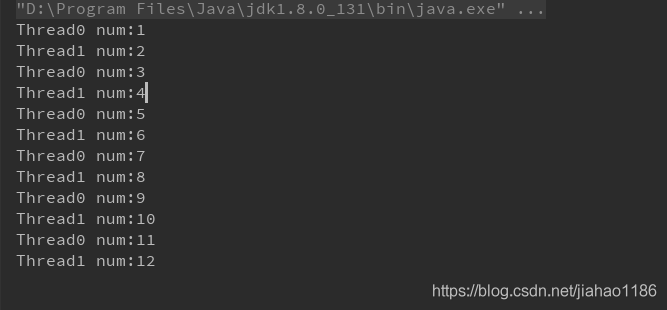
3. Output results


Implementation of multithread sequential alternate execution by using lock in Java

1. Principle

Synchronized thread synchronization

Notify() calls up the thread

The wait() thread waits

2. Code examples

package com.thread;

import java.util.concurrent.ExecutorService;
import java.util.concurrent.Executors;

public class TasksTestSync extends Thread {
    private static Integer num = 0;
    private int id;

    public TasksTestSync(int id) {
        this.id = id;
    }

    @Override
    public void run() {
        while (num < 12) {
            synchronized (TasksTestSync.class) {
                num = num + 1;
                System.out.println("thread_" + id + " num:" + num);

                TasksTestSync.class.notify();
                try {
                    TasksTestSync.class.wait();
                } catch (InterruptedException e) {
                    e.printStackTrace();
                }

            }
        }
    }

    public static void main(String[] args) {
        Thread thread0 = new TasksTestSync(0);
        Thread thread1 = new TasksTestSync(1);

        ExecutorService exec = Executors.newFixedThreadPool(3);

        exec.submit(thread0);
        exec.submit(thread1);

        exec.shutdown();

    }
}

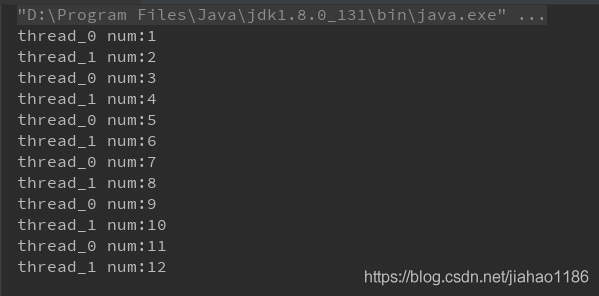
3. Implementation results