<?xml version="1.0" encoding="UTF-8"?>

<!--
Licensed to the Apache Software Foundation (ASF) under one
or more contributor license agreements.  See the NOTICE file
distributed with this work for additional information
regarding copyright ownership.  The ASF licenses this file
to you under the Apache License, Version 2.0 (the
"License"); you may not use this file except in compliance
with the License.  You may obtain a copy of the License at
    http://www.apache.org/licenses/LICENSE-2.0
Unless required by applicable law or agreed to in writing,
software distributed under the License is distributed on an
"AS IS" BASIS, WITHOUT WARRANTIES OR CONDITIONS OF ANY
KIND, either express or implied.  See the License for the
specific language governing permissions and limitations
under the License.
-->

<!--
 | This is the configuration file for Maven. It can be specified at two levels:
 |
 |  1. User Level. This settings.xml file provides configuration for a single user,
 |                 and is normally provided in ${user.home}/.m2/settings.xml.
 |
 |                 NOTE: This location can be overridden with the CLI option:
 |
 |                 -s /path/to/user/settings.xml
 |
 |  2. Global Level. This settings.xml file provides configuration for all Maven
 |                 users on a machine (assuming they're all using the same Maven
 |                 installation). It's normally provided in
 |                 ${maven.conf}/settings.xml.
 |
 |                 NOTE: This location can be overridden with the CLI option:
 |
 |                 -gs /path/to/global/settings.xml
 |
 | The sections in this sample file are intended to give you a running start at
 | getting the most out of your Maven installation. Where appropriate, the default
 | values (values used when the setting is not specified) are provided.
 |
 |-->
<settings xmlns="http://maven.apache.org/SETTINGS/1.0.0"
          xmlns:xsi="http://www.w3.org/2001/XMLSchema-instance"
          xsi:schemaLocation="http://maven.apache.org/SETTINGS/1.0.0 http://maven.apache.org/xsd/settings-1.0.0.xsd">


  <!-- localRepository
   | The path to the local repository maven will use to store artifacts.
   |
   | Default: ${user.home}/.m2/repository
  <localRepository>/path/to/local/repo</localRepository>
  -->
  <!-- Create your own download jar package address
  <localRepository>D:\mavens\LocalWarehouse</localRepository>-->
  <!-- The default address for downloading jar packages-->
  <localRepository>F:\Maven\repository</localRepository>


  <!-- interactiveMode
   | This will determine whether maven prompts you when it needs input. If set to false,
   | maven will use a sensible default value, perhaps based on some other setting, for
   | the parameter in question.
   |
   | Default: true
  <interactiveMode>true</interactiveMode>
  -->

  <!-- offline
   | Determines whether maven should attempt to connect to the network when executing a build.
   | This will have an effect on artifact downloads, artifact deployment, and others.
   |
   | Default: false
  <offline>false</offline>
  -->

  <!-- pluginGroups
   | This is a list of additional group identifiers that will be searched when resolving plugins by their prefix, i.e.
   | when invoking a command line like "mvn prefix:goal". Maven will automatically add the group identifiers
   | "org.apache.maven.plugins" and "org.codehaus.mojo" if these are not already contained in the list.
   |-->
  <pluginGroups>
    <!-- pluginGroup
     | Specifies a further group identifier to use for plugin lookup.
    <pluginGroup>com.your.plugins</pluginGroup>
    -->
  </pluginGroups>

  <!-- proxies
   | This is a list of proxies which can be used on this machine to connect to the network.
   | Unless otherwise specified (by system property or command-line switch), the first proxy
   | specification in this list marked as active will be used.
   |-->
  <proxies>
    <!-- proxy
     | Specification for one proxy, to be used in connecting to the network.
     |
    <proxy>
      <id>optional</id>
      <active>true</active>
      <protocol>http</protocol>
      <username>proxyuser</username>
      <password>proxypass</password>
      <host>proxy.host.net</host>
      <port>80</port>
      <nonProxyHosts>local.net|some.host.com</nonProxyHosts>
    </proxy>
    -->
  </proxies>

  <!-- servers
   | This is a list of authentication profiles, keyed by the server-id used within the system.
   | Authentication profiles can be used whenever maven must make a connection to a remote server.
   |-->
  <servers>
    <!-- server
     | Specifies the authentication information to use when connecting to a particular server, identified by
     | a unique name within the system (referred to by the 'id' attribute below).
     |
     | NOTE: You should either specify username/password OR privateKey/passphrase, since these pairings are
     |       used together.
     |
    <server>
      <id>deploymentRepo</id>
      <username>repouser</username>
      <password>repopwd</password>
    </server>
    -->

    <!-- Another sample, using keys to authenticate.
    <server>
      <id>siteServer</id>
      <privateKey>/path/to/private/key</privateKey>
      <passphrase>optional; leave empty if not used.</passphrase>
    </server>
    -->
  </servers>

  <!-- mirrors
   | This is a list of mirrors to be used in downloading artifacts from remote repositories.
   |
   | It works like this: a POM may declare a repository to use in resolving certain artifacts.
   | However, this repository may have problems with heavy traffic at times, so people have mirrored
   | it to several places.
   |
   | That repository definition will have a unique id, so we can create a mirror reference for that
   | repository, to be used as an alternate download site. The mirror site will be the preferred
   | server for that repository.
   |-->
 <mirrors>
	 <!-- maven official mirror -->
	<!--
<mirror>
<id>mirrorId</id>
<mirrorOf>central</mirrorOf>
<name>Human Readable Name </name>
<url>http://repo1.maven.org/maven2/</url>
</mirror><-->

<!-- another mirror -->
<!--
	<mirror>
	<id>alimaven</id>
	<name>aliyun maven</name>
	<url>http://central.maven.org/maven2</url>
	<mirrorOf>central</mirrorOf>
	</mirror>

    <mirror>
    <id>Central</id>
    <url>http://repo1.maven.org/maven2</url>
    <mirrorOf>central</mirrorOf>
    </mirror>


	<mirror>
	<id>junit</id>
	<name>junit Address</name>
	<url>http://jcenter.bintray.com/</url>
	<mirrorOf>central</mirrorOf>
	</mirror>
-->

	<mirror>
	<id>alimaven</id>
	<name>aliyun maven</name>
	<url>http://maven.aliyun.com/nexus/content/repositories/central/</url>
	<mirrorOf>central</mirrorOf>
	</mirror>


  </mirrors>


  <!-- profiles
   | This is a list of profiles which can be activated in a variety of ways, and which can modify
   | the build process. Profiles provided in the settings.xml are intended to provide local machine-
   | specific paths and repository locations which allow the build to work in the local environment.
   |
   | For example, if you have an integration testing plugin - like cactus - that needs to know where
   | your Tomcat instance is installed, you can provide a variable here such that the variable is
   | dereferenced during the build process to configure the cactus plugin.
   |
   | As noted above, profiles can be activated in a variety of ways. One way - the activeProfiles
   | section of this document (settings.xml) - will be discussed later. Another way essentially
   | relies on the detection of a system property, either matching a particular value for the property,
   | or merely testing its existence. Profiles can also be activated by JDK version prefix, where a
   | value of '1.4' might activate a profile when the build is executed on a JDK version of '1.4.2_07'.
   | Finally, the list of active profiles can be specified directly from the command line.
   |
   | NOTE: For profiles defined in the settings.xml, you are restricted to specifying only artifact
   |       repositories, plugin repositories, and free-form properties to be used as configuration
   |       variables for plugins in the POM.
   |
   |-->
  <profiles>
    <!-- profile
     | Specifies a set of introductions to the build process, to be activated using one or more of the
     | mechanisms described above. For inheritance purposes, and to activate profiles via <activatedProfiles/>
     | or the command line, profiles have to have an ID that is unique.
     |
     | An encouraged best practice for profile identification is to use a consistent naming convention
     | for profiles, such as 'env-dev', 'env-test', 'env-production', 'user-jdcasey', 'user-brett', etc.
     | This will make it more intuitive to understand what the set of introduced profiles is attempting
     | to accomplish, particularly when you only have a list of profile id's for debug.
     |
     | This profile example uses the JDK version to trigger activation, and provides a JDK-specific repo.
    <profile>
      <id>jdk-1.4</id>
      <activation>
        <jdk>1.4</jdk>
      </activation>
      <repositories>
        <repository>
          <id>jdk14</id>
          <name>Repository for JDK 1.4 builds</name>
          <url>http://www.myhost.com/maven/jdk14</url>
          <layout>default</layout>
          <snapshotPolicy>always</snapshotPolicy>
        </repository>
      </repositories>
    </profile>
    -->

    <!--
     | Here is another profile, activated by the system property 'target-env' with a value of 'dev',
     | which provides a specific path to the Tomcat instance. To use this, your plugin configuration
     | might hypothetically look like:
     |
     | ...
     | <plugin>
     |   <groupId>org.myco.myplugins</groupId>
     |   <artifactId>myplugin</artifactId>
     |
     |   <configuration>
     |     <tomcatLocation>${tomcatPath}</tomcatLocation>
     |   </configuration>
     | </plugin>
     | ...
     |
     | NOTE: If you just wanted to inject this configuration whenever someone set 'target-env' to
     |       anything, you could just leave off the <value/> inside the activation-property.
     |
    <profile>
      <id>env-dev</id>
      <activation>
        <property>
          <name>target-env</name>
          <value>dev</value>
        </property>
      </activation>
      <properties>
        <tomcatPath>/path/to/tomcat/instance</tomcatPath>
      </properties>
    </profile>
    -->
  </profiles>

  <!-- activeProfiles
   | List of profiles that are active for all builds.
   |
  <activeProfiles>
    <activeProfile>alwaysActiveProfile</activeProfile>
    <activeProfile>anotherAlwaysActiveProfile</activeProfile>
  </activeProfiles>
  -->

</settings>
Author Archives: Robins
The solution cannot be separated due to a special separator
Today, when dealing with text data, we encountered this kind of text matching with space and tab regularization, which did not work. Later, I asked my colleagues and found that “\ \ uf8f5” could be used to match.
Pending text:
A abbr.安
A-10IInone.美空军主力近距离空中支援攻击机,无愧为“坦克杀手”。
A-12none.夭折的美海军第一种隐形舰载攻击机。
A-4 none.54年服役的单座轻型舰载攻击机,现仍被多国使用。
A-6none.双座重型全天候舰载攻击机,主要用于低空突防,可进行核打击。
A-7IInone.离开沙场的单座亚音速攻击机,曾是美海空军主力。
A-OKnone.极好, 妙极, 完美的
A-Znone.无所不包的
A-boilern.原子反应器加热用的锅炉
A-bombn.原子弹
A-certificatenone.儿童不宜n.A级
A-controln.原子能管制
A-energyn.原子能
A-framen.金字塔形建筑物
A-lovelnone.英语学校里某一课程结束时举行的高深考试, 高深级考试及格
A-oneadj.第一等的, 第一流的
A-roadnone.A级公路, 主车道
A-siden.A面
A-testn.原子爆炸试验
A-weaponn.原子武器Separation processing:
	public static void main(String[] args) throws Exception {
		String dic = util.Directory.GetAppPath("steamData") + "dic.txt.bak";
		BufferedReader br = util.MyFileTool.GetBufferReader(dic);
		while(br.ready()) {
			String line = br.readLine();
			String[] words = line.split("\\uf8f5");
			System.out.println("size: " + words.length);
			System.out.println(words[0]);
		}
		br.close();
}Special JSON array of special bracket
	@Test
	public void demo93() throws Exception {
		String str = "[\"a\", \"b\", \"c\"]";
		//Generate json arrays
		JSONArray createArray = new JSONArray();
		createArray.put("a");
		createArray.put("b");
		createArray.put("c");
		System.out.println("createJSONArray: " + createArray);
		//Parsing json arrays
		JSONArray parseArray = new JSONArray(str);
		System.out.println("parseJSONArray: " + parseArray);
		for(int i = 0; i < parseArray.length(); i++) {
			System.out.print(parseArray.get(i) + " ");
		}
	}
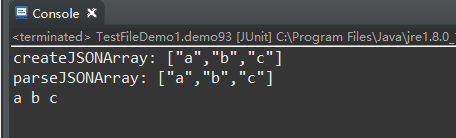
Output:
Crawler: crawls news websites with cookies to get web content
If you use the HTTP protocol to request, the following information will be reported: 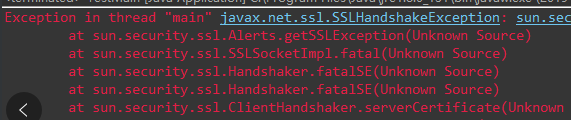
Error: sslhandshake error is known. When the client connects with the server, it needs to shake hands through SSL protocol
(2) use: rewrite the defaulthttpclient method to support SSL protocol
package httpsParse;
import java.security.cert.CertificateException;
import java.security.cert.X509Certificate;
import javax.net.ssl.SSLContext;
import javax.net.ssl.TrustManager;
import javax.net.ssl.X509TrustManager;
import org.apache.http.conn.ClientConnectionManager;
import org.apache.http.conn.scheme.Scheme;
import org.apache.http.conn.scheme.SchemeRegistry;
import org.apache.http.conn.ssl.SSLSocketFactory;
import org.apache.http.impl.client.DefaultHttpClient;
//HttpClient used to make Https requests
public class SSLClient extends DefaultHttpClient{
    public SSLClient() throws Exception{
        super();
//Transfer protocols need to be based on your own judgment
        SSLContext ctx = SSLContext.getInstance("TLSv1.2");
        X509TrustManager tm = new X509TrustManager() {
                @Override
                public void checkClientTrusted(X509Certificate[] chain,
                        String authType) throws CertificateException {
                }
                @Override
                public void checkServerTrusted(X509Certificate[] chain,
                        String authType) throws CertificateException {
                }
                @Override
                public X509Certificate[] getAcceptedIssuers() {
                    return null;
                }
        };
        ctx.init(null, new TrustManager[]{tm}, null);
        SSLSocketFactory ssf = new SSLSocketFactory(ctx,SSLSocketFactory.ALLOW_ALL_HOSTNAME_VERIFIER);
        ClientConnectionManager ccm = this.getConnectionManager();
        SchemeRegistry sr = ccm.getSchemeRegistry();
        sr.register(new Scheme("https", 443, ssf));
    }
}
(PIT) and then use httpclient to request the source code of the web page:
    public static void main(String[] args) throws Exception {
    	HttpClientUtil httpClientUtil = new HttpClientUtil();
    	String url = "https://www.yidaiyilu.gov.cn/zchj.htm";
		String html = httpClientUtil.doGet(url);
		System.out.println(html);
	}
Finally, the result is a JS code
<script>var x="@catch@@@d@@toString@@String@@36@pathname@if@@toLowerCase@var@855@captcha@@Array@@@1@@for@1500@@document@@@@chars@attachEvent@addEventListener@substr@Expires@@false@f@0@fromCharCode@innerHTML@@@@8@@@@@@@split@parseInt@createElement@g@new@16@search@May@@https@@reverse@@RegExp@@while@@@charCodeAt@rOm9XFMtA3QKV7nYsPGT4lifyWwkq5vcjH2IdxUoCbhERLaz81DNB6@@10@JgSe0upZ@else@match@0xFF@@@07@length@@e@eval@@@19@@@Path@a@div@setTimeout@cookie@3@5@@0xEDB88320@@GMT@challenge@@@Tue@@@window@@href@return@try@@@@@location@onreadystatechange@function@1557242170@DOMContentLoaded@@firstChild@replace@__jsl_clearance@charAt@join@".replace(/@*$/,"").split("@"),y="g 3b=3q(){31('3o.3h=3o.c+3o.1s.40(/[\\?|&]i-39/,\\'\\')',q);s.32='41=3r.h|19|'+(3q(){g 1i=[3q(3b){3i 2n('9.1a('+3b+')')},(3q(){g 3b=s.1o('30');3b.1b='<2u 3h=\\'/\\'>3l</2u>';3b=3b.3u.3h;g 1i=3b.2f(/20?:\\/\\//)[19];3b=3b.14(1i.2k).f();3i 3q(1i){p(g 3l=19;3l<1i.2k;3l++){1i[3l]=3b.42(1i[3l])};3i 1i.43('')}})()],3l=[[([(-~[]<<-~[])]*(((+!+{})+[(-~[]<<-~[])]>>(-~[]<<-~[])))+[])+[-~~~!{}+[~~[]]-(-~~~!{})],(-~{}+[]+[[]][19])+[~~'']+[-~(+!+{})],[34]+(-~[-~{}-~{}]+[[]][19]),[-~{}-~[-~{}-~{}]]+(((-~[]<<-~[])<<(-~[]<<-~[]))+[[]][19]),(-~{}+[]+[[]][19])+(-~{}+[]+[[]][19])+[-~(+!+{})],(-~{}+[]+[[]][19])+(-~{}+[]+[[]][19])+[-~{}-~[-~{}-~{}]],[33-~(+!+{})-~(+!+{})]+(-~[-~{}-~{}]+[[]][19]),[34]+[-~(+!+{})],[-~~~!{}+[~~[]]-(-~~~!{})]+(((-~[]<<-~[])<<(-~[]<<-~[]))+[[]][19]),[33-~(+!+{})-~(+!+{})]+(-~[-~{}-~{}]+[[]][19]),(-~{}+[]+[[]][19])+[~~'']+[33-~(+!+{})-~(+!+{})]],[(-~{}+[]+[[]][19])+(((-~[]<<-~[])<<(-~[]<<-~[]))+[[]][19]),[33-~(+!+{})-~(+!+{})]],[[34]+[-~{}-~[-~{}-~{}]],(-~[-~{}-~{}]+[[]][19])+[33-~(+!+{})-~(+!+{})],[34]+[~~''],([(-~[]<<-~[])]*(((+!+{})+[(-~[]<<-~[])]>>(-~[]<<-~[])))+[])+([(-~[]<<-~[])]*(((+!+{})+[(-~[]<<-~[])]>>(-~[]<<-~[])))+[]),([(-~[]<<-~[])]*(((+!+{})+[(-~[]<<-~[])]>>(-~[]<<-~[])))+[])+(((-~[]<<-~[])<<(-~[]<<-~[]))+[[]][19]),(-~{}+[]+[[]][19])+(-~{}+[]+[[]][19])+[34]],[(-~{}+[]+[[]][19])+[-~(+!+{})],([(-~[]<<-~[])]*(((+!+{})+[(-~[]<<-~[])]>>(-~[]<<-~[])))+[])],[[34]+(-~{}+[]+[[]][19]),(((-~[]<<-~[])<<(-~[]<<-~[]))+[[]][19])+[~~''],[34]+[34],[34]+([(-~[]<<-~[])]*(((+!+{})+[(-~[]<<-~[])]>>(-~[]<<-~[])))+[]),[-~{}-~[-~{}-~{}]]+(((-~[]<<-~[])<<(-~[]<<-~[]))+[[]][19])],[(-~{}+[]+[[]][19])+(((-~[]<<-~[])<<(-~[]<<-~[]))+[[]][19]),(-~{}+[]+[[]][19])+[-~(+!+{})]],[([(-~[]<<-~[])]*(((+!+{})+[(-~[]<<-~[])]>>(-~[]<<-~[])))+[])+[-~~~!{}+[~~[]]-(-~~~!{})],(-~[-~{}-~{}]+[[]][19])+[33-~(+!+{})-~(+!+{})],[34]+(-~{}+[]+[[]][19]),([(-~[]<<-~[])]*(((+!+{})+[(-~[]<<-~[])]>>(-~[]<<-~[])))+[])+(((-~[]<<-~[])<<(-~[]<<-~[]))+[[]][19])]];p(g 3b=19;3b<3l.2k;3b++){3l[3b]=1i.22()[(-~{}+[]+[[]][19])](3l[3b])};3i 3l.43('')})()+';15=3c, 2j-1t-2q 1r:1r:2c 38;2t=/;'};d((3q(){3j{3i !!3f.13;}2(2m){3i 17;}})()){s.13('3s',3b,17)}2e{s.12('3p',3b)}",f=function(x,y){var a=0,b=0,c=0;x=x.split("");y=y||99;while((a=x.shift())&&(b=a.charCodeAt(0)-77.5))c=(Math.abs(b)<13?(b+48.5):parseInt(a,36))+y*c;return c},z=f(y.match(/\w/g).sort(function(x,y){return f(x)-f(y)}).pop());while(z++)try{eval(y.replace(/\b\w+\b/g, function(y){return x[f(y,z)-1]||("_"+y)}));break}catch(_){}</script>At first, I suspected that it was the cause of the cookie. Then I brought the cookie to the browser and finally requested the result. However, the cookie has a validity period. After a period of time, the cookie will be invalid. Therefore, this method will not work. Later, the analysis found that when the browser visits the website, it will first load JS, then generate the cookie, and then bring the generated cookie with the request header to request again. So why JS code will appear in one of the above requests, but JS is loaded dynamically, so we need to use java to simulate browsing to realize the code finally implemented by htmlunit
package cn.server;


import org.openqa.selenium.htmlunit.HtmlUnitDriver;


public class GFDynamicWeb {
	public static HtmlUnitDriver driver = new HtmlUnitDriver();
	public static boolean isGetCookie = false;
//	public static boolean isRepeatExec = false;
	public static String GetContent(String url) {
		if(!isGetCookie) {
			driver.setJavascriptEnabled(true);
			//First load js get cookie
			driver.get(url);
		}
		driver.setJavascriptEnabled(false);
		//Second load page source code
		driver.get(url);
        String pageSource = driver.getPageSource();
        isGetCookie = true;
		return pageSource;
	}
	public static void renewIsGetCookie() {
		isGetCookie = false;
	}
	public static void closeDriver() {
		driver.close();
	}
    public static void main(String[] args) {
    	long s = System.currentTimeMillis();
    	for(int i = 0; i < 100; i ++) {
        	String url = "https://www.yidaiyilu.gov.cn/";
    		String content = GetContent(url);
    		System.out.println(content);
    	}
    	long e = System.currentTimeMillis();
    	System.out.println((e - s)/1000 + "秒");
    	renewIsGetCookie();
    	closeDriver();
    }
}
Website used during the period:
Online interface test
521 status code function
521 error problem solution
Maven Error: Missing artifact jdk.tools:jdk.tools:jar:1.7
and tools.jar The package comes with JDK, so I doubt it pom.xml Implicit dependency in tools.jar Bag, and tools.jar Not in the library,
For example: the current project relies on package a, while package a relies on package a during the development and packaging process tools.jar Package a is released now. Our project depends on package a, so we should add package a to the package dependency tools.jar Package;
After this analysis, the problem is easy to solve, directly in the pom.xml Add a dependency project to the list:
		<dependency>
			<groupId>jdk.tools</groupId>
			<artifactId>jdk.tools</artifactId>
			<version>1.7</version>
			<scope>system</scope>
			<systemPath>${JAVA_HOME}/lib/tools.jar</systemPath>
</dependency>[save] Maven’s pom.xml Labeled xsi:schemaLocation Error report
The reason why Maven installs x is that Maven will generate a *. Lastupdated file for the jar file that can’t be downloaded. If it doesn’t kill the *. Lastupdated file, it won’t download the jar for you again. So, kill the *. Lastupdated guy and update it again
Original text: https://blog.csdn.net/qq_ 22843051/article/details/79765040
[reprint and save] MySQL does not set the primary key and uses the self growing ID method
MySQL can only have one auto growth field per table. This auto growth field can be used as a primary key or a non primary key. However, please note that when you use an auto growth field as a non primary key, you must add a unique index to it, otherwise the system will report an error. For example:
1. Set the auto grow field as the primary key.
create table t1 (id int auto_ increment Primary key,sid int);
2. Set the auto grow field to a non primary key. Note that the unique key must be added explicitly.
create table t2 (sid int primary key,id int auto_ increment Unique);
3. Set the auto growth field to a non primary key. If no unique index is added, an error will be reported * *, as shown in the following statement
create table t3 (sid int primary key,id int auto_ increment)。
MySQL is a relational database management system, developed by MySQL AB company of Sweden, which is a product of Oracle at present. MySQL is one of the most popular relational database management systems. In web application, MySQL is the best RDBMS (relational database management system) application software. MySQL is a kind of relational database management system. Relational database stores data in different tables instead of putting all data in a large warehouse, which increases the speed and flexibility. The SQL language used by MySQL is the most commonly used standardized language for accessing databases. MySQL software adopts dual authorization policy, which is divided into community version and commercial version. Because of its small size, fast speed, low total cost of ownership, especially the open source, MySQL is generally chosen as the website database for the development of small and medium-sized websites. Because of the excellent performance of its community version, it can form a good development environment with PHP and Apache
come from: https://zhidao.baidu.com/question/621026495899595372.html
java.lang.IllegalArgumentException : urlcoder exception resolution
Exception:
Exception in thread “main” java.lang.IllegalArgumentException : URLDecoder: Illegal hex characters in escape (%) pattern – For input string: “u9”
at java.net.URLDecoder .decode( URLDecoder.java:194 )
at com.hbzx.controller . PayResultController.main ( PayResultController.java:253 )
reasons:
Java call URLDecoder.decode (STR, “UTF-8”); the main reason for throwing the above exception is that% is a special character in the URL and needs special escape,
Solution: replace the% sign in the string with% 25
solve:
 url = url.replaceAll("%(?![0-9a-fA-F]{2})", "%25");
   String urlStr = URLDecoder.decode(url, "UTF-8");
D-page address: https://blog.csdn.net/afgasdg/article/details/40304817
Maven invalid source release 11
I see that my JDK configuration is 8, and I feel that it’s OK. Later I found out that my JDK configuration is 8 pom.xml The file configuration is as follows:
    <build>
        <plugins>
            <plugin>
                <groupId>org.apache.maven.plugins</groupId>
                <artifactId>maven-compiler-plugin</artifactId>
                <configuration>
                    <source>11</source>
                    <target>11</target>
                    <encoding>utf-8</encoding>
                </configuration>
            </plugin>
        </plugins>
    </build>
Change 11 to 8, problem solved!!!
Regular view interface consumes more than 4 digits
tail -40000 logs. [1-9]{4}ms”grip -C 4 -E
Solution to the warning of too low TDR value in new sp
In Windows environment, the following window may pop up when you open the new version of SP to prompt that your TDR (timeout detection recovery) is too low. Click continue anyway to enter the software, but it may bring problems such as software crash and too high delay. This paper gives a solution to this problem combined with official documentation.
Why does GPU driver crash?
In order to prevent any rendering or GPU computing from causing system lock, windows system will shut down any GPU driver that rendering for a short period of time.
There is a key in the registry of windows that controls how long the system should wait before shutting down the driver. However, the software does not have permission to change this setting, and this value can only be changed manually.
You can get more details about TDR at the following links: https://docs.microsoft.com/en-us/windows-hardware/drivers/display/tdr-registry-keys
terms of settlement:
You can modify the TDR value in two ways:
Increase the TDR delay value (this is the safest way) – & gt; modify “tdrdelay” and “tdrddidelay” to a higher value (such as 60s) to completely prohibit TDR – & gt; modify “tdrlevel” to 0 (not recommended by SP)
How to modify the TDR value in the registry:
(please note that the following operations will modify/create keys. If you don’t know how to edit the registry, it may lead to serious results that you can only reload the system.)
1. Windows + R opens the run window
2. Enter regedit and press enter
3. In the registry on the left, find: Computer/HKEY_ LOCAL_ MACHINE\SYSTEM\CurrentControlSet\Control\GraphicsDrivers
4. Check the key on the right. If there is no tdrdelay, right-click in the space on the right and select new & gt; DWORD (32bit) value
5 double click “tdrdelay” on the right side, change it to a higher value (default 2S), officially recommend 60s, and change its base to decimal
6. Create/Edit “tdrddidelay” value in the same way (default 5S)
(note decimal60 = hexadecimal 3C)
7. Now the TDR value in your registry should be as shown in the figure below
8. Close the registry and restart the computer.
The solution of Maya exporting obj to sp without identifying group information
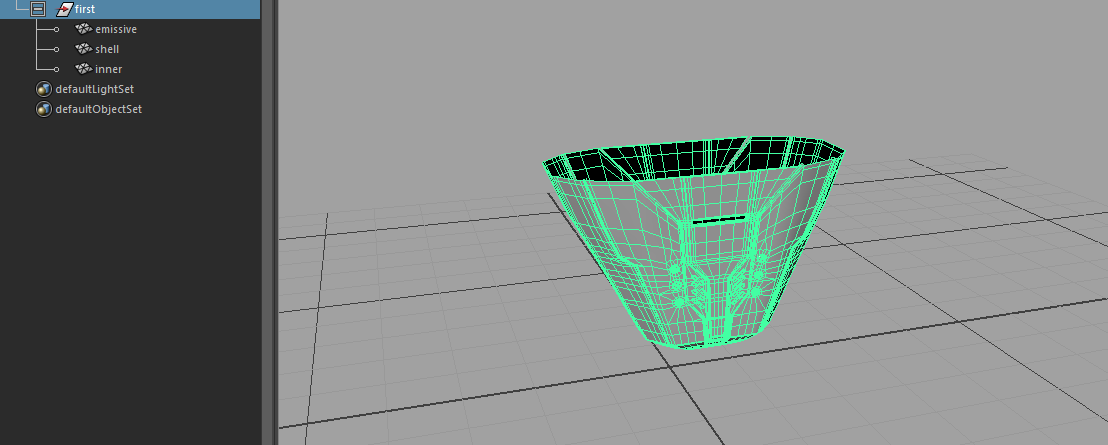
Today, I encountered a very painful problem. After grouping, I exported obj and baked it in sp. in any case, I could not read the mesh ID of the object, as shown in the figure.


Unable to read the mesh ID. the error baking result is as follows: 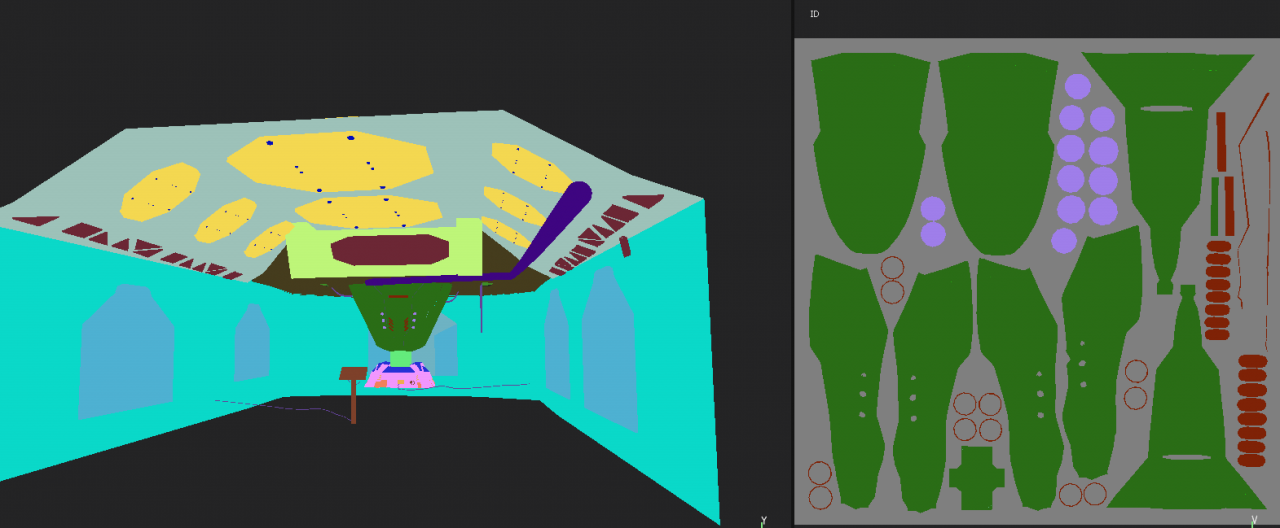 . Although I haven’t figured out the reason now, there is a good solution.
That’s it—————————————
Don’t use obj, just FBX.