Author Archives: Robins

JAVA ERROR: JDWP Unable to get JNI 1.2 environment, jvm->GetEnv() return code = -2 JDWP exit erro

When running the program is suddenly the following exception occurs

ERROR: JDWP Unable to get JNI 1.2 environment, jvm->GetEnv() return code = -2
JDWP exit error AGENT_ERROR_NO_JNI_ENV(183):  [util.c:840]

The reason:

1.JDK1.6.1
2. There is an error in the last debugging code, which causes the process not to terminate and take up the Console output, and such error occurs when starting debugging later.

Solutions:

At the end of the program, the main() function adds: System.exit(0);
System.exit(0); will cause the program to be terminated immediately, and if there are threads in the program that are still executing tasks, subsequent tasks will not be able to continue.


STMS communications error with system/destination rfc error when sending logon data

I. Problem

When setting up the traffic system: After executing with TCode: STMS, an error is reported: communication error with the system/destination rfc error when the login data sent

Using SM59 to view RFC connection test failed, using se38 execution program TMS_UPDATE_PWD_OF_TMSADM to change TMSADM password failed.

Second, the solution

Call the transaction SECSTORE.
Select “Execute” (F8).
In the displayed entry, if the entry /HMAC_INDEP/RFC_INTERNAL_TICKET_4_TRUSTED_SYSTEM is marked with a red light, delete the entry.
Delete the entry /HMAC_INDEP/RFC_EXTERNAL_TICKET_4_TRUSTED_SYSTEM if it is marked red in the displayed entries.

After deleting the above red record, then execute the stms selection overview – “transport route click edit and save 。。。。 and it works!

Solve ERROR 1136 (21S01) in Mysql: Column count doesn’t match value count at row 1

The problem is that when a new row is inserted, an error is returned.
type:

mysql> insert into students values(1,"goutou",18,"male",12121);

Returns:

ERROR 1136 (21S01): Column count doesn't match value count at row 1

check statement is ok. Considering the previous operation of deleting a column, two new columns are added, and the input is:

mysql> insert into students(id,name,age,gender,clc_id) values(0,"zhutou",12,"male",12121);
Query OK, 1 row affected (0.06 sec)


Python Fatal error: Py_Initialize: unable to load the file system codec

terminal open error
Could not find platform independent libraries <prefix>
Could not find platform dependent libraries <exec_prefix>
Consider setting $PYTHONHOME to <prefix>[:<exec_prefix>]
Fatal Python error: Py_Initialize: unable to load the file system codec
ModuleNotFoundError: No module named 'encodings'

want to clean up the python installation version, get rid of some files, this is what happened, my hand is out of control……
Solution:

1. sudo vim /etc/profile/
2. export PYTHONHOME=/Library/Frameworks/Python.framework/Versions/3.7
export PYTHONPATH=.:$PYTHONHOME/bin:$PYTHONHOME/site-packages
export PATH=$PATH:$PYTHONHOME:$PYTHONP

Error after run

Fatal Python error: Py_Initialize: unable to load the file system codec
ModuleNotFoundError: No module named 'encodings'

Continue to modify
to delete the environment variables associated with anaconda
Perfect!

Lua: Error during loading: [string “/usr/share/wireshark/init.lua”]:45: dofile has been disabled

Run as user “root” and group “root”. This can be dangerous.
tshark: Lua:Error loading:[string
” /usr/local/share/wireshark/init]lua”]:44: dofile has been disabled
due to running Wireshark as superuser. See also
Running Wireshark as an unprivileged user
https://wiki.wireshark.org/CaptureSetup/CapturePrivileges
Confirm that lua is supported by wireshark, and also use the find command to locate init.lua.
Make sure that disable_lua = false in the init. lua file.

How to quickly locate the problem in DB2-407 error reporting SQLCODE: -407, SQLSTATE: 23502

SQLCODE: -407, SQLSTATE: 23502: The exact description of this error is such that a NULL value cannot be inserted into a column defined as NOT NULL. This is a violation of the integrity constraint exception.

in development, this error is something that we often encounter. The problem is simply, “Columns that cannot be empty are empty.” For a table with a large number of fields, it is difficult to sift. How to accurately

positioning?It’s actually pretty simple.

We can learn more from the error message, which can help us pinpoint the problem. Common error messages are as follows:

com.ibm.db2.jcc.b.SqlException: DB2 SQL error: SQLCODE: -407, SQLSTATE: 23502, SQLERRMC: TBSPACEID=2, TABLEID=201, COLNO=3
	at com.ibm.db2.jcc.b.sf.d(sf.java:1396)
	at com.ibm.db2.jcc.c.jb.l(jb.java:356)
	at com.ibm.db2.jcc.c.jb.a(jb.java:64)
	at com.ibm.db2.jcc.c.w.a(w.java:48)
	at com.ibm.db2.jcc.c.dc.c(dc.java:312)
	at com.ibm.db2.jcc.b.tf.cb(tf.java:1723)
	at com.ibm.db2.jcc.b.tf.d(tf.java:2315)
	at com.ibm.db2.jcc.b.tf.Z(tf.java:1326)
	at com.ibm.db2.jcc.b.tf.execute(tf.java:1310)
	at java.util.concurrent.ThreadPoolExecutor$Worker.runTask(ThreadPoolExecutor.java:886)
	at java.util.concurrent.ThreadPoolExecutor$Worker.run(ThreadPoolExecutor.java:908)
	at java.lang.Thread.run(Thread.java:662)

Message: Integrity constraint exception (  
--- The error occurred in D:\------- path omitted-------.  
--- The error occurred while applying a parameter map.  
--- Check the aaa.sql-InlineParameterMap.  
--- Check the statement (update failed).  
--- Cause: com.ibm.db2.jcc.b.SqlException: DB2 SQL error: SQLCODE: -407, SQLSTATE: 23502, SQLERRMC: TBSPACEID=2, TABLEID=201, COLNO=3)

observe this error message carefully: SQLCODE: -407, SQLSTATE: 23502, SQLERRMC: TBSPACEID=2, TABLEID=201, COLNO=3. You can see that the error message has been located very well

is clear. We only need to query in syscat.columns of the system table. The syscat.columns table is a system table that holds detailed information about the COLUMNS of all tables in a DB2 database. We just need the basis

view, table name, column number can be queried to find which column. COLNO=3 in the error message above is the column number for which the error was reported. As follows:

SELECT 
	* 
FROM 
	SYSCAT.COLUMNS 
WHERE 
	TABSCHEMA = 'DB' AND 
	TABNAME = 'TT_PARAM_LOG' AND 
	COLNO = '3'


An error is reported when starting the Remote Access Connection Manager service

Description:

Remote Access Connection Manager failed to start because of the protocol engine [vpnike]. Initialization failed. The system could not find the specified device.

Finally it was found that some devices were missing and were created successfully with this command:
devcon.exe install c:\Windows\inf\netavpna.positive MS_AgileVpnMiniport

NPM install Error cb.apply is not a function

NPM install error cb.apply is not a function

solve:
Win + R open and run, enter % appdata% to delete NPM and NPM cache folder, and execute NPM cache clean — force
At this point, it should be OK. If not, uninstall node.js and install it again.

If not!!

Change yarn

Install yarn NPM install - G yarn

yarn install instead of NPM install

then, everything will be fine

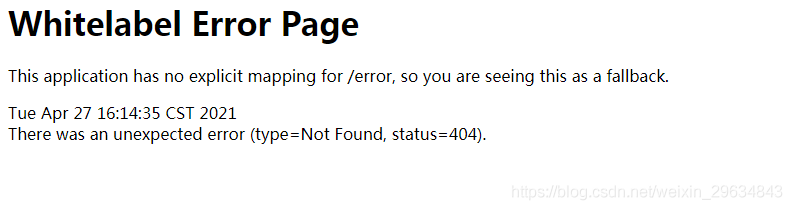
Swagger-ui.html Open Error: There was an unexpected error (type=Not Found, status=404)

After starting the springboot project, the following error will be reported if the swagger page cannot be opened:

after checking the data, it is found that webmvcconfig custom inherits webmvcconfigureradapter in the code, which causes the configuration related contents in the configuration file to be invalid, and the static resources need to be specified again

@Configuration
public class WebMvcConfig extends WebMvcConfigurerAdapter {
    @Value("${file.front-end.path}")
    private String fePath;

    @Value("${file.up-down-load.static-path}")
    private String udlPath;

    /**
     * Static resource handling
     **/
    @Override
    public void addResourceHandlers(ResourceHandlerRegistry registry) {
        registry.addResourceHandler("/**")
                .addResourceLocations(fePath,udlPath);
    }

    /**
     * Front and back-end separation to solve cross-domain problems
     **/
    @Override
    public void addCorsMappings(CorsRegistry registry) {
        registry.addMapping("/**")
                .allowedMethods("*")
                .allowedOrigins("*")
                .allowCredentials(true);
    }

    //Allow multiple request addresses with extra slashes e.g. /msg/list   //msg/list
    @Bean
    public HttpFirewall httpFirewall() {
        return new DefaultHttpFirewall();
    }


}

It is amended as follows:

 /**
     * Static resource handling
     **/
    @Override
    public void addResourceHandlers(ResourceHandlerRegistry registry) {
        registry.addResourceHandler("/**")
                .addResourceLocations(fePath,udlPath);
        // Add access to swagger pages
        registry.addResourceHandler("swagger-ui.html").addResourceLocations(
                "classpath:/META-INF/resources/");
    }

Login again, access success

Spring Boot Druid Error: discard long time none received connection

Spring boot integration Druid exception

In the spring boot integrated Druid project, the following error messages are frequently found in the error log:

discard long time none received connection. , jdbcUrl : jdbc:mysql://******?useSSL=false&allowPublicKeyRetrieval=true&useUnicode=true&characterEncoding=UTF-8, version : 1.2.3, lastPacketReceivedIdleMillis : 172675

After troubleshooting, it was found that the exception was caused by Druid version, which did not appear in version 1.2.2 or earlier. In the above versions, there is this problem, the following is to analyze the causes of the exception and solutions.

Anomaly analysis

First of all, the above exception does not affect the normal operation of the program, but as a programmer to see the program constantly abnormal or intolerable. So we still need to get to the bottom of it.

Trace the stack information and find that the corresponding exception is thrown from the com.alibaba.druid.pool.druidabstractdatasource # testconnectioninternal method. The corresponding code is as follows:

if (valid && isMySql) { // unexcepted branch
    long lastPacketReceivedTimeMs = MySqlUtils.getLastPacketReceivedTimeMs(conn);
    if (lastPacketReceivedTimeMs > 0) {
        long mysqlIdleMillis = currentTimeMillis - lastPacketReceivedTimeMs;
        if (lastPacketReceivedTimeMs > 0 //
                && mysqlIdleMillis >= timeBetweenEvictionRunsMillis) {
            discardConnection(holder);
            String errorMsg = "discard long time none received connection. "
                    + ", jdbcUrl : " + jdbcUrl
                    + ", jdbcUrl : " + jdbcUrl
                    + ", lastPacketReceivedIdleMillis : " + mysqlIdleMillis;
            LOG.error(errorMsg);
            return false;
        }
    }
}

In the above code, mysqlutils.getlastpacketreceivedtimems (conn) is to get the last used time, mysqlidle millis is to calculate the idle time, and timebetweenevecitionrunsmillis is a constant of 60 seconds. If the connection is idle for more than 60 seconds, the discard connection (holder) discards the old connection and prints a log. Warn (errormsg) along with it.

Principle tracing

In the above code, we can see that there is a prerequisite for entering the business logic, that is, the variables valid and ismysql are true at the same time. It is necessary for ismysql to be true. What we use is the MySQL database. Can I make valid false?In this way, it will not enter the business processing?

Let’s take a look at the source of the valid method

boolean valid = validConnectionChecker.isValidConnection(conn, validationQuery, validationQueryTimeout);

We find the MySQL implementation subclass of validconnectionchecker, MySQL validconnectionchecker. The implementation of isvalidconnection in this class is as follows:

public boolean isValidConnection(Connection conn, String validateQuery, int validationQueryTimeout) throws Exception {
    if (conn.isClosed()) {
        return false;
    }

    if (usePingMethod) {
        if (conn instanceof DruidPooledConnection) {
            conn = ((DruidPooledConnection) conn).getConnection();
        }

        if (conn instanceof ConnectionProxy) {
            conn = ((ConnectionProxy) conn).getRawObject();
        }

        if (clazz.isAssignableFrom(conn.getClass())) {
            if (validationQueryTimeout <= 0) {
                validationQueryTimeout = DEFAULT_VALIDATION_QUERY_TIMEOUT;
            }

            try {
                ping.invoke(conn, true, validationQueryTimeout * 1000);
            } catch (InvocationTargetException e) {
                Throwable cause = e.getCause();
                if (cause instanceof SQLException) {
                    throw (SQLException) cause;
                }
                throw e;
            }
            return true;
        }
    }

    String query = validateQuery;
    if (validateQuery == null || validateQuery.isEmpty()) {
        query = DEFAULT_VALIDATION_QUERY;
    }

    Statement stmt = null;
    ResultSet rs = null;
    try {
        stmt = conn.createStatement();
        if (validationQueryTimeout > 0) {
            stmt.setQueryTimeout(validationQueryTimeout);
        }
        rs = stmt.executeQuery(query);
        return true;
    } finally {
        JdbcUtils.close(rs);
        JdbcUtils.close(stmt);
    }

}

We can see that there are three return places in the above methods: the first connection is closed; The second uses Ping to check; Third, use select 1 to check. When Ping is used, it will return true no matter whether the exception is thrown or not. Here we can disable this mode.

The business logic of Ping mainly depends on the variable usepingmethod. Tracing code will find the settings here:

public void configFromProperties(Properties properties) {
    String property = properties.getProperty("druid.mysql.usePingMethod");
    if ("true".equals(property)) {
        setUsePingMethod(true);
    } else if ("false".equals(property)) {
        setUsePingMethod(false);
    }
}

In other words, when we set the system property Druid. Mysql. Usepingmethod to false, we can disable this function.

Disable ping method

After finding the root of the problem, the rest is how to disable it. There are usually three forms.

First, when starting the program, add: – Druid. Mysql. Usepingmethod = false in the running parameters.

Second, in the spring boot project, you can add the following static code to the startup class:

static {
    System.setProperty("druid.mysql.usePingMethod","false");
}

Third, class file configuration. In the druidconfig class of the project, add:

/*
* Resolving druid log errors: discard long time none received connection:xxx
* */
@PostConstruct
public void setProperties(){
    System.setProperty("druid.mysql.usePingMethod","false");
}

So far, the function has been successfully turned off, and the exception information will never appear again.

Why clear connections that are idle for more than 60 seconds

It is speculated that the idle waiting time of the database set by Alibaba is 60 seconds. When the MySQL database reaches the idle waiting time, the idle connection will be closed to improve the processing capacity of the database server.

The default idle waiting time of MySQL is 8 hours, which is “wait”_ “Timeout”. If the database actively closes the idle connection, but the connection pool does not know that it is still using the connection, an exception will be generated.
Mybatis Error: The server time zone value ‘����1532a0’ is unrecognized

The first time to install and use mybatis, problems encountered are as follows:

Question 1: Unkonwn database ‘test’

I created a new test database in my own database, and the corresponding table name, the problem was solved. However, what I want to understand is: how to specify which database and which table to use in the XML configuration file, otherwise, this problem will appear.

Question 2: The server time zone value ‘appears in MySQL й ��� ׼ʱ ‘is unrecognized record

Solution 1: modify the database time zone
set global time_ zone = ‘+8:00’; ## Modify the global time zone of Mysql to Beijing time, that is, the East 8 district where we are
in the database   set time_ zone = ‘+8:00’; ## Modify the time zone of the current session
0   flush privileges; # Effective immediately

Solution 2: modify the value of driver and URL.

<?xml version="1.0" encoding="UTF-8" ?>
<!-- Pay attention to this configuration header tag, don't make a mistake -->
<!DOCTYPE configuration
        PUBLIC "-//mybatis.org//DTD Config 3.0//EN"
        "http://mybatis.org/dtd/mybatis-3-config.dtd">
<configuration>

    <environments default="bank">
        <environment id="bank">
            <!-- Using jdbc transaction management -->
            <transactionManager type="JDBC" />
            <!-- Database connection pooling -->
            <dataSource type="POOLED">
                <property name="driver" value="com.mysql.cj.jdbc.Driver" />  
                <property name="url"
                          value="jdbc:mysql://localhost:3306/test?characterEncoding=utf-8" />
                <property name="username" value="root" />
                <property name="password" value="123456" />
            </dataSource>
        </environment>
    </environments>

    <!-- This place configures the entity class sql mapping file -->
    <mappers>
        <mapper resource="pufaSpring\otherMybatis\UserMapper.xml"/>

    </mappers>
</configuration>