Author Archives: Robins

[Solved] Win10 and Linux address reading format is different (CV2. Error: opencv (4.2.0)/Io/opencv…)

img = cv2.resize(img, (512, 1024))
cv2.error: OpenCV(4.2.0) /io/opencv/modules/imgproc/src/resize. cpp:4045 : error: (-215:Assertion failed) ! ssize.empty() in function ‘resize’

The code can run normally in win10, but the above error is reported in Linux. My analysis is due to the different address reading formats between win10 and Linux.

img   = cv2.imread(item['path'])
#item['path']:'./data/TuSimple/LaneDetection\clips/0313-2/42120/20.jpg'

There is a ‘\’ in the address of item [‘path ‘], which results in an error in Linux operation
so change the’ \ ‘in the address of item [‘path’] to ‘/’

item['path']=item['path'].replace('\\', '/')#Add this code
img   = cv2.imread(item['path'])

RabbitMQ The channelMax limit is reached. Try later. [How to Solve]

Anomaly interpretation

In a high concurrency scenario, the number of channels reaches the limit, so they cannot continue to be created

Self-built rabbitmq solution

1. Custom configuration

@Configuration
@Slf4j
public class RabbitMQConfig {


    @Bean
    public RabbitTemplate rabbitTemplate(final ConnectionFactory connectionFactory) {
        CachingConnectionFactory cachingConnectionFactory = (CachingConnectionFactory) connectionFactory;
        // set ChannelMax as 4095
        cachingConnectionFactory.getRabbitConnectionFactory().setRequestedChannelMax(4095);
        final RabbitTemplate rabbitTemplate = new RabbitTemplate(cachingConnectionFactory);
        rabbitTemplate.setMessageConverter(jackson2MessageConverter());
        rabbitTemplate.setMandatory(true);
        rabbitTemplate.setConfirmCallback((correlationData, b, s) -> {
            if(!b){
                log.error("confirmCallBack Sending failed data: {}",correlationData);
                log.error("confirmCallBack Confirmation status: {}",b);
                log.error("ConfirmCallBack Reason for sending failure: {}",s);
            }
        });
        rabbitTemplate.setReturnCallback((message, i, s, s1, s2) -> {
            log.error("returnCallBack message: {}",message);
            log.error("returnCallBack response code: {}",i);
            log.error("returnCallBack response message: {}",s);
            log.error("returnCallBack Switch: {}",s1);
            log.error("returnCallBack Routing Key.{}",s2);
        });
        return rabbitTemplate;
    }

    @Bean
    public Jackson2JsonMessageConverter jackson2MessageConverter() {
        return new Jackson2JsonMessageConverter();
    }
}

2. Modify the configuration of MQ server synchronously
rabbitmq.conf

## Set the max permissible number of channels per connection.
## 0 means "no limit".
##In the configuration file, just enter the following parameters and the value you want to set, if you don't use 2047, then you don't need to configure
# channel_max = 128

Rabbitmq solution for cloud services

For paid versions of MQ cloud services, you can try the following to configure rabbitMq connection caching

springBoot 2.3+

  rabbitmq:
    cache:
      connection:
        size: 1000
      channel:
        size: 64

[Solved] failed to req API:/nacos/v1/ns/instance after all servers

Scenario: CentOS virtual machine SpringCloud-Nacos Dubbo integration error reporting
failed to req API:/nacos/v1/ns/instance after all servers([192.168.56.101:8848, 192.168.56.102:8848, 192.168.56.103:8848]) tried: failed to req API:192.168.56.102:8848/nacos/v1/ns/instance. code:400 msg: <html><body><h1>Whitelabel Error Page</h1><p>This application has no explicit mapping for /error, so you are seeing this as a fallback.</p><div id=’created’>Fri May 21 01:29:11 CST 2021</div><div>There was an unexpected error (type=Bad Request, status=400).</div><div>receive invalid redirect request from peer 192.168.56.101</div></body></html>
Cause.
When the nacos service is started, the virtual machine’s enp0s3 NIC is used with an ip of 10.0.2.x
And 192.168.56.x is the address of the enp0s8 NIC
So the solution here is to open the configuration item in /nacos/conf/application.properties and specify the ip on it

OpenCV(-206:Bad flag (parameter or structure field)) Unrecognized or unsupported array type [How to Solve]

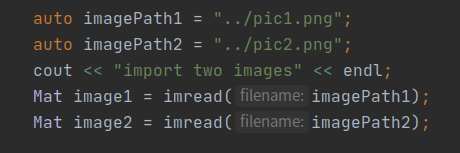
This problem occurred when I ran C + + opencv code. I realized that the mask format I entered was incorrect, not the. PNG or. JPG problem I wrote. The source of the problem may be that CV2. Imread() is loading an empty matrix. Instead of delving into this problem, I will check your input image and mask name and format again. I think this error is a sign that the image cannot be loaded correctly. You need to check your code imread read read problem, whether the file name is correct and whether there is a problem with the file input path. Finally, I changed the way the file path was read

My modification: change the input path in the program parameters to:

The above is my solution to this problem, the correct operation of the modified code.

Solving routing errors by rewriting Vue push method

/**
Rewrite the push method of the route
Solve the problem of reporting an error when jumping on the same route
Add, when same route jump, trigger watch (string only, like “view?id=5″)
*/
const routerPush = Router.prototype.push
Router.prototype.push = function push(location) {
if(typeof(location)==”string”){
var Separator = “&”;
if(location.indexOf(‘?’)==-1) { Separator=’?’; }
location = location + Separator + “random=” + Math.random();
}
return routerPush.call(this, location).catch(error=> error)
}

[How to Solve] Content with element type ‘mapper’ must match

Today, in the mapper. XML file, I mistakenly annotated it with /* * code description */ and then reported this error
the specific exception is as follows

Caused by: org.xml.sax.SAXParseException; lineNumber: 134; columnNumber: 10, The element type "mapper" must match "(cache-ref|cache|resultMap*|parameterMap*|sql*|insert*|update*|delete*|select*)+"。

error code 

   /** Public conditions */
    <sql id="commonIfWhere">
        <if test='params.projectId != null and params.projectId != ""'>
            and project_id = #{params.projectId}
        </if>
        <if test='params.id!= null and params.id != ""'>
            and id = #{params.id}
        </if>
    </sql>

after correction

   <!-- Public conditions -->
    <sql id="commonIfWhere">
        <if test='params.projectId != null and params.projectId != ""'>
            and project_id = #{params.projectId}
        </if>
        <if test='params.id!= null and params.id != ""'>
            and id = #{params.id}
        </if>
    </sql>

The problem was solved smoothly

The upgrade of Ubuntu results in an error in the compilation of Android Jack [Two Method to Solve]

Error log:

Ensuring Jack server is installed and started
FAILED: setup-jack-server
/bin/bash -c "(prebuilts/sdk/tools/jack-admin install-server prebuilts/sdk/tools/jack-launcher.jar prebuilts/sdk/tools/jack-server-4.11.ALPHA.jar  2>&1 || (exit 0) ) && (JACK_SERVER_VM_ARGUMENTS=\"-Dfile.encoding=UTF-8 -XX:+TieredCompilation\" prebuilts/sdk/tools/jack-admin start-server 2>&1 ||
 exit 0 ) && (prebuilts/sdk/tools/jack-admin update server prebuilts/sdk/tools/jack-server-4.11.ALPHA.jar 4.11.ALPHA 2>&1 || exit 0 ) && (prebuilts/sdk/tools/jack-admin update jack prebuilts/sdk/tools/jacks/jack-4.32.CANDIDATE.jar 4.32.CANDIDATE || exit 47 )"
Jack server already installed in "~/.jack-server"
Launching Jack server java -XX:MaxJavaStackTraceDepth=-1 -Djava.io.tmpdir=/tmp -Dfile.encoding=UTF-8 -XX:+TieredCompilation -cp ~/.jack-server/launcher.jar com.android.jack.launcher.ServerLauncher
Jack server failed to (re)start, try 'jack-diagnose' or see Jack server log
SSL error when connecting to the Jack server. Try 'jack-diagnose'
ninja: build stopped: subcommand failed.
10:11:50 ninja failed with: exit status 1

Problems caused by JDK automatic upgrade

Method 1:

Delete tlsv1 and tlsv1.1 under jdk.tls.disabledalgorithms in/etc/java-8-openjdk/security/java.security

Then install Jack again  ( Jack needs to modify the port number after unloading and reloading)

It needs to be implemented
mmm   prebuilts/sdk/tools/
jack-admin   uninstall-server  & amp;& amp;   jack-admin   kill-server
make   setup-jack-server

Method 2:


diff --git a/prebuilts/sdk/tools/jack b/prebuilts/sdk/tools/jack
index ae291f4..16eb180 100755
--- a/prebuilts/sdk/tools/jack
+++ b/prebuilts/sdk/tools/jack
@@ -134,7 +134,7 @@ HTTP_CODE=$(curl -f $JACK_EXTRA_CURL_OPTIONS \
      -F "version=$JACK_VERSION;type=application/vnd.jack.select-exact;version=1" \
      -F "pwd=$JACK_PWD;type=text/plain$CHARSET_ARGUMENT" \
      --noproxy ${SERVER_HOST} \
-     https://${SERVER_HOST}:$SERVER_PORT_SERVICE/jack \
+     http://${SERVER_HOST}:$SERVER_PORT_SERVICE/jack \
      )
 
 CURL_CODE=$?
diff --git a/prebuilts/sdk/tools/jack-admin b/prebuilts/sdk/tools/jack-admin
index ee193fc..c964bc5 100755
--- a/prebuilts/sdk/tools/jack-admin
+++ b/prebuilts/sdk/tools/jack-admin
@@ -136,7 +136,7 @@ updateProgram () {
        -F "jar=@$2;type=application/octet-stream" \
        -F "force=$FORCE_INSTALLATION;type=text/plain$CHARSET_ARGUMENT" \
        --noproxy ${SERVER_HOST} \
-       https://${SERVER_HOST}:$SERVER_PORT_ADMIN/$1 \
+       http://${SERVER_HOST}:$SERVER_PORT_ADMIN/$1 \
        )
   handleHttpErrors $?$HTTP_CODE
 
@@ -159,7 +159,7 @@ isServerRunning () {
          -X GET \
          -H "Accept: text/plain$CHARSET_ARGUMENT" \
          --noproxy ${SERVER_HOST} \
-         https://${SERVER_HOST}:$SERVER_PORT_ADMIN/server \
+         http://${SERVER_HOST}:$SERVER_PORT_ADMIN/server \
          )
     CURL_CODE=$?
     if [ $CURL_CODE -eq 0 ]; then
@@ -196,7 +196,7 @@ waitServerStarted () {
          -X GET \
          -H "Accept: text/plain$CHARSET_ARGUMENT" \
          --noproxy ${SERVER_HOST} \
-         https://${SERVER_HOST}:$SERVER_PORT_ADMIN/server \
+         http://${SERVER_HOST}:$SERVER_PORT_ADMIN/server \
          )
     CURL_CODE=$?
     if [ $CURL_CODE -eq 7 ] || [ $CURL_CODE -eq 35 ] || [ $CURL_CODE -eq 58 ] || [ $CURL_CODE -eq 60 ] || [ $CURL_CODE -eq 77 ]; then
@@ -226,7 +226,7 @@ listProgramVersion () {
        -X GET \
        -H "Accept: text/plain$CHARSET_ARGUMENT" \
        --noproxy ${SERVER_HOST} \
-       https://${SERVER_HOST}:$SERVER_PORT_ADMIN/$1 \
+       http://${SERVER_HOST}:$SERVER_PORT_ADMIN/$1 \
        )
   handleHttpErrors $?$HTTP_CODE
   exec 3>&-
@@ -336,7 +336,7 @@ case $COMMAND in
              --data "$4" \
              -H "Content-Type:application/vnd.jack.select-exact;version=1" \
              --noproxy ${SERVER_HOST} \
-             https://${SERVER_HOST}:$SERVER_PORT_ADMIN/$2 \
+             http://${SERVER_HOST}:$SERVER_PORT_ADMIN/$2 \
              )
         CURL_CODE=$?
         if [ $CURL_CODE -eq 22 ]; then
@@ -365,7 +365,7 @@ case $COMMAND in
          --no-buffer --write-out '%{http_code}' --silent --connect-timeout $JACK_CONNECTION_TIMEOUT \
          -X POST \
          --noproxy ${SERVER_HOST} \
-         https://${SERVER_HOST}:$SERVER_PORT_ADMIN/server/stop \
+         http://${SERVER_HOST}:$SERVER_PORT_ADMIN/server/stop \
          )
     handleHttpErrors $?$HTTP_CODE ;;
 
@@ -382,7 +382,7 @@ case $COMMAND in
          -X GET \
          -H "Accept: text/plain$CHARSET_ARGUMENT" \
          --noproxy ${SERVER_HOST} \
-         https://${SERVER_HOST}:$SERVER_PORT_ADMIN/stat \
+         http://${SERVER_HOST}:$SERVER_PORT_ADMIN/stat \
          )
     handleHttpErrors $?$HTTP_CODE
     exec 3>&- ;;
@@ -398,7 +398,7 @@ case $COMMAND in
          -X GET \
          -H "Accept: text/plain$CHARSET_ARGUMENT" \
         --noproxy ${SERVER_HOST} \
-         https://${SERVER_HOST}:$SERVER_PORT_ADMIN/launcher/log \
+         http://${SERVER_HOST}:$SERVER_PORT_ADMIN/launcher/log \
          )
     handleHttpErrors $?$HTTP_CODE
     exec 3>&- ;;
@@ -500,7 +500,7 @@ case $COMMAND in
          --form "limit=$LIMIT;type=text/plain$CHARSET_ARGUMENT" \
          --form "count=$COUNT;type=text/plain$CHARSET_ARGUMENT" \
          --noproxy ${SERVER_HOST} \
-         https://${SERVER_HOST}:$SERVER_PORT_ADMIN/launcher/log/level \
+         http://${SERVER_HOST}:$SERVER_PORT_ADMIN/launcher/log/level \
          )
     handleHttpErrors $?$HTTP_CODE ;;
 
@@ -515,7 +515,7 @@ case $COMMAND in
          --no-buffer --write-out '%{http_code}' --silent --connect-timeout $JACK_CONNECTION_TIMEOUT \
          -X POST \
          --noproxy ${SERVER_HOST} \
-         https://${SERVER_HOST}:$SERVER_PORT_ADMIN/gc \
+         http://${SERVER_HOST}:$SERVER_PORT_ADMIN/gc \
          )
     handleHttpErrors $?$HTTP_CODE ;;
 
diff --git a/prebuilts/sdk/tools/jack-server-3.0.ENGINEERING.jar b/prebuilts/sdk/tools/jack-server-3.0.ENGINEERING.jar
new file mode 100755
index 0000000..551073f
Binary files /dev/null and b/prebuilts/sdk/tools/jack-server-3.0.ENGINEERING.jar differ
diff --git a/prebuilts/sdk/tools/jack_server_setup.mk b/prebuilts/sdk/tools/jack_server_setup.mk
old mode 100644
new mode 100755
index fd6a134..a2b6714
--- a/prebuilts/sdk/tools/jack_server_setup.mk
+++ b/prebuilts/sdk/tools/jack_server_setup.mk
@@ -15,7 +15,8 @@
 #
 LOCAL_PATH:= $(call my-dir)
 
-jack_server_version := 4.8.ALPHA
+#jack_server_version := 4.8.ALPHA
+jack_server_version := 3.0.ENGINEERING
 jack_server_jar := $(LOCAL_PATH)/jack-server-$(jack_server_version).jar


Then reinstall jack (you need to change the port number after jack uninstall and reinstall)
You need to execute
mmm prebuilts/sdk/tools/
jack-admin uninstall-server && jack-admin kill-server
make setup-jack-server

Refer:
https://stackoverflow.com/questions/67330554/is-openjdk-upgrading-to-8u292-break-my-aosp-build-system

Redis: How to Configurate Redis.conf File

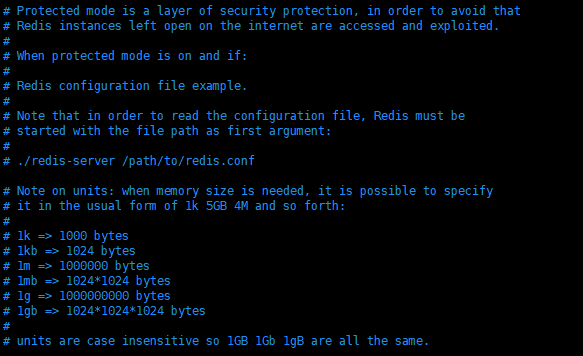
The configuration file is case insensitive

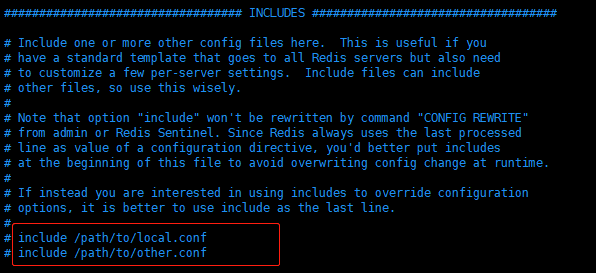
Other configuration files can be included

###Network-related###
# bind 127.0.0.1 # Bind the listening NIC IP, comment out or configure to 0.0.0.0 to make any IP accessible

protected-mode yes # Turn off protected mode, use password access

port 6379 # Set the listening port, it is recommended that production environments use custom ports

timeout 30 # how long the client connection is idle before disconnecting, in seconds, 0 means disabled

###General configuration###
daemonize yes # default is no, run in the background as a daemon

pidfile /var/run/redis_6379.pid # If running in the background, specify the pid process file name

### log###
# Specify the server verbosity level.
# This can be one of:
# debug (a lot of information, useful for development/testing)
# verbose (many rarely useful info, but not a mess like the debug level)
# notice (moderately verbose, what you want in production probably)
# warning (only very important/critical messages are logged)
loglevel notice

logfile "" # file name of the log

databases 16 # number of databases default is 16 databases

always-show-logo yes # Whether to show logs, default is no

### RDB persistence configuration ###
### redis is memory-based, no persistence, data disappears if power is lost
save 900 1 # bgsave for RDB persistence if at least one write operation in 900s
save 300 10
save 60 10000 

stop-writes-on-bgsave-error yes # Whether to continue working after persistence errors

rdbcompression yes # whether to compress the rdb file requires CPU consumption recommend setting to no, to exchange (disk) space for (CPU) time

rdbchecksum yes # whether to save the rdb file for checking

dbfilename dump.rdb # rdb file name

dir . / # rdb file save directory

###AOF configuration###
appendonly yes # The default value is no, which means do not use the AOF incremental persistence method, use the RDB full persistence method
appendfsync everysec # optional values always, everysec, no, suggest to set to everysec

### set password###
requirepass 123456 # Set a more complex password

###Clients###
maxclients 10000 # Maximum number of client connections

maxmemory <bytes> # redis sets the maximum memory capacity

maxmemory-policy noeviction # Policy for handling memory when it reaches the upper limit
1, volatile-lru: LRU only for keys with expiration time set (default)
2、allkeys-lru : remove the key of lru algorithm
3, volatile-random: randomly delete the key that is about to expire
4、allkeys-random:randomly delete
5、volatile-ttl : Delete the soon to expire
6、noeviction : Never expire, return error

###APPEND ONLY MODE aof configuration###
appendonly no # default does not enable aof mode, the default is to use rdb way persistent

appendfilename "appendonly.aof" # Persistent file name

# appendfsync always # sync every time you make a change, which consumes performance
appendfsync everysec # execute sync every second, but may lose this 1s data
# appendfsync no # no sync, OS syncs data itself, fastest

Ysec # executes sync once per second, but the 1s data may be lost

Appendfsync no # if you don’t execute sync, the operating system synchronizes data by itself, and the speed is the fastest


Resolving yum source-related issues: Cannot retrieve metalink for repository: epel/x86_64. Please verify its path and try again

Loaded plug-ins: fastestmirror
Loading mirror speeds from cached hostfile
One of the configured repositories failed (none),
and yum doesn’t have enough cached data to continue. At this point the only
safe thing yum can do is fail. There are a few ways to work “fix” this:

 1. Contact the upstream for the repository and get them to fix the problem.

 2. Reconfigure the baseurl/etc. for the repository, to point to a working
    upstream. This is most often useful if you are using a newer
    distribution release than is supported by the repository (and the
    packages for the previous distribution release still work).

 3. Run the command with the repository temporarily disabled
        yum --disablerepo=<repoid> ...

 4. Disable the repository permanently, so yum won't use it by default. Yum
    will then just ignore the repository until you permanently enable it
    again or use --enablerepo for temporary usage:

        yum-config-manager --disable <repoid>
    or
        subscription-manager repos --disable=<repoid>

 5. Configure the failing repository to be skipped, if it is unavailable.
    Note that yum will try to contact the repo. when it runs most commands,
    so will have to try and fail each time (and thus. yum will be be much
    slower). If it is a very temporary problem though, this is often a nice
    compromise:

        yum-config-manager --save --setopt=<repoid>.skip_if_unavailable=true

Cannot retrieve metalink for repository: epel/x86_64. Please verify its path and try again


Follow the prompts to correct the source.

cd /etc/yum.repos.d
vi epel.repo 

The revised contents are as follows:

[epel]
name=Extra Packages for Enterprise Linux 7 - $basearch
baseurl=http://mirrors.aliyun.com/epel/7/$basearch
#metalink=https://mirrors.aliyun.com/metalink?repo=epel-7&arch=$basearch
failovermethod=priority
enabled=1
gpgcheck=1
gpgkey=file:///etc/pki/rpm-gpg/RPM-GPG-KEY-EPEL-7

[epel-debuginfo]
name=Extra Packages for Enterprise Linux 7 - $basearch - Debug
baseurl=http://mirrors.aliyun.com/epel/7/$basearch/debug
#metalink=https://mirrors.aliyun.com/metalink?repo=epel-debug-7&arch=$basearch
failovermethod=priority
enabled=0
gpgkey=file:///etc/pki/rpm-gpg/RPM-GPG-KEY-EPEL-7
gpgcheck=1

[epel-source]
name=Extra Packages for Enterprise Linux 7 - $basearch - Source
baseurl=http://mirrors.aliyun.com/epel/7/SRPMS
#metalink=https://mirrors.aliyun.com/metalink?repo=epel-source-7&arch=$basearch
failovermethod=priority
enabled=0
gpgkey=file:///etc/pki/rpm-gpg/RPM-GPG-KEY-EPEL-7
gpgcheck=1

Execute the following command:

yum clean all
yum makecache
yum update
yum install -y git

Yum installation and use returned to normal.

How to Compress them with thumbrails When uploading pictures

When uploading large images, the speed is very slow, so the images are compressed and then stored

Thumbnailator website: http://code.google.com/p/thumbnailator/

Add in POM

   <dependency>
        <groupId>net.coobird</groupId>
        <artifactId>thumbnailator</artifactId>
        <version>0.4.8</version>
    </dependency>

controller

@PostMapping("/upload")
    public Object upload(@RequestParam("file") MultipartFile file) throws IOException {
//        if(file.getSize() > 2 * ONE_MB){
//            return ResponseUtil.fail(500,"Image size exceeds 2M!");
//        }
        String originalFilename = file.getOriginalFilename();
        logger.info("Before compression:"+file.getSize());
        ByteArrayInputStream inputStream = uploadFile(file);
        logger.info("After compression:"+inputStream.available());
        LitemallStorage litemallStorage = storageService.store(inputStream, inputStream.available(), file.getContentType(), originalFilename);
        return ResponseUtil.ok(litemallStorage);
    }

    /**
     * image compression
     * @return
     */
    public static ByteArrayInputStream uploadFile(MultipartFile file){
        if(file == null)return  null;
        ByteArrayOutputStream baos = null;
        try {
            baos = new ByteArrayOutputStream();
            Thumbnails.of(file.getInputStream()).scale(0.4f).outputQuality(0.25f).toOutputStream(baos);
            if(baos!=null)
                return parse(baos);
        } catch (Exception e) {
            e.printStackTrace();
        }
        return null;
    }


    // outputStream转inputStream
    public static ByteArrayInputStream parse(OutputStream out) throws Exception {
        ByteArrayOutputStream baos = new ByteArrayOutputStream();
        baos = (ByteArrayOutputStream) out;
        ByteArrayInputStream swapStream = new ByteArrayInputStream(baos.toByteArray());
        return swapStream;
    }

service:

 /**
     * Store a file object
     *
     * @param inputStream File input stream
     * @param contentLength The length of the file.
     * @param contentType File type
     * @param fileName File index name
     */
    public LitemallStorage store(InputStream inputStream, long contentLength, String contentType, String fileName) {
        String key = generateKey(fileName);
        store(inputStream, contentLength, contentType, key);

        String url = generateUrl(key);
        LitemallStorage storageInfo = new LitemallStorage();
        storageInfo.setName(fileName);
        storageInfo.setSize((int) contentLength);
        storageInfo.setType(contentType);
        storageInfo.setKey(key);
        storageInfo.setUrl(url);
        litemallStorageService.add(storageInfo);

        return storageInfo;
    }


    @Override
    public void store(InputStream inputStream, long contentLength, String contentType, String keyName) {
        try {
            // Simple file upload, supports up to 5 GB, suitable for small file upload, recommend using this interface for files under 20M
            ObjectMetadata objectMetadata = new ObjectMetadata();
            objectMetadata.setContentLength(contentLength);
            objectMetadata.setContentType(contentType);
            // The object key (Key) is the unique identifier of the object in the storage bucket.
            PutObjectRequest putObjectRequest = new PutObjectRequest(bucketName, keyName, inputStream, objectMetadata);
            PutObjectResult putObjectResult = getOSSClient().putObject(putObjectRequest);
        } catch (Exception ex) {
            logger.error(ex.getMessage(), ex);
        }

    }

Other methods of thumbnailator:

//Shrink and put the image by the specified size (will follow the original image height and width ratio)
// Here the image is compressed into a 400×500 thumbnail
Thumbnails.of(fromPic).size(400,500).toFile(toPic);

Zoom in and out according to the specified ratio // Zoom in and out according to the ratio
Thumbnails.of(fromPic).scale(0.2f).toFile(toPic);//scale down and scale up
Thumbnails.of(fromPic).scale(2f);//proportionally enlarge the image size, compress the image file size

// image size remains the same, compress the image file size outputQuality implementation, parameter 1 is the highest quality
Thumbnails.of(fromPic).scale(1f).outputQuality(0.25f).toFile(toPic);

[Solved] Failed to convert value of type ‘java.lang.String‘ to required type ‘java.util.Date‘;

Add a method to Java controller to solve the problem

    /**
     * Solution: Failed to convert value of type 'java.lang.String' to required type 'java.util;
     * The main reason for this error is that the required type in the Controller class is Date, but the type passed on the page side is String, which eventually leads to this error.
     */
    @InitBinder
    public void initBinder(WebDataBinder binder, WebRequest request) {
        //convert the date Note that the conversion here should always be in the same format as the string passed in, e.g. 2015-9-9 should be yyyy-MM-dd
        DateFormat dateFormat=new SimpleDateFormat("yyyy-MM-dd HH:mm:ss");
        binder.registerCustomEditor(Date.class, new CustomDateEditor(dateFormat, true));// CustomDateEditor is a custom date editor
    }