Author Archives: Robins

[Solved] Postman Error: Unsupported Media Type

The error message is as follows:

{
 " timestamp " : " 2018-12-06T01:37:11.184+0000 " ,
 " status " : 415 ,
 " error " : " Unsupported Media Type " ,
 " message " : " Content type'text/plain;charset=UTF -8' not supported " ,
 " path " : " /testgu/ycyzharry " 
}

problem causes:

Media Type, which is Internet Media Type, is also called MIME type. In the Http protocol message header, Content-Type is used to indicate the media type information in the specific request.
For example: Content-Type: text/html;charset:utf-8;
Common media format types are as follows:

text/ html: HTML format 
text / plain: plain text format       
text / xml: XML format 
image / gif: gif picture format     
image / jpeg: jpg picture format 
image /png: png picture format

Media format types beginning with application:

application/xhtml+ xml: XHTML format 
application / xml: XML data format 
application /atom+ xml: Atom XML aggregation format     
application / json: JSON data format 
application / pdf: pdf format   
application / msword: Word document format 
application /octet- stream: Binary Streaming data (such as common file downloads) 
application /x-www-form-urlencoded: The default encType in <form encType="”>, the form data is encoded in key/value format and sent to the server (the default submission data of the form Format)

Another common media format is used when uploading files:

multipart/form-data: When you need to upload files in the form, you need to use this format

The above is the content format of the content-type that we often use. The message information in this example indicates that the post request does not support the “text/plain” plain text format type.

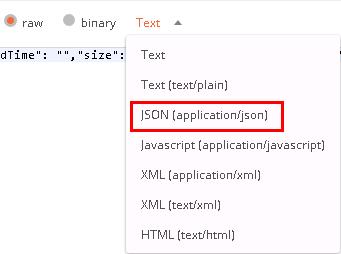
Solution: Select the “application/json” JSON data format type to send a Post request, and successfully get the interface return value.

Centos pip install uwsgi error: “fatal error: Python.h: No such file or directory”

Halfway through the writing of the flask project, I was going to try to run it on the server. I thought that app.run() could not be used in the production environment, but Baidu wanted to use Ngix+uwsgi.

In line with the principle of pip all the way, first came a beautiful

1
pip3 install uwsgi

  Unfortunately reported an error

1
2
3
4
5
6
7
8
9
10
11
12
13
14
15
16
17
18
19
[gcc -pthread] core/zlib.o
    [gcc -pthread] core/regexp.o
    [gcc -pthread] core/routing.o
    [gcc -pthread] core/yaml.o
    [gcc -pthread] core/ssl.o
    [gcc -pthread] core/legion.o
    [gcc -pthread] core/xmlconf.o
    [gcc -pthread] core/dot_h.o
    [gcc -pthread] core/config_py.o
    *** uWSGI compiling embedded plugins ***
    [gcc -pthread] plugins/python/python_plugin.o
    In file included from plugins/python/python_plugin.c:1:0:
    plugins/python/uwsgi_python.h:2:20: fatal error: Python.h: No such file or directory
     #include <Python.h>
                        ^
    compilation terminated.
    ----------------------------------------
Command "/usr/bin/python3.4 -u -c "import setuptools, tokenize;__file__='/tmp/pip-build-dsr9i4nq/uwsgi/setup.py';f=getattr(tokenize, 'open'open)(__file__);code=f.read().replace('\r\n''\n');f.close();exec(compile(code, __file__, 'exec'))" install --record /tmp/pip-9835ofpr-record/install-record.txt --single-version-externally-managed --compile" failed with error code 1 in /tmp/pip-build-dsr9i4nq/uwsgi/

I can’t find python.h. It must be a dependency problem. A search on the Internet shows that the basic answer is to install python-dev and build-essential. I tried yum and found that the package was not found.

1
2
3
4
5
6
7
8
9
[root@VM_0_13_centos python3]# yum install python-dev
Loaded plugins: fastestmirror, langpacks
Repository epel is listed more than once in the configuration
Loading mirror speeds from cached hostfile
 * base: mirrors.aliyun.com
 * extras: mirrors.aliyun.com
 * updates: mirrors.aliyun.com
No package python-dev available.
Error: Nothing to do

  Think about yourself as python3, change your posture

1
2
3
4
5
6
7
8
9
10
11
12
13
14
15
16
17
18
[root@VM_0_13_centos python3]# yum install python3-dev
Loaded plugins: fastestmirror, langpacks
Repository epel is listed more than once in the configuration
Loading mirror speeds from cached hostfile
 * base: mirrors.aliyun.com
 * extras: mirrors.aliyun.com
 * updates: mirrors.aliyun.com
No package python3-dev available.
Error: Nothing to do
[root@VM_0_13_centos python3]# yum install python34-dev
Loaded plugins: fastestmirror, langpacks
Repository epel is listed more than once in the configuration
Loading mirror speeds from cached hostfile
 * base: mirrors.aliyun.com
 * extras: mirrors.aliyun.com
 * updates: mirrors.aliyun.com
No package python34-dev available.
Error: Nothing to do

This is fascinating


Solution:

Although the error reports are not consistent, I can’t find <python.h> anyway.

1
yum install python34-devel

After the installation is complete, then pip install uwsgi, a smooth journey.

Windows: Nginx configuration error GetFileAttributesEx

Because there are bright spots on the computer screen, I took it to change the screen, so I used the windows environment and installed the wlmp environment

When configuring Nginx, I found that there is no problem with the configuration, but I can’t access it all the time.

, 2015 / 08 / 24  15 : 03 : 59 [Crit] 4560 # 3796 : * 222 GetFileAttributesEx () " D: \ wwwroot \ hj_app 
ES / CSS / Web / coach_join.css / index.html " failed (123: of The filename, directory name, or volume label syntax is incorrect)

Sister, it depends on the situation that the root directory is incorrect. At first, I always thought it was a rewrite problem. The key is the main domain name I configured.

A The virtual host root configuration is: access to the secondary directory root d:\wwwroot\a is no problem, but the configured resource domain name

The configuration of B virtual host root is: access to the third-level directory root d:\wwwroot\a\bb, and an error is reported.

What the log shows is:

CreateFile() " D:\wwwroot\abb /css/web/coach_join.css " failed (123: The filename CreateFile() "D:\wwwroot\hj_app es/css/web/coach_join.css" failed (123: The filename, directory name, or volume label syntax is incorrect), client: 127.0.0.1, server: ares.haojian.dev, request: "GET /css/web/coach_join.css HTTP/1.1", host: "ares.test .dev"


Solution:

Is the problem of backslashes

Just change root d:\wwwroot\a\bb to d:/wwwroot/a/bb

How to Solve NPM run dev error: missing script:dev

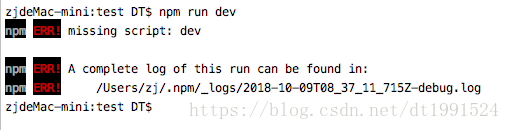
When running the Vue project today, an error was reported when running npm run dev as shown below:

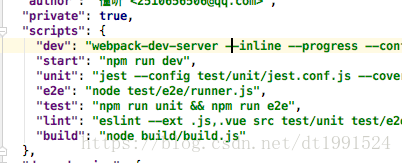
Open the package.js folder and find that the scripts in the folder have dev as shown below:

,

But I can’t find it. What is the reason? The last time I saw that the path was wrong, when vue init webpack my-project, I created a folder by myself, and I couldn’t get the dev in the corresponding package.js.

cd to the corresponding folder, re-run npm run dev and it will be OK .

And the scripts in package.js do not have dev, in this case 

Enter vue init webpack to download the missing package.json again:

   “dev”: “webpack-dev-server –inline –progress –config build/webpack.dev.conf.js”,
    “start”: “npm run dev”,
    “build”: “node build/build. js”

 Then install dependencies in npm intall, and finally npm run dev

Also suitable for solving start, build loss

[Solved] MYSQL 5.7 gruop by eRROR: this is incompatible with sql_mode=only_full_group_by

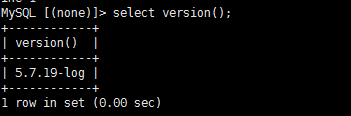
From the development of a project to the test and online operation, the team’s immature management of the project will affect the development efficiency of the project. Since I just took over the project and set up the PHP environment in Centos alone, I considered using the higher version, choosing Mysql5.7, the local development environment or the Windows inheritance environment, the PHP environment and Centos are unified 7.0, but the Mysql version is 5.3 , The local development went well, and some problems appeared under Centos, which was caused by the inconsistency between the development environment and the test|online environment.

mysql command groop by error this is incompatible with sql_mode=only_full_group_by

Take a look at the meaning of ONLY_FULL_GROUP_BY: For the GROUP BY aggregation operation, if the column in the SELECT does not appear in the GROUP BY, then this SQL is illegal, because the column is not in the GROUP BY clause, that is to say, the column found It must appear after the group by, otherwise an error will be reported, or this field appears in the aggregate function.

Next, let’s just talk about the process of solving the problem.

First enter the Mysql client to execute the command

select @@GLOBAL.sql_mode;
+------------------------------------------------- -------------------------------------------------- -----------------------------------+ 
| @@GLOBAL.sql_mode | 
+------ -------------------------------------------------- -------------------------------------------------- ----------------------------+ 
|ONLY_FULL_GROUP_BY,STRICT_TRANS_TABLES,NO_ZERO_IN_DATE,NO_ZERO_DATE,ERROR_FOR_DIVISION_BY_ZERO,NO_AUTO_CREATE_USER,NO_ENGINE_SUBSTITUTION 
+------ -------------------------------------------------- -------------------------------------------------- ----------------------------+

See the first paragraph of the above repentant command line —> ONLY_FULL_GROUP_BY;

There are about three solutions given on the Internet. One is to add aggregate functions to the query condition column in the statement of the program code. If you do this, it will be very troublesome, and you can use group by in the development process. You have to work hard on the sentence, and this method is fine.

It is recommended to turn off this configuration item directly.

So how to turn off this item, can it be turned off directly by executing the command on the client side, set @@global.sql_mode = ……., the execution is successful, and then execute the command to check it out. One item is gone, and then we restart the mysql service again, query again, still… haha. .

So, let’s play a trick next, let’s start from the Mysql configuration file.

Find my.cnf, edit it~Put the following commands in the right place, restart the mysql service, OK~the error is correct~

Note: There is not extra set in front.

[mysqld] 
#sql_mode =STRICT_TRANS_TABLES,NO_ZERO_IN_DATE,NO_ZERO_DATE,ERROR_FOR_DIVISION_BY_ZERO,NO_AUTO_CREATE_USER,NO_ENGINE_SUBSTITUTION

SpringCloud: gateway module startup error [How to Solve]

1. Error message

org.springframework.beans.factory.UnsatisfiedDependencyException: Error creating bean with name 'routeDefinitionRouteLocator' defined in class path resource [org/springframework/cloud/gateway/config/GatewayAutoConfiguration.class]: Unsatisfied dependency expressed through method 'routeDefinitionRouteLocator' parameter 4; nested exception is org.springframework.beans.factory.NoSuchBeanDefinitionException: No qualifying bean of type 'org.springframework.core.convert.ConversionService' available: expected at least 1 bean which qualifies as autowire candidate. Dependency annotations: {@org.springframework.beans.factory.annotation.Qualifier(value=webFluxConversionService)}
   
Caused by: org.springframework.beans.factory.NoSuchBeanDefinitionException: No qualifying bean of type 'org.springframework.core.convert.ConversionService' available: expected at least 1 bean which qualifies as autowire candidate. Dependency annotations: {@org.springframework.beans.factory.annotation.Qualifier(value=webFluxConversionService)}
    at org.springframework.beans.factory.support.DefaultListableBeanFactory.raiseNoMatchingBeanFound(DefaultListableBeanFactory.java:1662) ~[spring-beans-5.1.10.RELEASE.jar:5.1.10.RELEASE]
    at org.springframework.beans.factory.support.DefaultListableBeanFactory.doResolveDependency(DefaultListableBeanFactory.java:1221) ~[spring-beans-5.1.10.RELEASE.jar:5.1.10.RELEASE]
    at org.springframework.beans.factory.support.DefaultListableBeanFactory.resolveDependency(DefaultListableBeanFactory.java:1175) ~[spring-beans-5.1.10.RELEASE.jar:5.1.10.RELEASE]
    at org.springframework.beans.factory.support.ConstructorResolver.resolveAutowiredArgument(ConstructorResolver.java:857) ~[spring-beans-5.1.10.RELEASE.jar:5.1.10.RELEASE]
    at org.springframework.beans.factory.support.ConstructorResolver.createArgumentArray(ConstructorResolver.java:760) ~[spring-beans-5.1.10.RELEASE.jar:5.1.10.RELEASE]
    ... 19 common frames omitted

2. Reason

At the same time introduce dependencies: spring-cloud-starter-gateway and spring-boot-starter-web

The web module has been referenced in the gateway, so it will cause conflicts. I actually noticed this when I was learning about the gateway, but I still reported an error.

The pom.xml file is as follows

<dependencies>
        <dependency>
            <groupId>com.fdzang.microservice</groupId>
            <artifactId>api-common</artifactId>
            <version>1.0-SNAPSHOT</version>
        </dependency>
        <dependency>
            <groupId>org.springframework.cloud</groupId>
            <artifactId>spring-cloud-starter-gateway</artifactId>
            <version>${spring.cloud.starter.version}</version>
        </dependency>

        <dependency>
            <groupId>org.springframework.cloud</groupId>
            <artifactId>spring-cloud-starter-netflix-eureka-client</artifactId>
            <version>${spring.cloud.starter.version}</version>
        </dependency>

        <dependency>
            <groupId>org.springframework.boot</groupId>
            <artifactId>spring-boot-configuration-processor</artifactId>
            <version>${spring.boot.version}</version>
            <optional>true</optional>
        </dependency>
    </dependencies>

I did not rely on the web module in my pom, and I still reported an error, so I tried to exclude the web from the gateway, but to no avail.

After various attempts, I found that the web module was referenced in the common module I cited, and the case was solved.

So remove

<dependency>
  <groupId>com.fdzang.microservice</groupId>
  <artifactId>api-common</artifactId>
  <version>1.0-SNAPSHOT</version>
  <exclusions>
    <exclusion>
      <groupId>org.springframework.boot</groupId>
      <artifactId>spring-boot-starter-web</artifactId>
    </exclusion>
  </exclusions>
</dependency>

It runs successfully.

[Solved] Spring AOP Error creating bean with name

When learning the AOP configuration of spring, I encountered an error as follows:

Warning: Exception encountered during context initialization - cancelling refresh attempt: org.springframework.beans.factory.BeanCreationException: Error creating bean with name 'userService' defined in class path resource [applicationContext.xml]: Initialization of bean failed; nested exception is java.lang.NoClassDefFoundError: com/jeremy/service/userServiceImpl (wrong name: com/jeremy/service/UserServiceImpl)

org.springframework.beans.factory.BeanCreationException: Error creating bean with name 'userService' defined in class path resource [applicationContext.xml]: Initialization of bean failed; nested exception is java.lang.NoClassDefFoundError: com/jeremy/service/userServiceImpl (wrong name: com/jeremy/service/UserServiceImpl)

An error occurred when creating the bean because the class NoClassDefFoundError could not be found

Cause of the problem: the class name of pointcut configured in execution is filled in lowercase by mistake, so an error is reported
solution: change the class name to the correct uppercase

    <aop:config>
        <aop:pointcut id="pointcut" expression="execution(* com.jeremy.service.userServiceImpl.*(..))"/>

        <aop:advisor advice-ref="afterLog" pointcut-ref="pointcut"/>
        <aop:advisor advice-ref="beforeLog" pointcut-ref="pointcut"/>
    </aop:config>

Change to

 <aop:config>
     <aop:pointcut id="pointcut" expression="execution(* com.jeremy.service.UserServiceImpl.*(..))"/>

     <aop:advisor advice-ref="afterLog" pointcut-ref="pointcut"/>
     <aop:advisor advice-ref="beforeLog" pointcut-ref="pointcut"/>
 </aop:config>

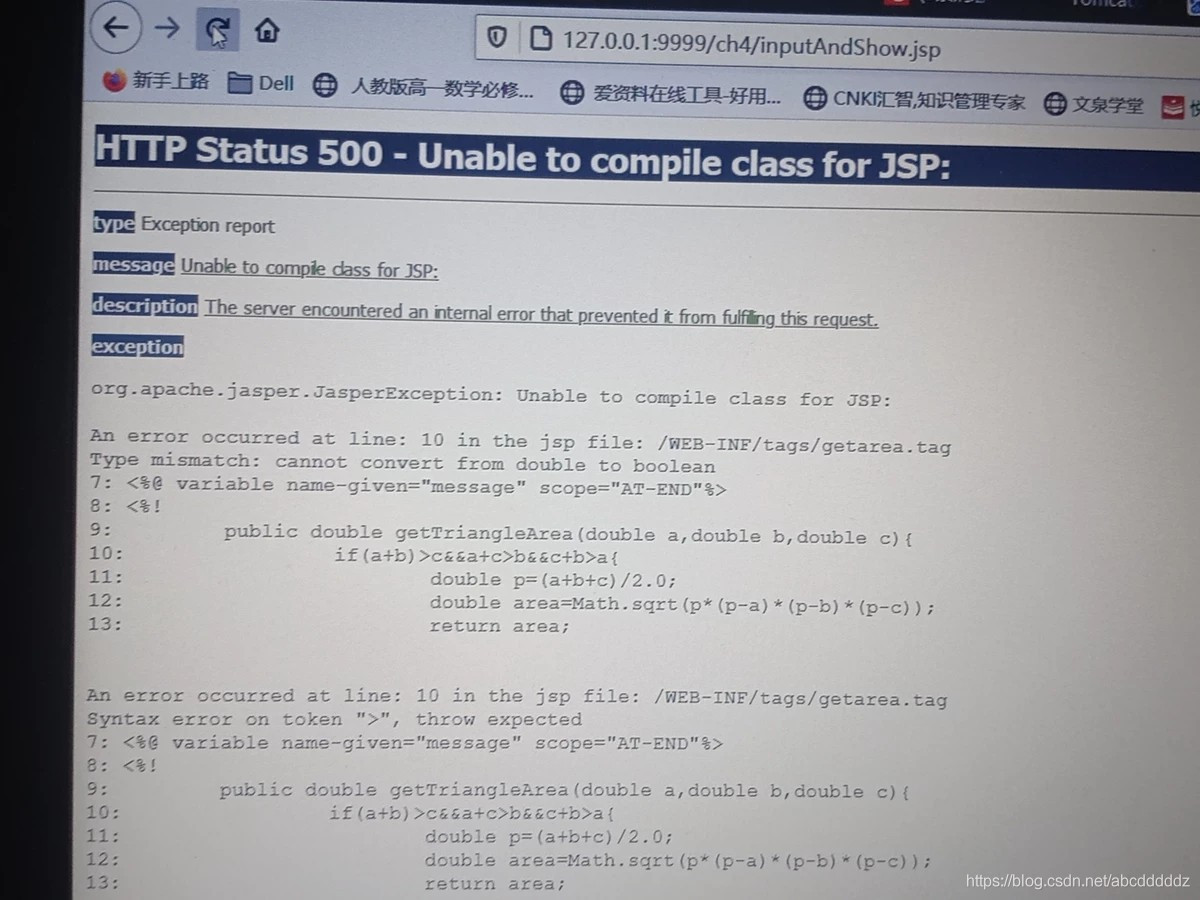
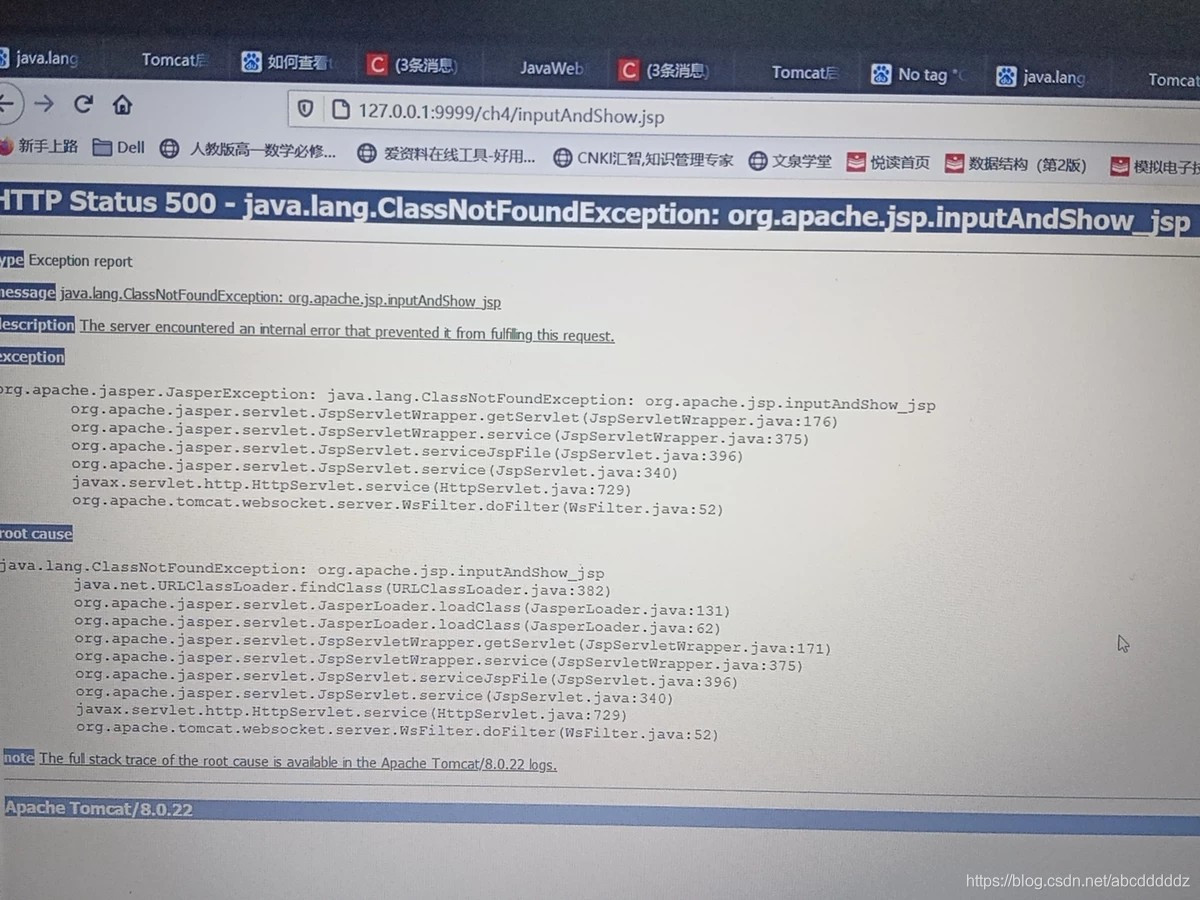
Tomcat error: 500 The server encountered an internal error that prevented it from fulfilling this request

Background:
I use JDK1.8 and tomcat8.0, but I encounter the following two problems


then I made a new tomcat, and its version is as follows:

and it succeeded…..

The reason: Tomcat version is higher than JDK version

In addition, I have problems with my code
here is the error code:

<%@ page contentType="text/html;charset=UTF-8" %>
<%@ taglib tagdir="/WEB-INF/tags" prefix="computer"%>
<html>
The three values entered a,b,c (representing the three sides of a triangle or the upper base, lower base and height of a trapezoid);
<body color=cyan>
        <form action="" method=get name=form> 
        <%--Get parameters to submit to yourself--%>
        <table>
        <tr><td>Enter value a: </td>
            <td><input type="text" name="a"></td>
        </tr>
        <tr><td>input value b: </td>
            <td><input type="text" name="b"></td>
        </tr>
        <tr><td>input value c: </td>
            <td><input type="text" name="c"></td>
        </tr>
        </table>
        <input type="radio" name="r" value="triangle">stands for triangle
        <input type="radio" name="r" value="lader">stands for trapezoid
        <br>
        <input type="submit" name="submit" value="submit" name=submit>stands for submit button
        </form>
        <% String a=request.getParameter("a");
           String b=request.getParameter("b");
           String c=request.getParameter("c");
           String cd=request.getParameter("r");
           if(a==null||b==null||c==null){
              a="0";
              b="0";
              c="0";
              cd="0";
                      
           }
           if(a.length()>0&&b.length()>0&&c.length()>0){
        %>
           <computer:Getarea numberA="<%=a%>" numberB="<%=b%>"
                             numberC="<%=c%>" condition="<%=cd%>"/>
           
           
           <br><%= message%>
           <br><%= area %>
        
        <% }
        %>
        </body>
        </html>


The reason for the error is that there are two more spaces. The error report is the same
here is the correct code:

<%@ page contentType="text/html;charset=UTF-8" %>
<%@ taglib tagdir="/WEB-INF/tags" prefix="computer"%>
<html>
The three values entered a,b,c (representing the three sides of a triangle or the upper base, lower base and height of a trapezoid);
<body color=cyan>
        <form action="" method=get name=form> 
        <%--Get parameters to submit to yourself--%>
        <table>
        <tr><td>Enter value a: </td>
            <td><input type="text" name="a"></td>
        </tr>
        <tr><td>input value b: </td>
            <td><input type="text" name="b"></td>
        </tr>
        <tr><td>input value c: </td>
            <td><input type="text" name="c"></td>
        </tr>
        </table>
        <input type="radio" name="r" value="triangle">stands for triangle
        <input type="radio" name="r" value="lader">stands for trapezoid
        <br>
        <input type="submit" name="submit" value="submit" name=submit>stands for submit button
        </form>
        <% String a=request.getParameter("a");
           String b=request.getParameter("b");
           String c=request.getParameter("c");
           String cd=request.getParameter("r");
           if(a==null||b==null||c==null){
              a="0";
              b="0";
              c="0";
              cd="0";
                      
           }
           if(a.length()>0&&b.length()>0&&c.length()>0){
        %>
           <computer:Getarea numberA="<%=a%>" numberB="<%=b%>"
                             numberC="<%=c%>" condition="<%=cd%>"/>
           
           
           <br><%=message%>
           <br><%=area %>
        
        <% }
        %>
        </body>
        </html> 

[Solved] Error running ‘LocalTest‘: Command line is too long. Shorten command line for LocalTest or also for…

Error running ‘Application’:
Command line is too long.Shorten command line for Application or also for Spring Boot default configuration.
IDEA reports the above error, add the following content to the project workspace.xml

  <component name="PropertiesComponent">
    //add
    <property name="dynamic.classpath" value="true" />
  </component>

Cuda Runtime error (38) : no CUDA-capable device is detected

When training the model in vscode, the following errors appear:
CUDA runtime error (38): no CUDA capable device is detected at/Torch/aten/SRC/THC/thcgeneral cpp:51

The reason is that CUDA is not selected correctly, so you need to check how many graphics cards you have first:
Enter Python in terminal; Enter the following code

import torch
print(torch.cuda.device_count()) #Number of available GPUs

View CUDA version

nvcc --version # Check your own CUDA version

I have two graphics cards in my library. Choose one from 0 or 1 and write it before
model = torch.nn.dataparallel (net). Cuda()

os.environ['CUDA_VISIBLE_DEVICES'] = '0'
model = torch.nn.DataParallel(net).cuda()

Problem solving.

[Solved] Job for network.service failed because the control process exited with error code. See “systemctl st

Job for network.service failed because the control process exited with error code. See “systemctl status network.service” and “journalctl -xe” for details.

1、 The xshell is down and the reconnection failed. First Ping to see if the network is connected. Second, restart the network service and find an error. Third, view the error information according to the prompt. Fourth, solutions. First, check whether the configuration file is wrong. Second, there may be a conflict with the network manager service. Just close the service directly

3. If the two methods 1 and 2 still fail, try to delete all the other irrelevant network card location files under/etc/sysconfig/network scripts to avoid unnecessary influence. 5. Verify the network

Standby for a while, found that xshell connection failed, found that network connection failed, and restart failed.

1、 The xshell is down and the reconnection failed. Ping first to see if the network is connected

[root@db01 ~]# ping www.google.com
ping: www.google.com: Unknown name or service

2、 Restart the network service and find an error

[root@db01 ~]# systemctl restart network
Job for network.service failed because the control process exited with error code. See "systemctl status network.service" and "journalctl -xe" for details.

3、 Check the error information according to the prompt

[root@db01 ~]# systemctl status network.service
● network.service - LSB: Bring up/down networking
   Loaded: loaded (/etc/rc.d/init.d/network; bad; vendor preset: disabled)
   Active: failed (Result: exit-code) since 四 2021-06-03 05:23:42 CST; 23s ago
     Docs: man:systemd-sysv-generator(8)
  Process: 8821 ExecStart=/etc/rc.d/init.d/network start (code=exited, status=1/FAILURE)

6月 03 05:23:42 db01 network[8821]: RTNETLINK answers: File exists
6月 03 05:23:42 db01 systemd[1]: network.service: control process exited, code=e...s=1
6月 03 05:23:42 db01 systemd[1]: Failed to start LSB: Bring up/down networking.
6月 03 05:23:42 db01 systemd[1]: Unit network.service entered failed state.
6月 03 05:23:42 db01 systemd[1]: network.service failed.
Hint: Some lines were ellipsized, use -l to show in full.

4、 Solutions

1. Check whether the configuration file is wrong

[root@db01 ~]# cat /etc/sysconfig/network-scripts/ifcfg-ens33
TYPE=Ethernet
BOOTPROTO=static
DEFROUTE=yes
NAME=ens33
UUID=b5672928-cbbb-4428-a752-8bd9c14098e7
····
DEVICE=ens33
ONBOOT=yes
IPADDR=192.168.10.102
PREFIX=24
GATEWAY=192.168.10.2
DNS1=114.114.114.114
DNS2=8.8.8.8
DNS3=119.29.29.29
[root@db01 ~]# ip a
1: lo: <LOOPBACK,UP,LOWER_UP> mtu 65536 qdisc noqueue state UNKNOWN group default qlen 1000
    link/loopback 00:00:00:00:00:00 brd 00:00:00:00:00:00
    inet 127.0.0.1/8 scope host lo
       valid_lft forever preferred_lft forever
    inet6 ::1/128 scope host 
       valid_lft forever preferred_lft forever
2: ens33: <BROADCAST,MULTICAST> mtu 1500 qdisc noop state DOWN group default qlen 1000
    link/ether 00:0c:29:3f:0f:29 brd ff:ff:ff:ff:ff:ff
3: virbr0: <NO-CARRIER,BROADCAST,MULTICAST,UP> mtu 1500 qdisc noqueue state DOWN group default qlen 1000
    link/ether 52:54:00:3a:15:b7 brd ff:ff:ff:ff:ff:ff
    inet 192.168.122.1/24 brd 192.168.122.255 scope global virbr0
       valid_lft forever preferred_lft forever
4: virbr0-nic: <BROADCAST,MULTICAST> mtu 1500 qdisc pfifo_fast master virbr0 state DOWN group default qlen 1000
    link/ether 52:54:00:3a:15:b7 brd ff:ff:ff:ff:ff:ff

2. There may be a conflict with the NetworkManager service. Just close the service directly

[root@db01 ~]# systemctl stop NetworkManager
[root@db01 ~]# systemctl restart network

3. If both methods 1 and 2 fail after verification, try to delete all other irrelevant network card location files under/etc/sysconfig/network scripts to avoid unnecessary influence

[root@db01 network-scripts]# ls
ifcfg-ens33      ifdown-ipv6      ifdown-tunnel  ifup-isdn    ifup-TeamPort
ifcfg-ens33.bak  ifdown-isdn      ifup           ifup-plip    ifup-tunnel
ifcfg-lo         ifdown-post      ifup-aliases   ifup-plusb   ifup-wireless
ifdown           ifdown-ppp       ifup-bnep      ifup-post    init.ipv6-global
ifdown-bnep      ifdown-routes    ifup-eth       ifup-ppp     network-functions
ifdown-eth       ifdown-sit       ifup-ib        ifup-routes  network-functions-ipv6
ifdown-ib        ifdown-Team      ifup-ippp      ifup-sit
ifdown-ippp      ifdown-TeamPort  ifup-ipv6      ifup-Team

5、 Verification Network

[root@db01 ~]# ping www.google.com
PING www.baidu.com (39.156.66.14) 56(84) bytes of data.
64 bytes from 39.156.66.14 (39.156.66.14): icmp_seq=1 ttl=128 time=55.8 ms
64 bytes from 39.156.66.14 (39.156.66.14): icmp_seq=2 ttl=128 time=42.8 ms
^C
--- www.baidu.com ping statistics ---
2 packets transmitted, 2 received, 0% packet loss, time 1000ms
rtt min/avg/max/mdev = 42.825/49.312/55.800/6.491 ms
[root@db01 ~]#