Author Archives: Robins

[Solved] PhpSpreadsheet Error: Invalid cell coordinate [1

When TP5 uses phpspreadsheet, if the number of columns exceeds 26, it will report an error. The specific solutions are as follows: it is easy to use by personal test

//Write to the table header section to read
  // Set the table header
  // $head formatted as ['Name', 'Phone', 'Contact']
        $colum = 'A';
        foreach ($head as $v) {
            $sheet->setCellValue($colum . '1', $v);
            $sheet->getColumnDimension($colum)->setWidth(20);
            $colum++;
        }
        //Write content to read
          $column = 2;
        foreach ($data as $key => $rows) {
            $span = 'A';
            // Column Write
            foreach ($rows as $keyName => $value) {
                $sheet->setCellValue($span . $column, $value);
                $span++;
            }
            $column++;
        }

ROS generate_messages_cpp [Compiler error resolution]

ROS generate_ messages_ Solution of CPP compilation error

Learning the knowledge of C + + and python joint programming under ROS, there is an error report when compiling cpp file, the following process is recorded:

    1. in the reference → Article 1 ← for configuration, the insertion of CPP and py has been completed, and

catkin is performed_ There are errors in the make

    1. steps, and the error contents are as follows:
CMake Error at my_pkg/CMakeLists.txt:27 (add_dependencies):
  The dependency target "my_pkg_generate_messages_cpp" of target "listener"
  does not exist.

The cmake version is adjusted according to Article 2 ←, and no error is reported. The principle is that cmake before 3.0 will turn this error report into a warning, and it has passed the compilation, but in actual use, it is still unable to find the listener program built from CPP. Finally, the cmakelists is adjusted according to Article 3 ←,
– first of all, Add the following code block:

catkin_package(
 INCLUDE_DIRS include
# LIBRARIES strands_gazing
 CATKIN_DEPENDS std_msgs
# DEPENDS system_lib
)

After that, in Add_ Added ${catkin> to dependencies _ EXPORTED_ Targets} finally, when compiling, execute catkin first_ make --pkg my_ PKG (here is the PKG name) , and then execute catkin_ Make problem solving

Finally, the revised cmakelists :

cmake_minimum_required(VERSION 3.0.2)
project(my_pkg)

## Compile as C++11, supported in ROS Kinetic and newer
# add_compile_options(-std=c++11)

find_package(catkin REQUIRED COMPONENTS
  roscpp
  rospy
  std_msgs
)

catkin_package(
  INCLUDE_DIRS include
# LIBRARIES strands_gazing
  CATKIN_DEPENDS std_msgs
# DEPENDS system_lib
)

include_directories(include/my_pkg ${catkin_INCLUDE_DIRS}) 
add_executable(listener src/listener.cpp) 
target_link_libraries(listener ${catkin_LIBRARIES}) 
add_dependencies(listener my_pkg_generate_messages_cpp ${catkin_EXPORTED_TARGETS})

Vue solves the problem of repeated click navigation route error

// Solve the error reported by repeatedly clicking the navigation route
const originalPush = VueRouter.prototype.push
VueRouter.prototype.push = function push (location) {
  return originalPush.call(this, location).catch(err => err)
}
Vue.use(VueRouter)

Copy directly to router.js. When pasting, pay attention to the execution sequence. This section is placed in front of new vuerouter

[error record] as compilation error (Android support plugin version is too high | upgrade Android studio to the latest version)

Contents of articles

1、 2. Solutions

1、 Error information


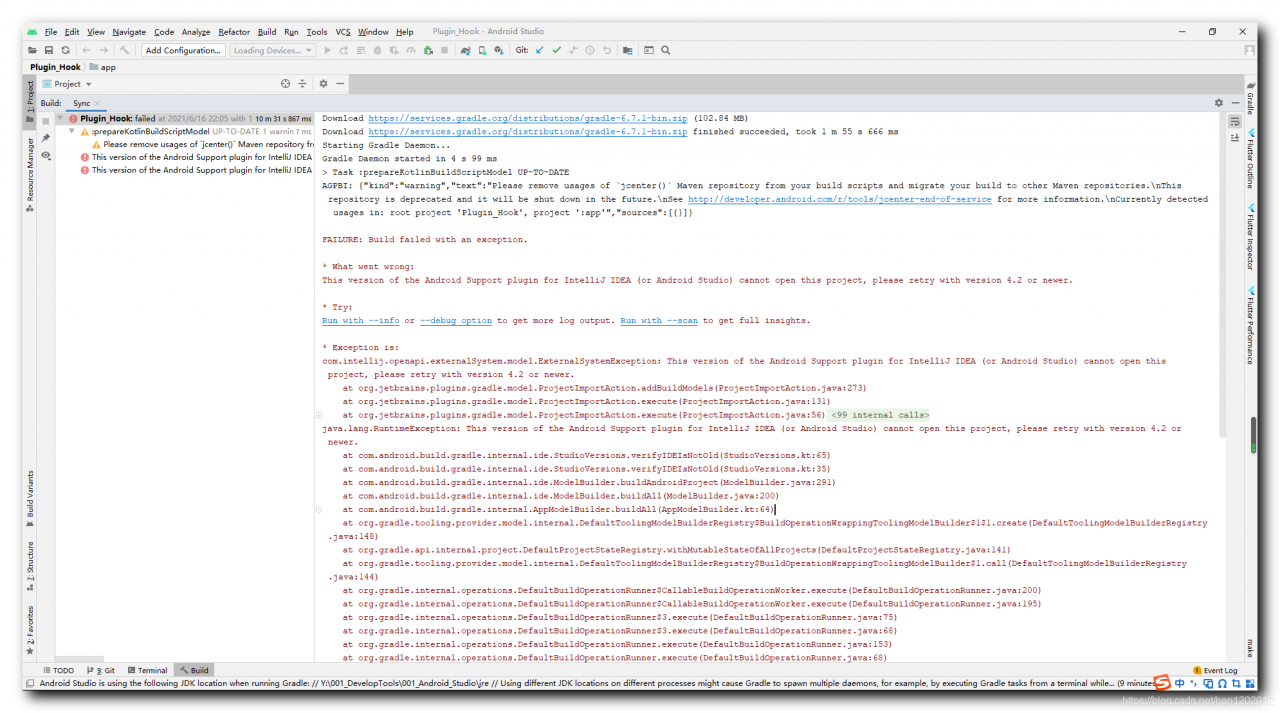
Clone a piece of code from GitHub. The following error occurs when compiling;

Download https://services.gradle.org/distributions/gradle-6.7.1-bin.zip (102.84 MB)
Download https://services.gradle.org/distributions/gradle-6.7.1-bin.zip finished succeeded, took 1 m 55 s 666 ms
Starting Gradle Daemon...
Gradle Daemon started in 4 s 99 ms
> Task :prepareKotlinBuildScriptModel UP-TO-DATE
AGPBI: {"kind":"warning","text":"Please remove usages of `jcenter()` Maven repository from your build scripts and migrate your build to other Maven repositories.\nThis repository is deprecated and it will be shut down in the future.\nSee http://developer.android.com/r/tools/jcenter-end-of-service for more information.\nCurrently detected usages in: root project 'Plugin_Hook', project ':app'","sources":[{}]}

FAILURE: Build failed with an exception.

* What went wrong:
This version of the Android Support plugin for IntelliJ IDEA (or Android Studio) cannot open this project, please retry with version 4.2 or newer.

* Try:
Run with --info or --debug option to get more log output. Run with --scan to get full insights.

* Exception is:
com.intellij.openapi.externalSystem.model.ExternalSystemException: This version of the Android Support plugin for IntelliJ IDEA (or Android Studio) cannot open this project, please retry with version 4.2 or newer.
	at org.jetbrains.plugins.gradle.model.ProjectImportAction.addBuildModels(ProjectImportAction.java:273)
	at org.jetbrains.plugins.gradle.model.ProjectImportAction.execute(ProjectImportAction.java:131)
	at org.jetbrains.plugins.gradle.model.ProjectImportAction.execute(ProjectImportAction.java:56)
	at org.gradle.tooling.internal.consumer.connection.InternalBuildActionAdapter.execute(InternalBuildActionAdapter.java:79)
	at org.gradle.tooling.internal.provider.runner.ClientProvidedPhasedActionRunner$ActionRunningListener.runAction(ClientProvidedPhasedActionRunner.java:120)
	at org.gradle.tooling.internal.provider.runner.ClientProvidedPhasedActionRunner$ActionRunningListener.run(ClientProvidedPhasedActionRunner.java:110)
	at org.gradle.tooling.internal.provider.runner.ClientProvidedPhasedActionRunner$ActionRunningListener.buildFinished(ClientProvidedPhasedActionRunner.java:104)
	at org.gradle.internal.concurrent.ThreadFactoryImpl$ManagedThreadRunnable.run(ThreadFactoryImpl.java:56)
	at java.lang.Thread.run(Thread.java:748)


* Get more help at https://help.gradle.org

BUILD FAILED in 8m 33s

2、 Solutions


Core error information:

This version of the Android Support plugin for IntelliJ IDEA (or Android Studio) cannot open this project, please retry with version 4.2 or newer.

The current Android support plug-in can’t open the project. Upgrade Android studio to

four point two

four point two

Version 4.2 or above;

[error record] kotlin code compilation error when Android studio compiles (process @ nonnull parameter when upgrading support library)

Contents of articles

1、 Error information 2. Error analysis 3. Solutions

1、 Error information


Recently, we have upgraded all the support libraries to

28.0.0

28.0.0

28.0.0 ;

implementation 'com.android.support:recyclerview-v7:28.0.0'

There are a lot of errors in the support library code of kotlin language;
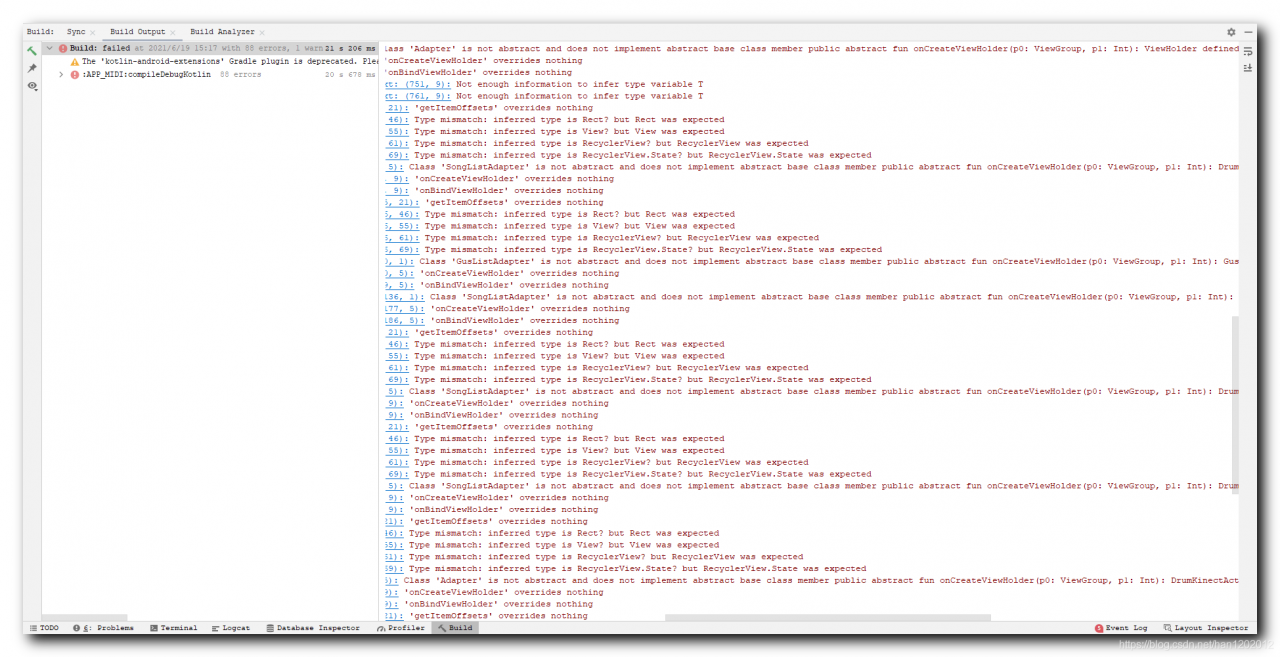
2、 Error analysis


Here, we inherit the recyclerview.itemdecision class and override the getitemoffsets method,

object : RecyclerView.ItemDecoration() {
                    override fun getItemOffsets(outRect: Rect?, view: View?, parent: RecyclerView?, state: RecyclerView.State?) {
                        super.getItemOffsets(outRect, view, parent, state)
}

Note that in the overridden method, the parameter type

outRect: Rect?view: View?parent: RecyclerView?state: RecyclerView.State?

All are nullable types;

Look at the real code of itemdeclaration. The four parameters of getitemoffsets method are all non empty types, and the @ nonnull annotation is added. Therefore, non empty parameters must be passed in here. When inheriting, they are nullable parameters. An error will be reported, and the parameter types are inconsistent;

        public void getItemOffsets(@NonNull Rect outRect, @NonNull View view, @NonNull RecyclerView parent, @NonNull RecyclerView.State state) {
            this.getItemOffsets(outRect, ((RecyclerView.LayoutParams)view.getLayoutParams()).getViewLayoutPosition(), parent);
        }

Item decision complete code reference:

    public abstract static class ItemDecoration {
        public ItemDecoration() {
        }

        public void onDraw(@NonNull Canvas c, @NonNull RecyclerView parent, @NonNull RecyclerView.State state) {
            this.onDraw(c, parent);
        }

        /** @deprecated */
        @Deprecated
        public void onDraw(@NonNull Canvas c, @NonNull RecyclerView parent) {
        }

        public void onDrawOver(@NonNull Canvas c, @NonNull RecyclerView parent, @NonNull RecyclerView.State state) {
            this.onDrawOver(c, parent);
        }

        /** @deprecated */
        @Deprecated
        public void onDrawOver(@NonNull Canvas c, @NonNull RecyclerView parent) {
        }

        /** @deprecated */
        @Deprecated
        public void getItemOffsets(@NonNull Rect outRect, int itemPosition, @NonNull RecyclerView parent) {
            outRect.set(0, 0, 0, 0);
        }

        public void getItemOffsets(@NonNull Rect outRect, @NonNull View view, @NonNull RecyclerView parent, @NonNull RecyclerView.State state) {
            this.getItemOffsets(outRect, ((RecyclerView.LayoutParams)view.getLayoutParams()).getViewLayoutPosition(), parent);
        }
    }

3、 Solutions


Google did not add the @ nonnull annotation to the parameters of the support library method before. In the

28.0.0

28.0.0

In version 28.0.0, the annotation is added, which leads to the incompatibility of inheritance;

The modification method is to set all parameter types to non empty type and delete the question mark in each parameter;
Error report and flashback after packaging pynput into exe

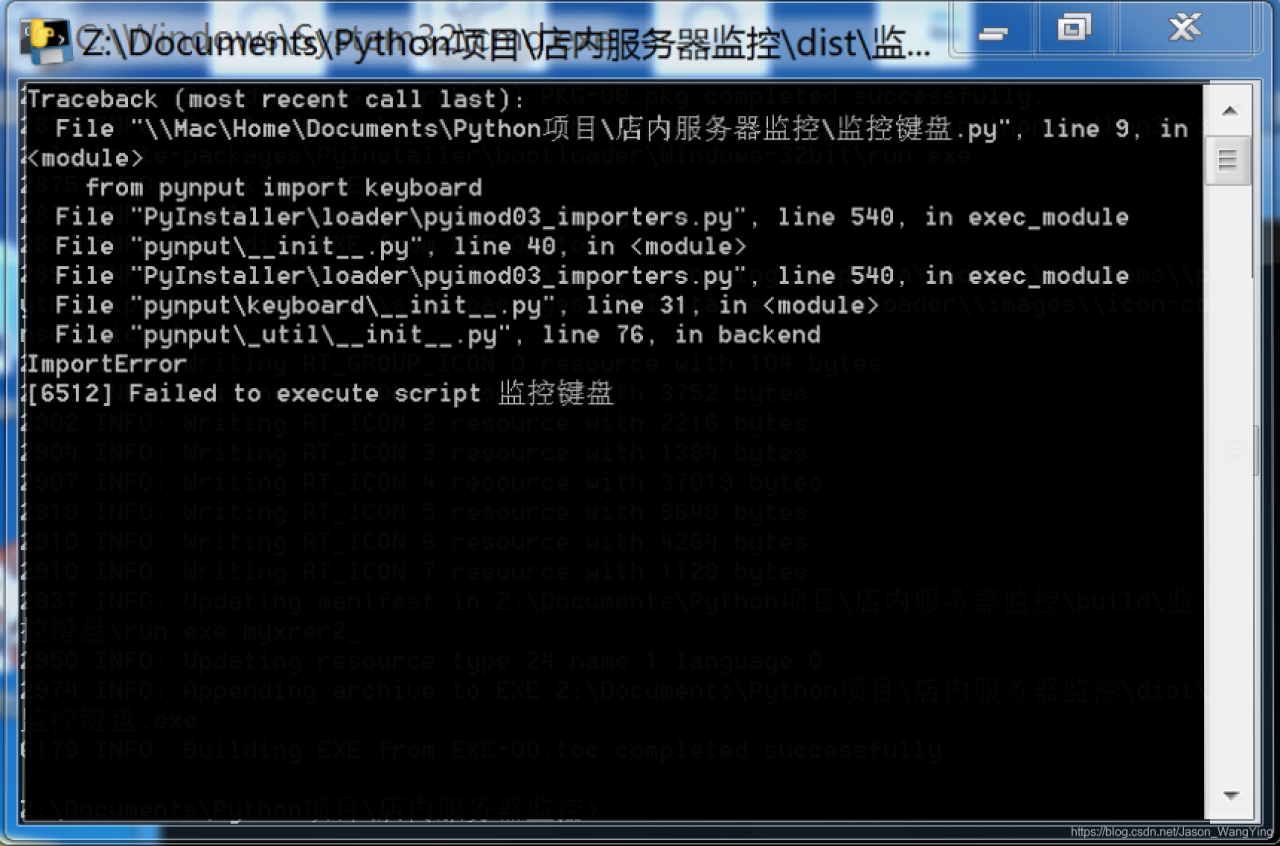
Recently, after using the pynput library, the packaged exe flashback occurred.

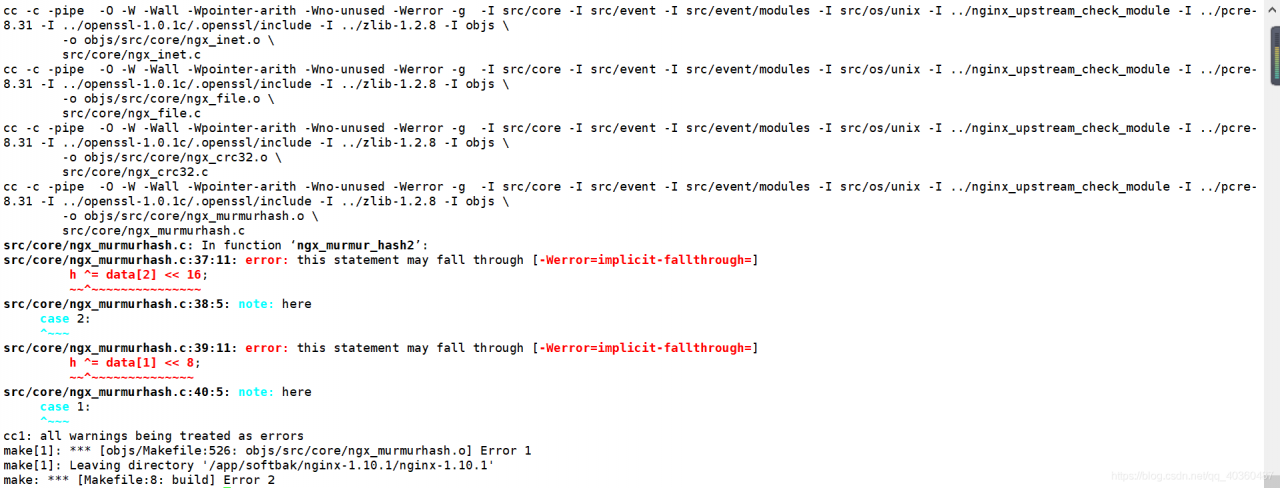
Use pyinstall – f * *. Py to package, with terminal commands, so that you can see where the final error occurred.

We can see that the import reference is wrong.

The solution is:

        Reduce the version of pynput and use the old version. pip install pynput==1.6.8


[error record] invalid gradle JDK configuration found

Contents of articles

1、 2. Solutions

1、 Error information


Android studio compile time prompt

Invalid Gradle JDK configuration found

Mistakes;

2、 Solutions


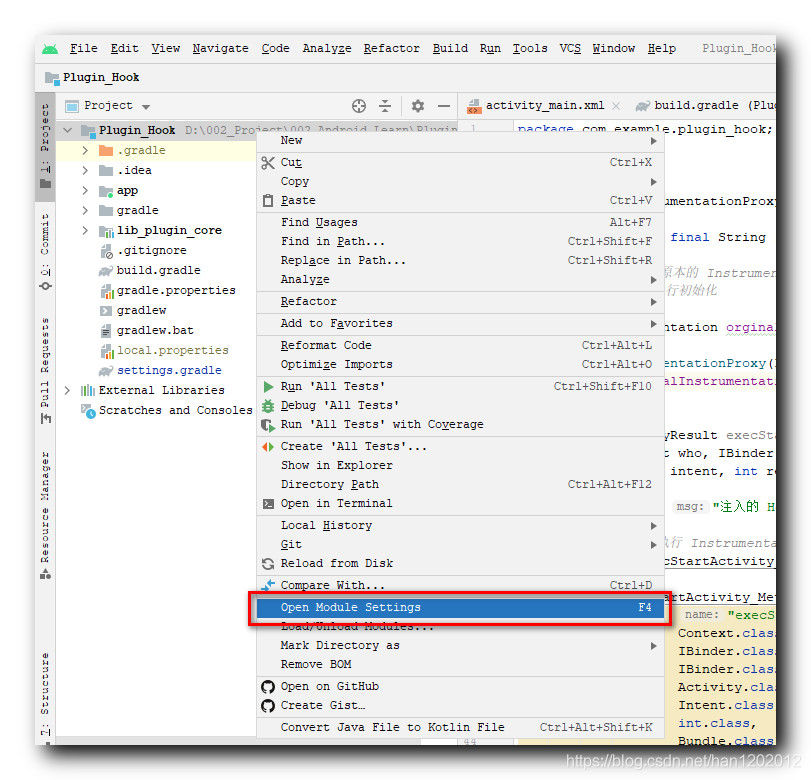
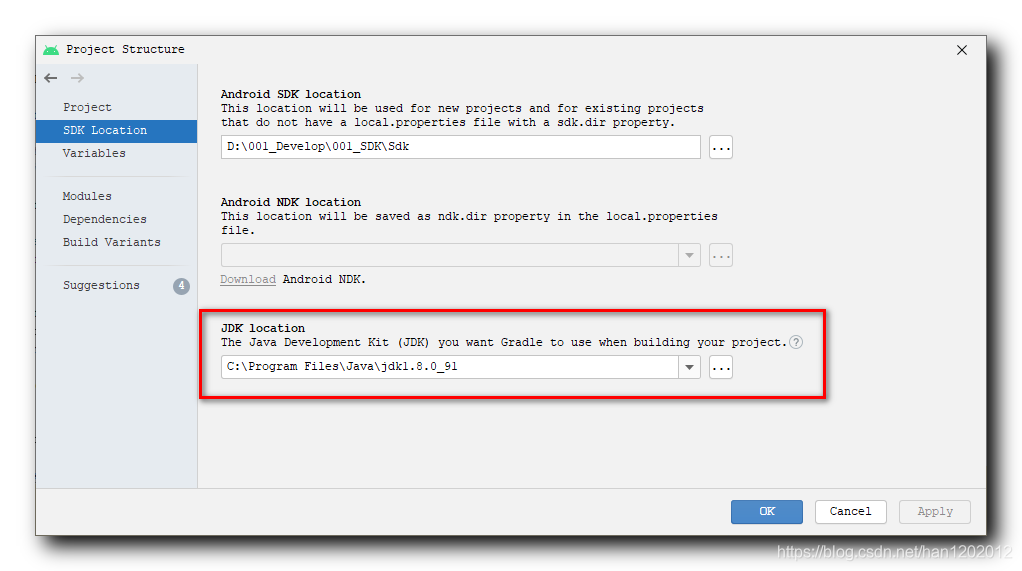
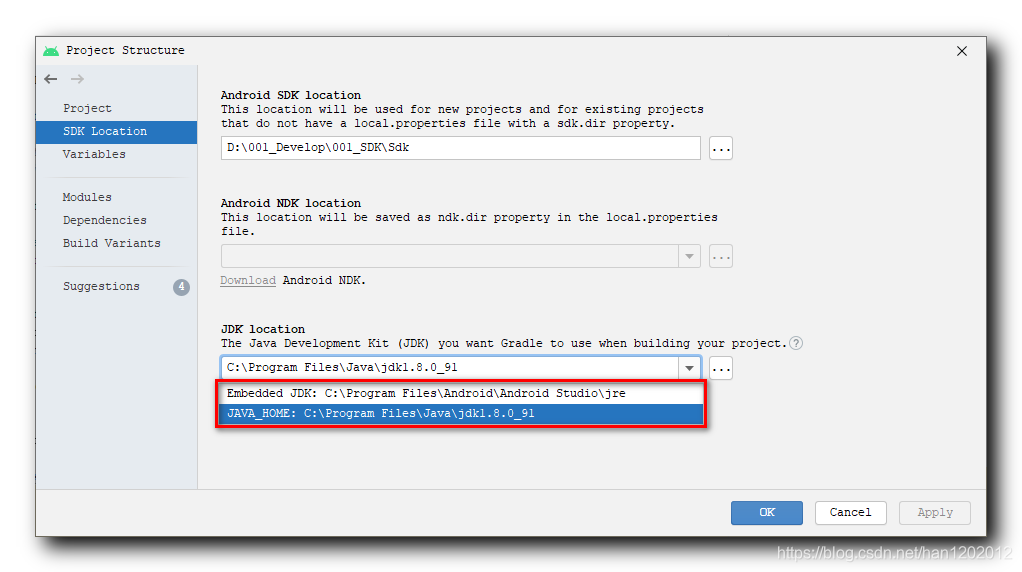
Right click the project root directory in the project panel and select the “open module settings” option,

In the “SDK location” panel of the “project structure” dialog box, switch the setting of “JDK location”;

There are two options to set, one is the default JDK path of the system, and the other is the default JDK path of Android studio. Just switch it;

Solution of node canvas error reporting in MacOS M1 installation

M1 native does not release binary version of canvas in node15. Therefore, when you install canvas, you will automatically compile from the source code, but if you do not install the corresponding dependency, you will report an error.

Solution

arch -arm64 brew install pkg-config cairo pango jpeg giflib librsvg

Troubleshooting

Homebrew cannot be installed

If you encounter

Error: Failure while executing; `tar --extract --no-same-owner --file /Users/wenbing/Library/Caches/Homebrew/downloads/6f65cc908bca8f42eeb93f33e25d76d748a7a28f20f30f41befe472ea2a01bc5--fribidi-1.0.10.arm64_big_sur.bottle.tar.gz --directory /private/tmp/d20210618-36598-16scyl7` exited with 1. Here's the output:
tar: Error opening archive: Failed to open '/Users/wenbing/Library/Caches/Homebrew/downloads/6f65cc908bca8f42eeb93f33e25d76d748a7a28f20f30f41befe472ea2a01bc5--fribidi-1.0.10.arm64_big_sur.bottle.tar.gz'

For this kind of error reporting, you need to manually install the dependency front dependency first, and then install the module

brew install libtiff gdk-pixbuf librsvg

Node gyp could not find the header file

If your homebrew is also M1 native, then homebrew will be installed under/opt/homebrew. Brew install will be under/opt/homebrew/cell/instead of linking to/usr/local/include. When node gyp is compiled, it is still compiled with clang in essence, and the header file cannot be found, so a fatal error: 'JPEG lib. H' file not found will be reported. The solution is to add/opt/homebrew/cell/to clang’s include path. My practice is in ~ /. Bash_ Add a line to profile

export CPLUS_INCLUDE_PATH=/opt/homebrew/include

Examination

Install 0 accounts on Apple M1.

Accounting subjects