Author Archives: Robins

[Solved] Vue3 Configuration routing error: Catch all routes (“*“) must now be defined using a param with a custom regexp.

@[TOC] (vue3) catch all routes (“*”) must now be defined using a param with a custom regexp.)

Background

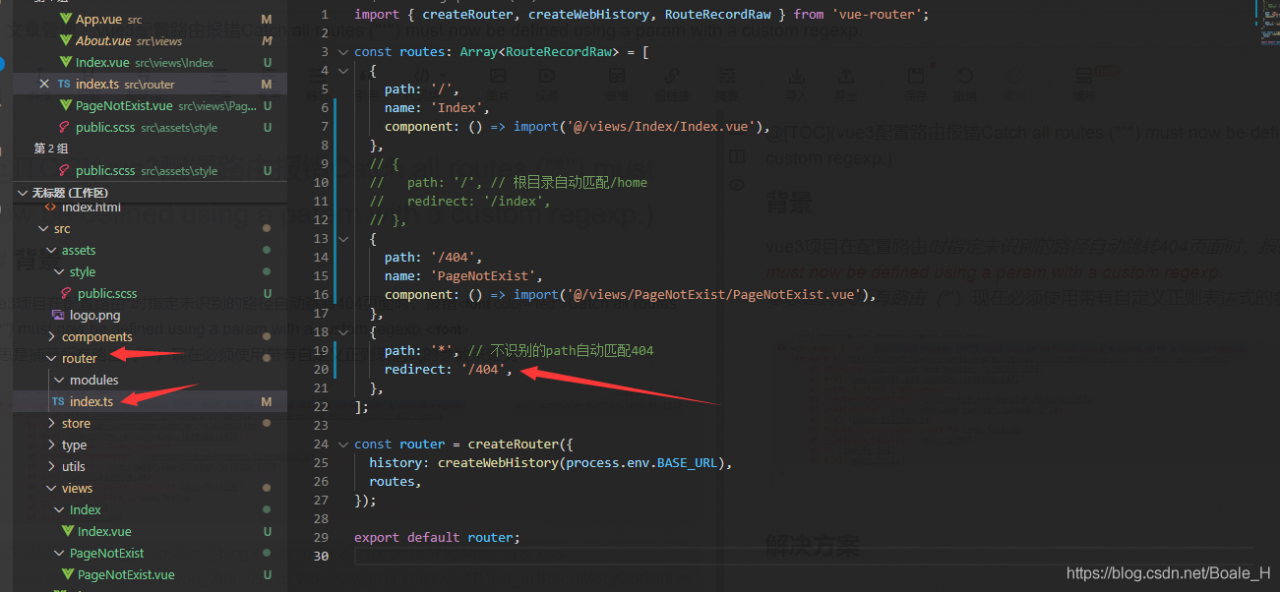
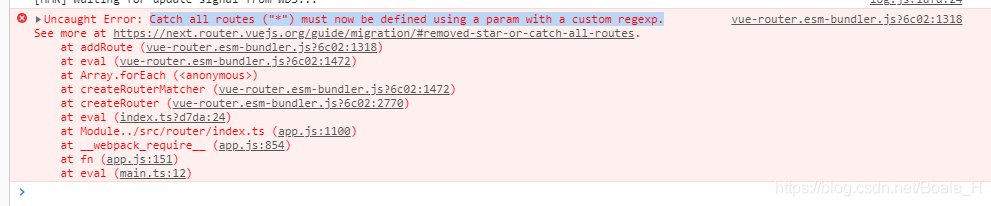
When the vue3 project specifies an unrecognized path to automatically jump to the 404 page when configuring the route, it reports an error catch all routes (“*”) must now be defined using a param with a custom regexp. </ font>
this means that all routes (“) must now be defined with a parameter with a self-defined regular expression
Solution

Change to the following configuration mode:

{
    path: "/:catchAll(.*)", // Unrecognized path automatically matches 404
    redirect: '/404',
},

Full routing configuration:

import { createRouter, createWebHistory, RouteRecordRaw } from 'vue-router';

const routes: Array<RouteRecordRaw> = [
  {
    path: '/',
    name: 'Index',
    component: () => import('@/views/Index/Index.vue'),
  },
  // {
  //   path: '/', // Root directory auto-match/home
  //   redirect: '/index',
  // },
  {
    path: '/404',
    name: 'PageNotExist',
    component: () => import('@/views/PageNotExist/PageNotExist.vue'),
  },
  {
    path: "/:catchAll(.*)", // Unrecognized path automatically matches 404
    redirect: '/404',
  },
];

const router = createRouter({
  history: createWebHistory(process.env.BASE_URL),
  routes,
});

export default router;

[Solved] Mac ES Startup Error: Exception in thread “main“ java.nio.file.NotDirectoryException

Exception in thread “main” java.nio.file.NotDirectoryException: /Users/lin/software/elasticsearch/elasticsearch-7.13.2/plugins/.DS_Store
at java.base/sun.nio.fs.UnixFileSystemProvider.newDirectoryStream(UnixFileSystemProvider.java:418)
at java.base/java.nio.file.Files.newDirectoryStream(Files.java:476)
at java.base/java.nio.file.Files.list(Files.java:3765)
at org.elasticsearch.tools.launchers.BootstrapJvmOptions.getPluginInfo(BootstrapJvmOptions.java:49)
at org.elasticsearch.tools.launchers.BootstrapJvmOptions.bootstrapJvmOptions(BootstrapJvmOptions.java:34)
at org.elasticsearch.tools.launchers.JvmOptionsParser.jvmOptions(JvmOptionsParser.java:137)
at org.elasticsearch.tools.launchers.JvmOptionsParser.main(JvmOptionsParser.java:86)
[process completed]

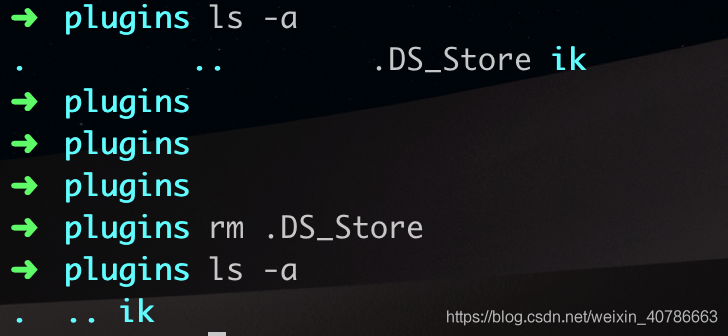
There is no such file in the plugins folder

Use ls -a to see the .DS_Store file, delete it directly, and then start ES.

Flask Startup Error: s.bind(server_address)PermissionError: [Errno 13] Permission denied

The contents of the error report are as follows:

File "xxx.py", line 4, in <module>  
  app.run(host='0.0.0.0' , port=80 , debug=true,threaded=False)
  File "/home/xxx/.local/lib/python3.6/site-packages/flask/app.py", line 922, in run
    run_simple(t.cast(str, host), port, self, **options)
  File "/home/xxx/.local/lib/python3.6/site-packages/werkzeug/serving.py", line 982, in run_simple
    s.bind(server_address)
PermissionError: [Errno 13] Permission denied

Looking up the relevant information on the Internet, I found that some people said that under the UNIX environment, ports smaller than 1024 can not be bound by ordinary users, and can only be bound by users with root authority, but using sudo command does not work, so it is necessary to bind a port larger than 1024, and the problem is finally solved

Set port to 8080

After introducing security, the service cannot be registered with Eureka

When building the Eureka service of springcloud, security was introduced for security. However, it was found that the Eureka client could not register. The error log is as follows:

DiscoveryClient_ EUREKA-CLIENT/10.168.211.109:8001 – was unable to send heartbeat!

Later, I inquired about the Security version of the project (spring boot starter security in version 2.3.2.release introduces the security configuration of 5.3. X). If the version is too high, it will be changed by default   When CSRF (Cross Site Request Forgery) is turned on, you need to turn it off. The steps are as follows:

Add the following code into the startup file:


    @EnableWebSecurity
    static class WebSecurityConfig extends WebSecurityConfigurerAdapter {
        @Override
        protected void configure(HttpSecurity http) throws Exception {
            http.csrf().disable(); // Close csrf
            super.configure(http);
        }
    }

The test is effective.

[Solved] Java Error: Must declare a named package because this compilation unit is associated to the named module

Using the latest version of eclipse, you may encounter such a problem (error report)

“Must declare a named package because this compilation unit is associated to the named module ‘xxx'”
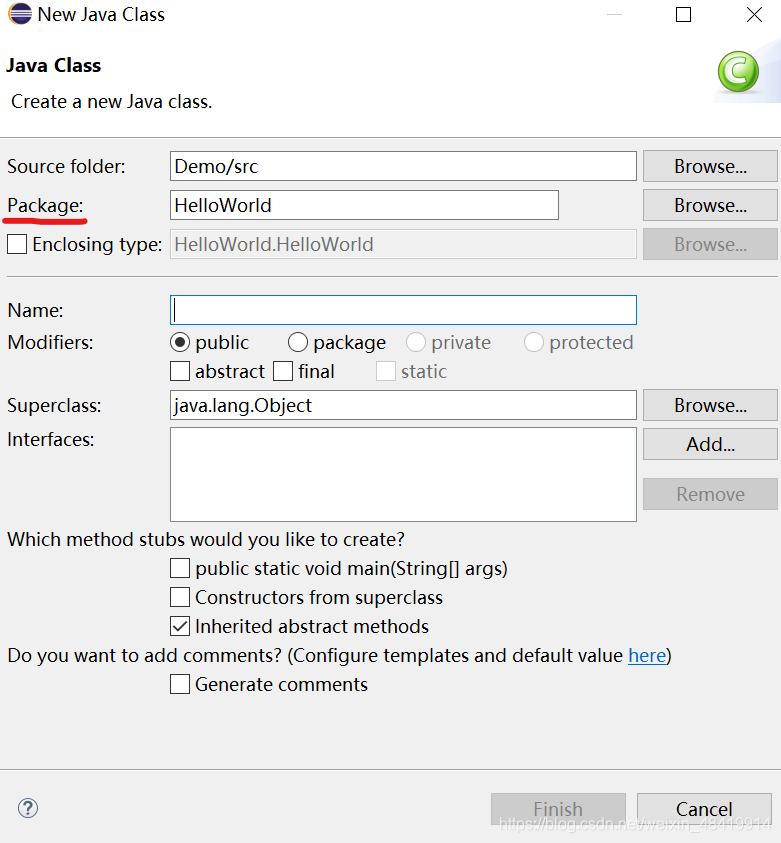
the reason for this is that in the latest version of eclipse, the package needs to be defined while defining a class.

How to define a package:

In the eclipse menu bar, select File – & gt; New-> Class command, in the Import dialog box, find the package, and then name it( The position of the red line cannot be empty)

Stackexchange.redis data timeout [How to Solve]

StackExchange.Redis Error when loading large batch of hash data.
StackExchange.Redis.RedisTimeoutException: Timeout performing HGET Cache.IncomeShare.AccountData@Cache.IncomeShare.AccountData.InnerIncomeDistributionItem, inst: 1, mgr: ExecuteSelect, err: never, queue: 2, qu: 0, qs: 2, qc: 0, wr: 0, wq: 0, in: 0, ar: 0, clientName: xx, serverEndpoint: 192.0.x.x:6379, keyHashSlot: 10857, IOCP: (Busy=0,Free=1000,Min=6,Max=1000), WORKER: (Busy=0,Free=32767,Min=6,Max=32767) (Please take a look at this article for some common client-side issues that can cause。 timeouts: http://stackexchange.github.io/StackExchange.Redis/Timeouts)
According to the information to see IOCP and WORKER Busy are 0, will also report a timeout problem, is expected to be a StackExchange.Redis bug, the solution can be changed to use FreeRedis.

Tensor for argument #2 ‘mat1‘ is on CPU, but expected it to be on GPU (while checking arguments for

Tensor for argument #2 ‘mat1’ is on CPU, but expected it to be on GPU (while checking arguments for addmm)
Both the model and the input data need to be moved to the device

model=NonLinearRegression().to(device)#Moudle
for batch_idx,(data,target) in enumerate(train_loader):
	data,target=data.to(device),target.to(device)
	...
for data,target in val_loader: 
	data,target=data.to(device),target.to(device)
	...

To silence this warning, use `float` by itself. Doing this will not modify any behavior and is safe.

import numpy as np 
e = np.ones((3,3),np.float)# 3x3 floating-point 2-dimensional array, and initialize all elements to value 1

D:\projects\Numpy\array.py:25: DeprecationWarning:
np.float is a deprecated alias for the builtin float.
To silence this warning, use float by itself. Doing this will not modify any behavior and is safe. If you specifically wanted the numpy scalar type, use np.float64 here.
Deprecated in NumPy 1.20;
for more details and guidance:
https://numpy.org/devdocs/release/1.20.0-notes.html#deprecations

Change to:

import numpy as np 
e = np.ones((3,3),np.float64)# 3x3 floating-point 2-dimensional array, and initialize all elements to value 1

All right, we’re in the trough

Ubuntu Server: How to Install Chrome

Install Google without interface

1. Install chrome on the command line of Ubuntu server version

sudo apt-get install libxss1 libappindicator1 libindicator7
wget https://dl.google.com/linux/direct/google-chrome-stable_current_amd64.deb
sudo dpkg -i google-chrome*.deb # Might show "errors", fixed by next line
sudo apt-get install -f
google-chrome --version # check the version

2. Drivers of different browsers

Chrome:https://sites.google.com/a/chromium.org/chromedriver/downloads

Firefox:https://github.com/mozilla/geckodriver/releases

Edge:https://developer.microsoft.com/en-us/microsoft-edge/tools/webdriver/

Safari:https://webkit.org/blog/6900/webdriver-support-in-safari-10/

3. Test whether the installation is successful

from selenium import webdriver
 
chrome_options = webdriver.ChromeOptions()
chrome_options.add_argument('--headless')
chrome_options.add_argument('--disable-gpu')
chrome_options.add_argument('--no-sandbox')
client = webdriver.Chrome(chrome_options=chrome_options, executable_path='your path')   
client.get("https://www.baidu.com")
print (client.page_source.encode('utf-8'))
client.quit()

4. Error in running selenium, permission denied. Add executable permissions to driver files

command: sudo chmod +x chromedriver

MacOS: How to Fix Intellij-IDEA main menu disappears Bug

I found a lot of blogs and tried them, but they didn’t work. I wasted a lot of time, such as preference  & gt;   keymap   & gt; Main menu has many methods. Finally, we found a solution on stackoverflow

idea-community version 2021.1

macOS 10.14

Follow these steps:

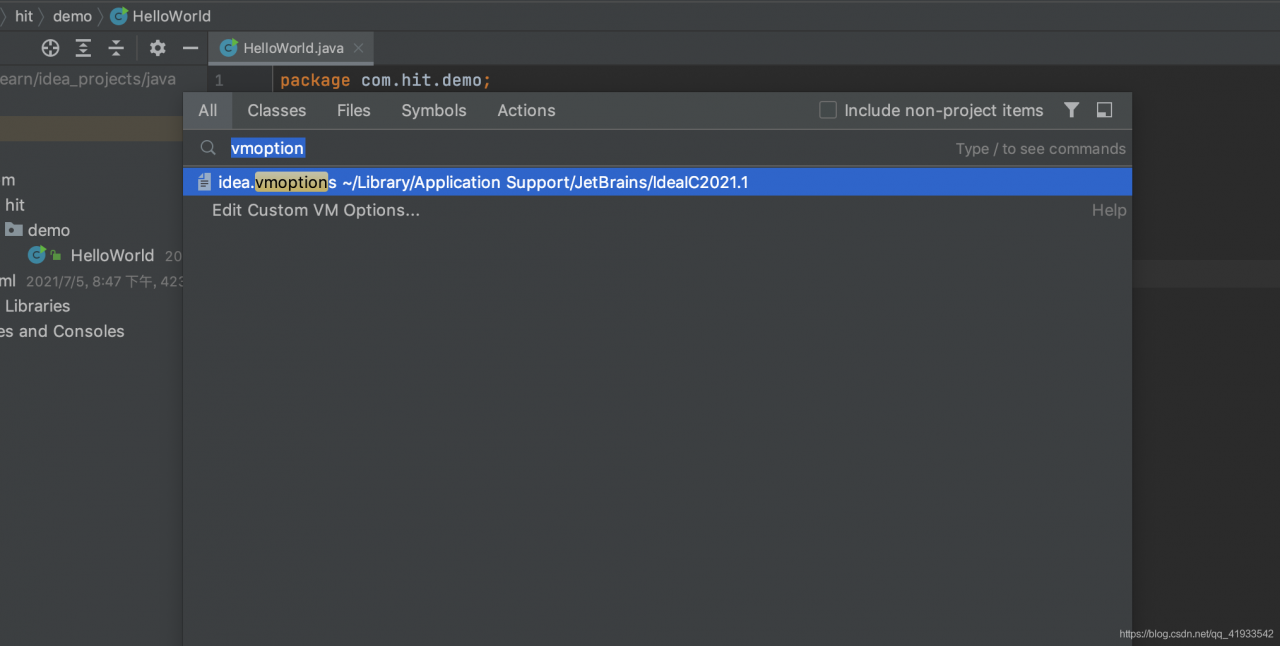
Step1: shortcut key shift + shift (or CMD + Shift + a)

Step 2: enter vmoptions to see the idea.vmoptions file

Step3: edit file, add at the end:

-Dapple.laf.useScreenMenuBar=false

Step 4: restart idea