Author Archives: Robins

CCS Error: gmake: Target ‘all‘ not remade because of errors.

Just entered the pit DSP, the relevant data is not a little less than STM32.

The above mistakes are often encountered, so I don’t know why.

I found the problem this time. Let’s summarize it.

This problem is a path problem. The called function is not in your project directory

Just add the file to your directory.

At the same time, we should form a habit. After debugging, check the error prompt and look at this window more

There are errors in this

[Solved] TypeError: Cannot read property ‘indexOf‘ of undefined at VueComponent.resetFields

When you click the empty form button, an error will be reported because the form contains values that are not found;

For example, when active = 1, the prop of El form item is bound to username; When active = 2, prop binds gender;

When active = 1, the form contains username and gender, and gender is not displayed on the page. When the form is cleared, all values in the form will be cleared, and the gender field cannot be found, so an error is reported;


Solution:

Replace the resetfields provided with element with each item in the form as the initial value;

For example:

reset(formName){
this.form.username='',
this.form.gender=''
  this.$nextTick(() => {
        this.$refs[formName].clearValidate(); //To clear the checksum prompt
      
      });
}

[Solved] Postgres Start Error: Job for postgresql.service failed because the control process exited with error code.

error message

Job for postgresql.service failed because the control process exited with error code. See "systemctl status postgresql.service" and "journalctl -xe" for details.

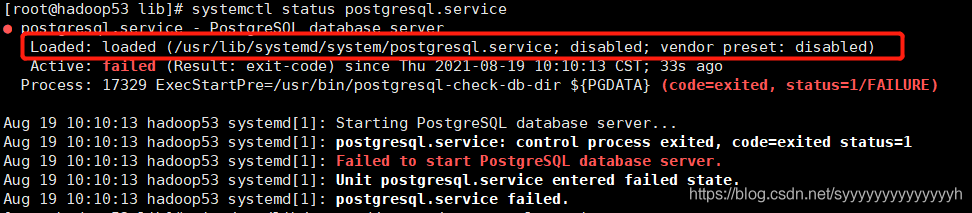
Execute systemctl status postgresql.service as prompted

Open this file

vim /usr/lib/systemd/system/postgresql.service
Found not modified to their own initialization of the specified path, modify can

[Solved] Pdfjs Preview PDF error: formaterror: bad fcheck in flat stream: 120, 239

The page after the jump can be displayed, and the links generated by the blog are returned, but the preview is blank, and the console warns: warning: invalid stream: “formaterror: bad fcheck in flat stream: 120, 239”

Follow the source code to see the reason for the warning. There should still be a problem.

Solution:

When Axios requests the document flow, the responsetype is changed to blob

If the responsetype is not modified, JSON is the default in Axios.

If it is set to null in XHR, the default is text, and the link: https://developer.mozilla.org/zh-CN/docs/Web/API/XMLHttpRequest/responseType

// originally written here is this.$axios.get(`/api/preview?id=${id}`)
// later found the problem here, $axios is encapsulated axios, did not set the requestType, and I only cross-referenced the returned data is the document stream after ignoring the problem!
// $request is the axios directly thrown out
this.$request({
    methods: 'GET',
    url: `/api/preview?id=${id}`,
    responseType: 'blob'
})
.then(res => {
    console.log(res)
    var blob = new Blob([res.data], {
        type: 'application/pdf;chartset=UTF-8'
    })
    const fileURL = URL.createObjectURL(blob)
    window.open(`${path}pdf/web/viewer.html?file=${fileURL}`)
})
.catch(err => {
    console.log(err)
})

[Solved] Docker Error: got permission denied while trying to connect to the docker daemon socket at…

Problem Description:
got permission denied while trying to connect to the docker daemon socket at unix:///var/run/docker.sock: Get http://% 2fvar% 2frun% 2fdocker.sock/v1.40/version: Dial UNIX/var/run/docker.sock: Connect: permission denied
error reason:
docker process uses UNIX socket instead of TCP port. By default, UNIX socket belongs to the root user and needs root permission to access it
solution:

sudo groupadd docker     #Add the docker user group
sudo gpasswd -a $USER docker #Add the logged-in user to the docker user group
newgrp docker #Update the user group
docker ps #Test that the docker command works properly with sudo

[Solved]Org.springframework.beans.factory.nosuchbeandefinitionexception error reported

Problems:
Caused by: org.springframework.beans.factory.NoSuchBeanDefinitionException: No qualifying bean of type ‘com.pri.dao.UserDao’ available: expected at least 1 bean which qualifies as autowire candidate. Dependency annotations: {@org.springframework.beans.factory.annotation.Autowired(required=true)}
Problem Description:
No match to com.pri.dao.UserDao
Error code:

14-Aug-2021 09:57:18.405 Warning [RMI TCP Connection(3)-127.0.0.1] org.apache.catalina.core.ApplicationContext.log No Spring WebApplicationInitializer types detected on classpath
14-Aug-2021 09:57:18.445 Warning [RMI TCP Connection(3)-127.0.0.1] org.apache.catalina.core.ApplicationContext.log Initializing Spring root WebApplicationContext
14-Aug-2021 09:57:20.787 Warning [RMI TCP Connection(3)-127.0.0.1] org.apache.catalina.core.StandardContext.listenerStart Exception sending context initialized event to listener instance of class org.springframework.web.context.ContextLoaderListener
 org.springframework.beans.factory.UnsatisfiedDependencyException: Error creating bean with name 'userController': Unsatisfied dependency expressed through field 'userService'; nested exception is org.springframework.beans.factory.UnsatisfiedDependencyException: Error creating bean with name 'userServiceImpl': Unsatisfied dependency expressed through field 'userDao'; nested exception is org.springframework.beans.factory.NoSuchBeanDefinitionException: No qualifying bean of type 'com.pri.dao.UserDao' available: expected at least 1 bean which qualifies as autowire candidate. Dependency annotations: {@org.springframework.beans.factory.annotation.Autowired(required=true)}
	at org.springframework.beans.factory.annotation.AutowiredAnnotationBeanPostProcessor$AutowiredFieldElement.inject(AutowiredAnnotationBeanPostProcessor.java:643)
	at org.springframework.beans.factory.annotation.InjectionMetadata.inject(InjectionMetadata.java:130)
	at org.springframework.beans.factory.annotation.AutowiredAnnotationBeanPostProcessor.postProcessProperties(AutowiredAnnotationBeanPostProcessor.java:399)
	at org.springframework.beans.factory.support.AbstractAutowireCapableBeanFactory.populateBean(AbstractAutowireCapableBeanFactory.java:1420)
	at org.springframework.beans.factory.support.AbstractAutowireCapableBeanFactory.doCreateBean(AbstractAutowireCapableBeanFactory.java:593)
	at org.springframework.beans.factory.support.AbstractAutowireCapableBeanFactory.createBean(AbstractAutowireCapableBeanFactory.java:516)
	at org.springframework.beans.factory.support.AbstractBeanFactory.lambda$doGetBean$0(AbstractBeanFactory.java:324)
	at org.springframework.beans.factory.support.DefaultSingletonBeanRegistry.getSingleton(DefaultSingletonBeanRegistry.java:234)
	at org.springframework.beans.factory.support.AbstractBeanFactory.doGetBean(AbstractBeanFactory.java:322)
	at org.springframework.beans.factory.support.AbstractBeanFactory.getBean(AbstractBeanFactory.java:202)
	at org.springframework.beans.factory.support.DefaultListableBeanFactory.preInstantiateSingletons(DefaultListableBeanFactory.java:897)
	at org.springframework.context.support.AbstractApplicationContext.finishBeanFactoryInitialization(AbstractApplicationContext.java:879)
	at org.springframework.context.support.AbstractApplicationContext.refresh(AbstractApplicationContext.java:551)
	at org.springframework.web.context.ContextLoader.configureAndRefreshWebApplicationContext(ContextLoader.java:401)
	at org.springframework.web.context.ContextLoader.initWebApplicationContext(ContextLoader.java:292)
	at org.springframework.web.context.ContextLoaderListener.contextInitialized(ContextLoaderListener.java:103)
	at org.apache.catalina.core.StandardContext.listenerStart(StandardContext.java:4861)
	at org.apache.catalina.core.StandardContext.startInternal(StandardContext.java:5322)
	at org.apache.catalina.util.LifecycleBase.start(LifecycleBase.java:145)
	at org.apache.catalina.core.ContainerBase.addChildInternal(ContainerBase.java:753)
	at org.apache.catalina.core.ContainerBase.addChild(ContainerBase.java:729)
	at org.apache.catalina.core.StandardHost.addChild(StandardHost.java:717)
	at org.apache.catalina.startup.HostConfig.manageApp(HostConfig.java:1730)
	at sun.reflect.NativeMethodAccessorImpl.invoke0(Native Method)
	at sun.reflect.NativeMethodAccessorImpl.invoke(NativeMethodAccessorImpl.java:62)
	at sun.reflect.DelegatingMethodAccessorImpl.invoke(DelegatingMethodAccessorImpl.java:43)
	at java.lang.reflect.Method.invoke(Method.java:498)
	at org.apache.tomcat.util.modeler.BaseModelMBean.invoke(BaseModelMBean.java:300)
	at com.sun.jmx.interceptor.DefaultMBeanServerInterceptor.invoke(DefaultMBeanServerInterceptor.java:819)
	at com.sun.jmx.mbeanserver.JmxMBeanServer.invoke(JmxMBeanServer.java:801)
	at org.apache.catalina.mbeans.MBeanFactory.createStandardContext(MBeanFactory.java:484)
	at org.apache.catalina.mbeans.MBeanFactory.createStandardContext(MBeanFactory.java:433)
	at sun.reflect.NativeMethodAccessorImpl.invoke0(Native Method)
	at sun.reflect.NativeMethodAccessorImpl.invoke(NativeMethodAccessorImpl.java:62)
	at sun.reflect.DelegatingMethodAccessorImpl.invoke(DelegatingMethodAccessorImpl.java:43)
	at java.lang.reflect.Method.invoke(Method.java:498)
	at org.apache.tomcat.util.modeler.BaseModelMBean.invoke(BaseModelMBean.java:300)
	at com.sun.jmx.interceptor.DefaultMBeanServerInterceptor.invoke(DefaultMBeanServerInterceptor.java:819)
	at com.sun.jmx.mbeanserver.JmxMBeanServer.invoke(JmxMBeanServer.java:801)
	at com.sun.jmx.remote.security.MBeanServerAccessController.invoke(MBeanServerAccessController.java:468)
	at javax.management.remote.rmi.RMIConnectionImpl.doOperation(RMIConnectionImpl.java:1468)
	at javax.management.remote.rmi.RMIConnectionImpl.access$300(RMIConnectionImpl.java:76)
	at javax.management.remote.rmi.RMIConnectionImpl$PrivilegedOperation.run(RMIConnectionImpl.java:1309)
	at java.security.AccessController.doPrivileged(Native Method)
	at javax.management.remote.rmi.RMIConnectionImpl.doPrivilegedOperation(RMIConnectionImpl.java:1408)
	at javax.management.remote.rmi.RMIConnectionImpl.invoke(RMIConnectionImpl.java:829)
	at sun.reflect.NativeMethodAccessorImpl.invoke0(Native Method)
	at sun.reflect.NativeMethodAccessorImpl.invoke(NativeMethodAccessorImpl.java:62)
	at sun.reflect.DelegatingMethodAccessorImpl.invoke(DelegatingMethodAccessorImpl.java:43)
	at java.lang.reflect.Method.invoke(Method.java:498)
	at sun.rmi.server.UnicastServerRef.dispatch(UnicastServerRef.java:324)
	at sun.rmi.transport.Transport$1.run(Transport.java:200)
	at sun.rmi.transport.Transport$1.run(Transport.java:197)
	at java.security.AccessController.doPrivileged(Native Method)
	at sun.rmi.transport.Transport.serviceCall(Transport.java:196)
	at sun.rmi.transport.tcp.TCPTransport.handleMessages(TCPTransport.java:568)
	at sun.rmi.transport.tcp.TCPTransport$ConnectionHandler.run0(TCPTransport.java:826)
	at sun.rmi.transport.tcp.TCPTransport$ConnectionHandler.lambda$run$0(TCPTransport.java:683)
	at java.security.AccessController.doPrivileged(Native Method)
	at sun.rmi.transport.tcp.TCPTransport$ConnectionHandler.run(TCPTransport.java:682)
	at java.util.concurrent.ThreadPoolExecutor.runWorker(ThreadPoolExecutor.java:1142)
	at java.util.concurrent.ThreadPoolExecutor$Worker.run(ThreadPoolExecutor.java:617)
	at java.lang.Thread.run(Thread.java:745)
Caused by: org.springframework.beans.factory.UnsatisfiedDependencyException: Error creating bean with name 'userServiceImpl': Unsatisfied dependency expressed through field 'userDao'; nested exception is org.springframework.beans.factory.NoSuchBeanDefinitionException: No qualifying bean of type 'com.pri.dao.UserDao' available: expected at least 1 bean which qualifies as autowire candidate. Dependency annotations: {@org.springframework.beans.factory.annotation.Autowired(required=true)}
	at org.springframework.beans.factory.annotation.AutowiredAnnotationBeanPostProcessor$AutowiredFieldElement.inject(AutowiredAnnotationBeanPostProcessor.java:643)
	at org.springframework.beans.factory.annotation.InjectionMetadata.inject(InjectionMetadata.java:130)
	at org.springframework.beans.factory.annotation.AutowiredAnnotationBeanPostProcessor.postProcessProperties(AutowiredAnnotationBeanPostProcessor.java:399)
	at org.springframework.beans.factory.support.AbstractAutowireCapableBeanFactory.populateBean(AbstractAutowireCapableBeanFactory.java:1420)
	at org.springframework.beans.factory.support.AbstractAutowireCapableBeanFactory.doCreateBean(AbstractAutowireCapableBeanFactory.java:593)
	at org.springframework.beans.factory.support.AbstractAutowireCapableBeanFactory.createBean(AbstractAutowireCapableBeanFactory.java:516)
	at org.springframework.beans.factory.support.AbstractBeanFactory.lambda$doGetBean$0(AbstractBeanFactory.java:324)
	at org.springframework.beans.factory.support.DefaultSingletonBeanRegistry.getSingleton(DefaultSingletonBeanRegistry.java:234)
	at org.springframework.beans.factory.support.AbstractBeanFactory.doGetBean(AbstractBeanFactory.java:322)
	at org.springframework.beans.factory.support.AbstractBeanFactory.getBean(AbstractBeanFactory.java:202)
	at org.springframework.beans.factory.config.DependencyDescriptor.resolveCandidate(DependencyDescriptor.java:276)
	at org.springframework.beans.factory.support.DefaultListableBeanFactory.doResolveDependency(DefaultListableBeanFactory.java:1307)
	at org.springframework.beans.factory.support.DefaultListableBeanFactory.resolveDependency(DefaultListableBeanFactory.java:1227)
	at org.springframework.beans.factory.annotation.AutowiredAnnotationBeanPostProcessor$AutowiredFieldElement.inject(AutowiredAnnotationBeanPostProcessor.java:640)
	... 62 more
Caused by: org.springframework.beans.factory.NoSuchBeanDefinitionException: No qualifying bean of type 'com.pri.dao.UserDao' available: expected at least 1 bean which qualifies as autowire candidate. Dependency annotations: {@org.springframework.beans.factory.annotation.Autowired(required=true)}
	at org.springframework.beans.factory.support.DefaultListableBeanFactory.raiseNoMatchingBeanFound(DefaultListableBeanFactory.java:1717)
	at org.springframework.beans.factory.support.DefaultListableBeanFactory.doResolveDependency(DefaultListableBeanFactory.java:1273)
	at org.springframework.beans.factory.support.DefaultListableBeanFactory.resolveDependency(DefaultListableBeanFactory.java:1227)
	at org.springframework.beans.factory.annotation.AutowiredAnnotationBeanPostProcessor$AutowiredFieldElement.inject(AutowiredAnnotationBeanPostProcessor.java:640)
	... 75 more

14-Aug-2021 09:57:20.797 信息 [RMI TCP Connection(3)-127.0.0.1] org.apache.catalina.core.ApplicationContext.log Closing Spring root WebApplicationContext

Solution:
first, check whether the Dao layer (mapper layer) has the annotation @ repository. Only when this annotation is added can this class be loaded during spring initialization.
Second, check whether the annotation is scanned in the spring configuration file. Note that the mappercannerconfigurer should be used to scan the interface of Dao layer

<bean class="org.mybatis.spring.mapper.MapperScannerConfigurer">
        <property name="basePackage" value="com.pri.dao"></property>
</bean>

instead of

<context:component-scan base-package="com.pri.dao"></context:component-scan>

This tag scans the basic components and the other three components @service @component @controller
the author made this mistake and found it after looking for a long time
so we must pay attention to the details and pay attention to the details
If an error is reported, you should analyze it yourself first. For example, if you can’t find the corresponding userdao and have comments on this class, you can only analyze the problem in the spring.xml configuration file and the scanning package
I hope I can help you!!!

Error: char cannot be dereferenced [How to Solve]

#Error reported: char cannot be dereferenced

##1. Error code

while(s.charAt(i).equals(" ")){
            i++;
        }

S is a string
## error reason
java: cannot dereference char
char is a basic data type and already a value. Here, the comparison value can be directly used = =.

##Solution 1
but the comparison here is “” (string space)
you can’t directly use the = = symbol
so replace charat() with substring()
substring() returns a string, so you can use equals()

while(s.substring(i,i+1).equals(" ")){
            i++;
        }

So the problem has been solved

##Solution 2
we can also compare it with ” (character space)
you can directly use the equal sign

while(s.charAt(i)==' '){
            i++;
        }

Python calendar.month() Error [How to Solve]

When calling calendar.month today, an error is reported. The
code is as follows

import calendar

yy=int(input("year:"))
mm=int(input("month:"))
print(calendar.month(yy,mm))

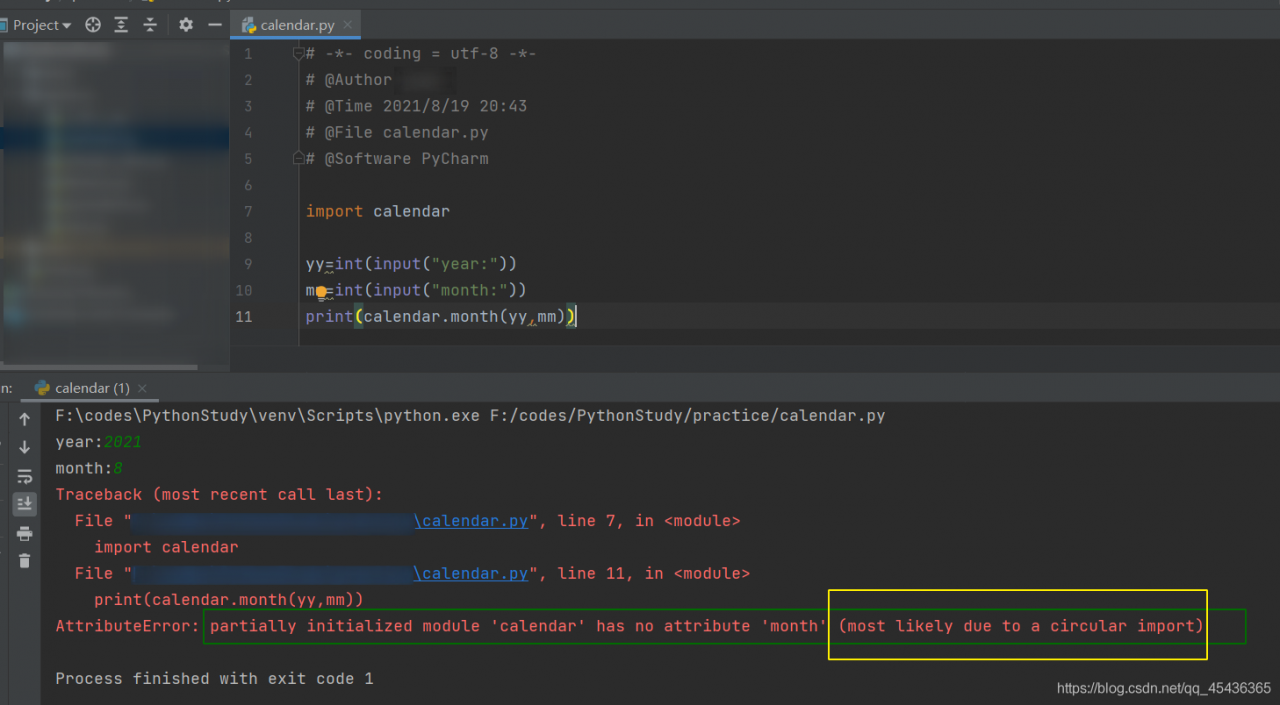
The error report is shown in the figure below

look at the yellow part circled in the figure. Circular import may be circular. You can see that the program file name is calendar.py, which is consistent with the introduced calendar, so it causes an error.

Solution
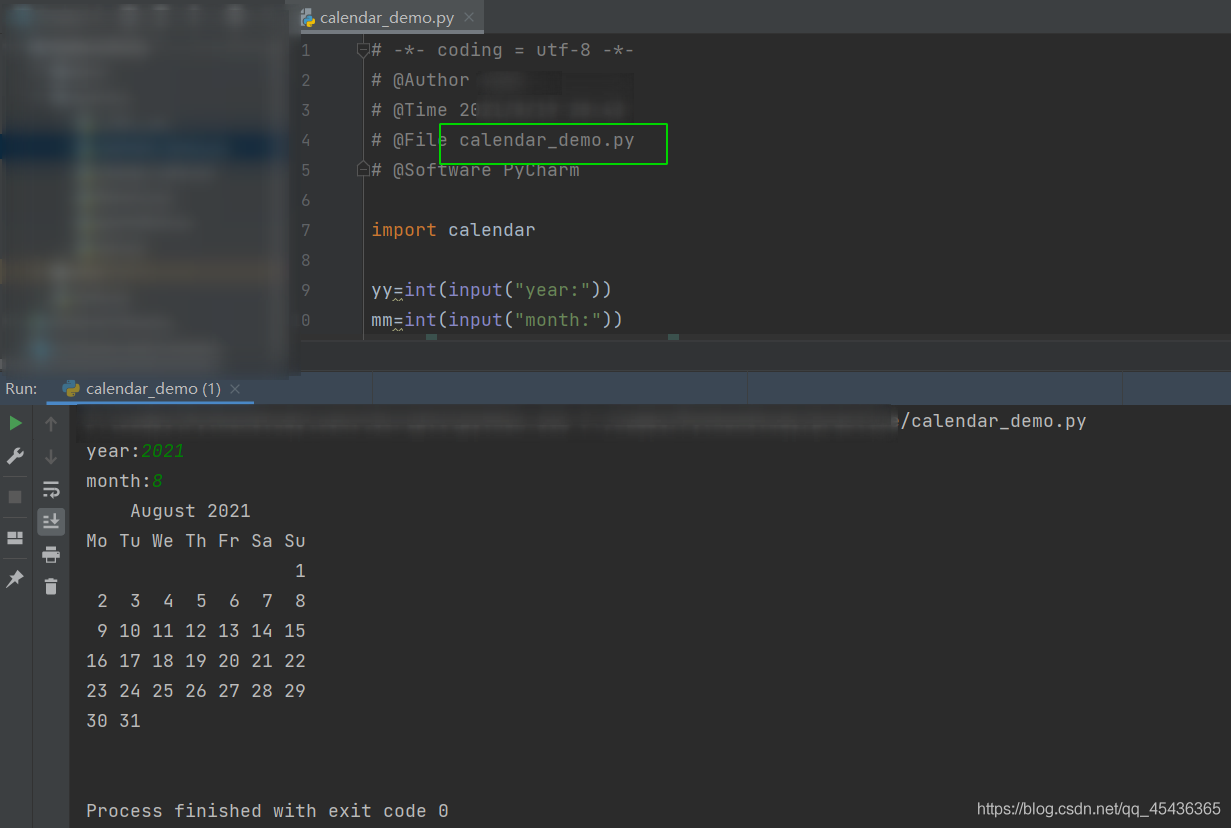
just modify the file name, which cannot have the same name as the imported package

[Solved] CentOS7 python import docker Error: No module named selectors

Environmental information

ansible to call the docker module of remote centos7 , you need to install the package docker = = 4.4.4 .

"msg": "Failed to import the required Python library (Docker SDK for Python: docker above 5.0.0 (Python >= 3.6) or docker before 5.0.0 (Python 2.7) or docker-py (Python 2.6)) on k8s-node-56-166.by.com's Python /usr/bin/python. 
Please read the module documentation and install it in the appropriate location. 
If the required library is installed, but Ansible is using the wrong Python interpreter, please consult the documentation on ansible_python_interpreter, for example via `pip install docker` (Python >= 3.6) or `pip install docker==4.4.4` (Python 2.7) or `pip install docker-py` (Python 2.6). The error was: No module named requests.exceptions"

After using pip to install, the following error is still reported:

>>> import docker
Traceback (most recent call last):
  File "<stdin>", line 1, in <module>
  File "/usr/lib/python2.7/site-packages/docker/__init__.py", line 2, in <module>
    from .api import APIClient
  File "/usr/lib/python2.7/site-packages/docker/api/__init__.py", line 2, in <module>
    from .client import APIClient
  File "/usr/lib/python2.7/site-packages/docker/api/client.py", line 8, in <module>
    import websocket
  File "/usr/lib/python2.7/site-packages/websocket/__init__.py", line 20, in <module>
    from ._app import WebSocketApp
  File "/usr/lib/python2.7/site-packages/websocket/_app.py", line 23, in <module>
    import selectors
ImportError: No module named selectors
>>> qa
Traceback (most recent call last):
  File "<stdin>", line 1, in <module>

This line of error code comes from

File "/usr/lib/python2.7/site-packages/websocket/_app.py", line 23, in <module>
    import selectors

This file is from the websocket client package.

Observe the detailed installation information as follows:

[root@k8s-node-56-164 ~]# pip install docker==4.4.4
Collecting docker==4.4.4
  Downloading https://files.pythonhosted.org/packages/c4/22/410313ad554477e87ec406d38d85f810e61ddb0d2fc44e64994857476de9/docker-4.4.4-py2.py3-none-any.whl (147kB)
    100% |████████████████████████████████| 153kB 636kB/s 
Requirement already satisfied (use --upgrade to upgrade): six>=1.4.0 in /usr/lib/python2.7/site-packages (from docker==4.4.4)
Requirement already satisfied (use --upgrade to upgrade): ipaddress>=1.0.16; python_version < "3.3" in /usr/lib/python2.7/site-packages (from docker==4.4.4)
Requirement already satisfied (use --upgrade to upgrade): backports.ssl-match-hostname>=3.5; python_version < "3.5" in /usr/lib/python2.7/site-packages (from docker==4.4.4)
Collecting requests!=2.18.0,>=2.14.2 (from docker==4.4.4)
  Downloading https://files.pythonhosted.org/packages/92/96/144f70b972a9c0eabbd4391ef93ccd49d0f2747f4f6a2a2738e99e5adc65/requests-2.26.0-py2.py3-none-any.whl (62kB)
    100% |████████████████████████████████| 71kB 827kB/s 
Collecting websocket-client>=0.32.0 (from docker==4.4.4)
  Downloading https://files.pythonhosted.org/packages/55/44/030ea47390896c8d6dc9995c8e9a4c5df3a161cd45416d88119036c73eda/websocket_client-1.2.1-py2.py3-none-any.whl (52kB)
    100% |████████████████████████████████| 61kB 815kB/s 
Collecting certifi>=2017.4.17 (from requests!=2.18.0,>=2.14.2->docker==4.4.4)
  Downloading https://files.pythonhosted.org/packages/05/1b/0a0dece0e8aa492a6ec9e4ad2fe366b511558cdc73fd3abc82ba7348e875/certifi-2021.5.30-py2.py3-none-any.whl (145kB)
    100% |████████████████████████████████| 153kB 740kB/s 
Collecting urllib3<1.27,>=1.21.1 (from requests!=2.18.0,>=2.14.2->docker==4.4.4)
  Downloading https://files.pythonhosted.org/packages/5f/64/43575537846896abac0b15c3e5ac678d787a4021e906703f1766bfb8ea11/urllib3-1.26.6-py2.py3-none-any.whl (138kB)
    100% |████████████████████████████████| 143kB 4.1MB/s 
Collecting idna<3,>=2.5; python_version < "3" (from requests!=2.18.0,>=2.14.2->docker==4.4.4)
  Downloading https://files.pythonhosted.org/packages/a2/38/928ddce2273eaa564f6f50de919327bf3a00f091b5baba8dfa9460f3a8a8/idna-2.10-py2.py3-none-any.whl (58kB)
    100% |████████████████████████████████| 61kB 732kB/s 
Collecting chardet<5,>=3.0.2; python_version < "3" (from requests!=2.18.0,>=2.14.2->docker==4.4.4)
  Downloading https://files.pythonhosted.org/packages/19/c7/fa589626997dd07bd87d9269342ccb74b1720384a4d739a1872bd84fbe68/chardet-4.0.0-py2.py3-none-any.whl (178kB)
    100% |████████████████████████████████| 184kB 610kB/s 
Installing collected packages: certifi, urllib3, idna, chardet, requests, websocket-client, docker
  Found existing installation: chardet 2.2.1
    Uninstalling chardet-2.2.1:
      Successfully uninstalled chardet-2.2.1
Successfully installed certifi-2021.5.30 chardet-4.0.0 docker-4.4.4 idna-2.10 requests-2.26.0 urllib3-1.26.6 websocket-client-1.2.1

docker==4.4.4withwebsocket-client>=0.32.0It is OK
websocket-clientversion is1.2.1

[root@k8s-node-56-164 ~]# pip show websocket-client
---
Metadata-Version: 2.1
Name: websocket-client
Version: 1.2.1
Summary: WebSocket client for Python with low level API options
Home-page: https://github.com/websocket-client/websocket-client.git
Author: liris
Author-email: [email protected]
Installer: pip
License: Apache-2.0
Location: /usr/lib/python2.7/site-packages
...

Solution:

Reduce the version of websocket client to 0.32.0 .

[root@k8s-node-56-164 ~]# pip install websocket-client==0.32.0

The verification is successful, and the ansible call is also successful.

[root@k8s-node-56-164 ~]# python
Python 2.7.5 (default, Nov 16 2020, 22:23:17) 
[GCC 4.8.5 20150623 (Red Hat 4.8.5-44)] on linux2
Type "help", "copyright", "credits" or "license" for more information.
>>> import docker
>>> exit
[Solved] NPM install Error: check python checking for Python executable python2 in the PATH

Scenario: after upgrading the node environment, an error is reported when the project version number does not match. After deciding to reinitialize, an error is reported again

Building: G:\nodejs\node.exe F:\test\node_modules\node-gyp\bin\node-gyp.js rebuild --verbose --libsass_ext= --libsass_cflags= --libsass_ldflags= --libsass_library=
gyp info it worked if it ends with ok
gyp verb cli [
gyp verb cli   'G:\\nodejs\\node.exe',
gyp verb cli   'F:\\test\\node_modules\\node-gyp\\bin\\node-gyp.js',
gyp verb cli   'rebuild',
gyp verb cli   '--verbose',
gyp verb cli   '--libsass_ext=',
gyp verb cli   '--libsass_cflags=',
gyp verb cli   '--libsass_ldflags=',
gyp verb cli   '--libsass_library='
gyp verb cli ]
gyp info using [email protected]
gyp info using [email protected] | win32 | x64
gyp verb command rebuild []
gyp verb command clean []
gyp verb clean removing "build" directory
gyp verb command configure []
gyp verb check python checking for Python executable "python2" in the PATH
gyp verb `which` failed Error: not found: python2
gyp verb `which` failed     at getNotFoundError (F:\test\node_modules\which\which.js:13:12)
gyp verb `which` failed     at F (F:\test\node_modules\which\which.js:68:19)
gyp verb `which` failed     at E (F:\test\node_modules\which\which.js:80:29)
gyp verb `which` failed     at F:\test\node_modules\which\which.js:89:16
gyp verb `which` failed     at F:\test\node_modules\isexe\index.js:42:5
gyp verb `which` failed     at F:\test\node_modules\isexe\windows.js:36:5
gyp verb `which` failed     at FSReqCallback.oncomplete (fs.js:158:21)
gyp verb `which` failed  python2 Error: not found: python2
gyp verb `which` failed     at getNotFoundError (F:\test\node_modules\which\which.js:13:12)
gyp verb `which` failed     at F (F:\test\node_modules\which\which.js:68:19)
gyp verb `which` failed     at E (F:\test\node_modules\which\which.js:80:29)
gyp verb `which` failed     at F:\test\node_modules\which\which.js:89:16
gyp verb `which` failed     at F:\test\node_modules\isexe\index.js:42:5
gyp verb `which` failed     at F:\test\node_modules\isexe\windows.js:36:5
gyp verb `which` failed     at FSReqCallback.oncomplete (fs.js:158:21) {
gyp verb `which` failed   stack: 'Error: not found: python2\n' +
gyp verb `which` failed     '    at getNotFoundError (F:\\test\\node_modules\\which\\which.js:13:12)\n' +
gyp verb `which` failed     '    at F (F:\\test\\node_modules\\which\\which.js:68:19)\n' +
gyp verb `which` failed     '    at E (F:\\test\\node_modules\\which\\which.js:80:29)\n' +
gyp verb `which` failed     '    at F:\\test\\node_modules\\which\\which.js:89:16\n' +
gyp verb `which` failed     '    at F:\\test\\node_modules\\isexe\\index.js:42:5\n' +
gyp verb `which` failed     '    at F:\\test\\node_modules\\isexe\\windows.js:36:5\n' +
gyp verb `which` failed     '    at FSReqCallback.oncomplete (fs.js:158:21)',
gyp verb `which` failed   code: 'ENOENT'
gyp verb `which` failed }
gyp verb check python checking for Python executable "python" in the PATH
gyp verb `which` succeeded python G:\Python\Python37-32\python.EXE
gyp ERR! configure error
gyp ERR! stack Error: Command failed: G:\Python\Python37-32\python.EXE -c import sys; print "%s.%s.%s" % sys.version_info[:3];
gyp ERR! stack   File "<string>", line 1
gyp ERR! stack     import sys; print "%s.%s.%s" % sys.version_info[:3];
gyp ERR! stack                                ^
gyp ERR! stack SyntaxError: invalid syntax
gyp ERR! stack
gyp ERR! stack     at ChildProcess.exithandler (child_process.js:295:12)
gyp ERR! stack     at ChildProcess.emit (events.js:210:5)
gyp ERR! stack     at maybeClose (internal/child_process.js:1021:16)
gyp ERR! stack     at Process.ChildProcess._handle.onexit (internal/child_process.js:283:5)
gyp ERR! System Windows_NT 10.0.18362
gyp ERR! command "G:\\nodejs\\node.exe" "F:\\test\\node_modules\\node-gyp\\bin\\node-gyp.js" "rebuild" "--verbose" "--libsass_ext=" "--libsass_cflags=" "--libsass_ldflags=" "--libsas
s_library="
gyp ERR! cwd F:\test\node_modules\node-sass
gyp ERR! node -v v12.13.0
gyp ERR! node-gyp -v v3.8.0
gyp ERR! not ok
Build failed with error code: 1
npm WARN [email protected] requires a peer of ajv@^5.0.0 but none is installed. You must install peer dependencies yourself.
npm WARN optional SKIPPING OPTIONAL DEPENDENCY: [email protected] (node_modules\fsevents):
npm WARN notsup SKIPPING OPTIONAL DEPENDENCY: Unsupported platform for [email protected]: wanted {"os":"darwin","arch":"any"} (current: {"os":"win32","arch":"x64"})

npm ERR! code ELIFECYCLE
npm ERR! errno 1
npm ERR! [email protected] postinstall: `node scripts/build.js`
npm ERR! Exit status 1
npm ERR!
npm ERR! Failed at the [email protected] postinstall script.
npm ERR! This is probably not a problem with npm. There is likely additional logging output above.

npm ERR! A complete log of this run can be found in:
npm ERR!     C:\Users\Administrator\AppData\Roaming\npm-cache\_logs\2019-11-18T07_33_10_767Z-debug.log

Process finished with exit code 1

The solution for online search is:

npm install --global windows-build-tools --save

But it got stuck when installing windows build tools, so the solution is as follows

1, run npm install -g windows-build-tools
2, in the %temp% folder, find the latest file with a filename similar to dd_installer_20210421124746.log
3, check this file, make sure the log output Closing the installer with exit code 0
4, make sure you have vscode installed
PS: In fact, you can skip steps 2-4, because your python environment has already been installed, and the repeated steps of the installer have already been executed.
5, create a file named dd_client_.log in the %temp% directory
6, edit the file created in 5, add a line Closing installer. return code: 3010. and save it.
Note: Paste %temp% directly in Explorer to open your Windows temp directory.

Finally, NPM install is installed successfully