Author Archives: Robins

Linux Error: bind error: Address already in use [How to Solve]

About network programming, the server-client bind error: address already in use:

reason:

1. You used the port number, but the process did not exist.

2. At the end of the process:

crtl +c   And crtl + Z are different. The former ends the process and the latter suspends the process

If you use the latter, the process will hang and not be killed


Solution:

1. Kill the process

PS – Aue view PID   , Then kill + process PID and kill the process

2. Change the port number

3. Wait half a minute until the port is released

4. External parameter transmission

It is more convenient to directly change the new port number than 2

5. Use the setsockopt() function to cancel the port number binding restriction

int on=1;
setsockopt(fd,SOL_ SOCKET,SO_ REUSEADDR,& on,sizeof(on));

[Solved] error: RPC failed; curl 56 GnuTLS recv error (-110): The TLS connection was non-properly terminated.

mkdir ~/.git-rectify    (. stands for hidden)
        1. mkdir ~/.git-rectify (. stands for hidden)

      cd ~/git-rectify


        1. apt-get source gitsudo apt-get build-dep gitsudo apt-get install libcurl4-openssl-devcd git-2.17.1/vim ./debian/control #modify

      libcurl4-gnutls-dev to libcurl4-openssl-dev


    1. vim ./debian/rules # Delete sudo dpkg-buildpackage -rfakeroot -bcd …


    1. sudo dpkg -i git_2.17.1-1ubuntu0.4_amd64.deb


[Jeston Xavier NX Compile librealsense Error] AttributeError: module ‘pyrealsense2‘ has no attribute ‘pipeline‘

Attributeerror: module ‘pyrealsense 2’ has no attribute ‘pipeline’ error Jeston Xavier NX compiles librealsense

Cmake version problem description solution

Attributeerror: module ‘pyralesense2’ has no attribute ‘pipeline’ problem description solution

appendix

The problem of compiling realsense SDK using Jeston platform has attracted a lot of attention on GitHub issue, indicating that these problems are common
let’s start with an easy mistake,

Cmake version problem

Problem description

After compilation, (note that the PIP installation method is not suitable for Jeston platform, and pip only stores the precompiled packages of X86 platform)
an error is reported in import pyrealsense, and the module cannot be found

Solution

The apt package manager of Ubuntu cannot be upgraded to the latest version of cmake and needs to be recompiled. This is a big problem. You need to update cmake to 3.12 + before it can work normally. The steps are as follows:
first check your cmake Version (my version is normal)

if the version is too low, compile the new version of cmake yourself (it may be bad if it is too new).
note that the online tutorial will let you uninstall cmake in the current system, that is, execute the following instructions:

sudo apt-get autoremove cmake

Do not do this. This operation will uninstall all cmake compiled programs. For example, if you have installed the ROS system in your computer, you will be killed
cmake can directly overwrite the old version with the new version without uninstalling the old version

1.wget http://www.cmake.org/files/v3.13/cmake-3.13.0.tar.gz
2. tar xpvf cmake-3.13.0.tar.gz cmake-3.13.0/
3. cd cmake-3.13.0/
4. ./bootstrap --system-curl
5. make -j6
6. echo 'export PATH=/home/nvidia/cmake-3.13.0/bin/:$PATH' >> ~/. bashrc
7. source ~/.bashrc


AttributeError: module ‘pyrealsense2’ has no attribute ‘pipeline’

Problem description

Import pyrealsense2 does not report an error
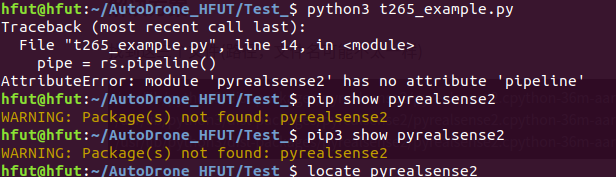
but we generally only do this. It is considered that our compilation has been completed and the test has passed. In fact, there is no attributeerror when actually using the function of pyrealsense2: module ‘pyrealsense2’ has no attribute ‘pipeline’ error
Solution

Find these three files (the path and file name may be different with your environment)

/usr/lib/python3/dist-packages/pyrealsense2/pyrealsense2.cpython-36m-aarch64-linux-gnu.so
/usr/lib/python3/dist-packages/pyrealsense2/pyrealsense2.cpython-36m-aarch64-linux-gnu.so.2.40
/usr/lib/python3/dist-packages/pyrealsense2/pyrealsense2.cpython-36m-aarch64-linux-gnu.so.2.40.0

Copy them to the location of your script
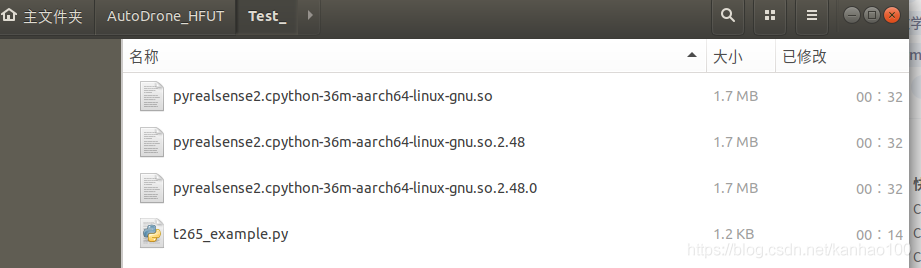
no error is reported
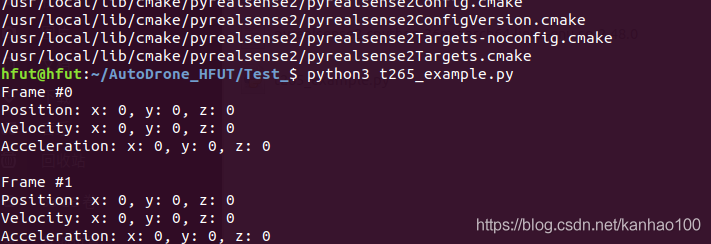
I know this method can not solve this problem gracefully
I remember solving this problem with raspberry pie 4B before, but I forgot.

Appendix

My cmake parameter

cmake ../ 
-DFORCE_RSUSB_BACKEND=ON 
-DBUILD_PYTHON_BINDINGS:bool=true 
-DPYTHON_EXECUTABLE=/usr/bin/python3.6 
-DCMAKE_BUILD_TYPE=release 
-DBUILD_EXAMPLES=true 
-DBUILD_GRAPHICAL_EXAMPLES=true 
-DBUILD_WITH_CUDA:bool=true

It should be noted that force_ RSUSB_ Backend, you’d better turn it on. There may be some problems. I forgot where I saw it
and import_ DEPTH_ CAM_ FW, update the firmware. It is recommended to close it, because the latest firmware file will be downloaded during cmake. We all know the current network situation. The probability is not moving. Don’t toss around here. Just update the firmware on the PC.

Complete parameter table: please refer to this table to determine the parameters to be filled in
https://dev.intelrealsense.com/docs/build-configuration

[Solved] Run sudo python setup.py install Error: error: error in setup.cfg: command ‘build‘ has no such option ‘i18

1. Problem description

Error: error in setup.cfg: Command ‘build’ has no such option ‘I18N’ when running sudo Python setup.py install in the installation package of Ubuntu system

2. Solutions

Other dependent environments need to be installed:

Python distutils extra needs to be installed

sudo apt-get update -y
sudo apt-get install -y python-distutils-extra

Then run it again

sudo python setup.py install

[Solved] Error resolving template template might not exist or might not be accessible

Resolving error template template may not exist or may not be accessible

    1. there may be a problem with your controller annotation
    1. the difference between controller annotation and restcontroller annotation. Thymeleaf configures the corresponding path in the properties or YML configuration file
    1. about

      1. properties spring.web.resources.static-locations=classpath:/static/, classpath:/templates/ yml
	spring:
      thymeleaf:
        # thymeleaf The directory where the page is stored
        prefix: classpath:/templates/

Return path problem
there is no Maven clear in the return path

[Solved] RuntimeError: Error(s) in loading state_dict for FasterRCNN: Missing key(s) in state_dict:……

Problem description
RuntimeError: Error(s) in loading state_dict for FasterRCNN:Missing key(s) in state_dict: “backbone.body.conv1.weight”, “backbone.body.bn1.weight”, …

Solution:

# model.load_state_dict(torch.load("./model.pth"))
model.load_state_dict(torch.load("./model.pth"), False)

Source code analysis

load_state_dict(state_dict, strict=True)[SOURCE]
		Copies parameters and buffers from state_dict into this module and its descendants. If strict is True, then the keys of state_dict must exactly match the keys returned by this module’s state_dict() function.

		Parameters
			state_dict (dict) – a dict containing parameters and persistent buffers.

			strict (bool, optional) – whether to strictly enforce that the keys in state_dict match the keys returned by this module’s state_dict() function. Default: True

		Returns
			missing_keys is a list of str containing the missing keys

			unexpected_keys is a list of str containing the unexpected keys

		Return type
			NamedTuple with missing_keys and unexpected_keys fields

[Solved] cv2.error: OpenCV(4.5.3) :-1: error: (-5:Bad argument) in function “pointPolygonTest“

python   Running error: CV2. Error: opencv (4.5.3): – 1: error: (- 5: bad argument) in function “pointpolygontest”

The solution is simple because the CV2 version is not compatible

Step 1: uninstall the installed version

Step 2: install the old version

Step 3:   Confirm successful installation

The above error will not be reported during operation.

How to Solve Git clone Error: error: RPC failed; result=35, HTTP code = 0

When installing odoo, GIT clone downloads odoo and reports an error
error: RPC failed; result=35, HTTP code = 0

[odoo@node02 src]$ git clone https://www.github.com/odoo/odoo --depth 1 --branch 14.0 /opt/odoo/odoo14
Cloning into '/opt/odoo/odoo14'...
error: RPC failed; result=35, HTTP code = 0
fatal: The remote end hung up unexpectedly

The Internet says the error cache is small

Solution: set the cache to 50m or greater
I set 50m

git config --global http.postBuffer 50M

The above error does not appear, but a new error appears

[odoo@node02 src]$ git config --global http.postBuffer 50M
[odoo@node02 src]$ git clone https://www.github.com/odoo/odoo --depth 1 --branch 14.0 /opt/odoo/odoo14
Cloning into '/opt/odoo/odoo14'...
fatal: unable to access 'https://www.github.com/odoo/odoo/': Encountered end of file

This is a mistake, fatal: unable to access ‘ https://www.github.com/odoo/odoo/ ’: Encountered end of file
clicking on the Internet:
git config –global http.proxy
git config –global –unset http.proxy

or not.

[odoo@node02 src]$ git config --global http.proxy
[odoo@node02 src]$ git config --global --unset http.proxy
[odoo@node02 src]$ git clone https://www.github.com/odoo/odoo --depth 1 --branch 14.0 /opt/odoo/odoo14
Cloning into '/opt/odoo/odoo14'...
fatal: unable to access 'https://www.github.com/odoo/odoo/': Encountered end of file
[odoo@node02 src]$ rm ~/.gitconfig
[odoo@node02 src]$ git clone https://www.github.com/odoo/odoo --depth 1 --branch 14.0 /opt/odoo/odoo14
Cloning into '/opt/odoo/odoo14'...
fatal: unable to access 'https://www.github.com/odoo/odoo/': Encountered end of file

The ultimate solution:
change HTTPS to GIT and you will succeed in Git clone git://www.github.com/ ****

[odoo@node02 src]$ git clone git://www.github.com/odoo/odoo --depth 1 --branch 14.0 /opt/odoo/odoo14     
Cloning into '/opt/odoo/odoo14'...
remote: Enumerating objects: 31507, done.
remote: Counting objects: 100% (31507/31507), done.
remote: Compressing objects: 100% (25092/25092), done.
Receiving objects:  20% (6511/31507), 22.17 MiB | 64.00 KiB/s    

[Solved] Pytorch-transformers Error: AttributeError: ‘str‘ object has no attribute ‘shape‘

Error Message:
AttributeError: ‘str’ object has no attribute ‘shape’

"""Encoding Chinese text using bert-chinese pre-training model """
# Introduce torch model
import torch
# Introduce the neural network model in the torch model
import torch.nn as nn

# 1. get Google's already trained bert-base-chinese model related to Chinese information via torch.hub (a migration-focused tool in pytorch)
# The parameters are fixed
model = torch.hub.load('huggingface/pytorch-transformers', 'model', 'bert-base-chinese')

# 2. import the corresponding character mapper, which will map each Chinese character to a number
tokenizer = torch.hub.load('huggingface/pytorch-transformers', 'tokenizer', 'bert-base-chinese')


# 3. Map Chinese text into a bert encoded text tensor representation
def get_bert_encode_for_single(text):
    """
    description: encode Chinese text using bert-chinese pre-training model [map Chinese text to bert-encoded text tensor representation
    :param text: the text to be encoded
    :return: use the bert-encoded text tensor representation
    """
    # 3.1 First, each Chinese character is mapped using the character mapper, and the parameter is the text of the incoming Chinese message. This converts the Chinese message into an encoded message
    # The reason for [1:-1]: Note here that bert's tokenizer mapping will add start and end tokens before and after the result, i.e. 101 and 102
    # This makes sense for encoding multiple pieces of text, but not in our case, so use [1:-1] to slice the head and tail
    indexed_tokens = tokenizer.encode(text)[1:-1]
    # After 3.2 transform the list structure into a tensor tensor [put the encoded information in torch.tensor
    tokens_tensor = torch.tensor([indexed_tokens])
    print(tokens_tensor)
    # 3.3 Run the values directly from the model without automatically computing the gradient [the prediction part needs to make the model not auto-derive].
    with torch.no_grad():
        # 3.4 Call the model to get the hidden output
        encoded_layers, _ = model(tokens_tensor)
    print(f"encoded_layers.shape={encoded_layers.shape}")

reason:

The problem is that the return type has changed since the 3.xx version of transformers. Therefore, we explicitly require the tuple tuple of tensors tensor.

Therefore, we can pass an additional parameter return when calling model ()_ Dict = false to obtain the actual tensor corresponding to the last hidden state.

Solution:

 encoded_layers, _ = model(tokens_tensor, return_dict=False)

Error running ‘Tomcat 8.5.31’: Unable to open debugger port

This problem indicates that a port occupies the current port. For example, if you want to start tomact, but a tomact service has been started, an error will be reported

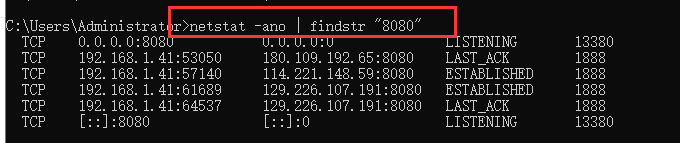
Shows the details of 8068 port occupation

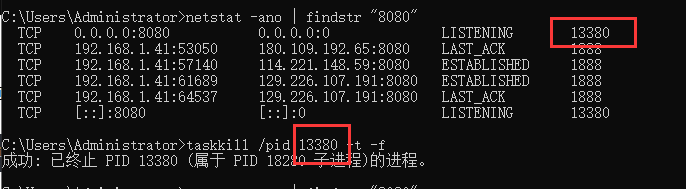
netstat -ano | findstr "8080"


Query which application occupies the port (according to PID)

tasklist | findstr "20344"

Force kill specified port (according to PID)

taskkill /pid 13800 -t -f

You can also close the process according to the program name

taskkill /f /t /im java.exe

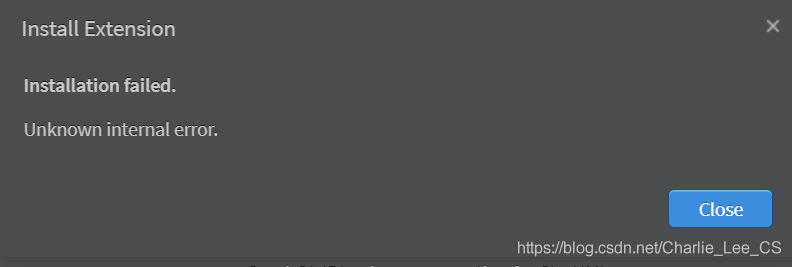
Solution to unknown internal error in StarUML installation extension


StarUML version: 4.0.0

Many solutions have been tried before because of this. Finally, it is found that the official manual states:

To install an extension manually:
1.Get an extension as a .zip file.
2.Extract the file on the extensions path.
	/Users/<user>/Library/Application 	Support/StarUML/extensions/user for Mac OS.
	C:\Users\<user>\AppData\Roaming\StarUML\extensions\user for Windows.
	~/.config/StarUML/extensions/user for Linux.
3.Check a folder in the extensions path and :file:main.js file in the folder.
4.Restart StarUML.

For example:

    there is a link to the extension on the official website. GitHub downloads the release version, copies it, decompresses it and restarts it. The official manual will always drop God