Author Archives: Robins

[Solved] Error reading comm device when writing serial communication with MSComm control

1. Problem description

In the process of serial communication written with MSComm control, when receiving the data sent by the serial port under the message response function OnComm function, in get_ An error reading comm develop error occurs in the input() function. The specific codes are as follows:

void XXXDlg::OnCommMscommLaser()
{
	memset(chstrLaser, 0, 1024);    //chstrLaseris a global variable.

	short i = m_mscomLaser.get_InBufferCount(); // statement 1.
	if(m_mscomLaser.get_CommEvent() == 2) // An event value of 2 means there are characters in the receive buffer.
	{
		/*m_recivedMsg = "";
		
		CString csstr = "";*/

		VARIANT InputData = m_mscomLaser.get_Input(); //Statement 2, read buffer.

		COleSafeArray csa = InputData; //VARIANT variable is converted to COleSafeArray variable.

		//translate to byte class.
		DWORD size = csa.GetOneDimSize();
		for(long k = 0; k < size; k++)
			csa.GetElement(&k, chstrLaser + k);
	}

    // Further processing of the received data ......

	return;
}

Each time the function is triggered, the data length of the receive buffer obtained by statement 1 is 30, which means that the receive buffer has data with a length of 30. However, the above error prompt will appear in statement 2, and the code after statement 2 will not be executed.

2.Method exploration

1. At first, I thought it was a data line problem. By changing the data line and making the data line myself, the problem could not be solved.

2. I suspected that there was a problem with the communication equipment. I also changed the equipment for debugging, but the same problem still occurred.

3. Suspected that the communication protocol was not clear.

4. Wait

3. Solution

After many serial port debugging assistants failed, I found that a serial port debugging assistant can communicate normally. I will provide the debugging assistant later. The current problem may be that the code is written incorrectly, and the data cable and equipment are OK.

Through a large number of searches, I found that one solution was to update the serial driver. After trying, I found that it was really possible. After a whole day, I finally solved this problem. I was very excited.

Here is the solution:

1. Download serial driver

My is a USB to 232 data cable, so I downloaded the prolific USB to serial comm port driver. You can download the corresponding driver according to your actual situation. Here I provide the driver that solves my problem: Click to download the serial port driver.

2. Update driver

After downloading the driver, start updating the driver:

a. Click Manage – > Click device manager -> Locate the serial port configured through the MSComm control

b. Right click the serial driver and click Update Driver Software – > Select browse computer for driver software

c. Click Browse to find the downloaded serial driver

d. Click next to solve the above problems after updating.
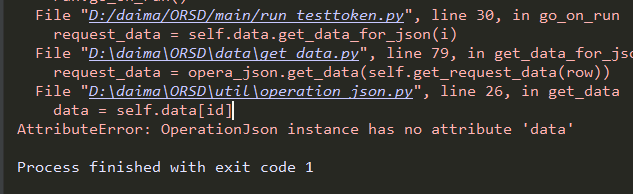
[Solved] AttributeError: OperationJson instance has no attribute ‘data‘

Wrong:
#coding:utf-8
import json
class OperetionJson:

	def __init__(self,file_path=None):
		if file_path == None:
			self.file_path = '../dataconfig/user.json'
		else:
			self.file_path = file_path
		    self.data = self.read_data();
		    

Right:
```python
#coding:utf-8
import json
class OperetionJson:

	def __init__(self,file_path=None):
		if file_path == None:
			self.file_path = '../dataconfig/user.json'
		else:
			self.file_path = file_path
		self.data = self.read_data()
	

Ionic Save to Gallery Plugin IOS Error: Method ‘requestAuthorization:’ not defined in Plugin ‘PhotoLibrary’ ERROR: Method ‘xxx’ not defined

Error in IOS when ionic is saved to the gallery plug-in error: method ‘requestauthorization:’ not defined in plugin ‘photolibrary’ error: method ‘xxx’ not defined in plugin

In IOS, when saving pictures to mobile photo album, the error is as follows

ERROR: Method 'requestAuthorization:' not defined in Plugin 'PhotoLibrary'

FAILED pluginJSON = ["PhotoLibrary815393554","PhotoLibrary","requestAuthorization",[{"write":true,"read":true}]]

resolvent

cordova plugin rm cordova-plugin-photo-library
cordova plugin add https://github.com/nilebma/cordova-plugin-photo-library.git

Due to GitHub network problems, you can use the following command

npm install --save @ionic-native/photo-library
cordova plugin add https://gitee.com/liuzhuo8081/cordova-plugin-photo-library.git

Pyinstaller Error: INTEL MKL ERROR: The specified module could not be found. mkl_intel_thread.1.dll.Intel MKL FATAL ERROR: Cannot

After using pyinstaller to package successfully, an error is reported when executing the executable file

Intel MKL error: the specified module could not be found. mkl_ intel_ thread.1.dll.
Intel MKL FATAL ERROR: Cannot load mkl_ intel_ thread.1.dll.
Method 1:

Enter the directory under CONDA

./conda/Liabary/bin/

After entering the directory, find mkl_ intel_ thread.1.dll   File, add the path to the system environment variable.

However, this method does not solve my problem, so it will MKL_ intel_ The thread.1.dll file is copied to the successfully packaged directory and placed in the folder of the executable file.

Problem-solving.

[Solved] Syntax Error: TypeError: Cannot read property ‘parseComponent‘ of undefined

Syntax Error: TypeError: Cannot read property ‘parseComponent’ of undefined
Vue packages version mismatch

Failed to compile.

./src/App.vue
Module Error (from ./node_modules/vue-loader/lib/index.js):


Vue packages version mismatch:

- [email protected] (D:\site\hst_tech\hst_platform_frontend\node_modules\vue\dist\vue.runtime.common.js)
- [email protected] (D:\site\hst_tech\hst_platform_frontend\node_modules\vue-template-compiler\package.json)

This may cause things to work incorrectly. Make sure to use the same version for both.
If you are using vue-loader@>=10.0, simply update vue-template-compiler.
If you are using vue-loader@<10.0 or vueify, re-installing vue-loader/vueify should bump vue-template-compiler to the latest.

Solution:

Set Vue template- [email protected] Version change Vue template- [email protected]

// Just change the version number to the same one
npm i -g [email protected] --save

C++: fatal error: variant: No such file or directory

Question

When compiling with C + + 17, you will be prompted with “fatal error: variant: no such file or directory” error;

reason

STD:: variant is a feature of C + + 17. Although I compiled and installed gcc7.5.0, I still prompted this error
with the help of colleagues, the problem was solved because GCC did not switch to GCC 7.5.0;

apt-get install gcc-7
apt-get install gcc-7 g++-7
rm /usr/bin/g++
ln -s /usr/bin/g++-7 /usr/bin/g++

Test

1. C + + variables doesn’t like file directories

Accounting subject

[Solved] Error:Plugin/Preset files are not allowed to export objects, only functions

There will be such an error when installing the on-demand loading of element UI under the official documentation of Vue.

Error:Plugin/Preset files are not allowed to export objects, only functions

In the official document of element

On demand import

With the help of   Babel plugin component, we can only introduce the required components to reduce the project volume.

First, install the Babel plugin component:

npm install babel-plugin-component -D

Then, change. Babelrc to:

{
  "presets": [["es2015", { "modules": false }]],
  "plugins": [
    [
      "component",
      {
        "libraryName": "element-ui",
        "styleLibraryName": "theme-chalk"
      }
    ]
  ]
}

At this time, after the installation and configuration are completed according to the official documents, an error will be reported when NPM run serve is started

Error: Cannot find module 'babel-preset-es2015'

This is due to the lack of Babel preset es2015 dependency

Just install the Babel preset es2015 dependency

npm i babel-preset-es2015 --save

This is OK, but sometimes you will still report an error when you start after installation

Error: Plugin/Preset files are not allowed to export objects, only functions.

I changed the preset in the babel.config.js file in the project     Not used in the official element UI documentation

Es2015, but change the content of babel.config.js to the following:

module.exports = {
  presets: [
    '@vue/cli-plugin-babel/preset',
    ["@babel/preset-env", {
      "useBuiltIns": "entry"
    }]
  ],
  "plugins": [
    [
      "component",
      {
        "libraryName": "element-ui",
        "styleLibraryName": "theme-chalk"
      }
    ]
  ]
}

Then install the dependencies on the command line

npm install --save-dev @babel/preset-env

This solves the error.

[Solved] Qt Vtk wglMakeCurrent failed in MakeCurrent(), error: The handle is invalid.

Problem description

The qvtkwidget control is used in QT’s interface. When clicking the close button in the upper right corner of the window, an error is reported: wglmakecurrent failed in makecurrent(), error: the handle is invalid .

Solution:

By overriding the void closeevent (qcloseevent * event) function, manually delete all qvtkwidget type controls, and then close the window.

Example

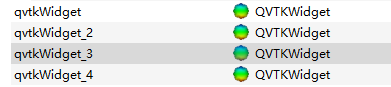
The qvtkwidget type controls in the QT design interface are as follows:

mymainwindow. H

class MyMainWindow : public QMainWindow
{
    Q_OBJECT
public:
    MyMainWindow(QWidget *parent = Q_NULLPTR);
protected:
	void closeEvent(QCloseEvent *event); 
private:
    Ui::MainWindow ui;
};

mymainwindow.cpp

MyMainWindow::MyMainWindow(QWidget *parent): QMainWindow(parent)
{
    ui.setupUi(this);
}

void MyMainWindow::closeEvent(QCloseEvent *event) {
	delete ui.qvtkWidget;
	delete ui.qvtkWidget_2;
	delete ui.qvtkWidget_3;
	delete ui.qvtkWidget_4;
	event->accept();
}

Postscript

I don’t know whether such hasty delete processing will cause other problems. I hope you can make more corrections.

C++: terminate called after throwing an instance of ‘std::length_error‘ (sort function cmp sorting rules problem)

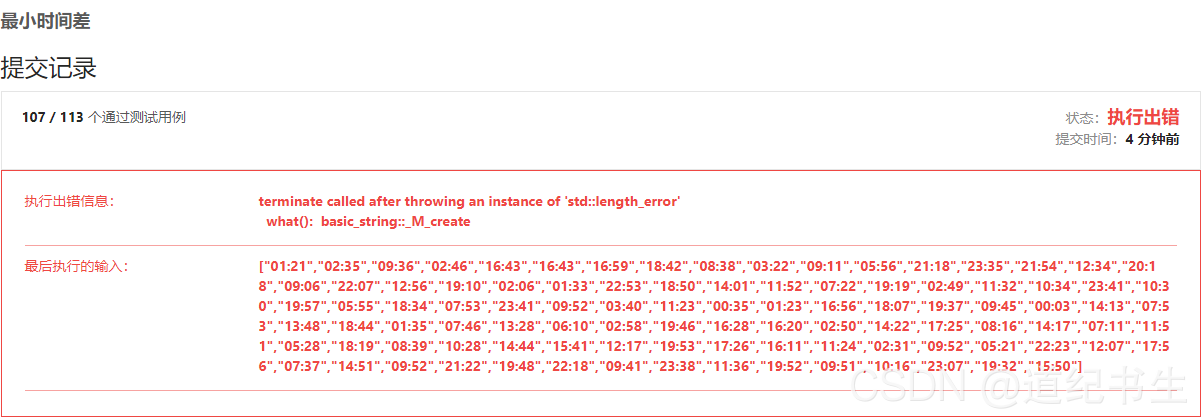
Leetcode-539: encountered a big problem when brushing the minimum time difference:

Errors are reported as follows:

terminate called after throwing an instance of 'std::length_error'
  what():  basic_string::_M_create

The error code is as follows:

class Solution {
public:
    static bool cmp(string x,string y){ //Handwritten sorting rules Sort by chronological ascending order
        int Xshi= (x[0]-'0')*10+x[1]-'0';
        int Xfen= (x[3]-'0')*10+x[4]-'0';
        int Yshi= (y[0]-'0')*10+y[1]-'0';
        int Yfen= (y[3]-'0')*10+y[4]-'0';
        if(Xshi>Yshi || (Xshi==Yshi && Xfen> Yfen))  return false;
        else return true;
    }
    //input time has been sorted x is less than y to find two time minute difference function
    int Time_diff(string x,string y){
        int Xshi= (x[0]-'0')*10+x[1]-'0';
        int Xfen= (x[3]-'0')*10+x[4]-'0';
        int Yshi= (y[0]-'0')*10+y[1]-'0';
        int Yfen= (y[3]-'0')*10+y[4]-'0';

        int diff=(Yshi-Xshi)*60;
        if(Yfen>Xfen) diff+=Yfen-Xfen;
        else diff-=Xfen-Yfen;
        return diff;
    }
    int findMinDifference(vector<string>& timePoints) {
        //After sorting, compare the two adjacent to each other and also compare the first and last
        sort(timePoints.begin(),timePoints.end(),cmp);
        //compare the first and the last
        int T_min=min(  Time_diff(timePoints[0],timePoints[timePoints.size()-1]),  
                        1440-(Time_diff(timePoints[0],timePoints[timePoints.size()-1])) );
        //Two adjacent to each other for comparison
        for(int i=1;i<timePoints.size();i++)
        {
            T_min=min(T_min, Time_diff(timePoints[i-1],timePoints[i]) );
        }
        return T_min;
    }
};

Looking back and forth at the code, I was stunned that I couldn’t see any problems. I consulted hundreds of relevant web pages, basically for the following two reasons:

    1. an empty string was entered. The array subscript is out of bounds

However, these two problems are obviously not in my code. Finally, I checked all night and found the official description of sort sorting comparison.

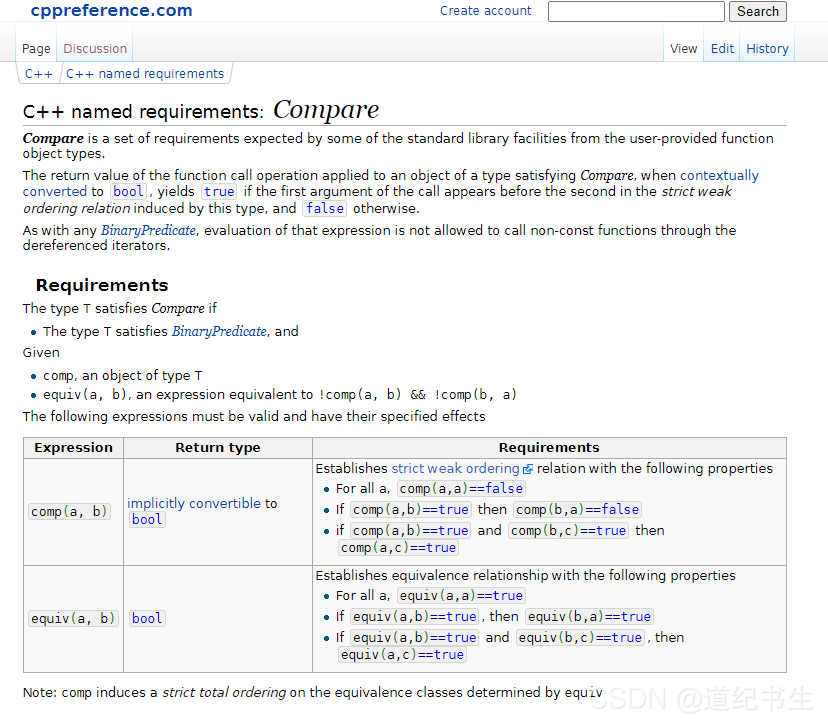
https://en.cppreference.com/w/cpp/named_req/Compare

Let’s focus here:

In other words, for the CMP comparison function we handwritten, the following three points should be met:

      1. for all input a, input two identical elements, namely CMP (a, a). If the returned result is false, it cannot be false. If the result of entering CMP (a, b) is true, conversely, the result of entering CMP (B, a) is false, that is, if a > b. No more B > a. Otherwise, there will be contradictions. If the result of input CMP (a, b) is true, and the result of input CMP (B, c) is true, then the result of CMP (a, c) should also be true, which is also well understood. If a > B and B > C then a must be greater than C

Here, we should mainly pay attention to the first point. When the two numbers are the same, the returned result should be false, and my code:

    static bool cmp(string x,string y){ //Handwritten sorting rules Sort by chronological ascending order
        int Xshi= (x[0]-'0')*10+x[1]-'0';
        int Xfen= (x[3]-'0')*10+x[4]-'0';
        int Yshi= (y[0]-'0')*10+y[1]-'0';
        int Yfen= (y[3]-'0')*10+y[4]-'0';
        if(Xshi>Yshi || (Xshi==Yshi && Xfen> Yfen))  return false;
        else return true;
    }

This rule is not satisfied. So add one   =  Number to make it comply with the rules.

    static bool cmp(string x,string y){ //Handwritten sorting rules Sort by chronological ascending order
        int Xshi= (x[0]-'0')*10+x[1]-'0';
        int Xfen= (x[3]-'0')*10+x[4]-'0';
        int Yshi= (y[0]-'0')*10+y[1]-'0';
        int Yfen= (y[3]-'0')*10+y[4]-'0';
        if(Xshi>Yshi || (Xshi==Yshi && Xfen>= Yfen))  return false;
        else return true;
    }

The problem that bothered me all night was solved.

org.postgresql.util.PSQLException: ERROR: operator does not exist: character varying XXX

PG database SQL error:
error reason: is caused by SQL writing error or parameter transfer error
database error information

[42883] ERROR: operator does not exist: character varying = record 
No operator matches the given name and argument types. You might need to add explicit type casts. 
line: 1063

error example:

select * from d_allotmoveai_setarea a where a.bills_id = ('123','456')

correct example:

select * from d_allotmoveai_setarea a where a.bills_id = ('456')
select * from d_allotmoveai_setarea a where a.bills_id in ('123','456')

ERROR Message:
org.postgresql.util.PSQLException: ERROR: operator does not exist: character varying <> record No operator matches the given name and argument types. You might need to add explicit type casts. line: 323 at org.postgresql.core.v3.QueryExecutorImpl.receiveErrorResponse(QueryExecutorImpl.java:2578) ~[postgresql-42.2.11.jar:42.2.11] at org.postgresql.core.v3.QueryExecutorImpl.processResults(QueryExecutorImpl.java:2313) ~[postgresql-42.2.11.jar:42.2.11] at org.postgresql.core.v3.QueryExecutorImpl.execute(QueryExecutorImpl.java:331) ~[postgresql-42.2.11.jar:42.2.11] at org.postgresql.jdbc.PgStatement.executeInternal(PgStatement.java:448) ~[postgresql-42.2.11.jar:42.2.11] at org.postgresql.jdbc.PgStatement.execute(PgStatement.java:369) ~[postgresql-42.2.11.jar:42.2.11] at org.postgresql.jdbc.PgPreparedStatement.executeWithFlags(PgPreparedStatement.java:159) ~[postgresql-42.2.11.jar:42.2.11] at org.postgresql.jdbc.PgPreparedStatement.executeQuery(PgPreparedStatement.java:109) ~[postgresql-42.2.11.jar:42.2.11] at com.p6spy.engine.wrapper.PreparedStatementWrapper.executeQuery(PreparedStatementWrapper.java:78) ~[p6spy-3.9.1.jar:na] at com.zaxxer.hikari.pool.ProxyPreparedStatement.executeQuery(ProxyPreparedStatement.java:52) ~[HikariCP-3.4.2.jar:na] at com.zaxxer.hikari.pool.HikariProxyPreparedStatement.executeQuery(HikariProxyPreparedStatement.java) ~[HikariCP-3.4.2.jar:na]