Author Archives: Robins

The browser reported an error ‘stylesheets undefined’‘‘

Problem Description:

The browser reported an error of ‘stylesheets undefined’

this.sheetData.styleSheets = "";

Cause analysis:

In some scenarios, stylesheets do not exist, causing the browser to report an error and are not defined


Solution:

Add a judgment. If stylesheets does not exist, this attribute will be automatically added and null value will be assigned.

if (this.sheetData) {
      this.sheetData['styleSheets'] = "";
    }

Canal synchronization error target column: name not matched

I. problem description

We have a usage scenario for canal:

Synchronize the same table data from multiple source ends to the same target end for unified data display.

However, it is found that after the field is deleted at source 1, the canal client logs of other sources will report an error:

Target column: name not matched
after that, the SQL operations of this table (such as insert, even if data is not inserted into the deleted field) cannot be synchronized.

II. How to avoid

In the scenario where multiple source ends are performing canal synchronization to the same target end, the drop field is prohibited.

Ego planner swarm installation and error reporting solution

Project address: https://github.com/ZJU-FAST-Lab/ego-planner-swarmhttps://github.com/ZJU -FAST-Lab/ego-planner-swarm https://github.com/ZJU-FAST-Lab/ego-planner-swarm

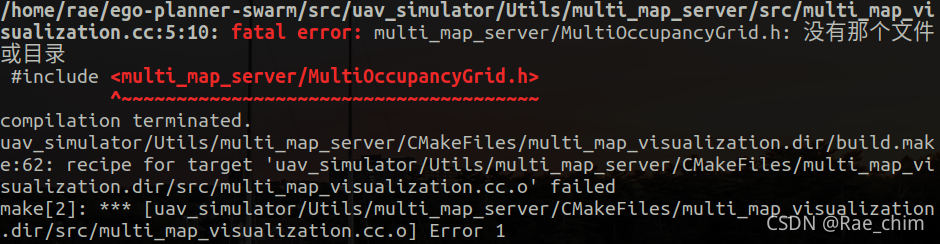
The errors reported after compilation are as follows:

  After consulting the author, the reply is as follows:

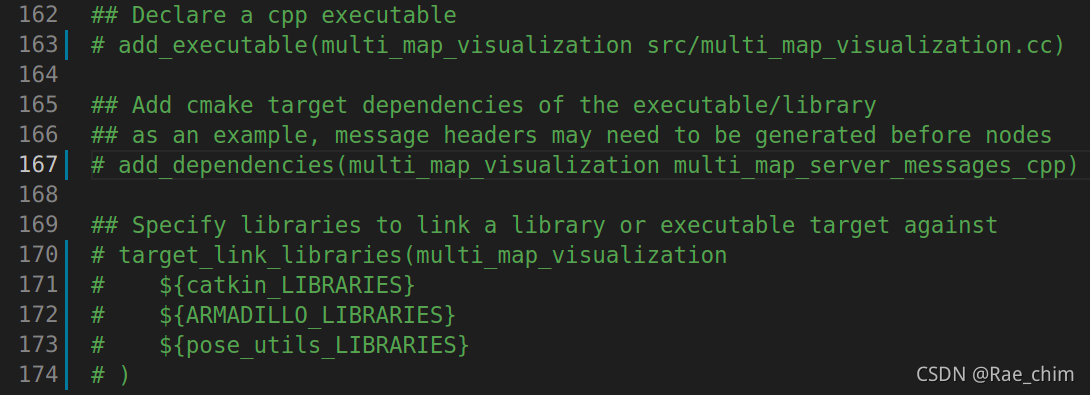
But I didn’t know how to change the file the author said, so I asked/ego Planner/SRC/UAV_ simulator/Utils/multi_ map_ Modify server/cmakelists.txt as follows:

  After compiling successfully, run

roslaunch ego_planner rviz.launch
roslaunch ego_planner swarm.launch

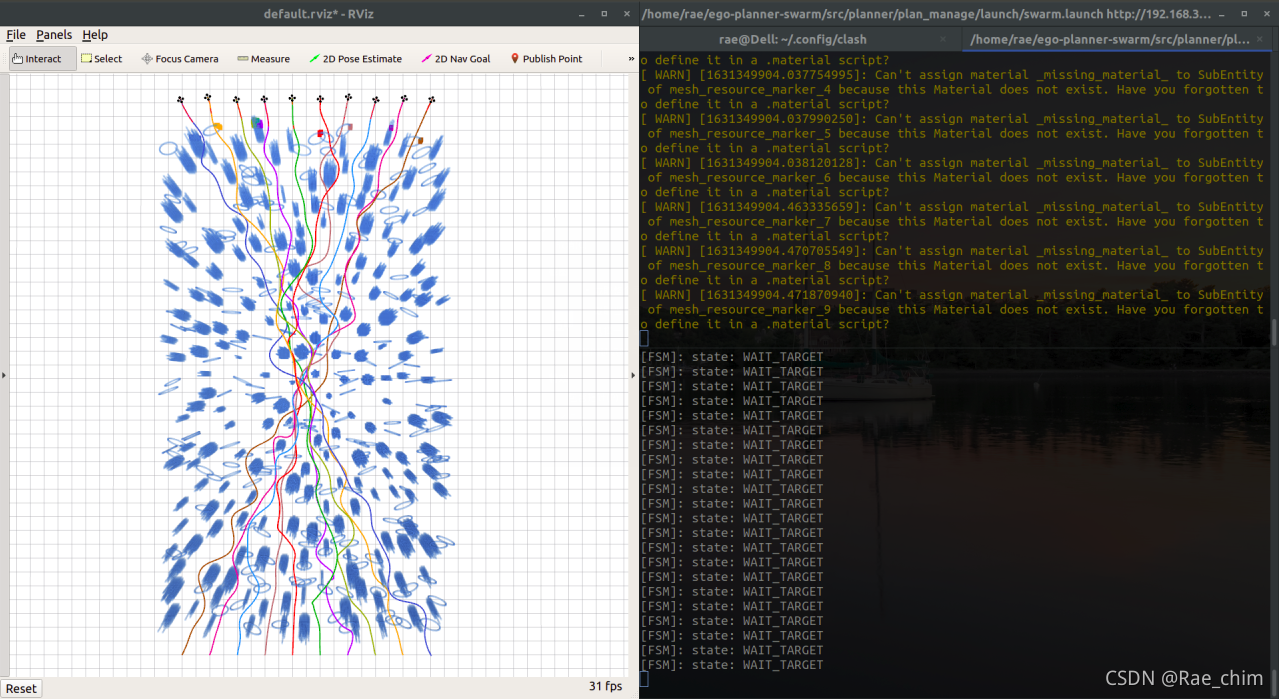
The results are as follows:

The java.lang.exceptionininitializererror of mybatis reports an error

1. First, look at mybatis-config.xml

<mapper resource="com/kuang/dao/TeacherMapper.xml"/>

Be sure to follow the student mapper above. The directory where XML is stored is right

2. Look at mapper.xml

<mapper namespace="com.kuang.dao.StudentMapper">

Be sure to match the directory stored in the student mapper above

3. If there is Chinese in the comments, check whether UTF-8 in the two XML is changed to uft8

<?xml version="1.0" encoding="UTF8" ?>

4. Maven resource export problem

<build>
    <resources>
        <resource>
            <directory>src/main/java</directory>
            <includes>
                <include>**/*.properties</include>
                <include>**/*.xml</include>
            </includes>
            <filtering>false</filtering>
        </resource>
        <resource>
            <directory>src/main/resources</directory>
            <includes>
                <include>**/*.properties</include>
                <include>**/*.xml</include>
            </includes>
            <filtering>false</filtering>
        </resource>
    </resources>
</build>

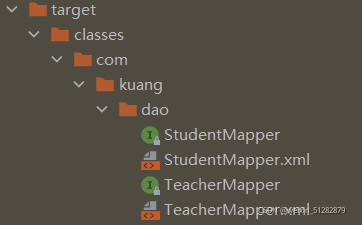
5. Check whether mapper and mapper.xml are in the same directory under the target directory, and then check whether there are any extra or duplicate. If so, delete those that do not correspond to the SRC directory above.

Summary:

The directories of SRC, test and target should be consistent!!!

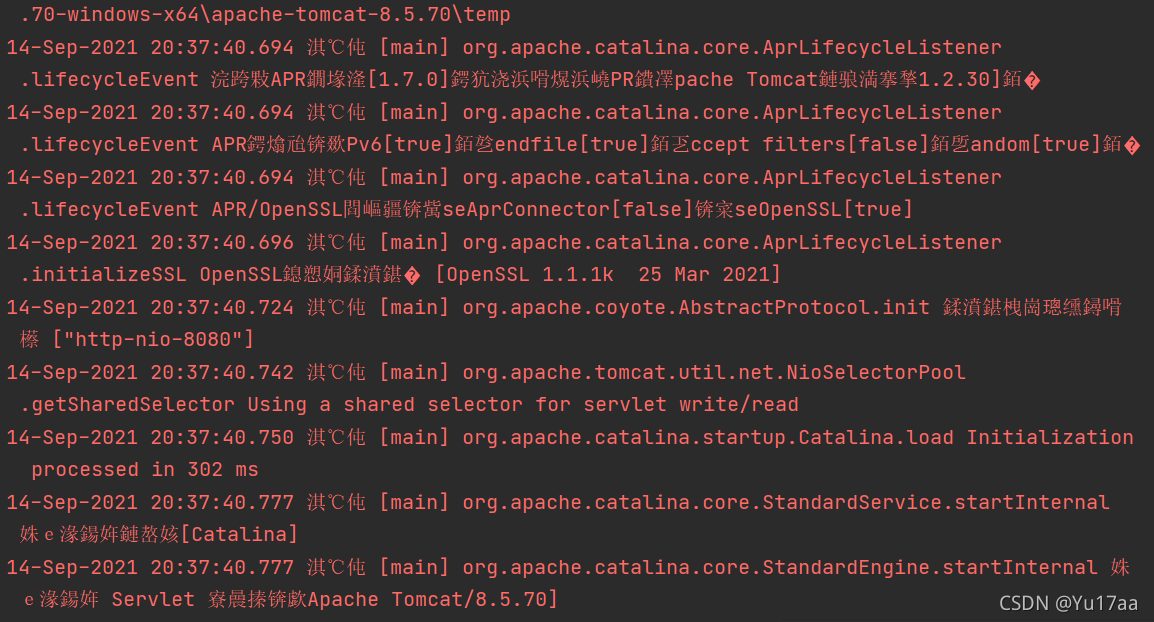
Idea starts Tomcat console with garbled code but no error

Problem display

resolvent

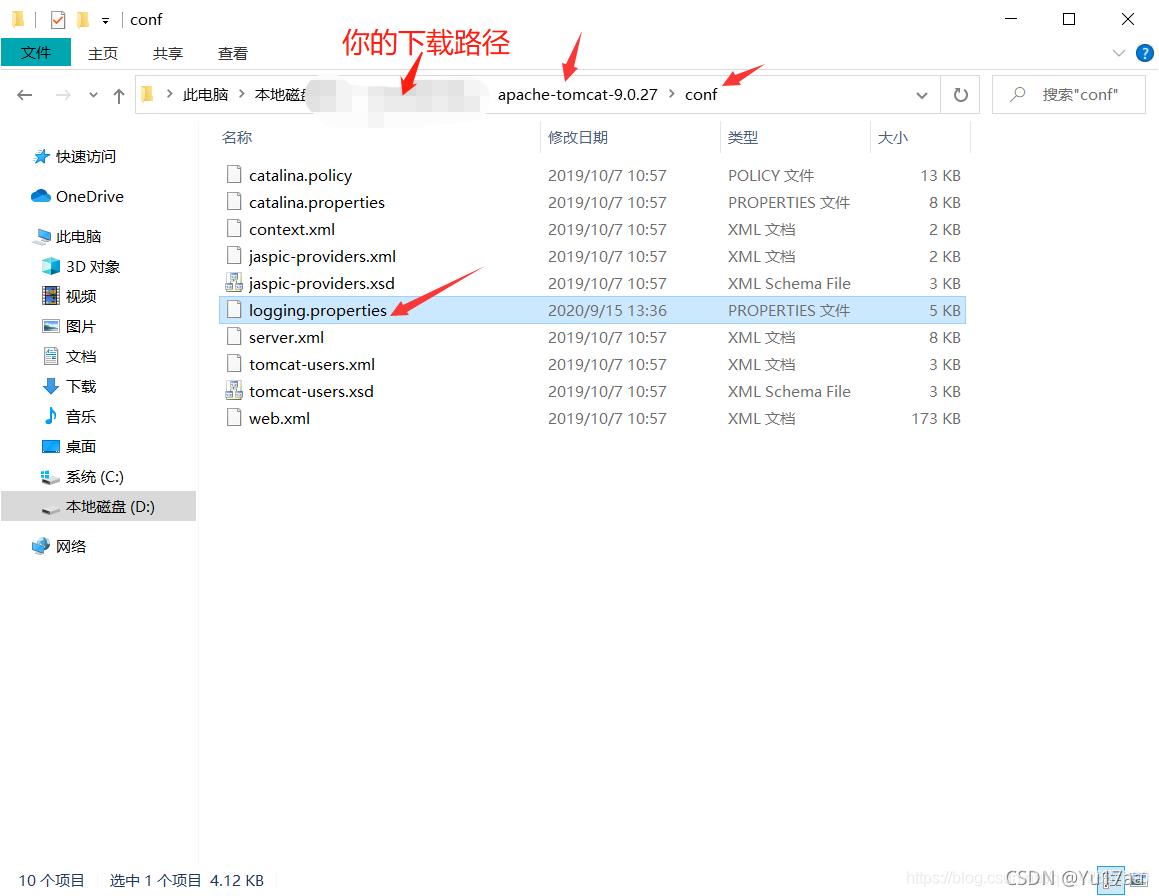
1. Find the Tomcat installation directory  

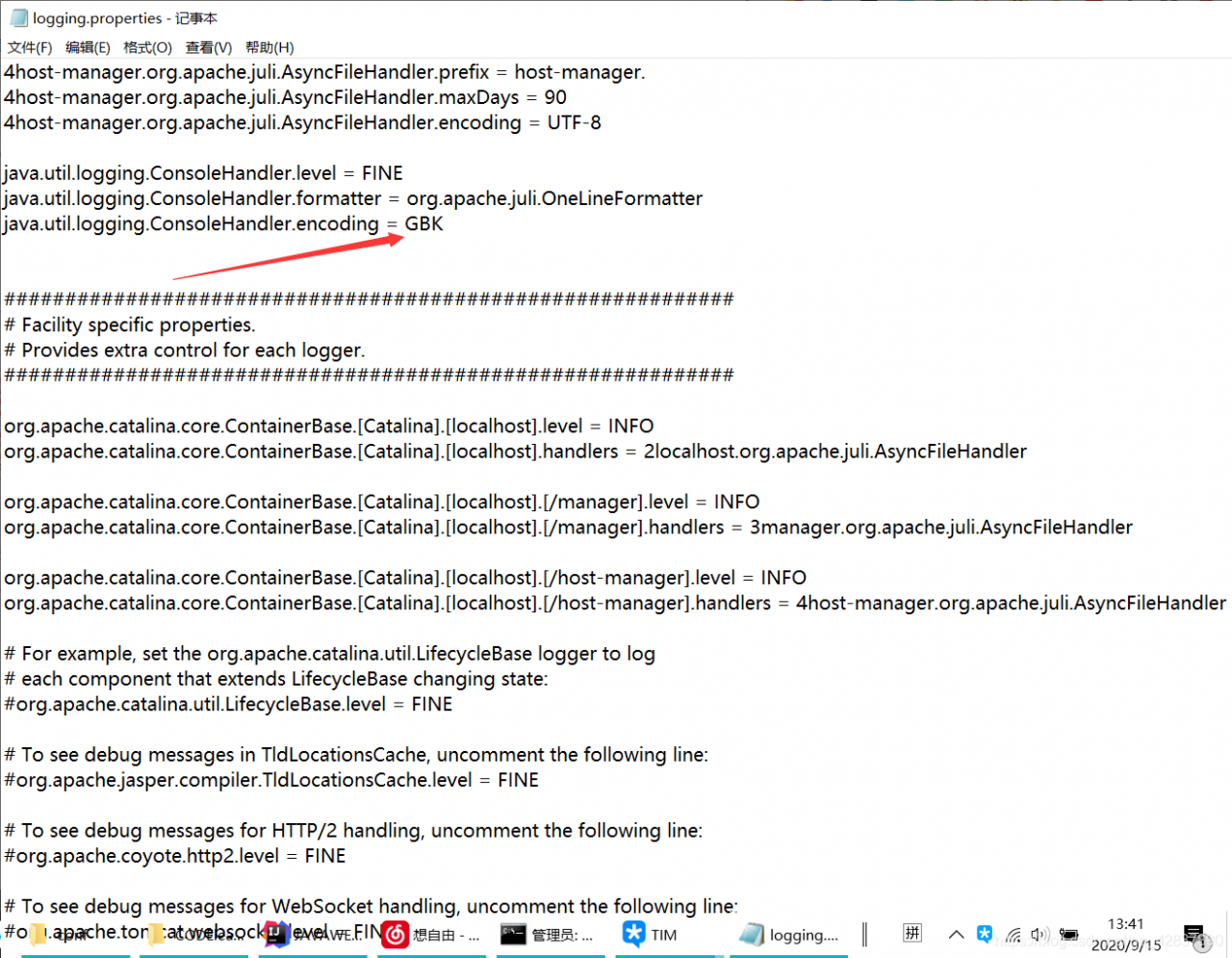
  2. Open the logging.properties file from the conf folder
find the line java.util.logging.consolehandler.encoding = UTF-8 and change it to java.util.logging.consolehandler.encoding = GBK
that is, change the console code from UTF-8 to GBK

  Successful solution, give a praise

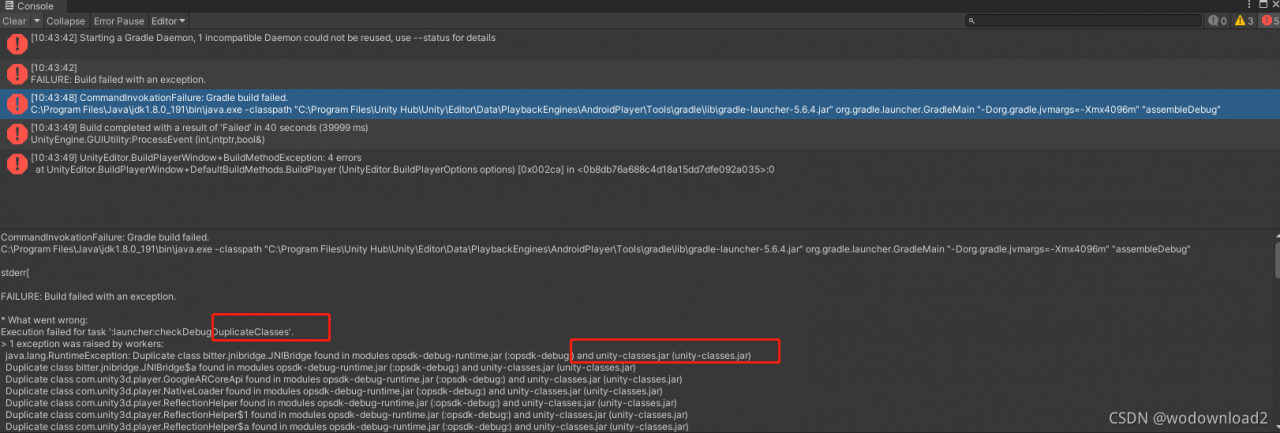
Android studio reports an error when building AAR for unity

CommandInvokationFailure: Gradle build failed. 
C:\Program Files\Java\jdk1.8.0_191\bin\java.exe -classpath "C:\Program Files\Unity Hub\Unity\Editor\Data\PlaybackEngines\AndroidPlayer\Tools\gradle\lib\gradle-launcher-5.6.4.jar" org.gradle.launcher.GradleMain "-Dorg.gradle.jvmargs=-Xmx4096m" "assembleDebug"

stderr[

FAILURE: Build failed with an exception.

* What went wrong:
Execution failed for task ':launcher:checkDebugDuplicateClasses'.
> 1 exception was raised by workers:
  java.lang.RuntimeException: Duplicate class bitter.jnibridge.JNIBridge found in modules opsdk-debug-runtime.jar (:opsdk-debug:) and unity-classes.jar (unity-classes.jar)
  Duplicate class bitter.jnibridge.JNIBridge$a found in modules opsdk-debug-runtime.jar (:opsdk-debug:) and unity-classes.jar (unity-classes.jar)
  Duplicate class com.unity3d.player.GoogleARCoreApi found in modules opsdk-debug-runtime.jar (:opsdk-debug:) and unity-classes.jar (unity-classes.jar)

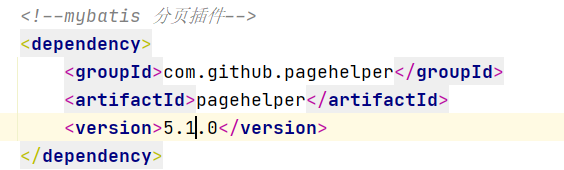
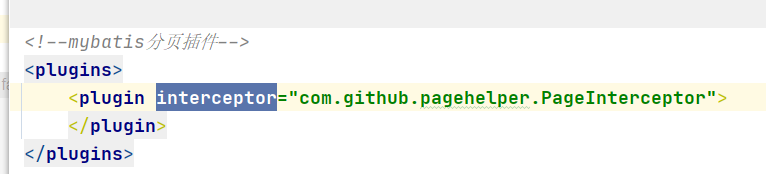
The SSM framework adds the mybatis paging plug-in to start the error report

1、 Error

pom.xml

Mybatis configuration

start the server: an error is reported

2. The cause of the error
1. There is no problem with various configurations
2. It is considered that jar packages conflict. Changing various jar packages has no effect
3. Finally, type
* * manually and start it successfully

3、 Analyze the possibility of errors

1. The idea is used for a long time and the cache is too large
3. There may be problems with character encoding such as spaces when copying

NoClassDefFoundError: io/ebean/bean/ EntityBean [How to Solve]

Error stack frame, as follows:

java.lang.NoClassDefFoundError: io/ebean/bean/EntityBean

	at java.lang.ClassLoader.defineClass1(Native Method)
	at java.lang.ClassLoader.defineClass(ClassLoader.java:763)
	at java.security.SecureClassLoader.defineClass(SecureClassLoader.java:142)
	at java.net.URLClassLoader.defineClass(URLClassLoader.java:468)
	at java.net.URLClassLoader.access$100(URLClassLoader.java:74)
	at java.net.URLClassLoader$1.run(URLClassLoader.java:369)
	at java.net.URLClassLoader$1.run(URLClassLoader.java:363)
	at java.security.AccessController.doPrivileged(Native Method)
	at java.net.URLClassLoader.findClass(URLClassLoader.java:362)
	at java.lang.ClassLoader.loadClass(ClassLoader.java:424)
	at sun.misc.Launcher$AppClassLoader.loadClass(Launcher.java:349)
	at java.lang.ClassLoader.loadClass(ClassLoader.java:357)
	at java.lang.Class.forName0(Native Method)
	at java.lang.Class.forName(Class.java:348)
	at sun.reflect.generics.factory.CoreReflectionFactory.makeNamedType(CoreReflectionFactory.java:114)
	at sun.reflect.generics.visitor.Reifier.visitClassTypeSignature(Reifier.java:125)
	at sun.reflect.generics.tree.ClassTypeSignature.accept(ClassTypeSignature.java:49)
	at sun.reflect.generics.visitor.Reifier.reifyTypeArguments(Reifier.java:68)
	at sun.reflect.generics.visitor.Reifier.visitClassTypeSignature(Reifier.java:138)
	at sun.reflect.generics.tree.ClassTypeSignature.accept(ClassTypeSignature.java:49)
	at sun.reflect.generics.repository.ClassRepository.getSuperInterfaces(ClassRepository.java:108)
	at java.lang.Class.getGenericInterfaces(Class.java:913)
	at org.springframework.core.ResolvableType.getInterfaces(ResolvableType.java:471)
	at org.springframework.core.GenericTypeResolver.buildTypeVariableMap(GenericTypeResolver.java:265)
	at org.springframework.core.GenericTypeResolver.getTypeVariableMap(GenericTypeResolver.java:242)
	at org.springframework.data.util.ClassTypeInformation.getTypeVariableMap(ClassTypeInformation.java:114)
	at org.springframework.data.util.ClassTypeInformation.getTypeVariableMap(ClassTypeInformation.java:103)
	at org.springframework.data.util.ClassTypeInformation.<init>(ClassTypeInformation.java:92)
	at org.springframework.data.util.ClassTypeInformation.lambda$from$1(ClassTypeInformation.java:70)
	at java.util.concurrent.ConcurrentMap.computeIfAbsent(ConcurrentMap.java:324)
	at org.springframework.data.util.ClassTypeInformation.from(ClassTypeInformation.java:70)
	at org.springframework.data.repository.core.support.AbstractRepositoryMetadata.<init>(AbstractRepositoryMetadata.java:58)
	at org.springframework.data.repository.core.support.DefaultRepositoryMetadata.<init>(DefaultRepositoryMetadata.java:52)
	at org.springframework.data.repository.core.support.AbstractRepositoryMetadata.getMetadata(AbstractRepositoryMetadata.java:73)
	at org.springframework.data.repository.config.RepositoryConfigurationExtensionSupport.getRepositoryConfigurations(RepositoryConfigurationExtensionSupport.java:98)
	at org.springframework.data.repository.config.RepositoryConfigurationDelegate.registerRepositoriesIn(RepositoryConfigurationDelegate.java:121)
	at org.springframework.boot.autoconfigure.data.AbstractRepositoryConfigurationSourceSupport.registerBeanDefinitions(AbstractRepositoryConfigurationSourceSupport.java:60)
	at org.springframework.context.annotation.ConfigurationClassBeanDefinitionReader.lambda$loadBeanDefinitionsFromRegistrars$1(ConfigurationClassBeanDefinitionReader.java:358)
	at java.util.LinkedHashMap.forEach(LinkedHashMap.java:684)
	at org.springframework.context.annotation.ConfigurationClassBeanDefinitionReader.loadBeanDefinitionsFromRegistrars(ConfigurationClassBeanDefinitionReader.java:357)
	at org.springframework.context.annotation.ConfigurationClassBeanDefinitionReader.loadBeanDefinitionsForConfigurationClass(ConfigurationClassBeanDefinitionReader.java:145)
	at org.springframework.context.annotation.ConfigurationClassBeanDefinitionReader.loadBeanDefinitions(ConfigurationClassBeanDefinitionReader.java:117)
	at org.springframework.context.annotation.ConfigurationClassPostProcessor.processConfigBeanDefinitions(ConfigurationClassPostProcessor.java:328)
	at org.springframework.context.annotation.ConfigurationClassPostProcessor.postProcessBeanDefinitionRegistry(ConfigurationClassPostProcessor.java:233)
	at org.springframework.context.support.PostProcessorRegistrationDelegate.invokeBeanDefinitionRegistryPostProcessors(PostProcessorRegistrationDelegate.java:273)
	at org.springframework.context.support.PostProcessorRegistrationDelegate.invokeBeanFactoryPostProcessors(PostProcessorRegistrationDelegate.java:93)
	at org.springframework.context.support.AbstractApplicationContext.invokeBeanFactoryPostProcessors(AbstractApplicationContext.java:694)
	at org.springframework.context.support.AbstractApplicationContext.refresh(AbstractApplicationContext.java:532)
	at org.springframework.boot.SpringApplication.refresh(SpringApplication.java:759)
	at org.springframework.boot.SpringApplication.refreshContext(SpringApplication.java:395)
	at org.springframework.boot.SpringApplication.run(SpringApplication.java:327)
	at org.springframework.boot.test.context.SpringBootContextLoader.loadContext(SpringBootContextLoader.java:139)
	at org.springframework.test.context.cache.DefaultCacheAwareContextLoaderDelegate.loadContextInternal(DefaultCacheAwareContextLoaderDelegate.java:99)
	at org.springframework.test.context.cache.DefaultCacheAwareContextLoaderDelegate.loadContext(DefaultCacheAwareContextLoaderDelegate.java:117)
	at org.springframework.test.context.support.DefaultTestContext.getApplicationContext(DefaultTestContext.java:108)
	at org.springframework.test.context.web.ServletTestExecutionListener.setUpRequestContextIfNecessary(ServletTestExecutionListener.java:190)
	at org.springframework.test.context.web.ServletTestExecutionListener.prepareTestInstance(ServletTestExecutionListener.java:132)
	at org.springframework.test.context.TestContextManager.prepareTestInstance(TestContextManager.java:246)
	at org.springframework.test.context.junit4.SpringJUnit4ClassRunner.createTest(SpringJUnit4ClassRunner.java:227)
	at org.springframework.test.context.junit4.SpringJUnit4ClassRunner$1.runReflectiveCall(SpringJUnit4ClassRunner.java:289)
	at org.junit.internal.runners.model.ReflectiveCallable.run(ReflectiveCallable.java:12)
	at org.springframework.test.context.junit4.SpringJUnit4ClassRunner.methodBlock(SpringJUnit4ClassRunner.java:291)
	at org.springframework.test.context.junit4.SpringJUnit4ClassRunner.runChild(SpringJUnit4ClassRunner.java:246)
	at org.springframework.test.context.junit4.SpringJUnit4ClassRunner.runChild(SpringJUnit4ClassRunner.java:97)
	at org.junit.runners.ParentRunner$3.run(ParentRunner.java:290)
	at org.junit.runners.ParentRunner$1.schedule(ParentRunner.java:71)
	at org.junit.runners.ParentRunner.runChildren(ParentRunner.java:288)
	at org.junit.runners.ParentRunner.access$000(ParentRunner.java:58)
	at org.junit.runners.ParentRunner$2.evaluate(ParentRunner.java:268)
	at org.springframework.test.context.junit4.statements.RunBeforeTestClassCallbacks.evaluate(RunBeforeTestClassCallbacks.java:61)
	at org.springframework.test.context.junit4.statements.RunAfterTestClassCallbacks.evaluate(RunAfterTestClassCallbacks.java:70)
	at org.junit.runners.ParentRunner.run(ParentRunner.java:363)
	at org.springframework.test.context.junit4.SpringJUnit4ClassRunner.run(SpringJUnit4ClassRunner.java:190)
	at org.junit.runner.JUnitCore.run(JUnitCore.java:137)
	at com.intellij.junit4.JUnit4IdeaTestRunner.startRunnerWithArgs(JUnit4IdeaTestRunner.java:69)
	at com.intellij.rt.junit.IdeaTestRunner$Repeater.startRunnerWithArgs(IdeaTestRunner.java:33)
	at com.intellij.rt.junit.JUnitStarter.prepareStreamsAndStart(JUnitStarter.java:221)
	at com.intellij.rt.junit.JUnitStarter.main(JUnitStarter.java:54)
Caused by: java.lang.ClassNotFoundException: io.ebean.bean.EntityBean
	at java.net.URLClassLoader.findClass(URLClassLoader.java:382)
	at java.lang.ClassLoader.loadClass(ClassLoader.java:424)
	at sun.misc.Launcher$AppClassLoader.loadClass(Launcher.java:349)
	at java.lang.ClassLoader.loadClass(ClassLoader.java:357)
	... 78 more


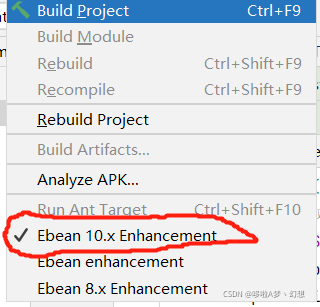
The solution is to replace the idea entitybean enhancement plug-in. My computer is replaced with entitybean 10. X enhancement

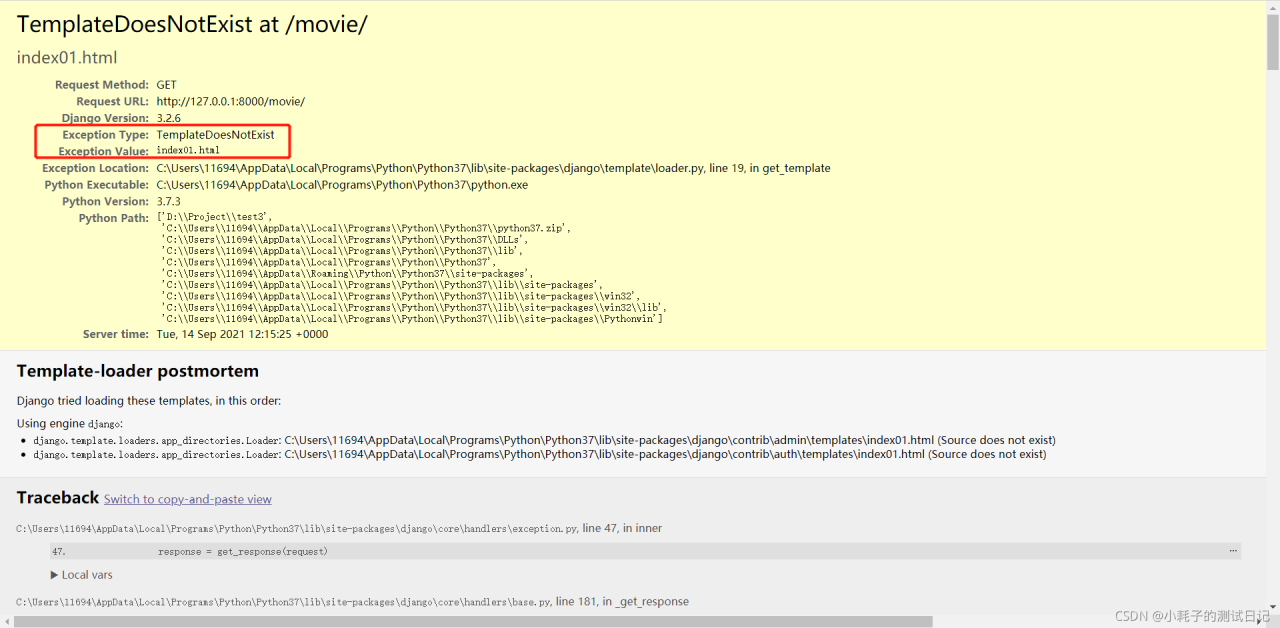
Django framework uses error reporting exception type: templatedoesnotexist

1、 Error: templatedoesnotexist

Exception Type: TemplateDoesNotExist


2、 Problem analysis and solution

Problem analysis: the accessed HTML file was not found

reason:

Django directly regards the template path as an absolute path, and the HTML file cannot be found.

After viewing the project setting file, you can see the setting method of template, including an option of “dirs”,
 

Solution:

'DIRS': [os.path.join(BASE_DIR), 'templates'],

An error occurs when cartopy library uses the coastlines() command

Reinstall the system, resulting in the need to reconfigure python. Python version 3.7.9 and cartopy version 0.19.0.post1 are used

Example code:

import numpy as np
import cartopy.crs as ccrs
import matplotlib.pyplot as plt
import matplotlib.ticker as mticker
from cartopy.mpl.ticker import LongitudeFormatter,LatitudeFormatter
dlon,dlat=60,30
xticks=np.arange(0,360.1,dlon)
yticks=np.arange(-90,90.1,dlat)
fig=plt.figure(figsize=(6,5))
ax=fig.add_subplot(1,1,1,projection=ccrs.PlateCarree(central_longitude=120))
ax.coastlines()
gl=ax.gridlines(crs=ccrs.PlateCarree(),draw_labels=False,linewidth=1,linestyle=":",color="k",alpha=0.8)
gl.xlocator=mticker.FixedLocator(xticks)
gl.ylocator=mticker.FixedLocator(yticks)
ax.set_xticks(xticks,crs=ccrs.PlateCarree())
ax.set_yticks(yticks,crs=ccrs.PlateCarree())
ax.xaxis.set_major_formatter(LongitudeFormatter(zero_direction_label=True))
ax.yaxis.set_major_formatter(LatitudeFormatter())
plt.show()

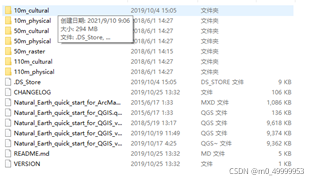
The first time you use this command, you need to download the corresponding coalistline file, but there is a problem with the website in the program and you can’t download it. You need to download the file yourself on the earthnatural official website.


Place the file in C: \ users \ XXXX \. Local \ share \ cartopy \ shapefiles \ natural_ Under the earth \ physical path, if the program still reports an error when running, you need to delete the path (. Local \ share \ cartopy \ shapefiles \ natural_earth \ physical) and run it again. After generating the path of the same path, copy the downloaded physical into physical, run it again, and no error will be reported. Code reference Python meteorological drawing tutorial (VII) — cartopy


Datasource bean injection failed, with startup error

springboot2.X+sharding-jdbc 3.0+mybatis 2.1.0

When PageHelper 1.3.0 was introduced, the project could not start

***************************
APPLICATION FAILED TO START
***************************

Description:

The bean 'dataSource', defined in class path resource [io/shardingsphere/shardingjdbc/spring/boot/SpringBootConfiguration.class], could not be registered. A bean with that name has already been defined in class path resource [org/springframework/boot/autoconfigure/jdbc/DataSourceConfiguration$Hikari.class] and overriding is disabled.

Action:

Consider renaming one of the beans or enabling overriding by setting spring.main.allow-bean-definition-overriding=true

Solution:
1.
automatically configure the priority problem. Add the org.apache.shardingsphere package path in @ componetscan to improve the scanning priority and solve the problem
@ componentscan (value = {“io. Shardingsphere. *” and “your other package names”})

2. Automatic injection of data source is prohibited

@SpringBootApplication(exclude={DataSourceAutoConfiguration.class})

Manual injection
https://www.cnblogs.com/inbeijing/p/14419108.html

Error in training yolox: error in importing apex

This error is reported because you did not successfully install apex. Note ~: it is not PIP install apex

ERROR: Command errored out with exit status 1: /usr/bin/python3 -u -c 'import io, os, sys, setuptools, tokenize; sys.argv[0] = '"'"'/tmp/pip-req-build-6o4wusvf/setup.py'"'"'; __file__='"'"'/tmp/pip-req-build-6o4wusvf/setup.py'"'"';f = getattr(tokenize, '"'"'open'"'"', open)(__file__) if os.path.exists(__file__) else io.StringIO('"'"'from setuptools import setup; setup()'"'"');code = f.read().replace('"'"'\r\n'"'"', '"'"'\n'"'"');f.close();exec(compile(code, __file__, '"'"'exec'"'"'))' --cpp_ext --cuda_ext install --record /tmp/pip-record-07hjl8r1/install-record.txt --single-version-externally-managed --compile --install-headers /usr/local/include/python3.7/apex Check the logs for full command output.
Exception information:
Traceback (most recent call last):
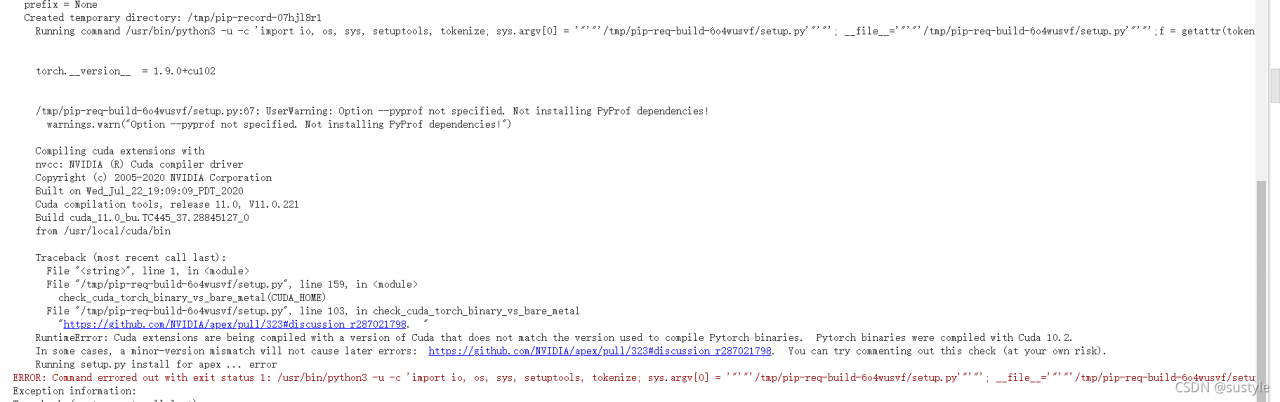
  Processing method: Step 1: use this command to check the CUDA version supported by your machine:

nvcc --version

Step 2: use the following command to view the version of CUDA you currently have installed.

pip list

Note: when installing apex, you must ensure that the two versions are consistent. That is, if the version supported by the machine is 11.0, you can install CUDA of the corresponding torch version.

First use the following command to uninstall the original torch of your machine

!pip uninstall -y torch torchvision torchaudio

Then use the following command to install. For example, the machine here supports CUDA version 11.0

!pip install torch==1.7.1+cu110 torchvision==0.8.2+cu110 torchaudio==0.7.2 -f https://download.pytorch.org/whl/torch_stable.html

Next, install apex:

!git clone https://github.com/NVIDIA/apex
%cd apex
!pip install -v --disable-pip-version-check --no-cache-dir --global-option="--cpp_ext" --global-option="--cuda_ext" ./

The above work is completed.