It is recommended to check each @ reference corresponding to XML or referenced style to see the specific error reason
 there is a problem with the unit of one dimension

Author Archives: Robins
Vue—— Error: Redirected when going from “/“ to “/directory/tree“ via a navigation guard
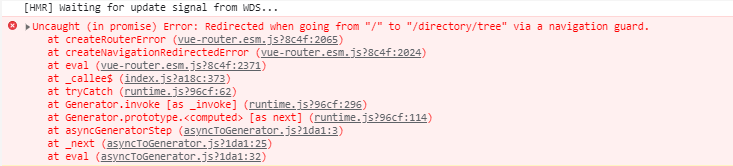
209150;”
/src/router/index.js:
const originalPush = VueRouter.prototype.push;
VueRouter.prototype.push = function push(location, onResolve, onReject) {
  if (onResolve || onReject)
    return originalPush.call(this, location, onResolve, onReject);
  return originalPush.call(this, location).catch(err => err);
};
Mybatis-plus calls its own method error: Invalid bound statement
Mybatis plus calls its own method and reports an error invalid bound statement
1. Check for version conflicts
<dependency>
  <groupId>com.baomidou</groupId>
  <artifactId>mybatis-plus</artifactId>
  <version>3.4.3</version>
  <scope>compile</scope>
</dependency>

<dependency>
    <groupId>com.baomidou</groupId>
    <artifactId>mybatis-plus-boot-starter</artifactId>
    <version>3.4.3</version>
</dependency>

<dependency>
    <groupId>com.baomidou</groupId>
    <artifactId>mybatis-plus-extension</artifactId>
    <version>3.4.3</version>
    <scope>compile</scope>
</dependency>
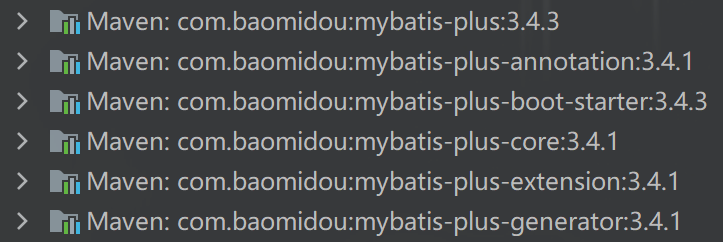
2. Check the path and namespace correspondence
Check scan compile path
MybatisSqlSessionFactoryBean bean = new MybatisSqlSessionFactoryBean();
bean.setMapperLocations(new PathMatchingResourcePatternResolver().getResources("classpath*:mapping/publicDB/**/*.xml"));
or
<build>
    <resources>
        <resource>
            <directory>src/main/java</directory>
            <includes>
                <include>**/*.xml</include>
            </includes>
        </resource>
    </resources>
    <resource>
	    <directory>src/main/resources</directory>
	    </resource>
    </resources>
</build>
Check the incoming basemapper path
import com.baomidou.mybatisplus.core.mapper.BaseMapper;
Check the namespace and function name correspondence of the XML file to ensure that no error is reported during compilation, and remove the Chinese comments in the XML file
3. Use mybatissqlsessionfactory
/**
 * Create SqlSessionFactory
 */
@Bean(name = "primarySqlSessionFactory")
@Primary
public SqlSessionFactory testSqlSessionFactory(@Qualifier("primaryDataSource") DataSource dataSource) throws Exception {

    // Do not use the original of SqlSessionFactory instead of using MybatisSqlSessionFactory
    MybatisSqlSessionFactoryBean bean = new MybatisSqlSessionFactoryBean();
    bean.setDataSource(dataSource);
    bean.setMapperLocations(new PathMatchingResourcePatternResolver().getResources("classpath*:mapping/publicDB/**/*.xml"));

    return bean.getObject();
}
Mybatisplusconfig configuration class configured in the original blog post:
import com.baomidou.mybatisplus.core.MybatisConfiguration;
import com.baomidou.mybatisplus.core.MybatisXMLLanguageDriver;
import com.baomidou.mybatisplus.core.toolkit.ObjectUtils;
import com.baomidou.mybatisplus.extension.plugins.PaginationInterceptor;
import com.baomidou.mybatisplus.extension.spring.MybatisSqlSessionFactoryBean;
import org.apache.ibatis.mapping.DatabaseIdProvider;
import org.apache.ibatis.plugin.Interceptor;
import org.mybatis.spring.boot.autoconfigure.MybatisProperties;
import org.mybatis.spring.boot.autoconfigure.SpringBootVFS;
import org.springframework.beans.factory.annotation.Autowired;
import org.springframework.context.annotation.Bean;
import org.springframework.context.annotation.Configuration;
import org.springframework.core.io.DefaultResourceLoader;
import org.springframework.core.io.ResourceLoader;
import org.springframework.util.StringUtils;

import javax.sql.DataSource;

@Configuration
public class MybatisPlusConfig {
    @Autowired
    private DataSource dataSource;
    @Autowired
    private MybatisProperties properties;
    @Autowired
    private ResourceLoader resourceLoader = new DefaultResourceLoader();
    @Autowired(required = false)
    private Interceptor[] interceptors;
    @Autowired(required = false)
    private DatabaseIdProvider databaseIdProvider;

    /** mybatis-plus */
    @Bean
    public PaginationInterceptor paginationInterceptor() {
        PaginationInterceptor page = new PaginationInterceptor();
        page.setDialectType("mysql");
        return page;
    }

    /** All resources that are already loaded automatically by mybatis-autoconfigure are used here. Instead of manually specifying the <p> configuration file and mybatis-boot's configuration file synchronization @return */
    @Bean
    public MybatisSqlSessionFactoryBean mybatisSqlSessionFactoryBean() {
        MybatisSqlSessionFactoryBean mybatisPlus = new MybatisSqlSessionFactoryBean();
        mybatisPlus.setDataSource(dataSource);
        mybatisPlus.setVfs(SpringBootVFS.class);
        if (StringUtils.hasText(this.properties.getConfigLocation()))
            mybatisPlus.setConfigLocation(this.resourceLoader.getResource(this.properties.getConfigLocation()));
        if (!ObjectUtils.isEmpty(this.interceptors)) mybatisPlus.setPlugins(this.interceptors);
        MybatisConfiguration mc = new MybatisConfiguration();
        mc.setDefaultScriptingLanguage(MybatisXMLLanguageDriver.class);
        // Database field design for hump naming, the default open hump to underscore will report an error field can not be found
        mc.setMapUnderscoreToCamelCase(true);
        mybatisPlus.setConfiguration(mc);
        if (this.databaseIdProvider != null) mybatisPlus.setDatabaseIdProvider(this.databaseIdProvider);
        if (StringUtils.hasLength(this.properties.getTypeAliasesPackage()))
            mybatisPlus.setTypeAliasesPackage(this.properties.getTypeAliasesPackage());
        if (StringUtils.hasLength(this.properties.getTypeHandlersPackage()))
            mybatisPlus.setTypeHandlersPackage(this.properties.getTypeHandlersPackage());
        if (!ObjectUtils.isEmpty(this.properties.resolveMapperLocations()))
            mybatisPlus.setMapperLocations(this.properties.resolveMapperLocations());
        return mybatisPlus;
    }
}
[Solved] Openfeign Error: error: Failed to parse Date value…
1 date conversion problem
1. Error reporting
error: Failed to parse Date value '2021-09-13 23:59:59': Cannot parse date "2021-09-13 23:59:59": while it seems to fit format 'yyyy-MM-dd'T'HH:mm:ss.SSSZ', parsing fails (leniency?null))
2. solution
Add the annotation of date format deserialization on the field attribute @ jsonformat (pattern = "yyyy MM DD HH: mm: SS")
	/**
     * the end of time
     */
    @JsonFormat(pattern="yyyy-MM-dd HH:mm:ss")
    private Date endDate;
MVN compile Error: [ERROR] Failed to execute goal org.apache.maven.plugins:maven-compiler-plugin…
[ERROR] Failed to execute goal org.apache.maven.plugins:maven-compiler-plugin:3.1:compile (default-compile) on project hello-world: Compilation failure: Compilation failure:
[ERROR] Source option 5 is no longer supported; use version 6 or higher.
[ERROR] Target option 1.5 is no longer supported. please use version 1.6 or higher.
Add the following attributes to pom.xml
	<properties>
		<project.build.sourceEncoding>UTF-8</project.build.sourceEncoding>
		<maven.compiler.encoding>UTF-8</maven.compiler.encoding>

 		<java.version>1.8</java.version>
		<maven.compiler.source>1.8</maven.compiler.source>
		<maven.compiler.target>1.8</maven.compiler.target>
	</properties>
Pytorch CUDA Error: UserWarning: CUDA initialization: CUDA unknown error…
After CUDA is installed, the following error is reported using pytorch
UserWarning: CUDA initialization: CUDA unknown error – this may be due to an incorrectly set up environment, e.g. changing env variable CUDA_ VISIBLE_ DEVICES after program start.
Solution: after CUDA and pytorch are installed, add the following in. Bashrc
export  PATH=/usr/local/cuda-11.4/bin:$PATH
export  LD_LIBRARY_PATH=/usr/local/cuda-11.4/lib64$LD_LIBRARY_PATH
export CUDA_HOME=/usr/local/cuda-11.4/bin
export CUDA_VISIBLE_DEVICES=0,1
If there is still a problem, use sudo apt-get install NVIDIA modprobe to install it. After the installation, you can use it
Methods of checking CUDA
import torch
flag = torch.cuda.is_available()
print(flag)

Output is: True cuda normal
C# connection MySQL error: SSL connection error [Solved]
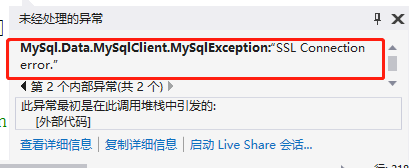
Just add SslMode = none; at the end of the join statement
string connectstr=“server=localhost;port=3306;database=test;uid=root;pwd=;SslMode = none;”;
[Solved] JSP tag forwarding forword error: org.apache.jasper.JasperException
Error reporting type
org.apache.jasper.JasperException: /jsptag1.jsp (行.: [11], 列: [0]) Expect the "jsp:param" standard operation using the "name" and "value" attributes
Problem Description:
29-Aug-2021 18:08:39.881 严重 [http-nio-8080-exec-5] org.apache.catalina.core.StandardWrapperValve.invoke 在路径为/jsp的上下文中,Servlet[jsp]的Servlet.service()引发了具有根本原因的异常/jsptag1.jsp (行.: [11], 列: [0]) 使用“name”和“value”属性期望“jsp:param”标准操作
	org.apache.jasper.JasperException: /jsptag1.jsp (行.: [11], 列: [0]) 使用“name”和“value”属性期望“jsp:param”标准操作
		at org.apache.jasper.compiler.DefaultErrorHandler.jspError(DefaultErrorHandler.java:41)
		at org.apache.jasper.compiler.ErrorDispatcher.dispatch(ErrorDispatcher.java:292)
		at org.apache.jasper.compiler.ErrorDispatcher.jspError(ErrorDispatcher.java:98)
		at org.apache.jasper.compiler.Parser.parseParam(Parser.java:843)
		at org.apache.jasper.compiler.Parser.parseBody(Parser.java:1696)
		at org.apache.jasper.compiler.Parser.parseOptionalBody(Parser.java:1020)
		at org.apache.jasper.compiler.Parser.parseForward(Parser.java:884)
		at org.apache.jasper.compiler.Parser.parseStandardAction(Parser.java:1136)
		at org.apache.jasper.compiler.Parser.parseElements(Parser.java:1474)
		at org.apache.jasper.compiler.Parser.parse(Parser.java:144)
		at org.apache.jasper.compiler.ParserController.doParse(ParserController.java:244)
		at org.apache.jasper.compiler.ParserController.parse(ParserController.java:105)
		at org.apache.jasper.compiler.Compiler.generateJava(Compiler.java:206)
		at org.apache.jasper.compiler.Compiler.compile(Compiler.java:391)
		at org.apache.jasper.compiler.Compiler.compile(Compiler.java:367)
		at org.apache.jasper.compiler.Compiler.compile(Compiler.java:351)
		at org.apache.jasper.JspCompilationContext.compile(JspCompilationContext.java:605)
		at org.apache.jasper.servlet.JspServletWrapper.service(JspServletWrapper.java:399)
		at org.apache.jasper.servlet.JspServlet.serviceJspFile(JspServlet.java:379)
		at org.apache.jasper.servlet.JspServlet.service(JspServlet.java:327)
		at javax.servlet.http.HttpServlet.service(HttpServlet.java:764)
		at org.apache.catalina.core.ApplicationFilterChain.internalDoFilter(ApplicationFilterChain.java:227)
		at org.apache.catalina.core.ApplicationFilterChain.doFilter(ApplicationFilterChain.java:162)
		at org.apache.tomcat.websocket.server.WsFilter.doFilter(WsFilter.java:53)
		at org.apache.catalina.core.ApplicationFilterChain.internalDoFilter(ApplicationFilterChain.java:189)
		at org.apache.catalina.core.ApplicationFilterChain.doFilter(ApplicationFilterChain.java:162)
		at org.apache.catalina.core.StandardWrapperValve.invoke(StandardWrapperValve.java:197)
		at org.apache.catalina.core.StandardContextValve.invoke(StandardContextValve.java:97)
		at org.apache.catalina.authenticator.AuthenticatorBase.invoke(AuthenticatorBase.java:542)
		at org.apache.catalina.core.StandardHostValve.invoke(StandardHostValve.java:135)
		at org.apache.catalina.valves.ErrorReportValve.invoke(ErrorReportValve.java:92)
		at org.apache.catalina.valves.AbstractAccessLogValve.invoke(AbstractAccessLogValve.java:687)
		at org.apache.catalina.core.StandardEngineValve.invoke(StandardEngineValve.java:78)
		at org.apache.catalina.connector.CoyoteAdapter.service(CoyoteAdapter.java:357)
		at org.apache.coyote.http11.Http11Processor.service(Http11Processor.java:382)
		at org.apache.coyote.AbstractProcessorLight.process(AbstractProcessorLight.java:65)
		at org.apache.coyote.AbstractProtocol$ConnectionHandler.process(AbstractProtocol.java:893)
		at org.apache.tomcat.util.net.NioEndpoint$SocketProcessor.doRun(NioEndpoint.java:1726)
		at org.apache.tomcat.util.net.SocketProcessorBase.run(SocketProcessorBase.java:49)
		at org.apache.tomcat.util.threads.ThreadPoolExecutor.runWorker(ThreadPoolExecutor.java:1191)
		at org.apache.tomcat.util.threads.ThreadPoolExecutor$Worker.run(ThreadPoolExecutor.java:659)
		at org.apache.tomcat.util.threads.TaskThread$WrappingRunnable.run(TaskThread.java:61)
		at java.lang.Thread.run(Thread.java:748)
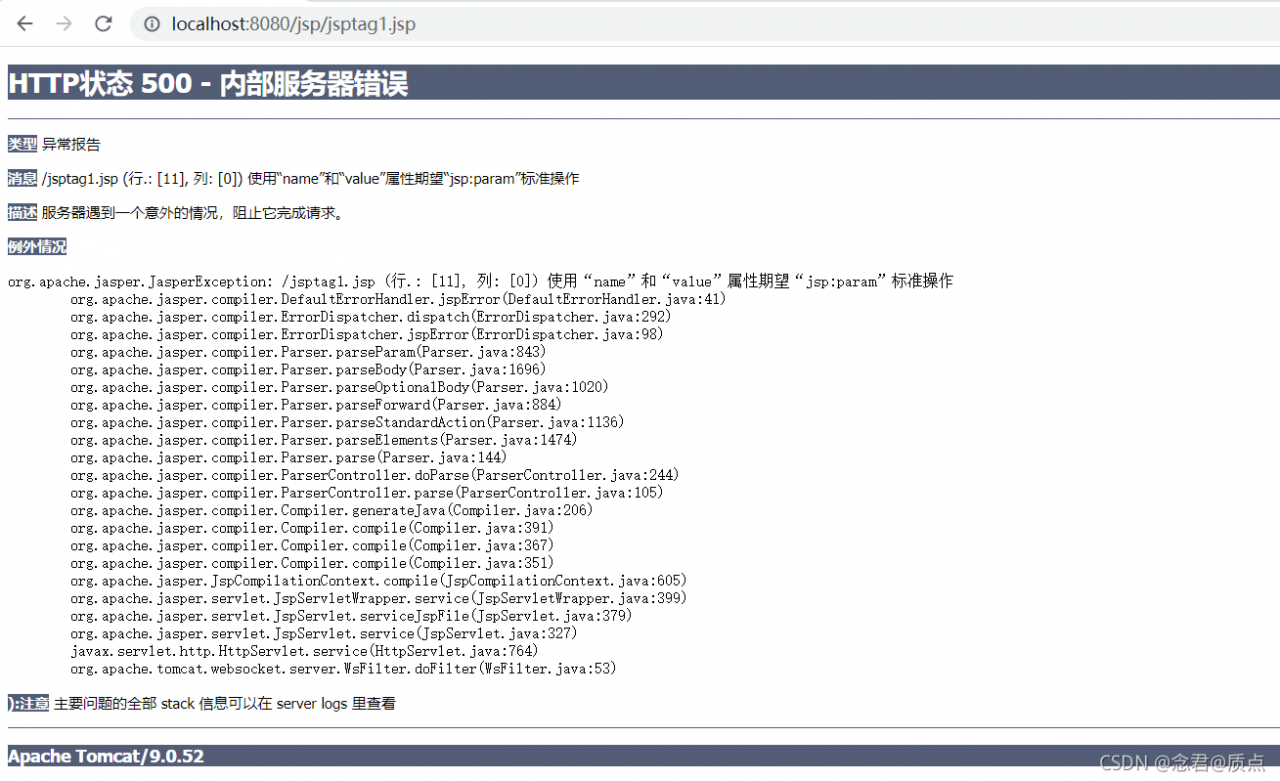
Solution:
Dynamically introduce or forward tags with spaces or comments in the middle
In addition to writing < jsp:param name="" value="" /> The sub tag will not report an error, and any other character will report an error.
Error:
<jsp:forward page="/jsptag2.jsp">
    <jsp:param name="username" value="root"></jsp:param>
    <jsp:param name="password" value="admin"></jsp:param>
</jsp:forward>


Error-Free:
<jsp:forward page="/jsptag2.jsp">
    <jsp:param name="username" value="root"></jsp:param>
    <jsp:param name="password" value="admin"></jsp:param>
</jsp:forward>
How to Solve Zeppelin page 503 error
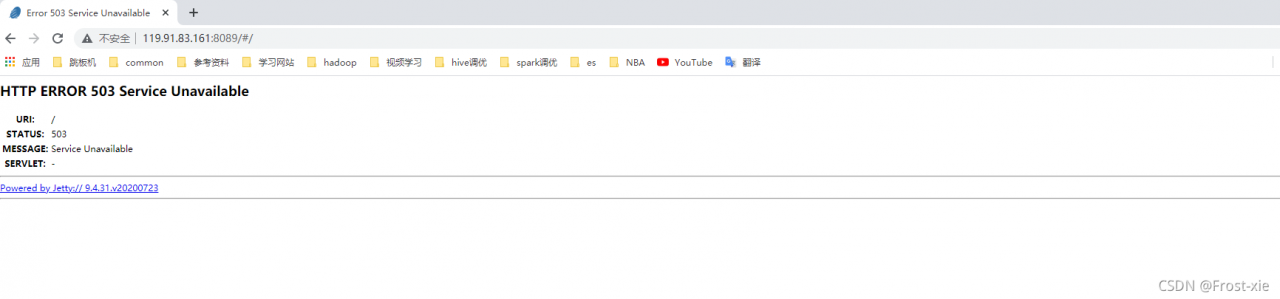
Problem Description: error 503 is reported on the page after Zeppelin is started
Solution:
You need to modify the directory permissions and attribution of webapp
drwxrwxr-x 3 hadoop hadoop 4096 Sep 9 11:23 webapps
chmod 755 webapps

chown -R hadoop:hadoop webapps/
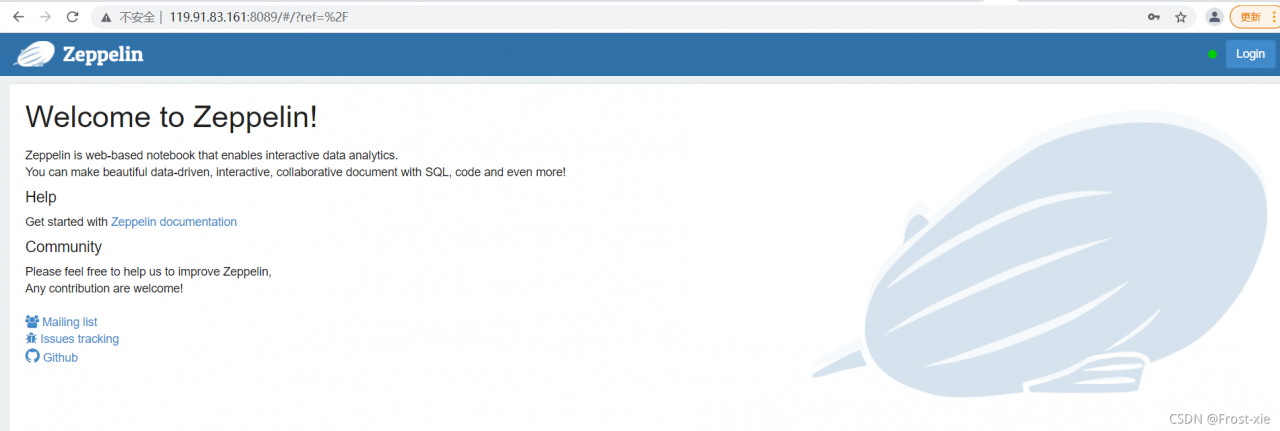
After modification, restart Zeppelin
[hadoop@10 /usr/local/service/zeppelin-0.9.0/bin]$ ./zeppelin-daemon.sh restart
Please specify HADOOP_CONF_DIR if USE_HADOOP is true
Zeppelin stop                                              [  OK  ]
Zeppelin start                                             [  OK  ]
[hadoop@10 /usr/local/service/zeppelin-0.9.0/bin]$
web UI
[Solved] Java POI export error: Invalid row number (65536) outside allowable range
Error Message:
Invalid row number (65536) outside allowable range (0..65535)
Reason:
Invalid row number (65536) outside allowable range (0..65535)
Reason:
When XSSFWorkbook exporting xls, a sheet can only export up to 65535 pieces of data.
Solution:

At the same time, the exported excel file format is changed from XLS to xlsx
Exsi virtual machine is missing vmdk file error [How to Solve]
background note: the virtual machine TANG2 lacks the vmdk file tang2.vmdk, resulting in boot failure and error
[ root@localhost :/vmfs/volumes/e9f402/tang2] ls -l
total 84028480
-rw-------    1 root     root     49936498688 Sep  9 02:30 tang2-000001-sesparse.vmdk
-rw-------    1 root     root           329 Aug 17  2020 tang2-000001.vmdk
-rw-------    1 root     root     4294967296 Dec 25  2019 tang2-Snapshot1.vmem
-rw-------    1 root     root       9732350 Dec 25  2019 tang2-Snapshot1.vmsn
-rw-------    1 root     root     107374182400 Dec 25  2019 tang2-flat.vmdk
-rw-------    1 root     root          8684 Sep  9 01:43 tang2.nvram
-rw-r--r--    1 root     root             0 Feb 24  2021 tang2.vmsd
-rwxr-xr-x    1 root     root          3303 Feb  7  2021 tang2.vmx
-rw-------    1 root     root          3237 Feb  7  2021 tang2.vmxf
-rw-------    1 root     root     107374182400 Sep  9 08:42 temp-flat.vmdk
-rw-------    1 root     root           494 Sep  9 08:42 temp.vmdk
-rw-r--r--    1 root     root        266758 Oct 18  2019 vmware-1.log
-rw-r--r--    1 root     root        351477 May  3  2020 vmware-2.log
-rw-r--r--    1 root     root        271780 Aug 17  2020 vmware-3.log
-rw-r--r--    1 root     root        296091 Sep  9 01:43 vmware-4.log
-rw-r--r--    1 root     root         78208 Sep  9 01:44 vmware-5.log
-rw-r--r--    1 root     root         76793 Sep  9 02:30 vmware.log
1. Generate a vmdk disk boot file based on the tang2-flat.vmdk file size 107374182400
[root@localhost:/vmfs/volumes/e9f402/tang2] vmkfstools -c 107374182400 -d thin temp.vmdk
Create: 100% done.
2. Delete the -flat.vmdk actual disk file and keep the .vmdk disk boot file**
[root@localhost:/vmfs/volumes/e9f402/tang2] rm -f temp-flat.vmdk
3. Rename the newly generated disk boot file to the missing file name
[root@localhost:/vmfs/volumes/e9f402/tang2] mv temp.vmdk tang2.vmdk
[root@localhost:/vmfs/volumes/e9f402/tang2] ls -l
total 84028480
-rw-------    1 root     root     49936498688 Sep  9 02:30 tang2-000001-sesparse.vmdk
-rw-------    1 root     root           329 Aug 17  2020 tang2-000001.vmdk
-rw-------    1 root     root     4294967296 Dec 25  2019 tang2-Snapshot1.vmem
-rw-------    1 root     root       9732350 Dec 25  2019 tang2-Snapshot1.vmsn
-rw-------    1 root     root     107374182400 Dec 25  2019 tang2-flat.vmdk
-rw-------    1 root     root          8684 Sep  9 01:43 tang2.nvram
-rw-------    1 root     root           494 Sep  9 08:42 tang2.vmdk
-rw-r--r--    1 root     root             0 Feb 24  2021 tang2.vmsd
-rwxr-xr-x    1 root     root          3303 Feb  7  2021 tang2.vmx
-rw-------    1 root     root          3237 Feb  7  2021 tang2.vmxf
-rw-r--r--    1 root     root        266758 Oct 18  2019 vmware-1.log
-rw-r--r--    1 root     root        351477 May  3  2020 vmware-2.log
-rw-r--r--    1 root     root        271780 Aug 17  2020 vmware-3.log
-rw-r--r--    1 root     root        296091 Sep  9 01:43 vmware-4.log
-rw-r--r--    1 root     root         78208 Sep  9 01:44 vmware-5.log
-rw-r--r--    1 root     root         76793 Sep  9 02:30 vmware.log
Confirm that the master disk is RW 209715200 VMFS “tang2-flat.vmdk”
[root@localhost:/vmfs/volumes/e9f402/tang2] vi tang2.vmdk
# Disk DescriptorFile
version=1
encoding="UTF-8"
CID=fffffffe
parentCID=ffffffff
isNativeSnapshot="no"
createType="vmfs"

 # Extent description
RW 209715200 VMFS "tang2-flat.vmdk"

 # The Disk Data Base
#DDB

ddb.adapterType = "lsilogic"
ddb.geometry.cylinders = "13054"
ddb.geometry.heads = "255"
ddb.geometry.sectors = "63"
ddb.longContentID = "dd1fc9f492c51eb078deb1b8fffffffe"
ddb.thinProvisioned = "1"
ddb.uuid = "60 00 C2 91 4b f7 a2 67-9d 42 aa b1 50 cf fe d0"
ddb.virtualHWVersion = "13"
[ root@localhost :/vmfs/volumes/e9f402/tang2]
4. Modify the secondary disk boot file as follows: parentcid = fffffffe modify the CID in the primary disk boot file
[ root@localhost :/vmfs/volumes/e9f402/tang2] vi tang2-000001.vmdk
# Disk DescriptorFile
version=1
encoding="UTF-8"
CID=daed5d66
parentCID=fffffffe
isNativeSnapshot="no"
createType="seSparse"
parentFileNameHint="tang2.vmdk"
 # Extent description
RW 209715200 SESPARSE "tang2-000001-sesparse.vmdk"

 # The Disk Data Base
#DDB

ddb.grain = "8"
ddb.longContentID = "d6bf9759610883dad09509d5daed5d66"
[root@localhost:/vmfs/volumes/e9f402/tang2] cat tang2-000001.vmdk
 # Disk DescriptorFile
version=1
encoding="UTF-8"
CID=daed5d66
parentCID=fffffffe
isNativeSnapshot="no"
createType="seSparse"
parentFileNameHint="tang2.vmdk"
 # Extent description
RW 209715200 SESPARSE "tang2-000001-sesparse.vmdk"

 # The Disk Data Base
#DDB

ddb.grain = "8"
ddb.longContentID = "d6bf9759610883dad09509d5daed5d66"
[ root@localhost :/vmfs/volumes/e9f402/tang2]
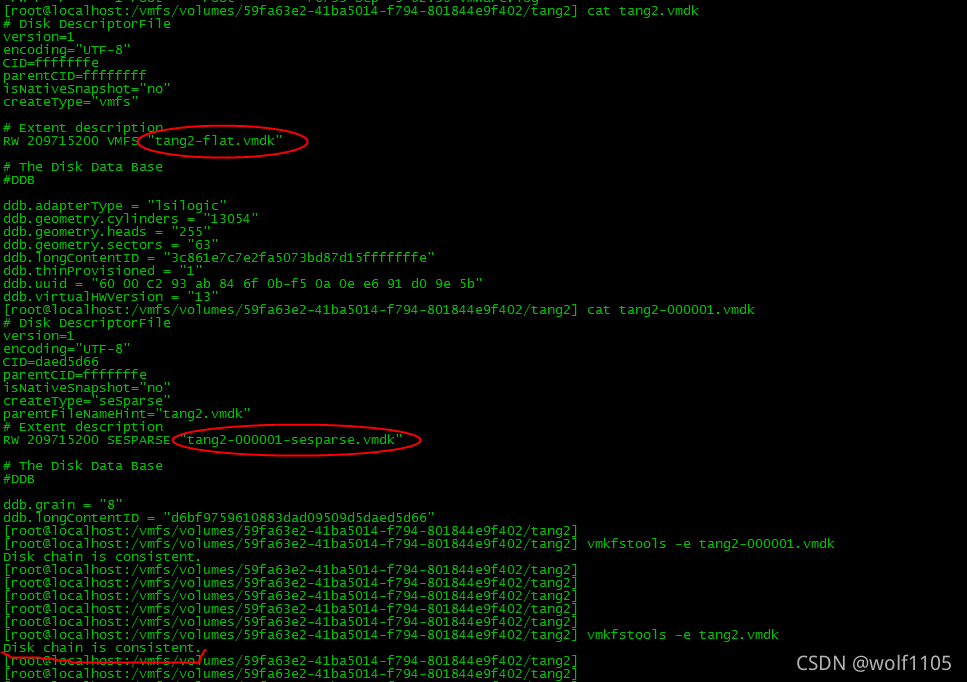
5. Check whether the disk chain configuration of the master vmdk file is correct
[ root@localhost :/vmfs/volumes/e9f402/tang2] vmkfstools -e tang2.vmdk
Disk chain is consistent.
6. Then check whether the disk chain configuration of the secondary vmdk file is correct
[ root@localhost :/vmfs/volumes/e9f402/tang2] vmkfstools -e tang2-000001.vmdk
Disk chain is consistent.
If the configuration is wrong, the following error messages will be reported:

It’s done. Turn on the console normally!
[Solved] Uncaught ReferenceError: axios is not defined
Uncaught ReferenceError: axios is not defined
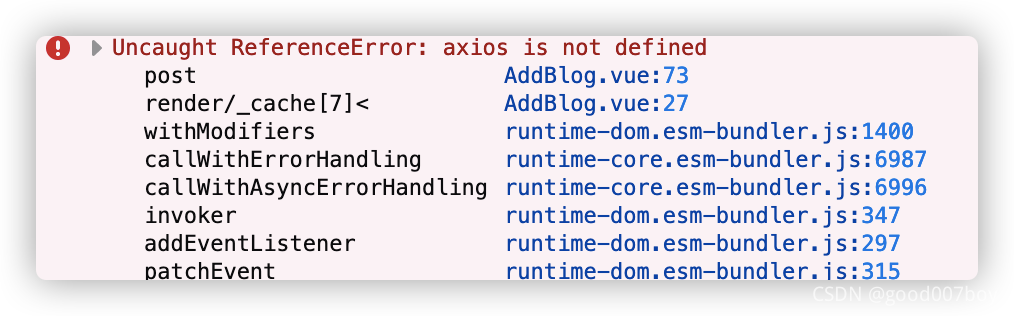
npm install --save axios vue-axios
PS: it is impossible to add Axios alone. It needs to be combined with Vue Axios. The plug-in only integrates Axios into vue.js.
Error reason & Solution:
//wrong
axios.post(...)
//right
this.axios.post(...)