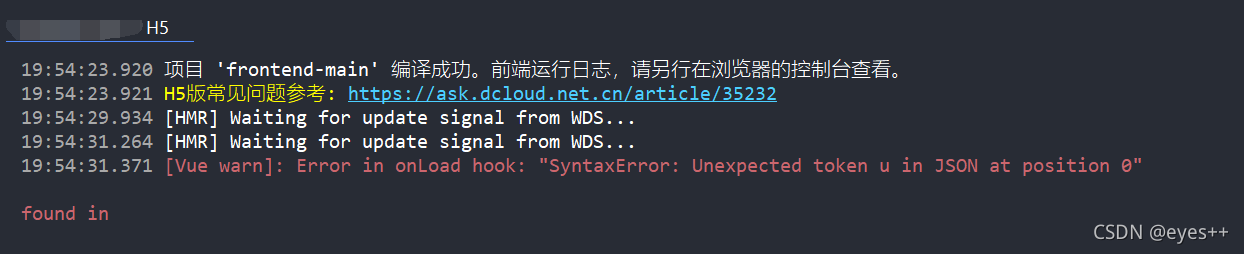
It was another day when I was annoyed by the bug. The error reports were as follows:
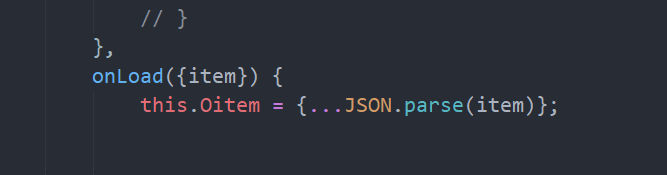
annotated all the codes, debugged them one by one, and finally found the error location:
after consulting the data, I found that JSON. Parse() can only process JSON format. If no item is passed in, it is equivalent to processing null values, Therefore, you can make a judgment before processing:
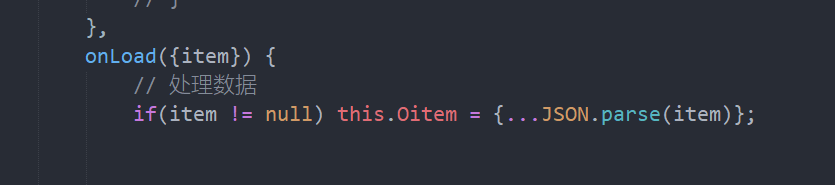
there is no problem.
Author Archives: Robins
Keyerror occurred when openpyxl copied some excel with pictures:. MPO‘
Solution
add the following code to the PY header of the operation picture:
from PIL import JpegImagePlugin
JpegImagePlugin._getmp = lambda  x:None
mime = mimetypes.types_ Map [true] [ext]
keyerror: ‘. MPO’
the above error occurs when using openpyxl to operate the pictures in Excel. Baidu has not. After a visit to Google, it is found that there is an image MIME type of. MPO, and the pictures in my excel are clearly in. PNG format
examples are as follows:
>>> import PIL.Image
>>> img = PIL.Image.open('bob a.jpg')
>>> img.format
'MPO'
>>> PIL.PILLOW_VERSION
'2.7.0'
First of all, you should know that openpyxl uses pilot to identify images. After Google found that this PNG image is recognized as an. MPO file by pilot, Openpyxl does not support
while images in MPO format are very similar to JPEG images
it may be that an additional flag is added when the pilot recognition format is JPEG or PNG and marked as MPO
so we can add the above two lines of code before importing any image and before the pilot recognition image (I don’t know what he means. The jpeimageplugin is used by the pilot to process images. It should not add any suffix to the source image).
Reference link
using openpyxl: keyerror: ‘. MPO’ while saving excel workbook
k
JPEG image being identified as MPO
Error creating bean with name ‘sqlsessionfactory’ appears in SSM framework integration‘
Causes and methods
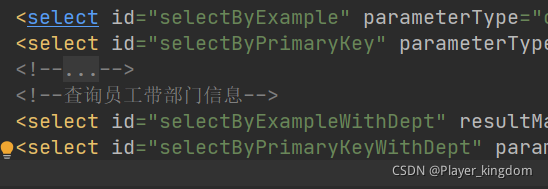
Duplicate ID value in mapper
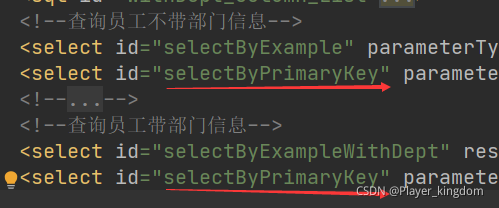
Just change
Link:
Error creating bean with name ‘lettuceClientResources‘ defined in class path resource
Error message
org.springframework.beans.factory.BeanCreationException: Error creating bean with name 'lettuceClientResources' defined in class path resource [org/springframework/boot/autoconfigure/data/redis/LettuceConnectionConfiguration.class]: Bean instantiation via factory method failed; ....
You can see that redis appears in the message. The reason for my error is that the dependency of spring boot starter data redis is added to the pom.xml file, but the redis connection information is not configured.
SyntaxError: (unicode error) ‘unicodeescape‘ codec can‘t decode bytes in position 2-3: truncated \UX
Open a named PI with absolute path under windows_ The file of digits.txt has an error

Because the resource of the path cannot be found after escape.
To change a \ in the absolute path to\\
This is the path before the error is reported. 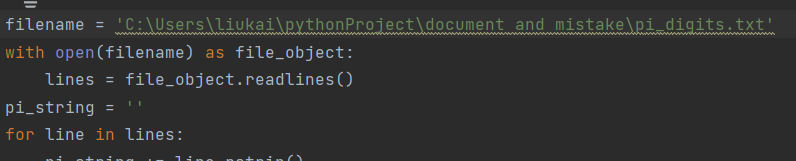
The path that runs successfully after modification. 
Moreover, it can be found that it is not necessary to replace all \ \, replace the front with \ \, and run without changing the back.
Ubuntu20.04 Installing WslRegisterDistribution failed with error: 0xc03a001a
After installing Ubuntu in the software store, the following prompt appears after opening, indicating that you have compressed the file to save space (if two opposite blue arrows appear in the upper right corner of your file, you have enabled this function).
Installing, this may take a few minutes...
WslRegisterDistribution failed with error: 0xc03a001a
Error: 0xc03a001a ???????????????????????????????????????????????????
Solution:
1. Go to the C: \ users \ user name \ appdata \ local \ packages folder. If you can’t find some files that may be hidden files, you need to click View in the file manager and select the option of hidden items.

2. Enter the directory and enter “Ubuntu” to search the subdirectory.
3. After finding the subdirectory, right-click properties & gt& gt; Advanced & gt& gt; Uncheck compressed content to save disk space & gt& gt; determine
4. The blue arrow on the file disappears and it’s OK.
SyntaxError: (unicode error) ‘unicodeescape‘ codec can‘t decode bytes in position 2-3: truncated \UX
Error:
When specifying the file path with Python, the error ‘syntax error: (Unicode error)’ Unicode escape ‘codec can’t decode bytes in position 2-3: truncated \ uxxxxxxxx escape’ may occur.
The reason for the error is that “\” is used in a string such as a path, which is treated as an escape sequence. In the windows environment, the combination of ‘\’ and characters represents an escape sequence. Python provides escape sequences including \\(backslash) and \n (line spacing).
Generally speaking, the path is as follows:
C:\Users\Desktop\myproject
Solution:
Windows:
Use the escape sequence “\\” representing the backslash (on windows\), as follows:
C:\\Users\\Desktop\\myproject
Unix:
Use “/” to separate directories
C:/Users/Desktop/myproject
ERROR StatusLogger No Log4j 2 configuration file found
terms of settlement:
In IntelliJ idea:
- in SRC – & gt; Create a new folder resources under main create a new log4j2.xml file
<?xml version="1.0" encoding="UTF-8"?>
<Configuration>
    <Appenders>
        <Console name="STDOUT" target="SYSTEM_OUT">
            <PatternLayout pattern="%d %-5p [%t] %C{2} (%F:%L) - %m%n"/>
        </Console>
    </Appenders>
    <Loggers>
        <Logger name="com.opensymphony.xwork2" level="info"/>
        <Logger name="org.apache.struts2" level="info"/>
        <Logger name="org.demo.rest" level="debug"/>
        <Root level="warn">
            <AppenderRef ref="STDOUT"/>
        </Root>
    </Loggers>
</Configuration>Login failed with an access denied error.
After the Dell server logs in to Idrac, login denied appears in both Java and HTML5 using the virtual console.
method:
Restart Idrac and click Reset Idrac
error: remote origin already exists [How to Solve]
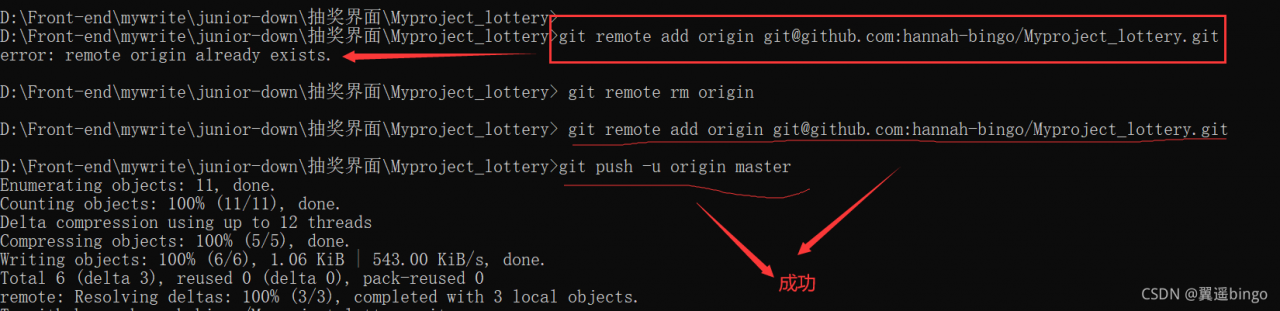
After GitHub uploads the project, you also want to upload it to gitee. The result is
error: remote origin already exists
Then, an operation git remote RM origin , done
elasticsearch NoClassDefFoundError error creating RestHighLevelClient bean
NoClassDefFoundError is usually a configuration error – which means that the code you use refers to a class, but the class itself is not in the classpath. In this case, this may also be a dependency management error in the relevant elasticsearch POMS itself, because it should contain the required classes
        <dependency>
            <groupId>org.elasticsearch.client</groupId>
            <artifactId>elasticsearch-rest-high-level-client</artifactId>
            <version>7.6.2</version>
        </dependency>
        <dependency>
            <groupId>org.elasticsearch.client</groupId>
            <artifactId>elasticsearch-rest-client</artifactId>
            <version>7.6.2</version>
        </dependency>
        <dependency>
            <groupId>org.elasticsearch</groupId>
            <artifactId>elasticsearch</artifactId>
            <version>7.6.2</version>
        </dependency>
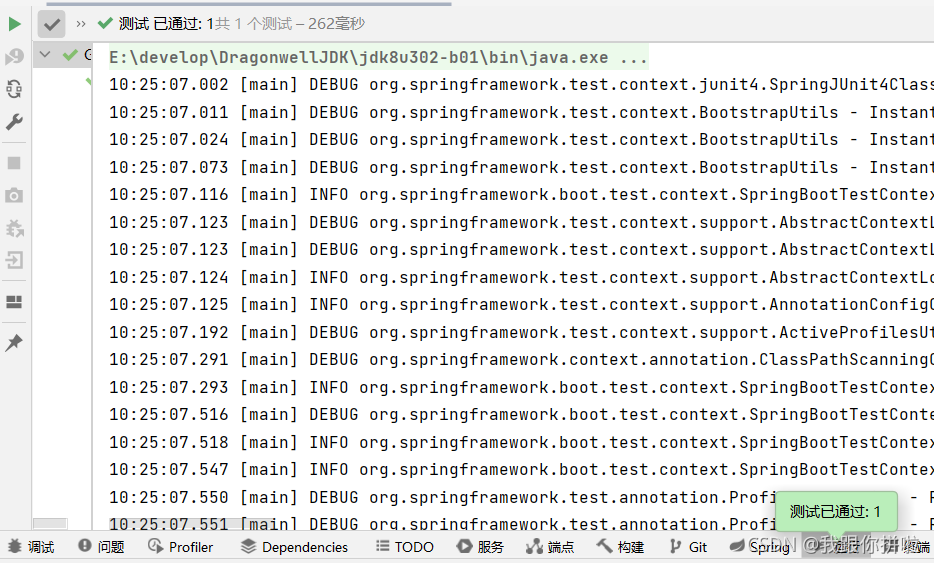
Complete dependency, OK
(pay attention to switching to your own version)
maybe your mood is broken at the moment. Don’t worry. I believe it will bring you good luck _
[Solved] Save error: error: connect etimedout
Problem Description:
Use nodejs to connect to the MySQL database of ECs and execute the JS file. The error is as follows:
Error: connect ETIMEDOUT
{
  errorno: 'ETIMEDOUT',
  code: 'ETIMEDOUT',
  syscall: 'connect',
  fatal: true
}
Solution:
Because the server port is not open (MySQL default port is 3306)
go to the server firewall and open the port