Author Archives: Robins

[Solved] CentOS 6 yum update Error: Cannot find a valid baseurl for repo: base

Error Message:
Loaded plugins: fastestmirror, ovl
Setting up Update Process
Loading mirror speeds from cached hostfile
YumRepo Error: All mirror URLs are not using ftp, http[s] or file.
Eg. Invalid release/repo/arch combination/
removing mirrorlist with no valid mirrors: /var/cache/yum/x86_64/6/base/mirrorlist.txt
Error: Cannot find a valid baseurl for repo: base

Solution:

mv /etc/yum.repos.d/CentOS-Base.repo /etc/yum.repos.d/CentOS-Base.repo.old  #Backup
vi /etc/yum.repos.d/CentOS-Base.repo   #New

/etc/yum.repos.d/centos-base.repo

[base]
name=CentOS-$releasever - Base
baseurl=https://vault.centos.org/6.10/os/$basearch/
gpgcheck=1
gpgkey=file:///etc/pki/rpm-gpg/RPM-GPG-KEY-CentOS-6

[updates]
name=CentOS-$releasever - Updates
baseurl=https://vault.centos.org/6.10/updates/$basearch/
gpgcheck=1
gpgkey=file:///etc/pki/rpm-gpg/RPM-GPG-KEY-CentOS-6

[extras]
name=CentOS-$releasever - Extras
baseurl=https://vault.centos.org/6.10/extras/$basearch/
gpgcheck=1
gpgkey=file:///etc/pki/rpm-gpg/RPM-GPG-KEY-CentOS-6
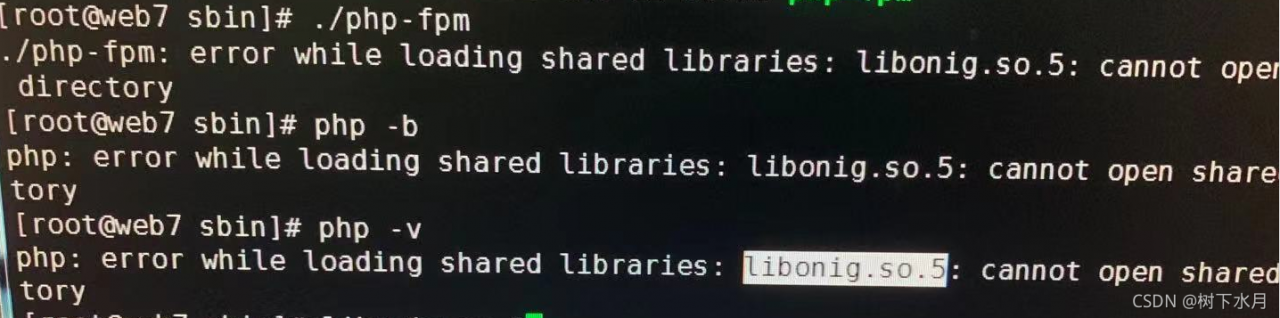

[Solved] PHP -v Error: error while loading shared libraries: libonig.so.5:cannot open share directory

When upgrading from PHP 5.6 to PHP 7.4, you can directly replace the compiled installation package. When you enter PHP – V, you will report an error while loading shared libraries: libonig. So. 5: cannot open share directory

#php -v
#php: error while loading shared libraries: libonig.so.5:cannot open share directory

Solution:

Step 1

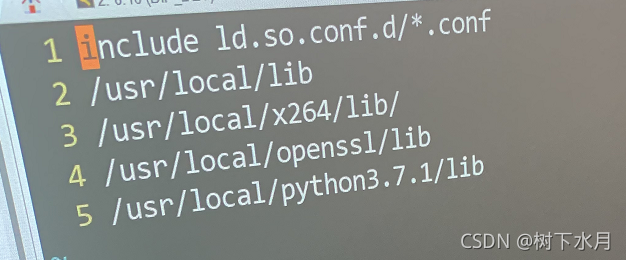
Modify /ect/ld.so.conf     Add the following line

#vim /etc/ld.so.conf
include ls.so.conf.d/*.conf
/usr/local/lib
/usr/local/x264/lib
/usr/local/openssl/lib
/usr/local/python3.7.1/lib

After saving   Execute ldconfig

#ldconfig

Step 2:

Install oniguruma library

Download Link:

https://download-ib01.fedoraproject.org/pub/epel/7/x86_64/Packages/o/oniguruma-devel-6.8.2-1.el7.x86_64.rpm

https://download-ib01.fedoraproject.org/pub/epel/7/x86_64/Packages/o/oniguruma-6.8.2-1.el7.x86_64.rpm

oniguruma-6.8.2-1.el7.x86 64.rpm

oniguruma-devel-6.8.2-1.el7.x86 64.rpm

Use the follow commands to install:

#rpm -ivh oniguruma-devel-6.8.2-1.el7.x86_64
#rpm -ivh oniguruma-6.8.2-1.el7.x86_64

Then run the command PHP – V     Perfect display

If installation error

Generating autotools files.
./autogen.sh: line 6: autoreconf: command not found

Solution:

[root@yjweb oniguruma-6.9.4]# yum install autoconf automake libtool

[Solved] Error: no “print“ mailcap rules found for type “text/plain“

Blog background

The author has always wanted to understand how to use the Print command under Linux?

Direct Print hello. TXT will report an error

Error: no "print" mailcap rules found for type "text/plain"

Specific operation

ubuntu@139:~/temp $ cat /etc/mailcap | egrep print
application/x-troff-man; /usr/bin/nroff -mandoc -Tutf8; copiousoutput; print=/usr/bin/nroff -mandoc -Tutf8 | print text/plain:-
text/troff; /usr/bin/nroff -mandoc -Tutf8; copiousoutput; print=/usr/bin/nroff -mandoc -Tutf8 | print text/plain:-
text/plain; view %s; edit=vim %s; compose=vim %s; test=test -x /usr/bin/vim; print=cat %s; needsterminal
application/x-tar; /bin/tar tvf '%s'; print=/bin/tar tvf - | print text/plain:-; copiousoutput
application/x-gtar; /bin/tar tvf '%s'; print=/bin/tar tvf - | print text/plain:-; copiousoutput
application/x-ustar; /bin/tar tvf '%s'; print=/bin/tar tvf - | print text/plain:-; copiousoutput
ubuntu@139:~/temp $ ls
hello  hi.txt
ubuntu@139:~/temp $ cat hi.txt 
hello
ubuntu@139:~/temp $ print hi.txt 
hello

This is the situation after I edit the mailcap file. Pay attention to this line

text/plain; view %s; edit=vim %s; compose=vim %s; test=test -x /usr/bin/vim; print=cat %s; needsterminal

That is, just add a print command rule after text/plain, which is so simple.

Error starting ApplicationContext. To display the conditions report re-run your application with ‘de

Error starting ApplicationContext. To display the conditions report re-run your application with ‘debug’ enabled. How to Solve
Error Message:

Error starting ApplicationContext. To display the conditions report re-run your application with 'debug' enabled.
2021-10-02 13:18:49.964 ERROR 7280 --- [  restartedMain] o.s.b.d.LoggingFailureAnalysisReporter   : 

***************************
APPLICATION FAILED TO START
***************************

Description:

Field navigationMapper in com.test.littleapp.controller.NavigationController required a bean of type 'com.test.littleapp.mapper.NavigationMapper' that could not be found.

The injection point has the following annotations:
	- @org.springframework.beans.factory.annotation.Autowired(required=true)


Action:

Consider defining a bean of type 'com.test.littleapp.mapper.NavigationMapper' in your configuration.

Solution:

Under the main file of spring boot application, add

@MapperScan("Your mapper name")

package com.test.littleapp;

import org.mybatis.spring.annotation.MapperScan;
import org.springframework.boot.SpringApplication;
import org.springframework.boot.autoconfigure.SpringBootApplication;

@SpringBootApplication
@MapperScan("com.test.littleapp.mapper")
public class LittleappApplication {
    public static void main(String[] args) {
        SpringApplication.run(LittleappApplication.class, args);
    }
}

[Solved] Docker Error: Error response from daemon: driver failed programming external connectivity on endpoint

Error Message:

docker: Error response from daemon: driver failed programming external connectivity on endpoint kibana (16b783b436c6fc895f51866efea8a25c5748f7b3a78db1ec2cb0364e28e7feef): (iptables failed: iptables –wait -t nat -A DOCKER -p tcp -d 0/0 –dport 5601 -j DNAT –to-destination 172.17.0.4:5601 ! -i docker0: iptables: No chain/target/match by that name.
(exit status 1)).

Solution:
Docker reboot
You can register the iptables chain
Restart the Docker container

systemctl restart docker

Gensim Error: AttributeError: The vocab attribute was removed from KeyedVector in Gensim 4.0.0.

gensim error: AttributeError: The vocab attribute was removed from KeyedVector in Gensim 4.0.0.
Use KeyedVector’s .key_to_index dict, .index_to_key list, and methods .get_vecattr(key, attr) and .set_vecattr(key, attr, new_val) instead.
Solution:
1. directly modify the code
Find all the modules of vocab.keys() and modify them if they are mods defined by gensim.

Show:

## Wrong
model = KeyedVectors.load_word2vec_format(word2vec_glove_file)
words = np.random.choice(list(model.vocab.keys()), sample)

## Right
model = KeyedVectors.load_word2vec_format(word2vec_glove_file)
words = np.random.choice(list(model.key_to_index.keys()), sample)

Method 2: install the original version

!pip install gensim==3.0

springcloud alibaba Integrating nacos reports errors: create config service error!properties=NacosConfigPropertie

Solution:

First, check whether the YML file is configured

spring:    
    cloud:
        nacos:
          discovery:
            server-addr: 127.0.0.1:8848
      application:
        name: gulimall-member

If the configuration is completed, check whether the POM file references the configuration center

        <dependency>
            <groupId>com.alibaba.cloud</groupId>
            <artifactId>spring-cloud-starter-alibaba-nacos-config</artifactId>
        </dependency>

If so, just comment it out.

Problem reason: when Nacos config is used for unified configuration management, the bootstrap.properties configuration file is used to initialize the context when starting the springboot project.

When using the unified configuration of springcloudconfig, the loading order of spring boot configuration files is bootstrap.properties – & gt; bootstrap.yml -> application.properties -> Application.yml, where bootstrap.properties is configured as the highest priority.

Therefore, an error is reported if the properties file is not found during configuration.

If you need to use the Nacos configuration center, on the premise of referencing the above dependencies, you need to add the bootstrap.properties file in the resource directory, configure the service name, Nacos address and port number, and restart the service.

spring.application.name=gulimall-coupon
spring.cloud.nacos.config.server-addr=127.0.0.1:8848


Hbuilder x cannot display the built-in browser: load plugin < “builtincef3browser” > error

After win11 is modified, the built-in browser cannot be displayed when hbuilder x is opened. The log error is as follows:

2021-10-05 16:11:42.186 [WARNING:] load plugin < "builtincef3browser" > error :  "Unable to load libraryD:\\HBuilderX\\HBuilderX.3.1.18.20210609.full\\HBuilderX\\plugins\\builtincef3browser\\builtincef3browser.dll: The specified module could not be found."

Reinstalling the built-in browser plug-in of builtincef3browser still cannot solve the problem. Run hbuilder x as an administrator to solve the problem.

[Solved] Simple jwt Error: AttributeError: type object ‘BlacklistedToken‘ has no attribute ‘objects

Solution: add in Django setting

'ROTATE_REFRESH_TOKENS': False,
    'BLACKLIST_AFTER_ROTATION': False,
    'UPDATE_LAST_LOGIN': False,

For example:

SIMPLE_JWT = {

     'ACCESS_TOKEN_LIFETIME': datetime.timedelta(days=7),
    'REFRESH_TOKEN_LIFETIME': datetime.timedelta(days=7),
    'ROTATE_REFRESH_TOKENS': False,
    'BLACKLIST_AFTER_ROTATION': False,
    'UPDATE_LAST_LOGIN': False,

}

[Solved] mysqldump: Error: ‘Access denied; you need (at least one of) the PROCESS privilege(s) for this opera

Problem: back up the database on centos7 of the virtual machine, and an error occurs when executing mysqldump: error: ‘access denied; You need (at least one of) the process privilege (s) for this operation ‘when trying to dump tablespaces

[root@localhost backup]# sh ./mysql_backup.sh
Start exporting the database...
mysqldump: Error: 'Access denied; you need (at least one of) the PROCESS privilege(s) for this operation' when trying to dump tablespaces
The export was successful and the file name is : /data/backup/mysql/2021-10-06_003536.sql.gz

Solution: log in to MySQL with the root account in CentOS

[root@localhost backup]# mysql -uroot -p

Input password

Then execute the command

mysql> GRANT PROCESS ON *.* TO 'demo'@'localhost';

This demo should be changed to your own login database account

Then refresh the database

mysql> flush privileges;

All execution processes:

[root@localhost backup]# mysql -uroot -p
Enter password: 
Welcome to the MySQL monitor.  Commands end with ; or \g.
Your MySQL connection id is 61
Server version: 8.0.24 Source distribution

Copyright (c) 2000, 2021, Oracle and/or its affiliates.

Oracle is a registered trademark of Oracle Corporation and/or its
affiliates. Other names may be trademarks of their respective
owners.

Type 'help;' or '\h' for help. Type '\c' to clear the current input statement.

mysql> GRANT PROCESS ON *.* TO 'demo'@'localhost';
Query OK, 0 rows affected (0.01 sec)

mysql> flush privileges;
Query OK, 0 rows affected (0.01 sec)

mysql> exit
Bye
[root@localhost backup]# sh ./mysql_backup.sh
Start exporting the database... 
The export was successful and the file name is : /data/backup/mysql/2021-10-06_003815.sql.gz
[root@localhost backup]# 

This method is accessed locally by the user

Another method is to change localhost to% by using the global access command

mysql> GRANT PROCESS ON *.* TO 'demo'@'%';

Similarly, change the demo to your own MySQL login account, and then execute the above command to refresh the database

I used the first method.

[Solved] Request.url is not modifiable, use Request.replace() instead

Encountered in a scene_ In the redis project, the URL needs to be filtered and de duplicated, so a de duplication class is customized

Simply copy the source code directly, and then rewrite the request_ See, to change the logic, the original direct assignment will report the error of the title

    def request_seen(self, request):
        temp_request = request
        if "ref" in temp_request.url:
            # An error is reported here, you cannot assign a value directly
            temp_request.url = temp_request.url.split("ref")[0]
        fp = self.request_fingerprint(temp_request)
        added = self.server.sadd(self.key, fp)
        return added == 0

Solution:

Use _set_URL (URL) is OK

temp_request._set_url(temp_request.url.split("ref")[0])

The complete code is as follows:

from scrapy.dupefilters import BaseDupeFilter
from scrapy.utils.request import request_fingerprint
from scrapy_redis import get_redis_from_settings
from scrapy_redis import defaults
import logging
import time

logger = logging.getLogger(__name__)


class UrlFilter(BaseDupeFilter):
    logger = logger

    def __init__(self, server, key, debug=False):
        self.server = server
        self.key = key
        self.debug = debug
        self.logdupes = True

    @classmethod
    def from_settings(cls, settings):
        server = get_redis_from_settings(settings)
        # XXX: This creates one-time key. needed to support to use this
        # class as standalone dupefilter with scrapy's default scheduler
        # if scrapy passes spider on open() method this wouldn't be needed
        # TODO: Use SCRAPY_JOB env as default and fallback to timestamp.
        key = defaults.DUPEFILTER_KEY % {'timestamp': int(time.time())}
        debug = settings.getbool('DUPEFILTER_DEBUG')
        return cls(server, key=key, debug=debug)

    @classmethod
    def from_crawler(cls, crawler):
        """Returns instance from crawler.

        Parameters
        ----------
        crawler : scrapy.crawler.Crawler

        Returns
        -------
        RFPDupeFilter
            Instance of RFPDupeFilter.

        """
        return cls.from_settings(crawler.settings)

    def request_seen(self, request):
        temp_request = request
        if "ref" in temp_request.url:
            temp_request._set_url(temp_request.url.split("ref")[0])
        fp = self.request_fingerprint(temp_request)
        added = self.server.sadd(self.key, fp)
        return added == 0

    def request_fingerprint(self, request):
        """Returns a fingerprint for a given request.

        Parameters
        ----------
        request : scrapy.http.Request

        Returns
        -------
        str

        """
        return request_fingerprint(request)

    @classmethod
    def from_spider(cls, spider):
        settings = spider.settings
        server = get_redis_from_settings(settings)
        dupefilter_key = settings.get("SCHEDULER_DUPEFILTER_KEY", defaults.SCHEDULER_DUPEFILTER_KEY)
        key = dupefilter_key % {'spider': spider.name}
        debug = settings.getbool('DUPEFILTER_DEBUG')
        return cls(server, key=key, debug=debug)

    def close(self, reason=''):
        """Delete data on close. Called by Scrapy's scheduler.

        Parameters
        ----------
        reason : str, optional

        """
        self.clear()

    def clear(self):
        """Clears fingerprints data."""
        self.server.delete(self.key)

    def log(self, request, spider):
        """Logs given request.

        Parameters
        ----------
        request : scrapy.http.Request
        spider : scrapy.spiders.Spider

        """
        if self.debug:
            msg = "Filtered duplicate request: %(request)s"
            self.logger.debug(msg, {'request': request}, extra={'spider': spider})
        elif self.logdupes:
            msg = ("Filtered duplicate request %(request)s"
                   " - no more duplicates will be shown"
                   " (see DUPEFILTER_DEBUG to show all duplicates)")
            self.logger.debug(msg, {'request': request}, extra={'spider': spider})
            self.logdupes = False