Author Archives: Robins

How to Solve svn error: WC DB

Go to sqlite official website (http://www.sqlite.org/download.html) to download sqlite3.exe

       Find Precompiled Binaries for Windows,Click sqlite-shell-win32-x86-3080500.zip to download,300KB

Show items hide folders Svn
Svn download sqlite.exe and place it in the .svn folder.
Configure the sqlite environment variable, copy the .svn root directory and add it to the global environment variable
execute sqlite3 .svn/wc.db “select * from work_queue” view the error message
delete the error file table sqlite3 .svn/wc.db “delete from work_queue”
If an error is reported that the database is locked – database is locked
execute sqlite3 .svn/wc.db “delete from wc_lock” delete locked information
return to the project file for clearup operation

No module named ‘google.rpc‘ [How to Solve]

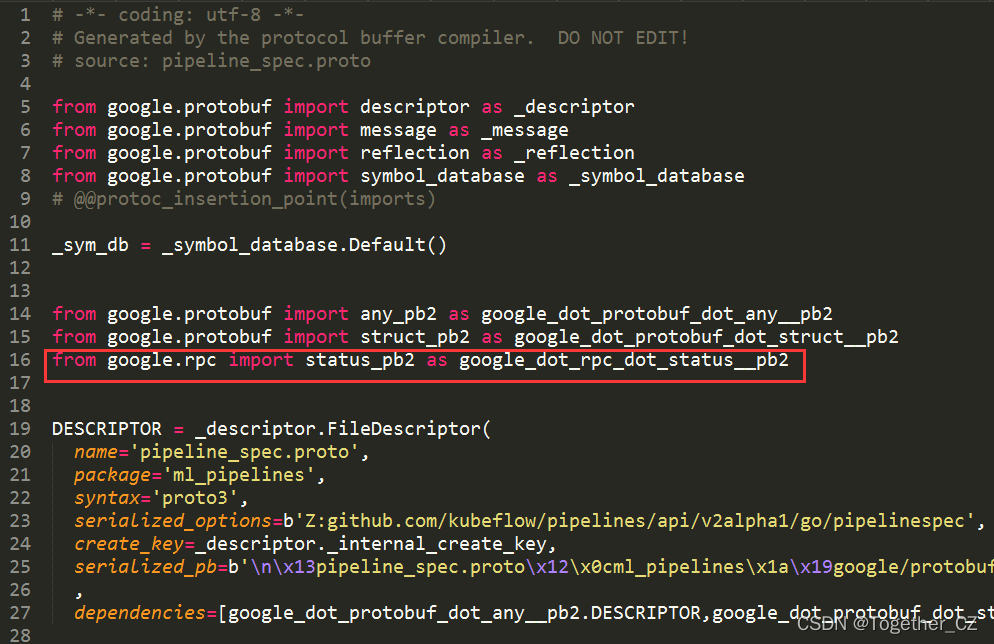
The occurrence of this error is also inexplicable. The error is reported when importing the KFP module after installing the KFP module, but there is no error in its own installation process.

Open KFP to locate the error position:

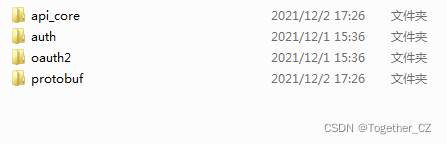
According to the past experience, after all the troubleshooting, I still can’t find the cause of the error. At this time, I have to open the local Google installation directory. The screenshot is as follows:

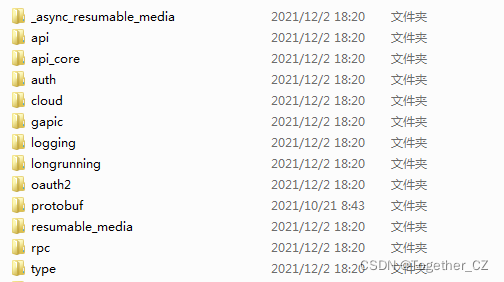
It was found that there was no RPC directory. The reason was found. Because I really didn’t want to study more, I created a new virtual environment and installed it. After that, I copied all the modules in Google and copied them to my current Google directory, as shown below:

Re import, solve the problem.

Mongodb error: authentication failed [How to Solve]

Error Messages:

Database connect error:

com.mongodb.MongoSecurityException: Exception authenticating MongoCredential{mechanism=SCRAM-SHA-1, userName=‘root’, source=‘gateway’, password=, mechanismProperties=} Command failed with error 18 (AuthenticationFailed): ‘Authentication failed.’ on server 192.168.81.13:27017. The full response is {“ok”: 0.0, “errmsg”: “Authentication failed.”, “code”: 18, “codeName”: “AuthenticationFailed”}.


Solution:

Connect URL

mongodb://user:password@host:port/dbname

Add parameter authsource

For example:

mongodb://user:password@host:port/dbname?authSource=admin

In general, authsource is admin and can be replaced as needed

[Solved] npm run start Error: Exit status 3221225477

NPM run start reports an error exit status 3221225477

Error content resolution

Error content

#
# Fatal error in , line 0
# Check failed: U_SUCCESS(status).      
#
#
#
#FailureMessage Object: 00000088678FDB80npm ERR! code ELIFECYCLE
npm ERR! errno 3221225477
npm ERR! [email protected] start: `vue-cli-service serve`
npm ERR! Exit status 3221225477
npm ERR!
npm ERR! Failed at the [email protected] start script.
npm ERR! This is probably not a problem with npm. There is likely additional logging output above.

npm ERR! A complete log of this run can be found in:
npm ERR!     C:\Users\a\AppData\Roaming\npm-cache\_logs\2021-12-13T09_16_55_301Z-debug.log        
/c/Users/a/AppData/Roaming/nvm/nodejs/npm: line 34:  1042 Segmentation fault      "$NODE_EXE" "$NPM_CLI_JS" "$@"

Solution:

The problem can be solved by switching the appropriate node version

[Solved] Android Studio Start Error: Missing essential plugin: org.jetbrains.android Please reinstall Android

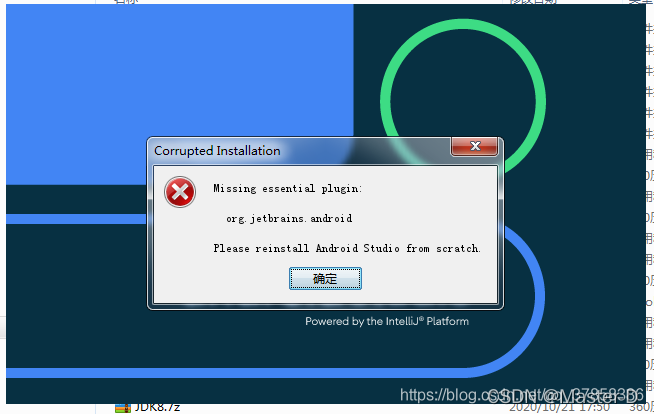
When the update is completed, Android studio reports an error: missing essential plugin: org jetbrains. android Please reinstall Android

Illustration

solution: delete C:\users\Lenovo\appdata\roaming\Google\androidstudio20203\disabled_plugins.txt,

If you can’t find the above file, set it as a hidden folder. You can’t see and view the hidden file until it is set

[Solved] react-router-dom Error: index.js:1 Warning: Functions are not valid as a React child.

index. js:1 Warning: Functions are not valid as a React child. This may happen if you return a Component instead of < Component /> from render. Or maybe you meant to call this function rather than return it.

reason:

1. When you return a component, you mistakenly write it as component instead of <Component/>

2. Maybe you want to call this function instead of return it.

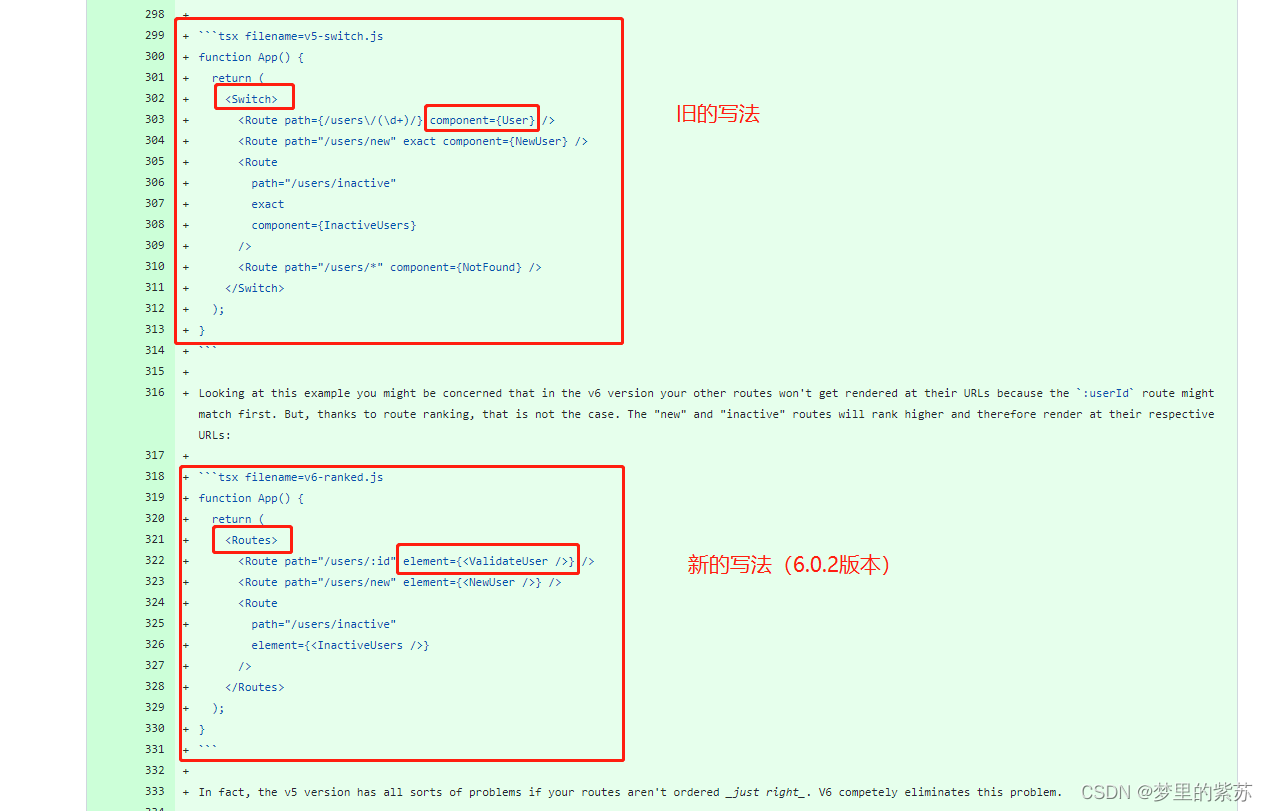
For example:

① When calling a method, forget to add the following parentheses.

② When using react-router version 6.0.2 (released in 20211110), the writing method has been changed when registering the route.

[Solved] Python Error: An attempt has been made to start a new process before the current process has finished …

This error usually occurs in Windows systems using multiple processes. For example, execute the following code in pychar:

import torch
import torch.utils.data as Data
import numpy as np
from sklearn.datasets import load_iris

iris_x, irisy = load_iris(return_X_y=True)
print("iris_x.dtype:", iris_x.dtype)
print("irisy:", irisy.dtype)

## transform the training set x into a tensor, and the training set y into a tensor
train_xt = torch.from_numpy(iris_x.astype(np.float32))
train_yt = torch.from_numpy(irisy.astype(np.int64))
print("train_xt.dtype:", train_xt.dtype)
print("train_yt.dtype:", train_yt.dtype)

## After converting the training set into a tensor, use TensorDataset to collate X and Y together
train_data = Data.TensorDataset(train_xt, train_yt)
## Define a data loader to batch the training dataset
train_loader = Data.DataLoader(
    dataset=train_data, ## the dataset to use
    batch_size=10, # # Batch sample size
    shuffle=True, # Break up the data before each iteration
    num_workers=2, # [Note: 2 processes are used here]
)

## Check if the dimensionality of the samples of a batch of the training dataset is correct
for step, (b_x, b_y) in enumerate(train_loader):
    if step > 0:
        break
## Output the dimensions of the training image and the labels, and the data type
print("b_x.shape:", b_x.shape)
print("b_y.shape:", b_y.shape)
print("b_x.dtype:", b_x.dtype)
print("b_y.dtype:", b_y.dtype)


## --------- -The correct result is as follows -------- --

# iris_x.dtype: float64
# irisy: int32
# train_xt.dtype: torch.float32
# train_yt.dtype: torch.int64
# b_x.shape: torch.Size([10, 4])
# b_y.shape: torch.Size([10])
# b_x.dtype: torch.float32
# b_y.dtype: torch.int64

The following errors will be reported. (no error will be reported when running in jupyter notebook under the same environment. I don’t know why…)

RuntimeError: 
        An attempt has been made to start a new process before the
        current process has finished its bootstrapping phase.

        This probably means that you are not using fork to start your
        child processes and you have forgotten to use the proper idiom
        in the main module:

            if __name__ == '__main__':
                freeze_support()
                ...

        The "freeze_support()" line can be omitted if the program
        is not going to be frozen to produce an executable.


Solution 1:

Remove the statement setting up multiple processes. In this example, comment or delete the following line.

num_workers=2,  # [Note: 2 processes are used here]

Solution 2:

Move the code part of calling multiple processes to [if _name_ = = ‘_main_’:].

if __name__ == '__main__':
    ##  Check if the dimensionality of the samples of a batch of the training dataset is correct
    for step, (b_x, b_y) in enumerate(train_loader):
        if step > 0:
            break
        ## Output the dimensions of the training image and the dimensions of the labels, and the data type
    print("b_x.shape:", b_x.shape)
    print("b_y.shape:", b_y.shape)
    print("b_x.dtype:", b_x.dtype)
    print("b_y.dtype:", b_y.dtype)

However, in pychart, the part before [for step, (b_x, b_y) in enumerate (train_loader):] will be executed twice.

## ——————————The result of running in Pycharm is as follows——————————
iris_x.dtype: float64
irisy: int32
train_xt.dtype: torch.float32
train_yt.dtype: torch.int64
iris_x.dtype: float64
irisy: int32
train_xt.dtype: torch.float32
train_yt.dtype: torch.int64
b_x.shape: torch.Size([10, 4])
b_y.shape: torch.Size([10])
b_x.dtype: torch.float32
b_y.dtype: torch.int64

[Solved] CentOS Network Card startup error: RTNETLINK answers: File exist

Error Messages:

Dec 09 15:26:16 test01 network[7599]: Bringing up loopback interface:  [  OK  ]
Dec 09 15:26:16 test01 network[7599]: Bringing up interface ens33:  Error: Connection activation failed: No suitable device found for this connection.
Dec 09 15:26:16 test01 network[7599]: [FAILED]
Dec 09 15:26:16 test01 network[7599]: RTNETLINK answers: File exists
Dec 09 15:26:16 test01 systemd[1]: network.service: control process exited, code=exited status=1
Dec 09 15:26:16 test01 systemd[1]: Failed to start LSB: Bring up/down networking.
Dec 09 15:26:16 test01 systemd[1]: Unit network.service entered failed state.
Dec 09 15:26:16 test01 systemd[1]: network.service failed.


Solution:
Stop NetworkManager service
systemctl stop NetworkManager
systemctl disable NetworkManager
restart network
systemctl restart network

Reason:
The reason for this failure under centos is that there is a conflict between the two services that start the network: network and NetworkManager, I think.
Fundamentally, the conflict is caused by NetworkMaganager (NM), so disable NetworkManager to solve it. Just restart it.

[Solved] docker Error: bridge docker0 failed: exchange full

Error reported: Bridge docker0 failed: exchange full

the default docker0 bridge only supports 1024 links. If it exceeds 1024, it will report bridge docker0 failed: exchange full

you can remove the restriction by creating another network bridge. When docker run creates a container, you specify our own network bridge. Of course, we only support 1024 network bridges. You can use this method to create unlimited network bridges as long as there is enough memory to create a docker container

1. View Bridge

[root@bj ~]# docker network ls
NETWORK ID     NAME      DRIVER    SCOPE
0c49b2d827f5   bridge    bridge    local
8ec28361848f   host      host      local
3b929af4064c   none      null      local

2. Create Bridge

[root@bj ~]# docker network create xinnet
[root@bj ~]# docker network ls
NETWORK ID     NAME      DRIVER    SCOPE
0c49b2d827f5   bridge    bridge    local
8ec28361848f   host      host      local
3b929af4064c   none      null      local
604ccc72661a   xinnet    bridge    local
[root@bj ~]# docker network inspect xinnet
[
    {
        "Name": "xinnet",
        "Id": "604ccc72661af52f0889bfea4664d70e899427418b1a9301d8a46e6ce95e46ee",
        "Created": "2021-12-08T13:50:43.973901095+08:00",
        "Scope": "local",
        "Driver": "bridge",
        "EnableIPv6": false,
        "IPAM": {
            "Driver": "default",
            "Options": {},
            "Config": [
                {
                    "Subnet": "172.19.0.0/16",
                    "Gateway": "172.19.0.1"
                }
            ]
        },
        "Internal": false,
        "Attachable": false,
        "Ingress": false,
        "ConfigFrom": {
            "Network": ""
        },
        "ConfigOnly": false,
        "Containers": {
            "e92f81a6fe11b6e2c82de38fbe4e06a9cfcdb1dcd1f64485e5b805e3714bd163": {
                "Name": "zabbix-agent-22000",
                "EndpointID": "b7ac1a57b2e91435c676a7b4203ab50237893a3714aff185d8cdac45b1251356",
                "MacAddress": "02:42:ac:13:00:02",
                "IPv4Address": "172.19.0.2/16",
                "IPv6Address": ""
            }
        },
        "Options": {},
        "Labels": {}
    }
]

3. Create container specified bridge – network

[root@bj ~]# docker run -m 100m --name zabbix-agent-22001 --network=xinnet -e HOSTNAME="TEST22001" -e ZBX_HOSTNAME="TEST22001" -e ZBX_SERVER_HOST="10.20.9.246" -p 22001:10050 -e ZBX_SERVER_PORT=10051 -d zabbix-agent:4.0.35 
[root@bj ~]# docker ps -a
CONTAINER ID   IMAGE                 COMMAND                  CREATED          STATUS          PORTS                      NAMES
e92f81a6fe11   zabbix-agent:4.0.35   "/usr/bin/tini -- /u…"   15 minutes ago   Up 15 minutes   0.0.0.0:22001->10050/tcp   zabbix-agent-22001

If – network is not specified, the created containers will be hung on docker0 by default, and the IP of docker0 interface on the local host will be used as the default gateway for all containers

[Solved] Huawei OBS Python SDK download picture error: nosuchkey

Background:

In the past, Huawei OBS was used to download pictures (that is, to view pictures through a browser), and the address was used to access OBS directly.
for example,
endpoint: obs-example-domain.cn
picture name: QCX% 2F1% 2f20210804% 2f2db3c4bb-0c2c-4c3c-84e0-7e131c1e8db61628047890560.jpg

Access address:

http://obs-example-domain.cn/qcx%2F1%2F20210804%2F2db3c4bb -0c2c-4c3c-84e0-7e131c1e8db61628047890560. jpg

WGet can download pictures from the above address.

However, if you use Python SDK to access, an error will be reported:


AK = 'PLAU4DD8EYVXSA****UL'
SK = 'MdNZCKgSwt9Qgq6ZXtaF7wtZOd8********xEiv'
server = "http://obs-example-domain.cn"
bucketName = 'qcx'
obsClient = ObsClient(access_key_id=AK, secret_access_key=SK, server=server)
name = "qcx%2F1%2F20210804%2F2db3c4bb-0c2c-4c3c-84e0-7e131c1e8db61628047890560.jpg"
resp = obsClient.getObject(bucketName, name, loadStreamInMemory=True)
print(resp.body)

Output: the specified key does not exist

In the above procedures: name = QCX% 2F1% 2f20210804% 2f2db3c4bb-0c2c-4c3c-84e0-7e131c1e8db61628047890560 jpg

Solution:

The picture name above is actually URLEncode. The original string urlcode can obtain:

qcx/1/20210804/2db3c4bb-0c2c-4c3c-84e0-7e131c1e8db61628047890560. jpg

Change the name in the above code to the picture name after URLDecode, that is:

name = "qcx/1/20210804/2db3c4bb-0c2c-4c3c-84e0-7e131c1e8db61628047890560.jpg"

You can get the picture correctly.

The function completion code

Picture browsing completed line:

Browser request img URL -> nginx -> API (with SK AK) – > obs -> Response API – > nginx -> browser

Python 2.7 (only this version is available on the server and cannot be upgraded to 3.X)

#coding=utf-8
from BaseHTTPServer import BaseHTTPRequestHandler
import urllib
import cgi
import os
import urllib
# print urllib.unquote('%E4%B8%89%E7%94%9F%E4%B8%89%E4%B8%96')

from obs import ObsClient

AK = 'PLAU4DD8EYVXSA****UL'
SK = 'MdNZCKgSwt9Qgq6ZXtaF7wtZOd8********xEiv'
server = "http://obs.cn-dchlw-1.digitalgd.com.cn"
bucketName = 'qcxx'
obsClient = ObsClient(access_key_id=AK, secret_access_key=SK, server=server)

cwd = os.getcwd()

class ObsHandler(BaseHTTPRequestHandler):
    def do_GET(self):
        path = urllib.unquote(self.path)
        buf = ""
        query_list = path.split("/")  #auto urldecode
        #print(query_list)
        if query_list[1] == "obs":
            name = "/".join(query_list[3:]).replace("?","")   # for online
            #name = urllib.unquote(name)
            resp = obsClient.getObject(bucketName, name, loadStreamInMemory=True)
            if resp.status < 300: 
                self.send_response(200) 
                buf = resp.body.buffer
            else: 
                self.send_response(400)
        self.end_headers()
        self.wfile.write(buf)
       
 
def StartServer():
    from BaseHTTPServer import HTTPServer
    sever = HTTPServer(("",12000),ObsHandler)
    sever.serve_forever()
  
  
if __name__=='__main__':
    StartServer()
[Solved] Linux Service Start Error: *.service: Main process exited, code=exited, status=203/EXEC

Error when starting rocketmq service:

[root@rocketmq1-nameserver-test bin]# systemctl start rocketmq-nameserver
[root@rocketmq1-nameserver-test bin]# systemctl status rocketmq-nameserver
● rocketmq-nameserver.service - nameserver
   Loaded: loaded (/usr/lib/systemd/system/rocketmq-nameserver.service; enabled; vendor preset: disabled)
   Active: failed (Result: exit-code) since Fri 2021-12-10 18:47:05 CST; 3s ago
  Process: 2414 ExecStart=/home/rocketmq/bin/mqnamesrv (code=exited, status=203/EXEC)
 Main PID: 2414 (code=exited, status=203/EXEC)

Dec 10 18:47:05 rocketmq1-nameserver-test systemd[1]: Started nameserver.
Dec 10 18:47:05 rocketmq1-nameserver-test systemd[1]: rocketmq-nameserver.service: Main process exited, code=exited, status=203/EXEC
Dec 10 18:47:05 rocketmq1-nameserver-test systemd[1]: rocketmq-nameserver.service: Failed with result 'exit-code'.


First, use journalctl – Xe to view the detailed error reports:

[root@rocketmq1-nameserver-test bin]# journalctl -xe
Dec 10 18:47:05 rocketmq1-nameserver-test systemd[1]: Started nameserver.
-- Subject: rocketmq-nameserver.service Unit has ended start
-- Defined-By: systemd
-- Support: https://access.redhat.com/support
-- 
-- rocketmq-nameserver.service Unit has ended start.
-- 
-- The start result is "done".
Dec 10 18:47:05 rocketmq1-nameserver-test systemd[2414]: rocketmq-nameserver.service: Failed to execute command: Permission denied
Dec 10 18:47:05 rocketmq1-nameserver-test systemd[2414]: rocketmq-nameserver.service: Failed at step EXEC spawning /home/rocketmq/bin/mqnamesrv: Permission denied
-- Subject: progression /home/rocketmq/bin/mqnamesrv could not be executed
-- Defined-By: systemd
-- Support: https://access.redhat.com/support
-- 
-- process /home/rocketmq/bin/mqnamesrv could not be executed and has failed.
-- 
-- The process returns an error code of 13.
Dec 10 18:47:05 rocketmq1-nameserver-test systemd[1]: rocketmq-nameserver.service: Main process exited, code=exited, status=203/EXEC
Dec 10 18:47:05 rocketmq1-nameserver-test systemd[1]: rocketmq-nameserver.service: Failed with result 'exit-code'.
-- Subject: Unit failed
-- Defined-By: systemd
-- Support: https://access.redhat.com/support
-- 
-- The unit rocketmq-nameserver.service has entered the 'failed' state with result 'exit-code'.
Dec 10 18:47:05 rocketmq1-nameserver-test dbus-daemon[970]: [system] Activating service name='org.fedoraproject.Setroubleshootd' requested by ':1.4' (uid=0 pid=948 comm="/usr/sbin/sedispatch " label="system_u:system_r:auditd_t:s0") (using servicehelper)
Dec 10 18:47:05 rocketmq1-nameserver-test dbus-daemon[2417]: [system] Failed to reset fd limit before activating service: org.freedesktop.DBus.Error.AccessDenied: Failed to restore old fd limit: Operation not permitted
Dec 10 18:47:07 rocketmq1-nameserver-test dbus-daemon[970]: [system] Successfully activated service 'org.fedoraproject.Setroubleshootd'
Dec 10 18:47:07 rocketmq1-nameserver-test setroubleshoot[2417]: AnalyzeThread.run(): Cancel pending alarm
Dec 10 18:47:07 rocketmq1-nameserver-test setroubleshoot[2417]: failed to retrieve rpm info for /home/rocketmq/bin/mqnamesrv
Dec 10 18:47:07 rocketmq1-nameserver-test dbus-daemon[970]: [system] Activating service name='org.fedoraproject.SetroubleshootPrivileged' requested by ':1.94' (uid=995 pid=2417 comm="/usr/libexec/platform-python -Es /usr/sbin/setroub" label="system_u:system_r:setroubleshootd_t:s0-s0:c0.c1023") (using servicehelper)
Dec 10 18:47:07 rocketmq1-nameserver-test dbus-daemon[2431]: [system] Failed to reset fd limit before activating service: org.freedesktop.DBus.Error.AccessDenied: Failed to restore old fd limit: Operation not permitted
Dec 10 18:47:09 rocketmq1-nameserver-test dbus-daemon[970]: [system] Successfully activated service 'org.fedoraproject.SetroubleshootPrivileged'
Dec 10 18:47:10 rocketmq1-nameserver-test setroubleshoot[2417]: SELinux is preventing /usr/lib/systemd/systemd from 'read, open' accesses on the file /home/rocketmq/bin/mqnamesrv. For complete SELinux messages run: sealert -l e1b1100f-c8cb-44d7-b3de-1559f1d87286
Dec 10 18:47:10 rocketmq1-nameserver-test setroubleshoot[2417]: SELinux is preventing /usr/lib/systemd/systemd from 'read, open' accesses on the file /home/rocketmq/bin/mqnamesrv.
                                                                  
                                                                  *****  Plugin restorecon (99.5 confidence) suggests   ************************
                                                                  
                                                                  If you want to fix the label. 
                                                                  /home/rocketmq/bin/mqnamesrv default label should be home_bin_t.
                                                                  Then you can run restorecon. The access attempt may have been stopped due to insufficient permissions to access a parent directory in which case try to change the following command accordingly.
                                                                  Do
                                                                  # /sbin/restorecon -v /home/rocketmq/bin/mqnamesrv
                                                                  
                                                                  *****  Plugin catchall (1.49 confidence) suggests   **************************
                                                                  
                                                                  If you believe that systemd should be allowed read open access on the mqnamesrv file by default.
                                                                  Then you should report this as a bug.
                                                                  You can generate a local policy module to allow this access.
                                                                  Do
                                                                  allow this access for now by executing:
                                                                  # ausearch -c '(qnamesrv)' --raw | audit2allow -M my-qnamesrv
                                                                  # semodule -X 300 -i my-qnamesrv.pp


There is a passage:

Dec 10 18:47:07 rocketmq1-nameserver-test dbus-daemon[2431]: [system] Failed to reset fd limit before activating service: org.freedesktop.DBus.Error.AccessDenied: Failed to restore old fd limit: Operation not permitted
Dec 10 18:47:09 rocketmq1-nameserver-test dbus-daemon[970]: [system] Successfully activated service 'org.fedoraproject.SetroubleshootPrivileged'
Dec 10 18:47:10 rocketmq1-nameserver-test setroubleshoot[2417]: SELinux is preventing /usr/lib/systemd/systemd from 'read, open' accesses on the file /home/rocketmq/bin/mqnamesrv. For complete SELinux messages run: sealert -l e1b1100f-c8cb-44d7-b3de-1559f1d87286

As mentioned above, we run: sealert – L e1b1100f-c8cb-44d7-b3de-1559f1d87286

[root@rocketmq1-nameserver-test bin]# sealert -l e1b1100f-c8cb-44d7-b3de-1559f1d87286
SELinux is preventing /usr/lib/systemd/systemd from 'read, open' accesses on the file /home/rocketmq/bin/mqnamesrv.

*****  Plugin restorecon (99.5 confidence level) Recommended ******************************************

If you want to fix the tags. /home/rocketmq/bin/mqnamesrv the default tag should be home_bin_t.
Then you can run restorecon. access attempts may have stopped due to insufficient permissions to access the parent directory, in which case try changing the following command accordingly.
Do
# /sbin/restorecon -v /home/rocketmq/bin/mqnamesrv

***** plug-in catchall (1.49 confidence level) Recommended ********************************************

If you believe (qnamesrv) should allow _BASE_PATH read open access to the mqnamesrv file by default.
Then this should be reported as a bug.
A local policy module can be generated to allow this access.
Do
Temporarily allow this access execute: #ausearch -c '(qnamesrv)'--raw | audit2allow -M my-qnamesrv #semodule -X 300 -i my-qnamesrv.pp
Omit the following

The last sentence above is to run the command: #ausearch – C ‘(qnamesrv)’ – raw | audit2alow – m my qnamesrv semodule – x 300 – I my qnamesrv pp

However, after running, it still reports an error
after verifying the data, it is the problem of SELinux:
SELinux believes that binary files can only be executed from some locations, and my user-defined directory is not clearly marked as allowed. It var_ T from/SRV /* (I think) inherited the type.

To get an extensive list of current rules for all directories, you can run semanage fcontext — list

I added an exception using the following ansible task:

name: set SELinux permissions on ts3server binaries
sefcontext:
target: “/srv/teamspeak/versions/[^/]+/ts3server”
setype: bin_ tname: reload SELinux policy to ensure that ts3server is executable
command: restorecon -irv /srv/teamspeak/
when: tarball. Changed
you can achieve the same goal by using the command followed by semanage fcontext restorecon – IRV/SRV/TeamSpeak/
therefore, we need to add a rocketmq startup flag:

restorecon -irv /home/rocketmq/bin/

Restart service succeeded:

[root@rocketmq1-nameserver-test bin]# semodule -i my-qnamesrv.pp
[root@rocketmq1-nameserver-test bin]# systemctl start rocketmq-nameserver
[root@rocketmq1-nameserver-test bin]# systemctl status rocketmq-nameserver
● rocketmq-nameserver.service - nameserver
   Loaded: loaded (/usr/lib/systemd/system/rocketmq-nameserver.service; enabled; vendor preset: disabled)
   Active: active (running) since Fri 2021-12-10 18:47:48 CST; 1min 15s ago
 Main PID: 2459 (mqnamesrv)
    Tasks: 36 (limit: 10931)
   Memory: 172.9M
   CGroup: /system.slice/rocketmq-nameserver.service
           ├─2459 /bin/sh /home/rocketmq/bin/mqnamesrv
           ├─2463 sh /home/rocketmq/bin/runserver.sh org.apache.rocketmq.namesrv.NamesrvStartup
           └─2480 /usr/local/jdk1.8.0_151/bin/java -server -Xms256m -Xmx256m -Xmn128m -XX:MetaspaceSize=128m -XX:MaxMetaspaceSize=320m -XX:+UseConcMarkSweepGC -XX:+UseCMSCompactAtFullCollection -XX:CMSInitiatingOccupancyFraction=70 -XX:+CMSP