Author Archives: Robins

vscode git error: would clobber existing tag [How to Solve]

Using vscode’s own git interface to operate pull, there may be an error about the tag would clobber existing tag, resulting in the inability to pull

Solution:

1. Type git pull directly in terminal to finish pulling the code. Although the code is pulled, the vscode git tool still does not work.
2. Type git fetch –tags -f in terminal to force the local code tag to be updated first. Then use vscode’s git tools to pull the code.

How to Solve Error:java.io.InvalidClassException

Exception information:

Caused by:java. io. InvalidClassException: com. eastcom xxx. xxxxxx. bean. AlarmReq; local class incompatible: stream classdesc serialversionUID =8050743254081999660, local class seriaiversionuId = 6638111461888145730

Cause of exception:
when serializing objects, they will be stored in redis memory, and then through redistemplate getValueSerializer(). The deserialize () method deserializes the data to the bean object. If the current bean object changes, that is, if an attribute is added, the serialVersionUID will change.

Because the serialVersionUID of this class is generated by the JVM according to the class name and the hash value of its attributes during serialization. When the properties of the class change, the serialVersionUID will also change accordingly, resulting in an error when the serialVersionUID does not match when the old data in redis is deserialized.

Solution:

I. Add code before the error reporting class property
private static final long serialVersionUID = 8050743254081999660L;
Here the UID corresponds to the above stream classdesc serialversionUID
ii.Clear the redis data linked by the current service.Clear the redis data linked by the current service.
[Solved] sys.stderr.write(f“ERROR: {exc}“) SyntaxError: invalid syntax

There was an error querying the version of Ubuntu after installing PIP3

Traceback (most recent call last):
  File "/usr/local/bin/pip3", line 7, in <module>
    from pip._internal.cli.main import main
  File "/usr/local/lib/python3.5/dist-packages/pip/_internal/cli/main.py", line 57
    sys.stderr.write(f"ERROR: {exc}")
                                   ^
SyntaxError: invalid syntax

Solution:

wget https://bootstrap.pypa.io/pip/3.5/get-pip.py

After downloading, execute the following command

python3 get-pip.py 

[Solved] yum error: rpmdb: BDB0113 Thread/process

error

shell> yum info subversion
error: rpmdb: BDB0113 Thread/process 1765361/140192760330112 failed: BDB1507 Thread died in Berkeley DB library
error: db5 error(-30973) from dbenv->failchk: BDB0087 DB_RUNRECOVERY: Fatal error, run database recovery
error: cannot open Packages index using db5 -  (-30973)
error: cannot open Packages database in /var/lib/rpm
Error: Error: rpmdb open failed

Solution:

shell> mv /var/lib/rpm/__db.00* /tmp/&&yum clean all

[Solved] Pytorch call tensorboard error: AttributeError: module ‘tensorflow’ has no attribute ‘gfile’

Problem description

An error occurs when executing the following command:

from torch.utils.tensorboard import SummaryWriter

tb_writer = SummaryWriter(osp.join(opt.savepath, "logdir"))

Error content:

AttributeError: module 'tensorflow._api.v1.io' has no attribute 'gfile'

Problem analysis

The root cause of this problem is that pytorch has adjusted tensorflow. Finally, tensorflow reports an error. The new version of tensorflow is incompatible with the old version.

After checking, my pytorch version is 1.6, tensorboard version is 1.15.0, and tensorflow version is 1.12.0

Problem-solving:

Upgrade the tensorflow version to version 2.0. Executing the following command will automatically upgrade the tensorflow version and tensorboard version:

pip install tensorflow==2.0

End.

[Solved] RuntimeError: ProcessGroupNCCL is only supported with GPUs, no GPUs found

GPU Error: RuntimeError: ProcessGroupNCCL is only supported with GPUs, no GPUs found!

pg = ProcessGroupNCCL(prefix_store, rank, world_size, pg_options)
RuntimeError: ProcessGroupNCCL is only supported with GPUs, no GPUs found!

At first, this mistake made me wonder if this GPU was useless, – – |, But the little partners in the lab are sure that GPU is OK! Then I started the bug troubleshooting journey

At this time, when viewing the command line, it finally shows its feet. It is estimated that there is a problem with pytorch, which is harmful!

>>> import torch
>>> print(torch.cuda.is_available())
/home/xutianjiao/anaconda3/envs/py36/lib/python3.6/site-packages/torch/cuda/__init__.py:80: UserWarning: CUDA initialization: The NVIDIA driver on your system is too old (found version 9020). Please update your GPU driver by downloading and installing a new version from the URL: http://www.nvidia.com/Download/index.aspx Alternatively, go to: https://pytorch.org to install a PyTorch version that has been compiled with your version of the CUDA driver. (Triggered internally at  ../c10/cuda/CUDAFunctions.cpp:112.)
  return torch._C._cuda_getDeviceCount() > 0
False
>>> print(torch.cuda.get_device_name(0))
Traceback (most recent call last):
  File "<stdin>", line 1, in <module>
  File "/home/xutianjiao/anaconda3/envs/py36/lib/python3.6/site-packages/torch/cuda/__init__.py", line 326, in get_device_name
    return get_device_properties(device).name
  File "/home/xutianjiao/anaconda3/envs/py36/lib/python3.6/site-packages/torch/cuda/__init__.py", line 356, in get_device_properties
    _lazy_init()  # will define _get_device_properties
  File "/home/xutianjiao/anaconda3/envs/py36/lib/python3.6/site-packages/torch/cuda/__init__.py", line 214, in _lazy_init
    torch._C._cuda_init()
RuntimeError: The NVIDIA driver on your system is too old (found version 9020). Please update your GPU driver by downloading and installing a new version from the URL: http://www.nvidia.com/Download/index.aspx Alternatively, go to: https://pytorch.org to install a PyTorch version that has been compiled with your version of the CUDA driver.

After checking this error, it shows that the versions of CUDA and torch do not match.

Check the version of pytorch, 1.10 +. OK, try installing a lower version of torch!

pip install torch==1.7.0

be accomplished!

[Solved] ERROR: Attempting to operate on hdfs namenode as root ERROR: but there is no HDFS_NAMENODE_USER defi

Question:

ERROR: Attempting to operate on hdfs namenode as root
ERROR: but there is no HDFS_NAMENODE_USER defined. Aborting operation

Solution:

Look for the start-dfs.sh and stop-dfs.sh files in the /hadoop/sbin path, and add both to the top of them:

#!/usr/bin/env bash
HDFS_DATANODE_USER=root
HADOOP_SECURE_DN_USER=hdfs
HDFS_NAMENODE_USER=root
HDFS_SECONDARYNAMENODE_USER=root

By the way, at the top of the start-yarn.sh and stop-yarn.sh files, add:

#!/usr/bin/env bash
YARN_RESOURCEMANAGER_USER=root
HADOOP_SECURE_DN_USER=yarn
YARN_NODEMANAGER_USER=root

Springcloud configuration center client 3355 startup Error: error on get request for“ http://localhost:8761/eureka/apps/ “: Connection

The error contents are as follows:

error on GET request for "http://localhost:8761/eureka/apps/": Connection refused: connect; nested exception is java.net.ConnectException: Connection refused: connect stacktrace=org.springframework.web.client.ResourceAccessException: I/O error on GET request for "http://localhost:8761/eureka/apps/": Connection refused: connect; nested exception is java.net.ConnectException: Connection refused: connect
	at org.springframework.web.client.RestTemplate.doExecute(RestTemplate.java:785)
	at org.springframework.web.client.RestTemplate.execute(RestTemplate.java:711)
                            ...
Caused by: java.net.ConnectException: Connection refused: connect
	at java.net.DualStackPlainSocketImpl.connect0(Native Method)
	at java.net.DualStackPlainSocketImpl.socketConnect(DualStackPlainSocketImpl.java:79)
	at java.net.AbstractPlainSocketImpl.doConnect(AbstractPlainSocketImpl.java:350)
     ...	

2022-01-08 22:16:56.800  WARN 15304 --- [           main] c.n.d.s.t.d.RetryableEurekaHttpClient    : Request execution failed with message: I/O error on GET request for "http://localhost:8761/eureka/apps/": Connection refused: connect; nested exception is java.net.ConnectException: Connection refused: connect
2022-01-08 22:16:56.801  INFO 15304 --- [           main] com.netflix.discovery.DiscoveryClient    : DiscoveryClient_UNKNOWN/windows10.microdone.cn - was unable to refresh its cache! This periodic background refresh will be retried in 30 seconds. status = Cannot execute request on any known server stacktrace = com.netflix.discovery.shared.transport.TransportException: Cannot execute request on any known server
		......

ConfigServletWebServerApplicationContext : Exception encountered during context initialization - cancelling refresh attempt: org.springframework.beans.factory.BeanCreationException: Error creating bean with name 'scopedTarget.configClientController': Injection of autowired dependencies failed; nested exception is java.lang.IllegalArgumentException: Could not resolve placeholder 'config.info' in value "${config.info}"
2022-01-08 22:16:57.016  INFO 15304 --- [           main] com.netflix.discovery.DiscoveryClient    : Shutting down DiscoveryClient ...
2022-01-08 22:16:57.847  INFO 15304 --- [nfoReplicator-0] c.n.d.s.t.d.RedirectingEurekaHttpClient  : Request execution error. endpoint=DefaultEndpoint{ serviceUrl='http://localhost:8761/eureka/}, exception=I/O error on POST request for "http://localhost:8761/eureka/apps/UNKNOWN": Connection refused: connect; nested exception is java.net.ConnectException: Connection refused: connect stacktrace=org.springframework.web.client.ResourceAccessException: I/O error on POST request for "http://localhost:8761/eureka/apps/UNKNOWN": Connection refused: connect; nested exception is java.net.ConnectException: Connection refused: connect
	......
	
2022-01-08 22:16:57.847  WARN 15304 --- [nfoReplicator-0] c.n.d.s.t.d.RetryableEurekaHttpClient    : Request execution failed with message: I/O error on POST request for "http://localhost:8761/eureka/apps/UNKNOWN": Connection refused: connect; nested exception is java.net.ConnectException: Connection refused: connect
2022-01-08 22:16:57.849  WARN 15304 --- [nfoReplicator-0] com.netflix.discovery.DiscoveryClient    : DiscoveryClient_UNKNOWN/windows10.microdone.cn - registration failed Cannot execute request on any known server

com.netflix.discovery.shared.transport.TransportException: Cannot execute request on any known server

	......

2022-01-08 22:16:57.850  WARN 15304 --- [nfoReplicator-0] c.n.discovery.InstanceInfoReplicator     : There was a problem with the instance info replicator

com.netflix.discovery.shared.transport.TransportException: Cannot execute request on any known server

		......	

2022-01-08 22:16:57.851  INFO 15304 --- [           main] com.netflix.discovery.DiscoveryClient    : Unregistering ...
2022-01-08 22:16:58.855  INFO 15304 --- [           main] c.n.d.s.t.d.RedirectingEurekaHttpClient  : Request execution error. endpoint=DefaultEndpoint{ serviceUrl='http://localhost:8761/eureka/}, exception=I/O error on DELETE request for "http://localhost:8761/eureka/apps/UNKNOWN/windows10.microdone.cn": Connection refused: connect; nested exception is java.net.ConnectException: Connection refused: connect stacktrace=org.springframework.web.client.ResourceAccessException: I/O error on DELETE request for "http://localhost:8761/eureka/apps/UNKNOWN/windows10.microdone.cn": Connection refused: connect; nested exception is java.net.ConnectException: Connection refused: connect
	com.netflix.discovery.shared.transport.decorator.EurekaHttpClientDecorator.cancel(EurekaHttpClientDecorator.java:71)
Caused by: java.net.ConnectException: Connection refused: connect
	at java.net.DualStackPlainSocketImpl.connect0(Native Method)
	......

2022-01-08 22:16:58.855  WARN 15304 --- [           main] c.n.d.s.t.d.RetryableEurekaHttpClient    : Request execution failed with message: I/O error on DELETE request for "http://localhost:8761/eureka/apps/UNKNOWN/windows10.microdone.cn": Connection refused: connect; nested exception is java.net.ConnectException: Connection refused: connect
2022-01-08 22:16:58.856 ERROR 15304 --- [           main] com.netflix.discovery.DiscoveryClient    : DiscoveryClient_UNKNOWN/windows10.microdone.cn - de-registration failedCannot execute request on any known server

com.netflix.discovery.shared.transport.TransportException: Cannot execute request on any known server
	
		......
		
2022-01-08 22:16:59.013 ERROR 15304 --- [           main] o.s.boot.SpringApplication               : Application run failed

org.springframework.beans.factory.BeanCreationException: Error creating bean with name 'scopedTarget.configClientController': Injection of autowired dependencies failed; nested exception is java.lang.IllegalArgumentException: Could not resolve placeholder 'config.info' in value "${config.info}"
	at org.springframework.beans.factory.annotation.AutowiredAnnotationBeanPostProcessor.postProcessProperties(AutowiredAnnotationBeanPostProcessor.java:405) ~[spring-beans-5.3.7.jar:5.3.7]
	

Cause of problem:

Because my spring cloud version is too high, I lack related dependencies.

Solution:

Add the following dependencies to the spring cloud configuration center client POM file:

<dependency>
    <groupId>org.springframework.cloud</groupId>
    <artifactId>spring-cloud-starter-bootstrap</artifactId>
    <version>3.1.0</version>
</dependency>

To illustrate, my spring cloud is version 2020.0.1, and the above dependencies should be added above the spring cloud g version.

[Solved] ERROR A malformed block was encountered while loading a block

ERROR! A malformed block was encountered while loading a block
[root@ansible test]# ansible-playbook -C roles_redis.yml -i hosts
ERROR! A malformed block was encountered while loading a block

Reason:
You don’t add the follow code after include when you are write main file:

- include add_group.yml

Solution:

We must pay attention to the problem of space format. The specification is very strict

- include: add_group.yml

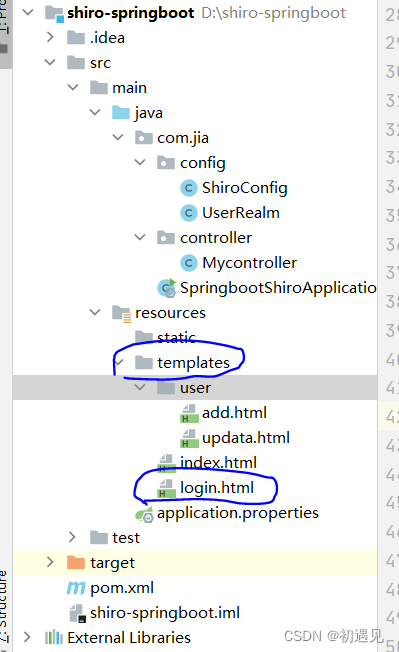
Error resolving template [index], template might not exist

Problem: error resolving template [index], template may not exist
Solution:
1. Check the project structure first and check whether the location of the static resource file is misplaced

2. Check if the thymeleaf dependency in pom.xml is imported correctly
At first, I only imported the following dependencies, but it reported an error

  <dependency>
            <groupId>org.springframework.boot</groupId>
            <artifactId>spring-boot-starter-thymeleaf</artifactId>
        </dependency>

3. Change to the following, just download it again

<!--        thymeleaf -->
        <dependency>
            <groupId>org.thymeleaf</groupId>
            <artifactId>thymeleaf-spring5</artifactId>
        </dependency>
        <dependency>
            <groupId>org.thymeleaf.extras</groupId>
            <artifactId>thymeleaf-extras-java8time</artifactId>
        </dependency>
        <dependency>
            <groupId>org.springframework.boot</groupId>
            <artifactId>spring-boot-starter-thymeleaf</artifactId>
        </dependency>