CCCryptorFinal(cryptor, &outBytes + outLength , outBytes.count, &outLength).check() error:
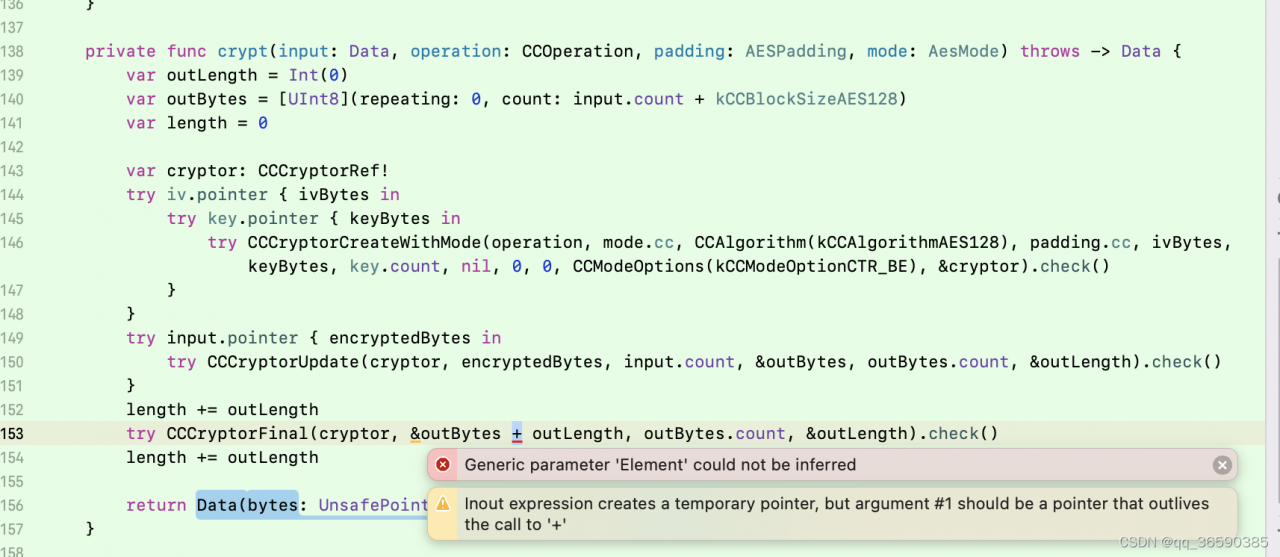
Solution:
Use CCCryptorFinal(cryptor, (&outBytes + outLength) as UnsafeMutableRawPointer, outBytes.count, &outLength).check()
CCCryptorFinal(cryptor, &outBytes + outLength , outBytes.count, &outLength).check() error:
Solution:
Use CCCryptorFinal(cryptor, (&outBytes + outLength) as UnsafeMutableRawPointer, outBytes.count, &outLength).check()
Docker runs the following command:
docker run -it --rm -v $PWD:/build -w /build quay.io/pypa/manylinux2010_x86_64 ./build.shreport errors:
/usr/local/bin/manylinux-entrypoint: /build/build.sh: /bin/bash: bad interpreter: Permission denied
Reason: insufficient authority.
Solution:
sudo chmod -R 777 build.shThere is no problem with the following code in Google browser and an error is reported in Firefox:
const doms = document.getElementsByClassName("cesium-baseLayerPicker-dropDown")
        for (let i in doms) {
            const dom = doms[i]
            if (dom) {
                $(dom).addClass("scroll-1")
            }
        }
The following modifications are required
$(".cesium-baseLayerPicker-dropDown").addClass("scroll-1")
Error report of M1 chip import numpy
Environmental installation method:
miniforge – python3. 9 numpy 1.21.1
Operation error:
## terminal/pycharm error
import numpy
import pandas
Error Messages:
Importing the numpy C-extensions failed. This error can happen for
many reasons, often due to issues with your setup or how NumPy was
installed.
We have compiled some common reasons and troubleshooting tips at:
https://numpy.org/devdocs/user/troubleshooting-importerror.html
At the same time, the python version and numpy version are given, and many files in the miniforge folder no such file are mentioned repeatedly
Solution:
conda install openblas
Import again works normally
report errors
Reason: no partition for this tuple.tuple=…
analysis
The data in Kafka comes in, but the dynamic partition table does not create the time partition of this data
Solution:
#Adding a partition to a dynamic partition

## Dynamic partition to static partition
ALTER TABLE ods_log_outlog_course_ydyjs_app SET ("dynamic_partition.enable" = "false");

## Add uncreated partitions
ALTER TABLE course_log.ods_log_outlog_course_ydyjs_app
        ADD PARTITION p20220307 VALUES [("2022-03-07"), ("2022-03-08"));
## Add uncreated partitions
ALTER TABLE course_log.ods_log_outlog_course_ydyjs_app
        ADD PARTITION p20220308 VALUES [("2022-03-08"), ("2022-03-09"));

## Check if the creation is successful
show partitions from ods_log_outlog_course_ydyjs_app;

## Restore a static partition to a dynamic partition
ALTER TABLE ods_log_outlog_course_ydyjs_app SET ("dynamic_partition.enable" = "true");

## resume routineLoad
resume routine load for ods_log_outlog_course_ydyjs_app_load
Cause of problem:
1. The function name is the same as the file name
2. Missing \vlfeat-0.9.21\toolbox\mex\mexw64.
File directory:
\vlfeat-0.9.21\toolbox\sift\vl_sift.m
Error: function Directory:
[ kp1,ds1 ] = vl_sift(single(rgb2gray(img1)),'PeakThresh', 0,'edgethresh',3);
Solution:
1. Rename vl_sift.m to vl_sift1.m to solve it perfectly.
2. Copy the mex folder from other projects to \vlfeat-0.9.21\toolbox directory
vlfeat-0.9.21 version may have this problem. vlfeat-0.9.14 version mex is basically compiled. So there is no such problem.
When using code to connect Clickhouse, you encounter an error connection reference, the following solutions are available.
Method 1: close the firewall
#Stop firewall
systemctl stop firewalld.service

#Stop firewall start
systemctl disable firewalld.service
Method 2: modify the configuration file config.xml
Edit the configuration file /etc/Clickhouse server/config.XML, open the comment on line 156
<listen_host>::1</listen_host>
Method 3: there is a problem with the port number
Error message
Call add_uv_lagerloef() function in pyEddyTracker==3.5.0 reports an error:
numba.core.errors.TypingError: Failed in nopython mode pipeline (step: nopython frontend)
No implementation of function Function(<built-in function sub>) found for signature:

 >>> sub(UniTuple(int64 x 2), float64)

There are 12 candidate implementations:
   - Of which 10 did not match due to:
   Overload of function 'sub': File: <numerous>: Line N/A.
     With argument(s): '(UniTuple(int64 x 2), float64)':
    No match.
   - Of which 2 did not match due to:
   Operator Overload in function 'sub': File: unknown: Line unknown.
     With argument(s): '(UniTuple(int64 x 2), float64)':
    No match for registered cases:
     * (int64, int64) -> int64
     * (int64, uint64) -> int64
     * (uint64, int64) -> int64
     * (uint64, uint64) -> uint64
     * (float32, float32) -> float32
     * (float64, float64) -> float64
     * (complex64, complex64) -> complex64
     * (complex128, complex128) -> complex128
During: typing of intrinsic-call at D:\Miniconda3\envs\dl\lib\site-packages\py_eddy_tracker\generic.py (570)
File "D:\Miniconda3\envs\dl\lib\site-packages\py_eddy_tracker\generic.py", line 570:
def nearest_grd_indice(x, y, x0, y0, xstep, ystep):
    <source elided>
    return (
        numba_types.int32(round(((x - x0[0]) % 360.0)/xstep)),
        ^
python-BaseException
Backend TkAgg is interactive backend. Turning interactive mode on.
Temporary Solution:
Find add_uv_lagerloef() function in ~/.conda/envs/dl/lib/python3.7/site-packages/py_eddy_tracker/dataset/grid.py line 1700:
Modify:
    def add_uv_lagerloef(self, grid_height, uname="u", vname="v", schema=15):
        self.add_uv(grid_height, uname, vname)
        latmax = 5
        # _, (i_start, i_end) = self.nearest_grd_indice((0, 0), )
        i_start, i_end = (((-latmax, latmax) - self.y_bounds[0])/self.ystep).round().astype('int32')  # debug from numba
        sl = slice(i_start, i_end)
        # Divide by sideral day
        lat = self.y_c[sl]
        gob = (
            cos(deg2rad(lat))
            * ones((self.x_c.shape[0], 1))
            * 4.0
            * pi
           /(23 * 3600 + 56 * 60 + 4.1)
           /self.EARTH_RADIUS
        )
        with errstate(divide="ignore"):
            gob = self.GRAVITY/(gob * ones((self.x_c.shape[0], 1)))
        mode = "wrap" if self.is_circular() else "reflect"

        # fill data to compute a finite difference on all point
        data = self.convolve_filter_with_dynamic_kernel(
            grid_height,
            self.kernel_bessel,
            lat_max=10,
            wave_length=500,
            order=1,
            extend=0.1,
        )
        data = self.convolve_filter_with_dynamic_kernel(
            data, self.kernel_bessel, lat_max=10, wave_length=500, order=1, extend=0.1
        )
        data = self.convolve_filter_with_dynamic_kernel(
            data, self.kernel_bessel, lat_max=10, wave_length=500, order=1, extend=0.1
        )
        v_lagerloef = (
            self.compute_finite_difference(
                self.compute_finite_difference(data, mode=mode, schema=schema),
                mode=mode,
                schema=schema,
            )[:, sl]
            * gob
        )
        # u_lagerloef = (
        #     -self.compute_finite_difference(
        #         self.compute_finite_difference(data, vertical=True, schema=schema),
        #         vertical=True,
        #         schema=schema,
        #     )[:, sl]
        #     * gob
        # )
        u_lagerloef = (
            -self.compute_finite_difference(
                self.compute_finite_difference(data, mode=mode, schema=schema),
                mode=mode,
                schema=schema,
            )[:, sl]
            * gob
        )
        w = 1 - exp(-((lat/2.2) ** 2))
        self.vars[vname][:, sl] = self.vars[vname][:, sl] * w + v_lagerloef * (1 - w)
        self.vars[uname][:, sl] = self.vars[uname][:, sl] * w + u_lagerloef * (1 - w)
1 line 1703Don’t use numba to calculate i_start, i_end
	# _, (i_start, i_end) = self.nearest_grd_indice((0, 0), )
	i_start, i_end = (((-latmax, latmax) - self.y_bounds[0])/self.ystep).round().astype('int32')
2 line 1743 fix the problem that the generated ugos is missing
        # u_lagerloef = (
        #     -self.compute_finite_difference(
        #         self.compute_finite_difference(data, vertical=True, schema=schema),
        #         vertical=True,
        #         schema=schema,
        #     )[:, sl]
        #     * gob
        # )
        u_lagerloef = (
            -self.compute_finite_difference(
                self.compute_finite_difference(data, mode=mode, schema=schema),
                mode=mode,
                schema=schema,
            )[:, sl]
            * gob
        )
1. Turn on raspberry pie settings
sudo raspi-config
2. Select the third interface options
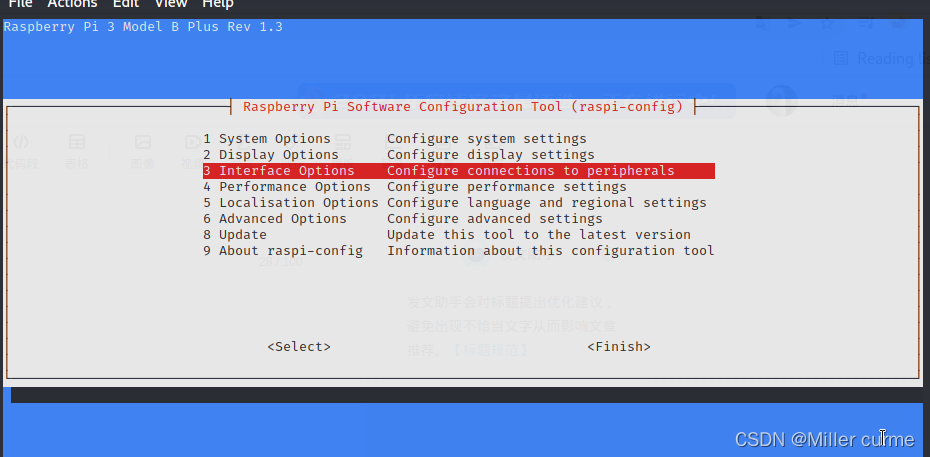
3. Turn all options on, and then restart raspberry pie
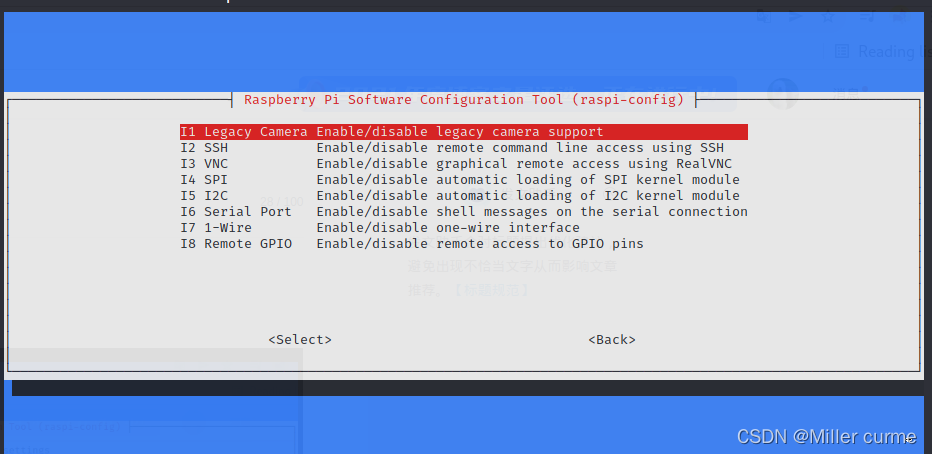
4.vcgencmd get_camera

The values change to 1, which can not only detect the input, but also identify the device
5. You can execute raspistill and run the python picamera program
For example: raspistill -o /home/pi/Desktop/first.jpg
Start swagger in the springboot project. If the following error is reported, two solutions can be adopted:
org.springframework.context.ApplicationContextException: Failed to start bean ‘documentationPluginsBootstrapper’; nested exception is java.lang.NullPointerException
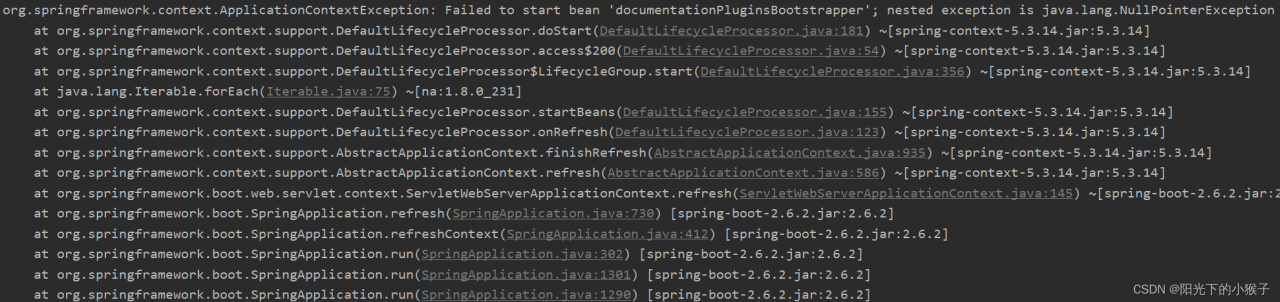
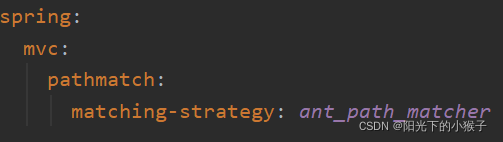
This error is caused by the mismatch between SpringBoot version and Swagger version, the blogger Swagger and Swagger-UI are using Springfox 2.9.2, SpringBoot is automatically provided in Idea when created 2.6.2, Springfox uses path matching based on AntPathMatcher, while Spring Boot 2.6.X uses PathPatternMatcher, the two solutions are as follows:
1. Modify the version of springboot to use the earlier version to solve this problem;
2. Add configuration to YML configuration file: ant_path_matcherspring: mvc: pathmatch: matching-strategy: ant_path_matcher.
Plugin“Caver3”has been installed but initialization failed
/Unable to initialize plugin ‘Caver3’ (pmg_tk.startup.Caver3).
Solution:
PyMOL>import pmg_tk.startup.Caver3
Traceback (most recent call last):
  File "D:\ProgramData\Anaconda3\Lib\site-packages\pmg_tk\startup\Caver3\__init__.py", line 25, in <module>
    import pmw
ModuleNotFoundError: No module named 'pmw'
Download PMW module
Method 1:
conda install -c conda-forge pmw
Method 2:
get into https://anaconda.org/conda-forge/pmw Click files to download the PMW compressed package
conda install {the package you need to download}
Enter PyMOL>import pmg_tk.startup.Caver3won’t be wrong

Solution:
Enter the directory: C:\Windows\SoftwareDistribution\DownloadC:\Windows\SoftwareDistribution\Download, delete all files in the folder, restart and reinstall.