Author Archives: Robins

How to Solve MacOS ffmpeg killed Error


tags: MacOS Debug Tips

Question

Recently, I wanted to download the live playback course in nailing with the tried and true method, but some errors suddenly appeared when executing ffmpeg on the command line:

[1]    40344 killed     ffmpeg


Solution:

This problem can be solved by compiling and installing from the source code through the following command

brew tap homebrew-ffmpeg/ffmpeg
brew install homebrew-ffmpeg/ffmpeg/ffmpeg

At this time, enter ffmpeg in the terminal to get:

❯ ffmpeg
ffmpeg version 5.0 Copyright (c) 2000-2022 the FFmpeg developers
  built with Apple clang version 13.1.6 (clang-1316.0.21.2)
  configuration: --prefix=/opt/homebrew/Cellar/ffmpeg/5.0-with-options_2 --enable-shared --cc=clang --host-cflags= --host-ldflags= --enable-gpl --enable-libaom --enable-libdav1d --enable-libmp3lame --enable-libopus --enable-libsnappy --enable-libtheora --enable-libvorbis --enable-libvpx --enable-libx264 --enable-libx265 --enable-libfontconfig --enable-libfreetype --enable-frei0r --enable-libass --enable-demuxer=dash --enable-opencl --enable-videotoolbox --enable-neon --disable-htmlpages
  libavutil      57. 17.100/57. 17.100
  libavcodec     59. 18.100/59. 18.100
  libavformat    59. 16.100/59. 16.100
  libavdevice    59.  4.100/59.  4.100
  libavfilter     8. 24.100/ 8. 24.100
  libswscale      6.  4.100/ 6.  4.100
  libswresample   4.  3.100/ 4.  3.100
  libpostproc    56.  3.100/56.  3.100
Hyper fast Audio and Video encoder
usage: ffmpeg [options] [[infile options] -i infile]... {[outfile options] outfile}...


pytorch DDP Accelerate Error: [W reducer.cpp:362] Warning: Grad strides do not match bucket view strides.

When pytorch uses DDP to accelerate, the prompt message is:

[W reducer.cpp:362] Warning: Grad strides do not match bucket view strides. This may indicate grad was not created according to the gradient layout contract, or that the param's strides changed since DDP was constructed.  This is not an error, but may impair performance.

The reason is that the internal memory address of the input tensor becomes contiguous after it has been transformed by transpose or permute.

It is simple to add a statement .contiguous() after the tensor has been transposed or permuted to make the memory address contiguous.

For example:

# error codes:
input_tensor = ori_tensor.transpose(1, 3)

# Modified codes:
input_tensor = ori_tensor.transpose(1, 3).contiguous()

[Solved] zookeeper Startup Error: already running as process

1. Problem description

Zookeeper has been able to start normally before, but an error is reported in a startup. Already running as process

2. Problem description

Enter the command JPS to check whether it is really started. It is found that it is not started (the process name of zookeeper is QuorumPeerMain)

This is usually caused by the machine abnormally closing the residual PID file in the cache directory (forced shutdown for the closing process, etc.)
just clean up the cache directory

3. Problem handling

Enter the file directory (this directory is the dataDir directory when setting zoo.cfg(cd /export/server/zookeeper-3.4.9/conf)):

(base) [ root@node2 zkdatas]# cd /export/server/apache-zookeeper-3.5.6-bin/zkdatas

(base) [ root@node2 zkdatas]# ll

Clean up cache files

(base) [root@node2 zkdatas]# rm -rf zookeeper_server.pid

Restart andyou can start normally

(base) [root@node2 apache-zookeeper-3.5.6-bin]# bin/zkServer.sh start

[Solved] IDEA JSP File out.println Error: Cannot resolve method ‘println(java.lang.String)’

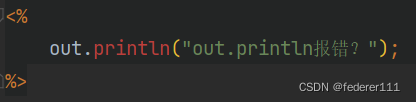
Idea uses out in JSP Print error

As follows:

report errors:

Cannot resolve method ‘println(java.lang.String)’

1. My solution:

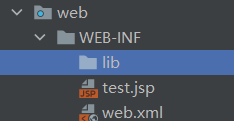
Create the Lib directory under WEB-INF

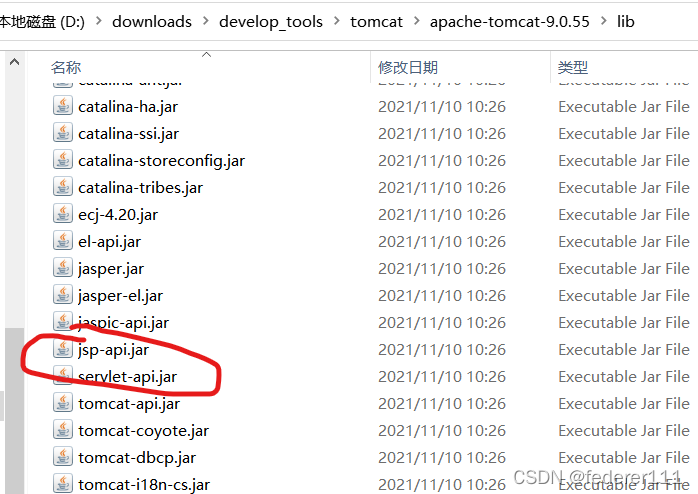
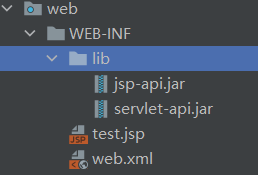
Find two jar packages and add them to lib

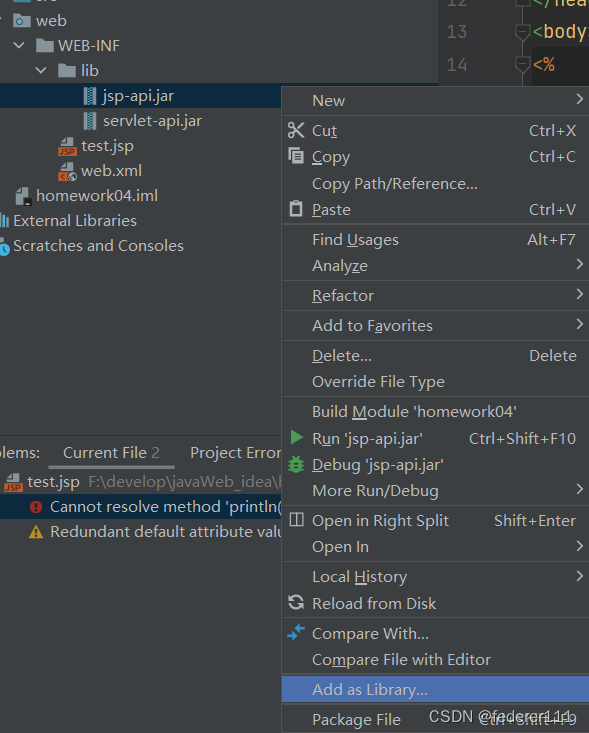
As shown in the figure:

After copy, select jsp-api.jar, right-click, Add as Library.

servlet-api. Jar. the same to previous one, right click Add as library

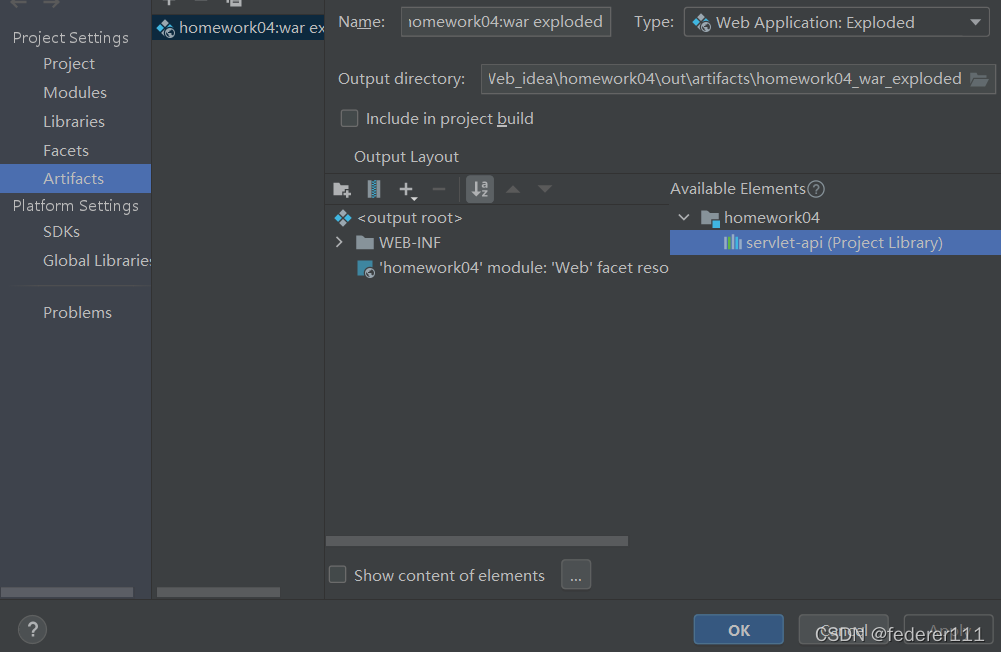
Find the Artifacts of Project Structure, double-click the jar package in the figure, and then click OK

At this time, we still report an error and need to restart idea. After restarting, we find out Println red fades and the problem is solved

Other Solutions (You can Take a Try):

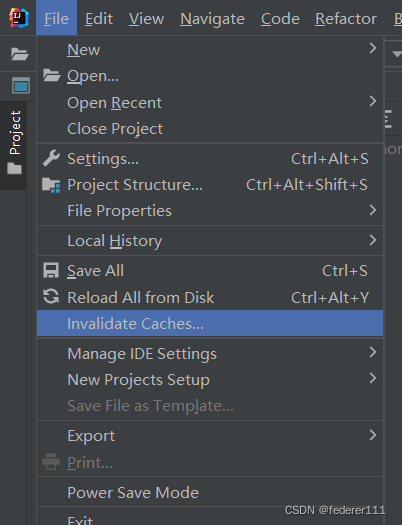
2. Direct file -> Invalidate Caches-> Invaliadate and Restart

3. Associate Tomcat to file -> Project Structure-> modules-> Dependencies-> Add library

4. When creating a new Java project, you should select Java Enterprise instead of webapplication in Java Java Enterprise will automatically associate Tomcat to dependencies)

[Solved] Mybatis Batch Modify Error: multi-statement not allow

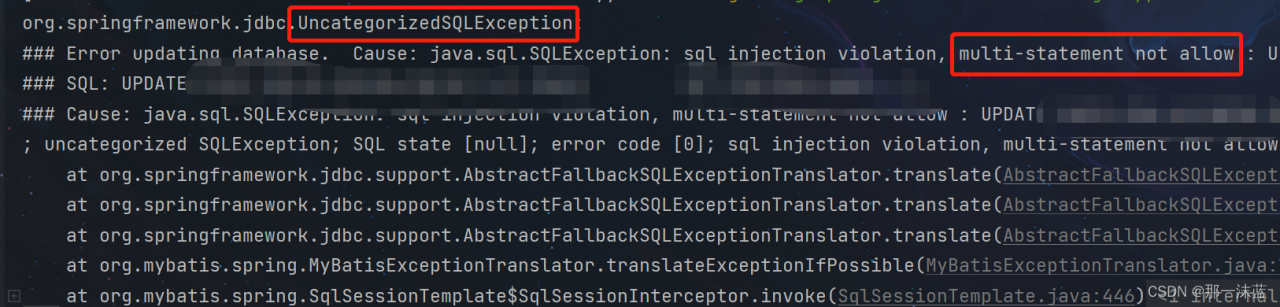
Error message:

Solution:
1. First add: &allowMultiQueries=true after the database connection string

jdbc:mysql://127.0.0.1:3306/test?useUnicode=true&characterEncoding=utf-8&useSSL=true&serverTimezone=GMT%2B8&allowMultiQueries=true

2. If there is still error, add a file

@Configuration
public class DruidConfig {   
     
     @Bean
     @ConfigurationProperties(prefix="spring.datasource")
     public DataSource druidPrimary(){
          DruidDataSource druidDataSource = new  DruidDataSource();
          List<Filter> filterList = new ArrayList<>();
          filterList.add(wallFilter());
          druidDataSource.setProxyFilters(filterList);
          return new DruidDataSource();     
     }    
     
     @Bean
    public WallFilter wallFilter(){
        WallFilter wallFilter = new WallFilter();
        wallFilter.setConfig(wallConfig());
        return wallFilter;
    }
     
     @Bean
    public WallConfig wallConfig() {
        WallConfig config = new WallConfig();
        config.setMultiStatementAllow(true);//允许一次执行多条语句
        config.setNoneBaseStatementAllow(true);//允许一次执行多条语句
        return config;
    }
}

[Solved] transformers Install Error: error can‘t find rust compiler

Install transformers after reinstalling the system. If you encounter a bug, record it and check it later.

When reinstalling with pip install transformers command under windows, an error is reported:

error: can't find Rust compiler
      
    If you are using an outdated pip version, it is possible a prebuilt wheel is available for this package but pip is not able to install from it. Installing from the wheel would avoid the need for a Rust compiler.
      
    To update pip, run:
      
        pip install --upgrade pip
      
    and then retry package installation.
      
    If you did intend to build this package from source, try installing a Rust compiler from your system package manager and ensure it is on the PATH during installation. Alternatively, rustup (available at https://rustup.rs) is the recommended way to download and update the Rust compiler toolchain.
    [end of output]
  
note: This error originates from a subprocess, and is likely not a problem with pip.
ERROR: Failed building wheel for tokenizers
Failed to build tokenizers
ERROR: Could not build wheels for tokenizers, which is required to install pyproject.toml-based projects

According to the error prompt, first run pip install -- upgrade pip is invalid, and then install Rust Compiler according to the error prompt. First go to the official website to download the corresponding installation package, select the 64-bit installation file according to my actual situation, then click the downloaded exe file to install, and select the default configuration during the installation process.

According to the instructions on the official website, all tools of rust are in the  ~/.cargo/bin directory includes commands:  rustc, cargo and rustup . Therefore, it needs to be configured into the environment variable, but windows will configure it automatically, but the configured environment variable will take effect only after restarting the computer under windows. After restarting, run the installation command again:

pip install transformers

The result is a successful installation. The screenshot is as follows:

[Solved] MXNet Error: ImportError: cannot import name _LIB

Reason: it should be that there are too many installation files, too many versions and chaotic installation of PIP and python in the system, so those unnecessary files need to be deleted

Solution: clean up the PIP installation location (operation in docker environment)

apt-get install python-pip
find/-name pip

Delete all folders output by the command, then uninstall PIP and reinstall it

apt-get remove python-pip

apt-get install python-pip

Check it again

find/-name pip

The correct should be as follows

The first folder should not matter. The following two folders must not be too many. Then install mxnet, and there will be no error when importing

[Solved] Ubuntu pip Install Error: which is not on PATH

First, let’s take a look at the warning information

  WARNING: The script normalizer is installed in '/home/llxy/.local/bin' which is not on PATH.
  Consider adding this directory to PATH or, if you prefer to suppress this warning, use --no-warn-script-location.

Solution: Configure environment variables

gedit ~/.bashrc
# Add the path at the end of the file, which comes from the warning issued when installing pip in the first step
export PATH=/home/llxy/.local/bin:$PATH
source ~/.bashrc

[Solved] IDEA Error: Unknown system variable ‘tx_isolation‘ at

IDEA Error: Unknown system variable ‘tx_isolation’ at

java.sql.SQLException: Unknown system variable ‘tx_isolation’ at com.mysql.jdbc.SQLError.createSQLException(SQLError.java:1094) at com.mysql.jdbc.MysqlIO.checkErrorPacket(MysqlIO.java:4208) at com.mysql.jdbc.MysqlIO.checkErrorPacket(MysqlIO.java:4140) at com.mysql.jdbc.MysqlIO.sendCommand(MysqlIO.java:2597) at com.mysql.jdbc.MysqlIO.sqlQueryDirect(MysqlIO.java:2758) at com.mysql.jdbc.ConnectionImpl.execSQL(ConnectionImpl.java:2820) at com.mysql.jdbc.ConnectionImpl.execSQL(ConnectionImpl.java:2769) at com.mysql.jdbc.StatementImpl.executeQuery(StatementImpl.java:1569) at com.mysql.jdbc.ConnectionImpl.getTransactionIsolation(ConnectionImpl.java:3372) at com.mchange.v2.c3p0.impl.NewPooledConnection.(NewPooledConnection.java:107) at com.mchange.v2.c3p0.WrapperConnectionPoolDataSource.getPooledConnection(WrapperConnectionPoolDataSource.java:198) at com.mchange.v2.c3p0.WrapperConnectionPoolDataSource.getPooledConnection(WrapperConnectionPoolDataSource.java:171) at com.mchange.v2.c3p0.impl.C3P0PooledConnectionPool$1PooledConnectionResourcePoolManager.acquireResource(C3P0PooledConnectionPool.java:137) at com.mchange.v2.resourcepool.BasicResourcePool.doAcquire(BasicResourcePool.java:1014) at com.mchange.v2.resourcepool.BasicResourcePool.access800 ( B a s i c R e s o u r c e P o o l . j a v a : 32 ) a t c o m . m c h a n g e . v 2. r e s o u r c e p o o l . B a s i c R e s o u r c e P o o l 800(BasicResourcePool.java:32) at com.mchange.v2.resourcepool.BasicResourcePool800(BasicResourcePool.java:32)atcom.mchange.v2.resourcepool.BasicResourcePoolAcquireTask.run(BasicResourcePool.java:1810) at com.mchange.v2.async.ThreadPoolAsynchronousRunner$PoolThread.run(ThreadPoolAsynchronousRunner.java:547)


Solution:
1. the version of mysql-connector-java is too low and you need to upgarde to version 8.0.*
2. After you had upgraded the version of mysql-connector-java, update the driver:
com.mysql.jdbc.Driver——>com.mysql.cj.jdbc.Driver