Error Messages:
RuntimeError: Invalid DISPLAY variable
Solution:
add the following codes
plt.switch_backend('agg')
after this line
import matplotlib.pyplot as plt
Done!
Error Messages:
RuntimeError: Invalid DISPLAY variable
Solution:
add the following codes
plt.switch_backend('agg')
after this line
import matplotlib.pyplot as plt
Done!
Building native extensions. This could take a while...
ERROR:  Error installing mongo:
        ERROR: Failed to build gem native extension.

    current directory: /usr/local/share/gems/gems/bson-4.14.1/ext/bson
/usr/bin/ruby -r ./siteconf20220325-427526-vfnj46.rb extconf.rb
mkmf.rb can't find header files for ruby at /usr/share/include/ruby.h

extconf failed, exit code 1

Gem files will remain installed in /usr/local/share/gems/gems/bson-4.14.1 for inspection.
Results logged to /usr/local/lib64/gems/ruby/bson-4.14.1/gem_make.out
Solution:
[root@DBAMAXWELL ~]# yum install ruby-devel
Last metadata expiration check: 1:48:48 ago on Fri 25 Mar 2022 05:54:43 PM CST.
Dependencies resolved.
===============================================================================================================================================================================================================
 Package                                     Architecture                            Version                                                                  Repository                                  Size
===============================================================================================================================================================================================================
Installing:
 ruby-devel                                  x86_64                                  2.5.9-109.module_el8.5.0+1097+b05a0601                                   appstream                                  126 k

Transaction Summary
===============================================================================================================================================================================================================
Install  1 Package

Total download size: 126 k
Installed size: 294 k
Is this ok [y/N]: y
Downloading Packages:
[MIRROR] ruby-devel-2.5.9-109.module_el8.5.0+1097+b05a0601.x86_64.rpm: Curl error (28): Timeout was reached for http://centosg9.centos.org/centos/8-stream/AppStream/x86_64/os/Packages/ruby-devel-2.5.9-109.module_el8.5.0%2b1097%2bb05a0601.x86_64.rpm [Operation too slow. Less than 1000 bytes/sec transferred the last 30 seconds]
ruby-devel-2.5.9-109.module_el8.5.0+1097+b05a0601.x86_64.rpm                                                                                                                   1.6 kB/s | 126 kB     01:17
---------------------------------------------------------------------------------------------------------------------------------------------------------------------------------------------------------------
Total                                                                                                                                                                          1.6 kB/s | 126 kB     01:18
Running transaction check
Transaction check succeeded.
Running transaction test
Transaction test succeeded.
Running transaction
  Preparing        :                                                                                                                                                                                       1/1
  Installing       : ruby-devel-2.5.9-109.module_el8.5.0+1097+b05a0601.x86_64                                                                                                                              1/1
  Running scriptlet: ruby-devel-2.5.9-109.module_el8.5.0+1097+b05a0601.x86_64                                                                                                                              1/1
  Verifying        : ruby-devel-2.5.9-109.module_el8.5.0+1097+b05a0601.x86_64                                                                                                                              1/1

Installed:
  ruby-devel-2.5.9-109.module_el8.5.0+1097+b05a0601.x86_64
Complete!
In the process of Jenkins building Maven project, the configuration source code management reports an error:
remote: Support for password authentication was removed on August 13, 2021. Please use a personal access token instead.
refs/heads/*: refs/remotes/origin/* "returned status code 128: stdout: stderr: fatal: unable to access
GitHub account password verification cannot be used:
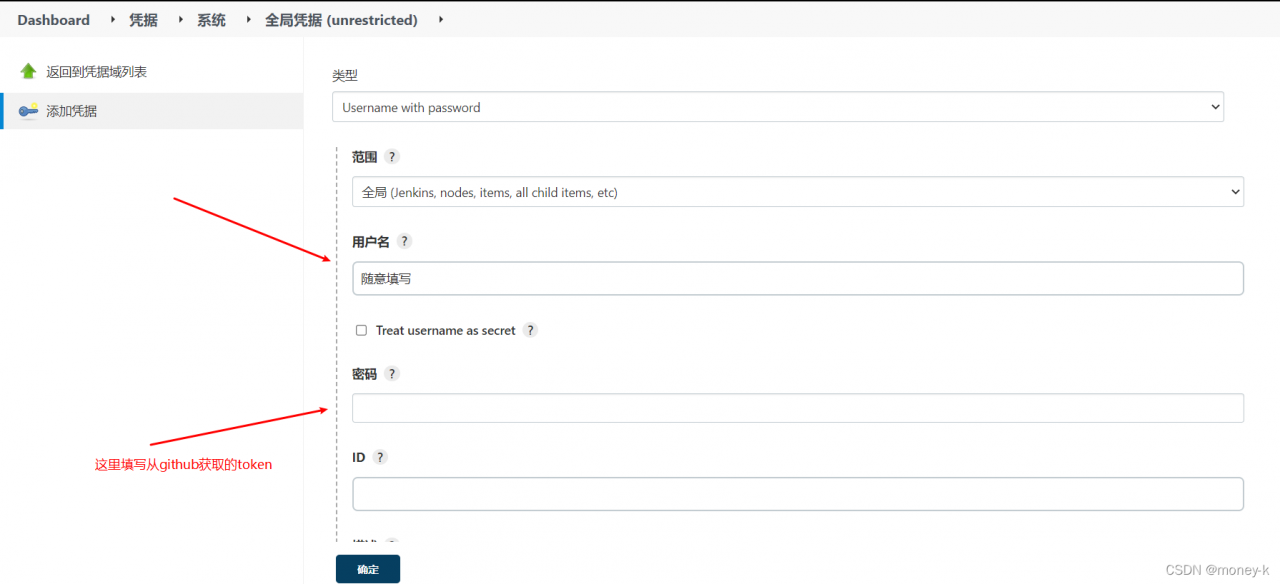
Solution: add a global certificate and use it in project configuration -> source management ->Use this voucher
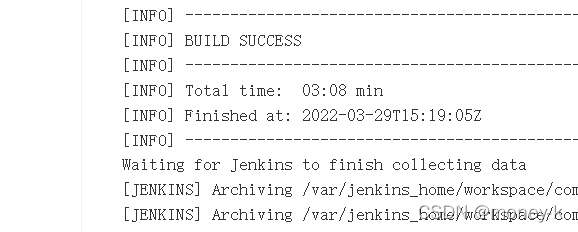
Build again:
install Jenkins command under docker (Mount: Java and Maven) pay attention to the host directory
docker run -d -p 8089:8080 -p 8090:50000 -v /usr/local/jenkins:/var/jenkins_home -v /usr/local/jdk:/usr/local/java -v /usr/local/dev/apache-maven-3.6.3:/usr/local/maven -v /etc/localtime:/etc/localtime --name myjenkins jenkins/jenkins:lts
preface
Solution to Channel-Offset Error when the same circuit module of ad20 PCB is multiplexed in room format
1. Problem phenomenon
We often encounter the following problems when using room format to quickly layout circuits of the same module,
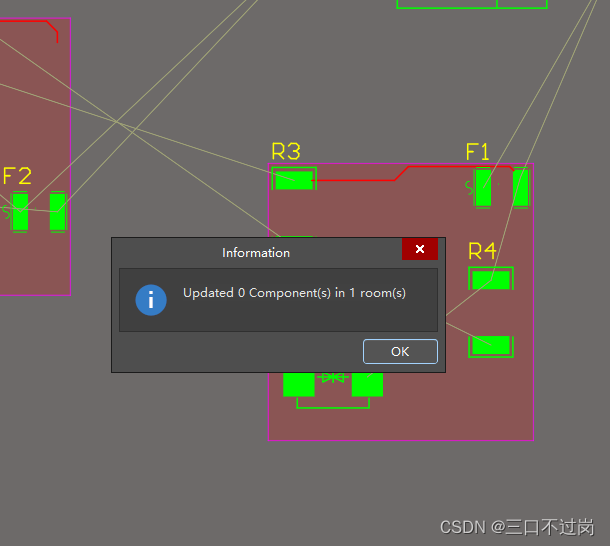
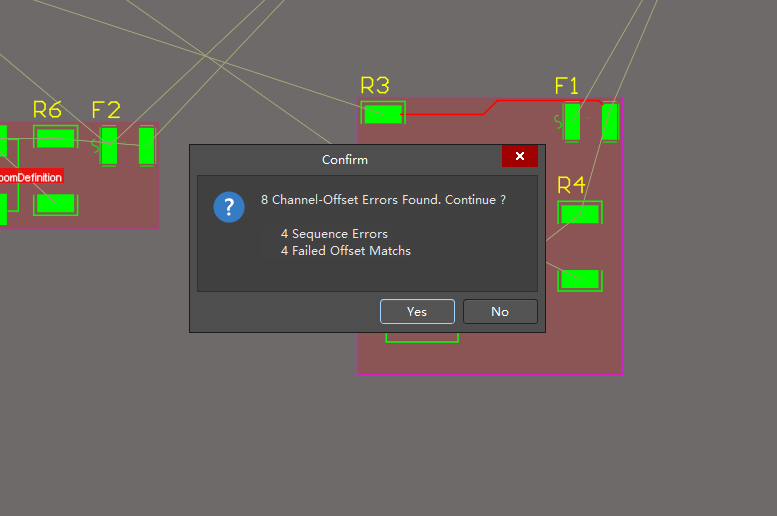
2. Solution
There are many processes of copying PCB layout of the same module circuit on the Internet, which will not be repeated here. The steps are similar, only the root cause of the problem
1: check whether the following three status settings are correct or not? 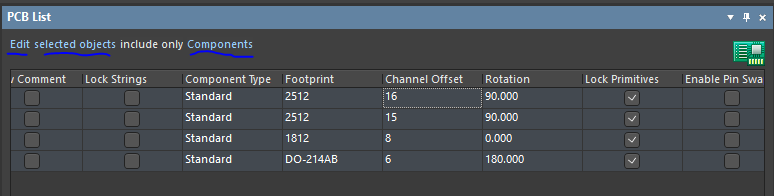
2: Channel Offset I recommend using the box, that is, select the first table and then pull down, paste the same; if you are in accordance with the EXCEL table as click Channel-Offset, and then right-click to copy, the results may lead to no copy success;.
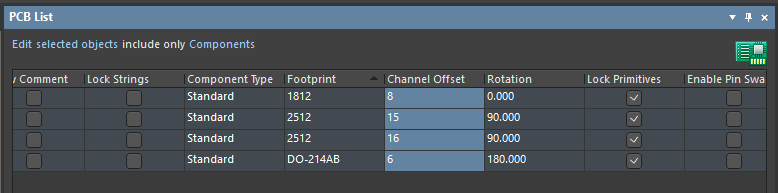
3: before pasting, pay attention to keep the device arrangement order of the original circuit and the target circuit consistent
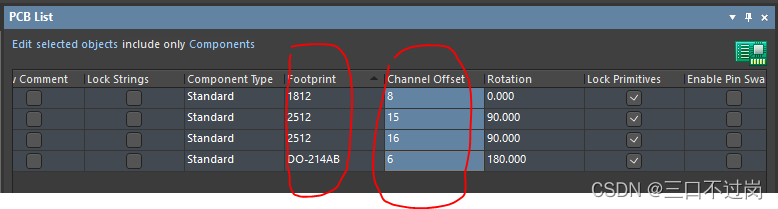
my main problem is the second point. I thought the copy was successful, but I didn’t copy it, so I didn’t paste it. Finally, I kept reporting errors, which annoyed me!
After this @truffle/hdwallet-provider will be successfully installed – then reference in required file as follows:
var HDWalletProvider = require("@truffle/hdwallet-provider");Reference: nodejs – Error: Cannot find module ‘truffle-hdwallet-provider’ – Ethereum Stack Exchange
When running detect.py for inference testing after yolov5 training is complete, this error occurs:
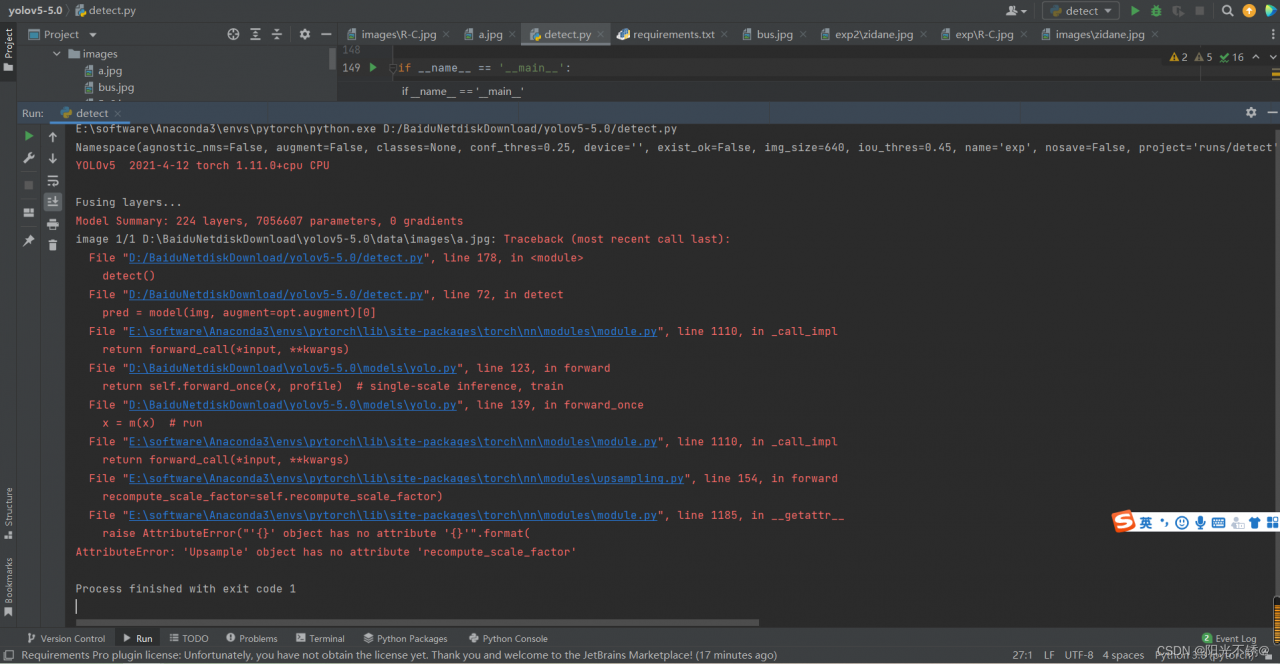
The specific error is as follows:

Solution:
1. Click the error reporting method below to enter:

2. Modify to the following code:

Done!
Error Messages:
The following error occurs from an application client or in the server.log:
java.security.AccessControlException: access denied
(java.util.PropertyPermission name write…
There is a permissions issue in the policy files. Either the client.policy for the application client or the server.policy for server side components does not have permission to set the property.
Solution:
Add the permission in client.policy (for the application client), or in server.policy (for EJB/web modules) for the application that needs to set the property. By default, applications only have “read” permission for properties.
For example, to grant read/write permission for all the files in the codebase directory, add or append the following to client.policy or server.policy:
grant codeBase "file:/.../build/sparc_SunOS/sec/-" {
   permission java.util.PropertyPermission "*", "read,write";
 };
Reference Resources: https://docs.oracle.com/cd/E19830-01/819-4726/fxxzk/index.html
Go to the running $JAVA_HOME and look for the xx.policy file, and then make changes in the contents
find . -type f -name "*.policy"
Note: local operation does not have such a problem and the production has, then you can consider the production of the corresponding file was modified to affect the original program (consider restoring the configuration to determine what configuration is affected)
Question:
1>c:\program files (x86)\microsoft sdks\windows\v7.0a\include\winbase.h(6132): warning C4229: used mnemonic error: ignore modifier on data
1>c:\program files (x86)\microsoft sdks\windows\v7.0a\include\winbase.h(6133): error C2226: syntax error : unexpected “LPSTR” type
Cause: Windows.h contains tchar.h and strsafe.h before Windows.h
Solution: Comment out the statement that contains tchar.h and strsafe.h before Windows.h.
Syntax Error: Error: ENOENT: no such file or directory, scandir ‘D:\LeStoreD
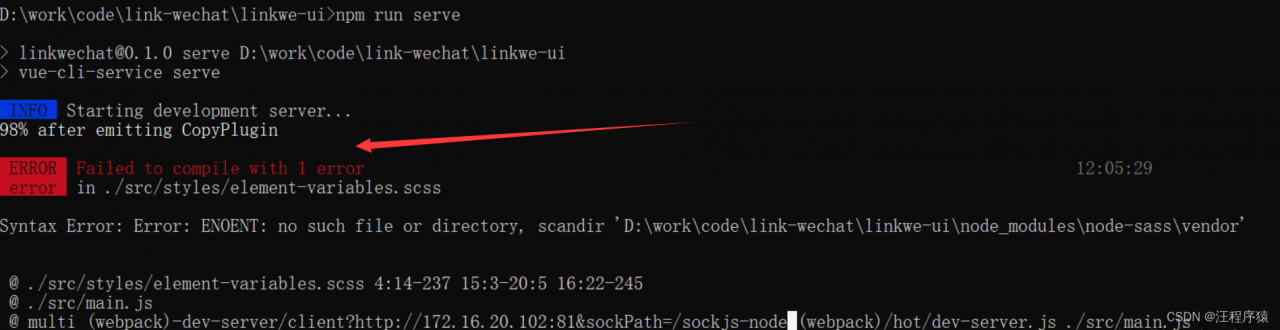
Solution: execute the following command
npm rebuild node-sass
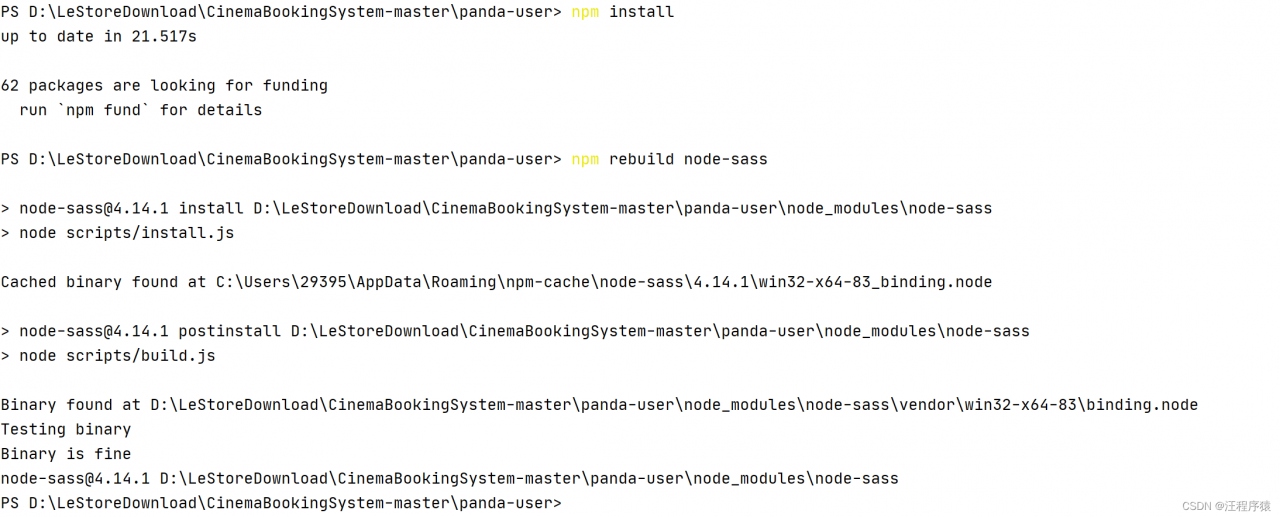
PS D:\LeStoreDownload\CinemaBookingSystem-master\panda-user> npm install
up to date in 21.517s

62 packages are looking for funding
  run `npm fund` for details

PS D:\LeStoreDownload\CinemaBookingSystem-master\panda-user> npm rebuild node-sass

> [email protected] install D:\LeStoreDownload\CinemaBookingSystem-master\panda-user\node_modules\node-sass
> node scripts/install.js

Cached binary found at C:\Users\29395\AppData\Roaming\npm-cache\node-sass\4.14.1\win32-x64-83_binding.node

> [email protected] postinstall D:\LeStoreDownload\CinemaBookingSystem-master\panda-user\node_modules\node-sass
> node scripts/build.js

Binary found at D:\LeStoreDownload\CinemaBookingSystem-master\panda-user\node_modules\node-sass\vendor\win32-x64-83\binding.node
Testing binary
Binary is fine
[email protected] D:\LeStoreDownload\CinemaBookingSystem-master\panda-user\node_modules\node-sass
The error prompt is as follows:
STATUS :220328:1302: 4.0 SOLVE/normd:  Epoch <2800 >    23:19:30.000
STATUS :220328:1302: 4.0 SOLVE/lsquar: Setting up mapping operator for bias parameters
WARNING:220328:1302: 4.0 SOLVE/dopt: No observation to satellite  1
WARNING:220328:1302: 4.0 SOLVE/dopt: No observation to satellite  2
WARNING:220328:1302: 4.0 SOLVE/dopt: No observation to satellite  3
WARNING:220328:1302: 4.0 SOLVE/dopt: No observation to satellite  4
WARNING:220328:1302: 4.0 SOLVE/dopt: No observation to satellite  5
WARNING:220328:1302: 4.0 SOLVE/dopt: No observation to satellite  6
WARNING:220328:1302: 4.0 SOLVE/dopt: No observation to satellite  7
WARNING:220328:1302: 4.0 SOLVE/dopt: No observation to satellite  8
WARNING:220328:1302: 4.0 SOLVE/dopt: No observation to satellite  9
WARNING:220328:1302: 4.0 SOLVE/dopt: No observation to satellite 10
WARNING:220328:1302: 4.0 SOLVE/dopt: No observation to satellite 11
WARNING:220328:1302: 4.0 SOLVE/dopt: No observation to satellite 12
WARNING:220328:1302: 4.0 SOLVE/dopt: No observation to satellite 13
WARNING:220328:1302: 4.0 SOLVE/dopt: No observation to satellite 14
WARNING:220328:1302: 4.0 SOLVE/dopt: No observation to satellite 15
WARNING:220328:1302: 4.0 SOLVE/dopt: No observation to satellite 16
WARNING:220328:1302: 4.0 SOLVE/dopt: No observation to satellite 17
WARNING:220328:1302: 4.0 SOLVE/dopt: No observation to satellite 18
WARNING:220328:1302: 4.0 SOLVE/dopt: No observation to satellite 19
WARNING:220328:1302: 4.0 SOLVE/dopt: No observation to satellite 20
WARNING:220328:1302: 4.0 SOLVE/dopt: No observation to satellite 21
WARNING:220328:1302: 4.0 SOLVE/dopt: No observation to satellite 22
WARNING:220328:1302: 4.0 SOLVE/dopt: No observation to satellite 23
WARNING:220328:1302: 4.0 SOLVE/dopt: No observation to satellite 24
WARNING:220328:1302: 4.0 SOLVE/dopt: No observation to satellite 25
WARNING:220328:1302: 4.0 SOLVE/dopt: No observation to satellite 26
WARNING:220328:1302: 4.0 SOLVE/dopt: No observation to satellite 27
WARNING:220328:1302: 4.0 SOLVE/dopt: No observation to satellite 28
WARNING:220328:1302: 4.0 SOLVE/dopt: No observation to satellite 29
WARNING:220328:1302: 4.0 SOLVE/dopt: No observation to satellite 30
WARNING:220328:1302: 4.0 SOLVE/dopt: No observation to satellite 31
WARNING:220328:1302: 4.0 SOLVE/dopt: No observation to satellite 32
STATUS :220328:1302: 4.0 SOLVE/lsquar: Calculating new normal equation submatrices
STATUS :220328:1302: 4.0 SOLVE/lsquar: Finding and removing dependent biases
STATUS :220328:1302: 4.0 SOLVE/lsquar: Applying a priori 1000.0 cyc sigma on biases
STATUS :220328:1302: 4.0 SOLVE/lsquar: Solving initial normal equations
STATUS :220328:1302: 4.0 SOLVE/lsquar: Finished solving initial normal equations
STATUS :220328:1302: 4.0 SOLVE/lsqerr: Constrained bias-free nrms =        NaN
STATUS :220328:1302: 4.0 SOLVE/lcloos: Performing LC biases-free loose solution
FATAL  :220328:1302: 4.0 SOLVE/lcloos: Inversion error in LCNORM(2)
STOP FATAL Error: Stop from report_stat
The solution is as follows:
The reason for the error should be that there are no synchronized observations, or the synchronized observations are too short.
Under the rinex folder, verify the gnss data file that confirms the synchronized observations.
Problem description
Edit formula:
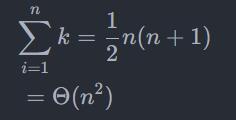
$\begin{align}
  & \sum\limits_{i=1}^{n}{k=\frac{1}{2}}n(n+1) \\
 & \text{       }=\Theta ({{n}^{2}}) \\
\end{align}$
Markdown Error: ParseError: KaTeX parse error: {align} can be used only in display mode
Error: KaTeX parse error: No such environment: align at position 7: \begin{̲a̲l̲i̲g̲n̲}̲ & \sum\limit…
Solution:
Modify {align} to {aligned}, KaTeX is not support align, you need to modify to aligned.
Layout
Next, modify the formula layout so that the formula surrounded by $$ by KaTeX is centered.
\limit can make n and i=1 located directly above and below the accumulation symbol.
$$
\begin{aligned}
\sum_{i=1}^{n} k &=\frac{1}{2} n(n+1) \\
&=\Theta \left(n^{2}\right)
\end{aligned}
$$
Error: Blocked mirror for repositories maven intellij
Error
the following errors appear when building a project:
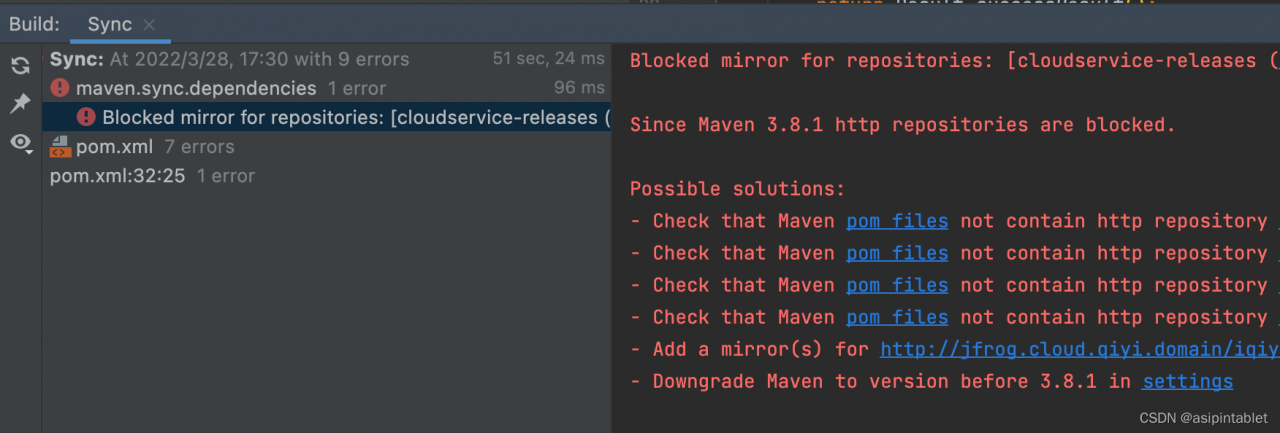
Solution:
First case
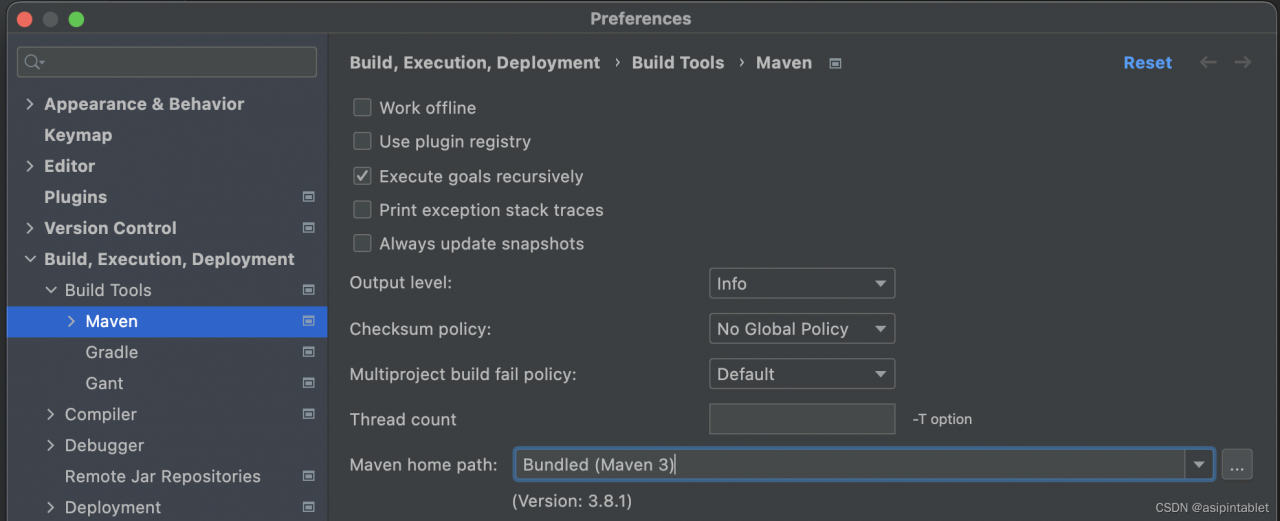
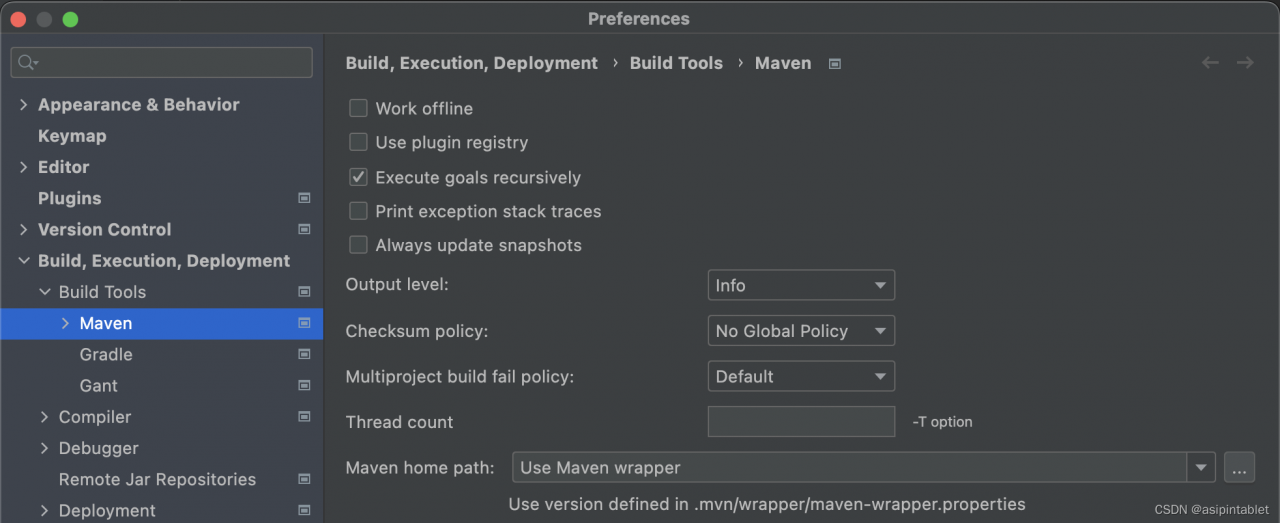
Change settings: preference -> Build, Execution, Deployment -> Build Tools -> Maven
Find Maven home path and change the default checked version to use Maven wrapper
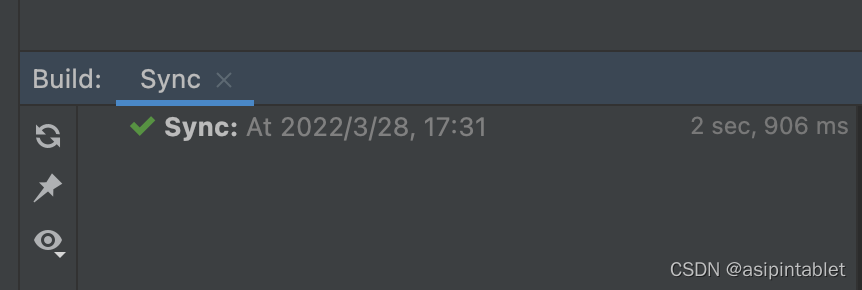
build succeefully
The second case
Maven is not installed. It is recommended to reinstall Maven
brew install maven