Author Archives: Robins

Prometheus 500 Internal Privoxy Error exception resolution

Prometheus 500 Internal Privoxy Error exception resolution
An exception while accessing Prometheus web-ui

Privoxy encountered an error while processing your request:
Could not load template file no-server-data or one of its included components.
Please contact your proxy administrator.
If you are the proxy administrator, please put the required file(s)in the (confdir)/templates directory. The location of the (confdir) directory is specified in the main Privoxy config file. (It's typically the Privoxy install directory).

The solution
, over the wall software is abnormal because the global agent is opened. Change the global agent to automatic agent to solve


npm error resolution

1, the Error: both Please install mysql2 package manually
A lot of what is said on the Internet is wrong, in fact, as long as the implementation of this sentence can solve the problem.

npm install mysql2 --save


Julia install and use the extension package package (ERROR: UndefVarError: Pkg not defined)

Julia1.0 has just been installed and I want to take the first step:

Pkg.add("PyPlot")

ERROR: ERROR: UndefVarError: Pkg not defined
 
Problem description:
Since Julia’s extension pack is installed using a Pkg extension pack, you must import Julia’s extension pack Pkg before installing the extension pack
 
Solutions:
Import the Pkg package
Then use the pkg. add() command

using Pkg
Pkg.add("Packagename")


mysql ERROR 1025 (HY000): Error on rename of

Today, when I was working on mysql, I wanted to drop the primary key, but there was an ERROR: mysql ERROR 1025 (HY000): ERROR on rename of… After searching the data, the solution is to remove the auto_increment if the primary key is auto_increment before dropping xx. If the primary key also has a foreign key constraint, the foreign key constraint is removed first. Once all of these additional constraints are removed, the primary key can be dropped safely.

Error watching file for changes: EMFILE

An error was reported during compilation when running the ReactNative project
Error watching file for changes: EMFILE

Fault cause:
Watchman is no longer available after upgrading. You need to reinstall watchman.
Solution
 
The first solution is to open the terminal and type the following commands in turn:
1. Uninstall the original installed Watchman:

brew uninstall --force watchman

2. Delete the original installation file: rm – rf/usr/local/var/run/watchman /
3. Reinstall watchman:
brew install watchman

brew install watchman

 
If the BREW command is prompted to report an error, please reinstall BREW, for specific reference
ReactNative environment configuration
 

Reproduced in: https://www.cnblogs.com/YooHoeh/p/9095406.html

Countermeasures for Error 1935 when installing MATLAB under Windows 10

The countermeasures of Error 1935 occurred when installing MATLAB in Windows 10 system
This error occurs because the installation process defaults to C++ 2005 instead of 2008, so bypass C++ 2005 to install. The specific steps are as follows:

1. Download the installer from the official website to MATLAB, the default download installation. My default installation directory is in the Download folder.

2. Found the installation file downloaded by the installer.
3. Enter the file and find the VC90 folder contained in the bin file (my default directory is “bin\win64\ VC90”)
4. Enter the vc90 folder, you should see two files, copy them to the previous folder (that is, “bin\win64”). The system will prompt you whether or not to replace, and select replace.

. Click setup.exe to execute the file again.
6. If the computer does not respond, choose to restart the computer. At this point, you should find that the system has an update during the restart.
7. After the restart, enter the folder “bin\win64” again, and find setup.exe.

8. Click setup.exe and you can follow instructions for a normal installation.
Reproduced reference: https://www.douban.com/note/515531145/

ERROR in AppModule is not an NgModule No NgModule metadata found for ‘AppModule’.

Angularjs2’s environmental problems have been solved for a long time.
Baidu’s answer is also a variety of also can not solve my problems.
Fortunately, these days after constant testing finally to solve.
ERROR in AppModule is not an NgModule
ERROR in ./src/main.ts
Module build failed: TypeError: Always read the property ‘newLine of undefined
at the Object. The getNewLineCharacter (d: \ web \ myNg \ ng2 \ node_modules \ typescript \ lib \ typescript js: 8062:20)
at the Object. The createCompilerHost (d:\web\myNg\ng2\node_modules\typescript\lib\typescript.js:44978:26)
at Object.ngcLoader (d:\web\myNg\ng2\node_modules@ngtools\webpack\src\loader.js:338:33)
@ multi webpack-dev-server/client?http://localhost:4200 ./src/main.ts
ERROR in ./src/polyfills.ts
Module build failed: TypeError: Always read the property ‘newLine of undefined
at the Object. The getNewLineCharacter (d: \ web \ myNg \ ng2 \ node_modules \ typescript \ lib \ typescript js: 8062:20)
at the Object. The createCompilerHost (d:\web\myNg\ng2\node_modules\typescript\lib\typescript.js:44978:26)
at Object.ngcLoader (d:\web\myNg\ng2\node_modules@ngtools\webpack\src\loader.js:338:33)
@ multi ./src/polyfills.ts
webpack: Failed to compile.
This error is due to a local Typescript version conflict. But I don’t know why NPM is doing this. The web site says its mechanism is not supposed to cause version conflicts. It hasn’t been studied.
first:
$ npm ls typescript
Enter this command to see the Typescript version and dependencies of your project.
Two different versions have been found in various places.
Angular \ CLi relies on 2.1.6, which is automatically generated, so you can’t go to the node_module to find package.json. Can’t change. To give up.
[email protected] d: \ web \ myNg \ ng2
– – @ presents/[email protected] – & gt; D :\web\myNg\ node_modules.1.0.0-rc-1 @angular\cli
| ± -@angular /[email protected]
| | ± -@angular /[email protected]
| |>0 -- [email protected] deduped extraneous>1>2 [email protected] extraneous
| ± -@angular /[email protected]
| | ± [email protected]
|>0>1 -- [email protected] extraneous>3 [email protected] extraneous
>4 ±- @ngtools/[email protected]
| |-- [email protected] extraneous |[email protected]
‘– [email protected]
Then the other 2.0.10 is configured in the project’s package.json. This is angular/ CLI generated, but it’s in our own project, so it’s easy to change typescript to the angular/ CLI dependent version.
“Typescript” : “~2.0.0”
“change this to
” typescript “:” ~2.1.0 “
~ means that NPM automatically downloads the nearest smaller version. For example, it’s 2.1.6 on my computer. In this case, the Angular/CLI dependencies themselves are completely consistent.
again
$ npm ls typescript
Found that the version is consistent.
[email protected] d: \ web \ myNg \ ng2
– – @ presents/[email protected] – & gt; D :\web\myNg\ node_modules.1.0.0-rc.1@@angular\cli
| -- [email protected][email protected] -> D: \ web \ myNg \ ng2 \ node_modules 2.1.6 @ typescript
$ ng serve
** NG Live Development Server is running on http://localhost:4200 **
Hash: b21dc5aadbb6f2b69213
Time: 10251ms
chunk {0} polyfills.bundle.js, polyfills.bundle.js.map (polyfills) 158 kB {4} [initial] [rendered]
chunk {1} main.bundle.js, Rendered]
chunk {3} vendor.js.map (main) 3.14 kB {3} [initial] [rendered]
chunk {2} styles. funds. js (styles) 9.84 kB {4} [initial] Version2.6 MB [initial] [br> chunk {4} invitation.js, ininvitation.js map (ininvitation.js) 0 bytes [entry] [rendered]
webpack: Compiled.
Get things done. I will make a note here in the hope that I can help others I meet later. After all, it’s such a waste of time.
Also, remember to use CNPM install when installing the environment. The native NPM Install will report an error because Node-Sass is blocked.
The original link: https://blog.csdn.net/yaerfeng/article/details/62610510

When writing teacher Wu Enda’s machine learning class, there was a problem with the result of using scipy.optimize.fmin_cg

Tips for training Completion:

Warning: Desired error not necessarily achieved due to precision loss.
         Current function value:

The reason is I in front of def computeCost (myTheta myX, myy, mylambda = 0.) : # cost function first parameter myTheta write wrong, right should be myTheta… This problem has been looking for an hour, sad, it is good to change

c++ compilation error prompt [Error] name lookup of’i’ changed for ISO’for’ scoping

In VC 6, the scope of I is the function scope, and the variable I can be used outside of the for loop, that is:
for (int I = 0; i < n; + + I) {
//…
}
cout< < i< < endl;
can be passed by
and
for (int I = 0; i < n; + + I) {
//…
}
int i = 5;
compilation error.
In DEV C++, the scope of I is limited to the for loop, that is:
for (int I = 0; i < n; + + I) {
//…
}
int i = 5;
can be passed by
and
for (int I = 0; i < n; + + I) {
//…
}
cout< < i< < endl;
compilation error.
In VS.net, both pass, but if I is used outside of the for loop, warnings are given.

CMDTUX_CAT:1685: ERROR: Application initialization failure

Start the error
The exec JREPSVR – A — – W – P/TBS/tuxedo/tuxedo12.1.1.0/udataobj/jolt/repository/jrepository:
CMDTUX_CAT: 1685: ERROR: Application initialization failure
CMDTUX_CAT:1685: ERROR: Application initialization failure

Check the ULOG
164052.pc0010! JREPSVR. 11278.2233255680.0: Can ‘t open/TBS tuxedo/tuxedo12.1.1.0 udataobj/jolt/repository/jrepository.
164052.pc0010! JREPSVR. 11278.2233255680.0: LIBTUX_CAT: 250: ERROR: tpsvrinit () failed

Perform add service
java bea.jolt.admin.jbld //***.***.***.***:18000 joltRep
An error
The Exception in the thread “main” bea. Jolt. SessionException: always connect to any// * * *. * * *. * * *. * * * : 18000.
“Reason: NwHdlr: IO exceptions
the at bea. Jolt. JoltSessionAttributes. GetDomainInfo (JoltSessionAttributes. Java: 642)
the at Bea. Jolt. JoltSessionAttributes. CheckAuthenticationLevel (JoltSessionAttributes. Java: 563)
the at bea. Jolt. Admin. JBLD. Login (JBLD. Java: 890)
the at bea.jolt.admin.jbld.main(jbld.java:850)

Solutions:
Modify/TBS tuxedo/tuxedo12.1.1.0 udataobj/jolt/repository/jrepository. The permission is solved for 777

Node-error cause analysis: Error: Multipart: Boundary not found

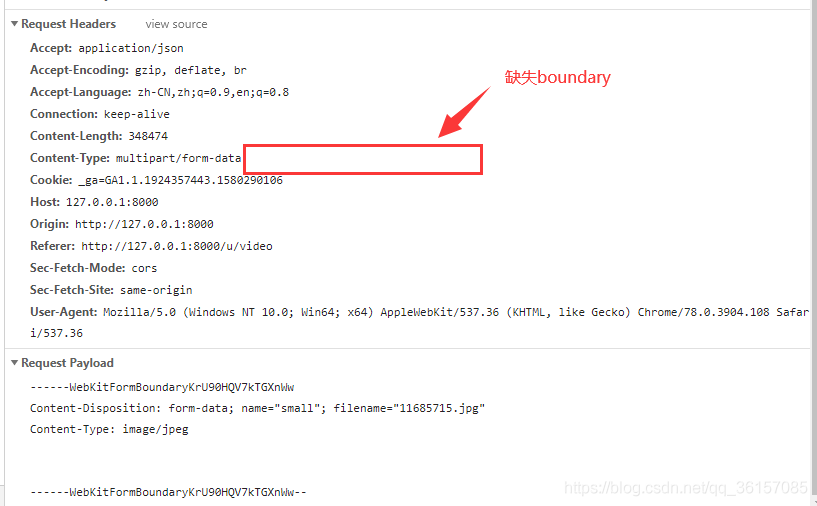
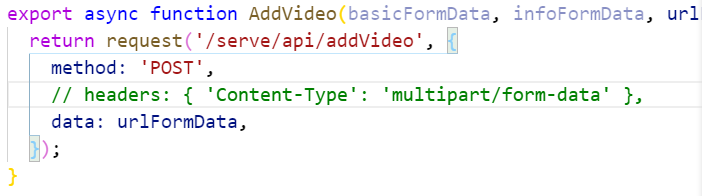
The front end USES umi-Request to upload the file and set it

The content-type headers: {‘ ‘:’ multipart/form – data ‘}

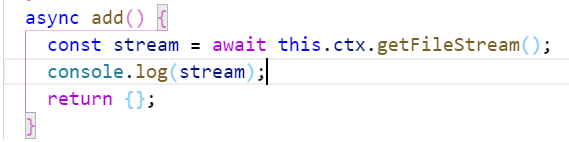
An error was reported when the back end received using Eggjs

nodejs.Error: Multipart: Boundary not found


Reason for the error: The Multipart did not find the Boundary
 
The upload file is a POST request form in multipart/form-data format

Content-type: The multipart/form-data did not follow the boundary
 
To sum up, the request header was set several times, overwriting the original form enctype= ‘multipart/form-data’
and finally finding the mutlipart/form-data in XHR. SetRequestHeader that overwriting the enctype setting in the form
To sum up: There is no need to set content-type: Mutipart /form-data repeatedly or it may overwrite the original and cause unexpected errors.


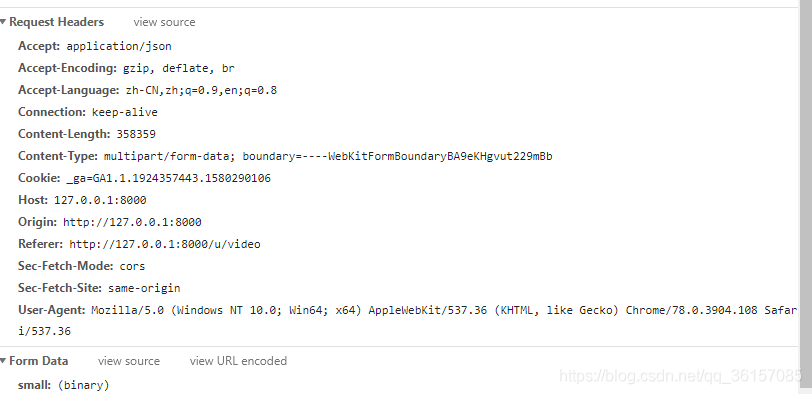
The Right way:
The front end

The back-end

The browser


https://blog.csdn.net/dongzhiliwansui/article/details/87896418