The BREW operation reported an error similar to the following:
brew install coreutils

Error: coreutils: /usr/local/Homebrew/Library/Taps/homebrew/homebrew-core/Formula/coreutils.rb:73: syntax error, unexpected << def caveats; <<~EOS

/usr/local/Homebrew/Library/Taps/homebrew/homebrew-core/Formula/coreutils.rb:77: syntax error, unexpected tIDENTIFIER, expecting keyword_end
can add a "gnubin" directory to your PATH from your bashrc like:

/usr/local/Homebrew/Library/Taps/homebrew/homebrew-core/Formula/coreutils.rb:77: syntax error, unexpected ':', expecting keyword_end
/usr/local/Homebrew/Library/Taps/homebrew/homebrew-core/Formula/coreutils.rb:79: dynamic constant assignment
    PATH="#{opt_libexec}/gnubin:$PATH"
         ^
/usr/local/Homebrew/Library/Taps/homebrew/homebrew-core/Formula/coreutils.rb:81: dynamic constant assignment
Additionally, you can access their man pag...
             ^
/usr/local/Homebrew/Library/Taps/homebrew/homebrew-core/Formula/coreutils.rb:81: syntax error, unexpected tIDENTIFIER, expecting keyword_do or '{' or '('
Additionally, you can access their man pages with ...
                     ^
/usr/local/Homebrew/Library/Taps/homebrew/homebrew-core/Formula/coreutils.rb:82: syntax error, unexpected tIDENTIFIER, expecting keyword_end
the "gnuman" directory to your MANPATH from your bashrc as well:
                      ^
/usr/local/Homebrew/Library/Taps/homebrew/homebrew-core/Formula/coreutils.rb:82: syntax error, unexpected ':', expecting keyword_end
/usr/local/Homebrew/Library/Taps/homebrew/homebrew-core/Formula/coreutils.rb:84: dynamic constant assignment
    MANPATH="#{opt_libexec}/gnuman:$MANPATH"`
Solutions:
rm -rf /usr/local/Homebrew/.git
brew update
brew config
https://github.com/Homebrew/brew/issues/3353
Troubleshooting of Jenkins upgrade to 2.42 JUnit test report
Jenkins 2.39 upgrade to Jenkins 2.42 with an error during build.
Recording test results
ERROR: Step ‘Publish JUnit test result report’ failed: No test report files were found. Configuration error?
Finished: FAILURE
No changes have been made during this period, except to upgrade the local gradle from 2.11 to Gradle 3.3
Go to the project configuration selection and find the red prompt.

According to Jenkins:
'build/test-results/*.xml' doesn't match anything: 'build' exists but not 'build/test-results/*.xml'

Fileset ‘includes’ setting that specifies the generated raw XML report files, such as ‘myproject/target/test-reports/*.xml’. Basedir of the fileset is the workspace root.
Modified the Settings format by
build/test-results/*.xmlInstead of
build/test-results/**/*.xmlRebuild and pass.
The format of reference:
http://ant.apache.org/manual/Types/patternset.html
Istio Error 503 upstream connect error or disconnect/reset before headers. reset reason: connect
Error description:
each time you upgrade the microservice (update the microservice version), there is a period of time when the visitor reports 503. istio-proxy + connect error or disconnect/reset before headers.
Reason:
Kubernetes detects Pod readiness (Running status) when a container in the Pod is ready. But once Istio is deployed, the first Pod ready is the istio-proxy container. istio-proxy receives the traffic and finds that upstream microservice has not been started, so istio-proxy will return 503.
The solution:
once you know why, the idea is simple. Just tell Kubernetes that Pod is ready after all the containers in the Pod have been started. Adding readinessprobes to other containers in Pod allows Kubernetes to confirm that the container is ready before forwarding the traffic. As added in the Pod template
livenessProbe:
      httpGet:
        path: /healthz
        port: 80
        httpHeaders:
      initialDelaySeconds: 10
      periodSeconds: 3
The readinessProbe reference: https://k8smeetup.github.io/docs/tasks/configure-pod-container/configure-liveness-readiness-probes/
Can’t initialize OCI. Error – 1 appears in toad for Oracle
Solutions:
(1) Environment variable: Simply set path and add the path of Oracle Client to path
(2) Network /admin: add tnsnames.ora and find one or copy one
(3) The key step: Copy Toad’s entire folder to the Oracle Client path
Caused by: java.io.IOException: CreateProcess error=87, The parameter is incorrect
Check buld.xml for configuration items
fork="true"Ant will create a new virtual machine to run the compile task, so here’s the problem, this will involve passing parameters between processes
https://support.microsoft.com/zh-cn/kb/830473, more than xp, the longest can support 8091, Win2000 longest support 2047, actually on the server manually run the same error, should be a directory hierarchy is too long, too deep to parameters than the longest support character;
Solution: Remove fork=”true” from build.xml and run again
git pull error: unable to unlink old (Permission denied)
Git pull error: pull to unlink old (Permission denied)
may be a file (such as font file) that is being pulled by the program/system, try to close the program or restart the system before git pull
Some mistakes in using NPM
# npm install -g hexo-cli
/usr/local/bin/hexo -> /usr/local/lib/node_modules/hexo-cli/bin/hexo

> [email protected] install /usr/local/lib/node_modules/hexo-cli/node_modules/fsevents
> node install

node-pre-gyp ERR! Tried to download(undefined): https://fsevents-binaries.s3-us-west-2.amazonaws.com/v1.1.3/fse-v1.1.3-node-v59-darwin-x64.tar.gz
node-pre-gyp ERR! Pre-built binaries not found for [email protected] and [email protected] (node-v59 ABI, unknown) (falling back to source compile with node-gyp)
gyp ERR! clean error
gyp ERR! stack Error: EACCES: permission denied, rmdir 'build'
gyp ERR! System Darwin 17.4.0
gyp ERR! command "/usr/local/bin/node" "/usr/local/lib/node_modules/npm/node_modules/node-gyp/bin/node-gyp.js" "clean"
gyp ERR! cwd /usr/local/lib/node_modules/hexo-cli/node_modules/fsevents
gyp ERR! node -v v9.8.0
gyp ERR! node-gyp -v v3.6.2
gyp ERR! not ok
node-pre-gyp ERR! build error
node-pre-gyp ERR! stack Error: Failed to execute '/usr/local/bin/node /usr/local/lib/node_modules/npm/node_modules/node-gyp/bin/node-gyp.js clean' (1)
node-pre-gyp ERR! stack     at ChildProcess.<anonymous> (/usr/local/lib/node_modules/hexo-cli/node_modules/fsevents/node_modules/node-pre-gyp/lib/util/compile.js:83:29)
node-pre-gyp ERR! stack     at ChildProcess.emit (events.js:180:13)
node-pre-gyp ERR! stack     at maybeClose (internal/child_process.js:936:16)
node-pre-gyp ERR! stack     at Process.ChildProcess._handle.onexit (internal/child_process.js:220:5)
node-pre-gyp ERR! System Darwin 17.4.0
node-pre-gyp ERR! command "/usr/local/bin/node" "/usr/local/lib/node_modules/hexo-cli/node_modules/fsevents/node_modules/node-pre-gyp/bin/node-pre-gyp" "install" "--fallback-to-build"
node-pre-gyp ERR! cwd /usr/local/lib/node_modules/hexo-cli/node_modules/fsevents
node-pre-gyp ERR! node -v v9.8.0
node-pre-gyp ERR! node-pre-gyp -v v0.6.39
node-pre-gyp ERR! not ok
Failed to execute '/usr/local/bin/node /usr/local/lib/node_modules/npm/node_modules/node-gyp/bin/node-gyp.js clean' (1)
npm WARN optional SKIPPING OPTIONAL DEPENDENCY: [email protected] (node_modules/hexo-cli/node_modules/fsevents):
npm WARN optional SKIPPING OPTIONAL DEPENDENCY: [email protected] install: `node install`
npm WARN optional SKIPPING OPTIONAL DEPENDENCY: Exit status 1

+ [email protected]
updated 1 package in 15.117s
The answer from the stupid network was to remove Node-gyp, so I went with RM-RF node-gyp, killing the entire Node-gyp directory
When it was executed again, another mistake was made:
npm ERR! Cannot find module '../node_modules/node-gyp/bin/node-gyp'Error 1, hexo-CLI cannot be installed because it cannot be downloaded. Solution: CNPM install -g Hexo-CLi can be executed again using CNPM
Second, I can’t find the module. I delete it before and install it again: Sudo NPM install Node-gyp-g
2. Error: ENOENT: no such file or directory, UV_Cwd Error
After deleting all the files in the blog folder, execute the command in Terminal again and report the following error:
path.js:1142
          cwd = process.cwd();
                        ^
Error: ENOENT: no such file or directory, uv_cwd
    at Error (native)
    at Object.resolve (path.js:1142:25)
    at Function.Module._resolveLookupPaths (module.js:390:17)
    at Function.Module._resolveFilename (module.js:460:31)
    at Function.Module._load (module.js:417:25)
    at Module.require (module.js:497:17)
    at require (internal/module.js:20:19)
    at /usr/local/lib/node_modules/npm/bin/npm-cli.js:25:13
    at Object.<anonymous> (/usr/local/lib/node_modules/npm/bin/npm-cli.js:75:3)
    at Module._compile (module.js:570:32)
Solution: Restart a Terminal
PHP Error Object of class mysqli could not be converted to string in
An object of class mysqli_result cannot be converted to a string
Check the code:
    function query($sql){
        echo $sql;
        $query = mysqli_query(self::$con,$sql)or die(mysqli_error(self::$con));

        return $query;
    }
Mysqli_result is returned by mysqli_query, so the error should be on the return value.
You cannot directly output an object as a string in PHP5 above.
So just change the type of the return value.
    function query($sql){
        echo $sql;
        $query = mysqli_query(self::$con,$sql)or die(mysqli_error(self::$con));
        return  mysqli_fetch_array($query);
        //return $query;
    }
Returns as an array with the mysqli_fetch_array() function.
ERROR in Entry module not found Error Can t resolve
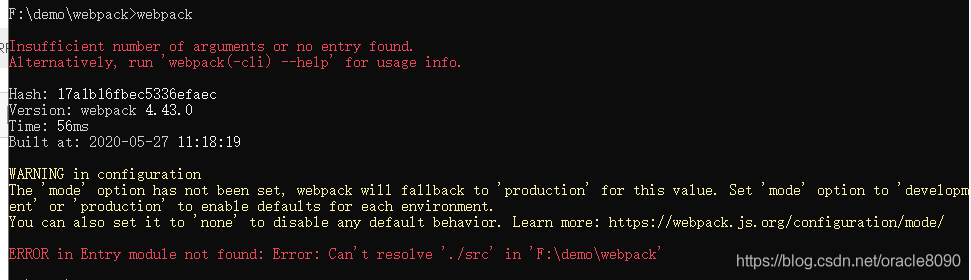
The problem could occur in two situations,
1. No SRC directory was created in the root of the project
2. Check if webpack.config.js is in the root directory
My reason is that I put Webpack.config. js under SRC
Solve the error error fetching remote repo origin problem in Git on Jenkins
The following error popped up in the Jenkins compilation today
 > git fetch --tags --progress https://github.com/XXX.git +refs/heads/*:refs/remotes/origin/*
ERROR: Error fetching remote repo 'origin'
But then there are some logs
stdout:
stderr: From https://github.com/XXX
 ! [rejected]          snap/master/20191024_1946 -> snap/master/20191024_1946  (would clobber existing tag)
To prevent any last minute code>Error remote repo ‘origin’ after last minute promotion, all methods were tried and failed.
- gilis-remote-t view remote tagsgit tag-l view local taggtag-d XXX ## delete local taggit fetch origin –prune tags ## finally pull remote tags
Problem solving
WebView loadrequest request request error “nsurlconnection finished with error – Code – 1022”
Execute the following code
[self.webView loadRequest:[NSURLRequest requestWithURL:[NSURL URLWithString:@"http://www.bing.com"]]];WebView didFailLoadWithError:(UIWebView *)webView didFailLoadWithError:(NSError *)error printed as follows
1 [6587:75627] NSURLConnection finished with error - code -1022
2 [6587:75574] Error Domain=NSURLErrorDomain Code=-1022 "The resource could not be loaded because the App Transport Security policy
3 requires the use of a secure connection." UserInfo={NSUnderlyingError=0x600000641f50
4 {Error Domain=kCFErrorDomainCFNetwork Code=-1022 "The resource could not be loaded because the App Transport Security policy requires
5 the use of a secure connection." UserInfo={NSErrorFailingURLStringKey=http://www.bing.com/,
6 NSLocalizedDescription=The resource could not be loaded because the App Transport Security policy requires the use of a secure connection.,
7  NSErrorFailingURLKey=http://www.bing.com/}}, NSErrorFailingURLStringKey=http://www.bing.com/, NSErrorFailingURLKey=http://www.bing.com/,
8 NSLocalizedDescription=The resource could not be loaded because the App Transport Security policy requires the use of a secure connection.}
The solution is simple:
URLString must use HTTPS to request the WebView to display properly
But then I found out that I had to load http://localhost:8080 and then, sadly, I’m going to have to look at the mechanics, and in XCode 9 I’m going to get an error message that’s pretty obvious
The resource could not be loaded because the App Transport Security policy
Go to Baidu ATS Policy, you can know the answer in detail, in SupportFiles-> Info.plist file to add the following attributes, there is a direct option, do not need to fill out

done!
Reproduced in: https://www.cnblogs.com/zhouhui231/p/8572705.html
runtime error program:c :\windows\ explorer.exe (appears after installing the win8 security update) why?
Runtime Error Program: C :\ Windows \ Explorer.exe (appears after installing the Win8 security update patch) Why?
zlb1201
Grade 12
Classification:
Windows 8
Has been accessed 37 times
2013.07.12
prosecution

ytreo
Adoption rates: 56%
Level 7
2013.07.13
Today came to client companies, an employee suddenly told me that her computer has a problem, I hurriedly in the past to see, found that the problem of the specific situation is as follows: normal operation of the computer, all procedures can be normal open closed, but when open a folder on a network drive appeared abnormal, click on the folder will pop up an Error dialog: the Runtime Error C: \ Windows \ explorer exe…
a very strange problem, open folder prompt this error. Without any idea, I have no choice but to turn to Google and Baidu for help. The search results generally have the following solutions:
1. Turn off Internet options — advanced — enable third-party browser support (uncheck the preceding check);
2. Scan for viruses, trojans, malware, useless plug-ins and so on;
3. Error caused by folder preview problem: (CMD – run – regsvr32 /u shmedia. DLL can solve runtime error program: C:\ Windows \explorer.exe)
4. Disk problems, resulting in Visual C++ problems, so prompt error, can my computer – C disk – right – properties – tools – error checking – start checking (may prompt restart to check the disk)
5. Search Microsoft’s official forum to get an answer to a related question:
Download an run ShellExView ( http://www.nirsoft.net/utils/shexview.html) and disable all NON Microsoft Shell extensions! If it’s fixed, try to enable them 50:50 until you find out which extension causes the issue.
finally, after trying the first four solutions, the problem was still unresolved, so I fluked the fifth solution and used ShellexView. After checking all Shell Extensions, some non-Microsoft plug-ins (such as PDF and CAD) were selectively disabled, and the Runtime Error was not reported again.
From here http://lance0215.blog.51cto.com/629043/593738
Q&a from 360