Author Archives: Robins

[Solved] kafka startup Error: java.net.ConnectException: Connection refused

0. Installation reference

Note that the new version of Kafka does not need to install zookeeper separately. You can directly use the self-contained one. Of course, you can also install it separately

1. Error message

Kafka startup error: java.net.ConnectException: Connection refused

2. Cause of error

Zookeeper was not started before Kafka was started

3. Solution

Start zookeeper first and then Kafka again

4. Start command

4.1 to Kafka installation directory

cd /usr/src/kafka_2.12-3.1.0/

4.2 start zookeeper (the latest version of the zookeeper from Kafka is used here)

bin/zookeeper-server-start.sh config/zookeeper.properties 

4.3 start Kafka

bin/kafka-server-start.sh config/server.properties

4.4 close Kafka

bin/kafka-server-stop.sh config/server.properties

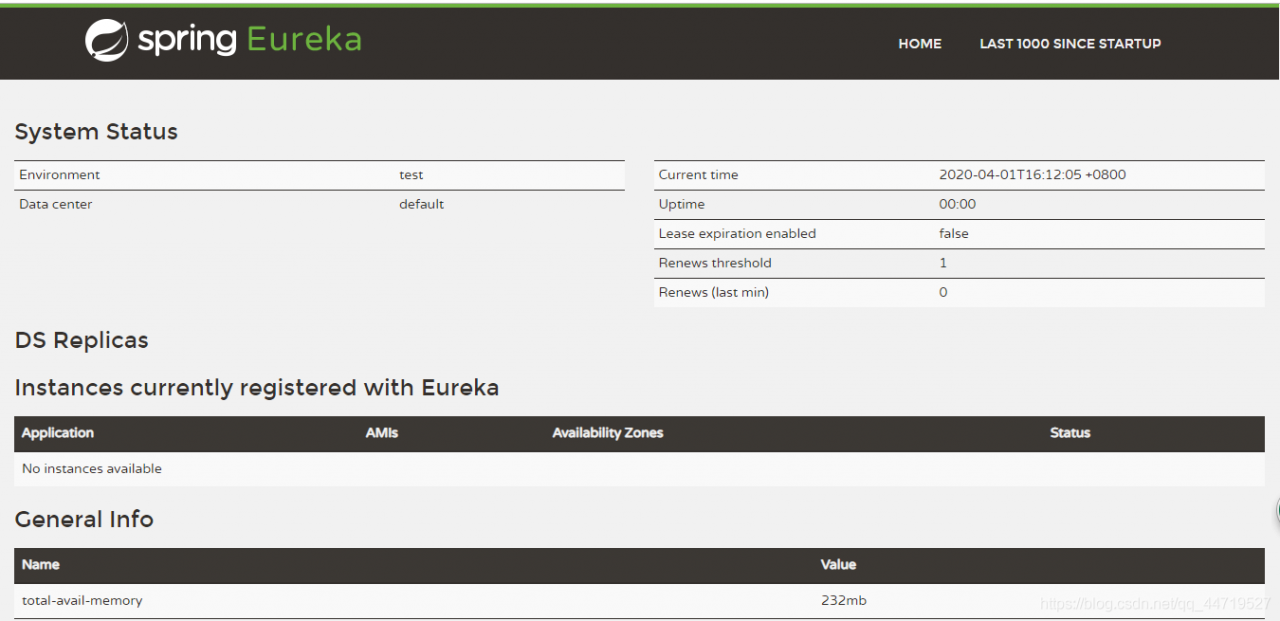
[Solved] eureka Startup Error: Unable to start web … nested exception is org.springframework.boot.web.server.WebS

1. ERROR MESSAGE
Unable to start web server; nested exception is org.springframework.boot.web.server.WebServerException: Unable to start embedded Tomcat at

Error starting ApplicationContext. To display the conditions report re-run your application with 'debug' enabled.
2020-04-01 16:13:51.487 ERROR 17944 --- [           main] o.s.boot.SpringApplication               : Application run failed

org.springframework.context.ApplicationContextException: Unable to start web server; nested exception is org.springframework.boot.web.server.WebServerException: Unable to start embedded Tomcat
	at org.springframework.boot.web.servlet.context.ServletWebServerApplicationContext.onRefresh(ServletWebServerApplicationContext.java:156) ~[spring-boot-2.2.0.RELEASE.jar:2.2.0.RELEASE]
	at org.springframework.context.support.AbstractApplicationContext.refresh(AbstractApplicationContext.java:544) ~[spring-context-5.2.0.RELEASE.jar:5.2.0.RELEASE]
	at org.springframework.boot.web.servlet.context.ServletWebServerApplicationContext.refresh(ServletWebServerApplicationContext.java:141) ~[spring-boot-2.2.0.RELEASE.jar:2.2.0.RELEASE]
	at org.springframework.boot.SpringApplication.refresh(SpringApplication.java:747) [spring-boot-2.2.0.RELEASE.jar:2.2.0.RELEASE]
	at org.springframework.boot.SpringApplication.refreshContext(SpringApplication.java:397) [spring-boot-2.2.0.RELEASE.jar:2.2.0.RELEASE]
	at org.springframework.boot.SpringApplication.run(SpringApplication.java:315) [spring-boot-2.2.0.RELEASE.jar:2.2.0.RELEASE]
	at org.springframework.boot.SpringApplication.run(SpringApplication.java:1226) [spring-boot-2.2.0.RELEASE.jar:2.2.0.RELEASE]
	at org.springframework.boot.SpringApplication.run(SpringApplication.java:1215) [spring-boot-2.2.0.RELEASE.jar:2.2.0.RELEASE]
	at com.beinuan.spring.cloud.EurekaAppBootstarp.main(EurekaAppBootstarp.java:12) [classes/:na]
Caused by: org.springframework.boot.web.server.WebServerException: Unable to start embedded Tomcat
	at org.springframework.boot.web.embedded.tomcat.TomcatWebServer.initialize(TomcatWebServer.java:126) ~[spring-boot-2.2.0.RELEASE.jar:2.2.0.RELEASE]
	at org.springframework.boot.web.embedded.tomcat.TomcatWebServer.<init>(TomcatWebServer.java:88) ~[spring-boot-2.2.0.RELEASE.jar:2.2.0.RELEASE]
	at org.springframework.boot.web.embedded.tomcat.TomcatServletWebServerFactory.getTomcatWebServer(TomcatServletWebServerFactory.java:438) ~[spring-boot-2.2.0.RELEASE.jar:2.2.0.RELEASE]
	at org.springframework.boot.web.embedded.tomcat.TomcatServletWebServerFactory.getWebServer(TomcatServletWebServerFactory.java:191) ~[spring-boot-2.2.0.RELEASE.jar:2.2.0.RELEASE]
	at org.springframework.boot.web.servlet.context.ServletWebServerApplicationContext.createWebServer(ServletWebServerApplicationContext.java:180) ~[spring-boot-2.2.0.RELEASE.jar:2.2.0.RELEASE]
	at org.springframework.boot.web.servlet.context.ServletWebServerApplicationContext.onRefresh(ServletWebServerApplicationContext.java:153) ~[spring-boot-2.2.0.RELEASE.jar:2.2.0.RELEASE]
	... 8 common frames omitted
Caused by: org.springframework.beans.factory.UnsatisfiedDependencyException: Error creating bean with name 'traceFilterRegistration' defined in class path resource [org/springframework/cloud/netflix/eureka/server/EurekaServerAutoConfiguration.class]: Unsatisfied dependency expressed through method 'traceFilterRegistration' parameter 0; nested exception is org.springframework.beans.factory.NoSuchBeanDefinitionException: No qualifying bean of type 'javax.servlet.Filter' available: expected at least 1 bean which qualifies as autowire candidate. Dependency annotations: {@org.springframework.beans.factory.annotation.Qualifier(value=httpTraceFilter)}
	at org.springframework.beans.factory.support.ConstructorResolver.createArgumentArray(ConstructorResolver.java:787) ~[spring-beans-5.2.0.RELEASE.jar:5.2.0.RELEASE]
	at org.springframework.beans.factory.support.ConstructorResolver.instantiateUsingFactoryMethod(ConstructorResolver.java:528) ~[spring-beans-5.2.0.RELEASE.jar:5.2.0.RELEASE]
	at org.springframework.beans.factory.support.AbstractAutowireCapableBeanFactory.instantiateUsingFactoryMethod(AbstractAutowireCapableBeanFactory.java:1338) ~[spring-beans-5.2.0.RELEASE.jar:5.2.0.RELEASE]
	at org.springframework.beans.factory.support.AbstractAutowireCapableBeanFactory.createBeanInstance(AbstractAutowireCapableBeanFactory.java:1177) ~[spring-beans-5.2.0.RELEASE.jar:5.2.0.RELEASE]
	at org.springframework.beans.factory.support.AbstractAutowireCapableBeanFactory.doCreateBean(AbstractAutowireCapableBeanFactory.java:557) ~[spring-beans-5.2.0.RELEASE.jar:5.2.0.RELEASE]
	at org.springframework.beans.factory.support.AbstractAutowireCapableBeanFactory.createBean(AbstractAutowireCapableBeanFactory.java:517) ~[spring-beans-5.2.0.RELEASE.jar:5.2.0.RELEASE]
	at org.springframework.beans.factory.support.AbstractBeanFactory.lambda$doGetBean$0(AbstractBeanFactory.java:323) ~[spring-beans-5.2.0.RELEASE.jar:5.2.0.RELEASE]
	at org.springframework.beans.factory.support.DefaultSingletonBeanRegistry.getSingleton(DefaultSingletonBeanRegistry.java:222) ~[spring-beans-5.2.0.RELEASE.jar:5.2.0.RELEASE]
	at org.springframework.beans.factory.support.AbstractBeanFactory.doGetBean(AbstractBeanFactory.java:321) ~[spring-beans-5.2.0.RELEASE.jar:5.2.0.RELEASE]
	at org.springframework.beans.factory.support.AbstractBeanFactory.getBean(AbstractBeanFactory.java:207) ~[spring-beans-5.2.0.RELEASE.jar:5.2.0.RELEASE]
	at org.springframework.boot.web.servlet.ServletContextInitializerBeans.getOrderedBeansOfType(ServletContextInitializerBeans.java:211) ~[spring-boot-2.2.0.RELEASE.jar:2.2.0.RELEASE]
	at org.springframework.boot.web.servlet.ServletContextInitializerBeans.getOrderedBeansOfType(ServletContextInitializerBeans.java:202) ~[spring-boot-2.2.0.RELEASE.jar:2.2.0.RELEASE]
	at org.springframework.boot.web.servlet.ServletContextInitializerBeans.addServletContextInitializerBeans(ServletContextInitializerBeans.java:96) ~[spring-boot-2.2.0.RELEASE.jar:2.2.0.RELEASE]
	at org.springframework.boot.web.servlet.ServletContextInitializerBeans.<init>(ServletContextInitializerBeans.java:85) ~[spring-boot-2.2.0.RELEASE.jar:2.2.0.RELEASE]
	at org.springframework.boot.web.servlet.context.ServletWebServerApplicationContext.getServletContextInitializerBeans(ServletWebServerApplicationContext.java:253) ~[spring-boot-2.2.0.RELEASE.jar:2.2.0.RELEASE]
	at org.springframework.boot.web.servlet.context.ServletWebServerApplicationContext.selfInitialize(ServletWebServerApplicationContext.java:227) ~[spring-boot-2.2.0.RELEASE.jar:2.2.0.RELEASE]
	at org.springframework.boot.web.embedded.tomcat.TomcatStarter.onStartup(TomcatStarter.java:53) ~[spring-boot-2.2.0.RELEASE.jar:2.2.0.RELEASE]
	at org.apache.catalina.core.StandardContext.startInternal(StandardContext.java:5135) ~[tomcat-embed-core-9.0.27.jar:9.0.27]
	at org.apache.catalina.util.LifecycleBase.start(LifecycleBase.java:183) ~[tomcat-embed-core-9.0.27.jar:9.0.27]
	at org.apache.catalina.core.ContainerBase$StartChild.call(ContainerBase.java:1384) ~[tomcat-embed-core-9.0.27.jar:9.0.27]
	at org.apache.catalina.core.ContainerBase$StartChild.call(ContainerBase.java:1374) ~[tomcat-embed-core-9.0.27.jar:9.0.27]
	at java.util.concurrent.FutureTask.run(FutureTask.java:266) ~[na:1.8.0_144]
	at org.apache.tomcat.util.threads.InlineExecutorService.execute(InlineExecutorService.java:75) ~[tomcat-embed-core-9.0.27.jar:9.0.27]
	at java.util.concurrent.AbstractExecutorService.submit(AbstractExecutorService.java:134) ~[na:1.8.0_144]
	at org.apache.catalina.core.ContainerBase.startInternal(ContainerBase.java:909) ~[tomcat-embed-core-9.0.27.jar:9.0.27]
	at org.apache.catalina.core.StandardHost.startInternal(StandardHost.java:841) ~[tomcat-embed-core-9.0.27.jar:9.0.27]
	at org.apache.catalina.util.LifecycleBase.start(LifecycleBase.java:183) ~[tomcat-embed-core-9.0.27.jar:9.0.27]
	at org.apache.catalina.core.ContainerBase$StartChild.call(ContainerBase.java:1384) ~[tomcat-embed-core-9.0.27.jar:9.0.27]
	at org.apache.catalina.core.ContainerBase$StartChild.call(ContainerBase.java:1374) ~[tomcat-embed-core-9.0.27.jar:9.0.27]
	at java.util.concurrent.FutureTask.run(FutureTask.java:266) ~[na:1.8.0_144]
	at org.apache.tomcat.util.threads.InlineExecutorService.execute(InlineExecutorService.java:75) ~[tomcat-embed-core-9.0.27.jar:9.0.27]
	at java.util.concurrent.AbstractExecutorService.submit(AbstractExecutorService.java:134) ~[na:1.8.0_144]
	at org.apache.catalina.core.ContainerBase.startInternal(ContainerBase.java:909) ~[tomcat-embed-core-9.0.27.jar:9.0.27]
	at org.apache.catalina.core.StandardEngine.startInternal(StandardEngine.java:262) ~[tomcat-embed-core-9.0.27.jar:9.0.27]
	at org.apache.catalina.util.LifecycleBase.start(LifecycleBase.java:183) ~[tomcat-embed-core-9.0.27.jar:9.0.27]
	at org.apache.catalina.core.StandardService.startInternal(StandardService.java:421) ~[tomcat-embed-core-9.0.27.jar:9.0.27]
	at org.apache.catalina.util.LifecycleBase.start(LifecycleBase.java:183) ~[tomcat-embed-core-9.0.27.jar:9.0.27]
	at org.apache.catalina.core.StandardServer.startInternal(StandardServer.java:930) ~[tomcat-embed-core-9.0.27.jar:9.0.27]
	at org.apache.catalina.util.LifecycleBase.start(LifecycleBase.java:183) ~[tomcat-embed-core-9.0.27.jar:9.0.27]
	at org.apache.catalina.startup.Tomcat.start(Tomcat.java:459) ~[tomcat-embed-core-9.0.27.jar:9.0.27]
	at org.springframework.boot.web.embedded.tomcat.TomcatWebServer.initialize(TomcatWebServer.java:107) ~[spring-boot-2.2.0.RELEASE.jar:2.2.0.RELEASE]
	... 13 common frames omitted
Caused by: org.springframework.beans.factory.NoSuchBeanDefinitionException: No qualifying bean of type 'javax.servlet.Filter' available: expected at least 1 bean which qualifies as autowire candidate. Dependency annotations: {@org.springframework.beans.factory.annotation.Qualifier(value=httpTraceFilter)}
	at org.springframework.beans.factory.support.DefaultListableBeanFactory.raiseNoMatchingBeanFound(DefaultListableBeanFactory.java:1695) ~[spring-beans-5.2.0.RELEASE.jar:5.2.0.RELEASE]
	at org.springframework.beans.factory.support.DefaultListableBeanFactory.doResolveDependency(DefaultListableBeanFactory.java:1253) ~[spring-beans-5.2.0.RELEASE.jar:5.2.0.RELEASE]
	at org.springframework.beans.factory.support.DefaultListableBeanFactory.resolveDependency(DefaultListableBeanFactory.java:1207) ~[spring-beans-5.2.0.RELEASE.jar:5.2.0.RELEASE]
	at org.springframework.beans.factory.support.ConstructorResolver.resolveAutowiredArgument(ConstructorResolver.java:874) ~[spring-beans-5.2.0.RELEASE.jar:5.2.0.RELEASE]
	at org.springframework.beans.factory.support.ConstructorResolver.createArgumentArray(ConstructorResolver.java:778) ~[spring-beans-5.2.0.RELEASE.jar:5.2.0.RELEASE]
	... 53 common frames omitted

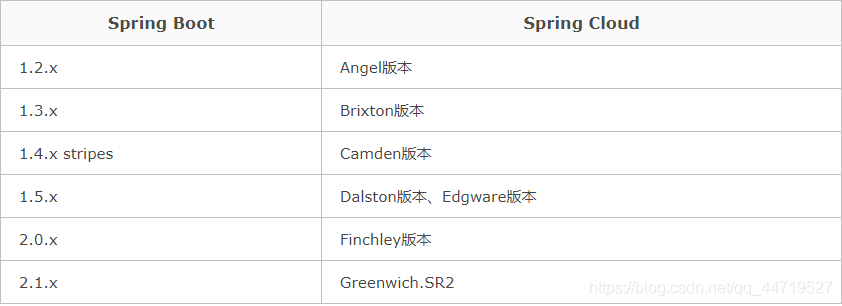
Solution: finally, it is found that there is a conflict between the versions of sprngboot and springcloud

I’m using springboot2.2.0RELEASE and spring-cloud Greenwich.SR2 these two versions…

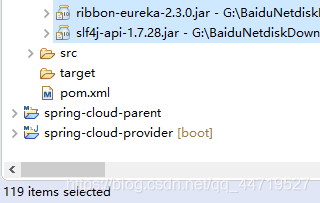
Using springboot2.2.0 is 119 jar packages.

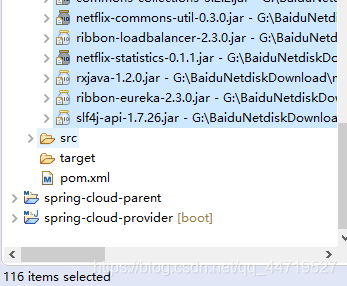
Finally, use springboot 2.1.6 is 116 jar packages


Version correspondence

[Solved] XiaoMi Phone Uiautomator Startup Error: uiautomator2.GatewayError

check the error messages:

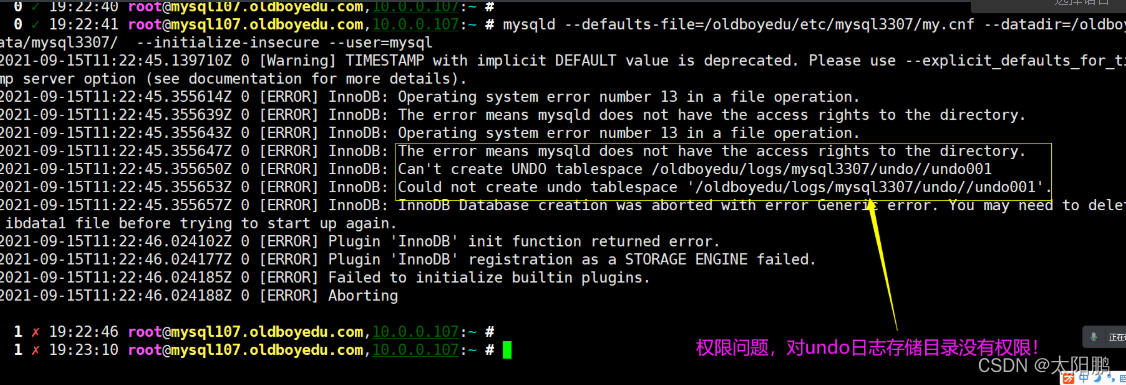
OSError: [WinError adb shell am instrument -w -r -e debug false -e class com.github.uiautomator.stub.Stub com.github.uiautomator.test/android.support.test.runner.AndroidJUnitRunner] uiautomator2.GatewayError(gateway error, time used 0.0s): 'https://github.com/openatx/uiautomator2/wiki/Common-issues'

It is said that app-uiautomator.apk or app-uiautomator-test.apk not installed. but if you use the following command:

 python -m uiautomator2 init

There are no errors, and you can see the successful installation of the above two apps, so the problem is not the failure of uiautomator app installation.

Solution:

Turn on the settings of Xiaomi mobile phone – turn on developer options – turn on USB debugging – turn on USB installation – turn on USB debugging (security settings) – turn on the application that passes USB verification (default on) – turn on wireless display authentication (optional). The key option is not to enable MIUI optimization. After operating the above settings, execute python -m uiautomator2 init (no error), and then you can execute the relevant scripts

[Solved] Win10 Install pyav Error: ERROR: Failed building wheel for avFailed to build av. ERROR: Could not build wheel

Python3. 6: In win10 environment, use the following command to install pyav:

pip install av

Failed to install pyav, here is the error message:

        ERROR: Failed building wheel for av
        Failed to build av
        ERROR: Could not build wheels for av which use PEP 517 and cannot be installed directly:


(C:\Users\Jayce\Anaconda3\envs\tf1.7) E:\Code\Python>pip install av
Looking in indexes: https://pypi.doubanio.com/simple
Collecting av
  Downloading https://pypi.doubanio.com/packages/00/3f/9fe21065912902a7856a69df334a67b73a51da5e08ff033fd79f15d05764/av-9.1.1.tar.gz (2.4 MB)
     |████████████████████████████████| 2.4 MB 3.2 MB/s
  Installing build dependencies ... done
  Getting requirements to build wheel ... done
    Preparing wheel metadata ... done
Building wheels for collected packages: av
  Building wheel for av (PEP 517) ... error
  ERROR: Command errored out with exit status 1:
   command: 'C:\Users\Jayce\Anaconda3\envs\tf1.7\python.exe' 'C:\Users\Jayce\Anaconda3\envs\tf1.7\lib\site-packages\pip\_vendor\pep517\in_process\_in_process.py' build_wheel 'C:\Users\J
ayce\AppData\Local\Temp\tmpctqsnqx6'
       cwd: C:\Users\Jayce\AppData\Local\Temp\pip-install-hi4s2fdw\av_03c9287622cf4da7918135c5be424e7b
  Complete output (38 lines):
  running bdist_wheel
  running build
  running build_py
  creating build
  creating build\lib.win-amd64-3.6
  creating build\lib.win-amd64-3.6\av
  copying av\about.py -> build\lib.win-amd64-3.6\av
  copying av\datasets.py -> build\lib.win-amd64-3.6\av
  copying av\deprecation.py -> build\lib.win-amd64-3.6\av
  copying av\__init__.py -> build\lib.win-amd64-3.6\av
  copying av\__main__.py -> build\lib.win-amd64-3.6\av
  creating build\lib.win-amd64-3.6\av\audio
  copying av\audio\__init__.py -> build\lib.win-amd64-3.6\av\audio
  creating build\lib.win-amd64-3.6\av\codec
  copying av\codec\__init__.py -> build\lib.win-amd64-3.6\av\codec
  creating build\lib.win-amd64-3.6\av\container
  copying av\container\__init__.py -> build\lib.win-amd64-3.6\av\container
  creating build\lib.win-amd64-3.6\av\data
  copying av\data\__init__.py -> build\lib.win-amd64-3.6\av\data
  creating build\lib.win-amd64-3.6\av\filter
  copying av\filter\__init__.py -> build\lib.win-amd64-3.6\av\filter
  creating build\lib.win-amd64-3.6\av\sidedata
  copying av\sidedata\__init__.py -> build\lib.win-amd64-3.6\av\sidedata
  creating build\lib.win-amd64-3.6\av\subtitles
  copying av\subtitles\__init__.py -> build\lib.win-amd64-3.6\av\subtitles
  creating build\lib.win-amd64-3.6\av\video
  copying av\video\__init__.py -> build\lib.win-amd64-3.6\av\video
  running build_ext
  building 'av.buffer' extension
  creating build\temp.win-amd64-3.6
  creating build\temp.win-amd64-3.6\Release
  creating build\temp.win-amd64-3.6\Release\src
  creating build\temp.win-amd64-3.6\Release\src\av
  C:\Program Files (x86)\Microsoft Visual Studio 14.0\VC\BIN\x86_amd64\cl.exe /c logo /Ox /W3 /GL /DNDEBUG /MD -IC:\Users\Jayce\Anaconda3\envs\tf1.7\include -IC:\Users\Jayce\Anaconda
3\envs\tf1.7\include "-IC:\Program Files (x86)\Microsoft Visual Studio 14.0\VC\INCLUDE" "-IC:\Program Files (x86)\Windows Kits\10\include\10.0.10240.0\ucrt" "-IC:\Program Files (x86)\Wi
ndows Kits\8.1\include\shared" "-IC:\Program Files (x86)\Windows Kits\8.1\include\um" "-IC:\Program Files (x86)\Windows Kits\8.1\include\winrt" /Tcsrc\av\buffer.c /Fobuild\temp.win-amd6
4-3.6\Release\src\av\buffer.obj
  buffer.c
  C:\Program Files (x86)\Microsoft Visual Studio 14.0\VC\BIN\x86_amd64\link.exe logo /INCREMENTAL:NO /LTCG /DLL /MANIFEST:EMBED,ID=2 /MANIFESTUAC:NO /LIBPATH:C:\Users\Jayce\Anaconda3
\envs\tf1.7\libs /LIBPATH:C:\Users\Jayce\Anaconda3\envs\tf1.7\PCbuild\amd64 "/LIBPATH:C:\Program Files (x86)\Microsoft Visual Studio 14.0\VC\LIB\amd64" "/LIBPATH:C:\Program Files (x86)\
Windows Kits\10\lib\10.0.10240.0\ucrt\x64" "/LIBPATH:C:\Program Files (x86)\Windows Kits\8.1\lib\winv6.3\um\x64" avformat.lib avcodec.lib avdevice.lib avutil.lib avfilter.lib swscale.li
b swresample.lib /EXPORT:PyInit_buffer build\temp.win-amd64-3.6\Release\src\av\buffer.obj /OUT:build\lib.win-amd64-3.6\av\buffer.cp36-win_amd64.pyd /IMPLIB:build\temp.win-amd64-3.6\Rele
ase\src\av\buffer.cp36-win_amd64.lib
  LINK : fatal error LNK1181: cannot open input file 'avformat.lib'
  error: command 'C:\\Program Files (x86)\\Microsoft Visual Studio 14.0\\VC\\BIN\\x86_amd64\\link.exe' failed with exit status 1181
  ----------------------------------------
  ERROR: Failed building wheel for av
Failed to build av
ERROR: Could not build wheels for av which use PEP 517 and cannot be installed directly

This is because installing without a version number will install the latest version of pyav, which is not suitable for Python 3 6, so you need to compile it yourself, and you need to install ffmpeg for your own compilation, which leads to compilation errors because there is no ffmpeg.

1. Either install ffmpeg by yourself and compile it;

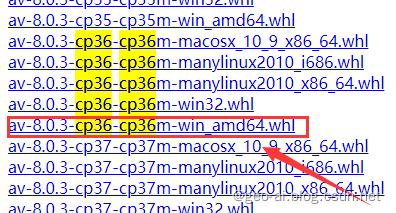
2. Or go straight to find the whl file of Python 3.6, direct installation;

I directly found the latest support for Python 3 on the mirror website Pyav of 6 is 8.0.3. Download and install:

Or add the version number of Python 3.6 in the PIP command:

pip install av==8.0.3

[Solved] k8s kubeadmin init Error: http://localhost:10248/healthz‘ failed

Error Messages:

[wait-control-plane] Waiting for the kubelet to boot up the control plane as static Pods from directory "/etc/kubernetes/manifests". This can take up to 4m0s
[kubelet-check] Initial timeout of 40s passed.
[kubelet-check] It seems like the kubelet isn't running or healthy.
[kubelet-check] The HTTP call equal to 'curl -sSL http://localhost:10248/healthz' failed with error: Get "http://localhost:10248/healthz": dial tcp [::1]:10248: connect: connection refused.
[kubelet-check] It seems like the kubelet isn't running or healthy.
[kubelet-check] The HTTP call equal to 'curl -sSL http://localhost:10248/healthz' failed with error: Get "http://localhost:10248/healthz": dial tcp [::1]:10248: connect: connection refused.
[kubelet-check] It seems like the kubelet isn't running or healthy.
[kubelet-check] The HTTP call equal to 'curl -sSL http://localhost:10248/healthz' failed with error: Get "http://localhost:10248/healthz": dial tcp [::1]:10248: connect: connection refused.
[kubelet-check] It seems like the kubelet isn't running or healthy.
[kubelet-check] The HTTP call equal to 'curl -sSL http://localhost:10248/healthz' failed with error: Get "http://localhost:10248/healthz": dial tcp [::1]:10248: connect: connection refused.
[kubelet-check] It seems like the kubelet isn't running or healthy.
[kubelet-check] The HTTP call equal to 'curl -sSL http://localhost:10248/healthz' failed with error: Get "http://localhost:10248/healthz": dial tcp [::1]:10248: connect: connection refused.
        Unfortunately, an error has occurred:
                timed out waiting for the condition
        This error is likely caused by:
                - The kubelet is not running
                - The kubelet is unhealthy due to a misconfiguration of the node in some way (required cgroups disabled)
        If you are on a systemd-powered system, you can try to troubleshoot the error with the following commands:
                - 'systemctl status kubelet'
                - 'journalctl -xeu kubelet'
        Additionally, a control plane component may have crashed or exited when started by the container runtime.
        To troubleshoot, list all containers using your preferred container runtimes CLI.
        Here is one example how you may list all Kubernetes containers running in docker:
                - 'docker ps -a | grep kube | grep -v pause'
                Once you have found the failing container, you can inspect its logs with:
                - 'docker logs CONTAINERID'
error execution phase wait-control-plane: couldn't initialize a Kubernetes cluster


Use the command to find the startup error reason:

systemctl status kubelet -l
kubelet.service - kubelet: The Kubernetes Node Agent
   Loaded: loaded (/usr/lib/systemd/system/kubelet.service; enabled; vendor preset: disabled)
  Drop-In: /usr/lib/systemd/system/kubelet.service.d
           └─10-kubeadm.conf
   Active: activating (auto-restart) (Result: exit-code) since 四 2022-04-14 19:12:05 CST; 7s ago
     Docs: https://kubernetes.io/docs/
  Process: 4796 ExecStart=/usr/bin/kubelet $KUBELET_KUBECONFIG_ARGS $KUBELET_CONFIG_ARGS $KUBELET_KUBEADM_ARGS $KUBELET_EXTRA_ARGS (code=exited, status=1/FAILURE)
 Main PID: 4796 (code=exited, status=1/FAILURE)
4月 14 19:12:05 K8SMASTER01 systemd[1]: kubelet.service: main process exited, code=exited, status=1/FAILURE
4月 14 19:12:05 K8SMASTER01 kubelet[4796]: E0414 19:12:05.862353    4796 server.go:294] "Failed to run kubelet" err="failed to run Kubelet: misconfiguration: kubelet cgroup driver: \"systemd\" is different from docker cgroup driver: \"cgroupfs\""
4月 14 19:12:05 K8SMASTER01 systemd[1]: Unit kubelet.service entered failed state.
4月 14 19:12:05 K8SMASTER01 systemd[1]: kubelet.service failed.


Solution:

[root@K8SMASTER01 ~]# cat > /etc/docker/daemon.json <<EOF
> {"exec-opts": ["native.cgroupdriver=systemd"]}
> EOF
[root@K8SMASTER01 ~]# systemctl restart docker

[Solved] Sharding-Proxy Insert Datas Error: Sharding value must implements Comparable NoSuchElementException

data insertion error
1. After doing sub-database and sub-table, it is now necessary to migrate the existing data of a single database to the corresponding sub-database and sub-table database
2. Data migration is to read the table structure information of the specified table, use 3. PreparedStatement, and use placeholders to splicing and submitting data
3. In order to prevent migration errors, migrate multiple times, clear the sharding table each time, and then migrate
4. During the migration, some errors were encountered, version 5.0

Report an error

Sharding value must implements Comparable

CommandExecutorTask - Exception occur: 
java.lang.IllegalArgumentException: Sharding value must implements Comparable.

Causes and Solutions

1. A non-null field with a null value inserted
2. It may be the primary key. If the primary key policy is not set and it is not automatically generated, an error will be reported.
3. It may be the sub-database sub-table key, which cannot be null. This is my situation, the data is maintained, and the sub-database fields of all tables are assigned corresponding values, and the error is resolved

Error report 2

NoSuchElementException

org.postgresql.util.PSQLException: ERROR: java.util.NoSuchElementException

Causes and Solutions

1. The reason is that the number of inserted values ​​does not match the number of table fields.
2. The first time I encountered this error, it was due to the use of sub-database sub-table and data encryption at the same time
3. The field configuration of data encryption affects the calculation and reading of the number of fields, resulting in the mismatch between fields and inserted values, resulting in an error. 4.  After temporarily dropping the data encryption,Solved
4. The second time I encountered this error, I found that the structure of the original table was changed, and 2 fields were added. The table structure of the sub-database and sub-tables has not changed, resulting in the field value and quantity not corresponding to each other. Maintain the table structure of the sub-database and sub-tables After that, solve it (the problem is that after adding the field, it will not take effect without restarting sharding-proxy)
Using Post no Body Error: socket hang up [How to Solve]

Project scenario:

Due to environmental problems, the server is only allowed to use the post and get methods to call the interface. The delete interface written using the post method can be called locally, but an error is reported in the server.


Problem description

Use the post method for logical deletion and error reporting, and use @pathvariable to obtain the front-end transmission parameters:

@PostMapping("/delete/{userGroupIds}")
public ResponseBean<Object> deleteUserGroup(@PathVariable("userGroupIds") String userGroupIds){
    return userGroupService.deleteUserGroup(userGroupIds);
}

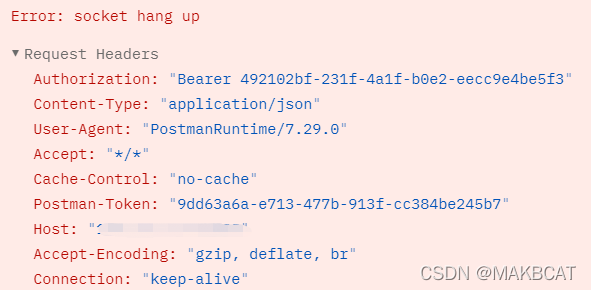
When using postman to call the server interface, the following error messages appear:

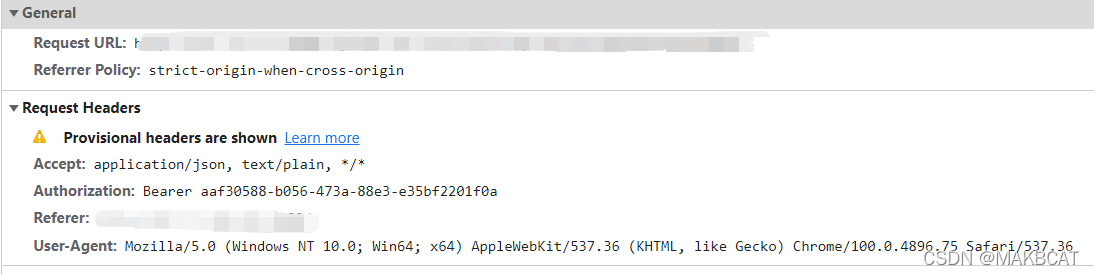
The front-end page calls the interface and reports the following error, cross domain:


Cause analysis:

The post method needs to use @Rquestbody to obtain parameters. This problem occurs when null is passed. The specific details were not clarified.


Solution:

Change the @pathvariable method to @rquestbody .

@PostMapping("/delete")
public ResponseBean<Object> deleteUserGroup(@RequestBody UserGroupIdDTO userGroupIds){
    return userGroupService.deleteUserGroup(userGroupIds);
}

The parameters in UserGroupIdDTO are as follows:

@Data
public class UserGroupIdDTO {
    private String userGroupId;
}

[Solved] Tensorflow2.0 Error: Function call stack:distributed_function

It can be clearly said that GPU resources are insufficient. What’s more, when using jupyters provided by various platforms to use GPU, when opening multiple tap pages, because tensorflow takes up all the resources as much as possible, only the first one will start successfully without setting the resource usage in advance, and the rest will cause the above error

You can close all pages first, then restart, and configure as follows

# import tensorflow as tf 
import os

os.environ['CUDA_VISIBLE_DEVICES']="0" # Specify which GPU to train
config=tf.compat.v1.ConfigProto() 
# Set the maximum occupied GPU to no more than 80% of the video memory (optional)
config.gpu_options.per_process_gpu_memory_fraction=0.5
config.gpu_options.allow_growth = True # Set dynamic GPU memory allocation
sess=tf.compat.v1.Session(config=config)

[Solved] jupyter notebook Error: 500 : Internal Server Error

1. Problem Description:
the Jupiter notebook can open the directory page, but it cannot open normally .ipynb file, as shown in the figure below, reports an error:

after consulting the data, we know that the error is caused by the incompatibility between nbconvert and pandoc
2. Solution:
enter the following command to install and upgrade nbconvert

pip install --upgrade --user nbconvert

After successfully installing nbconvert, start jupyter notebook again and open .ipynb file normally in the browser.

Error:Abnormal build process termination [How to Solve]

Pre:

Today I close the Firewall and java program failed to start error:

Error:Abnormal build process termination:
“C:\Program Files\Java\jdk1.8.0_152\bin\java.exe” -Xmx700m -Djava.awt.headless=true -Djava.endorsed.dirs=“” -Djdt.compiler.useSingleThread=true -Dpreload.project.path=D:/tangyuzhongshowtime/springboot-mybatis-token-freemarker -Dpreload.config.path=C:/Users/Administrator/AppData/Roaming/JetBrains/IntelliJIdea2020.1/options -Dcompile.parallel=false -Drebuild.on.dependency.change=true -Dio.netty.initialSeedUniquifier=1508232679689852792 -Dfile.encoding=GBK -Duser.language=zh -Duser.country=CN -Didea.paths.selector=IntelliJIdea2020.1 “-Didea.home.path=D:\Idea\IntelliJ IDEA 2020.1.2” -Didea.config.path=C:\Users\Administrator\AppData\Roaming\JetBrains\IntelliJIdea2020.1 -Didea.plugins.path=C:\Users\Administrator\AppData\Roaming\JetBrains\IntelliJIdea2020.1\plugins -Djps.log.dir=C:/Users/Administrator/AppData/Local/JetBrains/IntelliJIdea2020.1/log/build-log “-Djps.fallback.jdk.home=D:/Idea/IntelliJ IDEA 2020.1.2/jbr” -Djps.fallback.jdk.version=11.0.7 -Dio.netty.noUnsafe=true -Djava.io.tmpdir=C:/Users/Administrator/AppData/Local/JetBrains/IntelliJIdea2020.1/compile-server/springboot-mybatis-token-freemarker_830f3c4b/temp -Djps.backward.ref.index.builder=true -Dkotlin.incremental.compilation=true -Dkotlin.incremental.compilation.js=true -Dkotlin.daemon.enabled -Dkotlin.daemon.client.alive.path=“C:\Users\ADMINI~1\AppData\Local\Temp\kotlin-idea-1545321366046478132-is-running” -classpath “D:/Idea/IntelliJ IDEA 2020.1.2/plugins/java/lib/jps-launcher.jar;C:/Program Files/Java/jdk1.8.0_152/lib/tools.jar” org.jetbrains.jps.cmdline.Launcher “D:/Idea/IntelliJ IDEA 2020.1.2/lib/commons-lang3-3.9.jar;D:/Idea/IntelliJ IDEA 2020.1.2/lib/maven-resolver-impl-1.3.3.jar;D:/Idea/IntelliJ IDEA 2020.1.2/lib/gson-2.8.6.jar;D:/Idea/IntelliJ IDEA 2020.1.2/lib/trove4j.jar;D:/Idea/IntelliJ IDEA 2020.1.2/lib/commons-logging-1.2.jar;D:/Idea/IntelliJ IDEA 2020.1.2/plugins/java/lib/maven-resolver-connector-basic-1.3.3.jar;D:/Idea/IntelliJ IDEA 2020.1.2/lib/asm-all-7.0.1.jar;D:/Idea/IntelliJ IDEA 2020.1.2/lib/netty-transport-4.1.47.Final.jar;D:/Idea/IntelliJ IDEA 2020.1.2/lib/maven-resolver-api-1.3.3.jar;D:/Idea/IntelliJ IDEA 2020.1.2/lib/plexus-interpolation-1.25.jar;D:/Idea/IntelliJ IDEA 2020.1.2/lib/maven-repository-metadata-3.6.1.jar;D:/Idea/IntelliJ IDEA 2020.1.2/lib/slf4j-api-1.7.25.jar;D:/Idea/IntelliJ IDEA 2020.1.2/lib/nanoxml-2.2.3.jar;D:/Idea/IntelliJ IDEA 2020.1.2/lib/maven-resolver-provider-3.6.1.jar;D:/Idea/IntelliJ IDEA 2020.1.2/lib/maven-model-builder-3.6.1.jar;D:/Idea/IntelliJ IDEA 2020.1.2/lib/platform-api.jar;D:/Idea/IntelliJ IDEA 2020.1.2/lib/forms-1.1-preview.jar;D:/Idea/IntelliJ IDEA 2020.1.2/lib/netty-buffer-4.1.47.Final.jar;D:/Idea/IntelliJ IDEA 2020.1.2/lib/oro-2.0.8.jar;D:/Idea/IntelliJ IDEA 2020.1.2/lib/resources_en.jar;D:/Idea/IntelliJ IDEA 2020.1.2/lib/plexus-utils-3.2.0.jar;D:/Idea/IntelliJ IDEA 2020.1.2/plugins/java/lib/maven-resolver-transport-file-1.3.3.jar;D:/Idea/IntelliJ IDEA 2020.1.2/lib/util.jar;D:/Idea/IntelliJ IDEA 2020.1.2/lib/qdox-2.0-M10.jar;D:/Idea/IntelliJ IDEA 2020.1.2/lib/lz4-java-1.7.1.jar;D:/Idea/IntelliJ IDEA 2020.1.2/lib/plexus-component-annotations-1.7.1.jar;D:/Idea/IntelliJ IDEA 2020.1.2/lib/maven-builder-support-3.6.1.jar;D:/Idea/IntelliJ IDEA 2020.1.2/plugins/java/lib/javac2.jar;D:/Idea/IntelliJ IDEA 2020.1.2/lib/log4j.jar;D:/Idea/IntelliJ IDEA 2020.1.2/lib/maven-model-3.6.1.jar;D:/Idea/IntelliJ IDEA 2020.1.2/lib/jna-platform.jar;D:/Idea/IntelliJ IDEA 2020.1.2/plugins/java/lib/jps-builders.jar;D:/Idea/IntelliJ IDEA 2020.1.2/lib/netty-common-4.1.47.Final.jar;D:/Idea/IntelliJ IDEA 2020.1.2/lib/guava-28.2-jre.jar;D:/Idea/IntelliJ IDEA 2020.1.2/lib/netty-codec-4.1.47.Final.jar;D:/Idea/IntelliJ IDEA 2020.1.2/plugins/java/lib/aether-dependency-resolver.jar;D:/Idea/IntelliJ IDEA 2020.1.2/lib/idea_rt.jar;D:/Idea/IntelliJ IDEA 2020.1.2/lib/maven-artifact-3.6.1.jar;D:/Idea/IntelliJ IDEA 2020.1.2/lib/maven-resolver-util-1.3.3.jar;D:/Idea/IntelliJ IDEA 2020.1.2/lib/maven-resolver-spi-1.3.3.jar;D:/Idea/IntelliJ IDEA 2020.1.2/plugins/java/lib/jps-builders-6.jar;D:/Idea/IntelliJ IDEA 2020.1.2/lib/netty-resolver-4.1.47.Final.jar;D:/Idea/IntelliJ IDEA 2020.1.2/lib/jdom.jar;D:/Idea/IntelliJ IDEA 2020.1.2/lib/httpcore-4.4.13.jar;D:/Idea/IntelliJ IDEA 2020.1.2/lib/annotations.jar;D:/Idea/IntelliJ IDEA 2020.1.2/lib/protobuf-java-3.5.1.jar;D:/Idea/IntelliJ IDEA 2020.1.2/plugins/java/lib/maven-resolver-transport-http-1.3.3.jar;D:/Idea/IntelliJ IDEA 2020.1.2/lib/jna.jar;D:/Idea/IntelliJ IDEA 2020.1.2/lib/jps-model.jar;D:/Idea/IntelliJ IDEA 2020.1.2/lib/httpclient-4.5.12.jar;D:/Idea/IntelliJ IDEA 2020.1.2/plugins/JavaEE/lib/jasper-v2-rt.jar;D:/Idea/IntelliJ IDEA 2020.1.2/lib/gson-2.8.6.jar;D:/Idea/IntelliJ IDEA 2020.1.2/plugins/android/lib/jarutils.jar;D:/Idea/IntelliJ IDEA 2020.1.2/lib/guava-28.2-jre.jar;D:/Idea/IntelliJ IDEA 2020.1.2/plugins/android/lib/common-26.6.0.2.jar;D:/Idea/IntelliJ IDEA 2020.1.2/plugins/gradle/lib/gradle-api-6.1.1.jar;D:/Idea/IntelliJ IDEA 2020.1.2/lib/gson-2.8.6.jar;D:/Idea/IntelliJ IDEA 2020.1.2/plugins/android/lib/jarutils.jar;D:/Idea/IntelliJ IDEA 2020.1.2/lib/guava-28.2-jre.jar;D:/Idea/IntelliJ IDEA 2020.1.2/plugins/android/lib/common-26.6.0.2.jar;D:/Idea/IntelliJ IDEA 2020.1.2/plugins/gradle/lib/gradle-api-6.1.1.jar;D:/Idea/IntelliJ IDEA 2020.1.2/plugins/IntelliLang/lib/intellilang-jps-plugin.jar;D:/Idea/IntelliJ IDEA 2020.1.2/plugins/eclipse/lib/eclipse-jps-plugin.jar;D:/Idea/IntelliJ IDEA 2020.1.2/plugins/eclipse/lib/common-eclipse-util.jar;D:/Idea/IntelliJ IDEA 2020.1.2/plugins/ant/lib/ant-jps-plugin.jar;D:/Idea/IntelliJ IDEA 2020.1.2/plugins/Groovy/lib/groovy-jps-plugin.jar;D:/Idea/IntelliJ IDEA 2020.1.2/plugins/Groovy/lib/groovy-rt-constants.jar;D:/Idea/IntelliJ IDEA 2020.1.2/plugins/maven/lib/maven-jps-plugin.jar;D:/Idea/IntelliJ IDEA 2020.1.2/plugins/osmorc/lib/osmorc-jps-plugin.jar;D:/Idea/IntelliJ IDEA 2020.1.2/plugins/osmorc/lib/biz.aQute.bndlib-5.0.0.jar;D:/Idea/IntelliJ IDEA 2020.1.2/plugins/osmorc/lib/biz.aQute.repository-5.0.0.jar;D:/Idea/IntelliJ IDEA 2020.1.2/plugins/osmorc/lib/biz.aQute.resolve-5.0.0.jar;D:/Idea/IntelliJ IDEA 2020.1.2/plugins/osmorc/lib/bundlor-all.jar;D:/Idea/IntelliJ IDEA 2020.1.2/plugins/aspectj/lib/aspectj-jps-plugin.jar;D:/Idea/IntelliJ IDEA 2020.1.2/plugins/gradle-java/lib/gradle-jps-plugin.jar;D:/Idea/IntelliJ IDEA 2020.1.2/plugins/javaFX/lib/javaFX-jps-plugin.jar;D:/Idea/IntelliJ IDEA 2020.1.2/plugins/javaFX/lib/common-javaFX-plugin.jar;D:/Idea/IntelliJ IDEA 2020.1.2/plugins/uiDesigner/lib/jps/ui-designer-jps-plugin.jar;D:/Idea/IntelliJ IDEA 2020.1.2/plugins/devkit/lib/devkit-jps-plugin.jar;D:/Idea/IntelliJ IDEA 2020.1.2/plugins/flex/lib/flex-jps-plugin.jar;D:/Idea/IntelliJ IDEA 2020.1.2/plugins/flex/lib/flex-shared.jar;D:/Idea/IntelliJ IDEA 2020.1.2/plugins/JavaEE/lib/javaee-jps-plugin.jar;D:/Idea/IntelliJ IDEA 2020.1.2/plugins/JavaEE/lib/jps/jpa-jps-plugin.jar;D:/Idea/IntelliJ IDEA 2020.1.2/plugins/Kotlin/lib/jps/kotlin-jps-plugin.jar;D:/Idea/IntelliJ IDEA 2020.1.2/plugins/Kotlin/lib/kotlin-stdlib.jar;D:/Idea/IntelliJ IDEA 2020.1.2/plugins/Kotlin/lib/kotlin-reflect.jar;D:/Idea/IntelliJ IDEA 2020.1.2/plugins/Kotlin/lib/kotlin-plugin.jar;D:/Idea/IntelliJ IDEA 2020.1.2/plugins/android/lib/jps/android-jps-plugin.jar;D:/Idea/IntelliJ IDEA 2020.1.2/plugins/android/lib/android-common.jar;D:/Idea/IntelliJ IDEA 2020.1.2/plugins/android/lib/build-common.jar;D:/Idea/IntelliJ IDEA 2020.1.2/plugins/android/lib/android-rt.jar;D:/Idea/IntelliJ IDEA 2020.1.2/plugins/android/lib/android-extensions-ide.jar;D:/Idea/IntelliJ IDEA 2020.1.2/plugins/android/lib/sdk-common-26.6.0.2.jar;D:/Idea/IntelliJ IDEA 2020.1.2/plugins/android/lib/common-26.6.0.2.jar;D:/Idea/IntelliJ IDEA 2020.1.2/plugins/android/lib/repository-26.6.0.2.jar;D:/Idea/IntelliJ IDEA 2020.1.2/plugins/android/lib/sdklib-26.6.0.2.jar;D:/Idea/IntelliJ IDEA 2020.1.2/plugins/android/lib/jarutils.jar;D:/Idea/IntelliJ IDEA 2020.1.2/plugins/android/lib/layoutlib-api-26.6.0.2.jar;D:/Idea/IntelliJ IDEA 2020.1.2/plugins/android/lib/manifest-merger-26.6.0.2.jar;D:/Idea/IntelliJ IDEA 2020.1.2/plugins/webSphereIntegration/lib/jps/webSphere-jps-plugin.jar;D:/Idea/IntelliJ IDEA 2020.1.2/plugins/weblogicIntegration/lib/jps/weblogic-jps-plugin.jar;D:/Idea/IntelliJ IDEA 2020.1.2/plugins/dmServer/lib/dmServer-jps-plugin.jar;D:/Idea/IntelliJ IDEA 2020.1.2/plugins/GwtStudio/lib/gwt-jps-plugin.jar;D:/Idea/IntelliJ IDEA 2020.1.2/plugins/Grails/lib/grails-jps-plugin.jar;D:/Idea/IntelliJ IDEA 2020.1.2/plugins/Grails/lib/grails-compiler-patch.jar” org.jetbrains.jps.cmdline.BuildMain 127.0.0.1 49464 1fa79df5-132b-4c83-a797-a493feea0e28 C:/Users/Administrator/AppData/Local/JetBrains/IntelliJIdea2020.1/compile-server
Build process started. Classpath: D:/Idea/IntelliJ IDEA 2020.1.2/plugins/java/lib/jps-launcher.jar;C:/Program Files/Java/jdk1.8.0_152/lib/tools.jarSLF4J: Failed to load class “org.slf4j.impl.StaticLoggerBinder”.
SLF4J: Defaulting to no-operation (NOP) logger implementationSLF4J: See http://www.slf4j.org/codes.html#StaticLoggerBinder for further details.
Error connecting to 127.0.0.1:49464; reason: Connection timed out: no further information: /127.0.0.1:49464
io.netty.channel.AbstractChannel$AnnotatedConnectException: Connection timed out: no further information: /127.0.0.1:49464
Caused by: java.net.ConnectException: Connection timed out: no further information
at sun.nio.ch.SocketChannelImpl.checkConnect(Native Method)
at sun.nio.ch.SocketChannelImpl.finishConnect(SocketChannelImpl.java:717)
at io.netty.channel.socket.nio.NioSocketChannel.doFinishConnect(NioSocketChannel.java:330)
at io.netty.channel.nio.AbstractNioChannel$AbstractNioUnsafe.finishConnect(AbstractNioChannel.java:334)
at io.netty.channel.nio.NioEventLoop.processSelectedKey(NioEventLoop.java:702)
at io.netty.channel.nio.NioEventLoop.processSelectedKeysOptimized(NioEventLoop.java:650)
at io.netty.channel.nio.NioEventLoop.processSelectedKeys(NioEventLoop.java:576)
at io.netty.channel.nio.NioEventLoop.run(NioEventLoop.java:493)
at io.netty.util.concurrent.SingleThreadEventExecutor$4.run(SingleThreadEventExecutor.java:989)
at io.netty.util.internal.ThreadExecutorMap$2.run(ThreadExecutorMap.java:74)
at java.lang.Thread.run(Thread.java:748)
Exiting.

Solution:

Close the WIndows Firewall

If this method above does not work. try:

re-add the jdk of sdk in project structure.

[Solved] mmdet install error: ERROR: Could not build wheels for pycocotools

x86_64-linux-gnu-gcc -pthread -Wno-unused-result -Wsign-compare -DNDEBUG -g -fwrapv -O2 -Wall -g -fstack-protector-strong -Wformat -Werror=format-security -g -fwrapv -O2 -fPIC -I/usr/local/lib/python3.8/dist-packages/numpy/core/include -I./common -I/usr/include/python3.8 -c pycocotools/_mask.c -o build/temp.linux-x86_64-3.8/pycocotools/_mask.o -Wno-cpp -Wno-unused-function -std=c99
      pycocotools/_mask.c:4:10: fatal error: Python.h: No such file or directory
       #include "Python.h"
                ^~~~~~~~~~
      compilation terminated.
      error: command '/usr/bin/x86_64-linux-gnu-gcc' failed with exit code 1
      [end of output]
  
  note: This error originates from a subprocess, and is likely not a problem with pip.
  ERROR: Failed building wheel for pycocotools
Failed to build pycocotools
ERROR: Could not build wheels for pycocotools, which is required to install pyproject.toml-based projects

The python version I use is 3.8 (replaced according to your version).

Solution:

Execute sudo apt install python3.8-dev