Author Archives: Robins

c++ extra qualification

When running the code, I encountered the following error:
Extra qualification ‘Complex::’ on member ‘Complex’
Its code is as follows:
Complex: : Complex (double r)
{
m_real = r;
m_imag = 0.0;

}
Extra markeyerror is a common error in compiling C++ programs with GCC/G++ of version 4 or above.

This is the name of the over-referenced class in the statement — just drop the class name before the function: :, as follows:
Complex (double r)
{
m_real = r;
m_imag = 0.0;

}

Error: Microsoft Visual C + + 14.0 is required. Get it with “Microsoft Visual C + + build tools” problem

Python installed plugin appear error: Microsoft Visual c + + 14.0 is required. The Get it with the “Microsoft Visual c + + Build Tools” : https://visualstudio.microsoft.com/downloads/
Solution:
according to the given url https://visualstudio.microsoft.com/downloads/, download and install the software.
or follow the software I downloaded visualcppbuildtools_full.rar, and install it. Once installed, you don’t have to restart it.

OTS parsing error: invalid version tag

Error in browser is

The actual display effect is

 
Style.css (static/ static/ static/ static/ static/ static/ static/ static/ static/ static/ static/. The results did not change, or an error, see a foreign great god q&a https://stackoverflow.com/questions/34133808/webpack-ots-parsing-error-loading-fonts#, according to the above revised compulsory publicPath, still won’t do, tried a half a day since path is the problem, then use relative paths try, change the way to.. /static/…. And success!

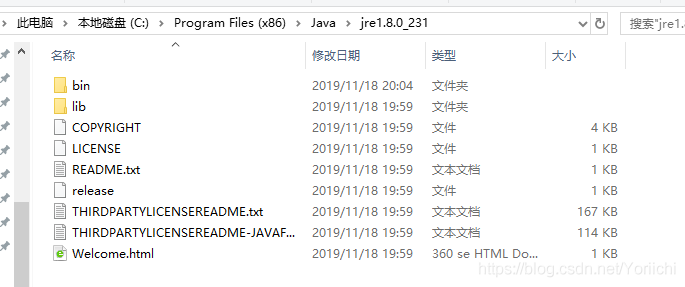
Error: missing `server’ JVM at `C:\Program Files (x86)\Java\jre1.8.0_231\bin\server\jvm.dll’.

** problem: ** when using “neo4j.bat confole” to start up neo4j, Error Error: missing server' JVM atC:\Program Files (x86)\Java\jre1.8.0_231\bin\server\ jvvm.dll ‘popped up.
Solution:
1. Find Java error path

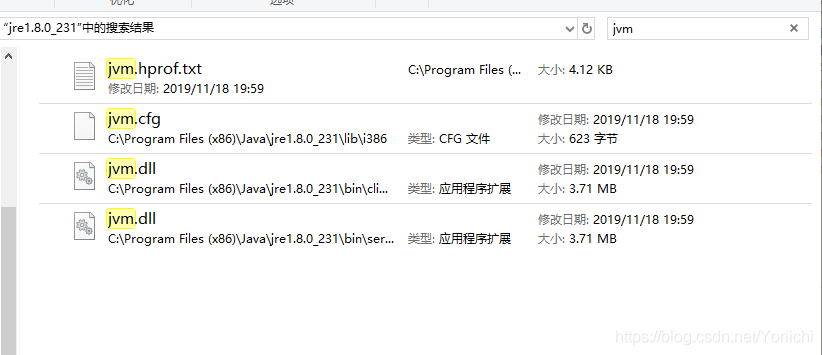
2. Search jvm. DLL

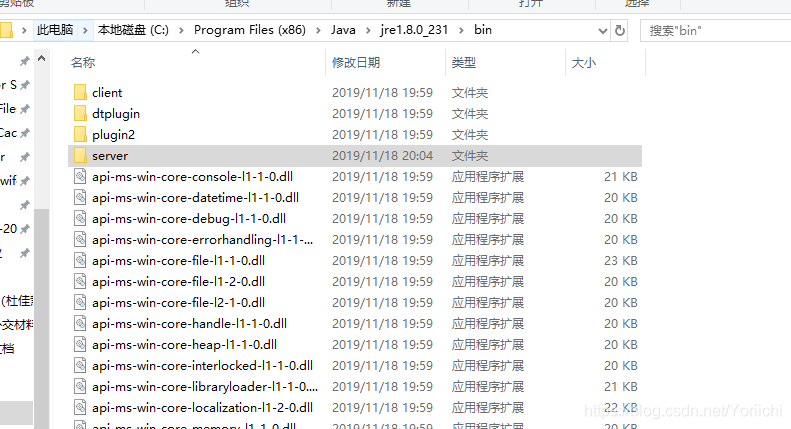
3. Create server in bin folder, copy jvm. DLL paste

4. Return CMD, run neo4j.bat Console, success

About 1 > link: fatal error lnk1168: unable to open… Exe or… DLL for writing

When we run our program with the VS compiler, there may be some questions about 1> LINK: Fatal Error LNK1168: Cannot open… DLL for writing or 1& GT; LINK: Fatal Error LNK1168: Cannot open… Exe to write, this is mainly because the process already exists, we can end the process of the program, we can open the “process Manager”, Ctrl+Alt+ DELETE key combination, and then find the corresponding process right-click to end.

ERROR in native method: JDWP No transports initialized, jvmtiError=AGENT_ERROR_TRANSPORT_INIT(197)

The error message is as follows:

FATAL ERROR in native method: JDWP No transports initialized, jvmtiError=AGENT_ERROR_TRANSPORT_INIT(197)
ERROR: transport error 202: handshake failed - connection prematurally closed
ERROR: JDWP Transport dt_socket failed to initialize, TRANSPORT_INIT(510)
JDWP exit error AGENT_ERROR_TRANSPORT_INIT(197): No transports initialized [../../../src/share/back/debugInit.c:750]

solution:

Add the following line to the /etc/hosts file
127.0.0.1 localhost localhost

in case of such a problem, please follow the following steps to check:
1. Set host:127.0.0.1 localhost; 2. Set the debug port of MyEclipse to see if it is consistent with the debug port of tomcat; 3. Check to see if any other running process occupies the debug port; 4. Configure the firewall to allow javaw.exe to access the network.

R-common errors and their possible causes — Notes

Directory)
Common Errors and their possible causes (self-use) GGplot class data manipulation and function class

Update on 2019.05.11
Common Errors and their possible causes (for personal use)
The following are all their actual process met, now collected, easy to learn to use, you have encountered other, I can also collect and update into here ~
Ps: Even if you understand the error message, you may not be able to find out which step is wrong, so don’t spray “the error message has explained blabla or other words”.
Ggplot class

    Q: ggplot2_Error: geom_point requires the following missing desire: y
    A: stat = “indentity” or “density”, Q: Error: Discrete value to continuous scale
    A: The X or Y axis may be set to discrete, while data is continuous, and vice versa. For example, scale_x_Continuous (blablabla) is set, but the X-axis data is C (” val1 “, “val2”,blabal2), which creates a conflict, so errorxlim Ylim and Coord_cartesian might have the same effect with graphs, but not the same. Coord_cartesian is a local zoom that does not change the dataset, while Xlim Ylim is a filter dataset that does change the dataset.

Data manipulation and function classes

    dat[datx > 5, c(1,9)] # only select column 1 and 9
    dat[datx > 5, 1:9] # select column 1 to 9. Although these two are different, the tibble of tidyverse bag has the property of data.frame, but it is not completely equal to data.frame:
    error:

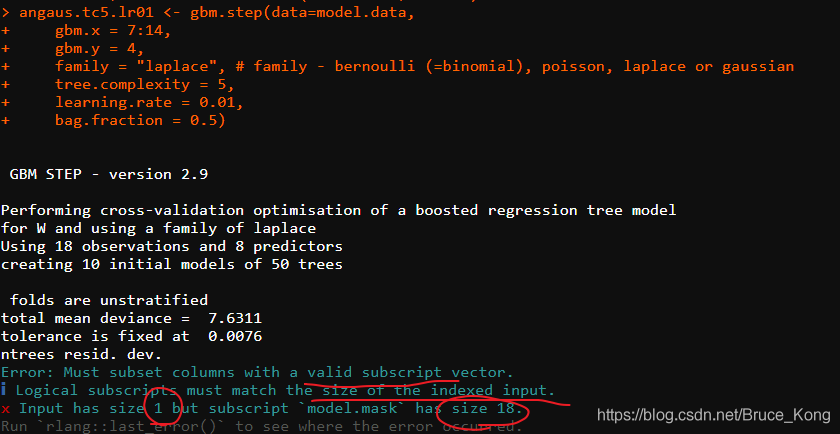
angaus.tc5.lr01 < – GBm. step(Data =model.data, GBM. x = 3:14, GBM. y = 2, family = “Bernoulli”, Tree.com Plexity = 5, learning.rate = 0.01, Bag.Fraction = 0.5)

Error: Must subset columns with a valid subscript vector.
ℹ Logical subscripts Must match the size of the indexed input.
x input from size 1 but subscript model. The mask has size 18.
Run rlang::last_error() to see where the error occurred.

This means that the columns of model.data cannot be recognized. Since model.data is the tidyverse package read_delim, try it and add as.data.frame().

[an error occurred while processing this directive]

Ssi file error [an error occurred while processing this directive]
https://www.cnblogs.com/andyhxl/p/8485310.html (attention to the problem of path, for example, I use # include virtual = “ssi/XXX. Ssi” was written in I # include virtual = “./ssi/head – top ssi “has been submitted to the the fault, check the heart tired only to find that is the result of the path!!!)

NPM- Cannot find module ‘xxxxx’

Error: Cannot find module 'semver'
    at Function.Module._resolveFilename (module.js:555:15)
    at Function.Module._load (module.js:482:25)
    at Module.require (module.js:604:17)
    at require (internal/module.js:11:18)
    at Object.<anonymous> (/usr/local/lib/node_modules/npm/lib/utils/unsupported.js:2:14)
    at Module._compile (module.js:660:30)
    at Object.Module._extensions..js (module.js:671:10)
    at Module.load (module.js:573:32)
    at tryModuleLoad (module.js:513:12)
    at Function.Module._load (module.js:505:3)

Cannot find module ‘XXXXX’ has encountered this problem,
I have tried:

npm install semver 
npm install -g socket.io

This is not going to work.
and then find another solution.
first see if your NPM is useful. Check method: open the terminal and enter

npm -v

If the error is reported, then it is necessary to re-install NPM. First, the original NPM is deleted. The method is:
, you can go to the global NPM package to have a look, the path is:

/usr/local/lib/node_modules/npm

Go to the Semver folder in NOde_modules in NPM and you’ll see that it’s empty! Or no, we will know why semver module can not be found!
1. First delete the global NPM package: just mentioned /usr/local/lib/node_modules/ NPM, this NPM folder delete
2. Go to /usr/local/lib/node_modules and clone git from GitHub

git clone --recursive git://github.com/isaacs/npm.git

This brings the new NPM package back to global node_modules
.

npm -v

Check it in the terminal. If you can print it out, that’s fine.

CodeBlocks environment error the compiler could not find a solution to the problem

Problem description:
Recently, I reinstalled Codeblocks, and found that after I entered it, an environment error window always pops up in the lower right corner, indicating that the compiler cannot be found, as shown in the figure:

Here’s the solution:
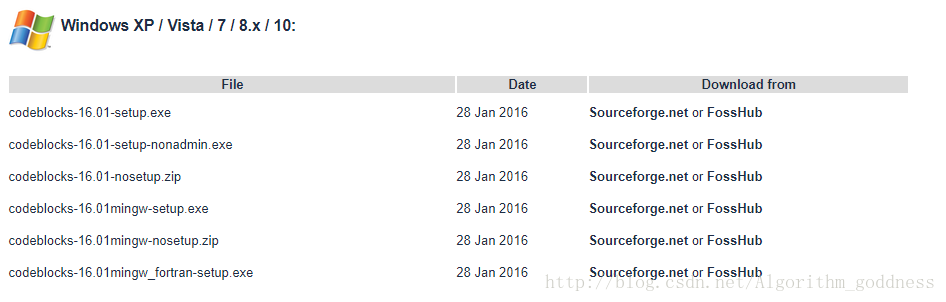
First is the best one to the address of the official download codeblocks:

http://www.codeblocks.org/downloads/26 – – – note!!!!!!!!!!
here’s the crux of the matter! Make sure you download the MinGW version (the fourth in the figure) :

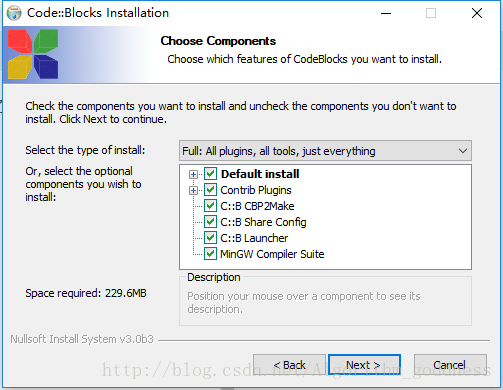
. After you download and install the MinGW option, you will see the

Once you open Codeblocks after installation, there will be no pop-up boxes!
There’s always a safe bet:
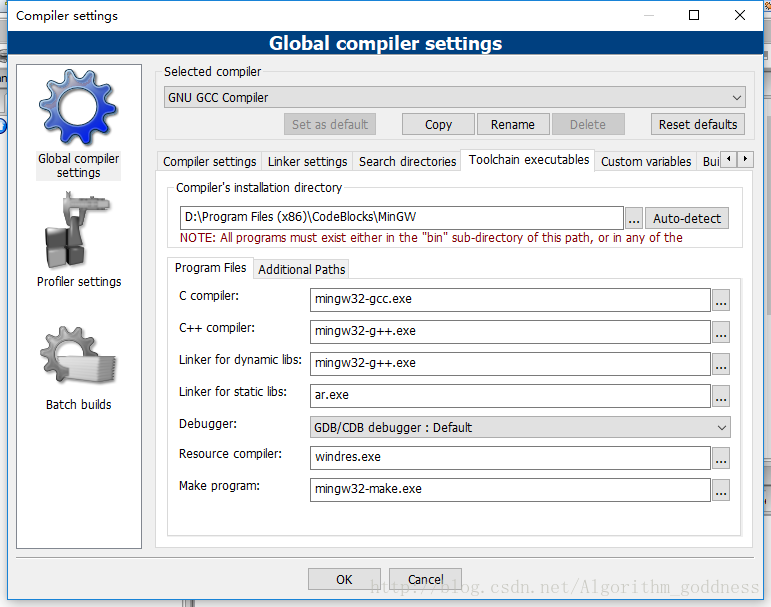
If the previous prompt is also displayed after opening, it may be in Settings -&gt because you changed the path in Settings compiler. compiler-> Toolchain executables changes the path (can auto-detect) to do the job:

ER_ACCESS_DENIED_ERROR: Access denied for user ‘root‘@‘localhost‘ (using password: NO)

ER_ACCESS_DENIED_ERROR: Access Denied for user ‘root’@’localhost’ (using password: NO) How to handle this?
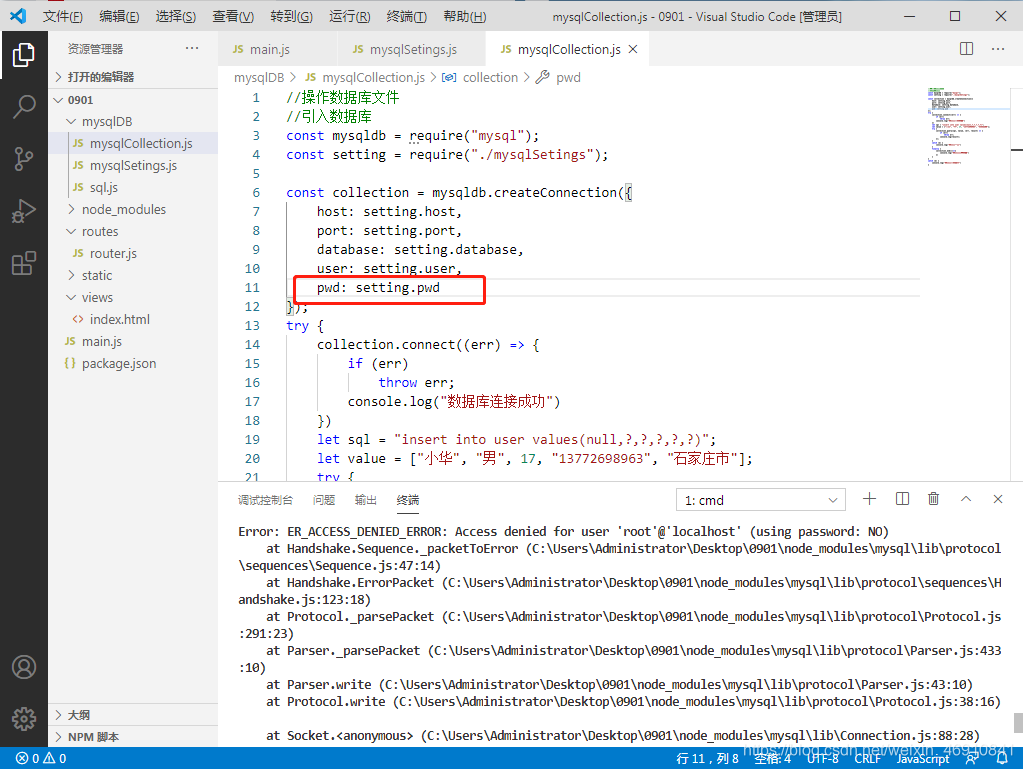
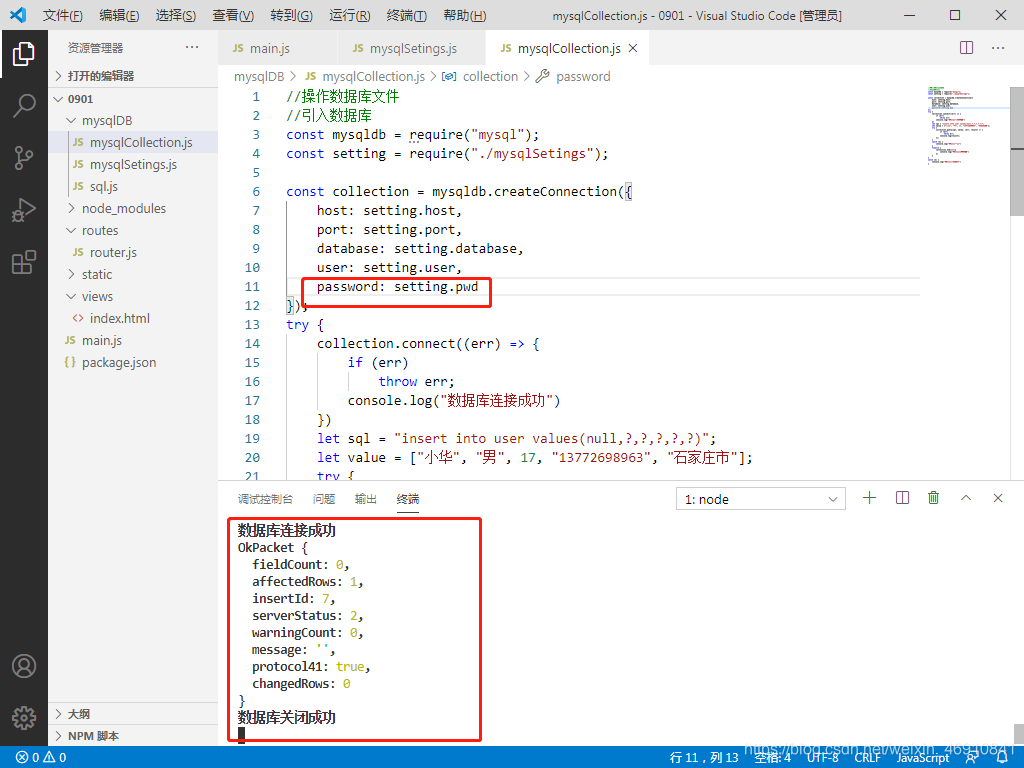
Recently, redo node. Js connect mysql, this problem has been appear, can start the project, is has been submitted to the error and write the information also can not add in mysql, then baidu search, most above all, what password is modified, said of the fog, I didn’t do this, then in a pet write before all deleted, I knocked again and again finally found an error or accidentally got the wrong number, and then see the reason for the error.
In Vscode, it’s the red box, it was password, it’s PWD, so let’s just change PWD to password.

curl.perform() pycurl.error: (23, ‘Failed writing body (0 != 59)’)

The introduction of the pycurl and StringIO modules when using python3.7 is prone to the above errors
The solution for importing the StringIO module:
StringIO module can only be imported in python2, directly from StringIO import StringIO
But python3, STringIO, and cStringIO modules are gone, and to use them you have to import the IO modules:

from io import StringIO
dot_data = StringIO()

StringIO can also be used by importing the Six module:

from six import StringIO

or

from sklearn.externals.six import StringIO 

Provide a method that is both Python2 and Python3 compatible:

try:
    from StringIO import StringIO
except ImportError:
    from io import StringIO

This solves the problem of importing the StringIO module in different Python versions.
But Pycurl is also influenced by the Python version when it encodes strings, as follows:
Write instead
Under python 2, you can use StringIO object:

import pycurl
from StringIO import StringIO
c = pycurl.Curl()
c.setopt(c.URL,'http://pycurl.io')
buffer = StringIO()
c.setopt(c.WRITEDATA, buffer)
# Same result if using WRITEFUNCTION instead:
#c.setopt(c.WRITEFUNCTION, buffer.write)
c.perform()
# ok

Under python 3, when pycurl USES the bytes parameter, the response must be written to the BytesIO object:

import pycurl
from io import BytesIO
c = pycurl.Curl()
c.setopt(c.URL,'http://pycurl.io')
buffer = BytesIO()
c.setopt(c.WRITEDATA, buffer)
# Same result if using WRITEFUNCTION instead:
#c.setopt(c.WRITEFUNCTION, buffer.write)
c.perform()
# ok

Trying to use the StringIO object will produce an error: :

import pycurl
from io import StringIO
c = pycurl.Curl()
c.setopt(c.URL,'http://pycurl.io')
buffer = StringIO()
c.setopt(c.WRITEDATA, buffer)
c.perform()

The error message is as follows:
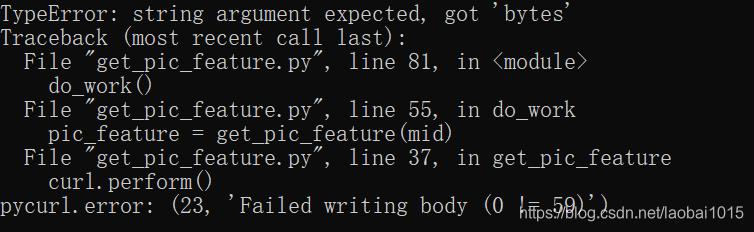
The following idiom is available for code that requires compatibility with Python2 and Python3:

import pycurl
try:
    # Python 3
    from io import BytesIO
except ImportError:
    # Python 2
    from StringIO import StringIO as BytesIO
c = pycurl.Curl()
c.setopt(c.URL,'http://pycurl.io')
buffer = BytesIO()
c.setopt(c.WRITEDATA, buffer)
c.perform()
# ok
# Decode the response body:
string_body = buffer.getvalue().decode('utf-8')