Author Archives: Robins

Make: * * [emigen] error 255 error analysis

The error message is as follows:
> Make new
Clean EMI Settings
Generate EMI Settings
No type library matching “Microsoft Excel” found at./tools/ emigenv2.pl line 79
Win32::OLE(0.1707): GetOleTypeLibObject () is Not a Win32: : OLE: : TypeLib object at C:
/Perl/lib/Win32/OLE/Const PM line 49.
Win32: : OLE (0.1707) error 0 x800401f3: “” palawan/tools/emiGenV2. Pl line 225
the eval {… } called at./tools/ emigenv2.pl line 225
make: *** [emigen] Error 255

reason: according to the Makefile gsm2.mak description, emigen is dependent on sysgen, sysgen is dependent on cmmgen, and new dependent
cmmgen. So this error happens when you make new, Be emigen Missing several dependent files
custom/system/NEOTEL25_06B_BB/ custom_emine.c
custom/system/NEOTEL25_06B_BB/ custom_emine.h
custom/system/NEOTEL25_06B_BB/flash_opt.h
custom/system/NEOTEL25_06B_BB/ custom_switch_clock C

the make/Gsm2 mak
— — — — — — — — — — — — — — — —
new: cleanall cmmgen asngen codegen asnregen The update
cmmgen: sysgen
sysgen: emigen
emigen: $$(FLASH_OPTIONS_HDR) (strip) $$(CUSTOM_EMI_H) (strip) $$(CUSTOM_EMI_C) (strip) $$(SWITCH_CLK_C) (strip)
@ echo the Generate EMI Settings
@ if exist $$(EMI_GENERATOR) (strip)/
(perl $$(EMI_GENERATOR) (strip) $(strip $(PLATFORM)) $$(MCU_CLOCK) (strip) $$(MEMORY_DEVICE_HDR) (strip) $$(MEMORY_DEVICE_LST) (strip)) 2 & gt; & 1
— — — — — — — — — — — — — — — — — — — — — — —

the variable $(PLATFORM), $(MCU_CLOCK) have NEOTEL25_06B_GPRS. Mak is defined.
variables $(EMI_GENERATOR), $(MEMORY_DEVICE_LST), $(MEMORY_DEVICE_HDR) are defined in option. mak.

so if the above source file is missing, Then make will call./tools/ emigenv2.pl to execute
./tools/ emigenv2.pl MT6225 MCU_104M Custom/system/NEOTEL25_06B_BB/custom_MemoryDevice. H.
/tools/MemoryDeviceList/MemoryDeviceList_Since06BW0652. XLS

emiGenV2. Pl is a Perl script, which invokes the Win32: : OLE libraries for Microsoft Office Excel file parsing.
if Excel is not installed, the above error message will be generated. Reference

http://bytes.com/topic/perl/answers/681606-win32-ole-error-no-type-library-matching-microsoft-excel-found

summary: keep the source code file is missing source file, or install MS Office Excel.
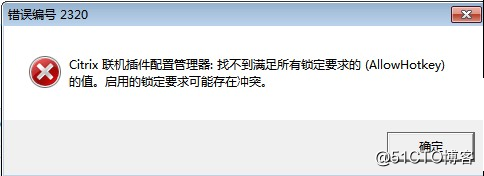
Citrix receiver error number 2320

Citrix Receiver error number 2320

After installing the citrix receiver, click the shortcut to start the application, the above error occurs
solution:
open the registry to search allowhotkey
2 to delete the allowhotkey value
Note, please backup the key value before deleting!

Reproduced in: https://blog.51cto.com/141686/2121024

C++ Use of deleted function error

Reason:
contains a STD ::unique_ptr.
A std::unique_ptr cannot be copied
or
contains a std::shared_ptr
A std::unique_ptr cannot be copied
Solutions:
To:

//cpp1
class B{
A::getPTR(target_ptr)
}

//cpp2
class A{
    getPTR(const B& target_ptr)
    {
    std::shared_ptr<B> copied_ptr = std::make_shared<B>(target_ptr);
    }
}

target_ptr:is the ptr you want to copy.
Copied ptr: is the ptr you copied

Solve win10 docker:error during connect: Get https://192.168.99.100 : 2376 and error checking TLS connection

There are two solutions :
1. If you simply can’t connect to docker, it may be the problem of port :
can be solved by the following methods: restart the service:

cd "C:\Program Files\Docker\Docker"
DockerCli.exe -SwitchDaemon

2. If it is a certificate problem, try the following methods to restart the computer:

//Step 1
docker-machine --debug regenerate-certs -f default
//Step 2
docker-machine --debug env default
//Step 3
docker-machine start
//Step 4
docker-machine -D ssh default

Note: If you install Win10 Professional Docker without Docker-Macheine, you can download and install it

Unknown error (SQLite code 14): could not open database (How to Fix)

Today, before I ran a project, I suddenly crashed as soon as I ran it. It felt very strange.

Caused by: android.database.sqlite.SQLiteCantOpenDatabaseException: unknown error (Sqlite code 14): Could not open database, (OS error - 13:Permission denied)

seems to lack permissions according to the log prompt, because the project is only using storage, then look at the permissions in the androidmanifest.xml and see

<uses-permission android:name="android.permission.WRITE_EXTERNAL_STORAGE"/>
<uses-permission android:name="android.permission.READ_EXTERNAL_STORAGE"/>

these two permissions are in ah, this is what is the matter, baidu is not added under the permission. Finally, it suddenly occurred to me that my phone was running on Android6.0. Then, to verify it, I found a 4.0 system and ran it directly. Once I found the problem, I would solve it. Many permissions have appeared since Android6.0, even though they are configured in androidmanifest.xml, and must be requested manually, or the permissions must be turned on in Settings – applications – permissions.
after 6.0 system with some permissions can be carried out such operation:

public static final int REQUEST_EXTERNAL_STORAGE = 1;
private static String[] PERMISSIONS_STORAGE = {Manifest.permission.READ_EXTERNAL_STORAGE, Manifest.permission.WRITE_EXTERNAL_STORAGE};
/**
* Verify access to the sd card
*
* @param activity
*/
public boolean verifyStoragePermissions(Activity activity) {
/*******below android 6.0*******/
if (Build.VERSION.SDK_INT < 23) {
return true;
}
int permission = ActivityCompat.checkSelfPermission(activity, Manifest.permission.READ_EXTERNAL_STORAGE);
if (permission != PackageManager.PERMISSION_GRANTED) {
ActivityCompat.requestPermissions(activity, PERMISSIONS_STORAGE, REQUEST_EXTERNAL_STORAGE);
return false;
} else {
return true;
}

}

Override in the Activity that invokes the requested permission. 
/**
 * :: Callbacks to request permissions
 *
 * @param requestCode
 * @param permissions
 * @param grantResults
 */
@Override
public void onRequestPermissionsResult(int requestCode, @NonNull String[] permissions, @NonNull int[] grantResults) {
super.onRequestPermissionsResult(requestCode, permissions, grantResults);
if (requestCode == REQUEST_EXTERNAL_STORAGE) {
if (grantResults[0] == PackageManager.PERMISSION_GRANTED) {
showToast("Authorization Success");
} else {
showToast("Authorization failed, please set open permissions.");
}
}
}

You can change the permission name to request another permission. Keep a small journal and hopefully help someone in need.

Solution to Dell server system halted

A company server from Dell1950,
xeon@5130
,2G memory, 146*2 SAS hard disk, reinstalled system, dosa boot, PCI error, prompt:

PCIe Degraded Link Width Error:
Embedded I/O Bridge Device6
Excepted Link Width Is X4
Actual Link Width Is X1
System Halted! , and is not into the BIOS.
it indicates that the internal bandwidth requirement is x4, but it is actually x1 at the moment. There are several ways: 1. You need to reset the BIOS to see, or just restore the BIOS default.
2: Try unplugging all peripherals PCI
3: Take off the motherboard battery before entering the BIOS
I used the third method to solve the problem that had been bothering me all day, without making any mistakes, and successfully installed the system. Also tell me a little bit of experience, think more before doing more hands, I think problems like similar problems such as server solution will be faster.

The original reference: http://blog.sina.com.cn/s/blog_4c2401cb0100a6pv.html

Unrecognized Windows Sockets error: 10106: solution to create

Socket cannot be created on a Windows system, resulting in many problems such as inaccessible, service cannot be created

Operational environment error situation resolution reference

The operating environment
Win7, the latest version of Eclipse, JDk8, Redis3.x, Maven3.5.x
Error scenario
Personal error reporting using Java client operation RedIS (non-clustered mode) :

Unrecognized Windows Sockets error: 10106: create
。。。

Other situations
When Tomcat in Eclipse starts up, it complains that the port is occupied by undertown/ when Tomcat starts up, HTTP cannot be accessed
At the code level, in the development environment, the IDE finds no bugs, almost inexplicably
To solve
Just follow the steps
Open the command prompt as an administrator (right-click in win7 attachment command operator , select run in administrator mode, win8 or 10, search command operator in the menu first, and then right-click…) Run netsh winsock reset restart the computer
reference
https://blog.csdn.net/u011019141/article/details/79154696

SQL Error: 904, SQLState: 42000

Question:

WARN 2011-03-04 09:33:18 org.hibernate.util.JDBCExceptionReporter – SQL Error: 904, SQLState: 42000

the ERROR 2011-03-04 09:33:18 org. Hibernate. Util. JDBCExceptionReporter – ORA – 00904: “MENU0_”. “MENU_OPEN_IN_HOME” : identifier is invalid

Hibernate: select portletloc0_.PORTLET_LOCATION_ROW as col_0_0_, portletloc0_.PORTLET_LOCATION_COLUMN as col_1_0_, portlet1_.PORTLET_URL as col_2_0_, portlet1_.PORTLET_TITLE as col_3_0_, portletloc0_.PORTLET_ID as col_4_0_ from JEDA_PORTLET_LOCATION portletloc0_, JEDA_PORTLET portlet1_ where portletloc0_.PORTLET_ID=portlet1_.PORTLET_ID and portletloc0_.POSITION_ID=?order by portletloc0_.PORTLET_LOCATION_ROW asc, portletloc0_.PORTLET_LOCATION_COLUMN asc

2011-3-4 9:33:18 org.apache.catalina.core.StandardWrapperValve invoke

severity: servlet.service () for Servlet DispatcherServlet threw exception

java.sqlexception: “MENU0_”.”MENU_OPEN_IN_HOME”: identifier is invalid

the reason:
The attribute name of the
hbm. XML file does not correspond to the attribute name of the database

Xcode – pbxcp Error Repair – no such file or directory

Xcode-pbxcp error fixes -No such file or directory, which is almost a common compilation error in Xcode. The reason is usually caused by an error when adding or deleting art resources. It’s a small problem, but it comes up quite frequently.

Solutions (try one after the other, and there is always one that will solve the problem) :
Methods 1. Xcode, then from the finder and into the ~/Library/Developer/Xcode/DerivedData delete all the content inside, and then restart Xcode give it a try

Method 2. The above operations can also be performed directly in The Xcode organizer, switch to projects in the organizer, and then delete derivedData
Delete the PrefixHeader values from the Target Settings and try restarting Xcode
Finally, restore the setting of the Prefix Header

Method 3:
It’s still in Xcode
Project – the targets – buildphases,
Then delete the red error resource file from copy Bundleresources

Mac OS error in make pycaffe times failure error:’python.h’file not found resolved

After installing caffe, report the following error when executing Make Pycaffe in caffe/build:

 linxierdeAir:caffe linxier$ cd build
linxierdeAir:build linxier$ make pycaffe
[  1%] Built target caffeproto
[ 98%] Built target caffe
[ 98%] Building CXX object python/CMakeFiles/pycaffe.dir/caffe/_caffe.cpp.o
/Users/linxier/caffe/python/caffe/_caffe.cpp:1:10: fatal error: 'Python.h' file
      not found
#include <Python.h>  // NOLINT(build/include_alpha)
         ^~~~~~~~~~
1 error generated.
make[3]: *** [python/CMakeFiles/pycaffe.dir/caffe/_caffe.cpp.o] Error 1
make[2]: *** [python/CMakeFiles/pycaffe.dir/all] Error 2
make[1]: *** [python/CMakeFiles/pycaffe.dir/rule] Error 2
make: *** [pycaffe] Error 2

Solutions:

Export CPLUS_INCLUDE_PATH =/System/Library/Frameworks/Python framework Versions/2.7/include/python2.7

Reference links: https://stackoverflow.com/questions/35778495/fatal-error-python-h-file-not-found-while-installing-opencv
the path name to your computer contains Python. H folder path, after successful compilation.