Author Archives: Robins

Ternary operator in Java?: error: not a statement

Error when running the following code:

/* package whatever; // don't place package name! */

import java.util.*;
import java.lang.*;
import java.io.*;

/* Name of the class has to be "Main" only if the class is public. */
/**
 * Determination of score levels
 * Use the nesting of conditional operators to complete this question: students with an >=90 academic score are represented by A, those between 60-89 are represented by B, and those below 60 are represented by C.
 * (a>b)?a:b This is a basic example of a conditional operator
*/

class ClassifyGrade
{
	public static void main(String[] args)
	{
		System.out.println("Please enter the score for a particular student.");
		Scanner aInt = new Scanner(System.in);
		int score = aInt.nextInt();			// This way we have a score to experiment with
		String grade = classify(score);
		System.out.println(grade);
	}
	public static String classify(int n)
	{
		n>=90?(grade = "A"):(n>=60?(grade = "B"):(grade = "C"));
		return grade;
	
	}
}

Error:

Main.java:26: error: not a statement
		n>=90?(grade = "A"):(n>=60?(grade = "B"):(grade = "C"));
		     ^
1 error


The reason for the mistake is:
Java ternary operator?: different from C++
In Java, N> = 90?(grade = “A”):(n> = 60?(grade = “B”):(grade = “C”)); This is just an expression, not a statement,
There are specific requirements for expressions in JAVA. Namely: expression E;
To form an expression statement, the expression E must only be :
1) assignment expression,
2) autoincrement ++ expression,
3) autodecrement — expression,
4) method call expression,
5)new expression (object creation expression)
The following statement is easier to understand:
Conditional statement?[expression 1] : [expression 2] where expression 1 is executed if the conditional statement is true, otherwise expression 2 is executed. Expression 1 or expression 2 should have a return value, which means that expression 1 or expression 2 can be some value, such as the integer 123. In my code, grade = “B” is an assignment statement that cannot return any value.

Correct code:

/* package whatever; // don't place package name! */

import java.util.*;
import java.lang.*;
import java.io.*;

/* Name of the class has to be "Main" only if the class is public. */
/**
 * Determination of score levels
 * Use the nesting of conditional operators to complete this question: students with an >=90 academic score are represented by A, those between 60-89 are represented by B, and those below 60 are represented by C.
 * (a>b)?a:b This is a basic example of a conditional operator
*/

class ClassifyGrade
{
	public static void main(String[] args)
	{
		System.out.println("Please enter the score for a particular student.");
		Scanner aInt = new Scanner(System.in);
		int score = aInt.nextInt();			//This way we have a score to experiment with
		String grade = classify(score);
		System.out.println(grade);
	}
	public static String classify(int n)
	{
		String grade = n>=90?"A":(n>=60?"B":"C");
		return grade;
	}
}


See the reference post:
Why can’t the ternary operator stand alone as a sentence, but a method that returns a value can stand alone as a sentence?
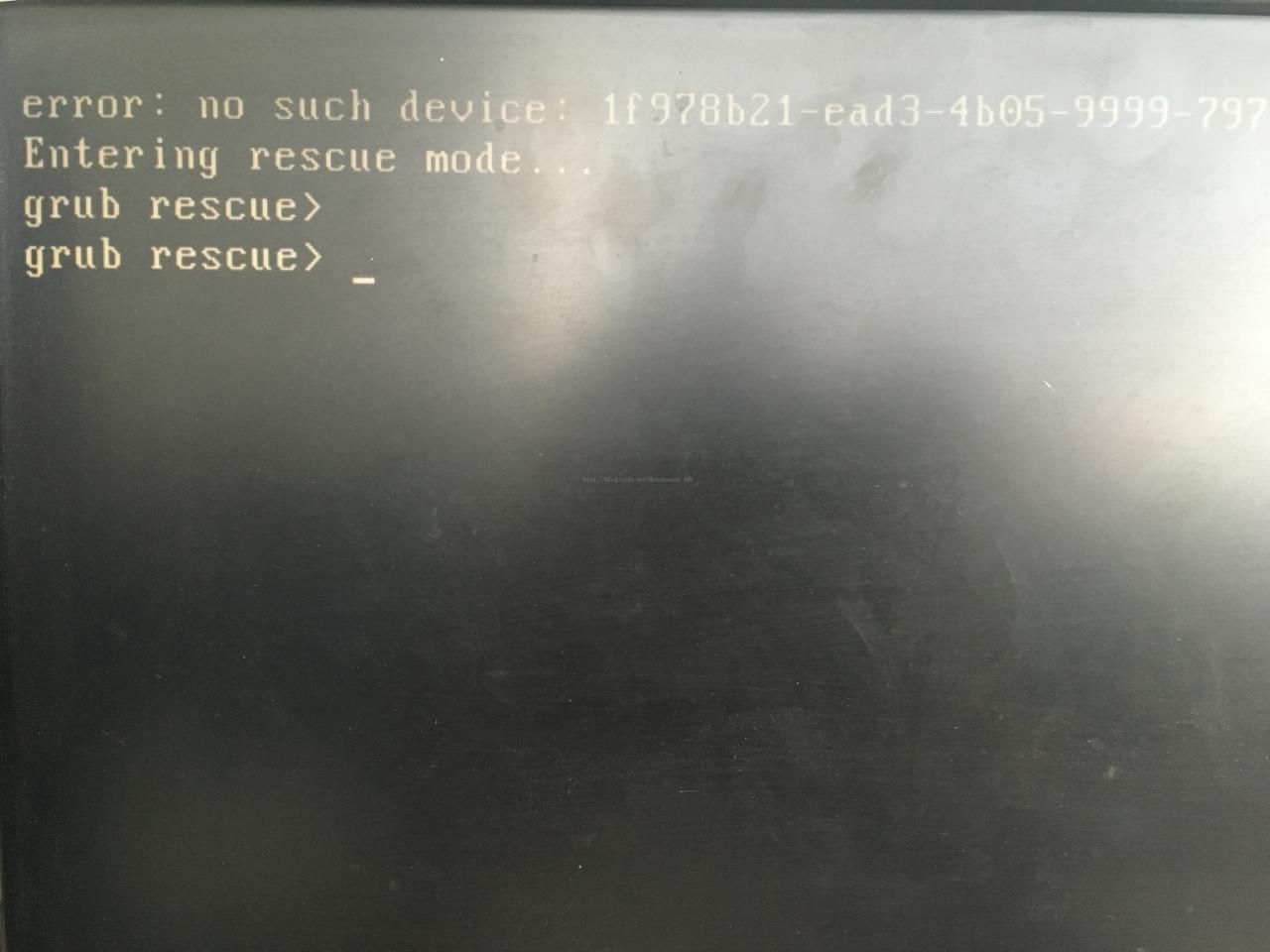
error: no such device: xxx xxx Entering rescue mode… grub rescue >

[update time: 2017/5/18]
I. Purpose of this paper:
I these days in the installation of dual systems, Win7 + Ubuntu, Linux and system layer is not very familiar with me, and indeed encountered a lot of problems. This paper is mainly aimed at the “system boot” aspects of the problem to do some sorting. This article provides an approach to system boot. Specific problems are described as follows:
1. The original system of my PC is Win7 system, and then I want to install an Ubuntu system.
2. The process of installing the system is arranged in another blog, please refer to here for details.
3, problem, case 1: after I install the system and restart, but the system directly into the original Windows 7 system, and there are no choice system interface (GRUB is start the implementation specification, which allows a user can have multiple operating systems at the same time inside a computer, in the startup of computer, want to run the operating system).
4. Case II: I made a similar mistake in another situation, and the solution I used was similar, so I put it together. The situation is described as follows: in the case of successful installation of two systems, I entered the win7 system disk management, and then the Ubuntu system related to the deletion of the disk, equivalent to the deletion of the formatting of the Ubuntu system. The problem comes, restart the computer, can not enter the win7 system, the following interface appears :(because of the previous operation, the system boot file has been deleted).

2. Solution:
1. Plug in the USB drive that has been successfully burned into the system, then choose to try Ubuntu and enter the Ubuntu system interface. (The item without UEFI was selected for this article)
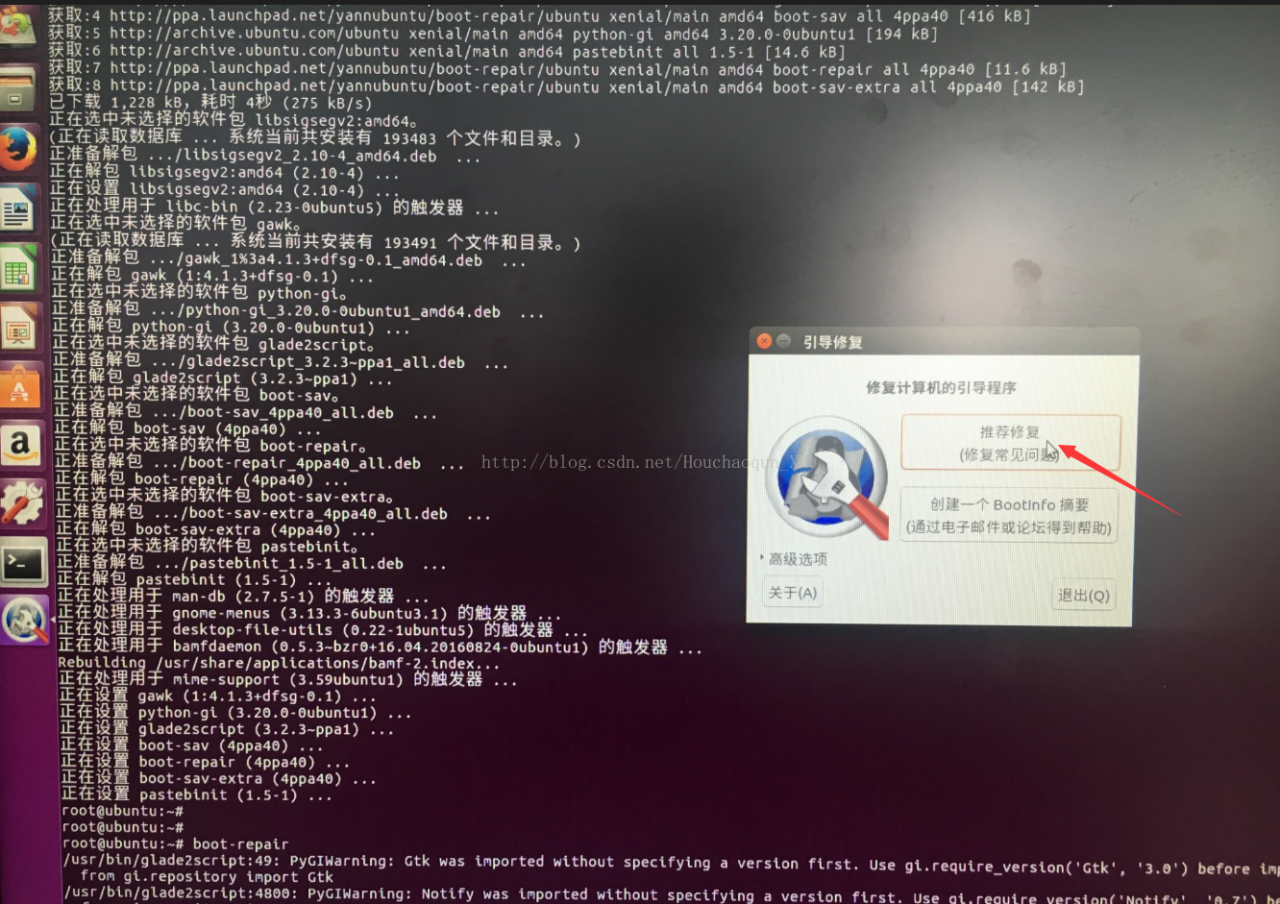
2. Make sure the machine is connected to the Internet, open the terminal and enter the following command:

sudo -i
add-apt-repository ppa:yannubuntu/boot-repair && apt-get update
apt-get install -y boot-repair && boot-repair

The first line indicates entering root account mode.
line 2 adds the software source and updates the system.
third action install boot-repair and start the software after the installation is complete.

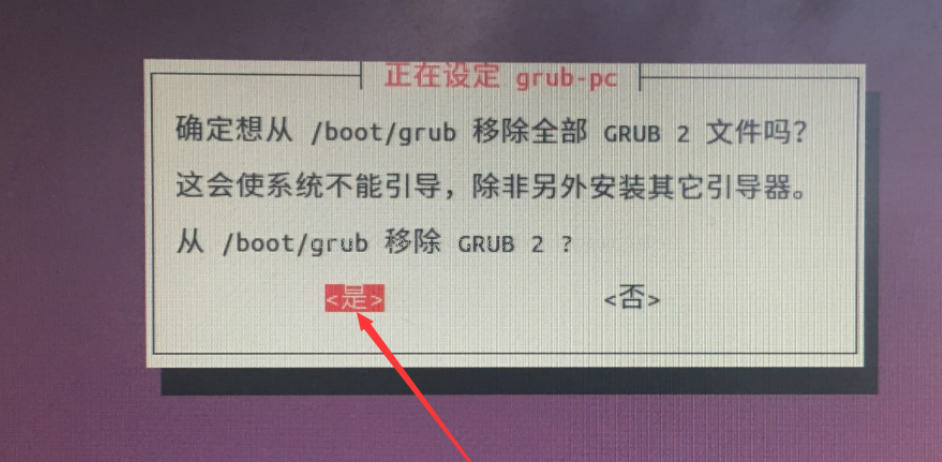
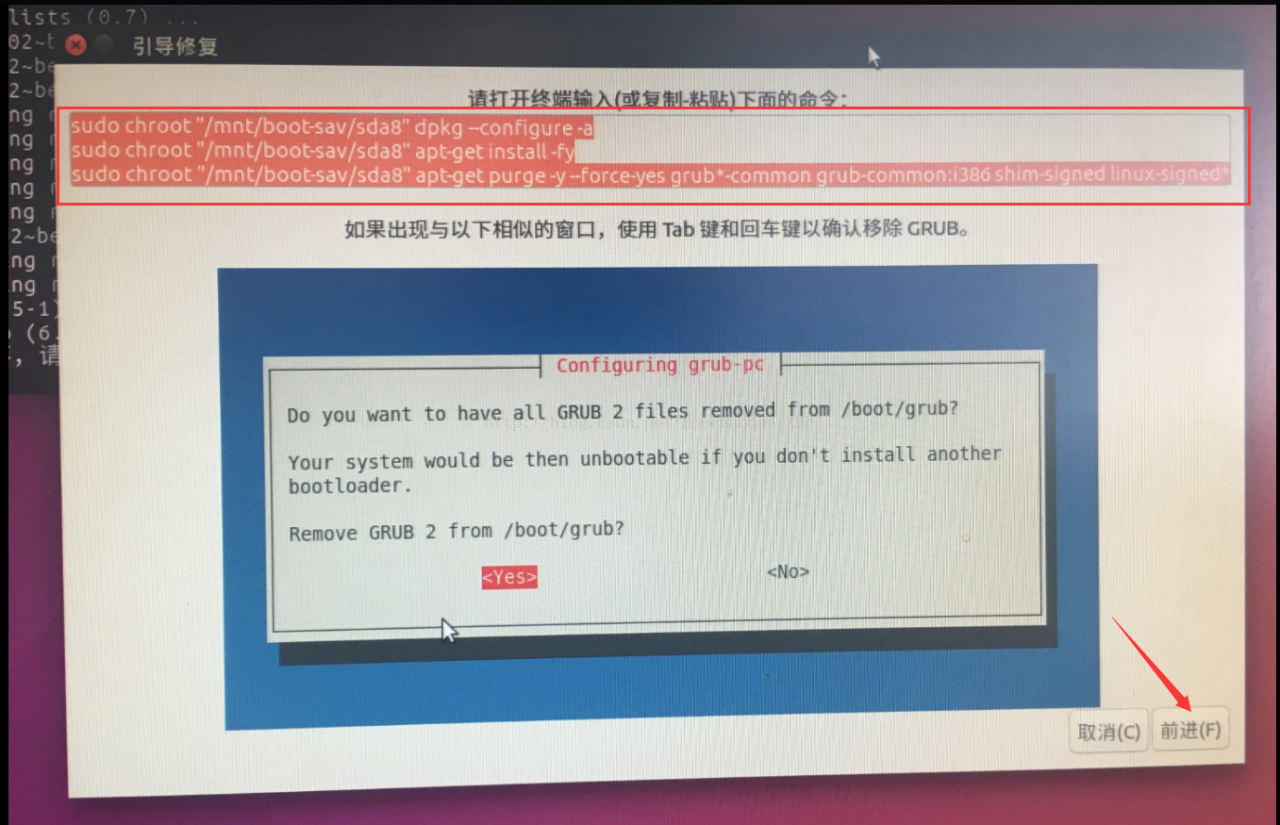
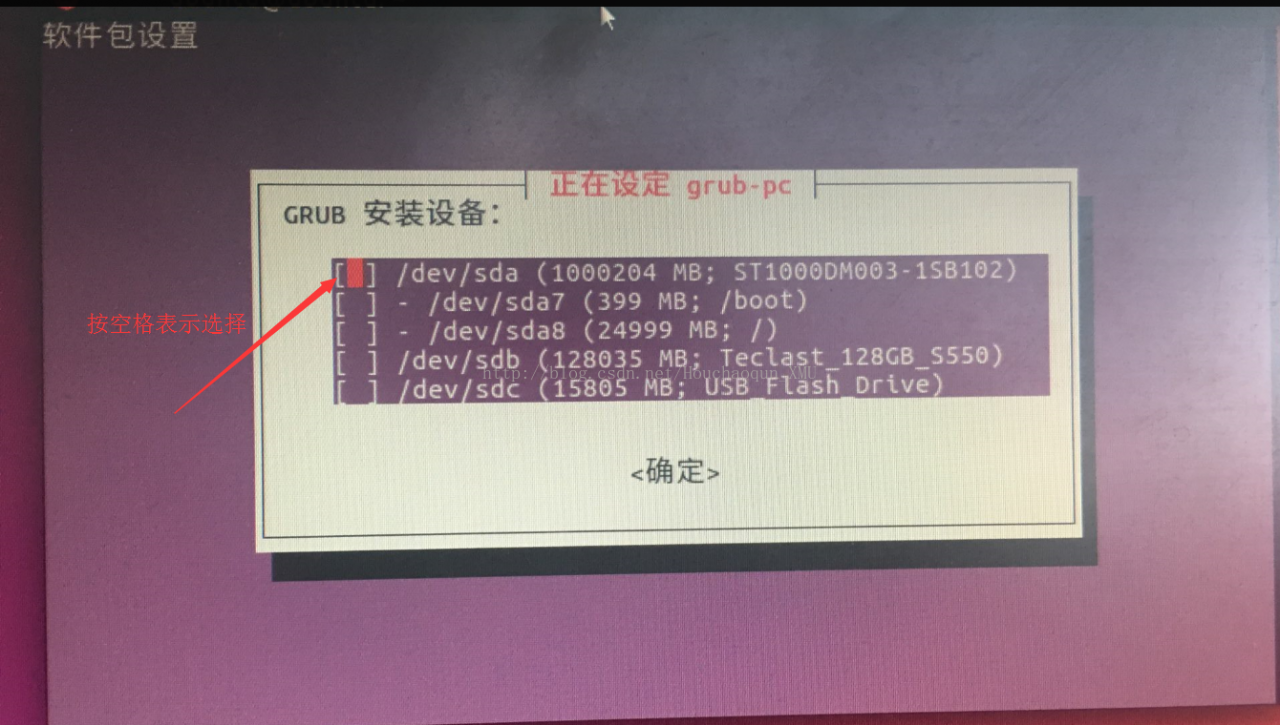
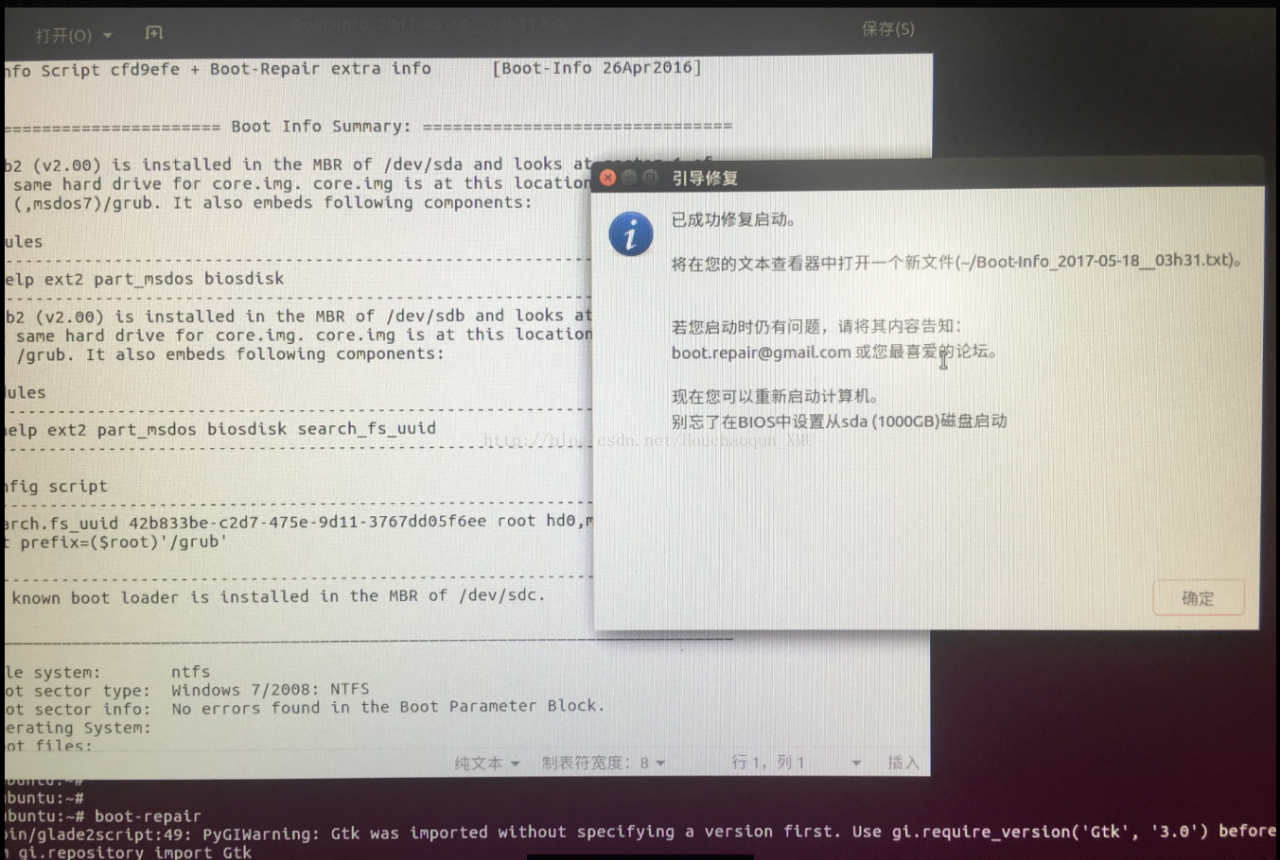
3. Input relevant instructions according to prompts. Part of the process diagram is shown below.


4, restart the computer, if successful, the system boot interface has come out, you can choose the required system.

3. Reference materials for this paper
1, use the Boot – repair repair double system: http://jingyan.baidu.com/article/5553fa82cd48a765a23934ae.html?qq-pf-to=pcqq.c2c

ABAQUS open error: FlexNet licensing error:-97 ,121 or -96,491

Abaqus Opening error: FLEXNET LICENSING Error :-97,121 or -96,491
(1) the system firewall problem, after closing the system firewall, you can open
and first run the lmgrd.exe in the license folder, there is no change; Run again lmreread. Exe, and then restart it
3. FLEXnet Licensing Error Codes – https://blog.csdn.net/baidu_18607183/article/details/51319104
REFERENCE [1]:https://blog.csdn.net/baidu_18607183/article/details/51319104

Error loading pscopg2 module: no module named pscopg2

When using Django to connect to a postgresql database, use python manager.py migrate to create a database.
django. Core. Exceptions. ImproperlyConfigured: Error loading psycopg2 module: No module named 'psycopg2' solution:
apt install psycopg2 if it fails, don't care if apt install libpq-dev or apt install postgresql-server-dev-x.y must be installed successfully, one of them PIP install psycopg2 must be installed successfully. Finally, remember to set an access password for the database set in your setting. Py , otherwise an error will be reported. You can set the access password by referring to the relevant commands here.

Python memoryerror (initializing a large matrix)

Encountered this problem is to initialize a large matrix:

import numpy as np
init_a = np.zeros((10000*10000,4096))

Direct initialization like this prompts a MemoryError.
Looking up the data, it finds that the default dtype=float64; therefore, after modifying the data type as float16, the error is avoided. Although the accuracy is lost, the code runs successfully:

init_a =  np.zeros((10000*10000,4096),dtype='float16')

If there is a better solution, please advise ~

boot.asm:1:error:parser:instruction expected

org 07c00h ; P
mov ax, cs
mov ds, ax
mov es, ax
call STR; Call display string routine
JMP $;
> BBSTR :
mov ax, BootMessage
mov bp, ax; ES:BP = string address
mov cx, 16; CX = string length
mov ax, 01301h; AH = 13, AL = 01h
mov bx, 000ch; BL = 0Ch, highlighted)
mov dl, 0
int 10h; BootMessage: db “Hello, OS world!” BootMessage: db “Hello, OS world!
times 510-($-$$) db 0 ; Fill the remaining space so that the generated binary code is exactly 512 bytes
dw 0xaa55; End flag

To compile into an executable program under Linux, use the command:
Nasm-f ELF pmboot.asm -o pmboot.bin

Compiler error:

The boot. The asm: 1: error: parser: instruction is expected

Use the command nasm pmboot.asm -o pmboot.bin without error.

LDAP: error code 21 – objectclass: value ා 0 invalid per syntax

The root cause is that the ObjectClass for manipulating data in LDAP is the same as in the original LDAP when adding, deleting, or altering it.
First, inconsistent ObjectClass type causes the reason for the addition failure
Entry, which is a directory managed object, is the most basic particle in LDAP. Generally, the addition, deletion, change, and retrieval of LDAP are based on entries. Each entry can have many attributes. An ObjectClass (ObjectClass) is a collection of properties.
Object classes make it easy to define entry types. Each entry can inherit directly from multiple object classes, thus inheriting various properties. If two object classes have the same property, only one property will be retained after the entry is inherited. The object class also specifies which attributes are essential information and Must or Required: which attributes are extensibility information and May or Optional.
Each Entry in the LDAP directory tree must belong to its own conditional objectClass, objectClass, then define its Entry attributes and corresponding values, and objectClass corresponds to Java as class. In Java, Class can be roughly divided into Abstract and Concrete, and only concrete Class can generate instance. In LDAP, objectClass is divided into three classes: Abstract, Structural, and Auxiliary. The specific definition is as follows:
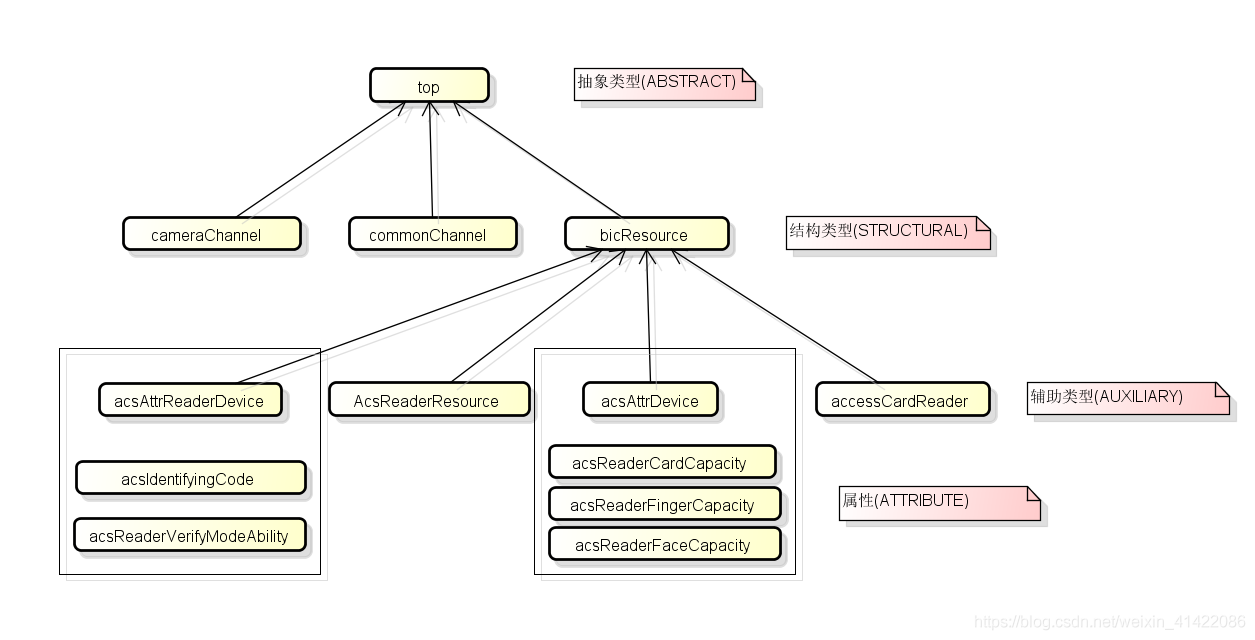
Abstract object classes are only intended to be extended by other object classes. An entry must not contain any abstract classes unless it also contains a structure or helper class from which Dervies derive an abstract class (that is, including non-abstract object classes, an inheritance chain of abstract classes). All entries must contain at least a “top” abstract object class and their structural classes in the inheritance chain. They may or may not contain other abstract classes in the inheritance chain in the structural class or in any of their helper classes. **Structural: ** Structured object classes are designed to define the key that an item represents. Each entry must contain a structured object class chain, and the root of the chain must ultimately be a “Top” abstract object class. Changes to the entry’s structural object class are not allowed. **Auxiliary: **Auxiliary object classes are intended to define the additional qualities of items. An entry may contain zero or more helper classes, and the set of helper classes associated with an entry may change over time.
The object classes themselves can inherit from each other, so the root of the object class is the top abstract object class. Take access control devices as an example, their inheritance relationship is shown in the figure below:

DAP entry attributes can be added depending on whether the objectClass inherited by the entry contains this attribute. ObjectClass has an inheritance relationship, that is, the attributes added to the entry ultimately depend on the collection of all objectclasses that it inherits.
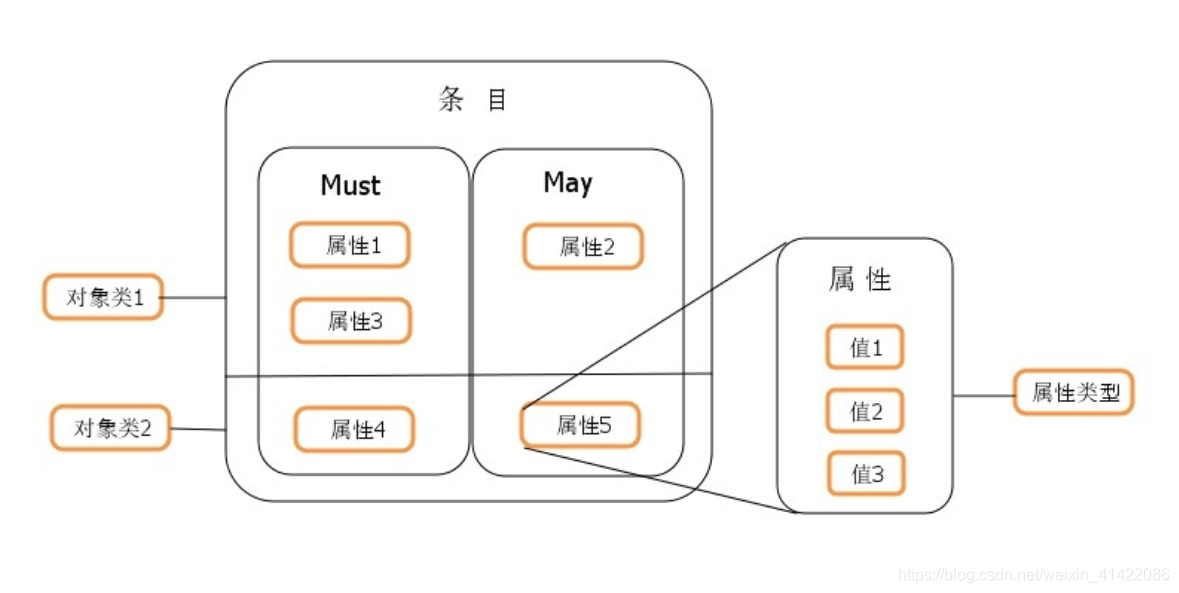
The objectClass and attributes are specified by the schema file, which is stored in the /etc/openldap/schema directory. The schema file specifies the composition of the objectClass and the corresponding relationships between attributes and values in the directory tree. You can generate the objectClass by defining a schema file to generate the required attributes. The relationships determined before the ObjectClass, AttributeType and Syntax are shown in the figure below:

so if the added property is not in the scope of objectClass, the directory server is not allowed to add the property. To do so, you must add the schema file to produce the properties corresponding to the objectClass.

Using Mocha to test can not find module ‘. /build/release/scrypt’ (Fixed)

I had a small problem learning the MoCHA testing framework and the Ganache-CLI testing environment
Install the video in the test code to write the following rules

const assert = require('assert');
const ganache = require('ganache-cli');
//If a variable begins with a capital letter, it is a constructor
const Web3 = require('web3');
//Plug the ganache test network card into web3.
const web3 = new Web3(ganache.provider());


describe('Testing Smart Contracts',()=>{
    it('Testing the web3 version',()=>{
        console.log(web3.version);
    });
});

Then enter NPM Run Test on the Terminal page
Cannot find module ‘./build/Release/scrypt’
Location is (F: \ MyEclipseWorkspace, Solidity, the Inbox, node_modules \ scrypt \ index js: 3:20)
Change the line code to
//var scryptNative = require(“./build/Release/scrypt”)
var scryptNative = require(“scrypt”)
Run the output test results again

Angular error – can’t resolve all parameters for []

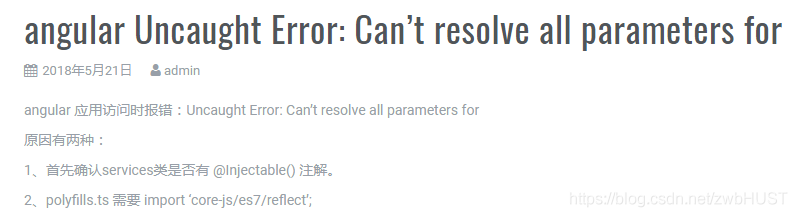
The error is as follows:

This problem has been a headache for a long time. Several reasons can be summarized as follows:

However, these two methods failed to solve my problem, and another reason was finally found, that is, the parameter that cannot be resolved is an HTTPService. The service was exported twice in index.ts, and one of them was commented out, so the error was not reported. In fact, this may only be the surface cause, but the root cause remains to be studied

Error ns when starting VirtualBox virtual machine after upgrading kernel_ ERROR_ FAILURE

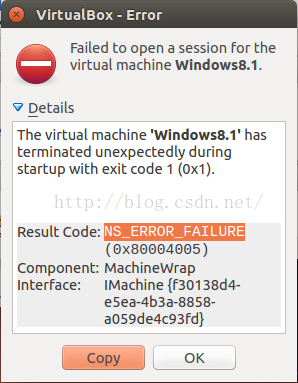
I updated the Ubuntu kernel today and everything seems to be going well. But when Trying to open a Previously created Windows 8.1 virtual machine inside VirtualBox, an error was reported:

Feeling confused, hard to create a virtual machine so can not be used?
After a long look, it turns out that the kernel driver for VirtualBox was not loaded successfully, presumably because the kernel had just been upgraded.
The solution is simple: simply execute the following command:

sudo /etc/init.d/vboxdrv setup

At this point, the VirtualBox kernel driver will be recompiled and loaded, possibly waiting a while.
After the command is executed, try to open the virtual machine again, and everything is fine.

Android studio — java.lang.nullpointerexception(no error message)

If Android Studio in Java. Lang. Nullpointerexception (no error message), then delete the project. Gradle folder, restart the Android Studio, and problem solving

Detailed answers address

http://stackoverflow.com/questions/39183674/java-lang-nullpointerexception-no-error-message

From: http://blog.csdn.net/huangxiaohui123/article/details/53900373