TypeError: ‘int’ object is not iterable
TypeError: ‘int’ object is not iterable. TypeError: ‘int’ object is not iterable. TypeError: ‘int’ object is not iterable
for i in len(A)
to
for i in range(len(A))
Can be
For more, please join the planet discussion.

XAMPP Error: Apache shutdown unexpectedly.This may be due to a blocked port, missing dependencies…
10:02:35 [Apache] Error: Apache shutdown unexpectedly.
10:02:35 [Apache] This may be due to a blocked port, missing dependencies,
10:02:35 [Apache] improper privileges, a crash, or a shutdown by another method.
10:02:35 [Apache] Press the Logs button to view error logs and check
10:02:35 [Apache] the Windows Event Viewer for more clues
10:02:35 [Apache] If you need more help, copy and post this
10:02:35 [Apache] entire log window on the forumsThis is a common problem, and the reason for this error is that the common ports, including http and https, are occupied by XAMPP’s settings, solution.
cmd by running apache/bin/httpd.exe Print the following log.
(OS 10048) Normally each socket address (protocol/network address/port) is allowed to be used only once. : make_sock: could not bind to address 0.0.0.0:443
Or maybe port 80 is occupied.
(OS 10048) Normally each socket address (protocol/network address/port) is allowed to be used only once. : make_sock: could not bind to address 0.0.0.0:80 or [ : : ]:80
Solution 1: The fastest way to handle this is to change the port number.
1, port 443 is occupied, apache can not listen to port 443, how to solve it?
In /xampp/apache/conf/extra/httpd-ssl. conf
Change Listen 443 to 444 (customizable)
2, port 80 is occupied, apache can not listen to port 80, how to solve it?
In /xampp/apache/conf/extra/httpd. conf
Change Listen 80 to 88 (customizable)
If you have configured vhosts, please change the port in httpd-vhosts.conf to 88 (same port number as above).
Solution 2: The most straightforward method is to shut down the processes that occupy ports 80 and 443.
1. see if the local ports 80 and 443 are occupied by netstat -ano in cmd —– – here it may be occupied by other programs such as iis, virtual machine, etc.
2. print tasklist in cmd to find the name of the process that occupies port 80 and 443. 3. taskkill /pid port number to kill the process name.
3. taskkill /pid port number kill this process name, XAMPP restart apache can be.
In summary, the first method is recommended, and the second is more or less every time you start up again.
*When Lenovo computer starts, 0190 appears: critical low battery error
The computer was shut down immediately after a message was displayed indicating a 0190crltical low-battery error. The battery on the motherboard is dead. From the Critical low-battery error, we can know that the electric quantity is too low, which can narrow the maintenance scope. It should be caused by the circuit problem in the charging part. *
Error when connecting to database: DB2 SQL error: sqlcode = – 204, sqlstate = 42704, sqlerrmc= YXUAT.CUST_ BLK_ REL, DRIVER=4.25.13
DB2 SQL Error: SQLCODE=-204, SQLSTATE=42704, SQLERRMC= yxuat. CUST_BLK_REL, DRIVER=4.25.13
Reason: When using MyBATIS, the remote database was connected, and the login user did not specify which schemas to use, that is, the user name was not specified. This led to the fact that Mybaits could not find the schemas we wanted, so it reported an error.
Solution 1: When you write SQL statements, you simply add schemas before the table names in the SQL
For example: SELECT * from cmis_uat1.cust_blk_rel
Solution 2: Add schemas when configuring datasource.
For example: spring: a datasource: url: JDBC: db2:// 10.10.0.36:50000/HNCKC: currentSchema = CMIS_UAT1; username: yxuat password: xfjr2016
DB2 create table error – 104 42601 illegal symbol encountered in SQL statement
Some SQL statements are as follows:
create table user
(
UserId int the not null,
The username varchar null,
Hobby varchar null,
Constraint PK_USER primary key clustered (userId)
);
Upon verification, it was found that the above SQL statement set the field to NULL, which cannot be written in DB2.
Error ora-00600 [ksfd] in logical standby database of DataGuard_ DECAIOPC]
I just arrived at the company this morning and found the following error in the alarm log of a logic backup library:
Fri Nov 25 07:44:08 2011
Errors in file /home/oracle/admin/cms2009/bdump/cms2009_lsp0_19249.trc:
ORA-12801: error signaled in parallel query server P004
ORA-00600: internal error code, arguments: [kollasg:client lob on server], [], [], [], [], [], [], []
LOGSTDBY Apply process P005 pid=47 OS id=19263 stopped
…
Errors in file /home/oracle/admin/cms2009/bdump/cms2009_lsp0_19249.trc:
ORA-12801: error signaled in parallel query server P000
ORA-00600: internal error code, arguments: [KSFD_DECAIOPC], [0x24C52A500], [], [], [], [], [], []
LOGSTDBY Apply process P005 pid=47 OS id=19263 stopped
LOGSTDBY Apply process P004 pid=46 OS id=19261 stopped
LOGSTDBY Apply process P009 pid=50 OS id=19271 stopped
LOGSTDBY Apply process P010 pid=51 OS id=19273 stopped
LOGSTDBY Apply process P008 pid=49 OS id=19269 stopped
Fri Nov 25 07:44:14 2011
TLCR process death detected. Shutting down TLCR
So immediately check:
select * from v$Logstdby_state;
Finding that the logging application has stopped, you attempt to restart its logging application.
alter database start logical standby apply immediate;
The log application was found to be in good working order.
Since then, I have been searching for the cause of the error.
may be due to a bug:
Bug 7312623: Ora-00600 [KSFD_DECAIOPC] ON LOGICAL STANDBY DATABASE.
From “ITPUB blog” link: http://blog.itpub.net/23073818/viewspace-712043/, if you want to reprint, please indicate the source, otherwise will be investigated for legal responsibility.
Reproduced in: http://blog.itpub.net/23073818/viewspace-712043/
Expanding the file system based on XFS in LVM
| did not contact CentsOS 7 before, do not understand its changed characteristics, accidentally in centos 7 contact LVM, the method to create LVM and 6 is no different, but the LVM is a little different, the use of the previous method for capacity expansion has not been effective, it took a long time to figure out its capacity expansion method. Xfs is the default file system type for CentOS7, and different file system types have different create, check, and adjust commands. |
Xfs is the default file system type for CentOS7, and different file system types have different create, check, and adjust commands.

In the XFS file system, you can only increase the partition, not decrease it.
[root@localhost ~]# ls /lib//modules/3.10.0-229.20.1.el7.x86_64/kernel/fs   #View all file system types supported by the kernel
binfmt_misc.ko  ceph    dlm    fat      gfs2   lockd       nfs_common  overlayfs  udf
btrfs           cifs    exofs  fscache  isofs  mbcache.ko  nfsd        pstore     xfs
cachefiles      cramfs  ext4   fuse     jbd2   nfs         nls         squashfs
I’ve created new partitions and added them to the VG, and I’ve extended the physical boundaries.
When extending logical boundaries, errors are reported as follows:
[root@localhost ~]# resize2fs -p /dev/mapper/centos-root
resize2fs 1.42.9 (28-Dec-2013)
resize2fs: Bad magic number in super-block When trying to open the /dev/mapper/centos-root 时
Can't find a valid file system superblock.
First, I thought of using FSCK for repair, but it didn’t work. When I saw the error message, I knew that XFS file should be repaired with XfS_REPAIR
[root@localhost ~]# fsck /dev/mapper/centos-root
fsck,from util-linux 2.23.2
If you wish to check the consistency of an XFS filesystem or
repair a damaged filesystem, see xfs_repair(8).
Then try to fix it, but it doesn’t work, you need to unmount it to fix it, and the filesystem is mounted to /, so don’t even think about it.
[root@localhost ~]# xfs_repair /dev/mapper/centos-root
xfs_repair: /dev/mapper/centos-root contains a mounted filesystem
xfs_repair: /dev/mapper/centos-root contains a mounted and writable filesystem

fatal error -- couldn't initialize XFS library
Finally, a web search reveals that there is one more step to go after the logical extension of the XFS filesystem:
[root@localhost ~]# lvs
  LV   VG     Attr       LSize  Pool Origin Data%  Meta%  Move Log Cpy%Sync Convert
  root centos -wi-ao---- 95.00g
  swap centos -wi-ao----  3.88g
[root@localhost ~]# df  -lh
File   System Capacity Used Available Used % Used Mount Points
/dev/mapper/centos-root   46G   42G  4.5G   91%/  ------------>46G
devtmpfs                 1.9G     0  1.9G    0% /dev
tmpfs                    1.9G  164K  1.9G    1% /dev/shm
tmpfs                    1.9G  8.7M  1.9G    1% /run
tmpfs                    1.9G     0  1.9G    0% /sys/fs/cgroup
/dev/sda1                497M  208M  290M   42% /boot
[root@localhost ~]# xfs_growfs /dev/mapper/centos-root      #This step is required to perform the adjustment, after the expansion.
meta-data=/dev/mapper/centos-root isize=256    agcount=4, agsize=2987776 blks
         =                       sectsz=512   attr=2, projid32bit=1
         =                       crc=0        finobt=0
data     =                       bsize=4096   blocks=11951104, imaxpct=25
         =                       sunit=0      swidth=0 blks
naming   =version 2              bsize=4096   ascii-ci=0 ftype=0
log      =internal               bsize=4096   blocks=5835, version=2
         =                       sectsz=512   sunit=0 blks, lazy-count=1
realtime =none                   extsz=4096   blocks=0, rtextents=0
data blocks changed from 11951104 to 24903680

[root@localhost ~]# df -lh
File System Capacity Used Available Used % Used Mount Points
/dev/mapper/centos-root   95G   42G   54G   44%/     ------------>Expansion has been completed
devtmpfs                 1.9G     0  1.9G    0% /dev
tmpfs                    1.9G  164K  1.9G    1% /dev/shm
tmpfs                    1.9G  8.7M  1.9G    1% /run
tmpfs                    1.9G     0  1.9G    0% /sys/fs/cgroup
/dev/sda1                497M  208M  290M   42% /boot
XFS related common commands
xfs_admin: Adjusting various parameters of the xfs file system
xfs_copy: copies the contents of the xfs file system to one or more targets (in parallel).
xfs_db: debugging or inspecting the xfs file system (looking at file system fragments, etc.)
xfs_check: checks the integrity of the xfs file system.
xfs_bmap: View a block map of a file.
xfs_repair: Attempts to repair damaged xfs filesystems
xfs_fsr: Defragmentation
xfs_quota: manages disk quotas for xfs filesystems
xfs_metadump: copies the metadata of the xfs file system to a file
xfs_mdrestore: restores metadata from a file to the xfs file system
xfs_growfs: Resize an xfs file system (only expandable)
xfs_freeze Suspend (-f) and Restore (-u) xfs filesystems
xfs_logprint: prints the xfs filesystem log.
xfs_mkfile: Creates the xfs file system.
xfs_info: Queries file system details
xfs_ncheck: generate pathnames from i-numbers for XFS
xfs_rtcp: XFS real-time copy command
xfs_io: debugging xfs I/O paths
Note:
becomes ext2 after using the mke2fs command on the Xfs filesystem. You need to change the filesystem type in /etc/fstab!
This paper address: http://www.linuxprobe.com/lvm+xfs++.html
Postgres solves permission denied for relation
I think you’ve all had privileges on database
grant all privileges on database XXX to XXX
is not in use.
and don’t want a table, to assign permissions.
Enter database
psql-u postgres-d postgres
\c mydb // switch TO mydb database
GRANT ALL PRIVILEGES ON ALL TABLES IN SCHEMA public TO xiaoming; // give ALL PRIVILEGES ON ALL tables TO xiaoming
GRANT ALL PRIVILEGES ON tuser TO wechart; // gives wechart user, tuser table all permissions
# pip install scipy — distutils.errors.LinkError: Command
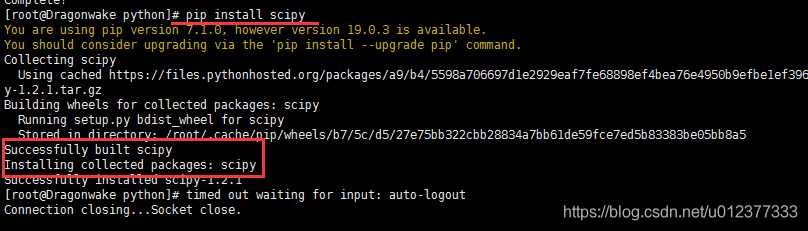
[root@Dragonwake python]# pip install scipy
You are using pip version 7.1.0, however version 19.0.3 is available.
You should consider upgrading via the 'pip install --upgrade pip' command.
Collecting scipy
  Using cached https://files.pythonhosted.org/packages/a9/b4/5598a706697d1e2929eaf7fe68898ef4bea76e4950b9efbe1ef396b8813a/scipy-1.2.1.tar.gz
Building wheels for collected packages: scipy
  Running setup.py bdist_wheel for scipy
  Complete output from command /usr/local/bin/python2.7 -c "import setuptools;__file__='/tmp/pip-build-5bcAZx/scipy/setup.py';exec(compile(open(__file__).read().replace('\r\n', '\n'), __file__, 'exec'))" bdist_wheel -d /tmp/tmptS4PsQpip-wheel-:
  Running from scipy source directory.
  lapack_opt_info:
  lapack_mkl_info:
  customize UnixCCompiler
    libraries mkl_rt not found in ['/usr/local/lib64', '/usr/local/lib', '/usr/lib64', '/usr/lib']
    NOT AVAILABLE

  openblas_lapack_info:
  customize UnixCCompiler
  customize UnixCCompiler
    libraries openblas not found in ['/usr/local/lib64', '/usr/local/lib', '/usr/lib64', '/usr/lib']
    NOT AVAILABLE

  openblas_clapack_info:
  customize UnixCCompiler
  customize UnixCCompiler
    libraries openblas,lapack not found in ['/usr/local/lib64', '/usr/local/lib', '/usr/lib64', '/usr/lib']
    NOT AVAILABLE

  atlas_3_10_threads_info:
  Setting PTATLAS=ATLAS
  customize UnixCCompiler
    libraries lapack_atlas not found in /usr/local/lib64
  customize UnixCCompiler
    libraries tatlas,tatlas not found in /usr/local/lib64
  customize UnixCCompiler
    libraries lapack_atlas not found in /usr/local/lib
  customize UnixCCompiler
    libraries tatlas,tatlas not found in /usr/local/lib
  customize UnixCCompiler
    libraries lapack_atlas not found in /usr/lib64/sse2
  customize UnixCCompiler
    libraries tatlas,tatlas not found in /usr/lib64/sse2
  customize UnixCCompiler
    libraries lapack_atlas not found in /usr/lib64
  customize UnixCCompiler
    libraries tatlas,tatlas not found in /usr/lib64
  customize UnixCCompiler
    libraries lapack_atlas not found in /usr/lib
  customize UnixCCompiler
    libraries tatlas,tatlas not found in /usr/lib
  <class 'numpy.distutils.system_info.atlas_3_10_threads_info'>
    NOT AVAILABLE

  atlas_3_10_info:
  customize UnixCCompiler
    libraries lapack_atlas not found in /usr/local/lib64
  customize UnixCCompiler
    libraries satlas,satlas not found in /usr/local/lib64
  customize UnixCCompiler
    libraries lapack_atlas not found in /usr/local/lib
  customize UnixCCompiler
    libraries satlas,satlas not found in /usr/local/lib
  customize UnixCCompiler
    libraries lapack_atlas not found in /usr/lib64/sse2
  customize UnixCCompiler
    libraries satlas,satlas not found in /usr/lib64/sse2
  customize UnixCCompiler
    libraries lapack_atlas not found in /usr/lib64
  customize UnixCCompiler
    libraries satlas,satlas not found in /usr/lib64
  customize UnixCCompiler
    libraries lapack_atlas not found in /usr/lib
  customize UnixCCompiler
    libraries satlas,satlas not found in /usr/lib
  <class 'numpy.distutils.system_info.atlas_3_10_info'>
    NOT AVAILABLE

  atlas_threads_info:
  Setting PTATLAS=ATLAS
  customize UnixCCompiler
    libraries lapack_atlas not found in /usr/local/lib64
  customize UnixCCompiler
    libraries ptf77blas,ptcblas,atlas not found in /usr/local/lib64
  customize UnixCCompiler
    libraries lapack_atlas not found in /usr/local/lib
  customize UnixCCompiler
    libraries ptf77blas,ptcblas,atlas not found in /usr/local/lib
  customize UnixCCompiler
    libraries lapack_atlas not found in /usr/lib64/sse2
  customize UnixCCompiler
    libraries ptf77blas,ptcblas,atlas not found in /usr/lib64/sse2
  customize UnixCCompiler
    libraries lapack_atlas not found in /usr/lib64
  customize UnixCCompiler
    libraries ptf77blas,ptcblas,atlas not found in /usr/lib64
  customize UnixCCompiler
    libraries lapack_atlas not found in /usr/lib
  customize UnixCCompiler
    libraries ptf77blas,ptcblas,atlas not found in /usr/lib
  <class 'numpy.distutils.system_info.atlas_threads_info'>
    NOT AVAILABLE

  atlas_info:
  customize UnixCCompiler
    libraries lapack_atlas not found in /usr/local/lib64
  customize UnixCCompiler
    libraries f77blas,cblas,atlas not found in /usr/local/lib64
  customize UnixCCompiler
    libraries lapack_atlas not found in /usr/local/lib
  customize UnixCCompiler
    libraries f77blas,cblas,atlas not found in /usr/local/lib
  customize UnixCCompiler
    libraries lapack_atlas not found in /usr/lib64/sse2
  customize UnixCCompiler
    libraries f77blas,cblas,atlas not found in /usr/lib64/sse2
  customize UnixCCompiler
    libraries lapack_atlas not found in /usr/lib64
  customize UnixCCompiler
    libraries f77blas,cblas,atlas not found in /usr/lib64
  customize UnixCCompiler
    libraries lapack_atlas not found in /usr/lib
  customize UnixCCompiler
    libraries f77blas,cblas,atlas not found in /usr/lib
  <class 'numpy.distutils.system_info.atlas_info'>
    NOT AVAILABLE

  accelerate_info:
    NOT AVAILABLE

  /usr/local/lib/python2.7/site-packages/numpy/distutils/system_info.py:638: UserWarning:
      Atlas (http://math-atlas.sourceforge.net/) libraries not found.
      Directories to search for the libraries can be specified in the
      numpy/distutils/site.cfg file (section [atlas]) or by setting
      the ATLAS environment variable.
    self.calc_info()
  lapack_info:
  customize UnixCCompiler
  customize UnixCCompiler
    FOUND:
      libraries = ['lapack', 'lapack']
      library_dirs = ['/usr/lib64']
      language = f77

  blas_info:
  customize UnixCCompiler
  customize UnixCCompiler
  C compiler: gcc -pthread -fno-strict-aliasing -g -O2 -DNDEBUG -g -fwrapv -O3 -Wall -Wstrict-prototypes -fPIC

  creating /tmp/tmp_D3_qJ/tmp
  creating /tmp/tmp_D3_qJ/tmp/tmp_D3_qJ
  compile options: '-I/usr/local/include -I/usr/include -c'
  gcc: /tmp/tmp_D3_qJ/source.c
  /tmp/tmp_D3_qJ/source.c:1:19: warning: cblas.h: No such file or directory
  /tmp/tmp_D3_qJ/source.c: In function ‘main’:
  /tmp/tmp_D3_qJ/source.c:6: warning: implicit declaration of function ‘cblas_ddot’
  gcc -pthread /tmp/tmp_D3_qJ/tmp/tmp_D3_qJ/source.o -L/usr/lib64 -lcblas -o /tmp/tmp_D3_qJ/a.out
  /usr/bin/ld: cannot find -lcblas
  collect2: ld returned 1 exit status
  gcc -pthread /tmp/tmp_D3_qJ/tmp/tmp_D3_qJ/source.o -L/usr/lib64 -lblas -o /tmp/tmp_D3_qJ/a.out
  /tmp/tmp_D3_qJ/tmp/tmp_D3_qJ/source.o: In function `main':
  /tmp/tmp_D3_qJ/source.c:6: undefined reference to `cblas_ddot'
  collect2: ld returned 1 exit status
  Traceback (most recent call last):
    File "<string>", line 1, in <module>
    File "/tmp/pip-build-5bcAZx/scipy/setup.py", line 492, in <module>
      setup_package()
    File "/tmp/pip-build-5bcAZx/scipy/setup.py", line 488, in setup_package
      setup(**metadata)
    File "/usr/local/lib/python2.7/site-packages/numpy/distutils/core.py", line 137, in setup
      config = configuration()
    File "/tmp/pip-build-5bcAZx/scipy/setup.py", line 388, in configuration
      lapack_opt = get_info('lapack_opt')
    File "/usr/local/lib/python2.7/site-packages/numpy/distutils/system_info.py", line 445, in get_info
      return cl().get_info(notfound_action)
    File "/usr/local/lib/python2.7/site-packages/numpy/distutils/system_info.py", line 638, in get_info
      self.calc_info()
    File "/usr/local/lib/python2.7/site-packages/numpy/distutils/system_info.py", line 1604, in calc_info
      blas_info = get_info('blas')
    File "/usr/local/lib/python2.7/site-packages/numpy/distutils/system_info.py", line 445, in get_info
      return cl().get_info(notfound_action)
    File "/usr/local/lib/python2.7/site-packages/numpy/distutils/system_info.py", line 638, in get_info
      self.calc_info()
    File "/usr/local/lib/python2.7/site-packages/numpy/distutils/system_info.py", line 1699, in calc_info
      lib = self.has_cblas(info)
    File "/usr/local/lib/python2.7/site-packages/numpy/distutils/system_info.py", line 1742, in has_cblas
      extra_postargs=info.get('extra_link_args', []))
    File "/usr/local/lib/python2.7/distutils/ccompiler.py", line 700, in link_executable
      debug, extra_preargs, extra_postargs, None, target_lang)
    File "/usr/local/lib/python2.7/distutils/unixccompiler.py", line 200, in link
      raise LinkError, msg
  distutils.errors.LinkError: Command "gcc -pthread /tmp/tmp_D3_qJ/tmp/tmp_D3_qJ/source.o -L/usr/lib64 -lblas -o /tmp/tmp_D3_qJ/a.out" failed with exit status 1

  ----------------------------------------
  Failed building wheel for scipy
Failed to build scipy
Installing collected packages: scipy
  Running setup.py install for scipy
    Complete output from command /usr/local/bin/python2.7 -c "import setuptools, tokenize;__file__='/tmp/pip-build-5bcAZx/scipy/setup.py';exec(compile(getattr(tokenize, 'open', open)(__file__).read().replace('\r\n', '\n'), __file__, 'exec'))" install --record /tmp/pip-gqE_Ie-record/install-record.txt --single-version-externally-managed --compile:
    Running from scipy source directory.

    Note: if you need reliable uninstall behavior, then install
    with pip instead of using `setup.py install`:

      - `pip install .`       (from a git repo or downloaded source
                               release)
      - `pip install scipy`   (last SciPy release on PyPI)


    lapack_opt_info:
    lapack_mkl_info:
    customize UnixCCompiler
      libraries mkl_rt not found in ['/usr/local/lib64', '/usr/local/lib', '/usr/lib64', '/usr/lib']
      NOT AVAILABLE

    openblas_lapack_info:
    customize UnixCCompiler
    customize UnixCCompiler
      libraries openblas not found in ['/usr/local/lib64', '/usr/local/lib', '/usr/lib64', '/usr/lib']
      NOT AVAILABLE

    openblas_clapack_info:
    customize UnixCCompiler
    customize UnixCCompiler
      libraries openblas,lapack not found in ['/usr/local/lib64', '/usr/local/lib', '/usr/lib64', '/usr/lib']
      NOT AVAILABLE

    atlas_3_10_threads_info:
    Setting PTATLAS=ATLAS
    customize UnixCCompiler
      libraries lapack_atlas not found in /usr/local/lib64
    customize UnixCCompiler
      libraries tatlas,tatlas not found in /usr/local/lib64
    customize UnixCCompiler
      libraries lapack_atlas not found in /usr/local/lib
    customize UnixCCompiler
      libraries tatlas,tatlas not found in /usr/local/lib
    customize UnixCCompiler
      libraries lapack_atlas not found in /usr/lib64/sse2
    customize UnixCCompiler
      libraries tatlas,tatlas not found in /usr/lib64/sse2
    customize UnixCCompiler
      libraries lapack_atlas not found in /usr/lib64
    customize UnixCCompiler
      libraries tatlas,tatlas not found in /usr/lib64
    customize UnixCCompiler
      libraries lapack_atlas not found in /usr/lib
    customize UnixCCompiler
      libraries tatlas,tatlas not found in /usr/lib
    <class 'numpy.distutils.system_info.atlas_3_10_threads_info'>
      NOT AVAILABLE

    atlas_3_10_info:
    customize UnixCCompiler
      libraries lapack_atlas not found in /usr/local/lib64
    customize UnixCCompiler
      libraries satlas,satlas not found in /usr/local/lib64
    customize UnixCCompiler
      libraries lapack_atlas not found in /usr/local/lib
    customize UnixCCompiler
      libraries satlas,satlas not found in /usr/local/lib
    customize UnixCCompiler
      libraries lapack_atlas not found in /usr/lib64/sse2
    customize UnixCCompiler
      libraries satlas,satlas not found in /usr/lib64/sse2
    customize UnixCCompiler
      libraries lapack_atlas not found in /usr/lib64
    customize UnixCCompiler
      libraries satlas,satlas not found in /usr/lib64
    customize UnixCCompiler
      libraries lapack_atlas not found in /usr/lib
    customize UnixCCompiler
      libraries satlas,satlas not found in /usr/lib
    <class 'numpy.distutils.system_info.atlas_3_10_info'>
      NOT AVAILABLE

    atlas_threads_info:
    Setting PTATLAS=ATLAS
    customize UnixCCompiler
      libraries lapack_atlas not found in /usr/local/lib64
    customize UnixCCompiler
      libraries ptf77blas,ptcblas,atlas not found in /usr/local/lib64
    customize UnixCCompiler
      libraries lapack_atlas not found in /usr/local/lib
    customize UnixCCompiler
      libraries ptf77blas,ptcblas,atlas not found in /usr/local/lib
    customize UnixCCompiler
      libraries lapack_atlas not found in /usr/lib64/sse2
    customize UnixCCompiler
      libraries ptf77blas,ptcblas,atlas not found in /usr/lib64/sse2
    customize UnixCCompiler
      libraries lapack_atlas not found in /usr/lib64
    customize UnixCCompiler
      libraries ptf77blas,ptcblas,atlas not found in /usr/lib64
    customize UnixCCompiler
      libraries lapack_atlas not found in /usr/lib
    customize UnixCCompiler
      libraries ptf77blas,ptcblas,atlas not found in /usr/lib
    <class 'numpy.distutils.system_info.atlas_threads_info'>
      NOT AVAILABLE

    atlas_info:
    customize UnixCCompiler
      libraries lapack_atlas not found in /usr/local/lib64
    customize UnixCCompiler
      libraries f77blas,cblas,atlas not found in /usr/local/lib64
    customize UnixCCompiler
      libraries lapack_atlas not found in /usr/local/lib
    customize UnixCCompiler
      libraries f77blas,cblas,atlas not found in /usr/local/lib
    customize UnixCCompiler
      libraries lapack_atlas not found in /usr/lib64/sse2
    customize UnixCCompiler
      libraries f77blas,cblas,atlas not found in /usr/lib64/sse2
    customize UnixCCompiler
      libraries lapack_atlas not found in /usr/lib64
    customize UnixCCompiler
      libraries f77blas,cblas,atlas not found in /usr/lib64
    customize UnixCCompiler
      libraries lapack_atlas not found in /usr/lib
    customize UnixCCompiler
      libraries f77blas,cblas,atlas not found in /usr/lib
    <class 'numpy.distutils.system_info.atlas_info'>
      NOT AVAILABLE

    accelerate_info:
      NOT AVAILABLE

    /usr/local/lib/python2.7/site-packages/numpy/distutils/system_info.py:638: UserWarning:
        Atlas (http://math-atlas.sourceforge.net/) libraries not found.
        Directories to search for the libraries can be specified in the
        numpy/distutils/site.cfg file (section [atlas]) or by setting
        the ATLAS environment variable.
      self.calc_info()
    lapack_info:
    customize UnixCCompiler
    customize UnixCCompiler
      FOUND:
        libraries = ['lapack', 'lapack']
        library_dirs = ['/usr/lib64']
        language = f77

    blas_info:
    customize UnixCCompiler
    customize UnixCCompiler
    C compiler: gcc -pthread -fno-strict-aliasing -g -O2 -DNDEBUG -g -fwrapv -O3 -Wall -Wstrict-prototypes -fPIC

    creating /tmp/tmpzUwJsa/tmp
    creating /tmp/tmpzUwJsa/tmp/tmpzUwJsa
    compile options: '-I/usr/local/include -I/usr/include -c'
    gcc: /tmp/tmpzUwJsa/source.c
    /tmp/tmpzUwJsa/source.c:1:19: warning: cblas.h: No such file or directory
    /tmp/tmpzUwJsa/source.c: In function ‘main’:
    /tmp/tmpzUwJsa/source.c:6: warning: implicit declaration of function ‘cblas_ddot’
    gcc -pthread /tmp/tmpzUwJsa/tmp/tmpzUwJsa/source.o -L/usr/lib64 -lcblas -o /tmp/tmpzUwJsa/a.out
    /usr/bin/ld: cannot find -lcblas
    collect2: ld returned 1 exit status
    gcc -pthread /tmp/tmpzUwJsa/tmp/tmpzUwJsa/source.o -L/usr/lib64 -lblas -o /tmp/tmpzUwJsa/a.out
    /tmp/tmpzUwJsa/tmp/tmpzUwJsa/source.o: In function `main':
    /tmp/tmpzUwJsa/source.c:6: undefined reference to `cblas_ddot'
    collect2: ld returned 1 exit status
    Traceback (most recent call last):
      File "<string>", line 1, in <module>
      File "/tmp/pip-build-5bcAZx/scipy/setup.py", line 492, in <module>
        setup_package()
      File "/tmp/pip-build-5bcAZx/scipy/setup.py", line 488, in setup_package
        setup(**metadata)
      File "/usr/local/lib/python2.7/site-packages/numpy/distutils/core.py", line 137, in setup
        config = configuration()
      File "/tmp/pip-build-5bcAZx/scipy/setup.py", line 388, in configuration
        lapack_opt = get_info('lapack_opt')
      File "/usr/local/lib/python2.7/site-packages/numpy/distutils/system_info.py", line 445, in get_info
        return cl().get_info(notfound_action)
      File "/usr/local/lib/python2.7/site-packages/numpy/distutils/system_info.py", line 638, in get_info
        self.calc_info()
      File "/usr/local/lib/python2.7/site-packages/numpy/distutils/system_info.py", line 1604, in calc_info
        blas_info = get_info('blas')
      File "/usr/local/lib/python2.7/site-packages/numpy/distutils/system_info.py", line 445, in get_info
        return cl().get_info(notfound_action)
      File "/usr/local/lib/python2.7/site-packages/numpy/distutils/system_info.py", line 638, in get_info
        self.calc_info()
      File "/usr/local/lib/python2.7/site-packages/numpy/distutils/system_info.py", line 1699, in calc_info
        lib = self.has_cblas(info)
      File "/usr/local/lib/python2.7/site-packages/numpy/distutils/system_info.py", line 1742, in has_cblas
        extra_postargs=info.get('extra_link_args', []))
      File "/usr/local/lib/python2.7/distutils/ccompiler.py", line 700, in link_executable
        debug, extra_preargs, extra_postargs, None, target_lang)
      File "/usr/local/lib/python2.7/distutils/unixccompiler.py", line 200, in link
        raise LinkError, msg
    distutils.errors.LinkError: Command "gcc -pthread /tmp/tmpzUwJsa/tmp/tmpzUwJsa/source.o -L/usr/lib64 -lblas -o /tmp/tmpzUwJsa/a.out" failed with exit status 1

    ----------------------------------------
Command "/usr/local/bin/python2.7 -c "import setuptools, tokenize;__file__='/tmp/pip-build-5bcAZx/scipy/setup.py';exec(compile(getattr(tokenize, 'open', open)(__file__).read().replace('\r\n', '\n'), __file__, 'exec'))" install --record /tmp/pip-gqE_Ie-record/install-record.txt --single-version-externally-managed --compile" failed with error code 1 in /tmp/pip-build-5bcAZx/scipy
The following error occurs:
distutils.errors.LinkError: Command "gcc -pthread /tmp/tmp2AUeGJ/tmp/tmp2AUeGJ/source.o -L/usr/lib64 -lblas -o /tmp/tmp2AUeGJ/a.out" failed with exit status 1Refer to the address: https://stackoverflow.com/questions/53565726/failed-building-wheel-for-numpy-pandas
The installation
sudo yum install atlas-devel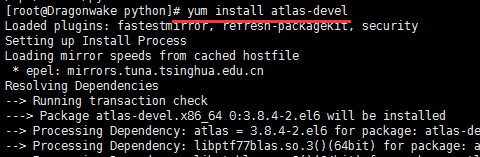
Solution to prompt “error opening terminal: xterm.” when making menuconfig
The solution to make Menuconfig is to prompt “Error opening terminal: xterm.
Under Linux environment, make menuconfig or make config commands are used when compiling embedded systems. These commands usually use the ncurses library. If the ncurses library is not installed and set correctly, the following Error message may appear:
Error opening terminal: xterm
Solutions:
1. First make sure that the ncurses library is installed correctly. On debian, Ubuntu, you can use dpkg-l | grep ncurses to see if the ncurses library is installed.
2. If ncurses is already installed, check to see if the TERM and TERMINFO environment variables have been set correctly. If it is not set correctly, you need to set it to the correct value.
$ echo $TERM
$ echo $TERMINFO
For TERMINFO, the path to TERMINFO should be set, such as /usr/share/ TERMINFO or /lib/ TERMINFO. To view Terminfo's storage location with the following instruction:
$whereis terminfo
terminfo: /etc/terminfo /lib/terminfo /usr/share/terminfo /usr/share/man/man5/terminfo.5.gz
See if the terminal information file is saved in the Terminfo directory: It is usually divided into A, B, C, D... Z these alphabetic directories, each containing term information beginning with that letter. For example, vT100 is placed in the "V" directory. The term we need must have the term information in the corresponding directory. Once you have identified this information, you can set the TERM and TERMINFO information:
export TERM=xterm
export TERMINFO=/lib/terminfo
The Settings above, must ensure that the/usr/share/terminfo term existing in the information, and/usr/share/terminfo/v/vt100 exists.
Regarding the setting of terms, it may need to be set to different terms such as Linux, VT100-putty, etc. Linux is commonly used for the Linux console, and vT100-putty is, as the name implies, a VT100 terminal that USES PuTTY to log in remotely.
The following are the values of the TERM and TERMINFO environment variables in the Ubuntu12.10 environment after the problem is resolved.
$ echo $TERM
xterm
$ echo $TERMINFO
/lib/terminfo/
standard_init_linux.go:211: exec user process caused “exec format error”
Write #! At the top of the sh script. Bin /bash, write this to any script file that executes, remember, remember!
