Author Archives: Robins

Solution to the problem of “undefined external error” after registering PBX of microsip

These days idle egg pain, the Win10 upgrade, upgrade after everything seems to be used as usual.
During a MicroSIP soft phone test of dot star PBX(DotAsterisk) call, it was found that once dialed, an “undefined External error” would pop up. The screenshot of the error is shown below.
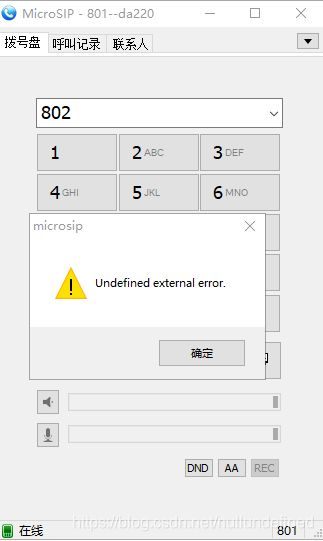
 
 
When Windows 10 was updated to 1803, access to sensitive and private devices (microphones) was restricted. However, the MicroSIP error message is too unfriendly.
Solutions:
In the lower right corner [Start menu] — [Settings] — [privacy] — on the left [reference permissions], select “Microphone”, and in the right “Allow Applications to access your microphone” switch, just keep it on. The diagram below.
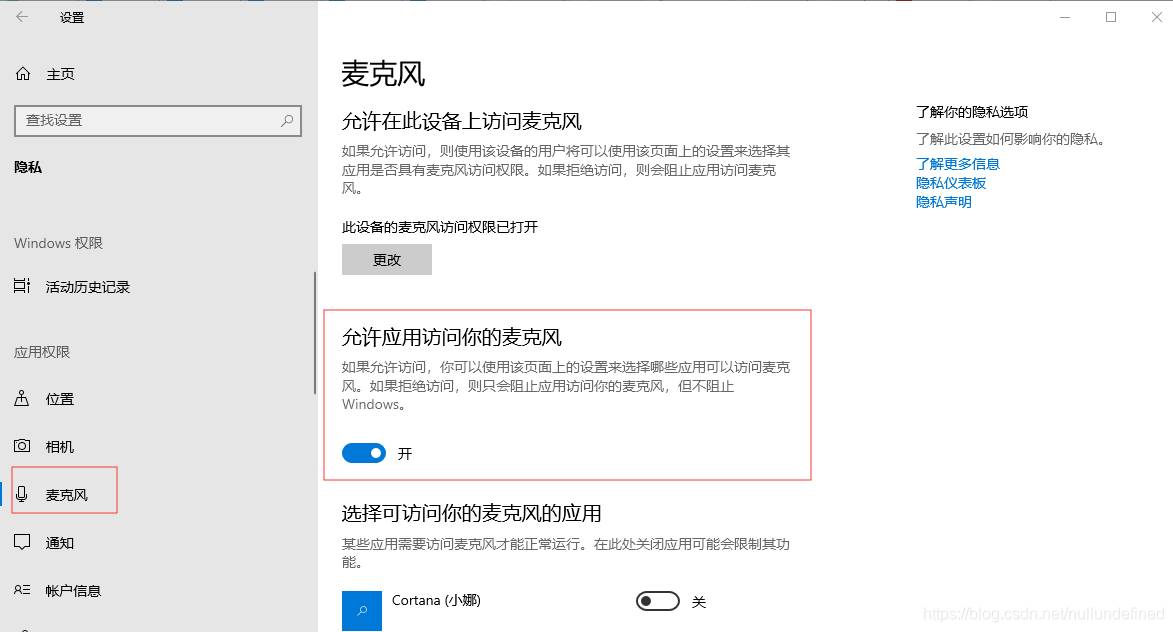
 
Once the state is on, register the Dot Star PBX(DotAsterisk) with the MicroSIP soft phone, make a dial-up call, and find that everything is fine.
 

OpenGL runtime returned 1283 (stack overflow) error

During the test, it was found that some models would cause OpengL to report 1283 error. The code is as follows:

// check for errors
	m_glErrorCode=glGetError();
	if(m_glErrorCode != GL_NO_ERROR)
	{
		const GLubyte *estring;
		CString mexstr;
// get the error descritption from OGL
		estring = gluErrorString(m_glErrorCode);
// prepare and show a message box
		mexstr.Format(L"GLEnabledView:\n\tAn OpenGL error occurred: %s\n", estring);
		AfxMessageBox(mexstr,MB_OK | MB_ICONEXCLAMATION);
	}

The value of m_glErrorCode for debugging is 1283 and eString is a stack overflow
After talking to friends and Googling, I came to the following conclusion:
The push and POP classes in OpengL don’t match.
The reason for the problem is that after a push, an opengL function made an error running, and then the return dropped, causing the subsequent POP not to run, reporting the error.

After the problem is solved, I find that the previous code will make a judgment on the return value of some OpengL functions. Let’s learn. This will help you find out quickly what the problem is.

	if(!gluUnProject(winx,winy,winz,modelMatrix,projMatrix,viewport,&objx1,&objy1,&objz1))
		return FALSE;

If you want to discuss it, please email me.

[338] MySQL error: error 1205: lock wait timeout exceeded solution

Solutions:
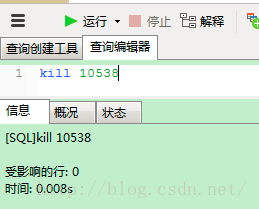
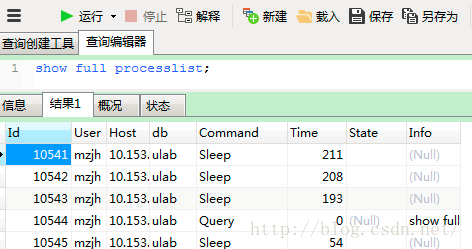
Execute mysql command: Show Full ProcessList;

Then find the system ID of the query statement: kill the thread ID that is being locked

Select * from information_schema.innodb_trx; select * from information_schema.innodb_trx;

Refer to the article: http://my.oschina.net/quanzhong/blog/222091
http://blog.sina.com.cn/s/blog_53e68b3b0101bjxi.html

Sudo: parse error in / etc / sudoers near line 24

From: https://www.cnblogs.com/starsea/p/4926658.html

Ubuntu USES viM for adding user permissions

/etc/sudoers

File editing, save and exit, sudo SU and other commands have been reported as follows:

sudo: parse error in /etc/sudoers near line 24
sudo: no valid sudoers sources found, quitting
sudo: unable to initialize policy plugin

The reason is that it is wrong to use Vim to modify the file. For example, Google says you should use visudo to edit sudoers.
If something goes wrong, the following solution is executed:

pkexec visudo

Enter the file edit, for just modify the wrong place, directly modify, save exit, restore normal

Python error: typeerror: ‘module’ object is not callable

TypeError: ‘module’ object is not callable when calling another function or class in Python. This is related to the import mechanism
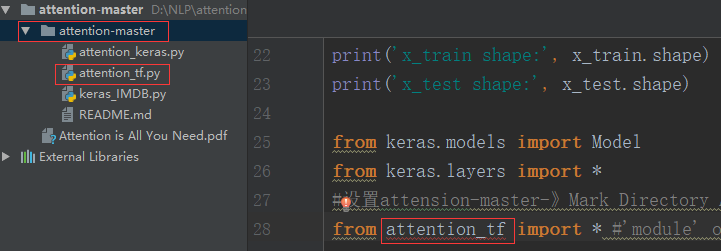
To be clear, attention_keras.py and attention_tf.py are in the same package (i.e. under the same folder)


While calling a function in the attention_Tf.py file, it is found that attention_TF cannot be called
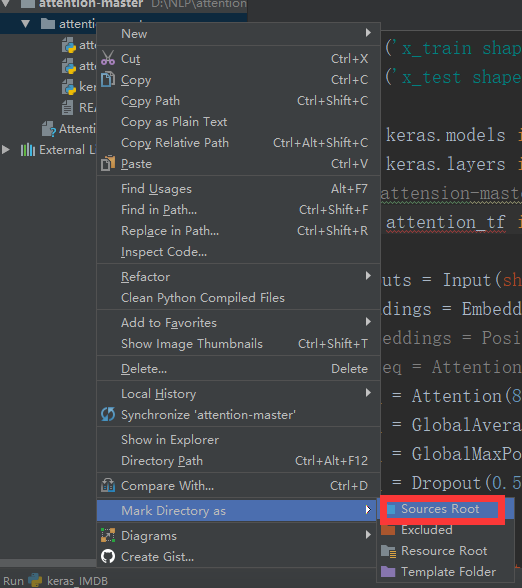
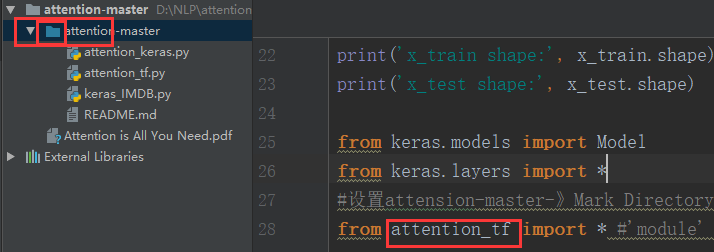
# Set attensons-Master – Mark Directory As -& GT; Resources ROOT

rule: 1, if the method in b.> file is called, that is, B.py has Class B: the principle of calling is: module name-class name-method name

2, if calling a function in the b.py file: module name – function name

SQL Server “login failed for user ‘domain account”. [sqlstate 28000] (error 18456). “Problem solving

Problem: SQL Server 2014, synchronized data from Linked Server with Job timing, executed times “Login Failed for User ‘domain account’ “(SQLSTATE 28000) (Error 18456).
Solution: Modify the SQL Server Agent service startup account as the domain account through the configuration management tool, see: Login Failed for [SQLSTATE 28000] (Error 18456) The Step Failed

Reproduced in: https://www.cnblogs.com/abelard/p/4840962.html

IIS 7.5, ASP.NET MVC. HTTP error 500 (internal server error), but debugging does not enter the background, the browser only reports 500 errors

Bugs, such as:
IIS 7.5, ASP.NET MVC. HTTP Error 500 (Internal Server Error) uploadify uploads images, the browser only reported 500 errors, the progress bar does not move, but debugging does not enter the background
After several days of searching, I could not debug the source of the error. I also wondered whether the maximum byte limit of the upload was limited. However, I finally found the prompt of foreign gods under Google and determined that it was this error.
http://stackoverflow.com/questions/17188930/iis-7-5-asp-net-mvc-http-error-500-internal-server-error-an-unexpected-cond
Solutions:
& lt; The httpRuntime requestValidationMode = “2.0” maxRequestLength = “100000”/& gt; The configuration file adds a maximum byte limit

Error 1606 Could Not Access Network Location %SystemDrive%/inetpub/wwwroot/

Prompt for title error when uninstalling or reinstalling Infragistics NetAdvantage
Under Windows 7
1. Open registry Regedit
2, find the HKEY_LOCAL_MACHINE/SOFTWARE/Microsoft/InetStp PathWWWRoot
64-bit operating system: HKEY_LOCAL_MACHINE\SOFTWARE\Wow6432Node\Microsoft\InetStp\PathWWWRoot
% SystemDrive %/inetpub/below/= = “C: \ inetpub \ below


error: expected unqualified-id before ‘dynamic_cast’

Error code:

Deride * q= std::dynamic_cast<Deride*>(p);

Dynamic_cast is not part of STD library, but C++ keyword, so it should be removed.

Deride * q= dynamic_cast<Deride*>(p);

A word of caution:
STD :: Dynamic_pointer_cast for dynamic conversion shared_PTR is the part in STD. This is also obvious because shared_PTR is a part in STD

An error occurred while win7 was sharing the Internet

The following errors may occur when sharing an Internet connection in Windows 7:
An error occurred while Internet Connection Sharing we being enabled.Internet Connection Sharing cannot be enabled. A LAN connection is already configured with the IP address that is required for automatic IP addressing.
This can be fixed with the following two commands:
netsh int ip reset
netsh winsock reset catalog
After executing these two commands with administrator privileges, restart and you should be able to share your Internet connection normally.

Error: EACCES: permission denied, access ‘/usr/local/lib/node_modules’ npm ERR! at Error (native)

Use the command line to keep this Error similar to: Error: EACCES: Permission Denied, Access ‘/usr/local/lib/node_modules’ NPM ERR! at Error (native)

Reason: No administrator rights were obtained while executing command line commands

Solution: Simply prefix the command with sudo. Then enter the computer administrator password operation can be completed.