Tag Archives: python

Python – writing visual interface (Python + pycharm + pyqt)

Recently began to learn Python, but only to see the theory, a few lines of code, think it is not interesting, I want to use Python to write a visual interface. Then I searched relevant materials and found PyQt. As I had just seen Qt a while ago and had a good impression on Qt, I thought using PyQt should be a more pleasant choice.
1, the preface
The version of PyQt should be the same as the version of Python. The version of PyQt I use here is PyQT5-5.6-GPL-Py3.5-QT5.6.0-x64.exe. For details, please search directly. Since this version requires the V3.5 version of Python, you need to install Python3.5 first and then PyQt. To make it easier to write code, you install PyCharm (version: PyCharm-Community-2017.3.2.exe). PyCharm +Python3.5+ PyQT5.6 is a Python visual programming tool that allows you to install and download Python Charm, Python3.5 and PyQT5.6. Visual programming in Python based on the latest version of PyChart 2018.3+Python3.7+ PyQT5.11 will also be introduced at the end of this article.
2, start
1) Open PyCharm and configure the relevant Settings
Open the PyCharm interface as follows:
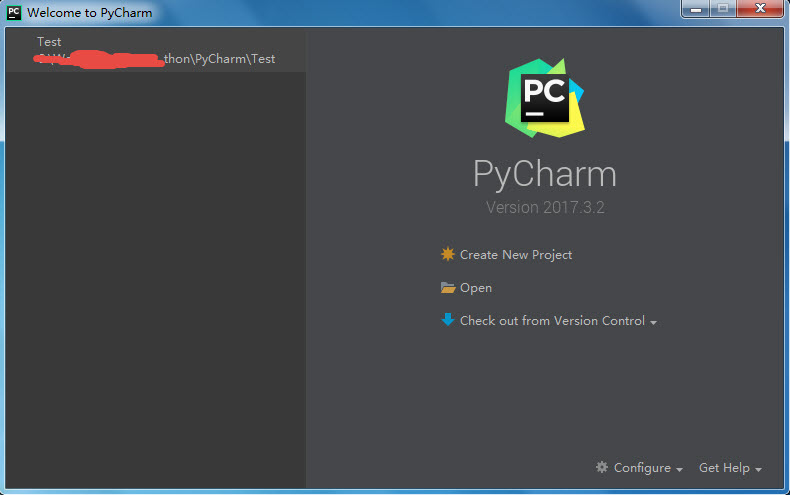
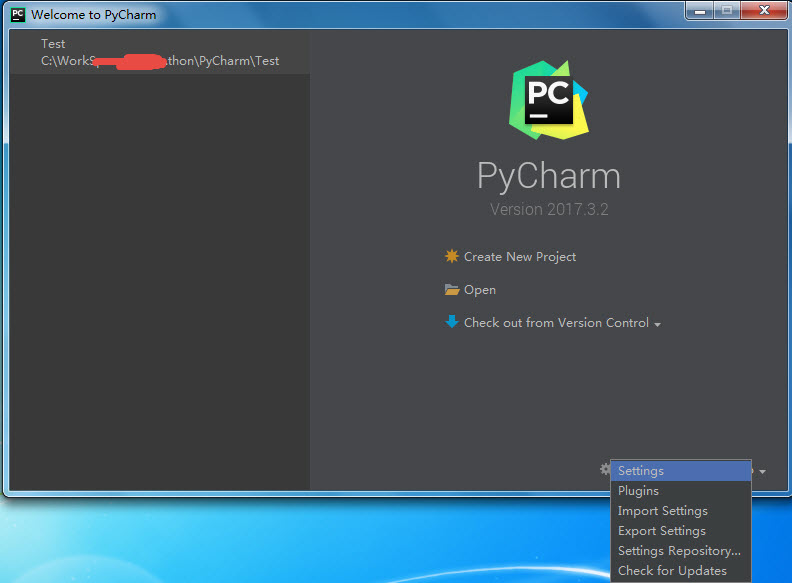
Click the “Configure” drop-down button at the bottom right of the screen and select “Settings”, as shown below:
Open the following setting interface:
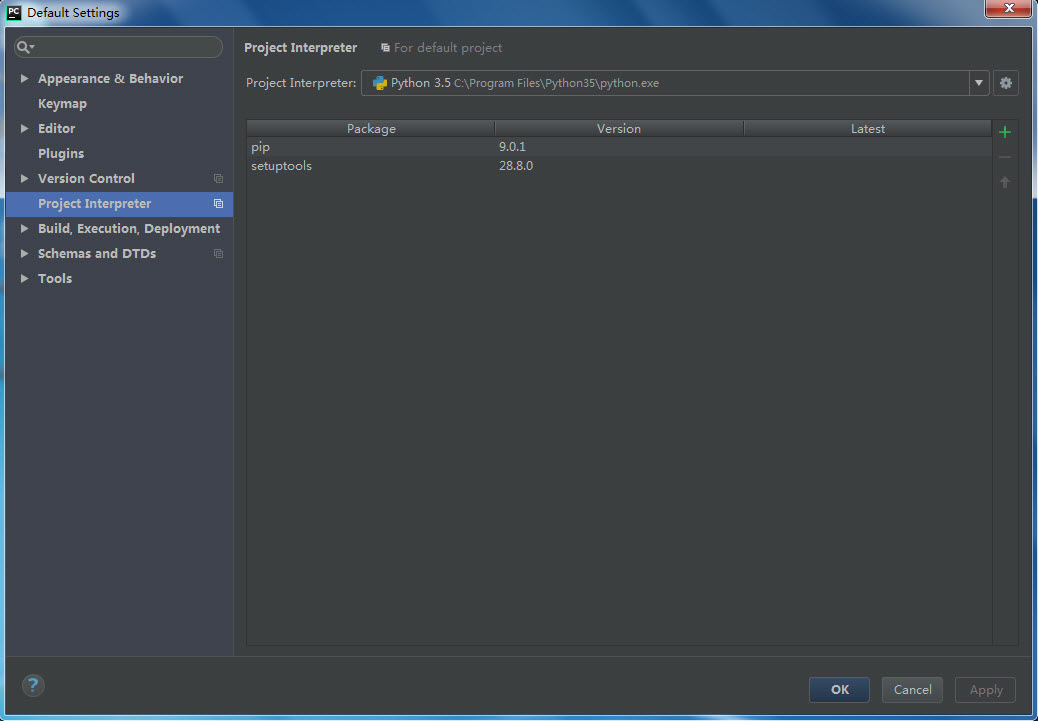
As shown above, select the Python version installed on this machine from the “Project Interpreter” graphics card. Normally, it will automatically recognize the Python version installed on this machine, as shown in Figure 3.5;
After the configuration is completed, click “OK” to return to the Start screen.
Select “Create New Project “, select the Project path and Project name, then click “Create”, and the following interface will pop up:
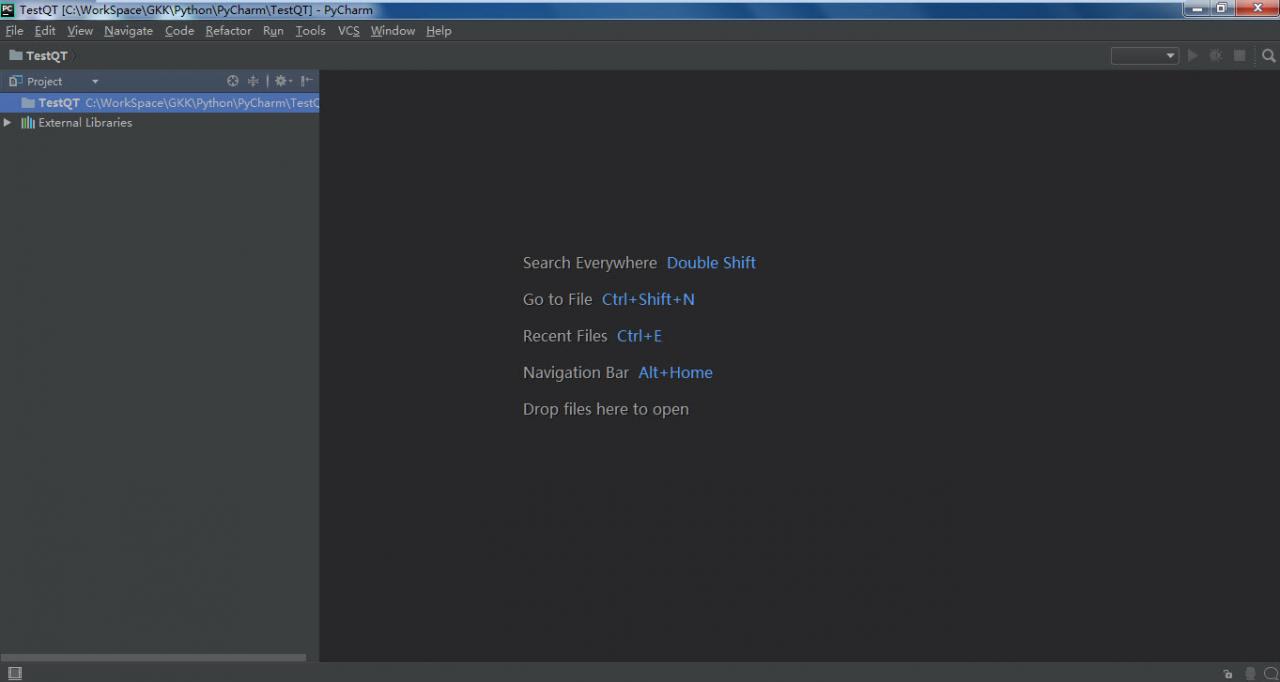
At this point, the working environment is ready;
3, write,
1) First, create a.py file, tentatively named pyqt.py
Next, the file you need to import PyQt is as follows:

import sys
from PyQt5.QtWidgets import QWidget, QApplication

Note that if the prompt fails to find the corresponding file, make sure the PyQT5 installation path is in the environment variable!
Then add the main function first:

if __name__ == "__main__":
    app = QApplication(sys.argv)
    sys.exit(app.exec_())

The next step is to add interface-related functions:

#class Example
class Example(QWidget):
    def __init__(self):
        super(Example, self).__init__()
        self.InitUI()

    def InitUI(self):
        self.btn = QPushButton("Dialog", self)
        self.btn.move(20, 20)
        self.btn.clicked.connect(self.ShowDialog)

        self.le = QLineEdit(self)
        self.le.move(130, 22)

        self.setWindowTitle("Input Dialog")
        self.show()

    def ShowDialog(self):
        text,ok = QInputDialog.getText(self, "Input Dialog", "Enter your name:")
        if ok:
            self.le.setText(str(text))

As shown in the code above, in Python, the interface is mainly generated by the class. In the class, you can generate the interface, create the control, create the control’s response function, connect the control and the control’s response function.
The function __init__(self) can be understood as the constructor of this class, where the initialization of the interface is performed.
The function initUI (self) is mainly used to generate interface controls;
When the class is created, you simply call the class in the main function. This is as follows:

if __name__ == "__main__":
    app = QApplication(sys.argv)
    ex = Example()
    sys.exit(app.exec_())

In the above code, a button (BTN), an edit box (le) and a button response function (showDialog) are mainly added in the interface, in which a standard input window is opened in the showDialog response function, and the value entered in the standard input window is displayed in the edit box (le).
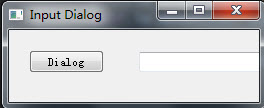
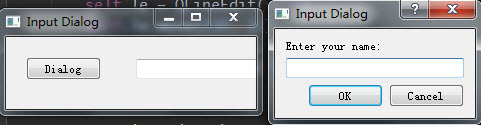
Results:
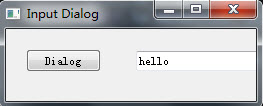
4, extension,
In the following, I made a more complex example, mainly to simulate the solution of exchange rate. The interface is mainly shown as follows:
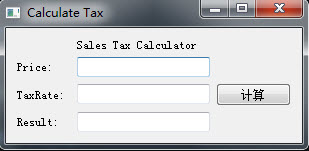
It mainly involves button, edit box, Label, layout, etc.
This is written in the same file as the first example, and can be downloaded by following the link:
http://download.csdn.net/download/bailang_zhizun/10249579
5. The latest version configuration method
Configure the visual programming environment with the latest versions of Python, PyQt, and PyCharm.
First install Python3.7, then install PyChart 2018.3, configure the Python interpreter to the local directory of Python3.7, and then install PyQT5.11.
Install PyQt5.11 is in the form of PIP + wheel files installed, download url: https://pypi.org/project/PyQt5/#files
About the installation of the PIP please refer to https://blog.csdn.net/bailang_zhizun/article/details/84563095
Put the downloaded pyqt5-5.11.3-5.11.2-cp35.cp36.cp37.cp38-none-win_amd64.whl file in the appropriate location.
Open CMD and enter the installation command as follows:

Enter and the PIP will automatically install the file:
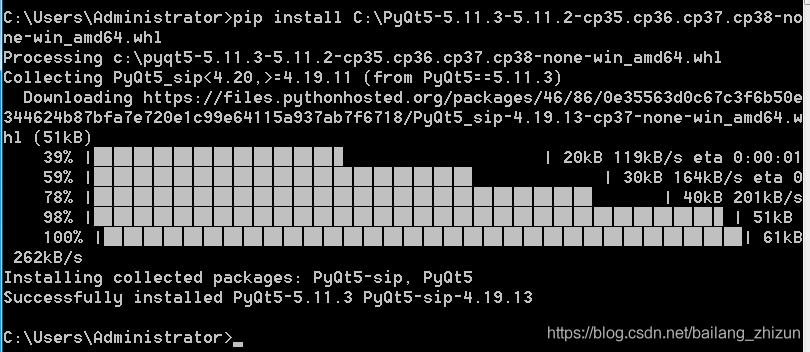
At this point, PyQT5.11 is installed successfully.
You can test it with the code above.
6. Install PyQT5 in Python 2.7 under Ubuntu
These are all documented installments of PyQT5 on Windows + Python 3. According to the official website of pyqt5, pyqt5 is only available for python3, but not for python2.7, so you can install pyqt5 online. Here is how to install pyqt5 in Ubuntu+python2.7:
Open a terminal in Ubuntu and type:

$sudo apt-get install python-pyqt5

After the installation is completed, you can directly import PyQt5 on the code editing page, and it is available for personal testing.
In addition, it seems that the above method can also be used to install PyQT5 in Ubuntu + Python 3 environment, also through the command installation:

$sudo apt-get install python3-pyqt5

It’s untested, but it should work.

 

Using qvtk renderwindoninteractor to load VTK widget

When embedding VTK qt met VTK widget can’t move, began to directly copy the official case inside vtkScalarBarWidget wording, is shown in the QVTKRenderWindowInteractor abnormalities, cannot interact with the widget.
https://vtk.org/Wiki/VTK/Examples/Python/Widgets/ScalarBarWidget
in writing is as follows:

# create the scalar_bar_widget
scalar_bar_widget = vtk.vtkScalarBarWidget()
scalar_bar_widget.SetInteractor(interactor)
scalar_bar_widget.SetScalarBarActor(scalar_bar)
scalar_bar_widget.On()

Changed to:

# create the scalar_bar_widget
self.scalar_bar_widget = vtk.vtkScalarBarWidget()
self.scalar_bar_widget.SetInteractor(self.iren)
self.scalar_bar_widget.SetScalarBarActor(scalar_bar)
self.scalar_bar_widget.On()

This means that the widget should be prefixed with self when loading with classes.

>

from PyQt5 import QtWidgets
from PyQt5.QtWidgets import QApplication
from vtk.qt.QVTKRenderWindowInteractor import QVTKRenderWindowInteractor
import sys
import vtk
class MainPage(QtWidgets.QMainWindow):
    def __init__(self, parent=None):
        QtWidgets.QMainWindow.__init__(self, parent)
        self.setObjectName("MainWindow")
        self.resize(603, 553)
        self.centralWidget = QtWidgets.QWidget(self)
        self.gridlayout = QtWidgets.QGridLayout(self.centralWidget)
        self.vtkWidget = QVTKRenderWindowInteractor(self.centralWidget)
        self.gridlayout.addWidget(self.vtkWidget)
        self.setCentralWidget(self.centralWidget)
        self.ren = vtk.vtkRenderer()
        self.vtkWidget.GetRenderWindow().AddRenderer(self.ren)
        self.iren = self.vtkWidget.GetRenderWindow().GetInteractor()
        # Create source
        source = vtk.vtkSphereSource()
        source.SetCenter(0, 0, 0)
        source.SetRadius(5.0)
        # Create a mapper
        mapper = vtk.vtkPolyDataMapper()
        mapper.SetInputConnection(source.GetOutputPort())
        # Create an actor
        actor = vtk.vtkActor()
        actor.SetMapper(mapper)
        self.ren.AddActor(actor)
        # create the scalar_bar
        scalar_bar = vtk.vtkScalarBarActor()
        scalar_bar.SetOrientationToHorizontal()
        lut = vtk.vtkLookupTable()
        lut.Build()
        scalar_bar.SetLookupTable(lut)
        # create the scalar_bar_widget
        self.scalar_bar_widget = vtk.vtkScalarBarWidget()
        self.scalar_bar_widget.SetInteractor(self.iren)
        self.scalar_bar_widget.SetScalarBarActor(scalar_bar)
        self.scalar_bar_widget.On()
if __name__ == "__main__":
    app = QApplication(sys.argv)
    window = MainPage()
    window.show()
    window.iren.Initialize()
    sys.exit(app.exec_())

[kimol Jun’s boring little invention] – using Python to write paper downloader (graphical interface)

[Kimol’s Boring Gizz] — Writing Theses in Python (Graphical Interface)
1. Function function 2. Callback function 3. Thread generation function 4. Effect display
Write in the last

preface

Micro cool wind slightly raises a night to night, night, month light into my study ~
when I open the folder to review the past, near many seemingly messy code. As I was sitting there, an idea suddenly occurred to me: “Life is already very boring, it would be better to be boring again.”
so, I decided to open a project, then call the kimol jun boring gizmos .
wonderful... Ah ~ ~ ~

In the process of scientific research and learning, we inevitably need to query the relevant literature, and presumably many partners know the SCI-HUB, which is a great tool, it can help us search the relevant papers and download the original. It can be said that the Sci-Hub has benefited a lot of researchers, and it is also a "pleasure" to use.
The analysis process and the corresponding function code were described in the previous article. I found some problems according to the feedback of my friends. After all, the form of the command box is not so "smooth".

font> (>)
(PS)

(PS)

(PS)

(PS) This is written by Kimol in his crazy squeeze time, so the interface is relatively simple, I hope you can understand it more
I. Instructions for use

:
:
:
:
:
:
:
:
:
:
:
:

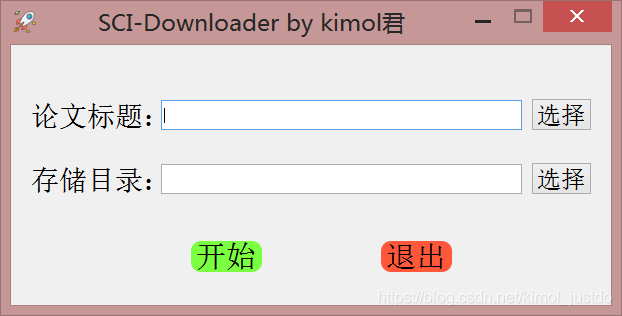
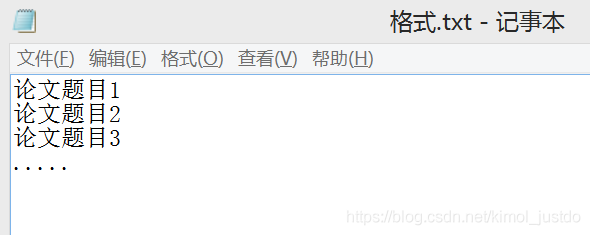
    Single Paper Download: Enter the title, DOI or PMID number of the paper in the title bar, and then select the directory of the paper storage. Click Start! Bulk download: select a.txt text in the title of the paper, which contains each paper to be downloaded in the following format:

    en, emmm...
    >
    >
    >
    >
    >
    >
    >
    >
    >

Second, code analysis
This graphical interface development is based on PyQT5, the specific layout of the interface here is not much introduction, mainly to the function of the realization of the description:
The idea is simple. Since we already have a function for the paper download, we just need to define a Button and bind it to the download function.
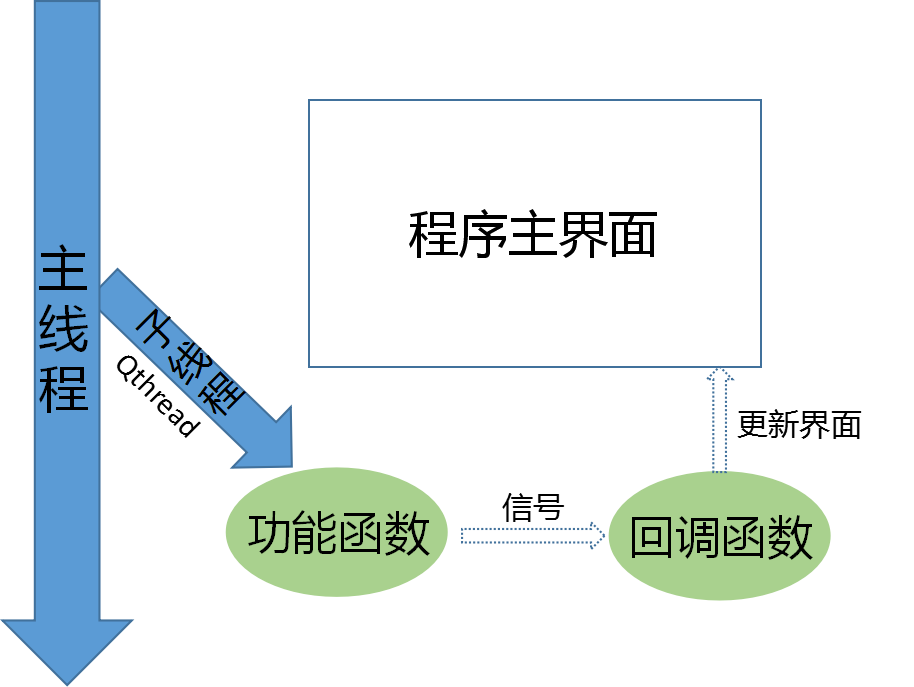
What's that?Not at all difficult. However, if you try it, the interface is stuttering. This is because it takes a long time to download the function, and if it is executed directly in the main thread, it will conflict with the main program that maintains the interface, resulting in a lag.

br>

Do you want to get fired? Let’s take a look at the programmer’s resignation tips

Dream eraser, a funny Internet advanced nerd.

The article directories
Write in front 1. Proficient in using rm command 2. Write in reading and writing database operation 3. Do not write comments, do not encapsulate code 4. Forcibly merge code on git 5. No technical resignation tips (thumb up over 200, send to get your boss quit tips O(∩_∩)O

Writing in the front
As the saying goes, write less code, leave less.
Travel the Internet recently, found some tips to leave the job, after reading, the heart was deeply moved
But after careful tasting, found that we programmers are not applicable.
Such as:

    leadership clip dishes you turn the table, we programmers generally not leadership at a table; Leaders open the door you get on the car, our programmers are sitting on duty, generally not on a business trip, business trip generally also leadership drive; Leader K song you cut song, oh ~ KTV singing, I generally hide in the corner; The leader toasts you not to drink,…… ; Leaders listen to your self-drawn,…… ; Leaders drink water you brake,… .

They are clever schemes, but they are not easy for us programmers to learn. Then I learned the following six tips.
“Career Tips”

    > When the Leader says “I’ve been working hard”, you will reply “Don’t be idle and get me a glass of water”, showing your recognition of the Leader’s care. Leader WeChat calls you, you reply “?” “Or” Yes?, simple and efficient. When the Leader asks you why the progress is so slow, you will reply, “Come if you can”, to show your affirmation of his working ability. You are working, and the Leader pretends to be in front of you. Straight back, “Are you teaching me to do something?” “, through humorous language, rhetorical question sentence pattern, play a role in relieving embarrassment. The Leader assigns you a JIRA task and you reply, “That’s it?” , indicates that the requirements are simple and the work can be fully competent. When the Leader asks you to go to the office, you reply, “Don’t you have legs?” “In recognition of his long legs. The Leader sends you a bunch of tasks and says “oh” first. Say more, the job is the same job, just give a response. A coworker asks you, “I notice you’re not doing anything lately?” “, you directly reply “mind your shit”, indicating that the Leader has a clear division of labor and praises the perfect system of the company.

Well, the general skills have been learned, the next formal entry programmer resignation skills reveal secrets.
1. Proficient in using RM command
What is the rm command?Knowledge is not particularly difficult, if you want to learn, can be in the test environment to try rm - rf/ or rm - rf/* command.
Note that after running this command, it is best to copy the file a few times after executing it
There's probably nothing the gods can do to keep you from getting fired
If this exit tip doesn't satisfy you, try it in a production environment
Challenge yourself. Give you the authority of the administrator and you will dominate the company
However, after learning this skill, in addition to being able to receive a resignation medal
Maybe you'll get a tip for going to jail
Here buy one get one free for everyone, how much is a gift eraser.

2. Reading and writing database operations are written in the for loop
This exit tip is even more powerful, and it's hard to find out without a Code Review
Read and write database operations, written in the for loop
What subquery, association query, left join, right join, all without
You look up one table, then iterate over the results, and then look up another table
Just be direct
What about multi-table queries?One table, one level loop.
The database link is opened and closed at each level of the loop
select *lect *

Think of the technical director's helpless face when the server's memory and CPU exploded while reading tens of thousands of data
Is not very cool ~
This is a great exit tip. I hope you enjoy it
What?Sounds like you're complaining, don't you think it's enough?it doesn't matter
In the attached to you a, to delete the delete , don't write the where condition, see.

3. Never write comments, never encapsulate code
Don't listen to the technical director, write notes, write documentation, he is to slow down your development efficiency
Then how do we aim at this kind of unreasonable request, and analyze from it to leave a skill
Do the opposite
Never write a comment, let alone a development document, is wasting your valuable time
And the name of the variable, the name of the function, just a, b, c, e, f, g
In addition to simplicity, it comes with encryption
That way you can devote your limited time to development
After all, when you write code, only you and God know what logic is. Maybe in a couple of days, only God knows what logic is.
Second, do not encapsulate the code, from the top to the bottom of the written, program execution, is the most efficient
One function writes a day, one function writes a file
A file to write tens of thousands of lines of code
Then at the end of the code file, write neatly 20 curly braces, that sense of accomplishment must be huge
Don't know what curly braces are?Here's a reference case

					}
				}
			}
		}
	}
}


4. Git forces merging of code
The tips above can't satisfy you, so you'll love this one, and it's a technical flow
After Git commits the code, what?Have a conflict?
Who dares to modify the same file with me
Forced to merge him
masteranch
branch
I'm sure I won't get a resignation letter once or twice
Need to repeat the operation N times, will be able to welcome the resignation notice
What?N times, still can't get the resignation achievement
After merging someone else's branch, make fun of the guy being merged
Make him feel inferior, and then get angry
Let him beat you, then the technical director, must think you are being bullied, and give you a parting award
This is a resignation achievement on its own merits

5. Quietly modify database fields without warning, or change the interface to return data
The trick is to slay the dragon, and when the testing process is found to be faulty, the opportunity arises
Quietly fix one of your own bugs, while silently triggering another
For example, you can modify a field in a table in the database
Then release a patch pack in the name of a system update BUG
The online environment may suddenly crash because it is difficult to see because of the database fields being modified
The more times the system crashes, the better off you'll be
You can also modify the interface data format for the mobile phone, adjust the name of the parameter
In short, fix bugs carefully and write code carefully
Don't let the technical director get the slightest hint that you want to leave
Quietly, he got his resignation letter

666. No skills to quit tips (thumb up over 200, send to your boss quit tips O(∩_∩)O)
What?The above technical level is too high, you technical dishes, can't learn?
No problem, Eraser has carefully prepared you with three easy-to-follow, no-tech quitting tips
There's no barrier to getting started with these skills, so just list the titles

    anonymously teased the company, inadvertently revealed their ID for the meeting screen projection, set automatic QQ reminder, let friends crazy teasing the boss, open the large screen oncoming mode when the technical director demonstrates the project, quietly connected to the projector with Bluetooth, you know the follow-up...

For more tips, please share the comments section

reading


    100 cases Python crawler tutorial, fantastic crawler tutorial, subscribe now Python crawler small class, wonderful 9 speak


    Today is the 100th day of continuous writing 610
    If you have ideas or techniques you'd like to share, feel free to leave them in the comments section.


    If you want to build a close relationship with the blogger, follow the blogger, or follow the public account non-undergraduate programmer to see how a non-undergraduate programmer grows.
    blogger ID: eam eraser ,>e you thumb up, comment, favorites

Python error: typeerror: not supported between instances of ‘STR’ and ‘Int’

Python: TypeError: ‘<<; 'not supported between instances of' STR 'and' int '
For example:
error:
me = input(‘ I’m Hi, what’s your name, please?\n ‘)
age = input(‘ I’m 8 years old, what about you?\ n ‘)
if (the age & lt; 30):
print(f” {age}”
print “How young you are, as young as a flower!”
age = input(‘ I’m 8 years old, what about you?\n ‘)
age = int(age)
(age < 30):
print(f” {age}”
print “How young you are, as young as a flower!” )

AttributeError: module ‘os’ has no attribute ‘mknod’

AttributeError: module ‘OS’ has no attribute ‘mknod’
Today, I’m going to make a Python program for students to traverse the directory and count the homework submitted by students. I ran into this problem when I wanted to generate some test files from code, using os.mknod() Python on Windows does not support the mknodnction, because there is no node concept on Windows. with open("file_name.txt", a+) as fpwith open("file_name.txt", a+) as fp.

Attributeerror: ‘module’ object has no attribute ‘handlers’ — Python sub module import problem

You want to log using Python’s logging module and use RotatingFileHandler to process the log so that new log files are regenerated if they exceed the specified size.

>

import logging

logger = logging.getLogger('mylogger')
logger.setLevel(logging.INFO)

fh=logging.handlers.RotatingFileHandler('/tmp/test.log', mode = 'a', maxBytes=10240, backupCount=3, encoding='utf-8')

formatter = logging.Formatter('%(asctime)s - %(filename)s[line:%(lineno)d] - %(levelname)s - %(message)s')
fh.setFormatter(formatter)

logger.addHandler(fh)

logger.info('hello logging')
logger.warning('hello logging')
logger.error('hello logging')
logger.critical('hello logging')

run times error:

AttributeError: ‘module’ object has no attribute ‘handlers’


import logging
import logging.handlers
……

Rerun, the program output normally.

import Logging
import Logging
import Logging
import Logging
import Logging
import Logging
import Logging
import Logging
import Logging
import Logging
import Logging
Therefore, it is necessary to explicitly import the logging.handlers submodule in the access TAB.

but sometimes, when importing some package does not require additional action will automatically import its module, this is because the set of packages for these operations in py files. In other cases, something else you import might also import logging.handlers. Anyway, just make sure that before visiting

The corresponding submodule has already been imported. Sometimes a module that looks like a package is not, such as OS and OS.Path. OS is not a package, it just provides another module called path, which you can access through os.path.

Attribute


An error occurred when Python called the pydot.py file

AttributeError: module ‘OS’ has no attribute ‘errno’

why
No longer available in Python 3.7os. errno
Change the method
Change python3.7/ site-packages /pydot.py to import errno. Line 1863:

if e.errno == errno.ENOENT:
Note: If NameError: Name ‘errno’ is not defined, add import errno to pydot.py

module ‘os’ has no attribute ‘mknod’

The reason is that the code is running under Linux, but I am running under Windows. The ‘OS’ module in WIN is different, which does not have this property. Please modify it as follows:

os.mknod(os.path.join(args.save_path, "{}.lst".format(args.set)))

Instead, the final “w” is added according to your own needs.

open(os.path.join(args.save_path, "{}.lst".format(args.set)),"w")

How to use Python split() function (split array)

describe
Python split() slits a string by specifying a delimiter, and only splits the num substring if the parameter num has a specified value
grammar
Split () method syntax:

str.split(str="", num=string.count(str)).

parameter
STR – The delimiter, which defaults to all null characters, including Spaces, newlines (\n), tabs (\t), and so on. Num – number of splits.
The return value
Returns a list of partitioned strings.
The instance
The following example shows how to use the split() function:

#!/usr/bin/python

str = "Line1-abcdef \nLine2-abc \nLine4-abcd";
print str.split( );
print str.split(' ', 1 );

The output of the above example is as follows:

['Line1-abcdef', 'Line2-abc', 'Line4-abcd']
['Line1-abcdef', '\nLine2-abc \nLine4-abcd']