Tag Archives: python

[Solved] Np.argwhere error: maximum recursion depth exceeded while calling

The complete error is: recursionerror: maximum recursion depth exceeded while calling a python object

resolvent

It is suggested to modify this usage according to the code logic, NP. Argwhere the original meaning of usage is to filter out the values that meet the conditions in numpy , such as:

np.argwhere(y == label)

It is to filter the value of y = = label , but this usage is very dangerous and can be rewritten as:

np.argwhere(sum(y == label))

Recommend another way to write code logic!!!

Python: How to Solve error While importing windpy

First of all, I met this error report

>>> import WindPy
Traceback (most recent call last):
  File "<stdin>", line 1, in <module>
ValueError: source code string cannot contain null bytes

It’s probably the coding problem. The solution is to use vscode to open windpy.py (just search in the computer). There is a coding button in the lower right corner. Now the UTF-8 is displayed. Originally, it seems to be utf-16le. The Chinese displayed in the text is still garbled. Click this button and select save in this format.

And then there’s the following error report

SyntaxError: 'gbk' codec can't decode byte 0xbd in position 2985: illegal multibyte sequence

The solution is to delete all the comments.

It’s the last mistake.

FileNotFoundError: [Errno 2] No such file or directory: 'C:\\**myfiles**\\Python\\Python38\\site-packages\\WindPy.pth'

The solution is to look for open in windpy.Py and comment all the following lines

Change the line that reads the library to the address of windpy.dll

    # pathfile=open(sitepath)
    # dllpath=pathfile.readlines();
    # pathfile.close();

    # sitepath=dllpath[0]+"\\WindPy.dll" 

    c_windlib=cdll.LoadLibrary('D:\\**install_WIND_files**\\x64\\WindPy.dll')

Just fine. I hope I can help you not to fall into the pit

[How to Solve] Python TypeError: ‘int‘ object is not subscriptable

The title is the teacher’s lesson, which is adapted from the python language design basis of Songtian teacher of Beijing Institute of technology, page 4.7, 121

Please modify example 5: body mass index BMI with exception handling, so that it can receive and process any input from the user

while True:
try:
Height, weight = Eval (input (“please input height (m) and weight (kg) [separated by commas]:”)
0         bmi = weight/pow(height,2)
Print (“BMI value is: {. 2F}”. Format (BMI))
0         if height > 3:
if h[:-1].isinstance():
Print (“height value is {. 2F}”. Format (height))
0                 break
elif weight > 150:
if   w[:-1].isinstance():
Print (“body weight value is {. 2F}”. Format (weight))
0                 break
except NameError:
Print (“input error, please input correct information”)
the     else:
Print (“no exception occurred”)
finally:
Print (“complete”)

The cause of the error is an operation on an object that cannot be operated on

The original errors were height [: – 1]. Isinstance and weight [: – 1]. Isinstance, which were changed to h and W

Please input height (m) and weight (kg) [comma separated]: 4,85
BMI value: 5.31
input error, please input correct information
complete
please input height (m) and weight (kg) [comma separated]: 1.85,85
BMI value: 24.84
no abnormality
complete
please input height (m) and weight (kg) [comma separated]: 1.85, 200
BMI value: 58.44
input error, please input correct information
complete
please input height (m) and weight (kg) [separated by commas]:

SyntaxError: Non-UTF-8 code starting with ‘\xe4‘ in file [How to Solve Chinese encoding problem]

Python 3 uses UTF-8 format by default

Generally, you don’t need to add a word at the beginning– coding:utf-8 —

However, in some Chinese, there will still be unrecognizable cases, and the error of “non-utf-8 code starting with” \ \ xe7 “will be thrown. At this time, you need to add this sentence in the first line.

#-*- coding:utf-8 -*-

JMeter: java.net.bindexception: address already in use: connect solution

The operating system will reserve a temporary port for TCP/IP services, and JMeter will start every thread (new operation) when running concurrency test

reason:

Windows reserves a temporary port for TCP/IP service. When JMeter runs concurrency test, every thread (new socket operation) will occupy a temporary port. If the TCP/IP port is occupied and not released in time (socket. Close() operation can not release the bound port immediately, but set the port to time_ Wait status, it will be released after a period of time, the default is 240s), and java.net.bindexception: address already in use: connect will appear.

resolvent:

To increase the number of ports reserved for TCP/IP service, it is necessary to operate on the system installed with JMeter. This paper introduces the solution on Windows system.

1. Key win + R, enter regedit to open the registry, or enter regedit command in CMD to open the registry;

2. Choose HKEY_ LOCAL_ MACHINE\SYSTEM\CurrentControlSet\Services\Tcpip\Parameters;

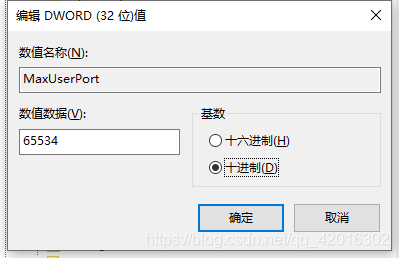
3. Right click parameters to create a new DWORD named maxuserport;

4. Then double-click maxuserport, select decimal base, input value data as 6553465534, which is the maximum value, exceeding     The system uses the closest effective value (min 5000 or max 65534);

5. Right click parameters to create a new DWORD named   TCPTimedWaitDelay;

6. Double click tcptimed waitdelay, select decimal base, input numerical data as 30, set time as 30 seconds, default is 240 seconds;

7. Restart the computer to take effect!!


Solve the error OMP: error # 15: initializing libiomp5. Dylib

resolvent

Method 1

conda install nomkl

It can be solved after installation

Method 2

Add in code

import os

os.environ["KMP_DUPLICATE_LIB_OK"] = "TRUE"

Problem analysis

The complete error is: OMP: error # 15: initializing libiomp5.dylib, but found libomp.dylib already initialized , the error is caused by repeatedly loading the DLL.

Reference article

Github I ssues:https ://github.com/dmlc/xgboost/issues/1715

[Solved] RuntimeError: cuda runtime error: device-side assert trigger

In this way, when running fastercnn, we need to change the original model’s 21 categories to our own number of categories. After the first modification, no error will be reported in the run, and after the second modification, an error will be reported as follows:
1 block: [0,0,0], thread: [16,0,0] assertion T & gt= 0 && amp; t < n_ Classes failed.
2 runtime error: CUDA runtime error (59): device side assert triggered
the main solutions on the Internet are as follows:

The reason for this problem is that there are tags in the training data that exceed the number of categories. For example, I set up a total of 8 classes, but if 9 appears in the tag in the training data, this error will be reported. So here’s the problem. There’s a trap. If the tag in the training data contains 0, the above error will also be reported. This is very weird. Generally, we start counting from 0, but in Python, the category labels below 0 have to report an error. So if the category label starts from 0, add 1 to all category labels.

Solution:
The first time I ran the program, I found that there were 16 categories (I deleted 4 categories, but I didn’t find them). After running the program, I found that there were four more categories, so I deleted these four categories. However, when I ran the program again, I reported the above error. The reason is that every time we
run the program, we have to delete the cache generated by the last run, because I didn’t delete it, so the program thought it was 16 categories, But only 12 categories are provided. So if you report this error, you can delete the cache and run it again

TypeError: An asyncio.Future, a coroutine or an awaitable is

Typeerror: an asyncio. Future, a coroutine or an awaitable is required
when it’s asynchronous, it’s found that one is reporting this error. Some methods are found on the Internet, but it doesn’t work, so it’s found that it doesn’t work

Async is missing from the front of the method

Full asynchronous:

async def ExportData(v,f_row,a):
			........


loop = asyncio.new_event_loop()
asyncio.set_event_loop(loop)
 t1 = time.time()
 # for v in a[1:]:
 tasks = [ExportData(v,f_row,a) for v in a[1:]]
 loop.run_until_complete(asyncio.gather(*tasks))

RuntimeError: each element in

Runtimeerror: each element in list of batch should be of equal size
define your own dataset class, return the corresponding data to be returned, and find the following error

RuntimeError: each element in list of batch should be of equal size

Baidu said that the most direct way is to batch it_ The value of size is changed to 1, and the error report is released. But I’m training models, not just to correct mistakes. batch_ How to train the model when size is set to 1, so I decided to study this error.

Original Traceback (most recent call last):
  File "/home/cv/anaconda3/lib/python3.8/site-packages/torch/utils/data/_utils/worker.py", line 202, in _worker_loop
    data = fetcher.fetch(index)
  File "/home/cv/anaconda3/lib/python3.8/site-packages/torch/utils/data/_utils/fetch.py", line 47, in fetch
    return self.collate_fn(data)
  File "/home/cv/anaconda3/lib/python3.8/site-packages/torch/utils/data/_utils/collate.py", line 83, in default_collate
    return [default_collate(samples) for samples in transposed]
  File "/home/cv/anaconda3/lib/python3.8/site-packages/torch/utils/data/_utils/collate.py", line 83, in <listcomp>
    return [default_collate(samples) for samples in transposed]
  File "/home/cv/anaconda3/lib/python3.8/site-packages/torch/utils/data/_utils/collate.py", line 83, in default_collate
    return [default_collate(samples) for samples in transposed]
  File "/home/cv/anaconda3/lib/python3.8/site-packages/torch/utils/data/_utils/collate.py", line 83, in <listcomp>
    return [default_collate(samples) for samples in transposed]
  File "/home/cv/anaconda3/lib/python3.8/site-packages/torch/utils/data/_utils/collate.py", line 81, in default_collate
    raise RuntimeError('each element in list of batch should be of equal size')

According to the error information, you can find the source of the error. Py source code, the error appears in the default_ In the collate() function. Baidu found this source defaul_ The collate function is the default batch processing method of the dataloader class. If the collate function is not used when defining the dataloader_ If the FN parameter specifies a function, the method in the following source code will be called by default. If you have the above error, it should be the last four line error in this function

def default_collate(batch):
    r"""Puts each data field into a tensor with outer dimension batch size"""

    elem = batch[0]
    elem_type = type(elem)
    if isinstance(elem, torch.Tensor):
        out = None
        if torch.utils.data.get_worker_info() is not None:
            # If we're in a background process, concatenate directly into a
            # shared memory tensor to avoid an extra copy
            numel = sum([x.numel() for x in batch])
            storage = elem.storage()._new_shared(numel)
            out = elem.new(storage)
        return torch.stack(batch, 0, out=out)
    elif elem_type.__module__ == 'numpy' and elem_type.__name__ != 'str_' \
            and elem_type.__name__ != 'string_':
        if elem_type.__name__ == 'ndarray' or elem_type.__name__ == 'memmap':
            # array of string classes and object
            if np_str_obj_array_pattern.search(elem.dtype.str) is not None:
                raise TypeError(default_collate_err_msg_format.format(elem.dtype))

            return default_collate([torch.as_tensor(b) for b in batch])
        elif elem.shape == ():  # scalars
            return torch.as_tensor(batch)
    elif isinstance(elem, float):
        return torch.tensor(batch, dtype=torch.float64)
    elif isinstance(elem, int_classes):
        return torch.tensor(batch)
    elif isinstance(elem, string_classes):
        return batch
    elif isinstance(elem, container_abcs.Mapping):
        return {key: default_collate([d[key] for d in batch]) for key in elem}
    elif isinstance(elem, tuple) and hasattr(elem, '_fields'):  # namedtuple
        return elem_type(*(default_collate(samples) for samples in zip(*batch)))
    elif isinstance(elem, container_abcs.Sequence):
        # check to make sure that the elements in batch have consistent size
        it = iter(batch)
        elem_size = len(next(it))
        if not all(len(elem) == elem_size for elem in it):
            raise RuntimeError('each element in list of batch should be of equal size')
        transposed = zip(*batch)
        return [default_collate(samples) for samples in transposed]

    raise TypeError(default_collate_err_msg_format.format(elem_type))

This function is to pass in a batch data tuple, in which each data is in the dataset class you defined__ getitem__() Method. The length of the tuple is your batch_ Size sets the size of the. However, one of the fields of the iteratable object returned by the dataloader class is the batch_ The corresponding fields of size samples are spliced together. Therefore, when this method is called by default, it will enter the penultimate line for the first time return [default]_ Collate (samples) for samples in translated] use the zip function to generate an iterative object from the batch tuple. Then the same field is retrieved by iteration and the default is recursively re passed in_ In the collate() function, take out the first field to judge whether the data type is in the type listed above, then the dateset content can be returned correctly
if the batch data is processed in the above order, the above error will not occur. If the data of the element is not in the listed data type after the second recursion, it will still enter the next recursion, that is, the third recursion. At this time, even if the data can be returned normally, it does not meet our requirements, and the error report generally appears after the third recursion. Therefore, if you want to solve this error, you need to carefully check the data type of the return field of your defined dataset class. It can also be found in defaule_ In the collate() method, output the batch content before and after processing, and view the specific processing flow of the function to help you find the error of the returned field data type
tips: don’t change defaule in the source code file_ The collate () method can copy this code and define its own collate_ Fn() function and specify your own collet when instantiating the dataloader class_ FN function
I hope you can solve the bug as soon as possible and run through the model!

Copying a param with shape torch. Size ([262, 2048]), parameter size does not match

A parameter with shape torch. Size ([262]) is copied from the checkpoint, and the shape in the current model is torch. Size ([290]).

The parameter size of fc.weight does not match, just modify the parameter.

VIM open the corresponding file and modify the parameters

Solve the problem successfully

Reference link