Tag Archives: java

Error analysis of queryformap method of jdbctemplate

  The queryformap method of jdbctemplate reported an error   If the queryformap method is not used properly, an error will occur  

The queryForMap method in JdbcTemplate only expects a single row to be returned, The return value for this method will be a map of column names to column values for the single result row.

The size of the result set returned by the queryformap method must be 1. In the returned map, the name of the column is used as the key and the value obtained is used as the value  

public void test() {
   String SQL_GET_ATTRIBUTE = "select * from test where rownum<1";
   Map<Object, Object> map = getJdbcTemplate().queryForMap(SQL_GET_ATTRIBUTE);
   Set<Entry<Object, Object >> entrySet = map.entrySet();
   for (Entry < Object, Object > entry :entrySet){
        System.out.println("key is "  + entry.getKey());
        System.out.println("value is "  + entry.getValue());
   }
}

The output will list all the fields of test as key, and the queried value is vlaue. Here, Oracle database is used, and “where rownum & lt; 1 “to restrict the return of only one line.  
Using spring’s getjdbctemplate(). Queryformap, if an empty set is returned, a  
org.springframework.dao.emptyresultdataaccessexception: incorrect result size: expected 1, actual 0. The solution is to catch this exception and return null.  
java code    
 

 try{  
       return getJdbcTemplate().queryForMap("select s.fb,s.pb,s.tu,s.qt,s.fbc,s.pbc,s.tt,s.ft,s.lt from gbc$view_user s where s.ud = ? and ad= ?", new Object[]{ud,ad});  
    }catch (EmptyResultDataAccessException e) {  
        return null;  
    } 
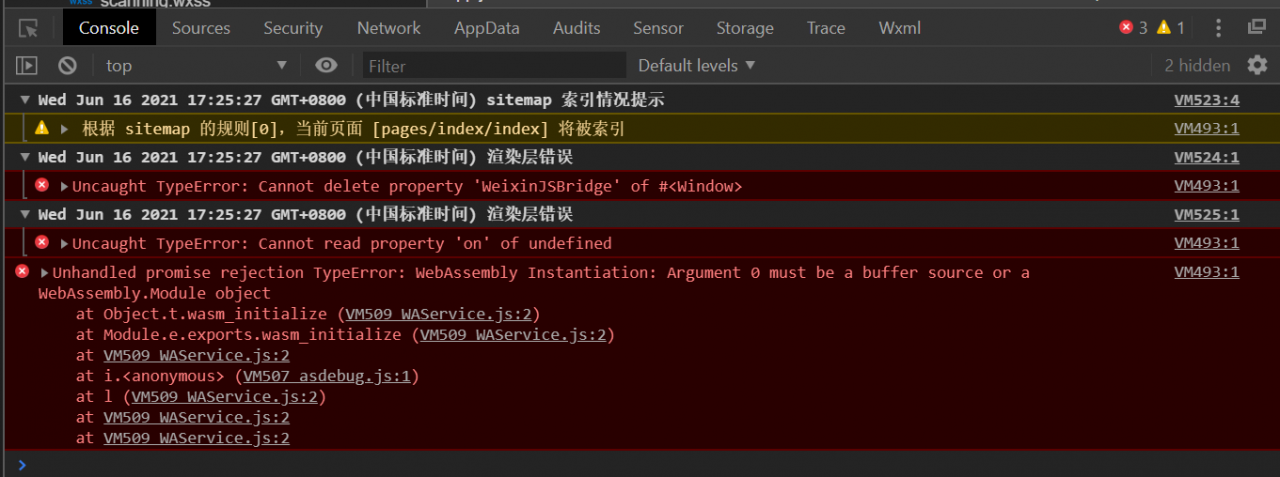
 

Unhandled project rejection type error: webassembly instance

Today, I created a new small program project in wechat developer tool
but when I opened it, such a bug appeared
which made me feel very confused

Unhandled promise rejection TypeError: WebAssembly Instantiation: Argument 0 must be a buffer source or a WebAssembly.Module object

It was very uncomfortable
I went to the wechat developer community and asked
it turned out that the default version of the basic debugging library was too high, which led to an error

A simple solution

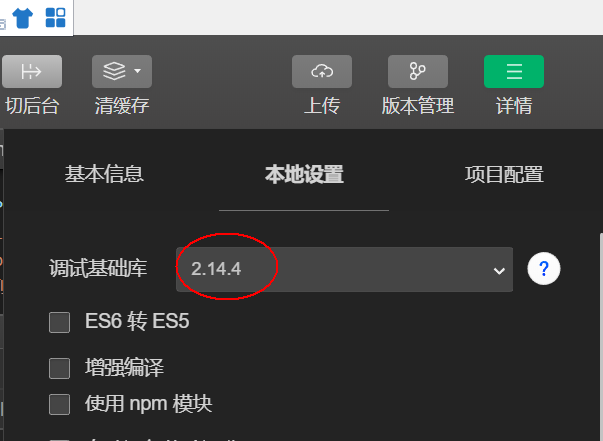
Click the details button in the upper right corner
and select local settings
to adjust the basic debugging library back to 2.14.4

Mybatis Error: Cause: org.apache.ibatis.builder.BuilderException: Error creating document instance.

Error reporting in mybatis learning: cause: org.apache.ibatis.builder.builderexception: error creating document instance. Cause: com.sun.org.apache.xerces.internal.impl.io.malformedbytesequenceexception: byte 1 of 1-byte UTF-8 sequence is invalid.)

Error details solution

Error details

java.lang.ExceptionInInitializerError
	at com.yy.dao.UserDaoTest.test(UserDaoTest.java:16)
	at sun.reflect.NativeMethodAccessorImpl.invoke0(Native Method)
	at sun.reflect.NativeMethodAccessorImpl.invoke(NativeMethodAccessorImpl.java:62)
	at sun.reflect.DelegatingMethodAccessorImpl.invoke(DelegatingMethodAccessorImpl.java:43)
	at java.lang.reflect.Method.invoke(Method.java:498)
	at org.junit.runners.model.FrameworkMethod$1.runReflectiveCall(FrameworkMethod.java:50)
	at org.junit.internal.runners.model.ReflectiveCallable.run(ReflectiveCallable.java:12)
	at org.junit.runners.model.FrameworkMethod.invokeExplosively(FrameworkMethod.java:47)
	at org.junit.internal.runners.statements.InvokeMethod.evaluate(InvokeMethod.java:17)
	at org.junit.runners.ParentRunner.runLeaf(ParentRunner.java:325)
	at org.junit.runners.BlockJUnit4ClassRunner.runChild(BlockJUnit4ClassRunner.java:78)
	at org.junit.runners.BlockJUnit4ClassRunner.runChild(BlockJUnit4ClassRunner.java:57)
	at org.junit.runners.ParentRunner$3.run(ParentRunner.java:290)
	at org.junit.runners.ParentRunner$1.schedule(ParentRunner.java:71)
	at org.junit.runners.ParentRunner.runChildren(ParentRunner.java:288)
	at org.junit.runners.ParentRunner.access$000(ParentRunner.java:58)
	at org.junit.runners.ParentRunner$2.evaluate(ParentRunner.java:268)
	at org.junit.runners.ParentRunner.run(ParentRunner.java:363)
	at org.junit.runner.JUnitCore.run(JUnitCore.java:137)
	at com.intellij.junit4.JUnit4IdeaTestRunner.startRunnerWithArgs(JUnit4IdeaTestRunner.java:68)
	at com.intellij.rt.junit.IdeaTestRunner$Repeater.startRunnerWithArgs(IdeaTestRunner.java:33)
	at com.intellij.rt.junit.JUnitStarter.prepareStreamsAndStart(JUnitStarter.java:230)
	at com.intellij.rt.junit.JUnitStarter.main(JUnitStarter.java:58)
Caused by: org.apache.ibatis.exceptions.PersistenceException: 
### Error building SqlSession.
### Cause: org.apache.ibatis.builder.BuilderException: Error creating document instance.  Cause: com.sun.org.apache.xerces.internal.impl.io.MalformedByteSequenceException: 1 字节的 UTF-8 序列的字节 1 无效。
	at org.apache.ibatis.exceptions.ExceptionFactory.wrapException(ExceptionFactory.java:30)
	at org.apache.ibatis.session.SqlSessionFactoryBuilder.build(SqlSessionFactoryBuilder.java:80)
	at org.apache.ibatis.session.SqlSessionFactoryBuilder.build(SqlSessionFactoryBuilder.java:64)
	at com.yy.utils.MybatisUtils.<clinit>(MybatisUtils.java:20)
	... 23 more
Caused by: org.apache.ibatis.builder.BuilderException: Error creating document instance.  Cause: com.sun.org.apache.xerces.internal.impl.io.MalformedByteSequenceException: 1 字节的 UTF-8 序列的字节 1 无效。
	at org.apache.ibatis.parsing.XPathParser.createDocument(XPathParser.java:260)
	at org.apache.ibatis.parsing.XPathParser.<init>(XPathParser.java:126)
	at org.apache.ibatis.builder.xml.XMLConfigBuilder.<init>(XMLConfigBuilder.java:81)
	at org.apache.ibatis.session.SqlSessionFactoryBuilder.build(SqlSessionFactoryBuilder.java:77)
	... 25 more
Caused by: com.sun.org.apache.xerces.internal.impl.io.MalformedByteSequenceException: 1 字节的 UTF-8 序列的字节 1 无效。
	at com.sun.org.apache.xerces.internal.impl.io.UTF8Reader.invalidByte(UTF8Reader.java:701)
	at com.sun.org.apache.xerces.internal.impl.io.UTF8Reader.read(UTF8Reader.java:567)
	at com.sun.org.apache.xerces.internal.impl.XMLEntityScanner.load(XMLEntityScanner.java:1895)
	at com.sun.org.apache.xerces.internal.impl.XMLEntityScanner.scanData(XMLEntityScanner.java:1375)
	at com.sun.org.apache.xerces.internal.impl.XMLScanner.scanComment(XMLScanner.java:801)
	at com.sun.org.apache.xerces.internal.impl.XMLDocumentFragmentScannerImpl.scanComment(XMLDocumentFragmentScannerImpl.java:1034)
	at com.sun.org.apache.xerces.internal.impl.XMLDocumentFragmentScannerImpl$FragmentContentDriver.next(XMLDocumentFragmentScannerImpl.java:2982)
	at com.sun.org.apache.xerces.internal.impl.XMLDocumentScannerImpl.next(XMLDocumentScannerImpl.java:602)
	at com.sun.org.apache.xerces.internal.impl.XMLDocumentFragmentScannerImpl.scanDocument(XMLDocumentFragmentScannerImpl.java:505)
	at com.sun.org.apache.xerces.internal.parsers.XML11Configuration.parse(XML11Configuration.java:842)
	at com.sun.org.apache.xerces.internal.parsers.XML11Configuration.parse(XML11Configuration.java:771)
	at com.sun.org.apache.xerces.internal.parsers.XMLParser.parse(XMLParser.java:141)
	at com.sun.org.apache.xerces.internal.parsers.DOMParser.parse(DOMParser.java:243)
	at com.sun.org.apache.xerces.internal.jaxp.DocumentBuilderImpl.parse(DocumentBuilderImpl.java:339)
	at org.apache.ibatis.parsing.XPathParser.createDocument(XPathParser.java:258)
	... 28 more


Process finished with exit code -1

When I taught mybatis by myself, I always reported this error because I wrote comments in two. XML files for easy learning

resolvent

Just delete all the Chinese comments in. XML

Just use this to record the error report, so as to avoid wasting time to find solutions when reporting errors again in the future.

Ubuntu: rabbitmq reports an error; Solution error: unable to connect to node rabbit@localhost : nodedown

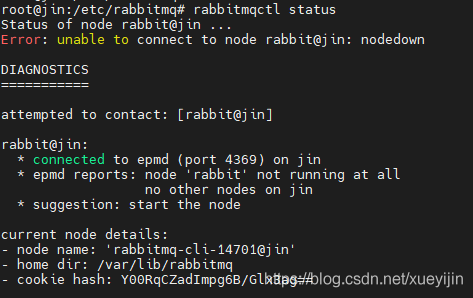
When installing rabbitmq and executing rabbitmqctl status, the errors are as follows:

the first thing is to check the log file and form a good habit here’s my list:

root@jin:/# cd /var/log/rabbitmq/
root@jin:/var/log/rabbitmq# ls
[email protected]  [email protected]  startup_err  startup_log
# Afterwards, execute the view
cat [email protected]

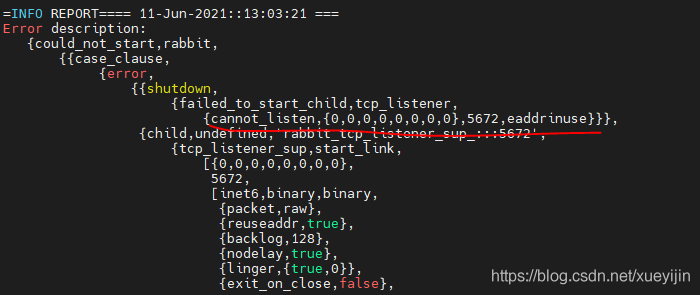
As shown in the figure:

my reason is that port 5672 is occupied by other applications, so rabbitmq can’t be used. Just modify the port

@requestbody: How to Use or Not Use

First of all, note that @ requestbody accepts the JSON string
so write this

dataType:"json",
contentType: 'application/json',
data: JSON.stringify(data.field),

Instead of @ requestbody, you can directly receive the JSON type

dataType:"json",
data: data.field,

The situation of not using @ requestbody
front end page

$.ajax({
		url: "http://localhost:8081/role//saveOrUpdate",
		method:"post",
	   dataType:"json",     
			// contentType: 'application/json',
		data: data.field,   
		success(data){
			console.log("======================")
				console.log(data.field)
			if(data.code == 200){
			layer.msg('add success', function () {
			 window.location = 'list.html';
				}); 
				}
		},
error(data){
	console.log(data)
	if(data.code != 200){
layer.msg(data); 
								}
								}
							});

Back end:

@PostMapping("/saveOrUpdate")
    public Result saveOrUpdate(Roles roles){
        System.out.println(roles);
        boolean saveOrUpdate = roleService.saveOrUpdate(roles);
        if(saveOrUpdate == true)
            return Result.succ(null);
        else
            return Result.fail("failed to add");
    }

Using @ requestbody
front end:

$.ajax({
								url: "http://localhost:8081/role//saveOrUpdate",
								method:"post",
								dataType:"json",
								contentType: 'application/json',   
								data: JSON.stringify(data.field),  
								success(data){
									console.log("======================")
									console.log(data.field)
									if(data.code == 200){
										layer.msg('add success', function () {
										    window.location = 'list.html';
										}); 
									}
								},
								error(data){
									console.log(data)
									if(data.code != 200){
										layer.msg(data); 
								}
								}
							});

back-end

@PostMapping("/saveOrUpdate")
    public Result saveOrUpdate(@RequestBody Roles roles){
        System.out.println(roles);
        boolean saveOrUpdate = roleService.saveOrUpdate(roles);
        if(saveOrUpdate == true)
            return Result.succ(null);
        else
            return Result.fail("failed to add");
    }

[Solved] java.sql.SQLException: Unknown system variable cache query size

Recently, when I was learning springboot + MySQL + mybatis and doing a project with CSDN boss, I encountered an error when connecting to MySQL:

java.sql.SQLException: Unknown system variable 'query_cache_size'

Error reason:
the version of MySQL connector Java is too low, and the database driver version does not match the local MySQL version. Query cache has been out of date since MySQL 5.7.20, but it has been removed since MySQL 8.0
solution:
first, modify the driver name in the application. YML or application. Properties file

driver-class-name: com.mysql.cj.jdbc.Driver  #Linked Drivers for MySQL 8.0 onwards
com.mysql.jdbc.Driver #Older linked drivers

Then modify the driver version in the POM. XML file

<dependency>
			<groupId>mysql</groupId>
			<artifactId>mysql-connector-java</artifactId>
			<version>8.0.25</version>
			<scope>runtime</scope>
		</dependency>

The previous version here is 5. X. just change it to the actual MySQL version number. Mine is 8.0.25
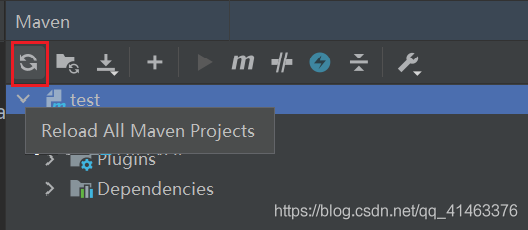
remember to reload Maven’s dependencies after changing. Otherwise, it will still report an error:

Cannot load driver class:com.mysql.cj.jdbc.Driver

Click this icon to reload the dependency

perfect solution!

[Solved] But was actually of type ‘com. Sun. Proxy. $proxy**‘

error:Caused by: org.springframework.beans.factory.BeanNotOfRequiredTypeException: Bean named '****' is expected to be of type '****' but was actually of type 'com.sun.proxy.$Proxy**'The solution to the problem.
The code inside my controller is.

@Autowired
private UserServiceImpl userServiceImpl;

The solution is to change the userserviceimpl implementation class to the userservice interface, and that’s it.

After solving the problem, the code is as follows:

@Autowired
private UserService userServiceImpl;

The specific reason is that the interface should be used to receive the proxy object, so as to obtain the proxy object.

Springmvc Content type ‘application/json‘ not supported

In the practice of spring MVC, many people may encounter this annoying problem, it took a long time to solve, the code is right, but he just reported an error
content type ‘application/JSON’ not supported
I have found many articles on the Internet and used many methods, but they can’t solve this problem
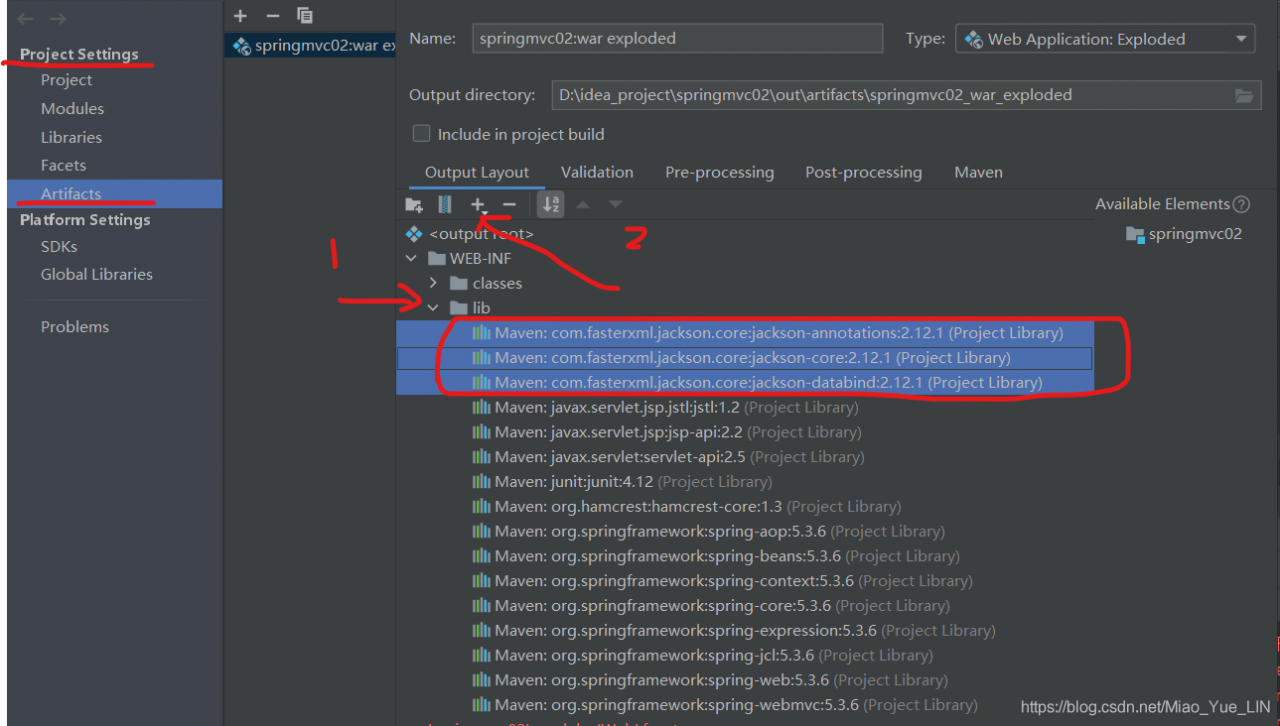
finally, I remembered if I didn’t add the jar package required by JSON in lib, so I tried it… It was a success indeed
the following is my method

because I have added it, so here you can see that there are three jar packages in my lib package,
just add these three packages~~~