Tag Archives: java

Use jstack to output the stack information in Java process to the specified file and analyze it

1. Printing stack information using jstack command

jstack -l pid >> thread.txt

Parameter: – l long lists to print out additional lock information. Jstack – L PID can be used to observe the lock holding status when a deadlock occurs

Examples

jstack -l 7052 >> thread.txt

2. Analyze stack information

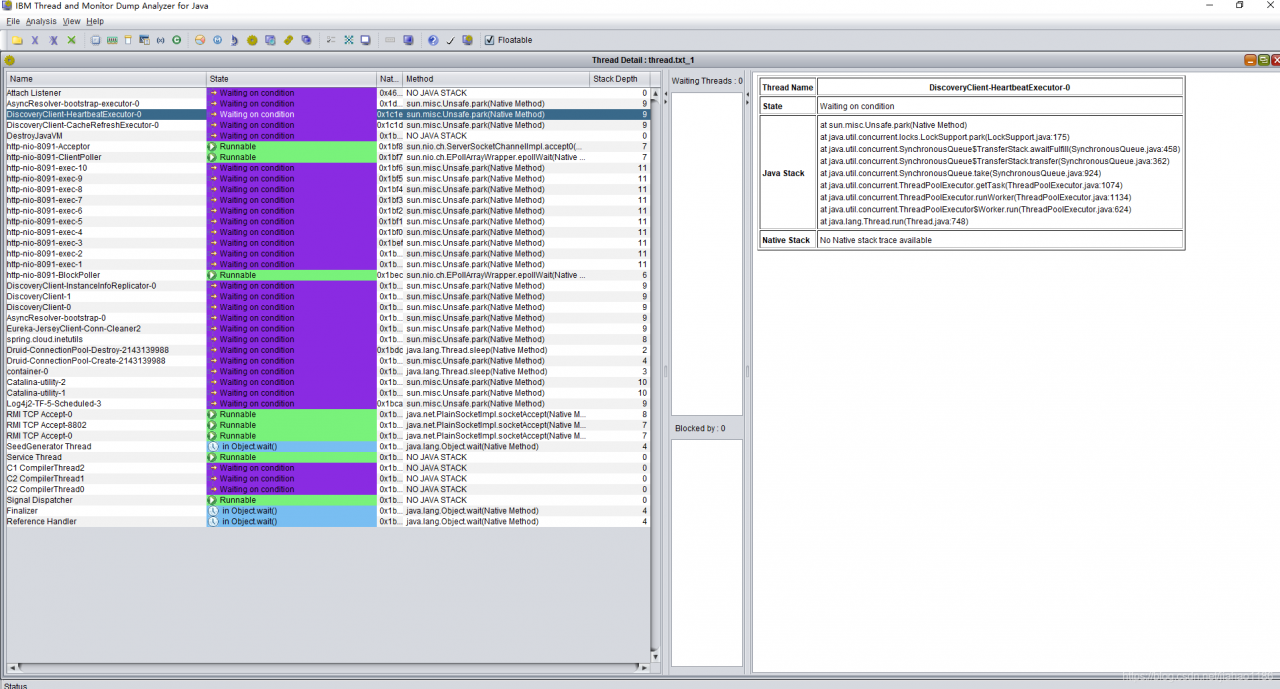
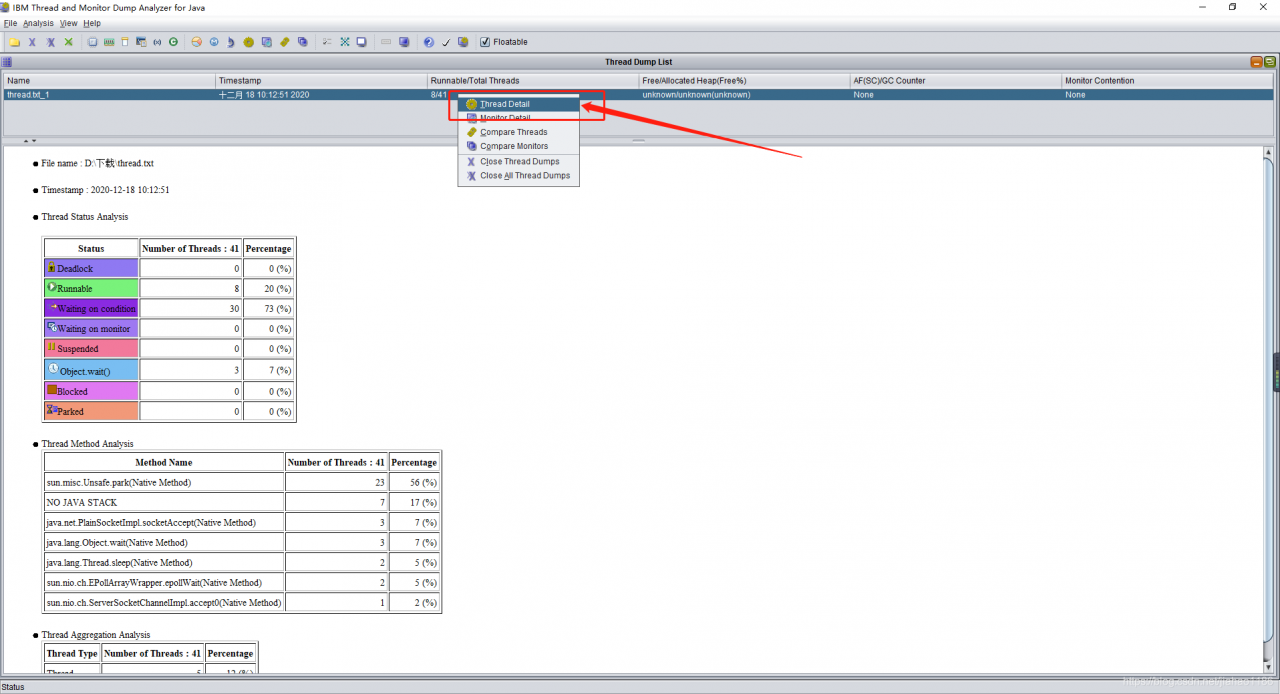
take thread.txt Download it locally and use IBM thread and monitor dump analyzer for Java to open the analysis

The local program cannot access the test environment redis cluster through public IP_ compromise

First, scene description

1. Test environment installation redis6, cluster deployment, three master and three slave. That is to achieve high concurrency, high availability, high security.

2. Redis creates clusters through bind intranet IP.

3. The local and test environment are not in the same LAN, and there is no VPN, so it is impossible to access redis through the test intranet IP.

4. Note: through the redis client, using the public IP + port, you can access redis.

Problem: spring program can’t access redis correctly through IP + port of public network.

Reason: when spring accesses the redis cluster, it first obtains the intranet IP and ports of all nodes in the redis cluster through the configured public IP and ports, and then the program finally accesses redis through the intranet IP and ports.

Second, the solution

1. Install the redis singleton on the test server.

2. Configuration file redis.conf Set daemonize to yes, that is to realize the background startup of redis.

3. In the test environment network security group, add the white list of local environment public IP, open port 6379.

4. Modify the local configuration file in spring program to access redis configuration mode. In this way, all technicians can connect to the test environment redis locally, and each technology does not need to open the redis service locally.

spring:
  redis:
    host: 47.112.108.1
    port: 6379
    timeout: 5000ms
  pool:
    max-active: 8
    min-idle: 0
    max-idle: 8
    max-wait: -1


org.apache.jasper.JasperException: Unsupported encoding:

org.apache.jasper .JasperException: Unsupported encoding: 

org.apache.jasper . compiler.DefaultErrorHandler.jspError ( DefaultErrorHandler.java:51 )

org.apache.jasper . compiler.ErrorDispatcher.dispatch ( ErrorDispatcher.java:409 )

org.apache.jasper . compiler.ErrorDispatcher.jspError ( ErrorDispatcher.java:116 )

org.apache.jasper . compiler.JspUtil.getReader ( JspUtil.java:1093 )

org.apache.jasper . compiler.ParserController.doParse ( ParserController.java:250 )

The reason for throwing this exception is that there is a problem in the encoding settings of the JSP page

<%@ page language=”java” import=” java.util .*” pageEncoding=””%>

Here, the value of pageencoding is empty, which cannot be recognized by the server. Even if there is one more space, the server will not recognize it.

& lt;% @ page contenttype = “text/HTML; charset = GB2312″% & gt; the charset here has an extra space, so this exception should be thrown.

Java handles special characters in URL

The URL can’t display some special symbols, so the encoding will be used at this time. The encoding format is: a percent sign followed by the ASCII (hexadecimal) code value of the corresponding character. For example, the encoding value of a space is% 20. (ASCII reference)
some characters have special meanings in the URL, and the basic coding rules are as follows:
special meaning
hexadecimal value
1. + indicates empty space (spaces cannot be used in the URL)% 20
2/ Separate directory and subdirectory% 2F
3.?separate actual URL and parameter% 3F
4.% specify special character% 25
2 5. # indicates the separator% 26 between the parameters specified in the bookmark% 23
6. & amp; URL

For example: http://192.168.xxx.xxx/source/20190112 121000.txt

Note: such a URL cannot be successfully requested because the URL contains special words. The example URL contains special characters for spaces, so it needs to be converted to http://192.168.xxx.xxx/source/20190112%20121000.txt

Such a URL can request success.

Supplementary points:

Encoding and decoding functions of URL in Java java.net.URLEncoder . encode (string s) and java.net.URLDecoder . decode (string s);
URL encoding and decoding functions in JavaScript
escape (string s) and unescape (string s);
JavaScript


How to Solve Error occurred during initialization of boot layer

problem

When using jdk9 or above, eclipse will report an error when running the program, indicating: error occurred during initialization of boot layer, that is, an error occurred during initialization of boot layer
this is because we cannot execute a single class

solve

Delete module directly- info.java This document

Solution of Java resources error reporting

These two items are very annoying when encountering this problem. Although they have no actual impact, programmers don’t like to see errors reported.
it’s generally good to make three changes

1. Change other versions to 3.0

<?xml version="1.0" encoding="UTF-8"?> 
<web-app version="3.0"
 xmlns="http://java.sun.com/xml/ns/javaee"  
    xmlns:xsi="http://www.w3.org/2001/XMLSchema-instance"  
    xsi:schemaLocation="http://java.sun.com/xml/ns/javaee  
    http://java.sun.com/xml/ns/javaee/web-app_3_0.xsd">
  <display-name>Archetype Created Web Application</display-name>
</web-app>

2. Find the root directory of the project, an XML in the. Setting file, or change the version to 3.0

<?xml version="1.0" encoding="UTF-8"?>
<faceted-project>
  <fixed facet="wst.jsdt.web"/>
  <installed facet="jst.web" version="3.0"/>
  <installed facet="wst.jsdt.web" version="1.0"/>
  <installed facet="java" version="1.8"/>
  <installed facet="jst.jaxrs" version="2.0"/>
  <installed facet="jst.jsf" version="2.2"/>
</faceted-project>

3. Another possibility is to see the directory missing and build path, and then create a new directory

java.lang.Error: Unresolved compilation problems

java.lang.Error : Unresolved compilation problems

java.lang.Error : Unresolved compilation problems

Environment description solution reason

environment

jdk1.8 + springboot + maven + ItelliJ IDEA

describe

When starting a project, initialize the datasource to report an error. The specific error is to say that a POJO cannot be resolved to a type , and repeatedly check that the POJO exists and has been relied on in POM .

A few days ago, it can be started normally. Other colleagues can start normally, and the code has not been modified.

Solution

The search results are generally caused by the inconsistency between the version of JDK compiled by eclipse or idea and the version of JDK required by the project. However, the configuration of any development environment has been modified recently. After careful inspection, it is found that the java complier and Project SDK versions are the same.

There is an answer on stackoverflow that is to say MVN clean once, try it and find that it can be started successfully

reason

It may be that the previous MVN clean install did not have the correct clean , resulting in some compiled codes not being updated.

Spring Boot Thymeleaf ERROR 8592 org.thymeleaf.TemplateEngine

Spring Boot + Thymeleaf Error: ERROR 8592 org.thymeleaf.TemplateEngine
Error Message:
org.thymeleaf.exceptions.TemplateInputException: An error happened during template parsing (template: “class path resource [templates/…….html]”)
……ERROR 8592 — [p-nio-80-exec-7] o.a.c.c.C.[.[.[/].[dispatcherServlet] : Servlet.service() for servlet [dispatcherServlet] in context with path [] threw exception [Request processing failed; nested exception is org.thymeleaf.exceptions.TemplateInputException: An error happened during template parsing (template: “class path resource [templates/…….html]”)] with root cause
Problem location and solution
1、Location
Checked the return value of the Controller, path spelling, annotations and so on are not found problems
Fortunately, there is a page can be displayed normally, so the exchange comparison, found that the problem in the <!DOCTYPE> tag
2, solve

<!DOCTYPE HTML PUBLIC "-//W3C//DTD HTML 4.01 Transitional//EN">

Change to

<!DOCTYPE html PUBLIC "-//W3C//DTD HTML 4.01 Transitional//EN" "http://www.w3.org/TR/html4/loose.dtd">

or

<!DOCTYPE HTML PUBLIC "-//W3C//DTD HTML 4.01 Transitional//EN" "http://www.w3c.org/TR/1999/REC-html401-19991224/loose.dtd">

I think it’s puzzling, but because of the project problem, the front end can only use this webpage written with a lot of obsolete tags. Thymeleaf has strict requirements on the front end, and suggests that H5 standard be used in new projects.

extend

Here is a configuration method to turn off strict syntax checking for thymeleaf

1. In pom.xml Add dependency to file

<dependency>
   <groupId>net.sourceforge.nekohtml</groupId>
   <artifactId>nekohtml</artifactId>
   <version>1.9.21</version>
</dependency>

2. In application.properties Add in

spring.thymeleaf.mode=LEGACYHTML5
Java Running Error: Could not find or load main class

[problem description]

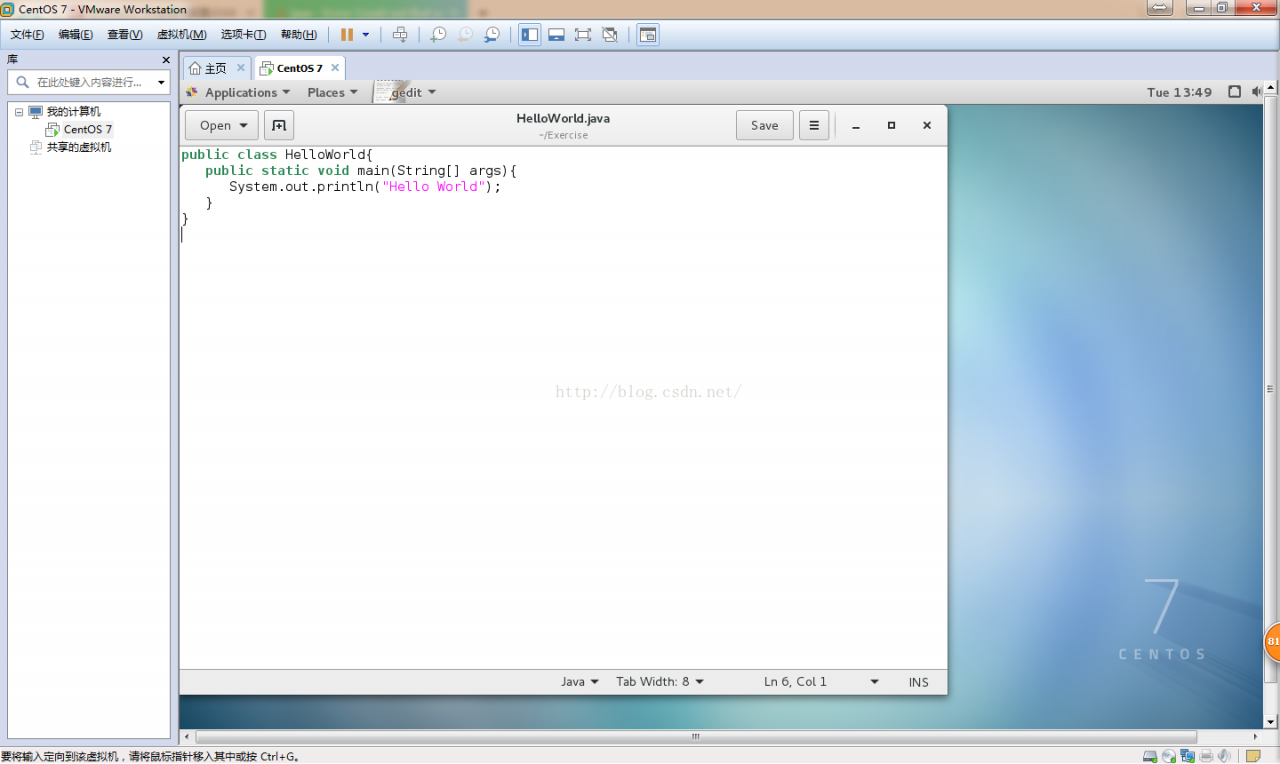
User root is created in the/root/exercise folder HelloWorld.java The code is as follows:

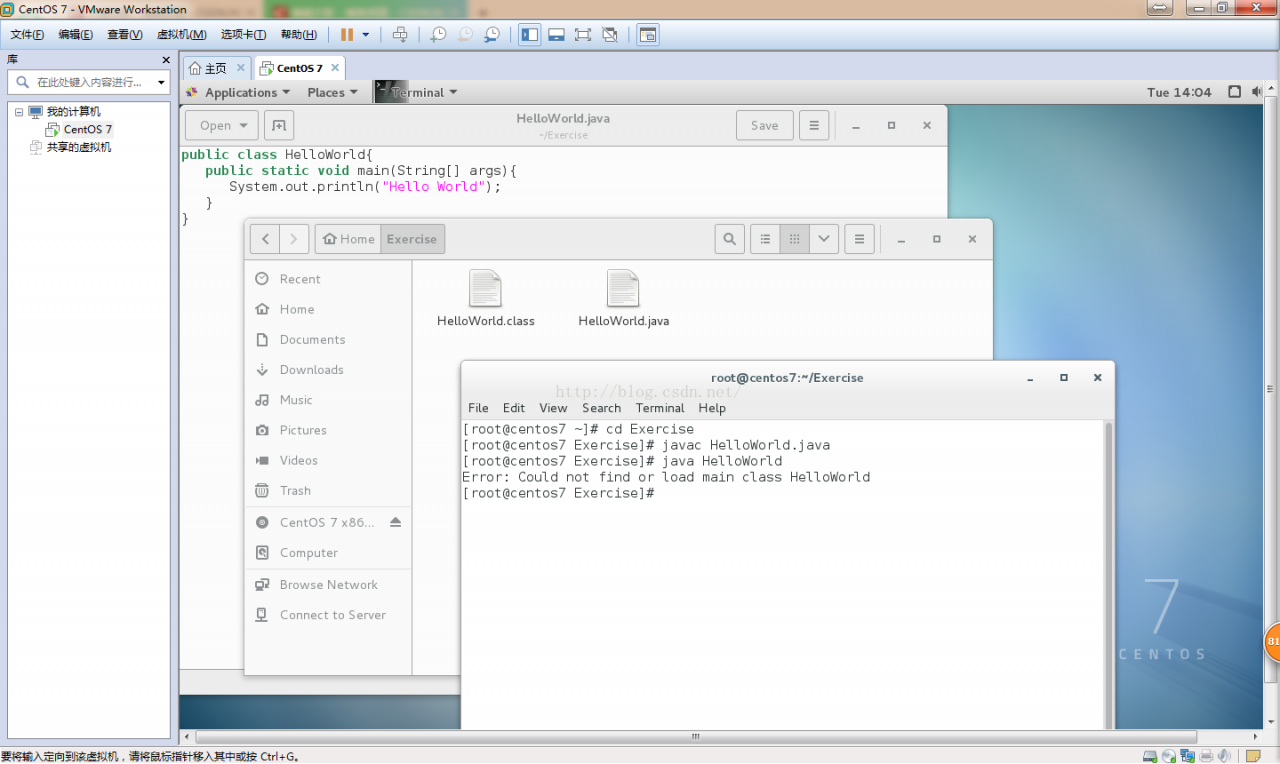
Compile and run the file as follows:

Compile HelloWorld.java Generate bytecode file HelloWorld.class , running HelloWorld.class Error: could not find or load main class.


[cause analysis]

The current directory is the directory where the. Class file is located. To run the. Class bytecode file, you need to add the current directory to the system variable classpath to find the Java class in the current directory.


[solution]

Step 1: add the classpath system variable at the end of the profile file in/etc.:,. To represent the current path.

The classpath in the original/etc/profile file is:

CLASSPATH=$JAVA_ HOME/jre/lib/ext:$JAVA_ HOME/lib/ dt.jar :$JAVA_ HOME/lib/ tools.jar .

The added classpath is: classpath =.: $Java_ HOME/jre/lib/ext:$JAVA_ HOME/lib/ dt.jar :$JAVA_ HOME/lib/ tools.jar

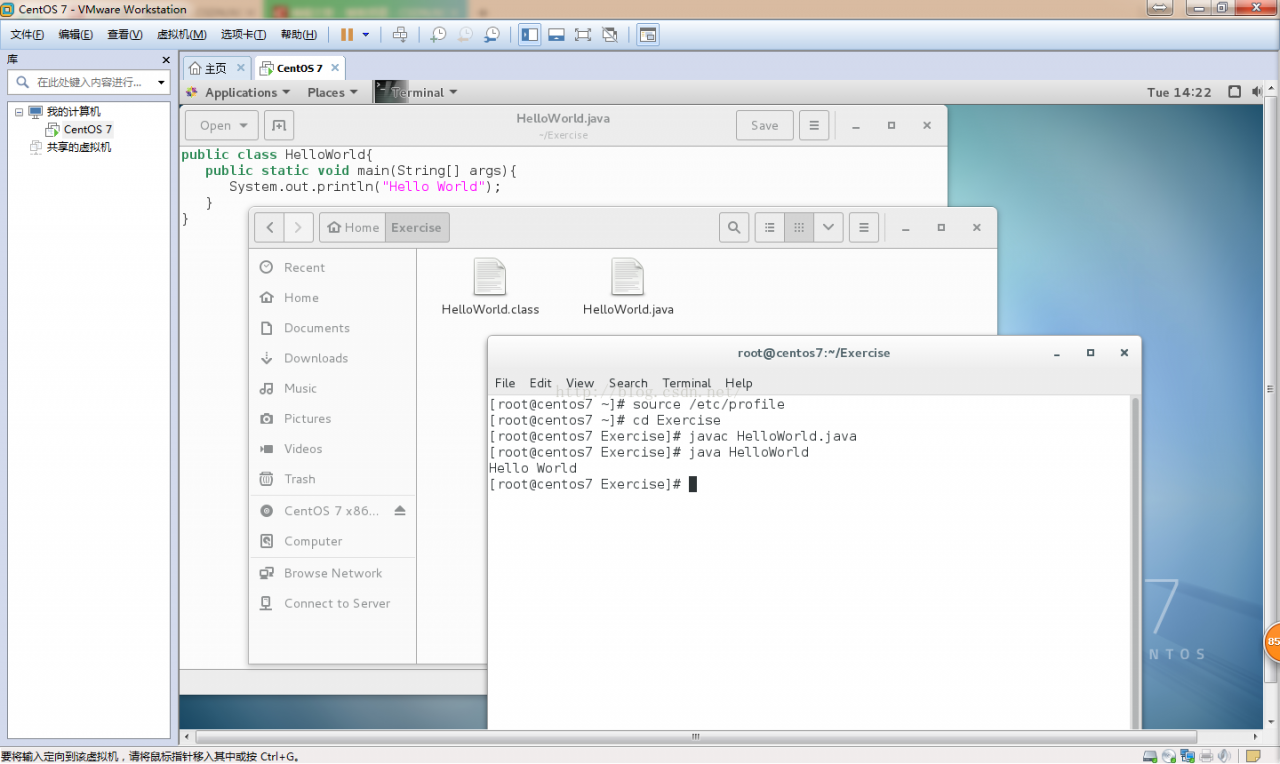
Step 2: input source/etc/profile on the command line to make the system variables in/etc/profile effective and then run.

Note: you can modify system variables only if the current user is root. If you enter source/etc/profile on the command line, the system variable will only take effect temporarily. If you close terminal, the system variable will be restored to its original state. Because the system variable is loaded at system startup, the system variable will be loaded automatically only at the next system restart, so you don’t need to enter source/etc/profile again.

The results are as follows

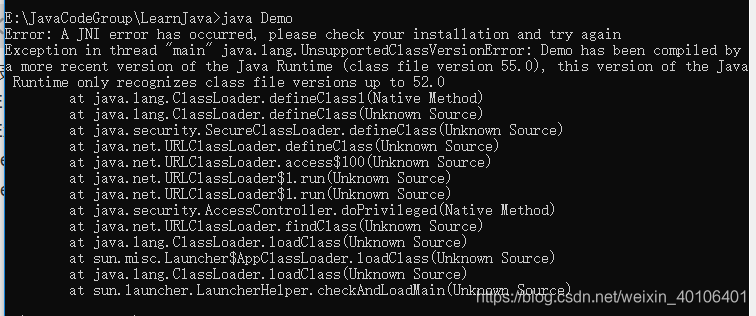
Java command line uses a JNI error has occurred, please check your installation and try again

Error: a JNI error has occurred, please check your installation and try again
exception in thread “main” java.lang.UnsupportedClassVersionError : Demo has been compiled by a more recent version of the Java Runtime (class file version 55.0), This version of the Java runtime only recognizes class file versions up to 52.0

solution:
jre8u164 was installed once before in the system, and jdk11.0.2 was installed without uninstalling. It is estimated that there is a conflict. Just delete jre8u164.

Extended content

For the concepts and differences of JDK, JRE, Java se, Java EE and java me, please refer to https://www.cnblogs.com/In-order-to-tomorrow/p/3652315.html

Exec format error: Java

welcome to my blog

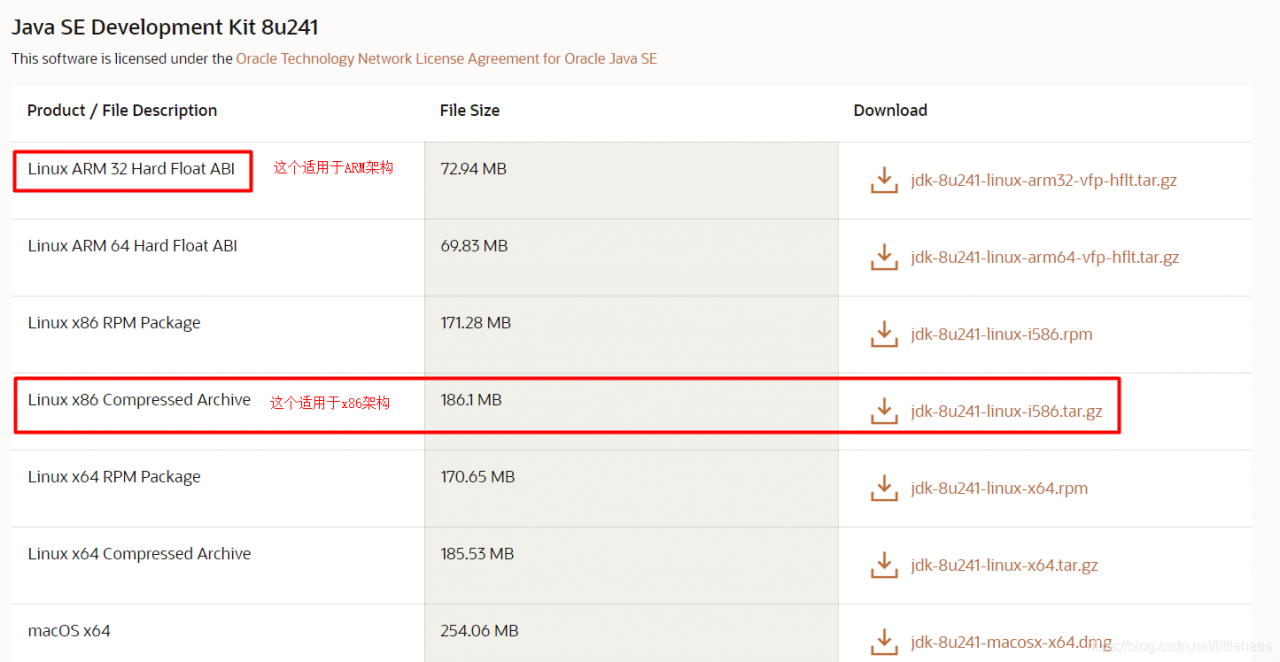
Problem Description: decompress the jdk8 installation package, configure the environment variables, execute the Java command, and report an error: exec format error: Java

Reason: I didn’t look carefully when downloading the compressed package. As a result, the download is wrong. The download is ARM architecture, and the Ubuntu/Linux I use is x64 architecture

Download the correct compressed package and re operate

The usage of Java JUnit unit test and the solution of initialization error

Usage:
1. Select project – right click – build path – add Libraries – JUnit – next – junit4 – finish
2. Write @ test on the method body to be tested

Note:
1. The test method must be modified with public
2. The return value must be void
3. There can be no parameters in the method
4. There can be no class named test under the package
if the test code is OK, an error is still reported, initialization error is not reported in other classes,
it may be because there is an error method in this class
2 Or there are multiple @ test annotations in a class, one of which adds static or has other errors.