How to Fix this error
Build Setting–> Apple LLVM 6.0 – Preprocessing–> Enable Strict Checking of objc_msgSend Calls Change to NO
Since the convention in Maven is larger than the configuration we may run into the problem that the configuration file we write cannot be exported or valid.
<!--    Configure resources in build to prevent our resource export from failing-->
    <build>
        <resources>
            <resource>
                <directory>src/main/resources</directory>
                <includes>
                    <include>**/*.properties</include>
                    <include>**/*.xml</include>
                </includes>
            </resource>
            <resource>
                <directory>src/main/java</directory>
                <includes>
                    <include>**/*.properties</include>
                    <include>**/*.xml</include>
                </includes>
            </resource>
        </resources>
    </build>
The problem
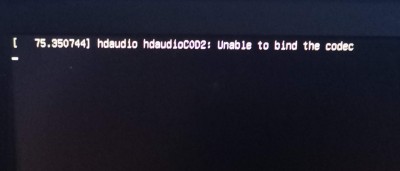
Not long ago, try the dual system, win10+ubuntu20.04, the installation is relatively smooth, can normally enter the system. However, when I updated the graphics driver (proprietary nvidia-drivers-390), I rebooted and couldn’t access the system’s graphical interface, which was stuck on the following page.
The diagram below:
To solve
After that, select ubunru advanced option select l> version of the kernel to boot>ut can enter the graphical interface.
But, it makes me feel bad…
/etc/default/grub
Ctr+Alt+F2
# The original line
# GRUB_CMDLINE_LINUX_DEFAULT="quiet splash nomodeset"
# Modified
GRUB_CMDLINE_LINUX_DEFAULT=""
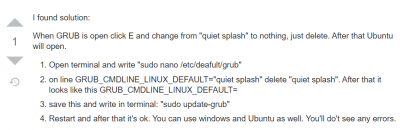
After editing and saving, update GRUB:
sudo update-grub
After rebooting, you can finally enter the graphical interface.
The appendix
https://forum.ubuntu.com.cn/viewtopic.php?t=490617
Python implements the principle of RNN
I’ve tweaked the code a little bit so it can do gradient descent.
import numpy as np
import torch
from torch import nn

class Rnn(nn.Module):

    def __init__(self, input_size, hidden_size, num_layers, bidirectional=False):
        super(Rnn, self).__init__()
        self.input_size = input_size
        self.hidden_size = hidden_size
        self.num_layers = num_layers
        self.bidirectional = bidirectional

    def forward(self, x):
        '''

        :param x: [seq, batch_size, embedding]
        :return: out, hidden
        '''

        # x.shape [sep, batch, feature]
        # hidden.shape [hidden_size, batch]
        # Whh0.shape [hidden_size, hidden_size]  Wih0.shape [hidden_size, feature]
        # Whh1.shape [hidden_size, hidden_size]  Wih1.size  [hidden_size, hidden_size]

        out = []
        x, hidden = np.array(x), [np.zeros((self.hidden_size, x.shape[1])) for i in range(self.num_layers)]
        Wih = [np.random.random((self.hidden_size, self.hidden_size)) for i in range(1, self.num_layers)]
        Wih0 = np.random.random((self.hidden_size, x.shape[2]))
        Whh = [np.random.random((self.hidden_size, self.hidden_size)) for i in range(self.num_layers)]
        # x, hidden, Wih, Whh = torch.from_numpy(x), torch.tensor(hidden), torch.tensor(Wih), torch.tensor(Whh)

        x = torch.from_numpy(x)
        hidden = torch.tensor(hidden)
        Wih0 = torch.tensor(Wih0, requires_grad=True)
        Wih, Whh = torch.tensor(Wih, requires_grad=True), torch.tensor(Whh, requires_grad=True)

        time = x.shape[0]
        for i in range(time):
            hidden[0] = torch.tanh((torch.matmul(Wih0, torch.transpose(x[i, ...], 1, 0)) +
                              torch.matmul(Whh[0], hidden[0])
                              ))

            for i in range(1, self.num_layers):
                hidden[i] = torch.tanh((torch.matmul(Wih[i-1], hidden[i-1]) +
                                     torch.matmul(Whh[i], hidden[i])
                                     ))

            out.append(hidden[self.num_layers-1])
        # If the element in the list is a tensor, it cannot be converted with torch.tensor() and an error will be reported
        return torch.stack([i for i in out]), hidden


def sigmoid(x):
    return 1.0/(1.0 + 1.0/np.exp(x))


if __name__ == '__main__':
    a = torch.tensor([1, 2, 3])
    print(torch.cuda.is_available(), type(a))
    rnn = Rnn(1, 5, 4)
    input = np.random.random((6, 2, 1))
    out, h = rnn(input)
    print(f'seq is {input.shape[0]}, batch_size is {input.shape[1]} ', 'out.shape ', out.shape, ' h.shape ', h.shape)
    # print(sigmoid(np.random.random((2, 3))))
    #
    # element-wise multiplication
    # print(np.array([1, 2])*np.array([2, 1]))
The divider
First of all, the code is just for understanding. The gradient descent part is not written. The default parameters have been fixed, so it does not affect understanding. Code mainly to achieve the principle of RNN, only use NUMPY library, can not be used for GPU acceleration.
import numpy as np


class Rnn():

    def __init__(self, input_size, hidden_size, num_layers, bidirectional=False):
        self.input_size = input_size
        self.hidden_size = hidden_size
        self.num_layers = num_layers
        self.bidirectional = bidirectional

    def feed(self, x):
        '''

        :param x: [seq, batch_size, embedding]
        :return: out, hidden
        '''

        # x.shape [sep, batch, feature]
        # hidden.shape [hidden_size, batch]
        # Whh0.shape [hidden_size, hidden_size]  Wih0.shape [hidden_size, feature]
        # Whh1.shape [hidden_size, hidden_size]  Wih1.size  [hidden_size, hidden_size]

        out = []
        x, hidden = np.array(x), [np.zeros((self.hidden_size, x.shape[1])) for i in range(self.num_layers)]
        Wih = [np.random.random((self.hidden_size, self.hidden_size)) for i in range(1, self.num_layers)]
        Wih.insert(0, np.random.random((self.hidden_size, x.shape[2])))
        Whh = [np.random.random((self.hidden_size, self.hidden_size)) for i in range(self.num_layers)]

        time = x.shape[0]
        for i in range(time):
            hidden[0] = np.tanh((np.dot(Wih[0], np.transpose(x[i, ...], (1, 0))) +
                              np.dot(Whh[0], hidden[0])
                              ))

            for i in range(1, self.num_layers):
                hidden[i] = np.tanh((np.dot(Wih[i], hidden[i-1]) +
                                     np.dot(Whh[i], hidden[i])
                                     ))

            out.append(hidden[self.num_layers-1])

        return np.array(out), np.array(hidden)


def sigmoid(x):
    return 1.0/(1.0 + 1.0/np.exp(x))


if __name__ == '__main__':
    rnn = Rnn(1, 5, 4)
    input = np.random.random((6, 2, 1))
    out, h = rnn.feed(input)
    print(f'seq is {input.shape[0]}, batch_size is {input.shape[1]} ', 'out.shape ', out.shape, ' h.shape ', h.shape)
    # print(sigmoid(np.random.random((2, 3))))
    #
    # element-wise multiplication
    # print(np.array([1, 2])*np.array([2, 1]))
As we know, direct access to the JSP EL expression in js is unable to obtain, if you want to get ${pageContext. Request. ContextPath} value, we can use the following two ways:
1, in the ${pageContext. Request. ContextPath} with single quotes, this is the most simple way
2. Create a form with type= “hidden”, for example:
<input name="rootUrl" id="rootUrl" type="hidden" value="${pageContext.request.contextPath}"/>Then get the value of the form through the JS action:
//Get the project root path
var rootUrl = "";
$(function () {
    rootUrl = $("#rootUrl").val();
})<repositories>
<repository>
<id>nexus-aliyun</id>
<name>Nexus aliyun</name>
<url>https://maven.aliyun.com/repository/public</url>
<layout>default</layout>
<snapshots>
<enabled>false</enabled>
</snapshots>
<releases>
<enabled>true</enabled>
</releases>
</repository>
</repositories>
<pluginRepositories>
<pluginRepository>
<id>nexus-aliyun</id>
<name>Nexus aliyun</name>
<url>https://maven.aliyun.com/repository/public</url>
<snapshots>
<enabled>false</enabled>
</snapshots>
<releases>
<enabled>true</enabled>
</releases>
</pluginRepository>
</pluginRepositories>
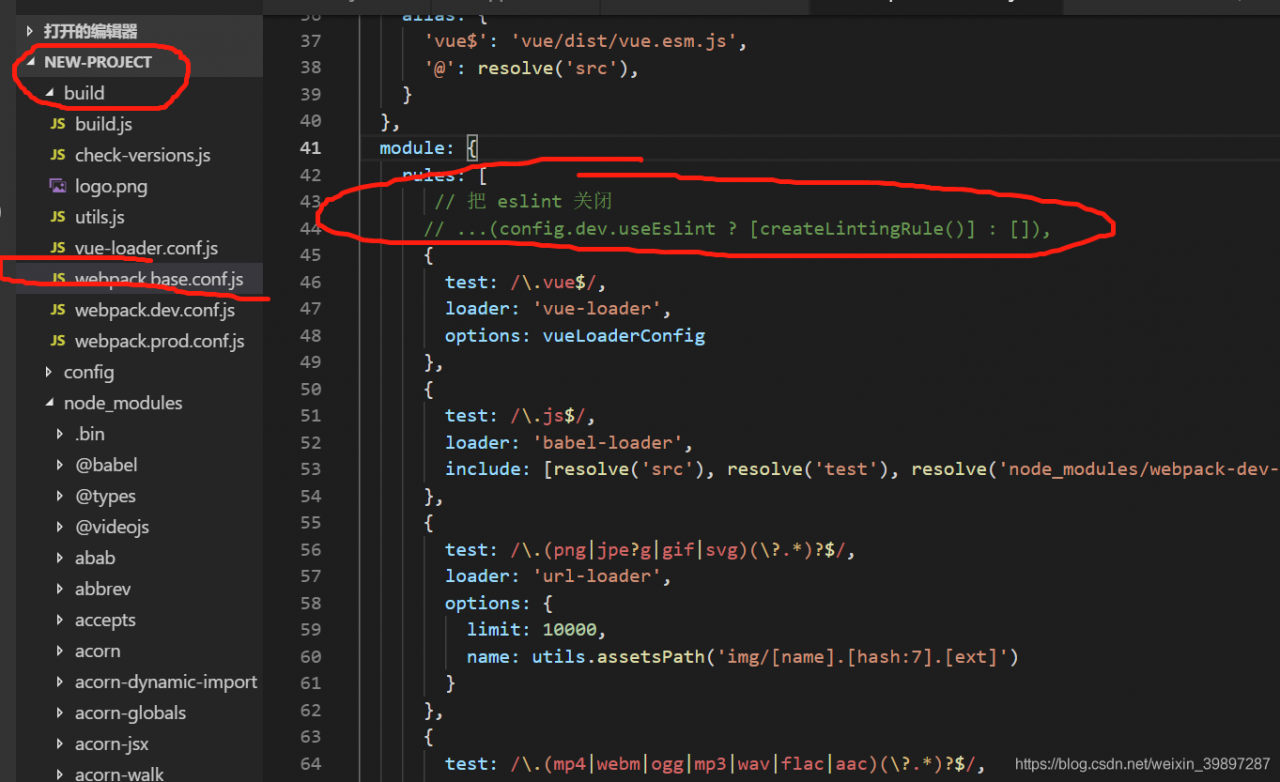
// Close ESLint
ild file find webpack-base.conf.js
c>nt out the first line
Expected indentation of 6 Spaces but found
10 The code is automatically formatted according to IDEA’s reformat
de, and the result is that the error is reported more and more. When Vue projects are initialized, ESLint is installed by default (ESLint is a syntax-rule and style-checking tool that can be used to ensure that syntax-correct, style-consistent code is written).
The solution here is to turn ESLint off, as follows.
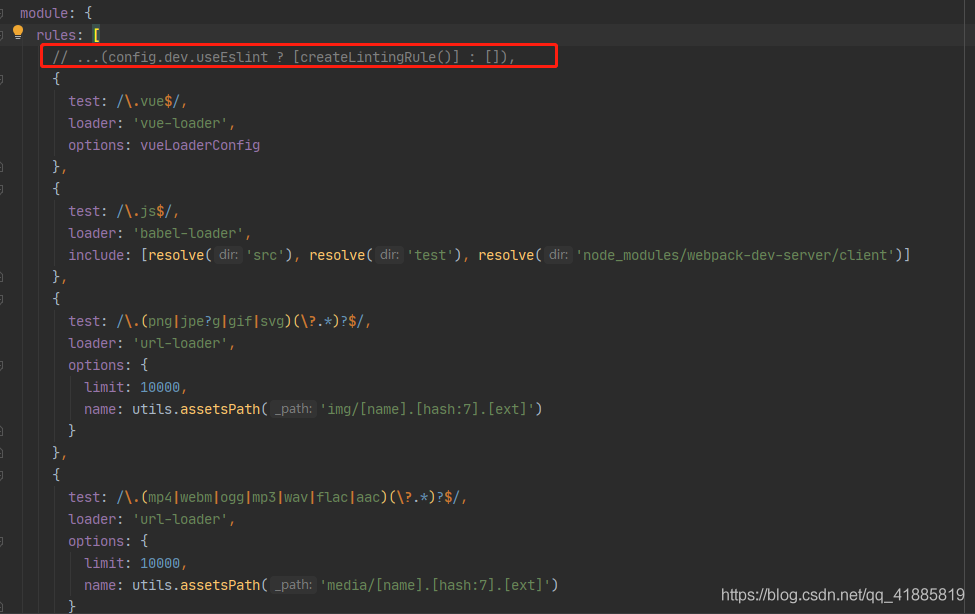
Open the project’s…/build/webpack. Base. Conf. Js file, find the module properties, comment out the following this line of code.
The worker node also needs to configure mysql.properties. This can be solved by setting mysql.properties on the worker node
[VUE WARN]: Duplicate keys detected: ‘1’. This may cause an update error. :
/ font>
Problem description:
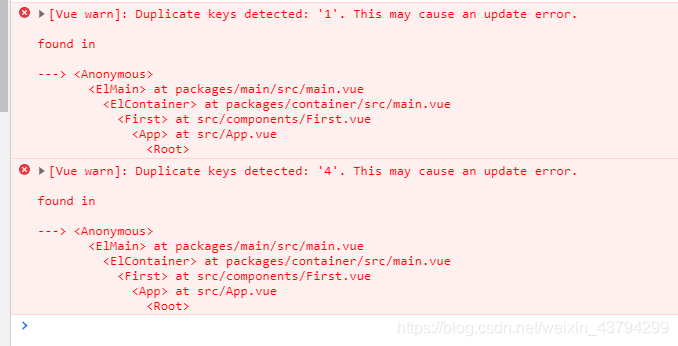
Reason analysis:
> Keys value binding problem
My problem is my problem when doing the project binding:

here my page rendering is based on id to apply colours to a drawing
Solution:
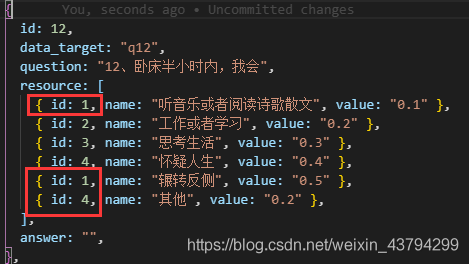
br> 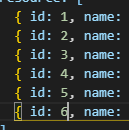


"View inheritance may not use attribute 'string' as a selector.
View inheritance cannot use the property “string” as a selector.
It is possible to add the name attribute to the page