Runtime error prompt in Android Studio: arrayadapter requires the resource ID to be a textview problem

At first, listview uses Android’s own simple_ list_ item_1 display simple text. Use the default attribute, and the code is as follows:

ArrayAdapter<String> adapter = new ArrayAdapter<String>(this,android.R.layout.simple_list_item_1, adapterData);
listView.setAdapter(adapter);

After that, when the function is updated, you need to change the font color of item and specify the typeface. Record is customized in RES/layout/folder_ text.xml File:

<?xml version="1.0" encoding="utf-8"?>
<LinearLayout xmlns:android="http://schemas.android.com/apk/res/android"
    android:orientation="vertical"
    android:layout_width="match_parent"
    android:layout_height="match_parent">
    <TextView
        android:id="@+id/TView"
        android:layout_width="match_parent"
        android:layout_height="match_parent"
        android:textColor="#2d373c"
        android:textSize="18sp"
        />
</LinearLayout>

Change the code in. Java file to:

ArrayAdapter<String> adapter = new ArrayAdapter<String>(RecordActivity.this,
         R.layout.record_text, adapterData);
 listView.setAdapter(adapter);

 //Change the item display text to a custom font
 LayoutInflater layoutInflater = (LayoutInflater) getSystemService(Context.LAYOUT_INFLATER_SERVICE);
 View view = layoutInflater.inflate(R.layout.record_text, null);
 TextView w = (TextView)view.findViewById(R.id.TView);
 Typeface tfsisan03 = Typeface.createFromAsset(getAssets(), "fonts/sisan03_0.ttf");
 w.setTypeface (tfsisan03);

Run, error prompt: arrayadapter requires the resource ID to be a textview. Finally, we found the problem of. XML file. The root label must be textview and cannot nest LinearLayout. After modification, the error will be resolved.

<?xml version="1.0" encoding="utf-8"?>
<TextView
    xmlns:android="http://schemas.android.com/apk/res/android"
    android:id="@+id/TView"
    android:layout_width="match_parent"
    android:layout_height="50dp"
    android:textColor="#2d373c"
    android:layout_marginLeft="10dp"
    android:paddingLeft="10dp"
    android:gravity="center_vertical"
    android:textSize="16sp"
    />
 

[Linux] undefined reference to `itoa’

I wrote a simple C program in Linux, which used Itoa. But when compiling, I prompted “undefined reference to ` Itoa ‘”, I thought it would be OK to add – LC, but the result was the same. Internet found that some people say that this function does not exist in Linux, generally use sprintf to replace. Look at the following code and comments:

#include <stdio.h>
#include <stdlib.h>
//#include <unistd.h>
#include <string.h>

int num = 0;
char namebuf[100];
char prefix[] = "/tmp/tmp/p";

char* gentemp()
{
    int length, pid;

    pid = getpid();
    strcpy(namebuf, prefix);
    length = strlen(namebuf);
    //itoa(pid, &namebuf[length], 10);      // Unix version: itoa() does not exist in the header file <stdlib.h>
    sprintf(namebuf+length, "%d", pid); // use sprintf to convert integers to strings
    strcat(namebuf, ".");
    length = strlen(namebuf);
    printf("before do...while\n");
    char command[1024] = {0};
    do 
    {
        //itoa(num++, &namebuf[length], 10);
        sprintf(namebuf+length, "%d", num++);
        sprintf(command, "touch %s", namebuf);  // Creating files via touch
        system(command);
        printf("command = %s, namebuf[%d]=%d\n", command, num-1, num-1);
    } while (num < 50 && access(namebuf, 0) != -1); // access to determine whether a file exists
    printf("end of do...while\n");

    return namebuf;
}

int main( void )
{
    char *p = gentemp();
    printf("%s\n", p);

    return 0;
}

How to Fix Error return arrays must be of arraytype

from math import log
import xlrd
***# from numpy import ****
import operator

def calcShannonEnt(dataSet):#calculata shannonEnt
    numEntries = len(dataSet)
    labelCounts = {}
    for featVec in dataSet:#Add the current key value to the dictionary and record the number of occurrences of the category
        currentLabel = featVec[-1]
        if currentLabel not in labelCounts.keys():
            labelCounts[currentLabel] = 0
        labelCounts[currentLabel] += 1
    shannonEnt = 0.0
    for key in labelCounts:#Calculating Shannon entropy
        prob = float(labelCounts[key])/numEntries#Calculate the probability of category occurrence using the frequency of occurrence of all class labels
        tmp = prob*log(prob,2)
        shannonEnt -= tmp#Get Shannon entropy
    return shannonEnt

Typeerror: return arrays must be of array-type occurs when the code is running, because the second parameter of log is not base but out array. If you just want to perform normal log operations, you can choose to use numpy.math.log (1.1, 2) or use the log function of math module in Python instead of importing all the functions TT in numpy

Error (active) e1696 cannot open source file “errno.H” rpgworld problems encountered in installing visual studio 2017

FORM stack overflow
Some of the errors:

Severity    Code    Description Project File    Line    Suppression State
Error (active)  E1696   cannot open source file "errno.h"   RPGWorld    c:\Program Files (x86)\Microsoft Visual Studio\2017\Community\VC\Tools\MSVC\14.10.25017\include\cerrno  7   
Error (active)  E1696   cannot open source file "float.h"   RPGWorld    c:\Program Files (x86)\Microsoft Visual Studio\2017\Community\VC\Tools\MSVC\14.10.25017\include\cfloat  7   
Error (active)  E0282   the global scope has no "acosf" RPGWorld    c:\Program Files (x86)\Microsoft Visual Studio\2017\Community\VC\Tools\MSVC\14.10.25017\include\cmath   629 
Error (active)  E0282   the global scope has no "asinf" RPGWorld    c:\Program Files (x86)\Microsoft Visual Studio\2017\Community\VC\Tools\MSVC\14.10.25017\include\cmath   629 
Error (active)  E0282   the global scope has no "atanf" RPGWorld    c:\Program Files (x86)\Microsoft Visual Studio\2017\Community\VC\Tools\MSVC\14.10.25017\include\cmath   630 
Error (active)  E0282   the global scope has no "atan2f"    RPGWorld    c:\Program Files (x86)\Microsoft Visual Studio\2017\Community\VC\Tools\MSVC\14.10.25017\include\cmath   630 
Error (active)  E0282   the global scope has no "ceilf" RPGWorld    c:\Program Files (x86)\Microsoft Visual Studio\2017\Community\VC\Tools\MSVC\14.10.25017\include\cmath   630 
Error (active)  E0282   the global scope has no "cosf"  RPGWorld    c:\Program Files (x86)\Microsoft Visual Studio\2017\Community\VC\Tools\MSVC\14.10.25017\include\cmath   631 
Error (active)  E0282   the global scope has no "coshf" RPGWorld    c:\Program Files (x86)\Microsoft Visual Studio\2017\Community\VC\Tools\MSVC\14.10.25017\include\cmath   631 
Error (active)  E0282   the global scope has no "swprintf"  RPGWorld    c:\Program Files (x86)\Microsoft Visual Studio\2017\Community\VC\Tools\MSVC\14.10.25017\include\cwchar  21  
Error (active)  E0282   the global scope has no "swscanf"   RPGWorld    c:\Program Files (x86)\Microsoft Visual Studio\2017\Community\VC\Tools\MSVC\14.10.25017\include\cwchar  21  
Error (active)  E0282   the global scope has no "ungetwc"   RPGWorld    c:\Program Files (x86)\Microsoft Visual Studio\2017\Community\VC\Tools\MSVC\14.10.25017\include\cwchar  21  
Error (active)  E0282   the global scope has no "vfwprintf" RPGWorld    c:\Program Files (x86)\Microsoft Visual Studio\2017\Community\VC\Tools\MSVC\14.10.25017\include\cwchar  22  
Error (active)  E0282   the global scope has no "vswprintf" RPGWorld    c:\Program Files (x86)\Microsoft Visual Studio\2017\Community\VC\Tools\MSVC\14.10.25017\include\cwchar  22  
Error (active)  E0282   the global scope has no "vwprintf"  RPGWorld    c:\Program Files (x86)\Microsoft Visual Studio\2017\Community\VC\Tools\MSVC\14.10.25017\include\cwchar  22  
Error (active)  E0282   the global scope has no "wcrtomb"   RPGWorld    c:\Program Files (x86)\Microsoft Visual Studio\2017\Community\VC\Tools\MSVC\14.10.25017\include\cwchar  23  
Error (active)  E0282   the global scope has no "wprintf"   RPGWorld    c:\Program Files (x86)\Microsoft Visual Studio\2017\Community\VC\Tools\MSVC\14.10.25017\include\cwchar  23  
Error (active)  E0282   the global scope has no "wscanf"    RPGWorld    c:\Program Files (x86)\Microsoft Visual Studio\2017\Community\VC\Tools\MSVC\14.10.25017\include\cwchar  23  
Error (active)  E0282   the global scope has no "wcsrtombs" RPGWorld    c:\Program Files (x86)\Microsoft Visual Studio\2017\Community\VC\Tools\MSVC\14.10.25017\include\cwchar  24  
Error (active)  E0282   the global scope has no "wcstol"    RPGWorld    c:\Program Files (x86)\Microsoft Visual Studio\2017\Community\VC\Tools\MSVC\14.10.25017\include\cwchar  24  
Error (active)  E0282   the global scope has no "wcscat"    RPGWorld    c:\Program Files (x86)\Microsoft Visual Studio\2017\Community\VC\Tools\MSVC\14.10.25017\include\cwchar  24  
Error (active)  E0282   the global scope has no "wcschr"    RPGWorld    c:\Program Files (x86)\Microsoft Visual Studio\2017\Community\VC\Tools\MSVC\14.10.25017\include\cwchar  25  
Error (active)  E0282   the global scope has no "wcscmp"    RPGWorld    c:\Program Files (x86)\Microsoft Visual Studio\2017\Community\VC\Tools\MSVC\14.10.25017\include\cwchar  25  
Error (active)  E0282   the global scope has no "wcscoll"   RPGWorld    c:\Program Files (x86)\Microsoft Visual Studio\2017\Community\VC\Tools\MSVC\14.10.25017\include\cwchar  25  
Error (active)  E0282   the global scope has no "wcscpy"    RPGWorld    c:\Program Files (x86)\Microsoft Visual Studio\2017\Community\VC\Tools\MSVC\14.10.25017\include\cwchar  26  
Error (active)  E0282   the global scope has no "wcscspn"   RPGWorld    c:\Program Files (x86)\Microsoft Visual Studio\2017\Community\VC\Tools\MSVC\14.10.25017\include\cwchar  26  
Error (active)  E0282   the global scope has no "wcslen"    RPGWorld    c:\Program Files (x86)\Microsoft Visual Studio\2017\Community\VC\Tools\MSVC\14.10.25017\include\cwchar  26  
Error (active)  E0282   the global scope has no "wcsncat"   RPGWorld    c:\Program Files (x86)\Microsoft Visual Studio\2017\Community\VC\Tools\MSVC\14.10.25017\include\cwchar  27  
Error (active)  E0282   the global scope has no "wcsncmp"   RPGWorld    c:\Program Files (x86)\Microsoft Visual Studio\2017\Community\VC\Tools\MSVC\14.10.25017\include\cwchar  27  
Error (active)  E0282   the global scope has no "wcsncpy"   RPGWorld    c:\Program Files (x86)\Microsoft Visual Studio\2017\Community\VC\Tools\MSVC\14.10.25017\include\cwchar  27  
Error (active)  E0282   the global scope has no "wcspbrk"   RPGWorld    c:\Program Files (x86)\Microsoft Visual Studio\2017\Community\VC\Tools\MSVC\14.10.25017\include\cwchar  28  
Error (active)  E0282   the global scope has no "wcsrchr"   RPGWorld    c:\Program Files (x86)\Microsoft Visual Studio\2017\Community\VC\Tools
Error (active)  E0260   explicit type is missing ('int' assumed)    RPGWorld    c:\Program Files (x86)\Microsoft Visual Studio\2017\Community\VC\Tools\MSVC\14.10.25017\include\xtgmath.h   212 
Error (active)  E0757   variable "size_t" is not a type name    RPGWorld    c:\Users\Fazil\Documents\Visual Studio 2017\Projects\Local\RPGWorld\packages\sfml-system.2.4.0.0\build\native\include\SFML\Graphics\Glsl.inl    40  
Error (active)  E0757   variable "size_t" is not a type name    RPGWorld    c:\Users\Fazil\Documents\Visual Studio 2017\Projects\Local\RPGWorld\packages\sfml-system.2.4.0.0\build\native\include\SFML\Graphics\Texture.hpp 159 
Error (active)  E0757   variable "size_t" is not a type name    RPGWorld    c:\Users\Fazil\Documents\Visual Studio 2017\Projects\Local\RPGWorld\packages\sfml-system.2.4.0.0\build\native\include\SFML\Graphics\VertexArray.hpp 64  
Error (active)  E0757   variable "size_t" is not a type name    RPGWorld    c:\Users\Fazil\Documents\Visual Studio 2017\Projects\Local\RPGWorld\packages\sfml-system.2.4.0.0\build\native\include\SFML\Graphics\VertexArray.hpp 72  
Error (active)  E0757   variable "size_t" is not a type name    RPGWorld    c:\Users\Fazil\Documents\Visual Studio 2017\Projects\Local\RPGWorld\packages\sfml-system.2.4.0.0\build\native\include\SFML\Graphics\VertexArray.hpp 88  
Error (active)  E0757   variable "size_t" is not a type name    RPGWorld    c:\Users\Fazil\Documents\Visual Studio 2017\Projects\Local\RPGWorld\packages\sfml-system.2.4.0.0\build\native\include\SFML\Graphics\VertexArray.hpp 104 
Error (active)  E0757   variable "size_t" is not a type name    RPGWorld    c:\Users\Fazil\Documents\Visual Studio 2017\Projects\Local\RPGWorld\packages\sfml-system.2.4.0.0\build\native\include\SFML\Graphics\VertexArray.hpp 129 
Error (active)  E0757   variable "size_t" is not a type name    RPGWorld    c:\Users\Fazil\Documents\Visual Studio 2017\Projects\Local\RPGWorld\packages\sfml-system.2.4.0.0\build\native\include\SFML\System\String.hpp    58  
Error (active)  E0757   variable "size_t" is not a type name    RPGWorld    c:\Users\Fazil\Documents\Visual Studio 2017\Projects\Local\RPGWorld\packages\sfml-system.2.4.0.0\build\native\include\SFML\System\String.hpp    332 
Error (active)  E0757   variable "size_t" is not a type name    RPGWorld    c:\Users\Fazil\Documents\Visual Studio 2017\Projects\Local\RPGWorld\packages\sfml-system.2.4.0.0\build\native\include\SFML\System\String.hpp    345 
Error (active)  E0757   variable "size_t" is not a type name    RPGWorld    c:\Users\Fazil\Documents\Visual Studio 2017\Projects\Local\RPGWorld\packages\sfml-system.2.4.0.0\build\native\include\SFML\System\String.hpp    365 
Error (active)  E0757   variable "size_t" is not a type name    RPGWorld    c:\Users\Fazil\Documents\Visual Studio 2017\Projects\Local\RPGWorld\packages\sfml-system.2.4.0.0\build\native\include\SFML\System\String.hpp    387 
Error (active)  E0757   variable "size_t" is not a type name    RPGWorld    c:\Users\Fazil\Documents\Visual Studio 2017\Projects\Local\RPGWorld\packages\sfml-system.2.4.0.0\build\native\include\SFML\System\String.hpp    399 
Error (active)  E0757   variable "size_t" is not a type name    RPGWorld    c:\Users\Fazil\Documents\Visual Studio 2017\Projects\Local\RPGWorld\packages\sfml-system.2.4.0.0\build\native\include\SFML\System\String.hpp    413 
Error (active)  E0757   variable "size_t" is not a type name    RPGWorld    c:\Users\Fazil\Documents\Visual Studio 2017\Projects\Local\RPGWorld\packages\sfml-system.2.4.0.0\build\native\include\SFML\System\String.hpp    427 
Error (active)  E0757   variable "size_t" is not a type name    RPGWorld    c:\Users\Fazil\Documents\Visual Studio 2017\Projects\Local\RPGWorld\packages\sfml-system.2.4.0.0\build\native\include\SFML\System\String.hpp    456 
Error (active)  E0020   identifier "rand" is undefined  RPGWorld    c:\Users\Fazil\Documents\Visual Studio 2017\Projects\Local\RPGWorld\RPGWorld\Blocks.cpp 23  
Error   C1083   Cannot open include file: 'corecrt.h': No such file or directory    RPGWorld    c:\program files (x86)\microsoft visual studio\2017\community\vc\tools\msvc\14.10.25017\include\crtdefs.h   10  

I never had this issue with Visual Studio 2015 Community Edition. Am I missing some component from the Installer? Any help would be appreciated. Thank you!

c++
visual-studio
visual-studio-2017


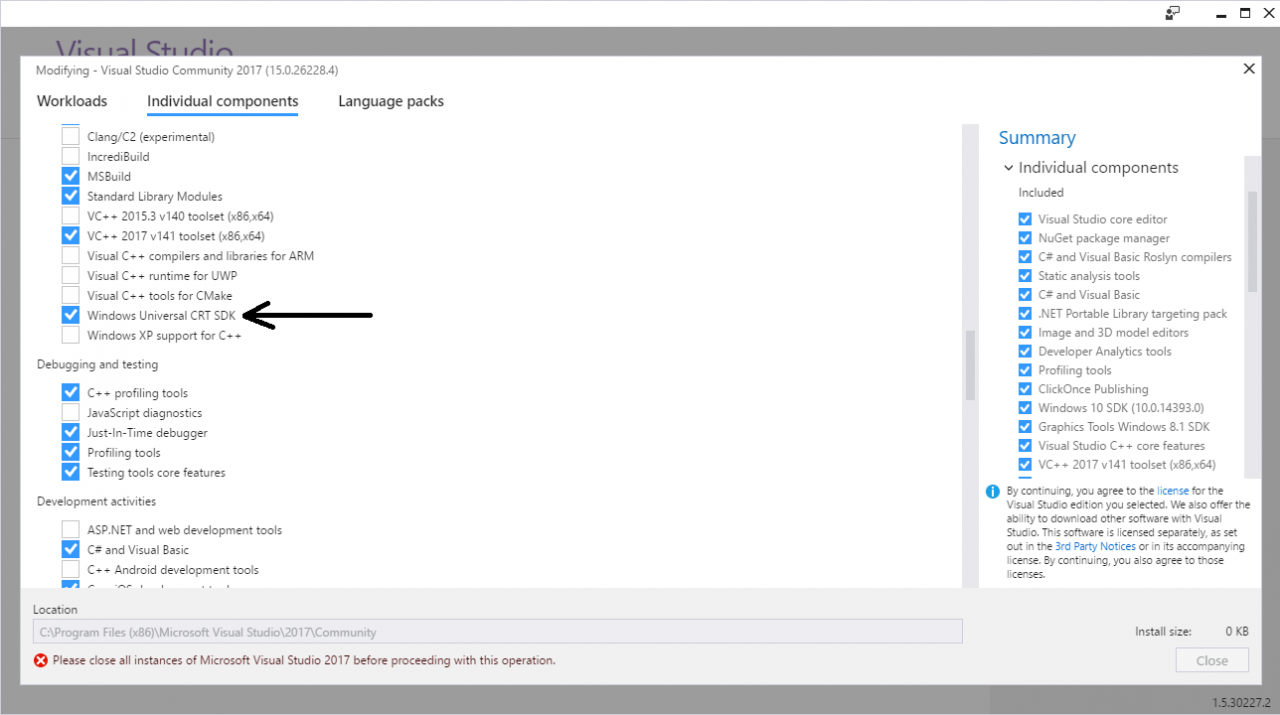
accepted I got the errors to go away by installing the Windows Universal CRT SDK component, which adds support for legacy Windows SDKs. You can install this using the Visual Studio Installer:

If the problem still persists, you should change the Target SDK in the Visual Studio Project : check whether the Windows SDK version is 10.0.15063.0.
In : Project -> test properties -> General -> Windows SDK Version -> select 10.0.15053.0.
Then errno.h and other standard files will be found and it will compile.


accepted I got the errors to go away by installing the Windows Universal CRT SDK component, which adds support for legacy Windows SDKs. You can install this using the Visual Studio Installer:

If the problem still persists, you should change the Target SDK in the Visual Studio Project : check whether the Windows SDK version is 10.0.15063.0.
In : Project -> test properties -> General -> Windows SDK Version -> select 10.0.15053.0.
Then errno.h and other standard files will be found and it will compile.

==================================== SQL Server 2012 fails on reinstallation – ================Clean up the registry

E/Art: failed sending reply to debugger: the solution of broken pipe

E/Art: failed sending a reply to the debugger: the solution of the broken pipe

Explanation error:

E/ART: Failed to send reply to the debugger: the pipe is broken.

What is e/art?

Art is an IME of android (This is the bytecode interpreter on Android phones. E is just the record level of error.)

What is the send reply debugger?

Debugging on Android phone is to use “ADB” (Android debugging bridge). The ADB process runs on your development computer (your laptop or PC), and the daemons run on Android devices (i.e. emulators or mobile phones).

What is a damaged pipe?

Your development machine and Android device communicate like a client-server. The damaged pipeline indicates that the communication has become invalid. For example, the client (Android device) is trying to send a reply to the server (the ADB process running on the development machine), but the server has closed the socket.

How to fix it

First, make sure your application is built correctly by performing cleanup/rebuild

Then, if you use USB to debug and run the application on a real phone, you can usually solve the problem by unplugging the USB cable and then re-inserting it to reestablish the client/server connection.

If this doesn’t work, you can disconnect the USB cable (stop the emulator if necessary) and close the Android studio. This is usually enough to stop the ADB process. Then, when you open Android studio again, it will restart and reestablish the connection.

If this doesn’t work, you can try using the instructions to manually stop the ADB server in this issue. For example, you can try to open a command prompt or terminal, and then go to the SDK /platform-tools directory and enter:
the

adb kill-server
adb start-server

* daemon not running; starting now at tcp:5037
* daemon started successfully

When this appears, It’s done

How to Fix Warning: Statement lambda can be replaced with expression lambda

Statement lambda can be replaced with expression lambda’s warning

The full text of warning is as follows

Statement lambda can be replaced with expression lambda less… (Ctrl+F1)
This inspection reports lambda expressions with code block bodies when expression-style bodies can be us

The place of warning is here

recyclerViewAdapter.setOnItemClicListener ((v ,id) -> {
checkChoosed(id);
});

Just change it to this

recyclerViewAdapter.setOnItemClicListener ((v ,id) -> checkChoosed(id) );

OK. Now that the lamda expression is used, it can be simpler

Solve the problem of illegalargumentexception: at least one JPA metadata must be present

problem

Springboot 2.0 project, start error, exception: nested exception is java.lang.IllegalArgumentException : At least one JPA metamodel must be present!。

Details are as follows:

org.springframework.beans.factory.BeanCreationException: Error creating bean with name 'jpaMappingContext': Invocation of init method failed; nested exception is java.lang.IllegalArgumentException: At least one JPA metamodel must be present!
	at org.springframework.beans.factory.support.AbstractAutowireCapableBeanFactory.initializeBean(AbstractAutowireCapableBeanFactory.java:1710) ~[spring-beans-5.0.4.RELEASE.jar:5.0.4.RELEASE]
	at org.springframework.beans.factory.support.AbstractAutowireCapableBeanFactory.doCreateBean(AbstractAutowireCapableBeanFactory.java:583) ~[spring-beans-5.0.4.RELEASE.jar:5.0.4.RELEASE]
	at org.springframework.beans.factory.support.AbstractAutowireCapableBeanFactory.createBean(AbstractAutowireCapableBeanFactory.java:502) ~[spring-beans-5.0.4.RELEASE.jar:5.0.4.RELEASE]
	at org.springframework.beans.factory.support.AbstractBeanFactory.lambda$doGetBean$0(AbstractBeanFactory.java:312) ~[spring-beans-5.0.4.RELEASE.jar:5.0.4.RELEASE]
	at org.springframework.beans.factory.support.DefaultSingletonBeanRegistry.getSingleton(DefaultSingletonBeanRegistry.java:228) ~[spring-beans-5.0.4.RELEASE.jar:5.0.4.RELEASE]
	at org.springframework.beans.factory.support.AbstractBeanFactory.doGetBean(AbstractBeanFactory.java:310) ~[spring-beans-5.0.4.RELEASE.jar:5.0.4.RELEASE]
	at org.springframework.beans.factory.support.AbstractBeanFactory.getBean(AbstractBeanFactory.java:200) ~[spring-beans-5.0.4.RELEASE.jar:5.0.4.RELEASE]
	at org.springframework.beans.factory.support.DefaultListableBeanFactory.preInstantiateSingletons(DefaultListableBeanFactory.java:741) ~[spring-beans-5.0.4.RELEASE.jar:5.0.4.RELEASE]
	at org.springframework.context.support.AbstractApplicationContext.finishBeanFactoryInitialization(AbstractApplicationContext.java:868) ~[spring-context-5.0.4.RELEASE.jar:5.0.4.RELEASE]
	at org.springframework.context.support.AbstractApplicationContext.refresh(AbstractApplicationContext.java:549) ~[spring-context-5.0.4.RELEASE.jar:5.0.4.RELEASE]
	at org.springframework.boot.web.servlet.context.ServletWebServerApplicationContext.refresh(ServletWebServerApplicationContext.java:140) ~[spring-boot-2.0.0.RELEASE.jar:2.0.0.RELEASE]
	at org.springframework.boot.SpringApplication.refresh(SpringApplication.java:752) [spring-boot-2.0.0.RELEASE.jar:2.0.0.RELEASE]
	at org.springframework.boot.SpringApplication.refreshContext(SpringApplication.java:388) [spring-boot-2.0.0.RELEASE.jar:2.0.0.RELEASE]
	at org.springframework.boot.SpringApplication.run(SpringApplication.java:327) [spring-boot-2.0.0.RELEASE.jar:2.0.0.RELEASE]
	at org.springframework.boot.SpringApplication.run(SpringApplication.java:1246) [spring-boot-2.0.0.RELEASE.jar:2.0.0.RELEASE]
	at org.springframework.boot.SpringApplication.run(SpringApplication.java:1234) [spring-boot-2.0.0.RELEASE.jar:2.0.0.RELEASE]
	at com.example.demo.JtademoApplication.main(JtademoApplication.java:22) [classes/:na]
Caused by: java.lang.IllegalArgumentException: At least one JPA metamodel must be present!
	at org.springframework.util.Assert.notEmpty(Assert.java:450) ~[spring-core-5.0.4.RELEASE.jar:5.0.4.RELEASE]
	at org.springframework.data.jpa.mapping.JpaMetamodelMappingContext.<init>(JpaMetamodelMappingContext.java:54) ~[spring-data-jpa-2.0.5.RELEASE.jar:2.0.5.RELEASE]
	at org.springframework.data.jpa.repository.config.JpaMetamodelMappingContextFactoryBean.createInstance(JpaMetamodelMappingContextFactoryBean.java:88) ~[spring-data-jpa-2.0.5.RELEASE.jar:2.0.5.RELEASE]
	at org.springframework.data.jpa.repository.config.JpaMetamodelMappingContextFactoryBean.createInstance(JpaMetamodelMappingContextFactoryBean.java:43) ~[spring-data-jpa-2.0.5.RELEASE.jar:2.0.5.RELEASE]
	at org.springframework.beans.factory.config.AbstractFactoryBean.afterPropertiesSet(AbstractFactoryBean.java:141) ~[spring-beans-5.0.4.RELEASE.jar:5.0.4.RELEASE]
	at org.springframework.beans.factory.support.AbstractAutowireCapableBeanFactory.invokeInitMethods(AbstractAutowireCapableBeanFactory.java:1769) ~[spring-beans-5.0.4.RELEASE.jar:5.0.4.RELEASE]
	at org.springframework.beans.factory.support.AbstractAutowireCapableBeanFactory.initializeBean(AbstractAutowireCapableBeanFactory.java:1706) ~[spring-beans-5.0.4.RELEASE.jar:5.0.4.RELEASE]
	... 16 common frames omitted

analysis

Spring boot supports JPA through spring boot starter data JPA. The default JPA implementer of spring boot is hibernate.
Due to pom.xml Spring boot starter data JPA is defined in the file.
<dependency>
            <groupId> org.springframework.boot&lt ;/groupId>
            <artifactId>spring-boot-starter-data-jpa</artifactId>
        </dependency>    

At this time, the project will automatically open the following two auto configuration classes:
jparepositoriesautoconfiguration
hibernatejpaautoconfiguration

As long as there is such a definition, the JPA metamodelmappingcontext class will check during the startup process. At least one JPA metamodel must be defined. Otherwise, an at least one JPA metamodel must be present! Error will be reported.

The relevant source code of jpametametamodelmappingcontext is as follows:

/**
	 * Creates a new JPA {@link Metamodel} based {@link MappingContext}.
	 *
	 * @param models must not be {@literal null} or empty.
	 */
	public JpaMetamodelMappingContext(Set<Metamodel> models) {

		Assert.notNull(models, "JPA metamodel must not be null!");
		Assert.notEmpty(models, "At least one JPA metamodel must be present!");

		this.models = models;
		this.persistenceProvider = PersistenceProvider.fromMetamodel(models.iterator().next());
	}


solve

Method 1: if JPA is not used in the system, remove the spring boot starter data JPA dependency.

Method 2: add @ enableautoconfiguration (exclude = {jparepositor) to the application iesAutoConfiguration.class }) notes.

Method 2 is mainly used for custom JPA configuration implementation.


The end of the article.

ImportError: cannot import name ‘SparkSession‘

Importerror: cannot import name ‘sparksession’
cannot find sparksession
reference https://databricks.com/blog/2016/08/15/how-to-use-sparksession-in-apache-spark-2-0.html

Sparksession is only available after spark2.0
so we need to change the spark version

wget
https://archive.apache.org/dist/spark/spark-2.3.0/
Choose your own version

I cried and went to install it again

Vs2019: solution nvcc total: cannot find compiler‘ cl.exe ‘ in PATH

vs2019:nvcc fatal : Cannot find compiler ‘ cl.exe ‘ in PATH

Three steps:

    Step 1:
    add the following two positions to the nameless variable path list of system variables
    Step 2:
    create a new variable named Lib, add three locations for it: C: program files (x86), Microsoft Visual Studio, 2019, community, VC, tools, MSVC, 14.27.29110, lib, x64
    C: program files (x86), windows kits, 10, lib, 10.0.18362.0, ucrt, x64
    C: Program files (x86), windows kits, 10, lib, 10.0.18362.0, um, x64 step 3:
    create a new variable named include in the system variable, and add 2 Location: C: program files (x86) – Microsoft Visual Studio (2019) – Community (VC) – tools – MSVC (14.27.29110) – include
    C: program files (x86) – Windows kits (10) – lib (10.0.18362.0) – ucrt

Reference article: http://iliutong.cn/2019/01/20/nvcc-cu-file-in-console-in-windows/

The meaning of escape character is’ ^] ‘prompted by telnet under linux / Unix

In Linux / Unix, you will be prompted to escape character is’ ^] ‘

This prompt means that pressing Ctrl +] will call out the command line of Telnet. After the telnet command comes out, you can execute the telnet command. For example, exit telnet is quit

Other common telnet command function description:

Close close the current connection logout force to exit the remote user and close the connection display display the parameters of the current operation mode try to enter the command line mode or character mode open connect to a site quit telnetsend send special characters set set the parameters of the current operation unset reset the current operation parameters status print status information Toggle switch the operation parameters SLC change special characters Character status auth on / off confirmation Z suspend telnetenviron change environment variable? Display help information