Net start command system error 5 and error 1058 solution

Source: http://blog.csdn.net/u012586848/article/details/46860839

1. Net start command

The net start command is used to start the service in the form of net start [service name] (the corresponding “net stop [service name]” is the command to close the service)

2. Open the default instance service of sqlserver

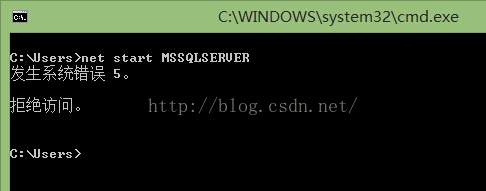
[win + R] shortcut – & gt; CMD – & gt; net start MSSqlServer

Prompt error “system error 5 occurred”, the screenshot is as follows:
3. Error analysis

The reason for this error is that there is a difference between the administrator and non administrator permissions in win7/win8 command prompt, and the net stat command can only be run under the administrator permission.

4. Solutions

1) Open the command prompt with administrator’s permission: [start] — & gt; search for “CMD” — & gt; right click “run as administrator”, or use the shortcut key [win + X + a]

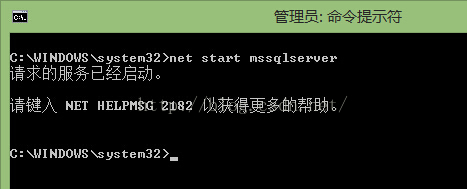
2) Enter “net start MSSqlServer” successfully. The screenshot is as follows:
note appended:

The above method can solve the “system error 5 access denied” error of the “net start” command, but it may still not be able to open the corresponding service, prompting “error 1058”, as shown in the figure below:
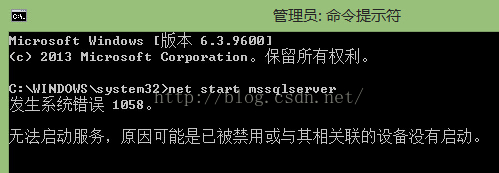
As shown in the error prompt in the figure, the reason may be that MS SQL server has been disabled or its associated device has not been started. For MSSqlServer service, find the “MSSqlServer” service in control panel — & gt; management tools — & gt; services, double-click to open properties, and select the dependency tab to see that the service has “no dependency”. Therefore, the reason of “other associated devices are not started” is excluded, as shown in the following figure
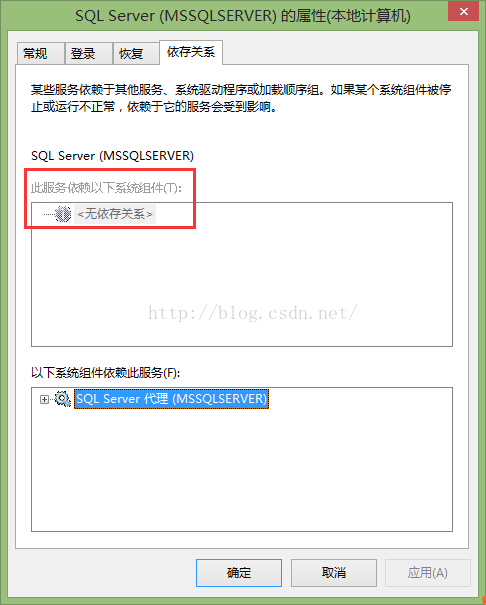
Switch the properties window to the General tab, and you can see that the service status is “stopped” and the start type is “disabled”. Change the start type to one of the other three items besides “disabled” – & gt; [OK].

Reference source:

one http://answers.microsoft.com/zh-hans/windows/forum/windows8_ 1-performance/%E8%BF%90%E8%A1%8Cnet-start/bec244e5-6385-4950-adc8-0d004905e41a?auth=1

two http://www.2cto.com/database/201304/200600.html

Net prompt is not an internal or external command

‘net’ is not an internal or external command, nor is it a runnable program or batch file

Method 1

My computer — & gt; properties — & gt; advanced — & gt; the variable value of the environment variable path is added with the following new value: systemroot% \ system32

After modification, you need to re open the command line of CMD, otherwise it will not take effect.

Method 2

The effect of entering DOS operation interface;
0

If you enter: netstat – an, you will be prompted that it is not an internal or external command, nor a runnable program or batch file.

The reason why the prompt is not an internal or external command is that the current operation of CMD is not in the system folder system32, so you can switch the current operation path to the system folder of the windows operating system by simply entering: CD C:: (Windows) system32. Then enter netstat – an to solve the problem.

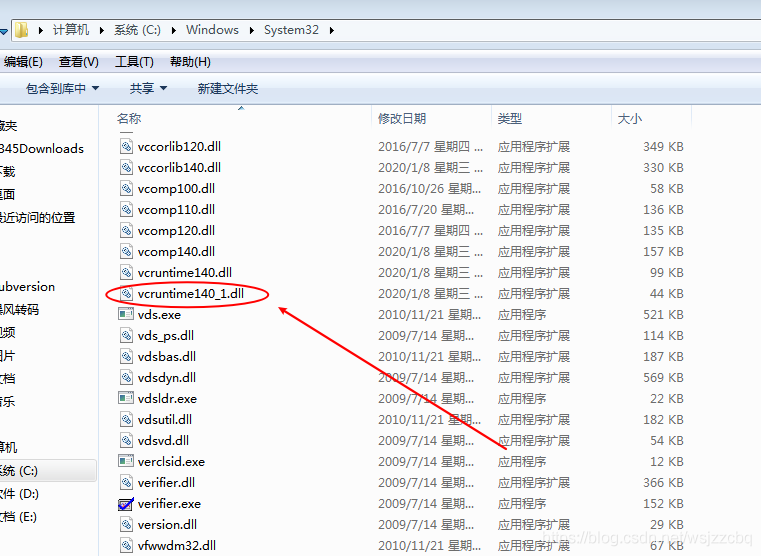
This program cannot be started because vcruntime140 is missing from your computer_ 1.dll。 Try to install the program again to solve the problem.

In the process of installing mysql8, this error is encountered


Solution: go to Microsoft official website to download and install visual C++

Download address: https://support.microsoft.com/en-us/help/2977003/the-latest-supported-visual-c-downloads

Here you can choose according to the number of digits of your computer

After downloading, install. After the installation is successful, there will be vcruntime140 in the directory of C: [windows] system32_ 1.dll file

If you continue to install mysql, no error will be reported


Springboot Project: How to Introduces Local Jar Package

Jar package

The path of the jar package is in the boot-inf/lib directory

Create a jar folder under the Resources folder and paste the jar package in.

Enter POM file to join

        <dependency>
            <groupId>com.jayZhou</groupId>
            <artifactId>aaaa-client-sso</artifactId>
            <version>1.0-1.0</version>
            <scope>system</scope>
            <systemPath>${project.basedir}/src/main/resources/jar/aaaa-client-sso-1.0-1.0.jar</systemPath>
        </dependency>

Groupid, artifactid and version can be written freely

You also need to add it on the last side and type it in when you pack it

<build>
        <plugins>
            <plugin>
                <groupId>org.springframework.boot</groupId>
                <artifactId>spring-boot-maven-plugin</artifactId>
                <!--Add-->
                <configuration>
                    <includeSystemScope>true</includeSystemScope>
                </configuration>
            </plugin>
        </plugins>
</build>

So far, the jar package has been successfully introduced

War package

(this method is not attempted)

The jar package is in the WEB-INF/lib directory

You need to add the following to the POM file

     <plugin>
                    <groupId>org.apache.maven.plugins</groupId>
                    <artifactId>maven-war-plugin</artifactId>
                    <version>2.4</version>
                    <configuration>
                        <webResources>
                            <resource>
                                <directory>src/main/resources/jar/</directory>
                                <targetPath>WEB-INF/lib/</targetPath>
                                <includes>
                                    <include>**/*.jar</include>
                                </includes>
                            </resource>
                        </webResources>
                    </configuration>
                </plugin>

Please transfer a valid prop path to form item

 <el-form-item v-for="(item, index) in formData.picSize" :key="item.title" :label="item.title" class="yydh-bili">
                <el-form-item
                    :prop="'item.' + index + '.width'"
                    :rules="picRules"
                >
                    <el-input v-model="item.width" style="width: 80px; margin-right: 10px;"></el-input>
                    <span>:</span>
                </el-form-item>
                <el-form-item
                    :prop="'item.' + index + '.height'"
                    :rules="picRules"
                >
                    <el-input v-model="item.height" style="width: 80px; margin-right: 10px;"></el-input>
                </el-form-item>
</el-form-item>


<script>
formData: {
                picSize: [
                    {
                        name:'ACTIVITYBIGSIZE',
                        title: 'title1',
                        width: 4,
                        height: 3,
                    },
                    {
                        title: 'title2',
                        width: 4,
                        height: 3,
                    },
                ],
}

</script>

The solution is to change the definition of the form’s data proformitemsize

 <el-form-item v-for="(item, index) in formData.picSize" :key="item.title" :label="item.title" class="yydh-bili">
                <el-form-item
                    <!--Im here-->
                    :prop="'picSize.' + index + '.width'"
                    :rules="picRules"
                >
                    <el-input v-model="item.width" style="width: 80px; margin-right: 10px;"></el-input>
                    <span>:</span>
                </el-form-item>
                <el-form-item
                     <!--Im here-->
                    :prop="'picSize.' + index + '.height'"
                    :rules="picRules"
                >
                    <el-input v-model="item.height" style="width: 80px; margin-right: 10px;"></el-input>
                </el-form-item>
</el-form-item>

MapReduce running in Hadoop environment with maven

Introducing Maven dependency into POM file

 <build>
        <pluginManagement>
            <plugins>
                <plugin>
                    <groupId>org.apache.maven.plugins</groupId>
                    <artifactId>maven-jar-plugin</artifactId>
                    <version>2.4</version>
                    <configuration>
                        <archive>
                            <manifest>
                                <addClasspath>true</addClasspath>
                                <classpathPrefix>lib/</classpathPrefix>
                                <mainClass>com.pro.main</mainClass>
                            </manifest>
                        </archive>
                    </configuration>
                </plugin>
            </plugins>
        </pluginManagement>
    </build>

Code in main method

 if(args.length !=2){
            System.out.println("Please enter the path");
            System.exit(-1);
        }
        Job job = Job.getInstance();
        Configuration conf = new Configuration();

        //1. encapsulate the position of the parameter jarbao
        job.setJarByClass(Submitter.class);
        //2. Wrapping parameters The position of the current job mapper implementation class in the position of the reduce implementation class
        job.setMapperClass(WordCountMapper.class);
        job.setReducerClass(WordConutReduce.class);
        //3. encapsulate the parameters of the current job map output
        job.setMapOutputKeyClass(Text.class);
        job.setMapOutputValueClass(IntWritable.class);
        //4. encapsulate the parameters What is the output of this job reduce
        job.setOutputKeyClass(Text.class);
        job.setOutputKeyClass(IntWritable.class);
        // determine whether there is an output folder
        Path path = new Path(args[1]);
        FileSystem fileSystem = path.getFileSystem(conf);// find this file according to path
        if (fileSystem.exists(path)) {
            fileSystem.delete(path, true);// true means that even if output has something, it is deleted along with it
        }


        //5. encapsulate the parameters where the dataset to be processed by this job is generated paths
        FileInputFormat.setInputPaths(job, new Path(args[0]));
        FileOutputFormat.setOutputPath(job, new Path(args[1]));
        //6. Wrap parameters Number of multiple reduce tasks started
        job.setNumReduceTasks(1);
        //7. Submit the job
        boolean b = job.waitForCompletion(true);
        System.exit(b ?0 : 1);

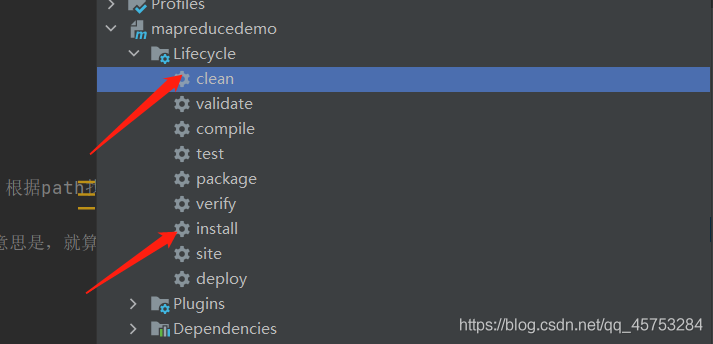
Maven is packaged as a jar package and put into the Hadoop environment

Upload text to Hadoop file

hadoop fs -put xxx.info /input

Enter the Hadoop environment and enter the command to start

hadoop jar mapreducedemo-1.0-SNAPSHOT.jar /input /output

catkin_make [Warning]:‘gazebo_LIBRARIES‘ is defined.

catkin_package() DEPENDS on ‘gazebo’ but neither ‘gazebo_INCLUDE_DIRS’ nor ‘gazebo_LIBRARIES’ is defined.
make use of DEPENDS in catkin_package(…)DEPENDS in catkin_package() not adding package INCLUDE_DIRS

Reason

This will not work in every listed case. In order to list something in DEPENDS, it needs to have matching case varaible names. For example, you put Ogre in the DEPENDS section, but Ogre produces these variables: OGRE_INCLUDE_DIRS and OGRE_LIBRARIES. Because the case is different, catkin has no way of mapping the name you give it to the variables which it produces. Others might work, like urdfdom, but Qt, Eigen, Ogre, and OpenGL will not work like this and you need to manually pass the correct variables along to INCLUDE_DIRS and LIBRARIES accordingly.

That is exactly correct, if the package does not follow the convention where <pkg_name> is used consistently in find_package(<pkg_name> …) and resulting variables like <pkg_name>_INCLUDE_DIRS, then catkin cannot determine it automatically.
In times like this you must manually pass include directories and libraries to the catkin_export call, and you cannot depend on the DEPENDS syntactic sugar.
For the documentation, I think it is already ticked here: #491

In brief, DEPENDS and the generated GAZEBO_INCLUDE_DIRS and GAZEBO_LIBRARIES do not correspond to the case in their names, and catkin cannot recognize the result.
Solution
Take gazebo as an example.
Modify the previous CMakeLists.txt:

catkin_package(
  INCLUDE_DIRS include
  CATKIN_DEPENDS roscpp std_msgs sensor_msgs geometry_msgs nav_msgs tf gazebo_ros
  DEPENDS gazebo
)

The revised CMakeLists.txt :

catkin_package(
  INCLUDE_DIRS include
  CATKIN_DEPENDS roscpp std_msgs sensor_msgs geometry_msgs nav_msgs tf gazebo_ros
  DEPENDS GAZEBO
)

Mybatis plus paging Plugin and Auto-fill

Mybatis plus paging plugin and auto-fill

Configuration details

@EnableTransactionManagement
@Configuration
@MapperScan("com.itoyoung.dao")
public class MybatisPlusConfig {

    /**
     * Page Break Plugin
     */
    @Bean
    public PaginationInterceptor paginationInterceptor() {
        PaginationInterceptor paginationInterceptor = new PaginationInterceptor();
         paginationInterceptor.setLimit(-1);
        return paginationInterceptor;
    }

    /**
     * Automatic filling function
     * @return
     */
    @Bean
    public GlobalConfig globalConfig() {
        GlobalConfig globalConfig = new GlobalConfig();
        globalConfig.setMetaObjectHandler(new MetaHandler());
        return globalConfig;
    }
}

@Component
@Slf4j
public class MetaHandler implements MetaObjectHandler {

    /**
     * New Data Execution
     * @param metaObject
     */
    @Override
    public void insertFill(MetaObject metaObject) {
        this.setFieldValByName("createTime", new Date(), metaObject);
        this.setFieldValByName("updateTime", new Date(), metaObject);
    }

    /**
     * Update data execution
     * @param metaObject
     */
    @Override
    public void updateFill(MetaObject metaObject) {
        this.setFieldValByName("updateTime", new Date(), metaObject);
    }

}

application

Add an annotation to the entity class @ tablefield (value = create)_ time", fill = FieldFill.INSERT ), the time is automatically filled in when inserting or updating

@Data
@Accessors(chain = true)
public class Channel implements Serializable {

    @TableId(type = IdType.AUTO)
    private Long id;

    /**
     * Channel Code
     */
    @NotEmpty(message = "Channel code cannot be null")
    private String channelCode;

    /**
     * Channel Name
     */
    @NotEmpty(message = "Channel name cannot be empty")
    private String channelName;

    /**
     * creat time
     */
    @TableField(value = "create_time", fill = FieldFill.INSERT)
    private Date createTime;

    /**
     * update time
     */
    @TableField(value = "update_time", fill = FieldFill.INSERT_UPDATE)
    private Date updateTime;
}

Paging query

@Service(version = "${provider.service.version}")
@Slf4j
@Component
public class ChannelServiceImpl extends ServiceImpl<ChannelMapper, Channel> implements IChannelService {
    
    @Override
    public Page<Channel> selectChannelPageByQuery(ChannelListGetQuery query) {
        Page<Channel> channelPage = new Page<>();
        channelPage.setCurrent(query.getCurrentPage());
        channelPage.setSize(query.getPageSize());

        QueryWrapper<Channel> queryWrapper = new QueryWrapper<>();
        if (StringUtil.isNotBlank(query.getChannelName())) {
            queryWrapper.lambda().like(Channel::getChannelName, query.getChannelName());
        }
        queryWrapper.lambda().orderByDesc(Channel::getId);

        IPage<Channel> page = page(channelPage, queryWrapper);
        channelPage.setTotal(page.getTotal());
        channelPage.setRecords(page.getRecords());
        return channelPage;
    }
}

Axios request failed, get the status code and error information, how to encapsulate the function dealing with the public error code

If the Axios request fails, how to get the status code and error information returned by the interface? How to encapsulate the function to handle the common error code?

The method is as follows

1. Use the object to map the status code to the corresponding prompt

const codeMessage = {
    200: 'The server successfully returned the requested data.' ,
    201: 'New or modified data was successful.' ,
    202: 'A request has been queued in the background (asynchronous task).' ,
    204: 'Deleting data was successful.' ,
    400: 'There was an error in the outgoing request, the server did not perform a new or modified data operation.' ,
    401: 'The user does not have permission (wrong token, username, password).' ,
    403: 'The user is authorized, but access is forbidden.' ,
    404: 'The request was sent for a record that does not exist and the server did not perform the operation.' ,
    406: 'The format of the request was not available.' ,
    410: 'The requested resource was permanently deleted and will not be available again.' ,
    422: 'A validation error occurred when an object was created.' ,
    500: 'An error occurred on the server, please check the server.' ,
    502: 'Gateway error.' ,
    503: 'Service is not available, the server is temporarily overloaded or under maintenance.' ,
    504: 'Gateway timeout.',
};

2. Encapsulate the common error request function

function errorHandle(error) {
    if (error.response) {
        // The request was made and the server responded with a status code 
        // The request has been sent and the server responds with a status code
        // that falls out of the range of 2xx out of the range of 2xx
        const { status } = error.response;
        if(status){
            const errorText = codeMessage[status]
            // notification is an Ant Design Anthem component and needs to be replaced with a self-defined component
            notification.error({
                message: `Error code ${status}`,
                description: `${
                    errorText
                }`,
                duration: 2.5
            });
        }
    } else {
        notification.error({
            message: 'request error!',
            description: '',
            duration: 2.5
        });
    }
}

3. Use error request function in common request response interceptor (recommended)

axios.interceptors.response.use(
function(){
	// Interface access success public interceptor
},
function(error){
	// Interface access failure public interceptor
	errorHandle(error)
})

4. Using the wrong request function in a request (not recommended)

axios.get('api/xxxx').then(res => {
	console.log(res); // The request succeeds in returning data
}).catch(errorHandle); // errorHandle is a wrapped public callback

5. The error parameter in Axios catch contains
error.response
error.response.headers
error.response.status //Status code error.response.data
error.request
error.message
error.config
Wait a minute…

Syntax error: typeerror: about installing sass in vue3 this.getOptions is not a function

Vue3 successfully installed sass, but the following error occurred during compilation


 ERROR  Failed to compile with 1 error                                                                            PM 1:05:09

 error  in ./src/components/HelloWorld.vue?vue&type=style&index=0&id=469af010&lang=scss

Syntax Error: TypeError: this.getOptions is not a function


 @ ./node_modules/vue-style-loader??ref--8-oneOf-1-0!./node_modules/css-loader/dist/cjs.js??ref--8-oneOf-1-1!./node_modules/vue-loader-v16/dist/stylePostLoader.js!./node_modules/postcss-loader/src??ref--8-oneOf-1-2!./node_modules/[email protected]@sass-loader/dist/cjs.js??ref--8-oneOf-1-3!./node_modules/cache-loader/dist/cjs.js??ref--0-0!./node_modules/vue-loader-v16/dist??ref--0-1!./src/components/HelloWorld.vue?vue&type=style&index=0&id=469af010&lang=scss 4:14-464 15:3-20:5 16:22-472
 @ ./src/components/HelloWorld.vue?vue&type=style&index=0&id=469af010&lang=scss
 @ ./src/components/HelloWorld.vue
 @ ./node_modules/cache-loader/dist/cjs.js??ref--12-0!./node_modules/babel-loader/lib!./node_modules/cache-loader/dist/cjs.js??ref--0-0!./node_modules/vue-loader-v16/dist??ref--0-1!./src/App.vue?vue&type=script&lang=js
 @ ./src/App.vue?vue&type=script&lang=js
 @ ./src/App.vue
 @ ./src/main.js
 @ multi (webpack)-dev-server/client?http://192.168.31.108:8080&sockPath=/sockjs-node (webpack)/hot/dev-server.js ./src/main.js

Cause of the problem

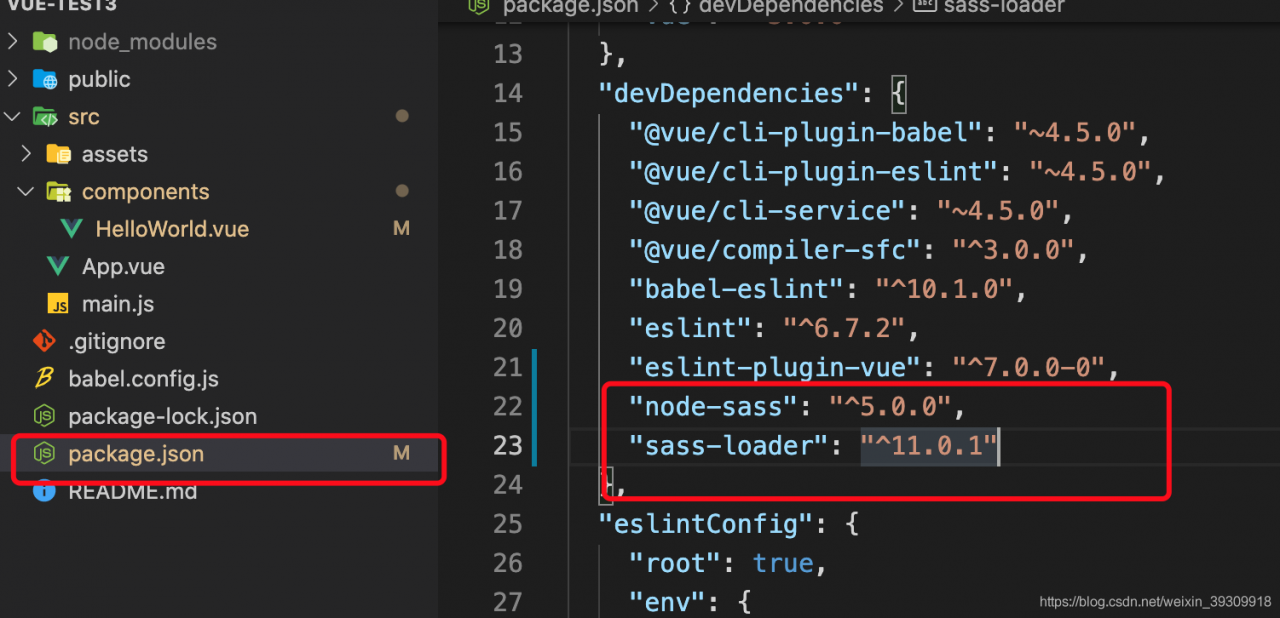
When the above error occurs, it is found that the version of SASS loader is too high, so the above problem occurs in the compilation

resolvent

We need to unload

cnpm uninstall less-loader

After reinstalling

cnpm i [email protected] --save-dev

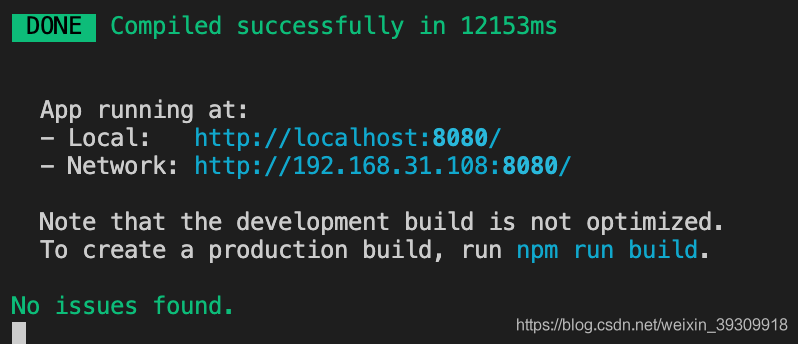
Finally, it is compiled successfully

Ajax prevents page requests from reporting errors

When sending an Ajax request, if there is no corresponding file content in the requested file, or if the path is wrong, the page will report an error. Here’s a brief introduction, such as how to avoid page error reporting, or page compatibility

xhr.onreadystatechange = function() {
  
  if(xhr.readyState == 4) {
    //Verify that the file is available, using status to determine the status
    if(xhr.status >= 200 && xhr.status < 300 || xhr.status == 304) {
      box.innerHTML = xhr.responseText;
    }else {
      // Error page, server error or not found error
      console.error("Error Request")
    }
  }
}

This page will not appear the following error problem

The error will be output on the console